

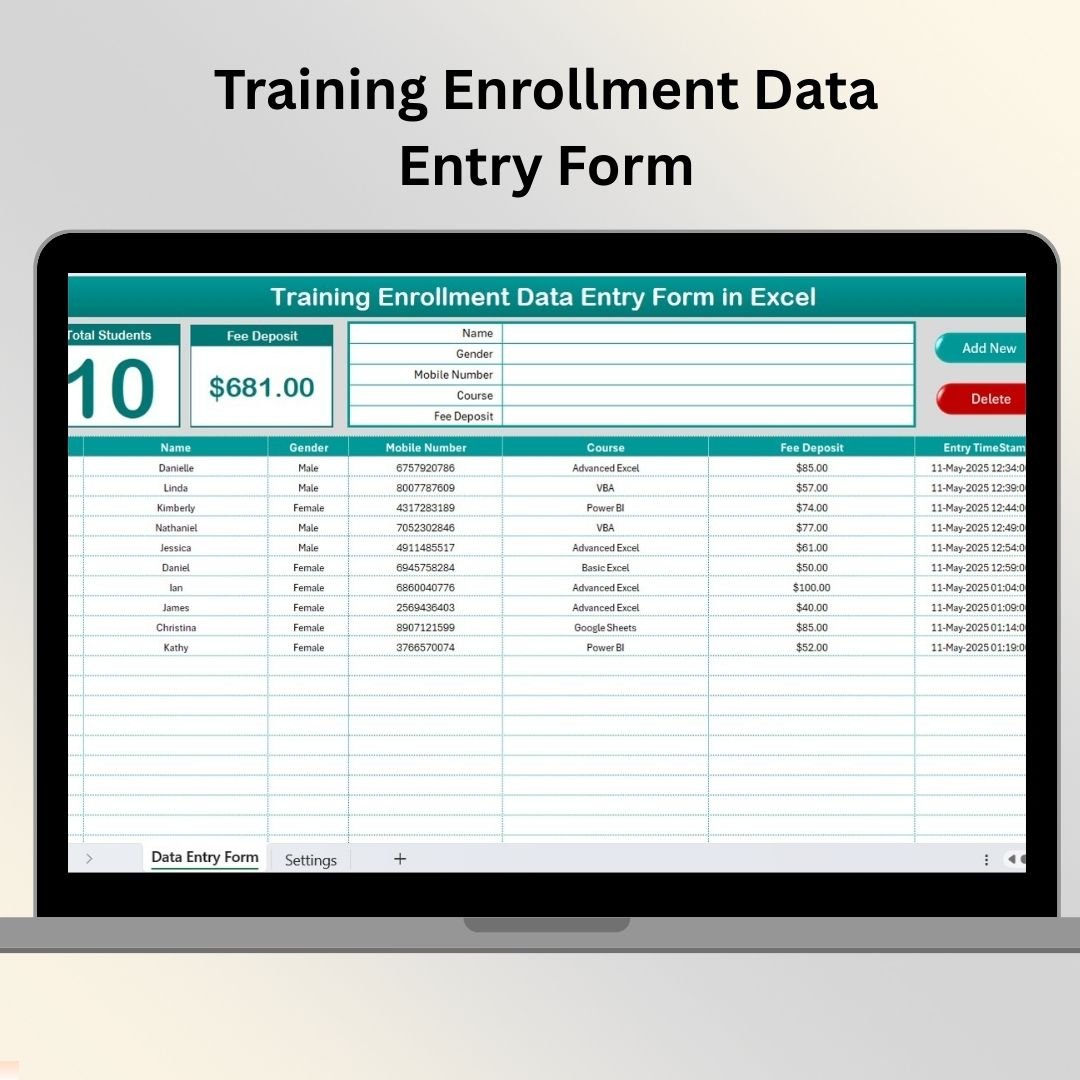

Managing training enrollments can quickly turn into chaos without a proper system. That’s why we created the Training Enrollment Data Entry Form in Excel—a smart, VBA-powered solution designed for trainers, educators, and coordinators who want a simple yet powerful way to collect and manage student data.
This ready-to-use Excel form automates student enrollment and fee tracking with interactive dashboards, drop-down menus, and time-stamped records—all with zero coding knowledge required.
🧰 What’s Included in the Template?
This Excel workbook includes 2 essential sheets that work together seamlessly:
1️⃣ Training Enrollment Form Sheet

📌 Dashboard Cards (Auto-updated)
Total Students Enrolled
Total Fee Deposited
📌 Mini Data Entry Form (VBA-powered)
Captures key fields:
Name
Gender
Mobile Number
Course
Fee Deposit
✅ Buttons to Add and Delete records
📅 Automatic Timestamp added on entry
📌 Main Table (Structured Log)
Displays all enrolled records with:
Serial Number
Student Info
Fee Status
Timestamp
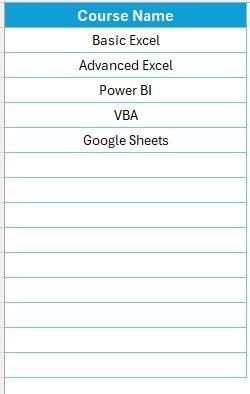
2️⃣ Settings Sheet (List Management)
📌 Define drop-down lists for:
- Course Names
📌 Update options anytime without editing the VBA form
📌 Ensures data consistency and eliminates typing errors
🚀 Key Benefits of This Excel Form
⏱️ Time-Saving Automation
No more manual record-keeping. One-click entry updates all fields and calculations.
🔒 Accurate & Secure
Predefined lists and button controls reduce input errors. Password-protect VBA and sheets for added security.
📊 Visual KPIs
View live metrics like total students and collected fees—instantly.
📁 Organized Recordkeeping
Timestamps ensure audit trails and accurate batch records.
🖨️ Printable Reports
Filter and export student records by course, gender, or payment status.
🧠 Who Should Use This Tool?
This Excel-based form is perfect for:
📚 Training Institutes
🏫 Schools & Colleges
🧑🏫 Corporate HR Departments
📈 Freelance Trainers
🏢 Coaching & Certification Centers
Whether you’re running weekly batches or semester-long programs, this tool keeps everything centralized.
💡 Best Practices for Optimal Use
📅 Update drop-downs in the Settings tab as needed
💾 Backup weekly for data safety
🔐 Lock your VBA editor with a password
📤 Duplicate file per batch or semester for clarity
👥 Train staff to use the form properly
🔧 Customization Ideas
🎨 Add more fields like Email, Address, or Course Type
📌 Highlight overdue fees with Conditional Formatting
📊 Add course-wise dashboards
🔗 Link it with Payment Trackers or Attendance Sheets
📎 Use filters to segment students by course or gender
💬 Frequently Asked Questions (FAQs)
Q1. Do I need to install anything?
No. Just open the Excel file, enable macros, and you’re ready to go.
Q2. Can I add more fields to the form?
Yes! You can customize both the form and the table using VBA.
Q3. What if I delete a record by mistake?
There’s no undo—please back up your file weekly.
Q4. Does this work on Mac?
Yes, but features depend on Excel for Mac’s VBA compatibility.
Q5. Is this beginner-friendly?
Absolutely! You just need basic Excel skills to use it effectively
Visit our YouTube channel to learn step-by-step video tutorials
Click here to read the Detailed blog post
Watch the step-by-step video tutorial:
Compatibility and Requirements
- Needs Microsoft Excel desktop with macros enabled, because the form runs on VBA. Microsoft explains macro settings in Enable or disable macros in Microsoft 365 files.
- Windows Excel gives full support. On a Mac, features depend on Excel for Mac’s VBA support.
- It does not work in Excel for the web, Google Sheets or the Excel mobile apps.
Related Enrollment and Data Entry Templates
- Training Enrolments Tracker in Excel: track enrollments in a tracker layout
- Training Enrolment Tracker in Google Sheets: the same task in Google Sheets
- Course Enrollment Data Entry System in Excel: a fuller course enrollment system
- Data Entry Form in Excel: a general data entry form
- Data Entry Form with Picture Box in Excel VBA: a free VBA form that also stores a photo
Browse all Excel Education templates or the VBA Tools.
























Reviews
There are no reviews yet.