

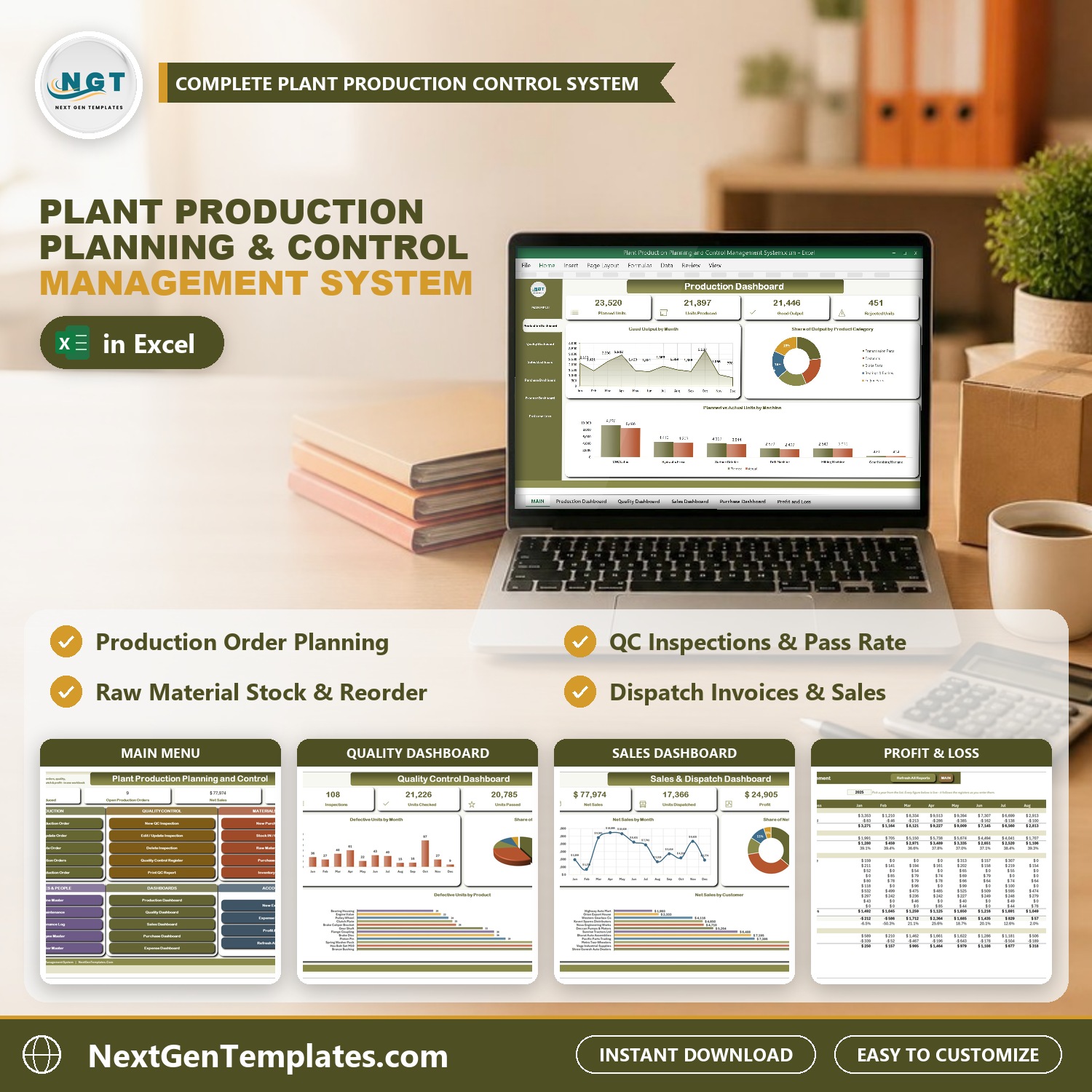
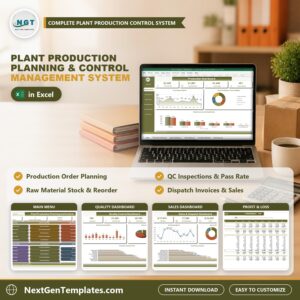
The Plant Production Planning and Control Management System runs a whole manufacturing plant from one macro-enabled Excel file: 22 worksheets, 13 VBA entry forms, 5 pivot dashboards, a live Profit & Loss statement and 5 printable documents that come out at A4, 4 inch and 3 inch. Production orders, quality inspections, raw material stock, dispatch invoices, machines, maintenance and expenses all sit in one workbook, and nothing is typed into a data sheet – every record goes in through a checked form.
Sample data ships with 120 production orders, 108 QC inspections, 110 dispatch invoice lines, 60 purchase lines, 90 stock movements, 96 expense vouchers and 30 maintenance jobs, across 12 finished products, 16 raw materials, 6 machines, 12 employees, 17 suppliers and 12 customers, so every chart is populated the moment you open it. Replace it with your own and the whole system follows. If you have outgrown a production planning Excel sheet that only lists orders, this is the step up: a real production control system with entry forms, stock that moves by itself and paperwork you can print.
🌍 Join 8,400+ teams in 40+ countries using NextGenTemplates to replace paid SaaS tools with one-time-purchase Excel, Google Sheets, Power BI and HTML templates.
✅ Instant download · One-time payment · No subscription · No per-user fees · Lifetime access
🎥 Watch the Demo Video
Video Overview
In this 10-minute demo PK walks through the whole system with one production order from start to finish: planning the order on the Machine and Schedule and Quantities tabs, opening the Production Orders register where achievement, scrap and capacity utilisation are already worked out, inspecting the batch with a QC entry, and checking the raw material stock, Stock IN / OUT slips and purchases. The goods are then dispatched on a tax invoice and the finished goods stock follows. You also see the Machine Master, the five dashboards, the twelve-month Profit & Loss, the Print Centre (A4, 4 inch and 3 inch), Export Report, Manage Dropdown Lists and Settings.
🎁 Try it free for 7 days before you buy – every form, dashboard and report works in the free trial, so you can test it on your own PC first.
🔑 Key Features of the Plant Production Planning and Control Management System
📌 Production orders that measure themselves. Enter the product, machine, operator, shift, dates and the planned, actual and rejected quantities. The order works out good quantity, Achievement %, Scrap %, production days, Capacity Utilisation % against the machine’s daily capacity, production cost and output value by formula – no manual arithmetic.
📌 Quality control against the real batch. Pick a production order and the QC form fills in the product and batch number. Record the quantity checked and defective with the defect type; passed quantity, Pass % and the QC result (Pass, Rework or Reject) follow, and the Quality Dashboard updates at once.
📌 Stock that keeps itself up to date. Purchases add to raw material stock, Stock IN / OUT slips issue material to a production order or return it from the floor, and finished goods rise with production and fall with dispatch. Every item shows stock in hand, stock value and a status of In Stock, Low Stock or Out of Stock against its reorder level.
📌 Dispatch invoices with profit and balance due. Each dispatch line carries the customer, quantity, discount, tax, net amount, cost and gross profit, plus payment status, amount paid, balance due, dispatch status and vehicle number. Customer outstanding balances roll up automatically.
📌 Machines that tell you when service is due. Log a maintenance job and the machine’s last and next service dates move with it. The Machine Master flags each machine OK, Due Soon or Overdue, and counts orders run, units produced and downtime hours.
📌 Printing the shop floor actually uses. Production Order, QC Inspection Report, Purchase Order, Tax Invoice and Material Issue / Receipt Slip all print from the same data at A4, 4 inch (104 mm) and 3 inch (80 mm). Paper size and what the print button does – Preview, Print or Save as PDF – are dropdowns on the Settings sheet.
📌 Type-to-search and locked dates. Long lists such as products, materials, machines, suppliers and customers filter as you type and match the start, middle or end of a name. Date boxes are locked and open a calendar picker, so 03/04 can never mean March on one PC and April on another.
📌 Everything is yours to edit. Product categories, material categories, machine types, production lines, defect types, departments, expense categories, shifts, priorities and statuses are all master lists you extend from the Manage Dropdown Lists form – no sheet editing, no broken dropdowns. It is Excel VBA production management that stays on your own PC.
📦 What’s Inside the Plant Production Planning and Control Management System
Twenty-two worksheets, laid out in the order you actually work in them.
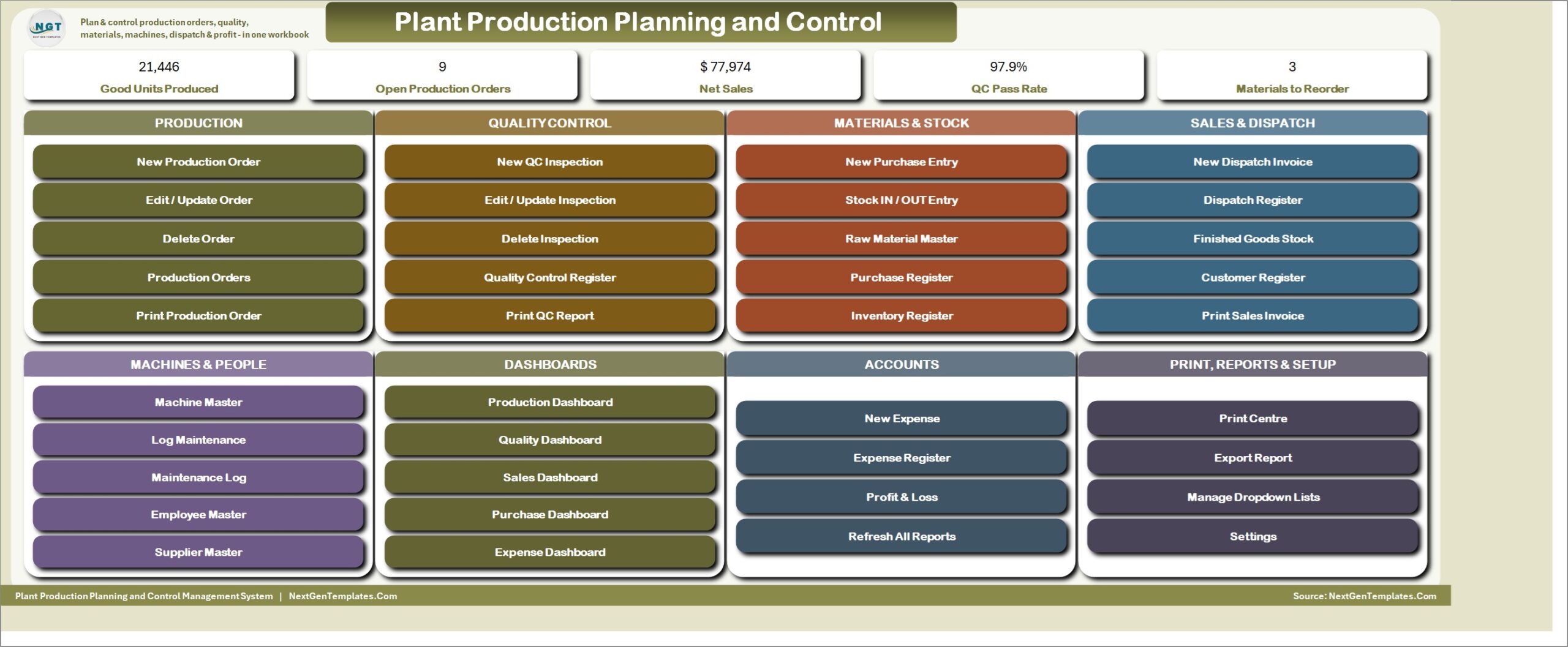
MAIN – the menu screen
The file opens here every time. Five live KPI chips across the top – Good Units Produced, Open Production Orders, Net Sales, QC Pass Rate and Materials to Reorder – then eight colour-coded cards covering Production, Quality Control, Materials & Stock, Sales & Dispatch, Machines & People, Dashboards, Accounts and Print, Reports & Setup. Thirty-eight buttons, no menu hunting.
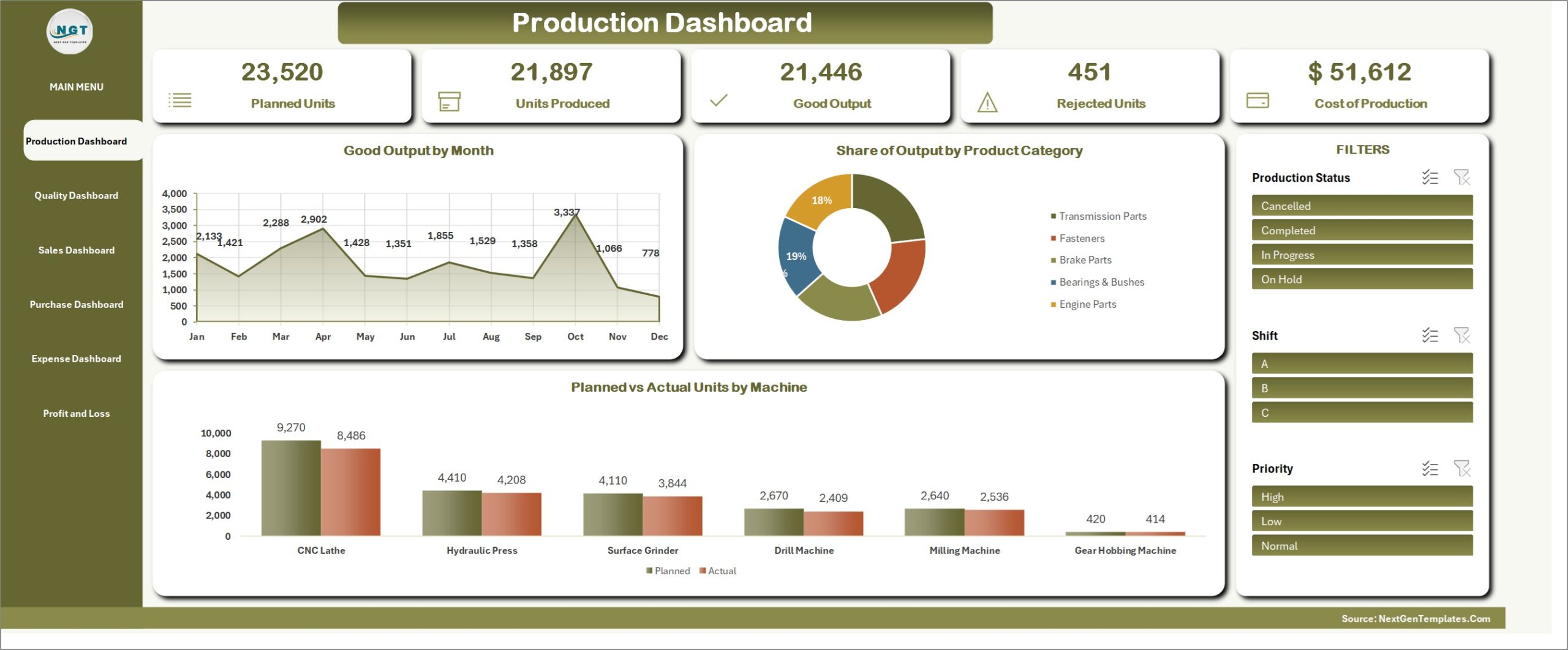
Production Dashboard
Planned Units, Units Produced, Good Output, Rejected Units and Cost of Production, with Good Output by Month, Share of Output by Product Category, and Planned vs Actual Units by Machine. Slicers for Production Status, Shift and Priority drive every figure and chart on the page.
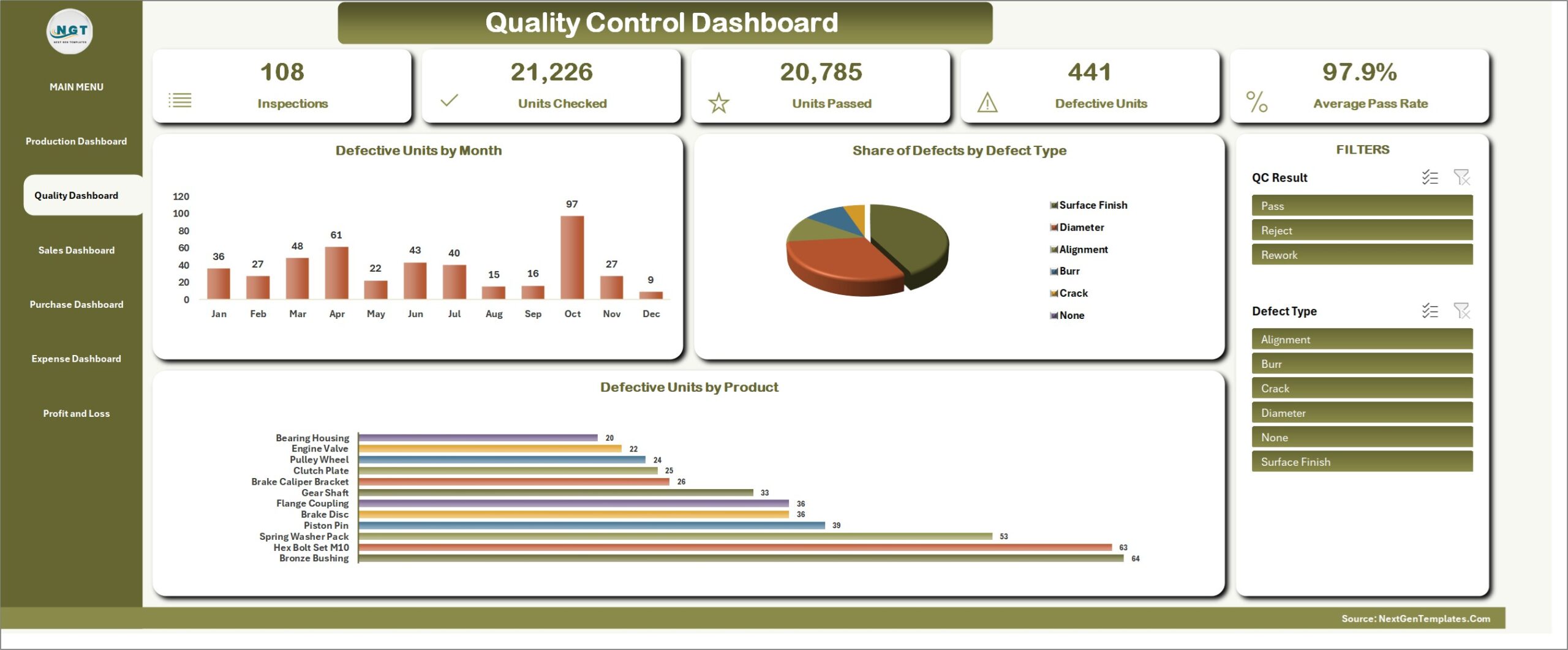
Quality Control Dashboard
Inspections, Units Checked, Units Passed, Defective Units and Average Pass Rate, with Defective Units by Month, Share of Defects by Defect Type, and Defective Units by Product. Filter by QC Result or Defect Type to see where rework comes from.
Sales & Dispatch Dashboard
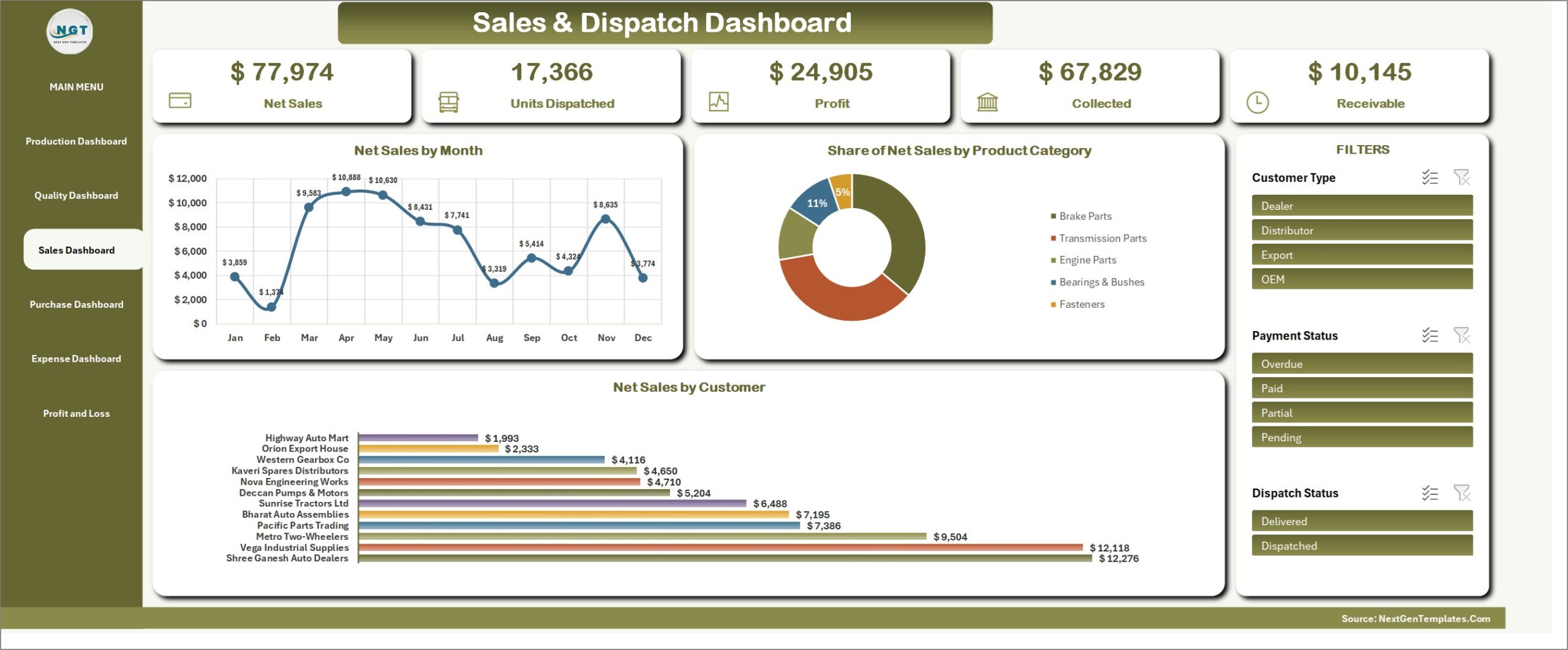
Net Sales, Units Dispatched, Profit, Collected and Receivable, with Net Sales by Month, Share of Net Sales by Product Category, and Net Sales by Customer. Slicers for Customer Type, Payment Status and Dispatch Status.
Purchase & Materials Dashboard
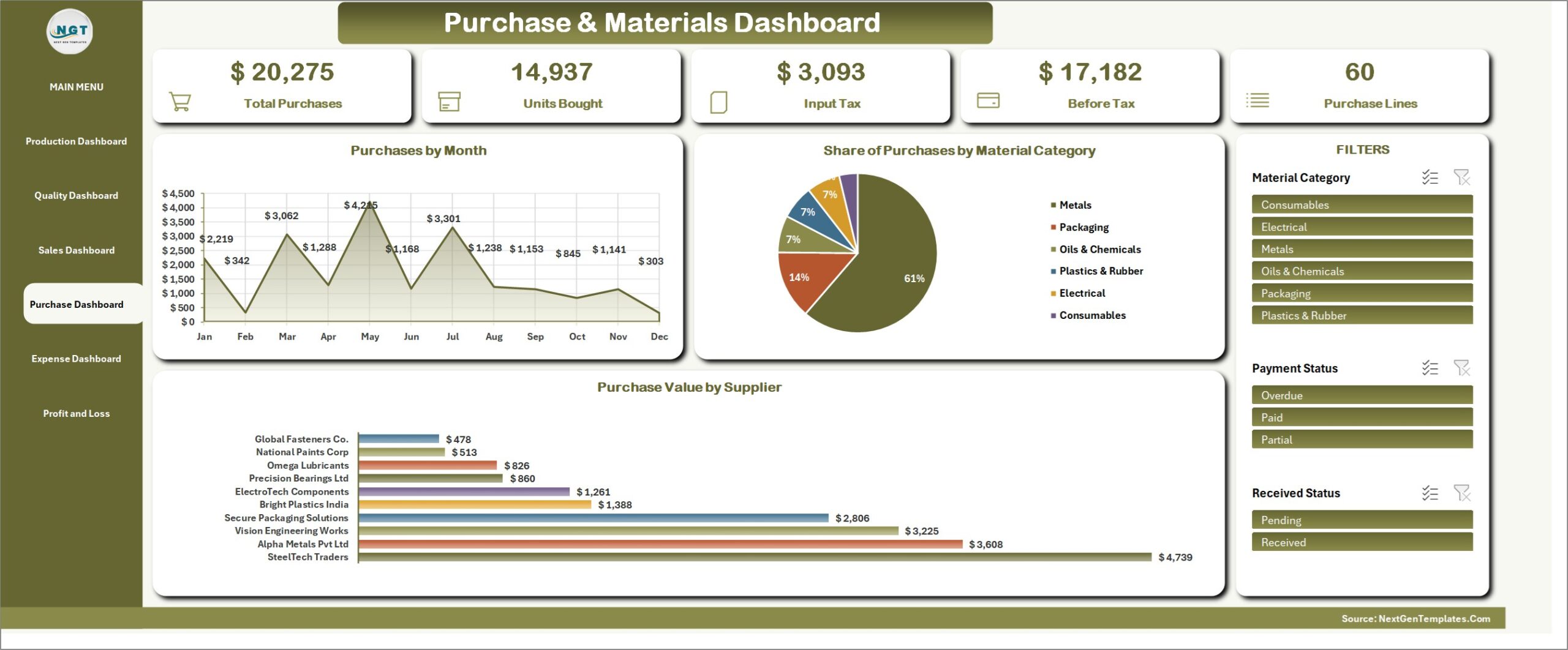
Total Purchases, Units Bought, Input Tax, Before Tax and Purchase Lines, with Purchases by Month, Share of Purchases by Material Category, and Purchase Value by Supplier. Filter by Material Category, Payment Status or Received Status.
Expense Dashboard
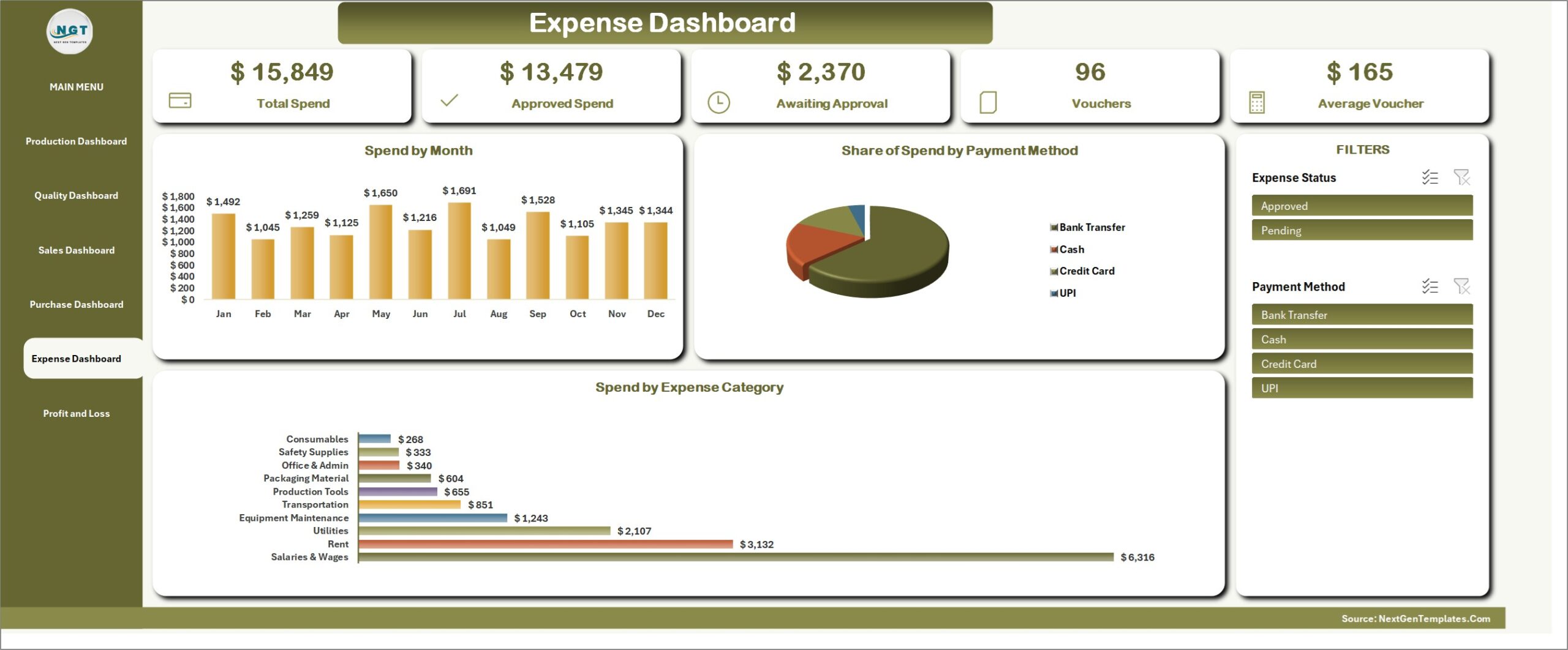
Total Spend, Approved Spend, Awaiting Approval, Vouchers and Average Voucher, with Spend by Month, Share of Spend by Payment Method, and Spend by Expense Category. Slicers for Expense Status and Payment Method.
Profit & Loss statement
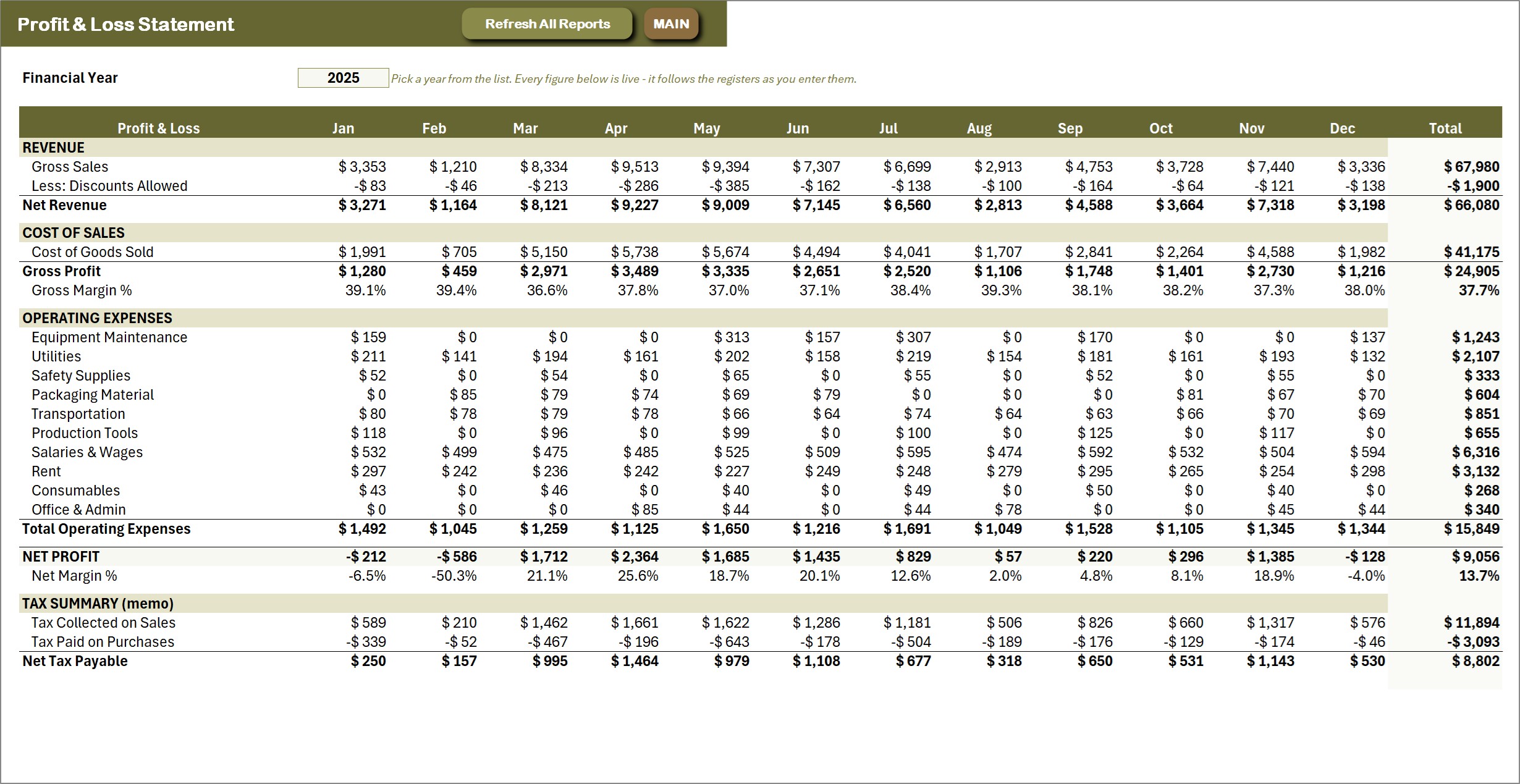
A live formula statement: twelve months and a year total, from gross sales and discounts through cost of goods sold and gross margin, every operating expense category, down to net profit and net margin – plus a tax memo showing tax collected on sales, tax paid on purchases and net tax payable. The Financial Year dropdown picks the year and every figure follows the registers.
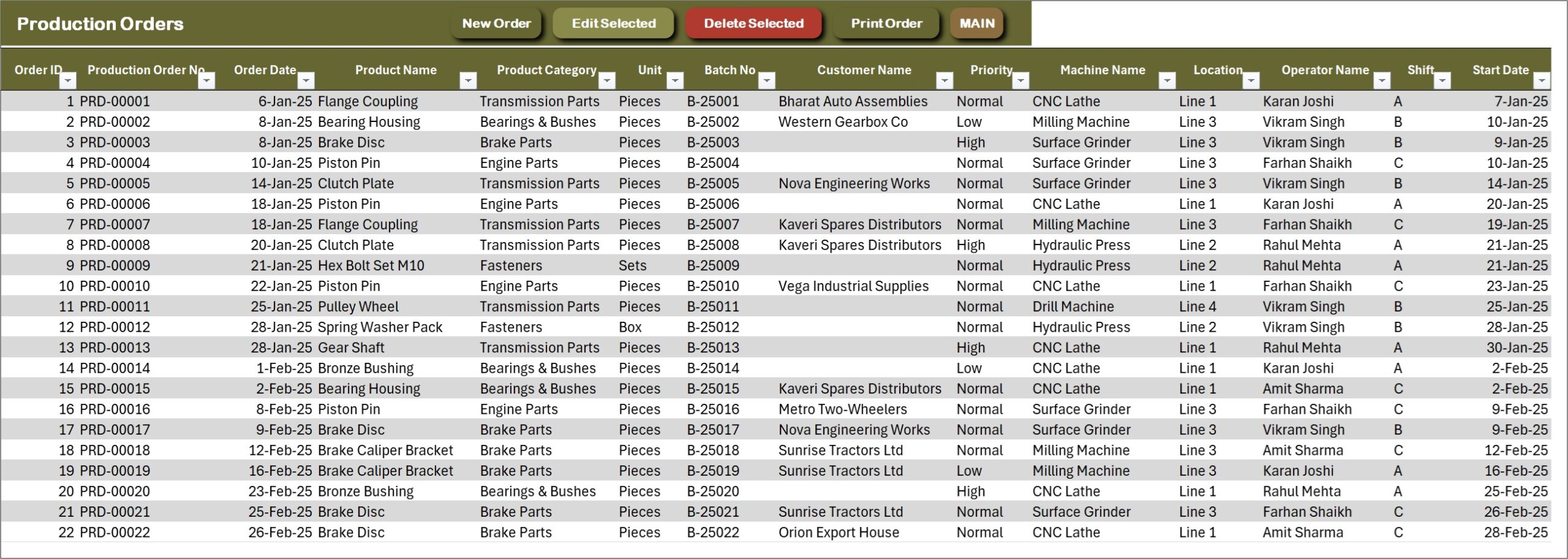
Production Orders – the main ledger
One row per production order across 33 columns: order number, date, product, category, batch, customer, priority, machine, line, operator, shift, start and end dates, planned, actual, rejected and good quantity, achievement %, scrap %, machine daily capacity, capacity utilisation %, standard unit cost, production cost, output value and status. New Order, Edit Selected, Delete Selected and Print Order sit on the action bar.
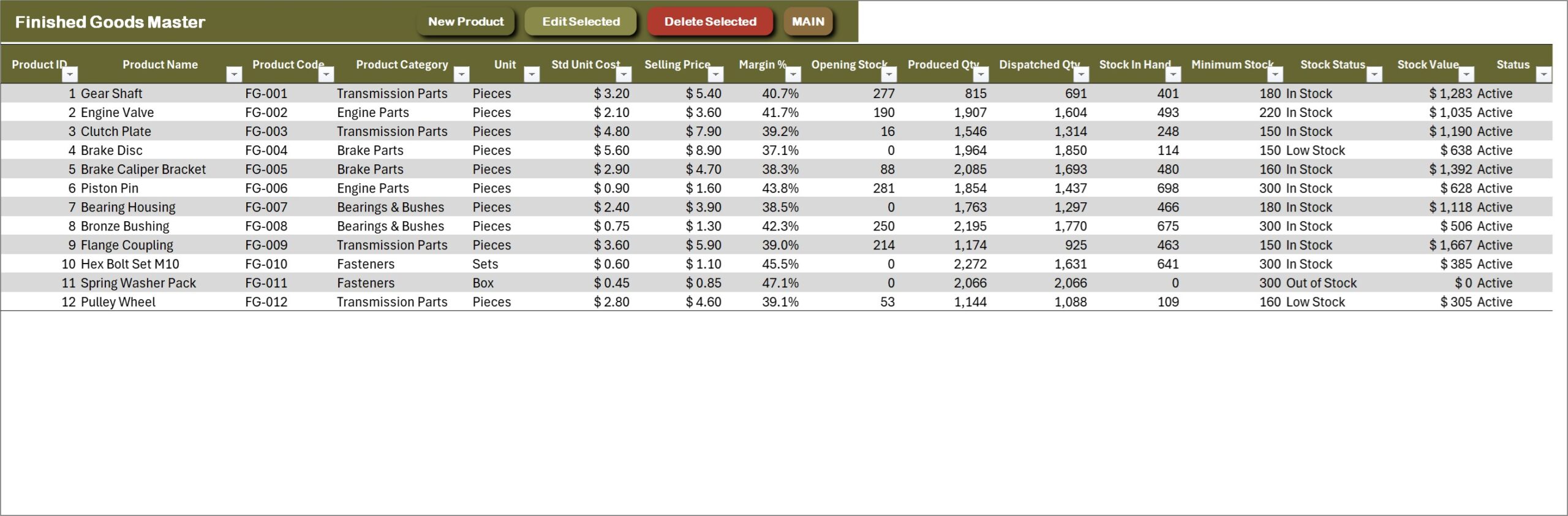
Finished Goods Master
Every finished product with its code, category, unit, standard unit cost, selling price and margin %, plus opening stock, produced quantity, dispatched quantity, stock in hand, minimum stock, stock status and stock value – all kept current by the production and dispatch registers.
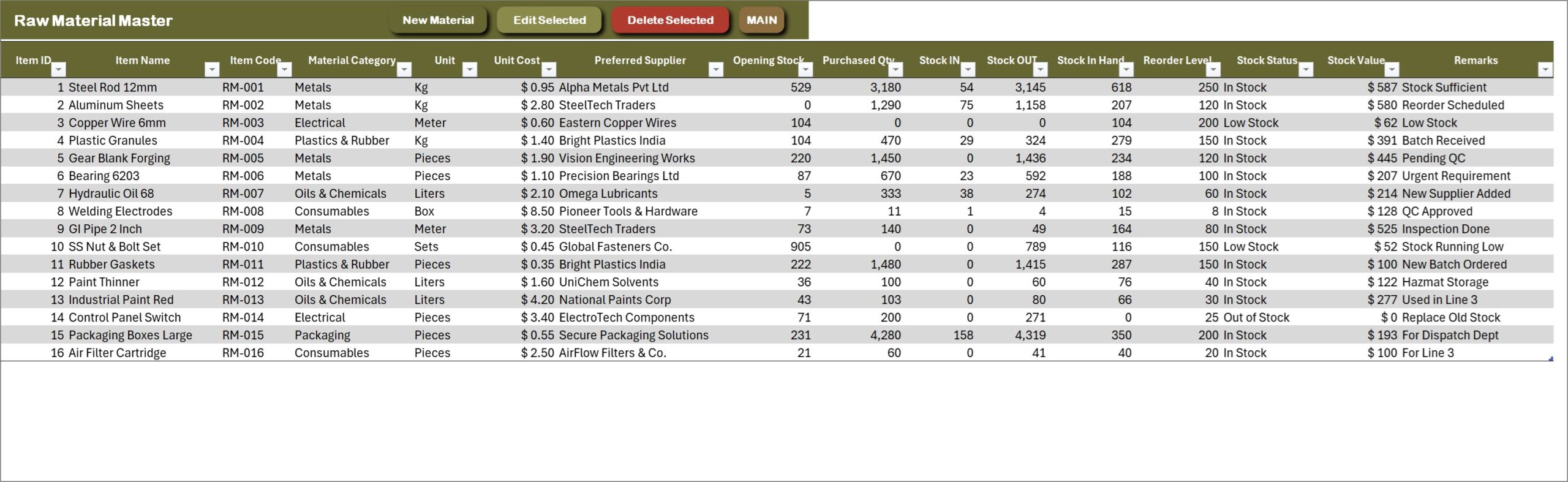
Raw Material Master
Each raw material with its code, category, unit, unit cost and preferred supplier. Purchased quantity, stock IN, stock OUT, stock in hand, stock status against the reorder level and stock value are formula columns, which is what feeds the Materials to Reorder chip on MAIN.
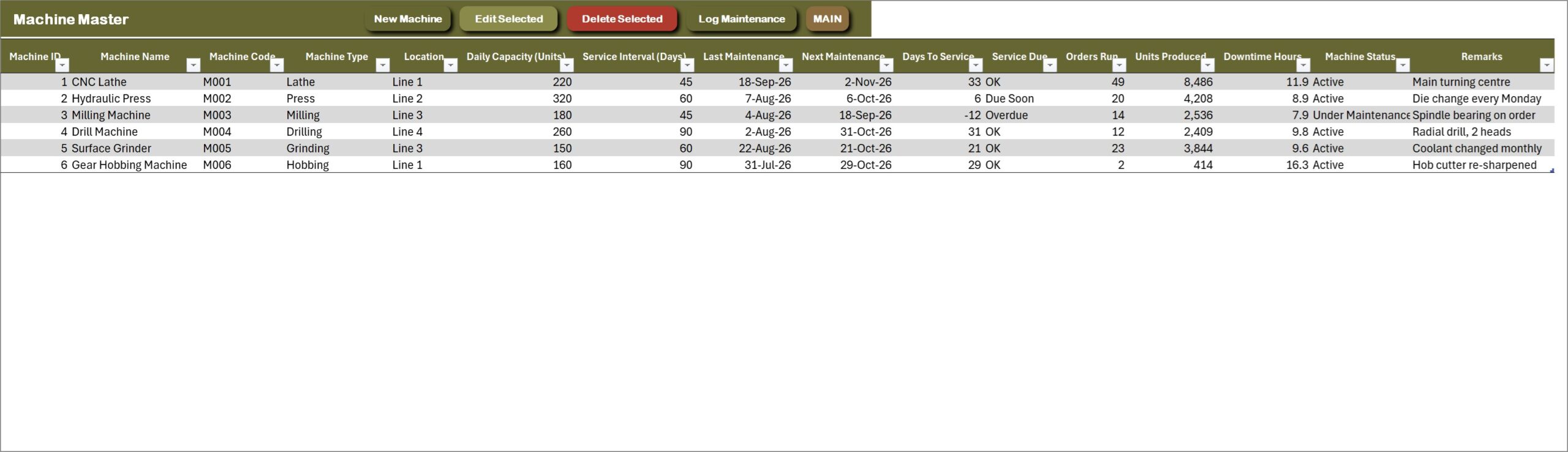
Machine Master
Machines with type, line, daily capacity and service interval. Last maintenance comes from the maintenance log, then next maintenance, days to service and a Service Due flag of OK, Due Soon or Overdue – alongside orders run, units produced and downtime hours.
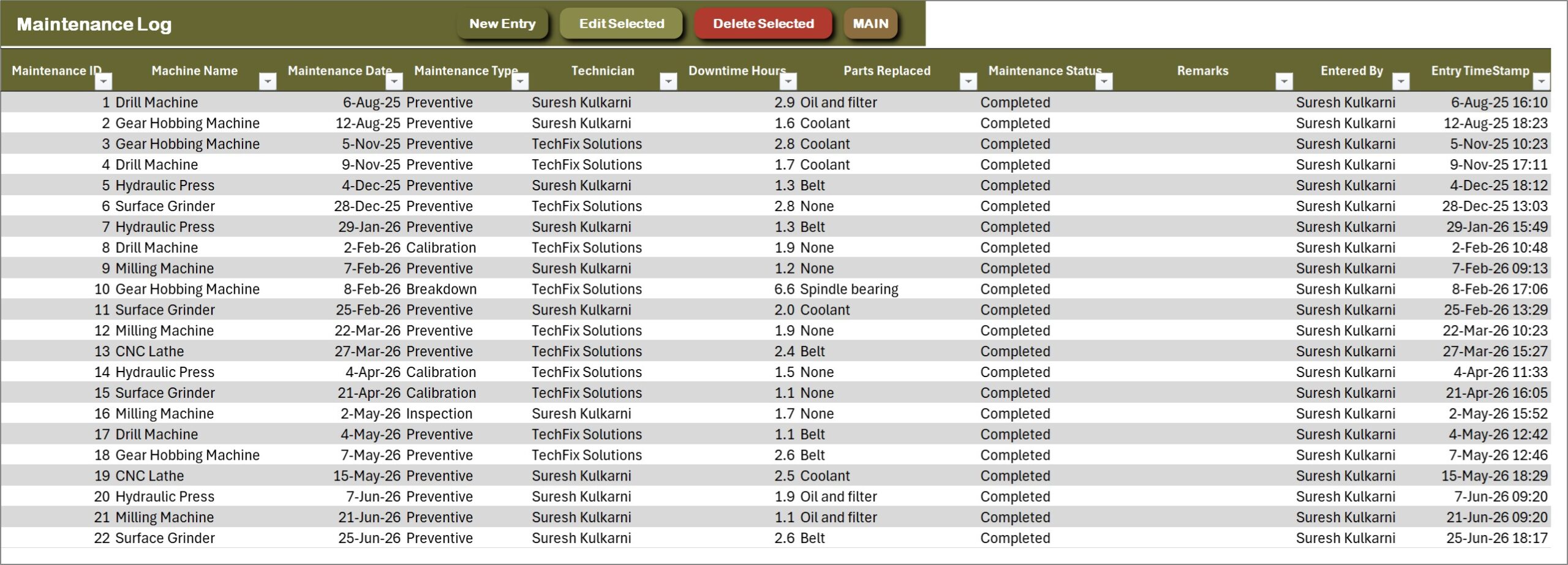
Maintenance Log
Every preventive, breakdown, calibration or inspection job: machine, date, technician, downtime hours, parts replaced and status. Log Maintenance on MAIN opens the form.
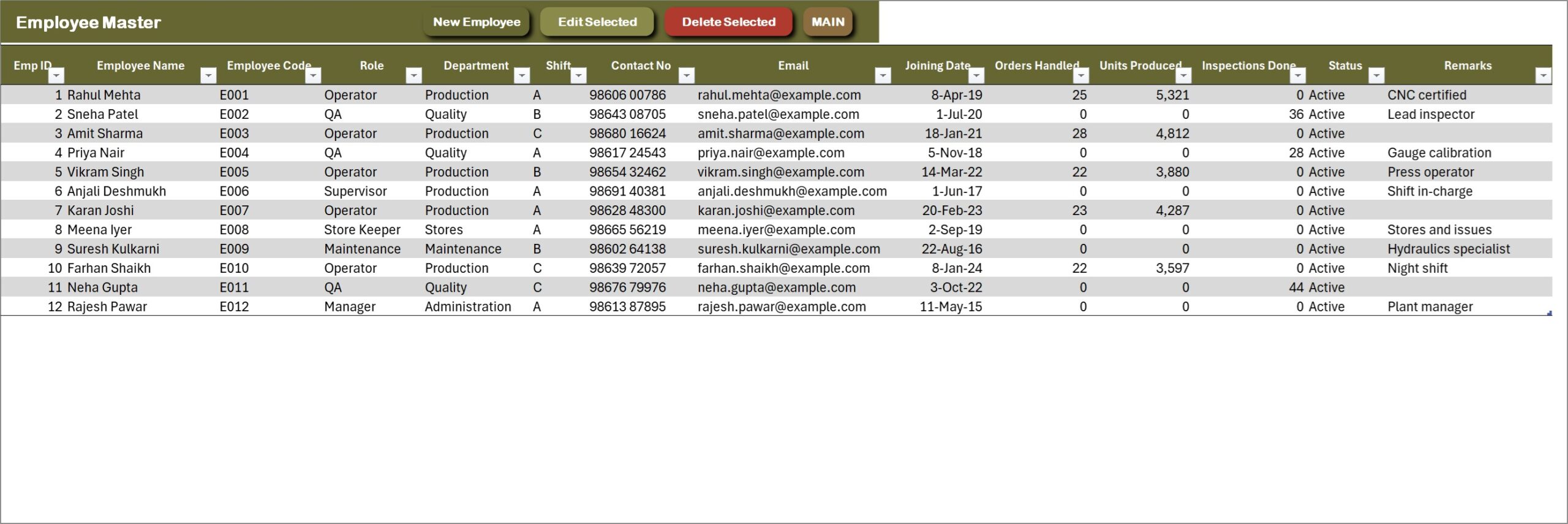
Employee Master
Operators, QA inspectors, supervisors and store staff with role, department, shift and joining date, plus live counts of orders handled, units produced and inspections done.
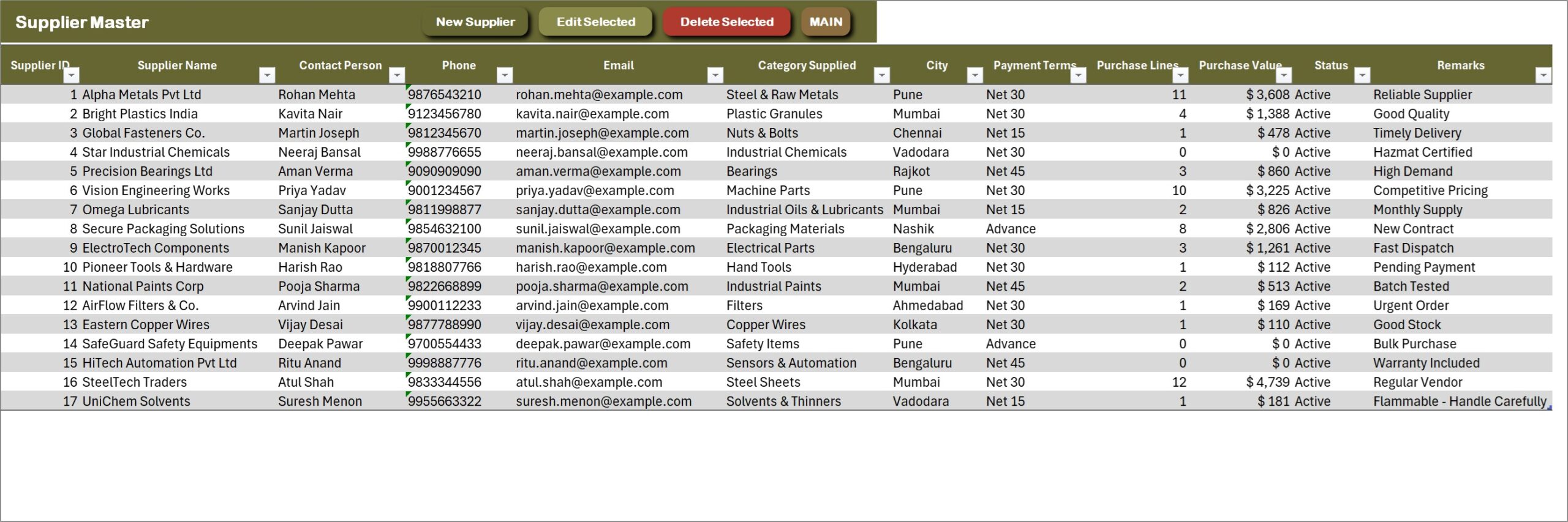
Supplier Master
Suppliers with contact person, phone, email, category supplied, city and payment terms, and formula columns for purchase lines and purchase value.
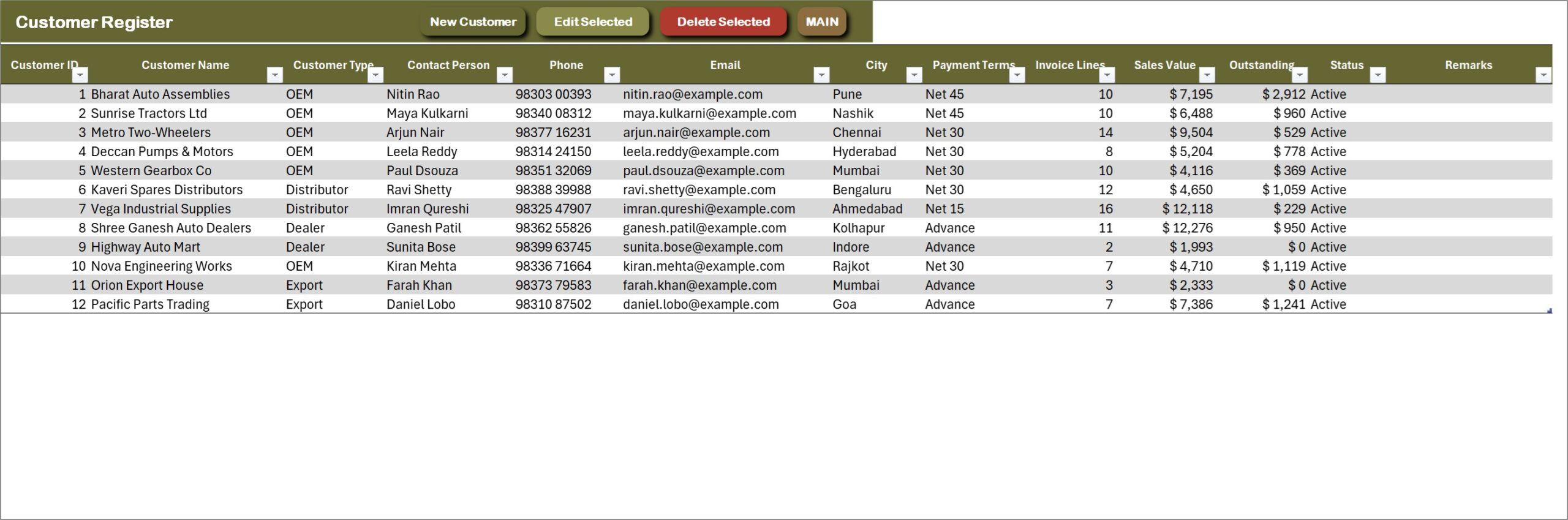
Customer Register
Customers by type – OEM, Distributor, Dealer or Export – with contact details and payment terms, plus invoice lines, sales value and the outstanding balance pulled from the dispatch register.
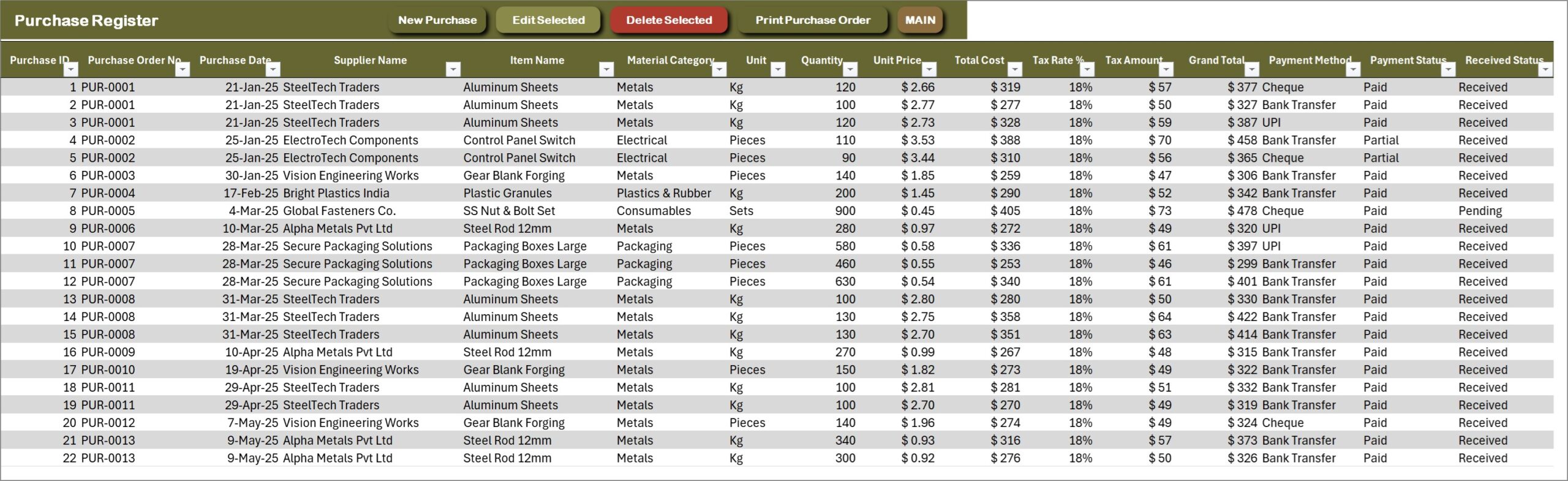
Purchase Register
Every purchase line under its purchase order number: supplier, item, quantity, unit price, total cost, tax, grand total, payment method, payment status and received status. Print Purchase Order prints the selected order without leaving the sheet.
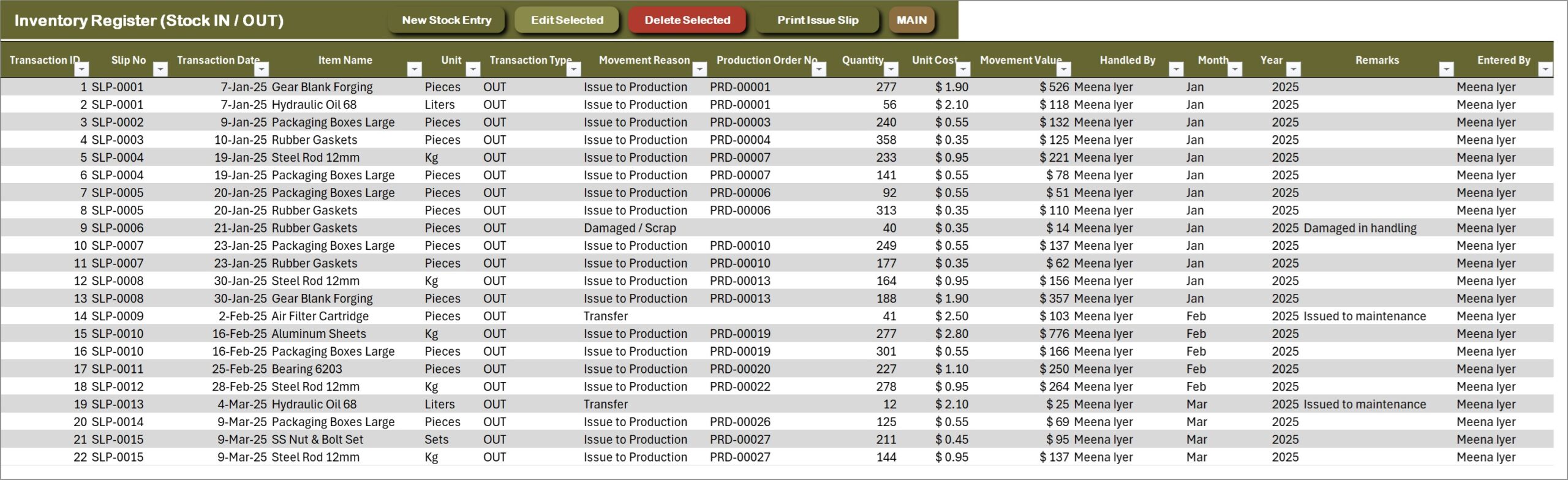
Inventory Register (Stock IN / OUT)
The store’s movement log: slip number, item, IN or OUT, the reason (issue to production, return from floor, damaged or scrap, transfer), the production order it belongs to, quantity, unit cost, movement value and who handled it. Print Issue Slip prints the selected slip.
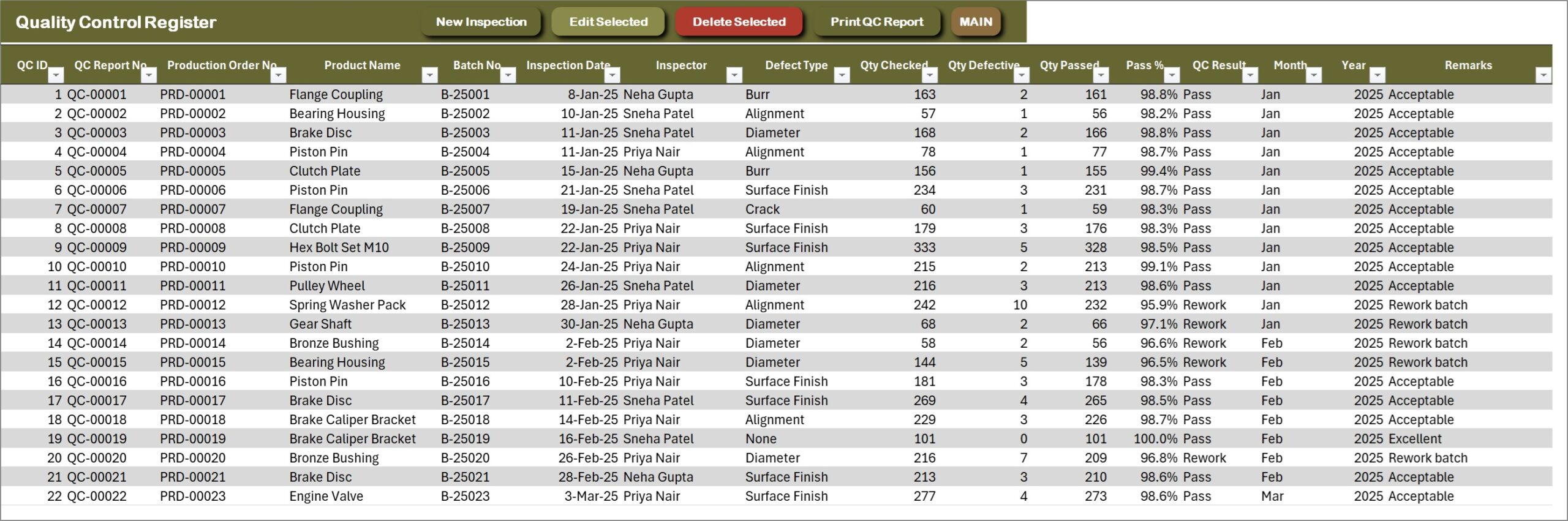
Quality Control Register
Every inspection with its QC report number, production order, product, batch, inspector, defect type, quantity checked, defective and passed, pass % and result. Print QC Report prints the selected inspection.
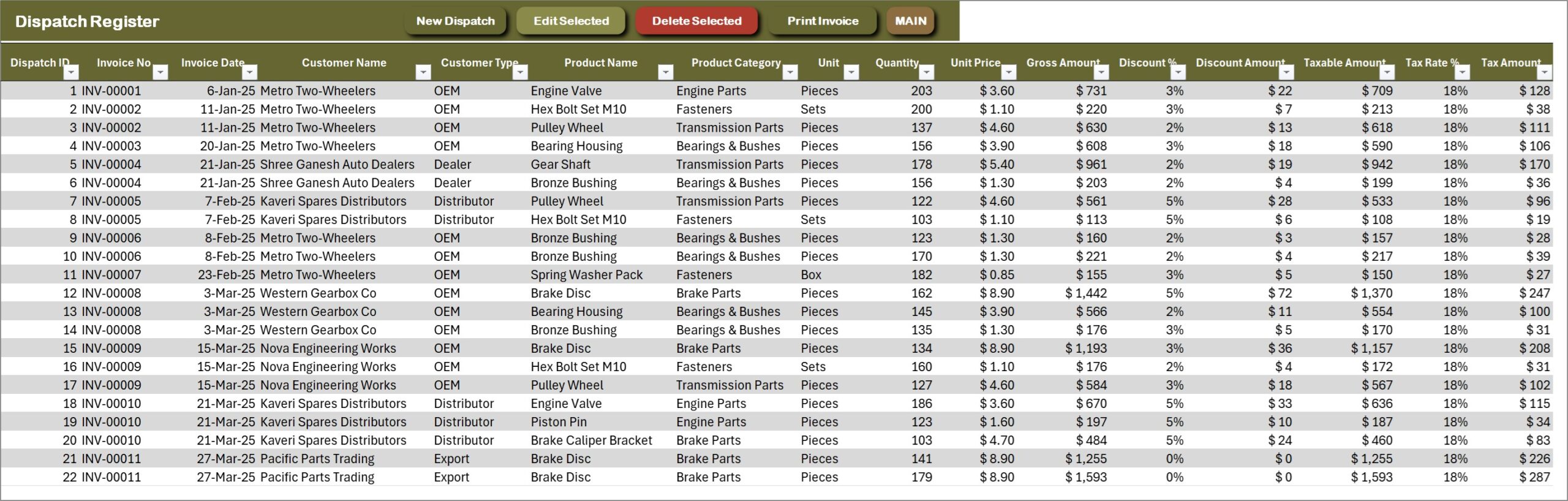
Dispatch Register
Each invoice line: customer, product, quantity, unit price, gross amount, discount, taxable amount, tax, net amount, cost, gross profit, payment mode and status, amount paid, balance due, dispatch status and vehicle number. Print Invoice prints the selected tax invoice.
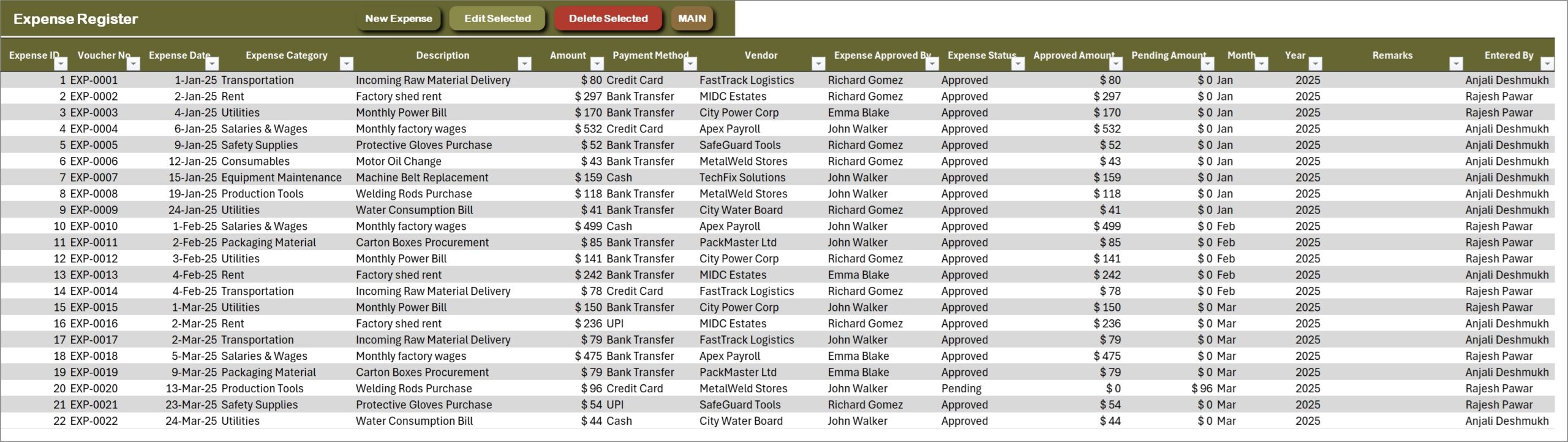
Expense Register
Plant running costs by category – salaries and wages, rent, utilities, equipment maintenance, consumables, transportation and more – with vendor, payment method, approval, and approved and pending amounts. This is the expense side of the Profit & Loss statement.
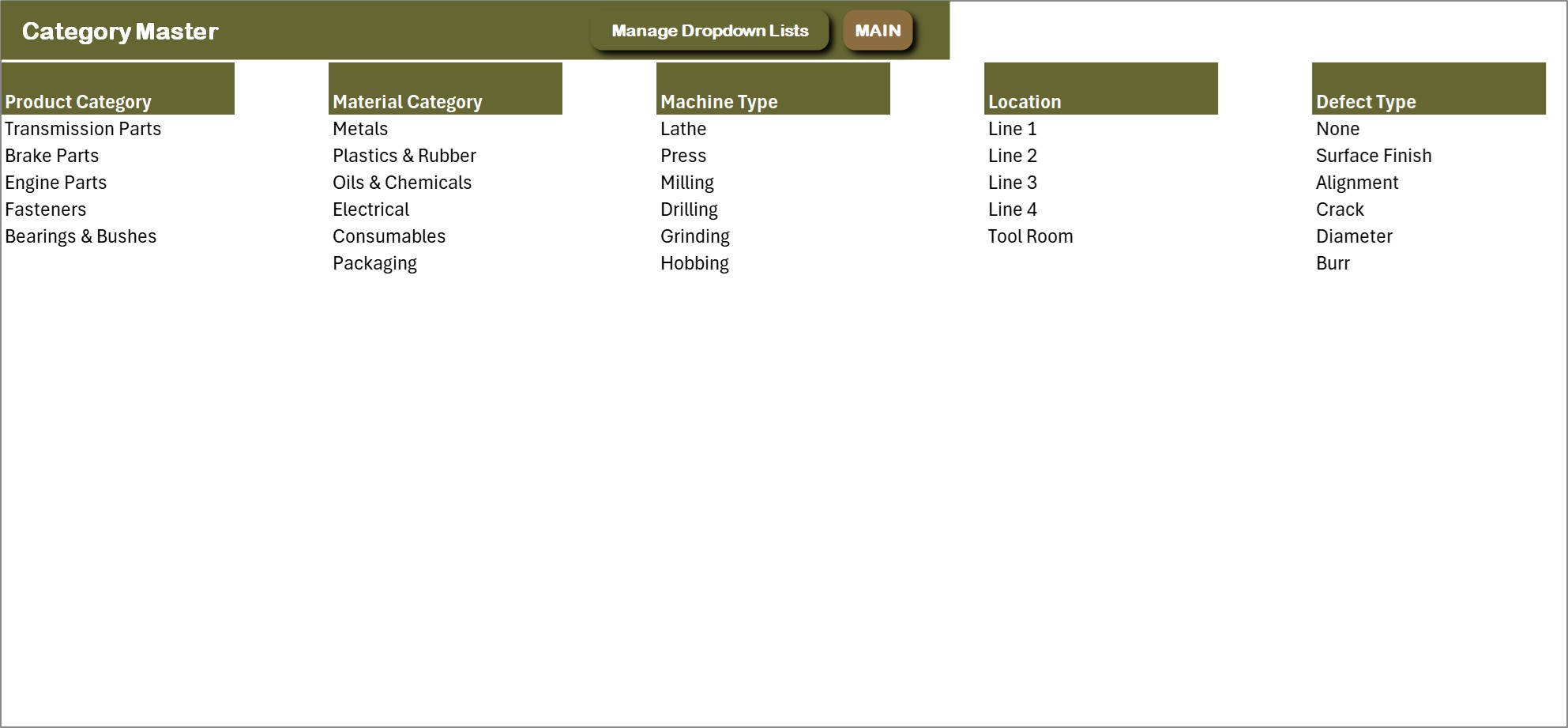
Category Master
The main dropdown lists in one place: product categories, material categories, machine types, production lines and defect types. Edit here or through the Manage Dropdown Lists form.
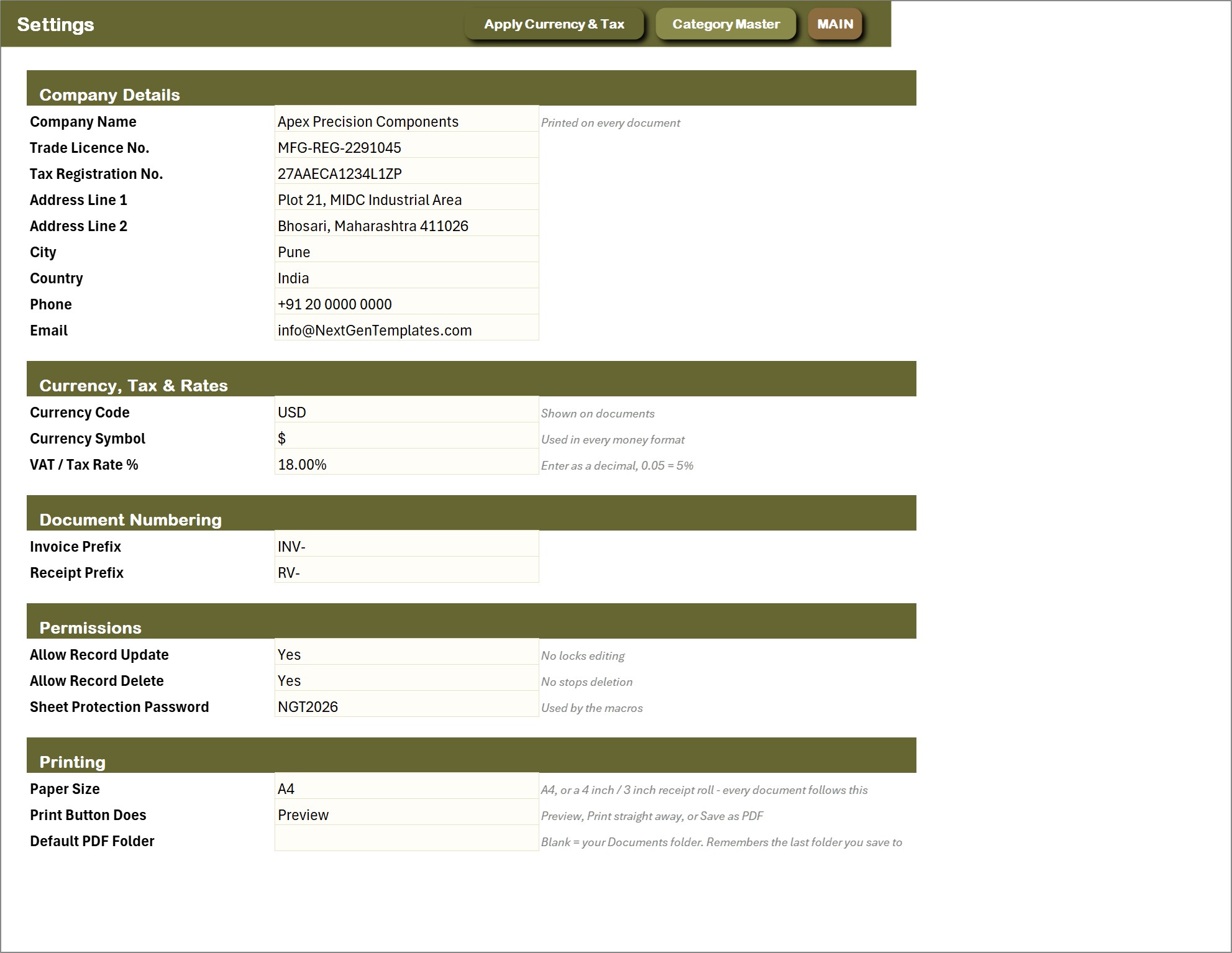
Settings
Company details printed on every document, currency code and symbol, tax rate, document numbering, permissions (allow record update, allow record delete and the sheet protection password) and the printing defaults: paper size, what the print button does and the default PDF folder.
📊 Plant Production Planning and Control Management System vs. a Production Planning Spreadsheet vs. Cloud MRP / ERP Software – Where This Fits
| Feature | This Excel VBA system | Plain production planning spreadsheet | Cloud MRP / ERP (Katana, MRPeasy, Odoo) |
|---|---|---|---|
| Cost | $29 one-time ✅ | Free to $20 one-time | Monthly subscription, often per user |
| Platform | Microsoft Excel for Windows (macros) | Excel or Google Sheets | Cloud, browser |
| Setup time | Under 20 minutes ✅ | Hours of building | Days to weeks |
| Achievement %, scrap % and capacity use per order | Yes, by formula ✅ | Manual formulas | Yes ✅ |
| QC inspections linked to the order and batch | Yes ✅ | No | Usually yes |
| Raw material and finished goods stock with reorder status | Yes, automatic ✅ | Manual | Yes ✅ |
| Machine service due and maintenance log | Yes ✅ | No | Depends on plan |
| Print production orders, invoices and slips at A4 + 4 inch + 3 inch | Yes, all three ✅ | No | A4 / PDF |
| Bill of materials and MRP run | No | No | Yes ✅ |
| Works offline, data stays on your PC | Yes ✅ | Yes | No |
For a small or mid-size plant that wants orders, quality, stock, dispatch and maintenance in one place without a monthly subscription, this manufacturing management system in Excel sits in the sweet spot. If you need bills of materials, MRP runs or many people working at once, buy an MRP.
👥 Who This Template Is For – and Who It’s Not For
✅ This template is built for:
- Small and mid-size manufacturers, machine shops and job-work units with a handful of machines and lines
- Production managers who want achievement, scrap and capacity utilisation per order without building formulas
- Owners who need raw material reorder alerts, finished goods stock and dispatch invoices in the same file
- Plants that print production orders, QC reports and issue slips for the floor, and invoices at the dispatch gate
❌ This template is NOT for:
- Teams that need several people in the same file at the same time – this is a single-user desktop workbook
- Mac or Excel-for-web users; the forms are VBA and need Excel for Windows with macros enabled
- Plants that need bills of materials, MRP runs, finite-capacity scheduling, barcode scanning or shop-floor terminals
- Regulated manufacturers that need validated audit trails or certification-grade traceability – an unprotected workbook is not that control environment
⚙️ How to Use the Plant Production Planning and Control Management System
- Download the ZIP, extract it, open the .xlsm file and click Enable Content so the VBA runs.
- Go to Print, Reports & Setup > Settings and enter your company details, currency symbol, tax rate and printing defaults.
- Open Manage Dropdown Lists and replace the sample product categories, material categories, machine types, lines and defect types with your own.
- Add your machines, finished products, raw materials, employees, suppliers and customers.
- Press New Production Order to plan work, then record actual and rejected quantities as the order runs.
- Log inspections with New QC Inspection, buy material with New Purchase Entry and move it with Stock IN / OUT Entry.
- Invoice finished goods with New Dispatch Invoice, record expenses and log machine maintenance.
- Delete the sample rows when you are ready – the dashboards and the Profit & Loss refresh themselves.
💼 Real-World Use Cases
Rajesh runs a 40-person auto-components machine shop. He plans every order against a CNC lathe or milling machine, watches capacity utilisation and scrap % on the Production Dashboard, and prints the production order on A4 for the operator. Service Due warns him before a machine goes overdue.
Laura is the quality lead at a fastener plant. She logs every inspection against its batch, tags defects as burr, crack, diameter or surface finish, and sends rework batches back with a printed QC Inspection Report. Her weekly review is the Quality Control Dashboard.
Ahmed owns a small plastic moulding unit. He records purchases, issues granules to production with a Stock IN / OUT slip, and watches the Low Stock status before he runs out. Dispatch invoices print on the 3 inch printer at the gate, and the Profit & Loss tells him each month what he actually made.
🎁 Try Before You Buy: 7-Day Free Trial
Download the free trial of the Plant Production Planning and Control Management System in Excel VBA and use the complete system for 7 days. Every form, register, dashboard, printable document and setting works exactly as in the full version, so you can test it with your own records before you decide.
How the free trial works
- Download and unzip the trial file below.
- Open it in Microsoft Excel for Windows (the desktop app, not Excel Online or Mac) and click Enable Content on the yellow bar. If there is no yellow bar, right-click the file, choose Properties, tick Unblock and open it again.
- Your 7 days start the first time the file opens with macros on. A banner on the MAIN page shows how many days are left.
- After 7 days the trial locks and shows a Buy Full Version button. Buy the full version to keep working with no time limit.
| Free Trial | Full Version | |
|---|---|---|
| Every feature, form and dashboard | Yes | Yes |
| Time limit | 7 days | None, lifetime use |
| Trial banner | Yes | No |
| PDF user manual | Included | Included |
| Editable (unlocked) VBA code | No, locked | Yes |
The trial runs once per computer: downloading it again does not restart the 7 days. Records you enter during the trial can be copied into the full version.
❓ Frequently Asked Questions
What does the Plant Production Planning and Control Management System track?
Production orders, quality inspections, purchases, stock movements, finished goods and raw material stock, dispatch invoices, machines and their maintenance, employees, suppliers, customers and expenses. Five dashboards and a live Profit & Loss statement are built on top of those registers.
Does it calculate achievement, scrap and capacity utilisation automatically?
Yes. From the planned, actual and rejected quantities, the dates and the machine’s daily capacity, each production order works out good quantity, achievement %, scrap %, production days, capacity utilisation %, production cost and output value by formula.
Does it handle a bill of materials or run MRP?
No. Material is issued to a production order with a Stock IN / OUT slip, and raw material stock shows a Low Stock status against its reorder level, but there is no bill-of-materials explosion or MRP planning run. If you need that, a dedicated MRP system is the right tool.
What can I print?
Production Order, QC Inspection Report, Purchase Order, Tax Invoice and Material Issue / Receipt Slip, each at A4, 4 inch (104 mm) or 3 inch (80 mm). Choose the paper size and whether the button previews, prints or saves a PDF on the Settings sheet, or print any document by number from the Print Centre.
Can I stop staff editing or deleting records?
Yes. Allow Record Update and Allow Record Delete on the Settings sheet switch editing and deleting off, and the data sheets are protected with a password the macros use. There are no separate user logins – it is a single-user desktop workbook.
Does it work on Mac or Excel for the web?
No. The entry forms and the printing engine are VBA, so it needs Microsoft Excel 2016 or later for Windows on the desktop, with macros enabled. It will open elsewhere but the buttons will not run.
How long does setup take?
Under 20 minutes. Enable macros, fill in Settings, replace the dropdown master lists with your own, and add your machines, products and materials. The sample data can stay while you learn the system and be deleted later.
👤 About the Author
Built by PK – Microsoft Certified Professional with 15+ years of Excel, Google Sheets and Power BI experience. Founder of NextGenTemplates, reaching 300K+ subscribers across YouTube channels (@PKAnExcelExpert, @NextGenTemplates, @NeoTechNavigators). Every template is hand-built and tested before release.
🔗 Explore Related Templates
💎 Best value: the VBA Management Systems Mega Pack bundles five complete Excel VBA systems for less than buying them separately.
- CRM and Sales Pipeline Management System V1.0 in Excel VBA – the same engine for the sales side: deals, quotations, activities and documents.
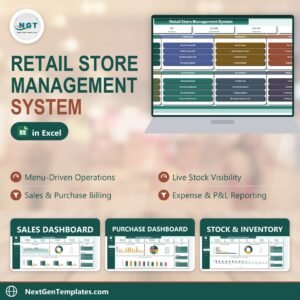
- Retail Store Management System V1.0 in Excel VBA – billing, purchases and stock for a shop counter.
- Manufacturing Business Plan Templates Kit – the plan, forecasts and pitch deck for starting or growing a manufacturing business.
- Furniture Manufacturing Management System Web App – a multi-user, browser-based system if your team needs to work at once.
- Flooring Materials Manufacturing Dashboard in Excel – an analytics-only dashboard for plants that already capture their data elsewhere.
Browse more Excel VBA Tools or the full range of MS Excel templates.
📖 Click here to read the Detailed Blog Post
🎥 Visit our YouTube channel for step-by-step video tutorials
👉 YouTube.com/@NextGenTemplates
📅 Last updated: September 2026













Reviews
There are no reviews yet.