

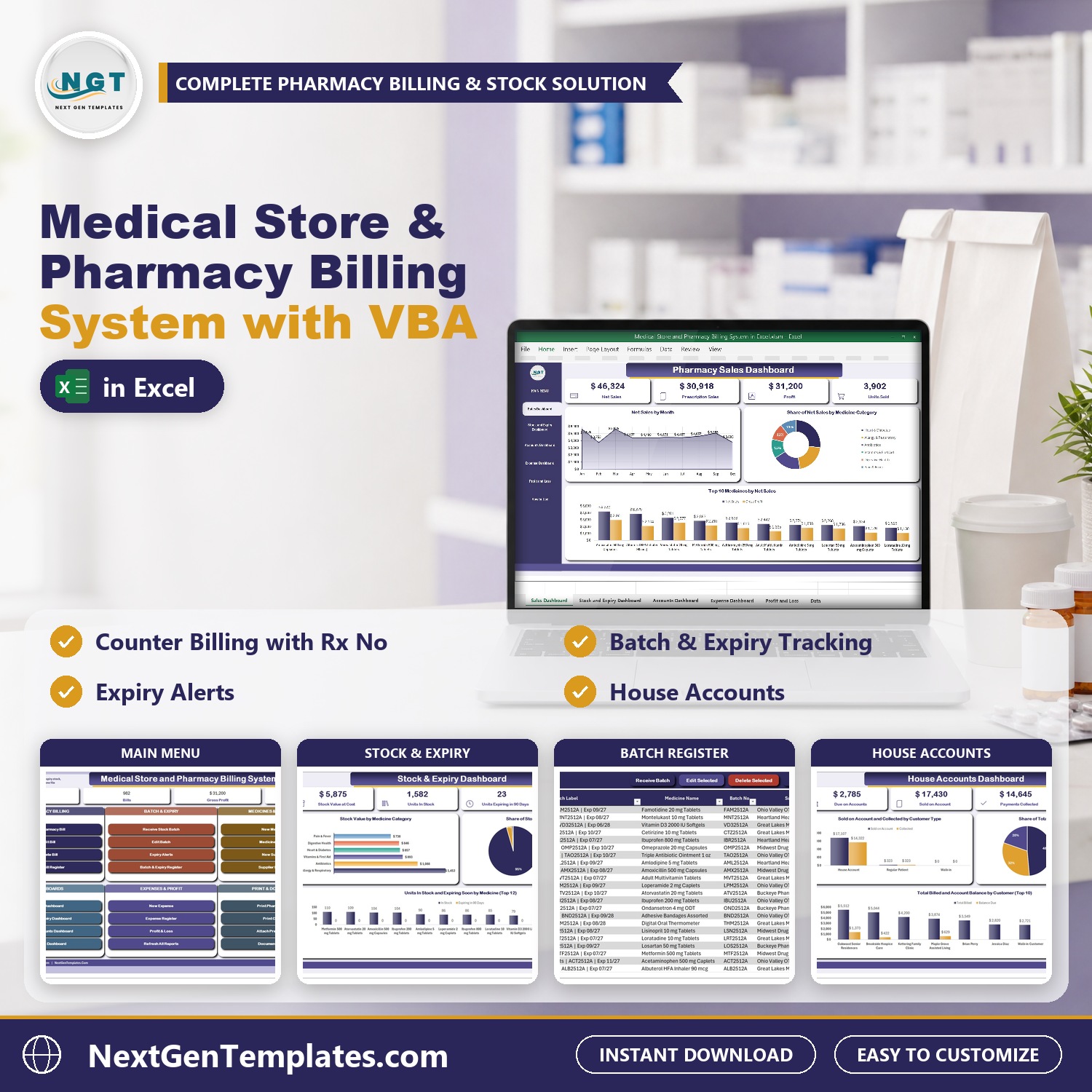
The Medical Store and Pharmacy Billing System in Excel VBA bills patients at the counter and keeps every medicine batch with its expiry date in one macro-enabled Excel file. Bills go in through a pharmacy bill form with type-to-search batches and a basket of lines, stock is received batch by batch, and the Sales, Stock and Expiry, House Accounts and Expense dashboards plus a monthly Profit and Loss build themselves.
Sample data for a small Ohio pharmacy ships with 982 bills, 84 batches, 24 medicines, 23 customers and 5 suppliers, so every chart is populated when you open it. Replace it with your own and the whole system follows. It is pharmacy billing software in Excel and medical store billing software for Windows with no cloud and no per-user fee, a pharmacy management system in Excel and a medicine expiry tracker in Excel in one file. If expiry dates are still checked by hand, this is the step up.
Watch the Medical Store and Pharmacy Billing System V1.0 in Excel VBA walkthrough
🌍 Join 10,000+ customers in 180+ countries using NextGenTemplates to replace paid SaaS tools with one-time-purchase Excel, Google Sheets, Power BI and HTML templates.
✅ Instant download · One-time payment · No subscription · No per-user fees · Lifetime access
🎁 Try it free for 7 days before you buy: every form, register and dashboard works in the free trial, so you can test it on your own PC first.
Please note: this system needs Microsoft Excel 2016 or later for Windows with macros enabled. It does not work on Mac, in Excel for the web or in Google Sheets. It does not connect to insurance plans or e-prescribing. It is a single-user desktop workbook and your data stays on your own PC.
🔑 Key Features of the Medical Store and Pharmacy Billing System
📌 A bill form built for the counter. Pick the patient, prescriber and Rx number, type-to-search a medicine batch, add lines to the basket and save. It uses drop-down lists and a pop-up calendar and refuses a blank required field.
📌 Stock kept batch by batch. Receive Stock Batch records the batch number, supplier invoice, manufacturing date, expiry date, quantity and purchase rate. Every sale names the batch it came from.
📌 Expiry alerts. Expiry Alerts lists expired batches and batches that expire within 90 days with stock still on the shelf, so you can sell or return them in time.
📌 Low stock and out of stock flags. Each medicine has a reorder level and a stock status, with the nearest expiry date beside it.
📌 Medicine Master. Rx Only or OTC schedule, pack size, cost, retail price, margin and a sales tax rate per item.
📌 House accounts. Put bills on account for clinics and care homes, set a credit limit, receive payments and print a payment receipt. The House Accounts Dashboard shows who owes what.
📌 Four dashboards with slicers. Sales, Stock and Expiry, House Accounts and Expenses filter by counter, schedule, medicine category, expiry status, customer type and payment mode.
📌 Monthly Profit and Loss. Revenue, cost of goods sold, operating expenses and net profit by month for the financial year you pick, with a sales tax summary.
📌 Print pharmacy bills. A4, 4 inch or 3 inch thermal paper, with the batch number and expiry date on every line.
📌 Scanned prescriptions on the bill. Attach a prescription, insurance card or supplier invoice to a bill, customer or batch and open it from the Document Library.
📦 What’s Inside the Medical Store and Pharmacy Billing System
Seventeen pages, laid out in the order you actually work in them.
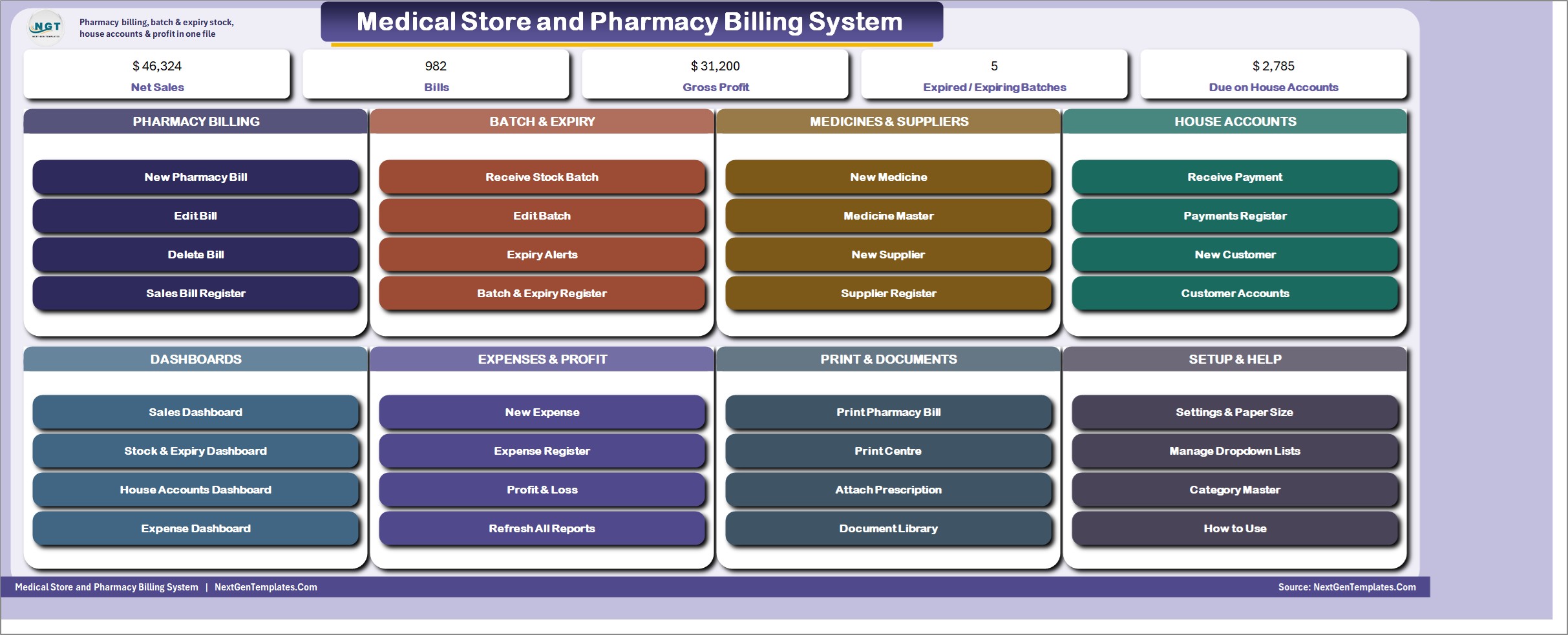
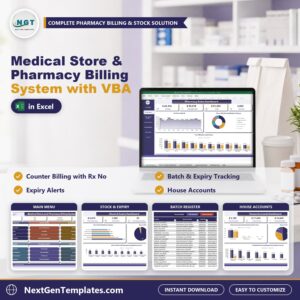
MAIN menu
The file opens here every time. Five live KPI chips (Net Sales, Bills, Gross Profit, Expired and Expiring Batches, and Due on House Accounts) sit above colour-coded cards for Pharmacy Billing, Batch and Expiry, Medicines and Suppliers, House Accounts, Dashboards, Expenses and Profit, Print and Documents, and Setup and Help.
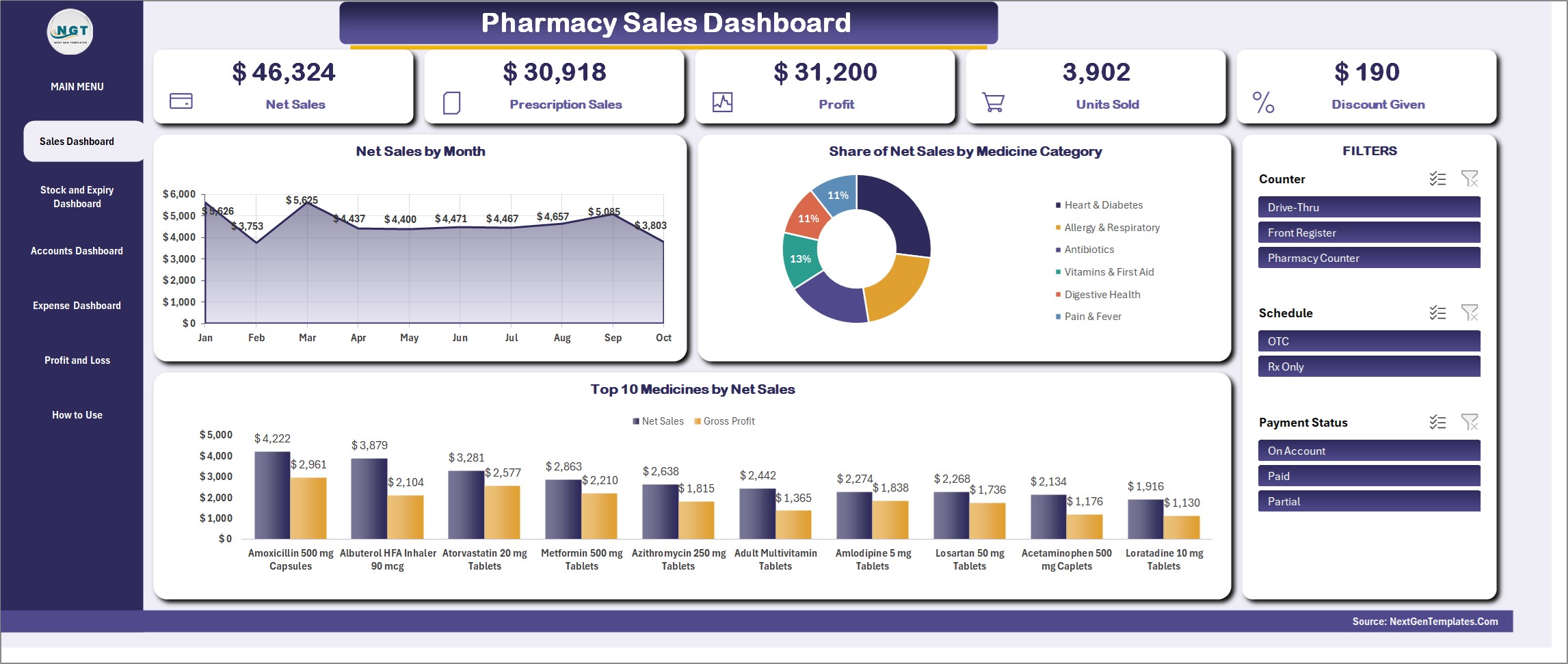
Pharmacy Sales Dashboard
Net Sales, Prescription Sales, Profit, Units Sold and Discount Given, with Net Sales by Month, Share of Net Sales by Medicine Category and the Top 10 Medicines by Net Sales. Slicers for Counter, Schedule and Payment Status drive every figure.
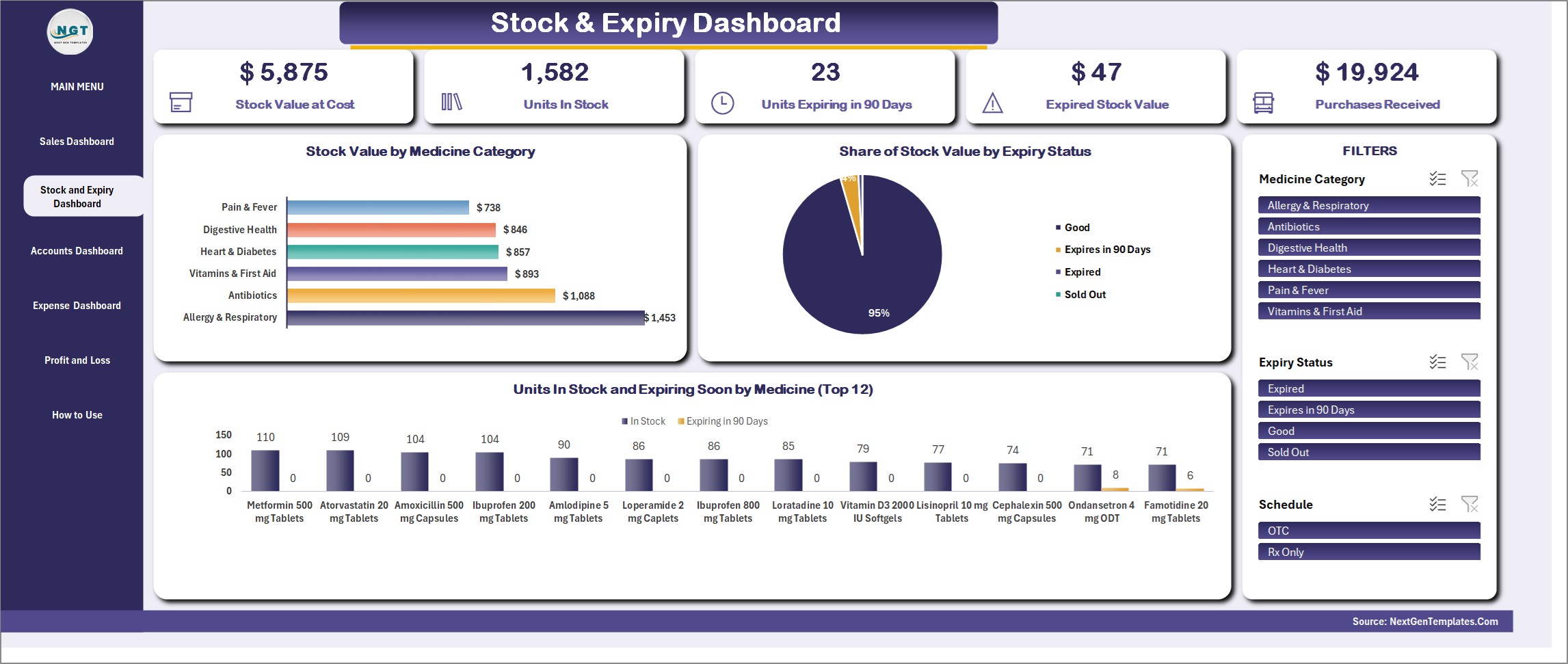
Stock and Expiry Dashboard
Stock Value at Cost, Units in Stock, Units Expiring in 90 Days and Expired Stock Value, with Stock Value by Medicine Category, Share of Stock Value by Expiry Status and Units in Stock by medicine. Filter by Medicine Category, Expiry Status and Schedule.
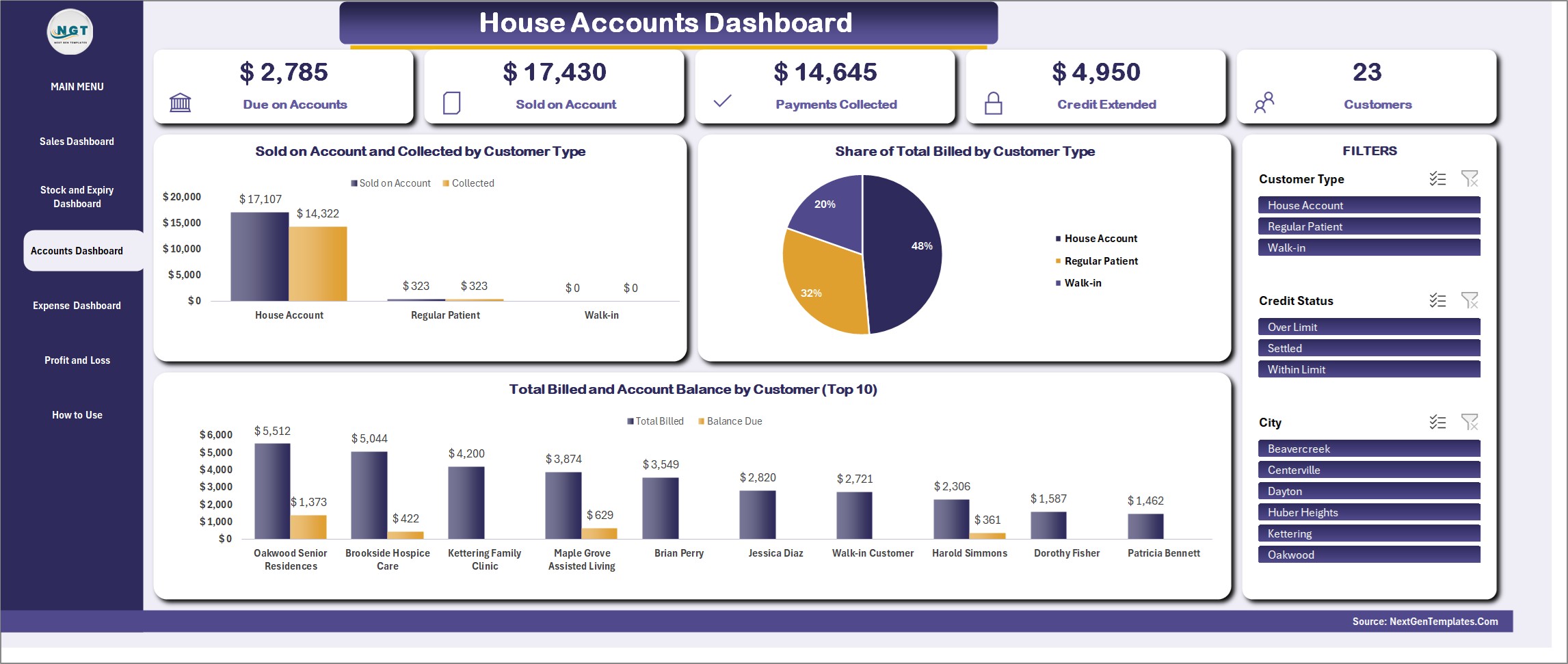
House Accounts Dashboard
Due on Accounts, Sold on Account, Payments Collected and Credit Extended, with Sold on Account and Collected by Customer Type, Share of Total Billed by Customer Type and the top customers by balance. Filter by Customer Type, Credit Status and City.
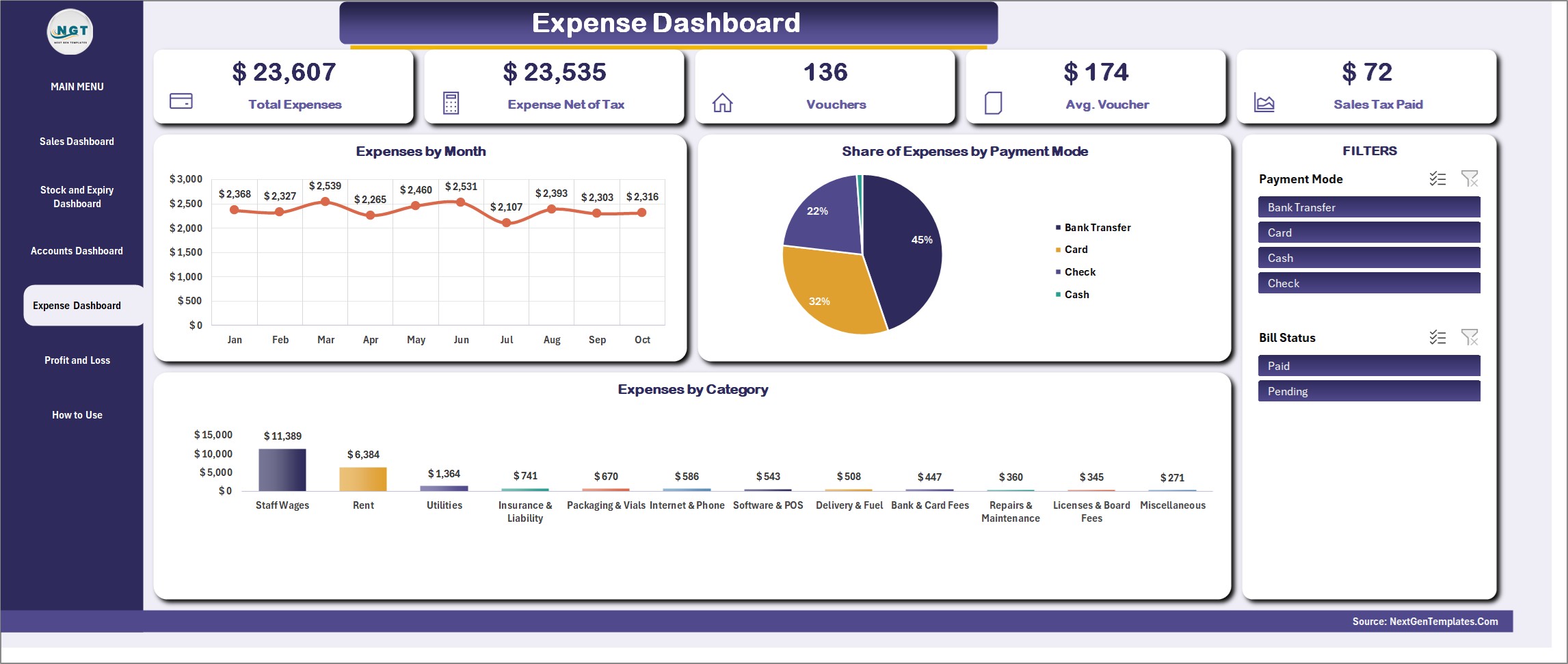
Expense Dashboard
Total Expenses, Expenses Net of Tax, Vouchers, Average Voucher and Sales Tax Paid, with Expenses by Month, Share of Expenses by Payment Mode and Expenses by Category.
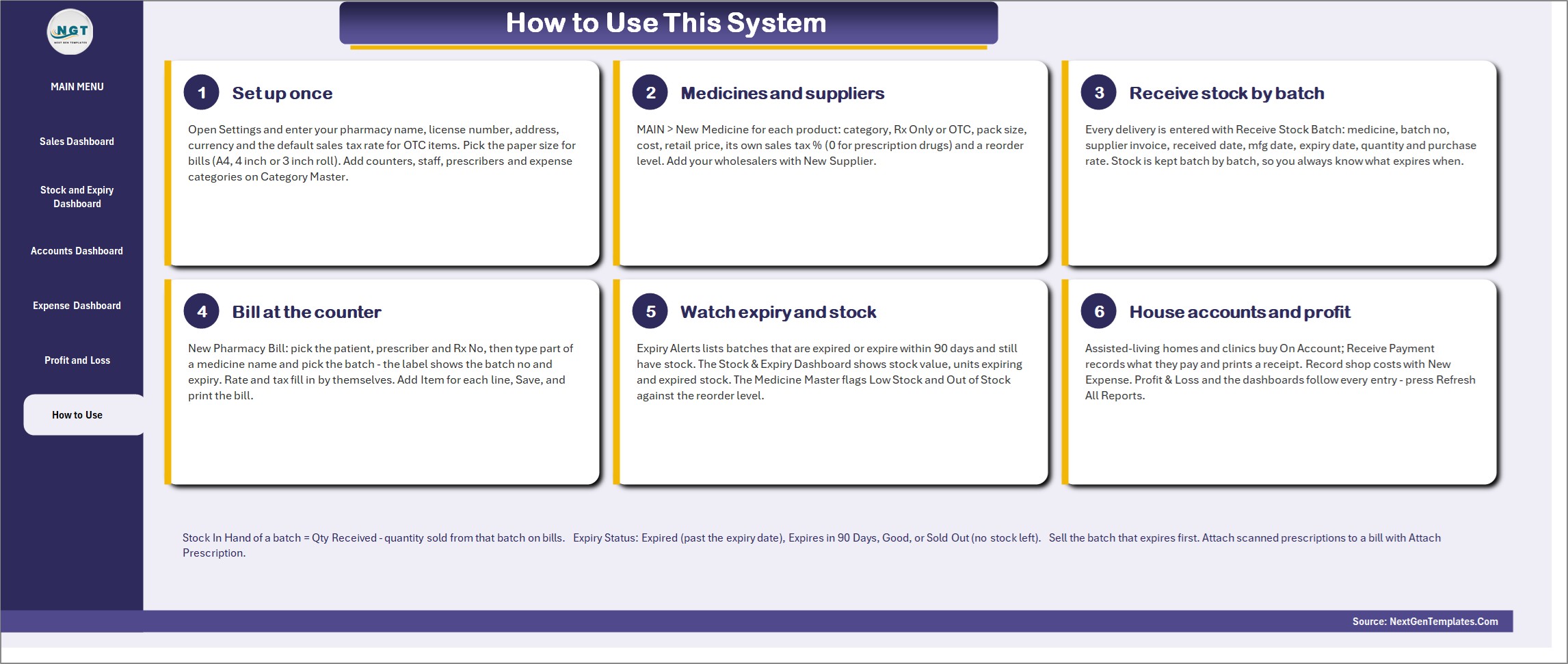
How to Use
Six numbered steps on one page: set up once, add medicines and suppliers, receive stock batches, bill at the counter, watch expiry and stock, and run house accounts and profit.
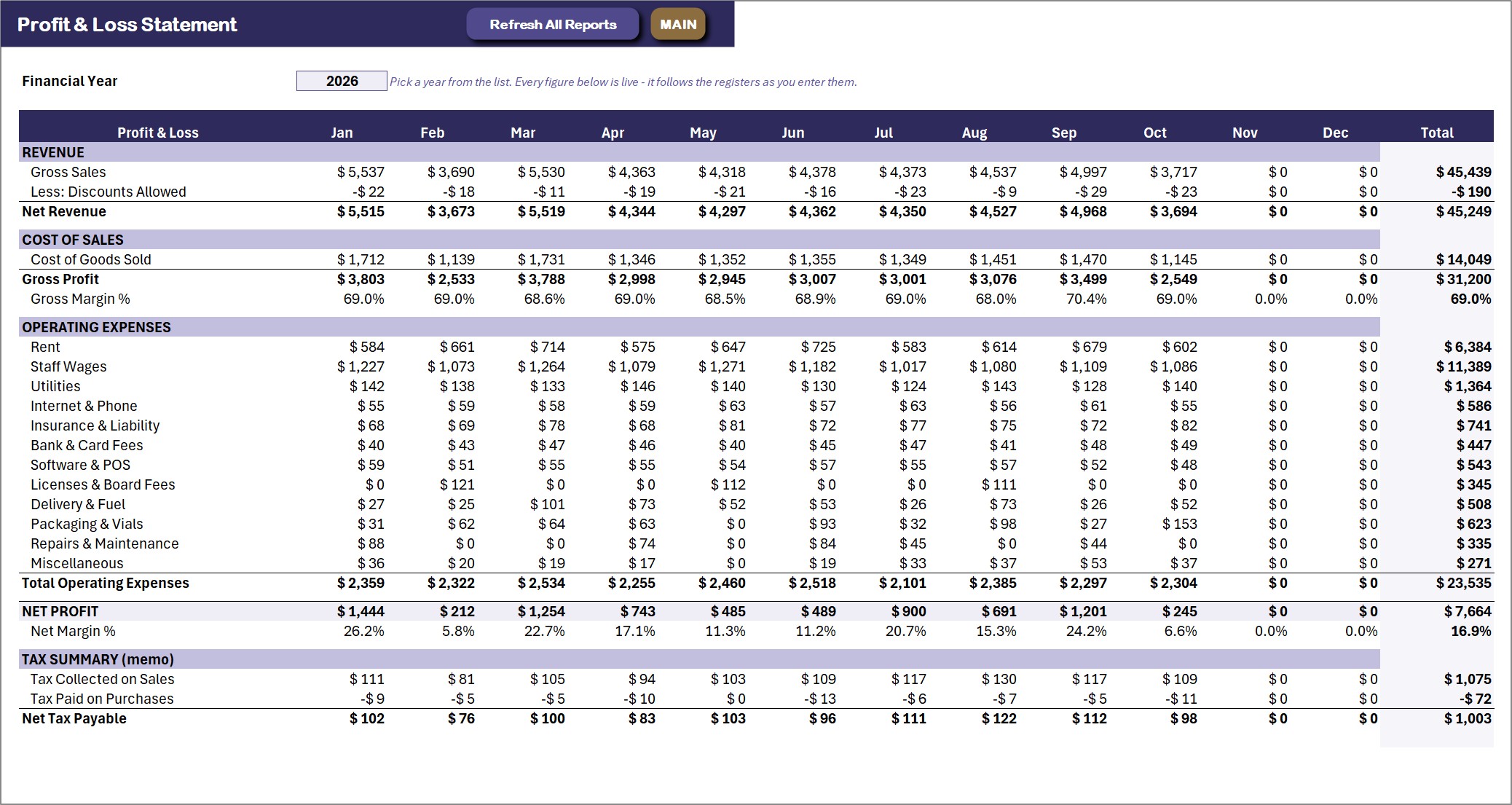
Profit and Loss
A live monthly statement: revenue, cost of goods sold, gross margin, every operating expense, net profit and a sales tax summary. Pick the financial year and every cell recalculates.
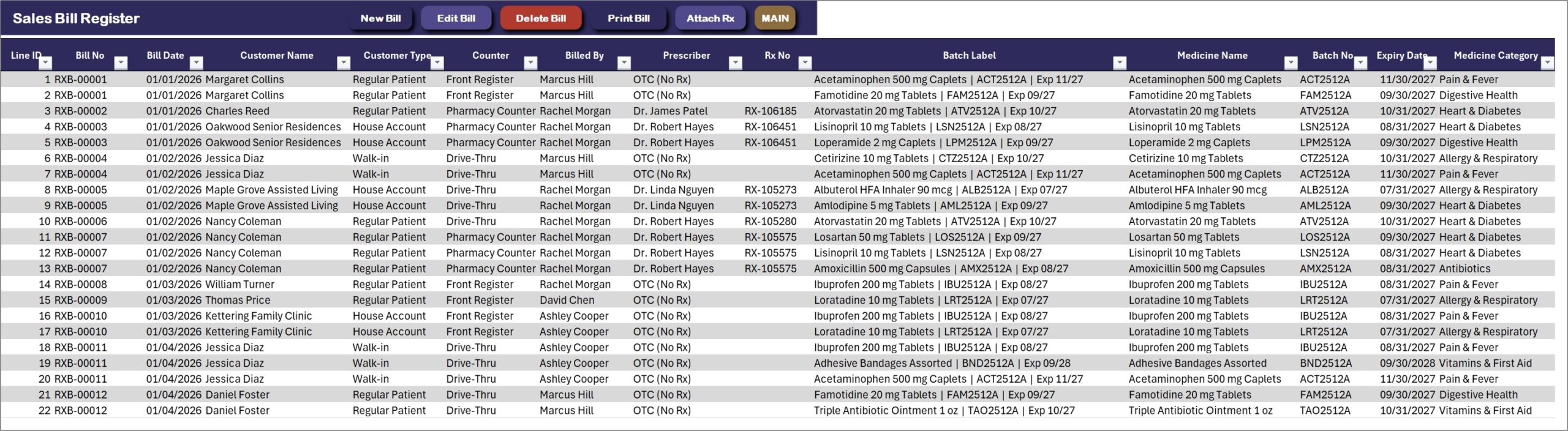
Sales Bill Register
One row per bill line with the bill number, customer, prescriber, Rx number, counter, batch, expiry date and medicine category. New Bill, Edit Bill, Delete Bill, Print Bill and Attach Rx sit on the action bar.
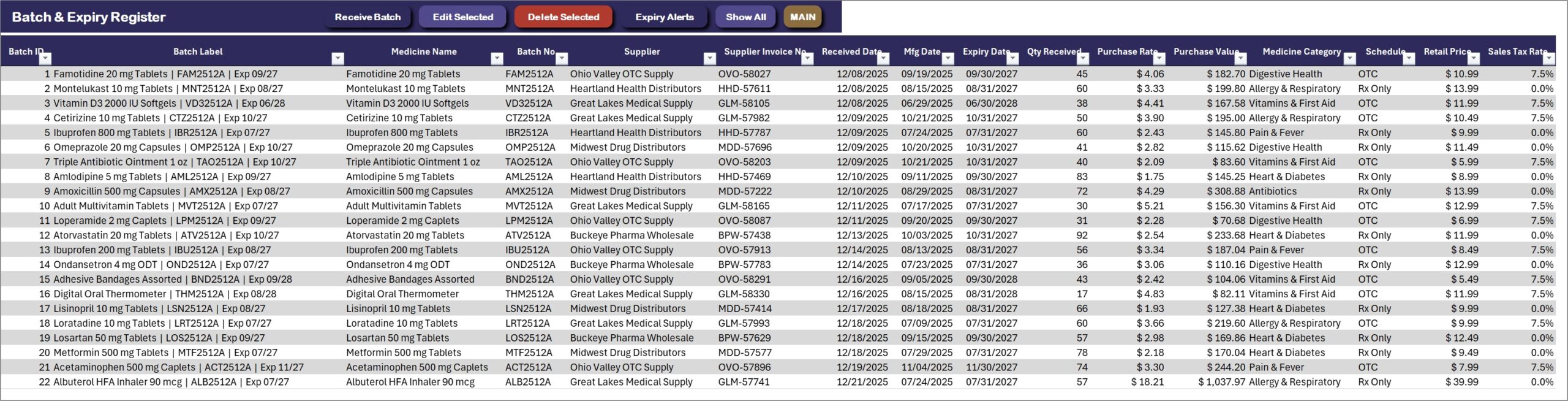
Batch and Expiry Register
Every stock receipt with batch number, supplier invoice, manufacturing and expiry dates, quantity received and sold, stock in hand, days to expiry and an expiry status of Good, Expires in 90 Days, Expired or Sold Out. Expiry Alerts and Show All sit on the action bar.
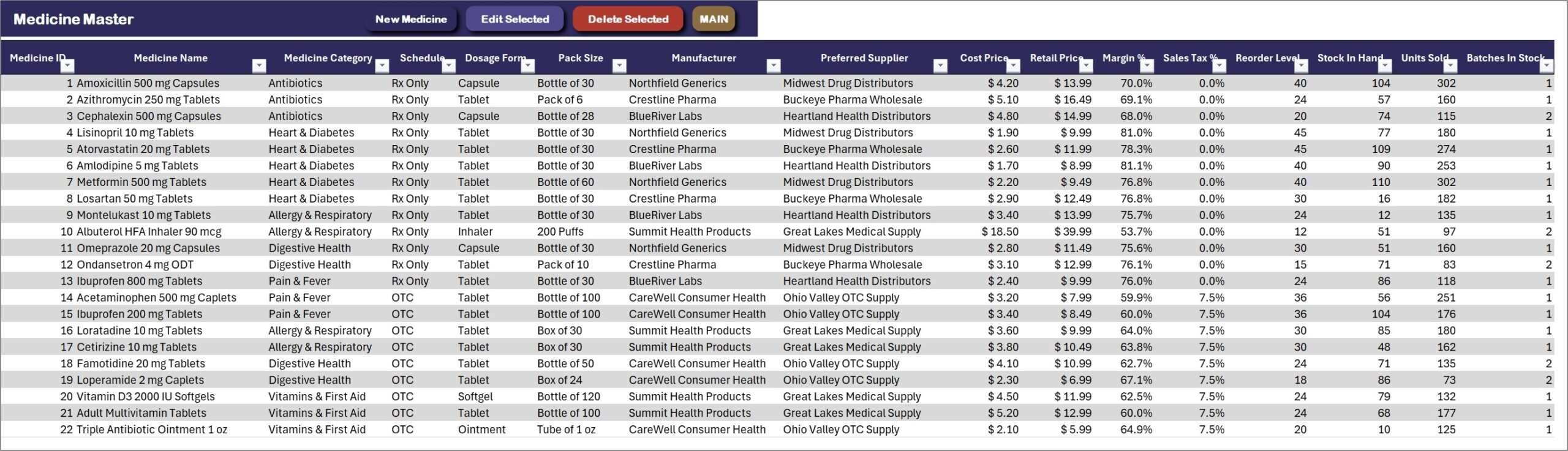
Medicine Master
Each medicine with Rx Only or OTC schedule, pack size, cost, retail price, margin, sales tax rate, reorder level, stock in hand and nearest expiry, plus a stock status.
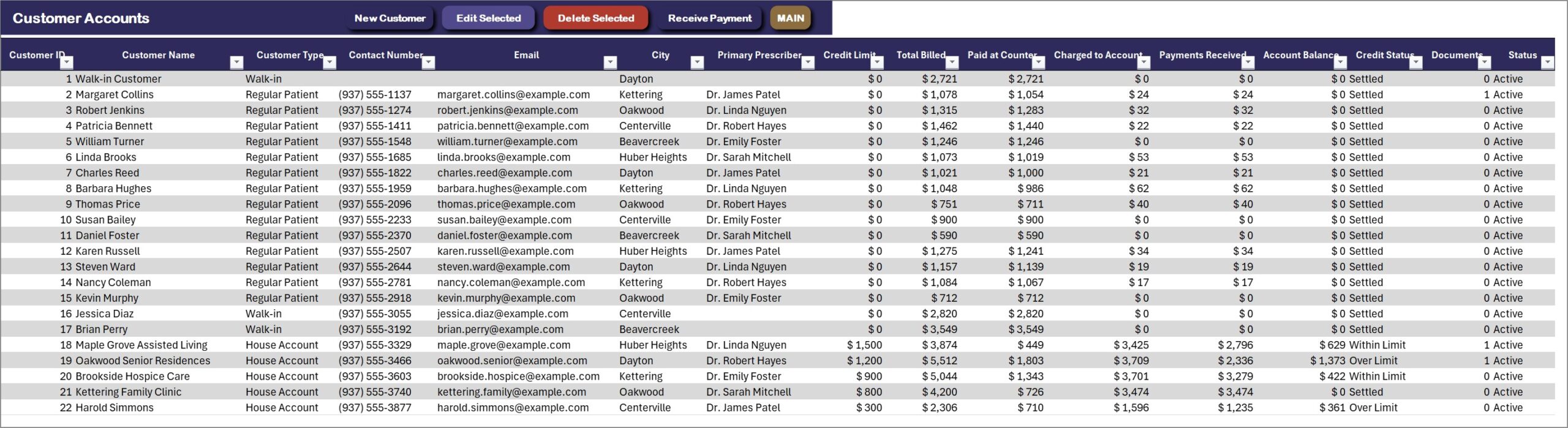
Customer Accounts
Walk-in customers, regular patients and house accounts with credit limits, the total billed, paid and charged to account, the balance and a credit status.
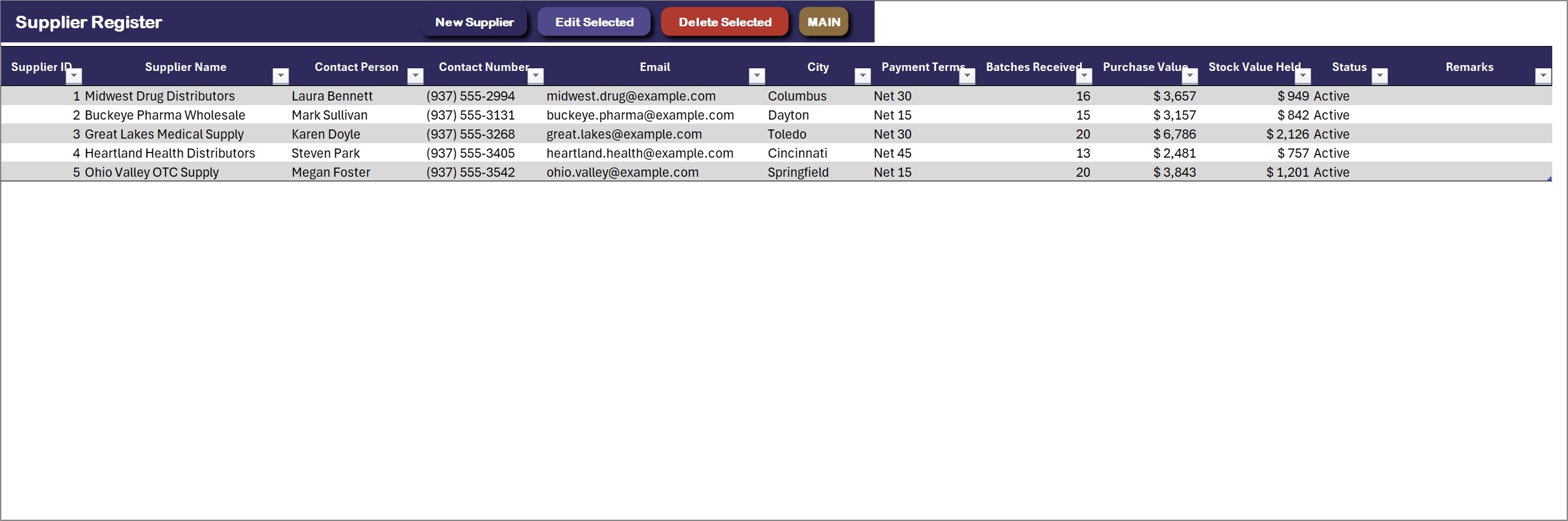
Supplier Register
Wholesalers with contact, payment terms, batches received, purchase value and stock value.
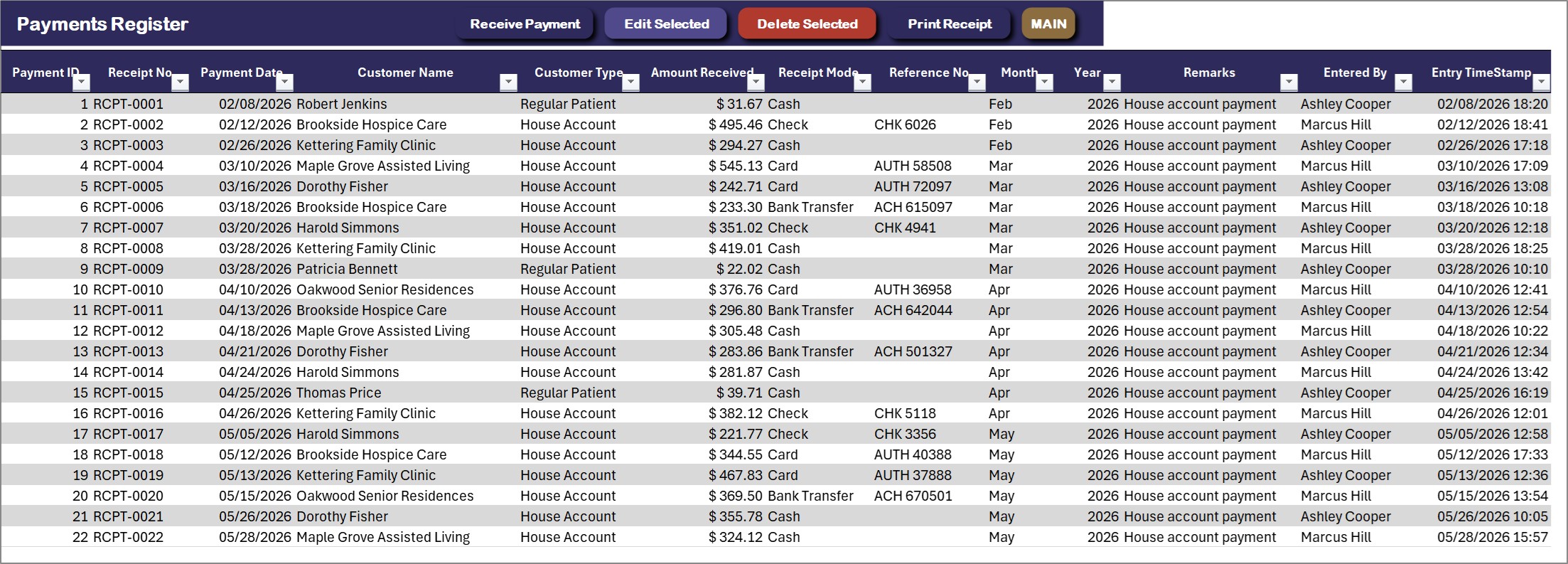
Payments Register
Receipts for house account payments, each with date, customer, amount, payment mode and reference. Receive Payment and Print Receipt sit on the action bar.
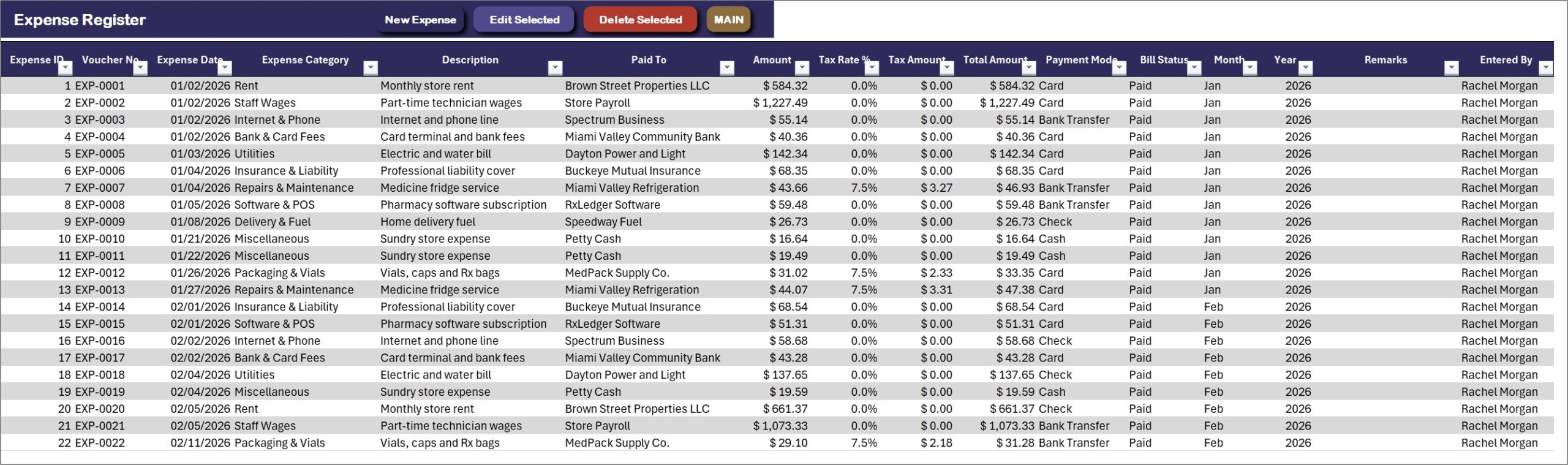
Expense Register
Rent, staff wages, utilities, insurance and more, each with voucher, category, paid to, tax and payment mode.
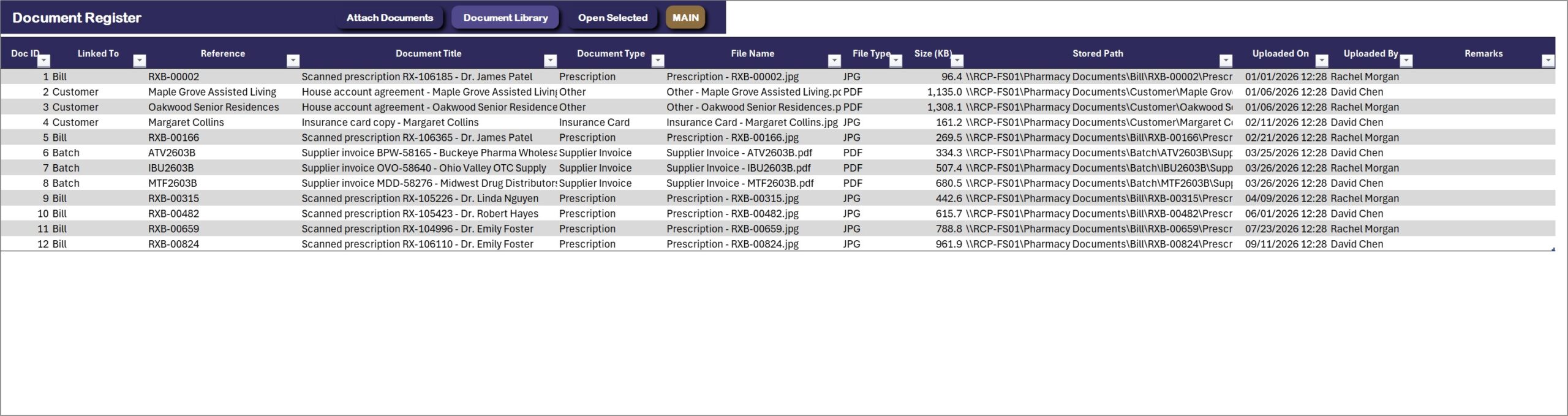
Document Register
Scanned prescriptions, insurance cards and supplier invoices linked to the bill, customer or batch they belong to, with file type and size. Open Selected File opens any of them in one click.
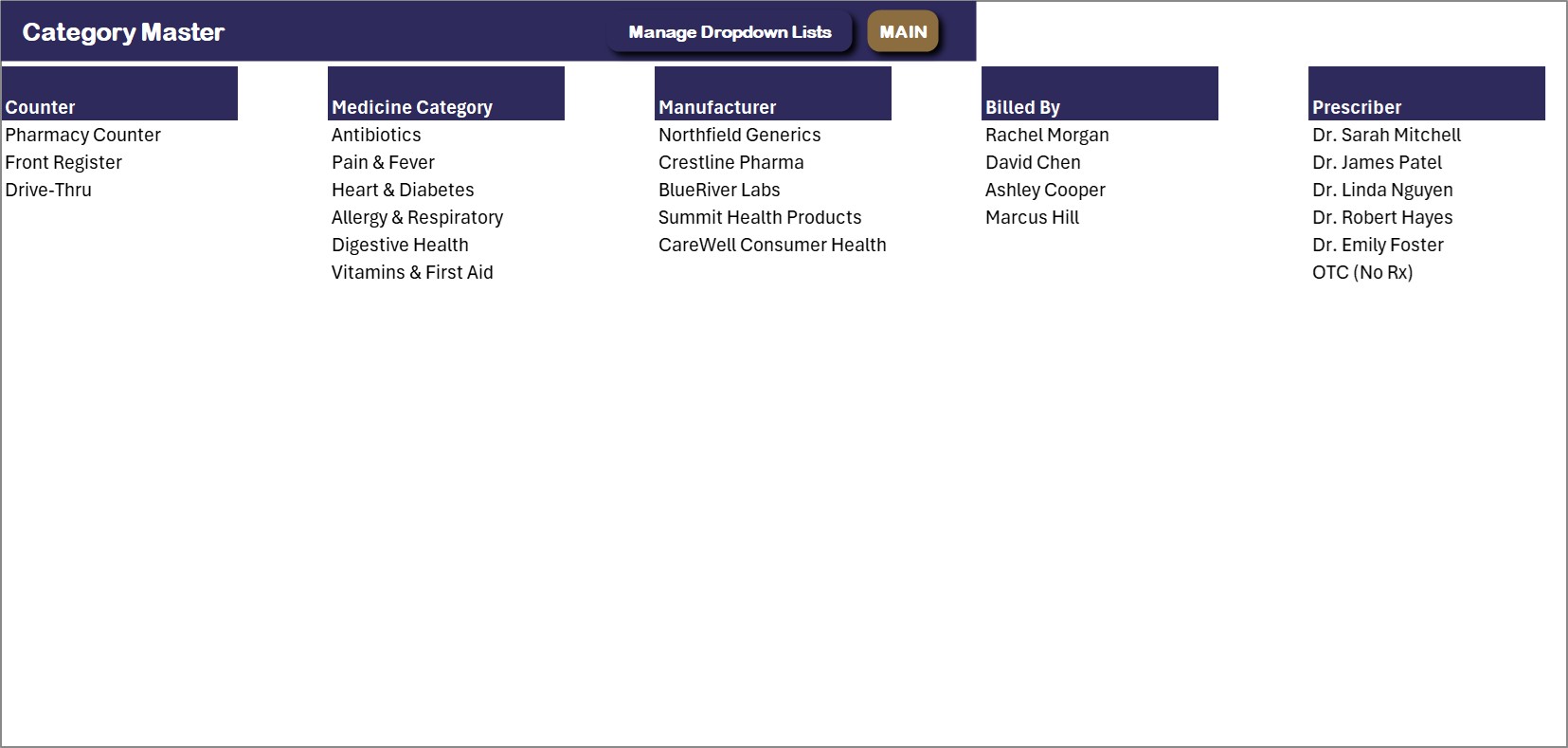
Category Master
Counters, medicine categories, manufacturers, billed by staff and prescribers in one place. Extend them here or from the Manage Dropdown Lists form and every drop-down follows.
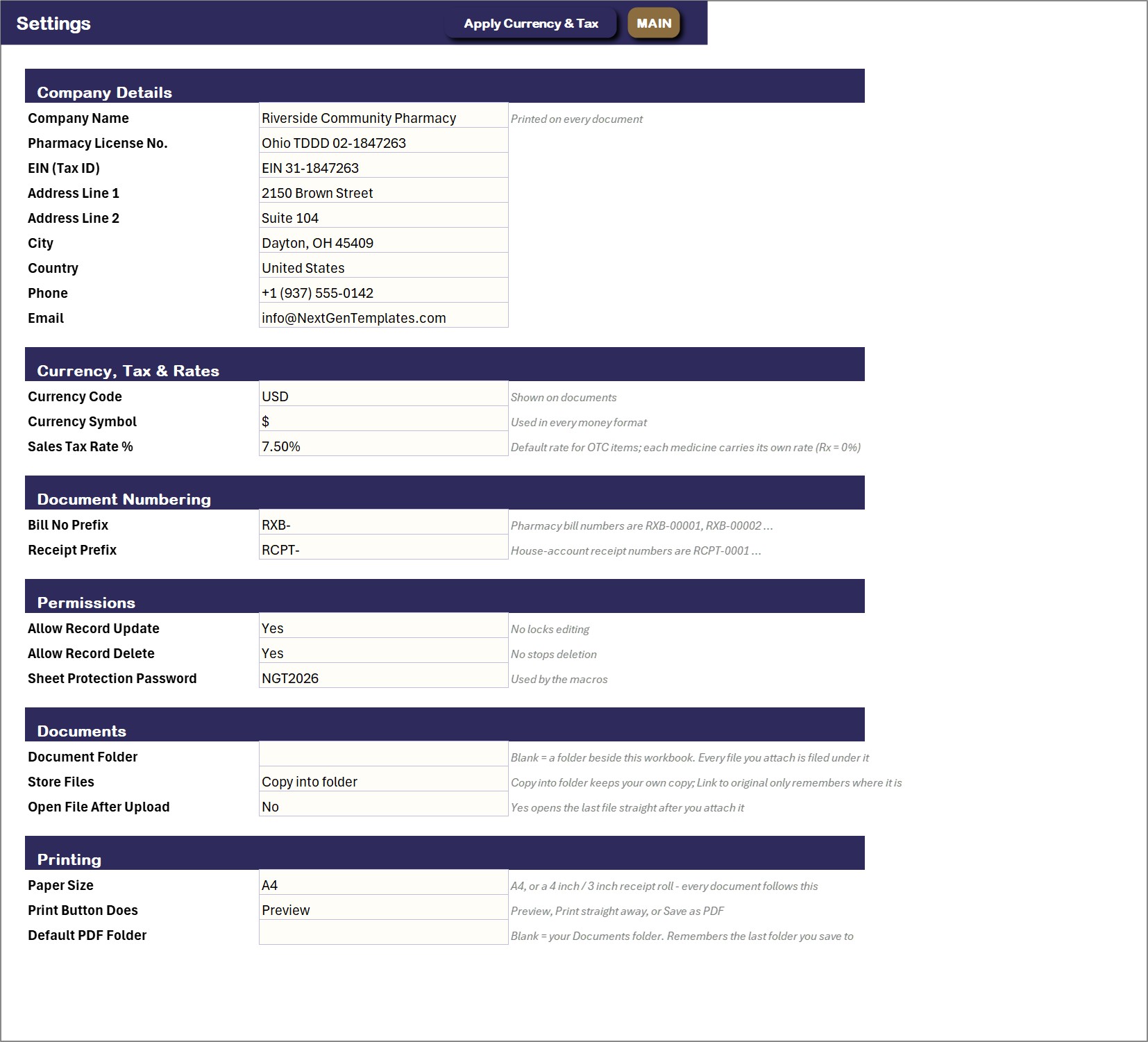
Settings
Pharmacy name, license number, currency and sales tax rate, document numbering, permissions, the document folder and the paper size for printing.
👥 Who Is It For?
Independent pharmacies, medical stores, chemists, clinic dispensaries and small drug stores that want billing, batch and expiry control and house accounts in one Excel file. It suits Windows Excel users who want a form and a button, not a database. It does not connect to insurance plans or e-prescribing.
🛠️ How to Use
- Download the ZIP, save the workbook to a normal folder and open it with macros enabled.
- Open Settings and enter your pharmacy details, sales tax rate and paper size, then extend the lists on Category Master.
- Add your medicines and suppliers, then use Receive Stock Batch for each delivery.
- Choose New Pharmacy Bill at the counter and Receive Payment for house accounts.
- Check Expiry Alerts, press Refresh All Reports and read the dashboards and the Profit and Loss.
📊 Medical Store Billing in Excel vs. a Paper Register vs. Pharmacy Software
| Feature | This Excel VBA system | Paper or plain Excel register | Cloud pharmacy software |
|---|---|---|---|
| Cost | $29 one-time ✅ | Free to $20 one-time | Monthly subscription |
| Platform | Microsoft Excel for Windows (macros) | Paper or Excel | Cloud or installed software |
| Counter billing with a basket | Yes ✅ | Manual | Yes ✅ |
| Stock by batch with expiry date | Yes ✅ | Build it yourself | Yes ✅ |
| Expiry and low stock alerts | Yes ✅ | No | Yes ✅ |
| House accounts with credit limits | Yes ✅ | Manual | Often ✅ |
| Dashboards and Profit and Loss | 4 dashboards and a P&L ✅ | No | Yes ✅ |
| A4 and thermal bill printing | A4, 4 inch or 3 inch ✅ | No | Yes ✅ |
| Insurance claims and e-prescribing | No | No | Often ✅ |
| Works offline, data stays on your PC | Yes ✅ | Yes | No |
For a small pharmacy that wants billing, batch expiry and house accounts in one file, this system covers the daily work. It does not include insurance claims or e-prescribing.
🎁 Try Before You Buy: 7-Day Free Trial
Download the free trial of the Medical Store and Pharmacy Billing System in Excel VBA and use the complete system for 7 days. Every form, register, dashboard, printable document and setting works exactly as in the full version, so you can test it with your own records before you decide.
How the free trial works
- Click Get the 7-Day Free Trial below, enter your email and download the ZIP from the email we send you. Unzip it.
- Open it in Microsoft Excel for Windows (the desktop app, not Excel Online or Mac) and click Enable Content on the yellow bar. If there is no yellow bar, right-click the file, choose Properties, tick Unblock and open it again.
- Your 7 days start the first time the file opens with macros on. A banner on the MAIN page shows how many days are left.
- After 7 days the trial locks and shows a Buy Full Version button. Buy the full version to keep working with no time limit.
| Free Trial | Full Version | |
|---|---|---|
| Every feature, form and dashboard | Yes | Yes |
| Time limit | 7 days | None, lifetime use |
| Trial banner | Yes | No |
| PDF user manual | No, full version only | Included |
| Editable (unlocked) VBA code | No, locked | Yes |
Enter your email and we send the download link straight to your inbox.
The trial runs once per computer: downloading it again does not restart the 7 days. Records you enter during the trial can be copied into the full version.
❓ Frequently Asked Questions
What is the Medical Store and Pharmacy Billing System in Excel VBA?
It is one macro-enabled Excel file that runs a small pharmacy or medical store: counter billing, stock kept batch by batch with manufacturing and expiry dates, expiry alerts, house accounts for clinics and care homes, expenses and a monthly Profit and Loss. Bills and stock go in through forms, and the dashboards update themselves.
How do I bill a patient?
Choose New Pharmacy Bill, pick the customer, the prescriber and the Rx number, then type-to-search a medicine batch and add it to the basket. Add as many lines as the bill needs and save. Stock is taken from the batch you picked.
How does batch and expiry tracking work?
Every stock receipt is a batch with a batch number, supplier invoice, manufacturing date, expiry date, quantity and purchase rate. A bill line names the batch it sells from, so stock, margin and expiry are tracked per batch. Expiry Alerts lists expired batches and batches that expire within 90 days.
Does it warn me about low stock?
Yes. Each medicine has a reorder level. The Medicine Master and the Stock and Expiry Dashboard flag Low Stock and Out of Stock items, together with the nearest expiry date.
Can I run house accounts for clinics and care homes?
Yes. Customers can be walk-in, regular patients or house accounts with a credit limit. Bills can be put on account, Receive Payment records what they pay, and the House Accounts Dashboard shows the amount due and who is over limit. A payment receipt can be printed.
Can I print bills?
Yes. Print Pharmacy Bill and Print Payment Receipt work on A4, 4 inch or 3 inch thermal paper. Choose the paper size once on the Settings sheet. Each bill line shows the batch number and expiry date.
Which Excel do I need?
Microsoft Excel 2016 or later for Windows with macros enabled. It does not work on Mac, in Excel for the web or in Google Sheets, because the entry forms are VBA UserForms.
Does it connect to insurance plans or e-prescribing?
No. It does not connect to insurance claims, e-prescribing or any outside service. It is a single-user desktop workbook and your data stays on your own PC. You can attach a scanned prescription or insurance card to a bill from the Document Library.
Can I try it before I buy?
Yes. A 7-day free trial is available from the product page. It is a separate file with every form, register and dashboard working, and it stops working after 7 days.
Is sample data included?
Yes. The file ships with ten months of sample data for a small Ohio pharmacy: 982 bills, 84 batches, 24 medicines, 23 customers and 5 suppliers, plus an illustrated PDF user manual, so every dashboard is populated when you open it.
🛒 Get the Medical Store and Pharmacy Billing System
Download the Medical Store and Pharmacy Billing System V1.0 in Excel VBA and stop checking expiry dates by hand. For a related VBA system, see the Warranty Claim Management System in Excel VBA or the Fixed Asset Register and Depreciation System in Excel VBA, or browse the VBA Management Systems Mega Pack.




Reviews
There are no reviews yet.