



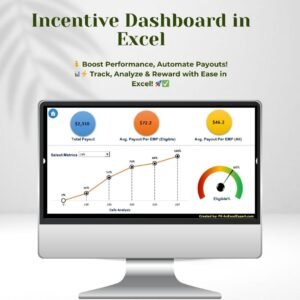
The Incentive Dashboard in Excel is a ready-made template that automates employee performance tracking and incentive payout calculations. It is built for HR teams, payroll staff, and team managers who want to replace manual, error-prone incentive sheets with a data-driven system. The result is accurate, transparent, and fair rewards based on clearly weighted performance metrics.
The dashboard combines multiple performance indicators, automated score calculations, and customizable weightage settings. You can track calls, sales, quality scores, and customer escalations in one place and see a complete view of employee performance.

Key Features of the Incentive Dashboard in Excel
1. Dynamic Performance Metrics Tracking
The dashboard evaluates employee performance across five key incentive metrics:
- Calls – number of calls handled
- AHT (Average Handling Time) – efficiency in resolving queries
- Sales – number of successful conversions
- Quality Score – service quality assessment
- Client Escalations – number of customer complaints or escalations
Each metric carries a specific weightage that influences the overall incentive calculation. The weightage system is fully customizable, so you can change the impact of each metric to match your company policy.
2. Interactive Dashboard Elements
- Hyperlinked buttons for easy navigation between the Summary, Data, and Weightage sheets
- Speedometer chart showing the percentage of eligible employees
- Trend analysis charts for tracking performance improvements over time
- Automated filters and drop-downs for selecting different performance criteria
These elements let HR teams and managers analyze employee incentives and make data-driven decisions in just a few clicks.
3. Automated Incentive Calculation System
The built-in calculation engine works as an Excel incentive calculator that computes incentives from your defined parameters. It automatically:
- Computes individual and team-level total scores
- Identifies employee eligibility for incentives
- Determines the final payout amount based on assigned weightages
- Updates results in real time when performance data is modified
This automation minimizes manual intervention and improves accuracy and transparency in incentive distribution.
4. Customizable Weightage and Payout Settings
The Weightage Sheet lets you modify:
- Weightages assigned to each performance metric
- Payout structures, including minimum and maximum incentive amounts
- Thresholds for eligibility criteria that define which employees qualify
This flexibility means you can tailor the incentive structure as your business requirements evolve.
5. Real-Time Eligibility and Payout Adjustments
The eligibility module gives dynamic updates on:
- Who qualifies for incentives based on total score thresholds
- Payout percentages depending on performance band
- Adjustments for absence-related deductions
This helps ensure that only deserving employees receive an incentive payout, reinforcing motivation and fairness.
6. Comprehensive Data View and Reports
The template provides two essential data views, and you can export reports for record-keeping, audits, and further analysis.
What’s Inside the Template
| Sheet | What it does |
|---|---|
| Summary Sheet | Quick snapshot of total payouts, average incentives, and eligibility percentages, with the speedometer chart, trend charts, filters, and drop-downs |
| Data Sheet | Detailed breakdown of each employee’s performance metrics, weightage distribution, and payout calculations |
| Weightage Sheet | Settings for metric weightages, minimum and maximum payouts, and eligibility thresholds |
Why Use This Incentive Dashboard?
- Saves time – removes manual calculations and automates the process
- Improves accuracy – reduces human errors with pre-defined formulas
- Boosts productivity – motivates employees with clear incentive structures
- Provides transparency – employees and management can track performance and payouts easily
- Customizable and scalable – adapt the tool as organizational policies change
Who Is It For?
- HR and payroll teams managing performance-based incentives
- Team leaders and managers who need clear employee performance tracking
- Call centers and customer service teams tracking calls, AHT, quality, and escalations
- Sales teams rewarding conversions with fair, weighted payouts
How to Use It
- Open the Weightage Sheet and set the weightage for each metric, the payout limits, and eligibility thresholds.
- Enter employee performance data (Calls, AHT, Sales, Quality Score, Client Escalations) in the Data Sheet.
- Let the template calculate total scores, eligibility, and final payout amounts automatically.
- Use the hyperlinked buttons to go to the Summary Sheet and review charts, filters, and drop-downs.
- Export reports for records, audits, or further analysis.
Click here to read the detailed blog post
Watch the step-by-step video tutorial:
Frequently Asked Questions
What metrics does the Incentive Dashboard in Excel track?
It tracks five metrics: Calls, AHT (Average Handling Time), Sales, Quality Score, and Client Escalations, each with its own weightage.
Can I change the weightage of each metric?
Yes. The Weightage Sheet is fully customizable, so you can adjust metric weightages, minimum and maximum incentive amounts, and eligibility thresholds.
How is the incentive payout calculated?
The built-in engine computes individual and team-level total scores, checks eligibility against thresholds, applies payout percentages by performance band and absence-related deductions, and determines the final payout amount.
Does the dashboard update automatically?
Yes. Results update in real time whenever you modify the performance data.
Can I export reports?
Yes. You can export reports for record-keeping, audits, and further analysis.
Is there a tutorial available?
Yes. A detailed blog post and a step-by-step video tutorial are linked on this page.
Also check our Inventory Management Form in Excel
Last updated: October 2026
Compatibility and Requirements
- Works in Microsoft Excel desktop (Excel 2016 or later, or Microsoft 365).
- Navigation uses hyperlinked buttons between the Summary, Data and Weightage sheets.
Related Incentive and Performance Templates
The dashboard is built with Excel charts. Microsoft explains them in Create a chart from start to finish.
- Sales Incentive Dashboard and Tracker in Google Sheets: incentives for sales teams in Google Sheets
- Sales Commission Template with Bonus Amount in Google Sheet: calculate commission and bonus
- Manufacturing Incentive Dashboard and Tracker in Google Sheets: incentives for production staff
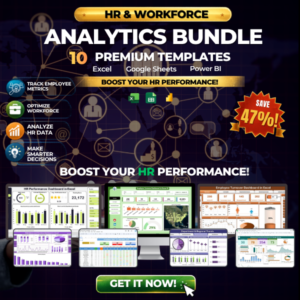
- HR and Workforce Analytics Bundle: 10 HR templates in one bundle
Browse all Excel dashboards or the Excel HR and payroll templates.


Reviews
There are no reviews yet.