

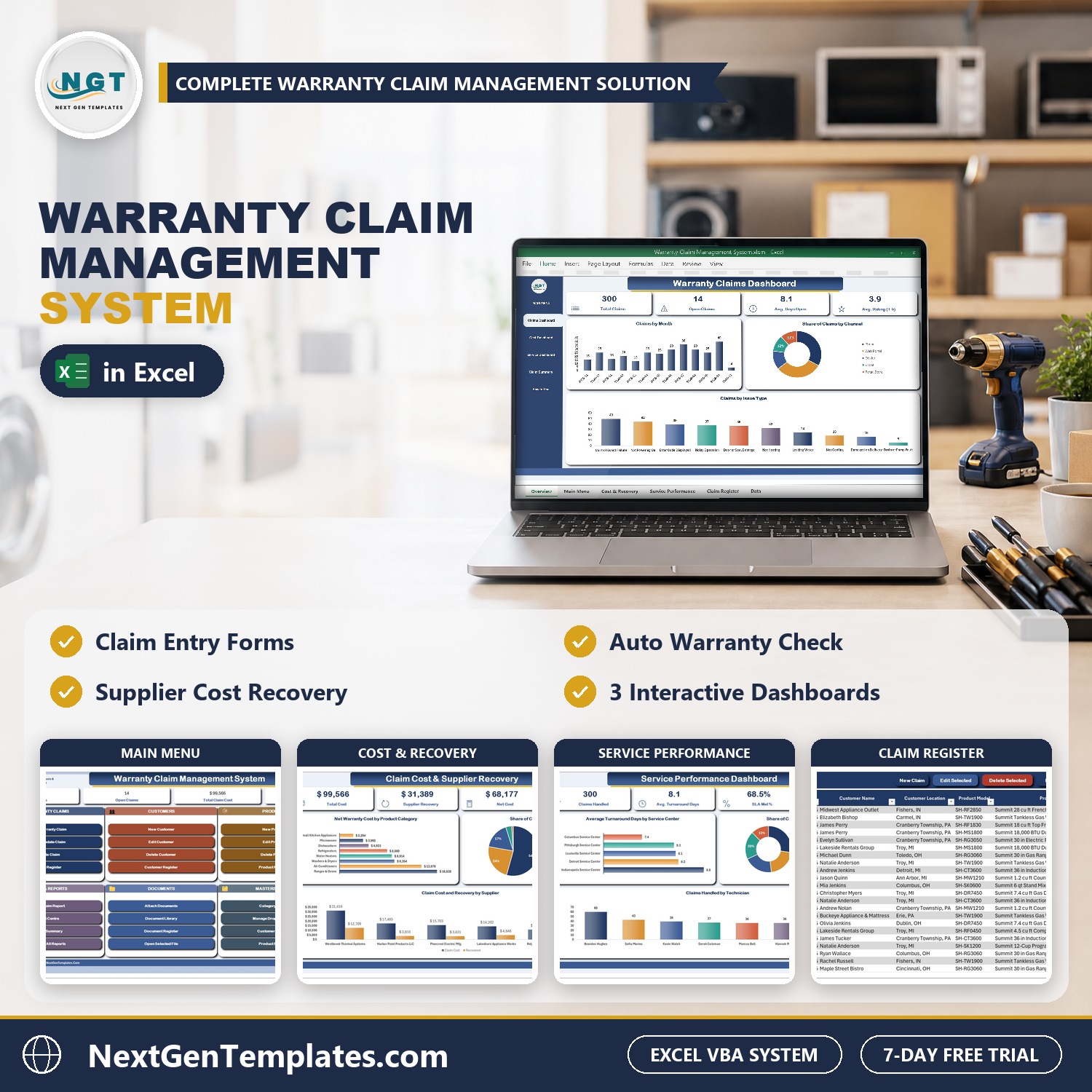

The Warranty Claim Management System in Excel VBA keeps every warranty claim of an appliance seller or service business in one macro-enabled Excel file. Claims go in through a three-tab warranty claim form, the warranty is checked for you, and the Claims, Cost and Recovery and Service dashboards plus a yearly Claim Summary build themselves. Expiry dates, days open, SLA met and net warranty cost are formulas, so they update the moment a claim is saved.
Sample data for a demo appliance company ships with 300 claims, 72 customers, 28 products and 14 documents, so every chart is populated when you open it. Replace it with your own and the whole system follows. It is an Excel VBA warranty claim system for Windows, with no cloud and no per-user fee. If a warranty claim tracker in Excel has stopped answering what your claims cost and what the supplier owes you, this is the step up.
Watch the Warranty Claim Management System V1.0 in Excel VBA walkthrough
🌍 Join 10,000+ customers in 180+ countries using NextGenTemplates to replace paid SaaS tools with one-time-purchase Excel, Google Sheets, Power BI and HTML templates.
✅ Instant download · One-time payment · No subscription · No per-user fees · Lifetime access
🎁 Try it free for 7 days before you buy: every form, register and dashboard works in the free trial, so you can test it on your own PC first.
Please note: this system needs Microsoft Excel 2016 or later for Windows with macros enabled. It does not work on Mac, in Excel for the web or in Google Sheets. It is a single-user desktop workbook and your data stays on your own PC.
🔑 Key Features of the Warranty Claim Management System
📌 A warranty claim form that does the checking. The Warranty Claim Entry form has three tabs: Claim, Service, and Cost and Recovery. It uses drop-down lists, type-to-search and a pop-up calendar, and refuses a blank required field, a typed date or a letter in a number box.
📌 Automatic warranty check. The expiry date comes from the purchase date and the product’s warranty months, and each claim shows In Warranty or Out of Warranty. It is warranty tracking in Excel without counting months by hand.
📌 Service workflow. Assign a service center and technician, then move the claim through Open, Under Review, In Repair, Resolved or Rejected and record the resolution type: repair, replacement, refund, parts shipped, rejected or pending.
📌 Cost and supplier recovery. Record parts, labor, shipping and replacement or refund cost, claim the cost back from the supplier and track the recovery status and amount. The Net Warranty Cost shows what each claim really cost you.
📌 Days open and SLA. Days Open is worked out for every claim and compared with the Target Resolution Days you set, so you see at once whether claims are closed on time.
📌 Customer and Product registers. Each customer and each model shows its claims, open claims, claim cost and amount recovered, so repeat problems and costly products stand out.
📌 Three dashboards with slicers. Claims, Claim Cost and Supplier Recovery, and Service Performance filter by year, status, priority, recovery status, warranty status and service center, and a Claim Summary covers the report year by product category and supplier.
📌 Print the claim report. Print Claim Report gives the customer a Warranty Claim Report in A4, 4 inch or 3 inch size.
📌 Documents on the claim. Attach purchase receipts, product photos, technician reports and supplier credit memos to the claim, then open them from the Document Register.
📌 Everything is yours to edit. Product categories, suppliers, service centers, technicians and issue types are master lists you extend from the Manage Dropdown Lists form, with no sheet editing and no broken drop-downs.
📦 What’s Inside the Warranty Claim Management System
Twelve pages, laid out in the order you actually work in them.
MAIN menu
The file opens here every time. Five live KPI chips (Total Claims, Open Claims, Total Claim Cost, Supplier Recovery and Average Days to Resolve) sit above colour-coded cards for Warranty Claims, Customers, Products, Dashboards, Print and Reports, Documents, Masters and Lists, and Setup and Help. Every job starts from one of its buttons.

Warranty Claims Dashboard
Total Claims, Open Claims, Average Days Open, Average Rating and Claim Cost, with Claims by Month, Share of Claims by Channel and Claims by Issue Type. Slicers for Year, Claim Status and Priority drive every figure and chart on the page.

Claim Cost and Supplier Recovery
Total Cost, Supplier Recovery, Net Cost, Parts Spend and Shipping Spend, with Net Warranty Cost by Product Category, Share of Claim Cost by Resolution and Claim Cost and Recovery by Supplier. Filter by Year, Recovery Status and Warranty Status.

Service Performance Dashboard
Claims Handled, Average Turnaround Days, SLA Met percent, Average Customer Rating and Labor Spend, with Average Turnaround Days by Service Center, Share of Claims by Service Center and Claims Handled by Technician.

Warranty Claim Summary
Claims, open claims, claim cost, recovered amount, net cost and average days for the report year, by product category and by supplier, with Claims by Month and Claim Cost and Recovery by Month charts.

How to Use
Six numbered steps on one page: set up once, add customers and products, log every claim, service and resolve, cost and recovery, and read the reports.

Warranty Claim Register
One row per claim: claim number and date, customer and location, product model, name, category and supplier, serial number, purchase date, warranty months, warranty expiry and the In Warranty or Out of Warranty status. New Claim, Edit Selected, Delete Selected, Print Claim Report and Attach Documents sit on the action bar.

Customer Register
Homeowners, dealers, property managers and businesses with their contact details, the number of claims, open claims and claim cost for each customer.

Product Register
Every model you sell with its category, supplier, unit price and warranty months, plus the claims, claim cost, amount recovered and net cost for each product.

Document Register
Purchase receipts, product photos, technician reports and supplier credit memos linked to the claim or customer they belong to, with file type, size and who uploaded them. Open Selected File opens any of them in one click.

Category Master
Product categories, suppliers, service centers, technicians and issue types in one place. Extend them here or from the Manage Dropdown Lists form and every drop-down follows.

Settings
Target Resolution Days, the Report Year, company details, currency, permissions, the document folder and the paper size for printing.

👥 Who Is It For?
Appliance and electronics dealers, home service and repair businesses, property managers with equipment under warranty, manufacturers’ service desks and any small business that handles warranty claims and wants one place for the customer, the product, the service job and the supplier refund. It suits Windows Excel users who want a form and a button, not a database.
🛠️ How to Use
- Download the ZIP, save the workbook to a normal folder and open it with macros enabled.
- Open Settings and enter your company details, currency, Target Resolution Days and Report Year, then extend the lists on Category Master.
- Add your customers and products, with the warranty months for each model.
- Choose New Warranty Claim, fill the Claim, Service and Cost and Recovery tabs and save.
- Press Refresh All Reports, then read the dashboards and print the claim report.
📊 Warranty Claim Management System vs. a Claim Spreadsheet vs. Cloud Warranty Software
| Feature | This Excel VBA system | Plain claim spreadsheet | Cloud warranty software |
|---|---|---|---|
| Cost | $29 one-time ✅ | Free to $20 one-time | Monthly subscription, often per user |
| Platform | Microsoft Excel for Windows (macros) | Excel or Google Sheets | Cloud, browser |
| Automatic In Warranty or Out of Warranty check | Yes ✅ | Manual formulas | Yes ✅ |
| Supplier recovery and net warranty cost | Yes ✅ | Build it yourself | Often ✅ |
| Days open and SLA met against a target | Yes ✅ | Manual | Yes ✅ |
| Dashboards with slicers | 3 dashboards and a summary ✅ | No | Yes ✅ |
| Customer portal, serial number scanning, ERP sync | No | No | Often ✅ |
| Works offline, data stays on your PC | Yes ✅ | Yes | No |
For a small or mid-size business that wants every warranty claim, cost and supplier refund in one file, this system covers the daily work. It does not include a customer portal or barcode scanning.
🎁 Try Before You Buy: 7-Day Free Trial
Download the free trial of the Warranty Claim Management System in Excel VBA and use the complete system for 7 days. Every form, register, dashboard, printable document and setting works exactly as in the full version, so you can test it with your own records before you decide.
How the free trial works
- Click Get the 7-Day Free Trial below, enter your email and download the ZIP from the email we send you. Unzip it.
- Open it in Microsoft Excel for Windows (the desktop app, not Excel Online or Mac) and click Enable Content on the yellow bar. If there is no yellow bar, right-click the file, choose Properties, tick Unblock and open it again.
- Your 7 days start the first time the file opens with macros on. A banner on the MAIN page shows how many days are left.
- After 7 days the trial locks and shows a Buy Full Version button. Buy the full version to keep working with no time limit.
| Free Trial | Full Version | |
|---|---|---|
| Every feature, form and dashboard | Yes | Yes |
| Time limit | 7 days | None, lifetime use |
| Trial banner | Yes | No |
| PDF user manual | No, full version only | Included |
| Editable (unlocked) VBA code | No, locked | Yes |
Enter your email and we send the download link straight to your inbox.
The trial runs once per computer: downloading it again does not restart the 7 days. Records you enter during the trial can be copied into the full version.
❓ Frequently Asked Questions
What is the Warranty Claim Management System in Excel VBA?
It is one macro-enabled Excel file that tracks every warranty claim of an appliance seller or service business: the customer, the product and serial number, the issue, the service center and technician, the repair or replacement cost and what the supplier paid back. Claims go in through an entry form, and the dashboards update themselves.
How does the automatic warranty check work?
Each product in the Product Register has its warranty in months. When you enter the purchase date on a claim, the workbook works out the expiry date and shows In Warranty or Out of Warranty straight away, so nobody has to count months by hand.
Can I track what the supplier refunds?
Yes. The Cost and Recovery tab of the claim form holds parts, labor, shipping and replacement or refund cost, the supplier recovery status (Not Filed, Filed, Received or Denied) and the amount recovered. The Net Warranty Cost is what the claim really cost you.
Can I measure how fast claims are closed?
Yes. Days Open is calculated for every claim, and the Settings sheet holds your Target Resolution Days. A resolved claim closed inside that target counts as SLA met, and the Service dashboard shows the SLA Met percentage.
Can I print a claim report for the customer?
Yes. Print Claim Report produces a Warranty Claim Report in A4, 4 inch or 3 inch size. Choose the paper size once on the Settings sheet and every printout follows it.
Which Excel do I need?
Microsoft Excel 2016 or later for Windows with macros enabled. It does not work on Mac, in Excel for the web or in Google Sheets, because the entry forms are VBA UserForms.
Can I try it before I buy?
Yes. A 7-day free trial is available from the product page. It is a separate file with every form, register and dashboard working, and it stops working after 7 days.
Is sample data included?
Yes. The file ships with 300 claims, 72 customers, 28 products and 14 documents for a demo appliance company, plus an illustrated PDF user manual, so every dashboard is populated when you open it.
🛒 Get the Warranty Claim Management System
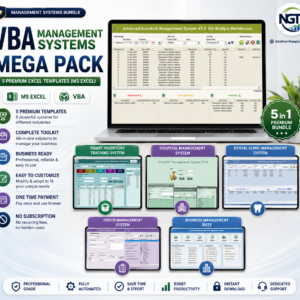
Download the Warranty Claim Management System V1.0 in Excel VBA and stop tracking warranty claims in scattered spreadsheets. For a related VBA system, see the Fixed Asset Register and Depreciation System in Excel VBA, or browse the VBA Management Systems Mega Pack.





Reviews
There are no reviews yet.