

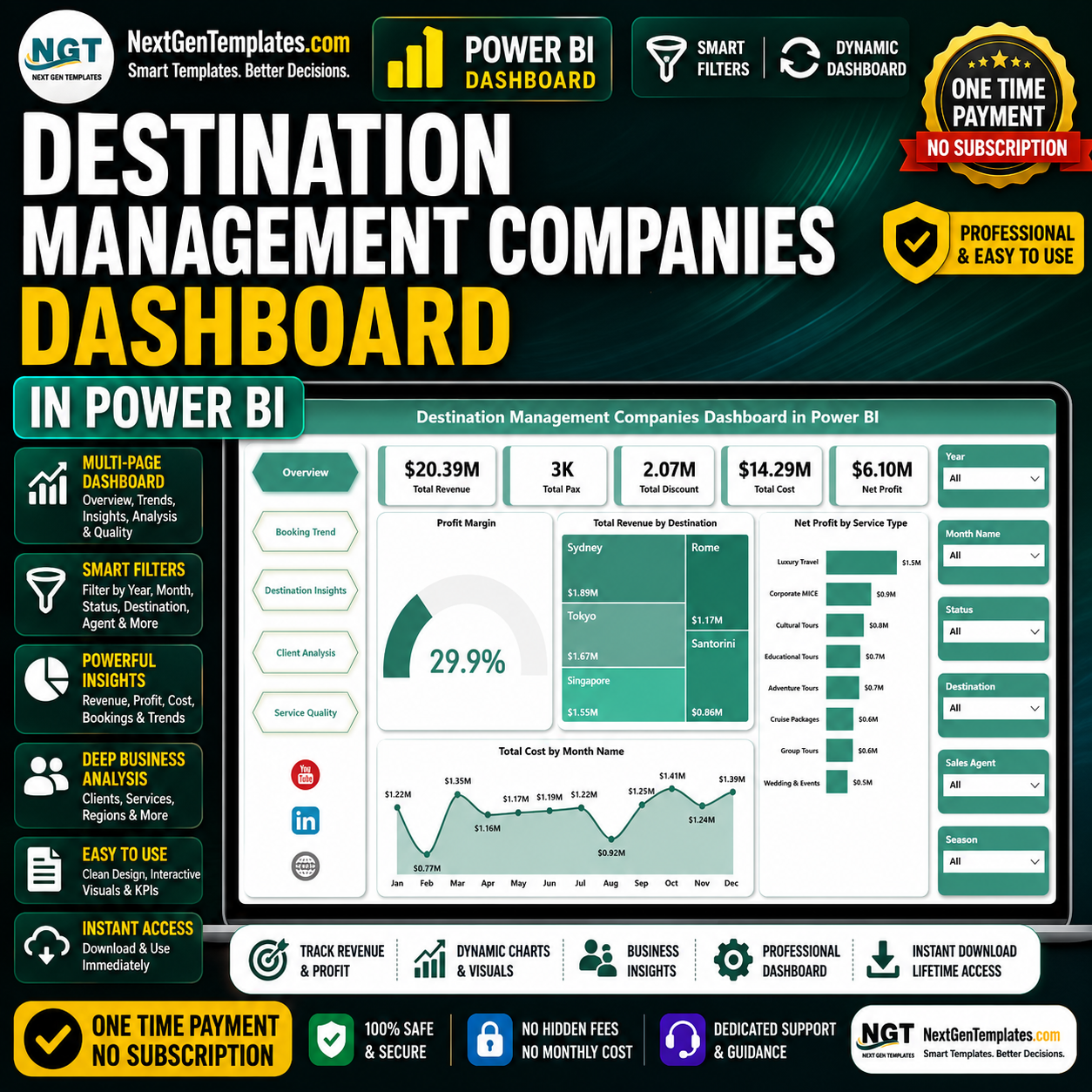
Destination Management Companies Dashboard in Power BI helps DMC owners, travel operations managers, tourism teams, event planners, and finance analysts monitor 5 executive KPI cards, 5 Power BI report pages, and 15+ focused visuals for revenue, pax, discount, cost, net profit, bookings, destinations, clients, and service quality. Instead of rebuilding reports manually or paying for a recurring travel analytics platform, this editable PBIX template gives you a one-time purchase dashboard with instant download, lifetime access, no subscription, no per-user fee, and a practical reporting structure built by PK, a Microsoft Certified Professional with 300K+ YouTube subscribers across training channels.
Key Features of Destination Management Companies Dashboard in Power BI
- 5 report pages: Overview, Booking Trend, Destination Insights, Client Analysis, and Service Quality.
- Executive KPI cards: Total Revenue, Total Pax, Total Discount, Total Cost, and Net Profit.
- Travel operations analysis: Review destination revenue, booking trends, package profitability, client segments, service types, status, cost, and commission.
- Interactive slicers: Filter the Power BI report quickly during leadership, sales, finance, and operations reviews.
- Editable PBIX file: Customize visuals, colors, fields, measures, slicers, and report pages in Power BI Desktop.
- DMC-ready layout: Built for destination management, inbound travel, group tours, MICE programs, and tourism service reporting.
What’s Inside the Destination Management Companies Dashboard in Power BI
1. Overview Page
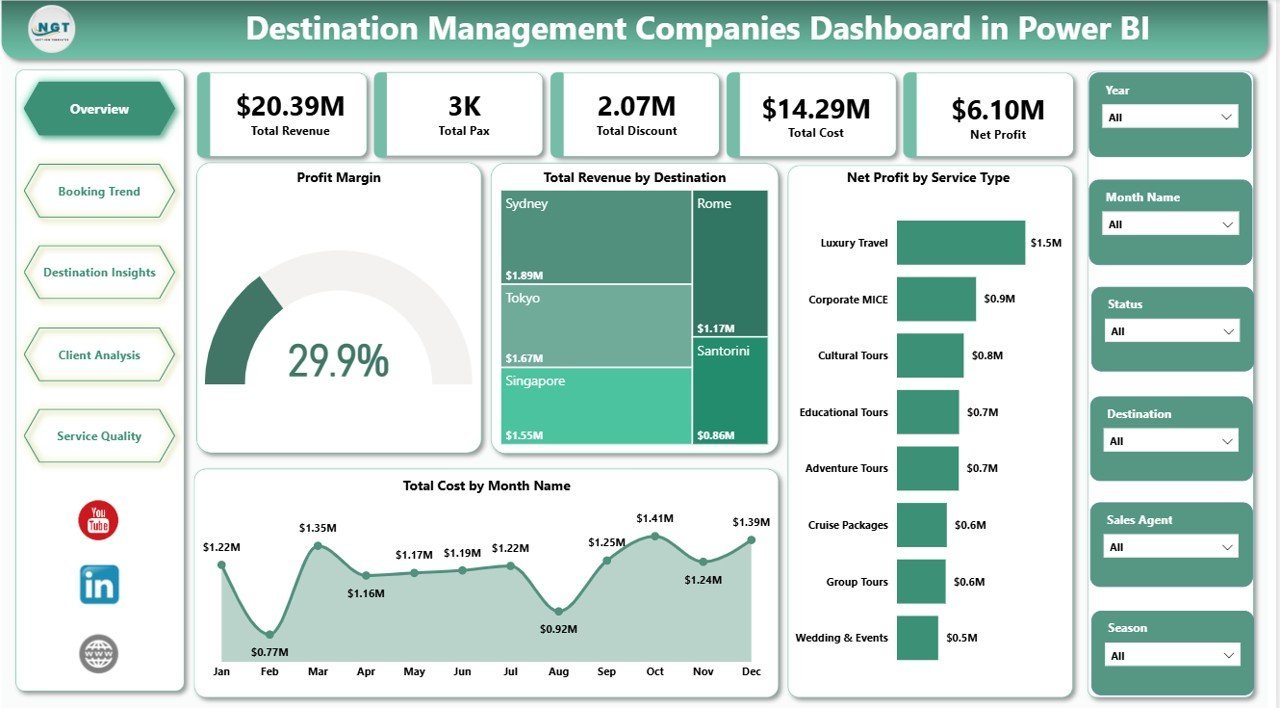
The Overview page gives management a fast business snapshot. At the top, KPI cards show Total Revenue, Total Pax, Total Discount, Total Cost, and Net Profit, so users can understand volume, pricing impact, cost load, and profit before reviewing deeper visuals.
Profit Margin shows how efficiently the DMC converts revenue into profit. It is useful for spotting whether strong booking activity is actually producing healthy margins.
Total Revenue by Destination compares revenue contribution across destinations. This helps sales and operations teams identify top-performing locations and destinations that may need promotion.
Net Profit by Service Type shows which services contribute the most profit. It helps teams compare transfers, tours, event services, accommodation support, and other service categories.
Total Cost by Month Name tracks monthly cost movement. This helps finance teams find high-cost months and investigate vendor, seasonality, staffing, or operational drivers.
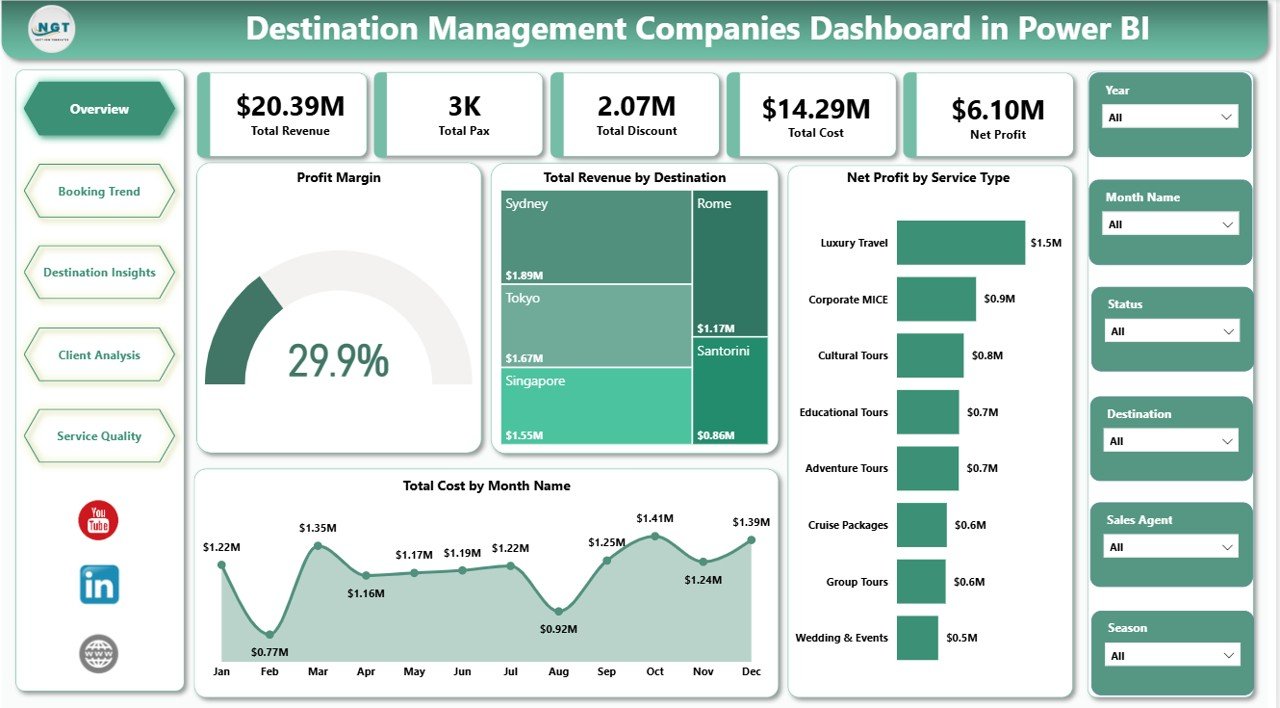
Destination Management Companies Dashboard in Power BI
2. Booking Trend
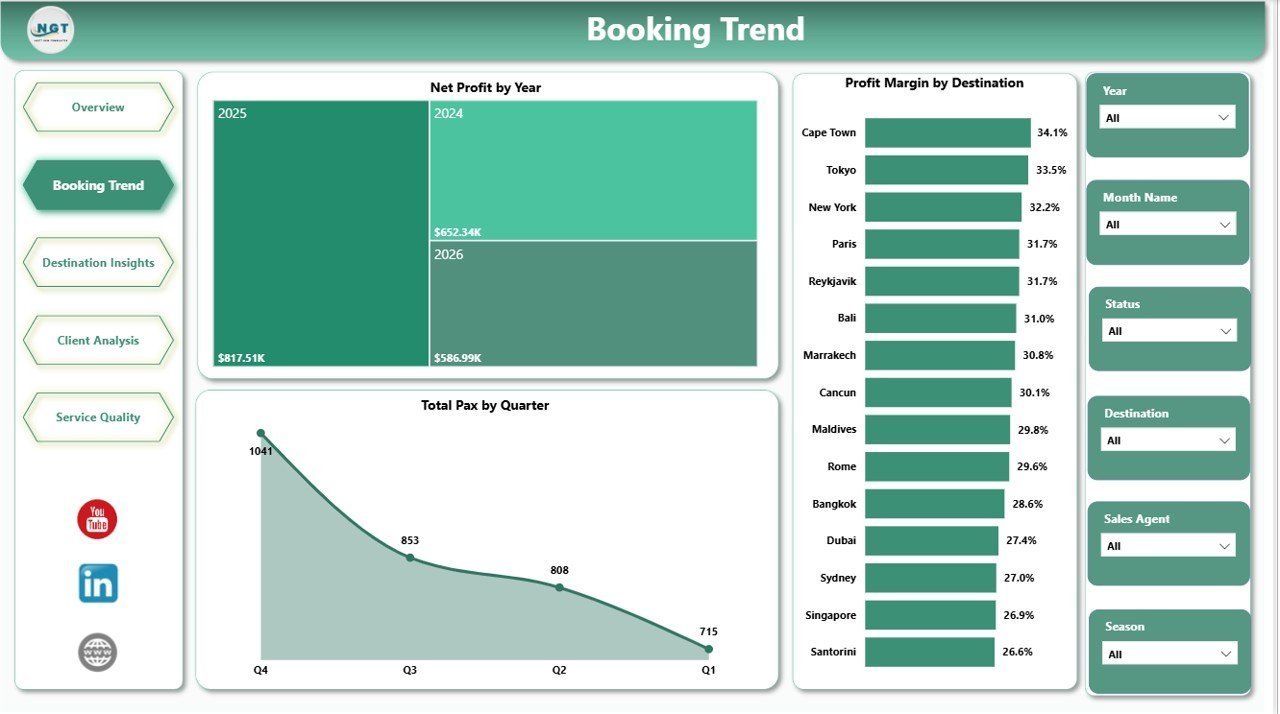
The Booking Trend page focuses on time-based and capacity-related analysis. It helps teams review yearly profit, destination margin, passenger movement, and quarterly demand patterns.
Net Profit by Year compares annual profit performance and helps owners review whether the DMC is improving over time. It is useful for long-term planning and year-end performance discussions.
Profit Margin by Destination shows destination-level profitability, not just revenue. This helps identify destinations that are popular but may need better pricing or cost control.
Total Pax by Quarter shows passenger volume by quarter. It helps teams plan guides, transport, vendor bookings, hotel blocks, and staffing around expected demand.
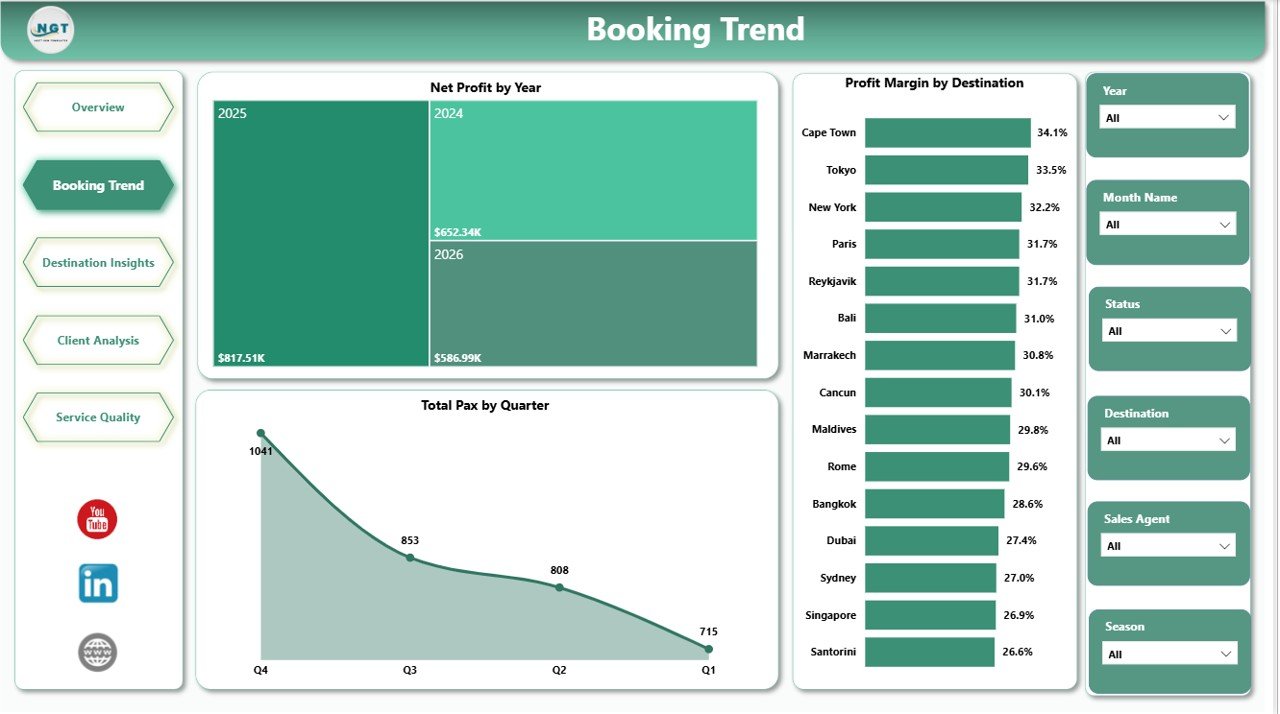
Booking Trend
3. Destination Insights
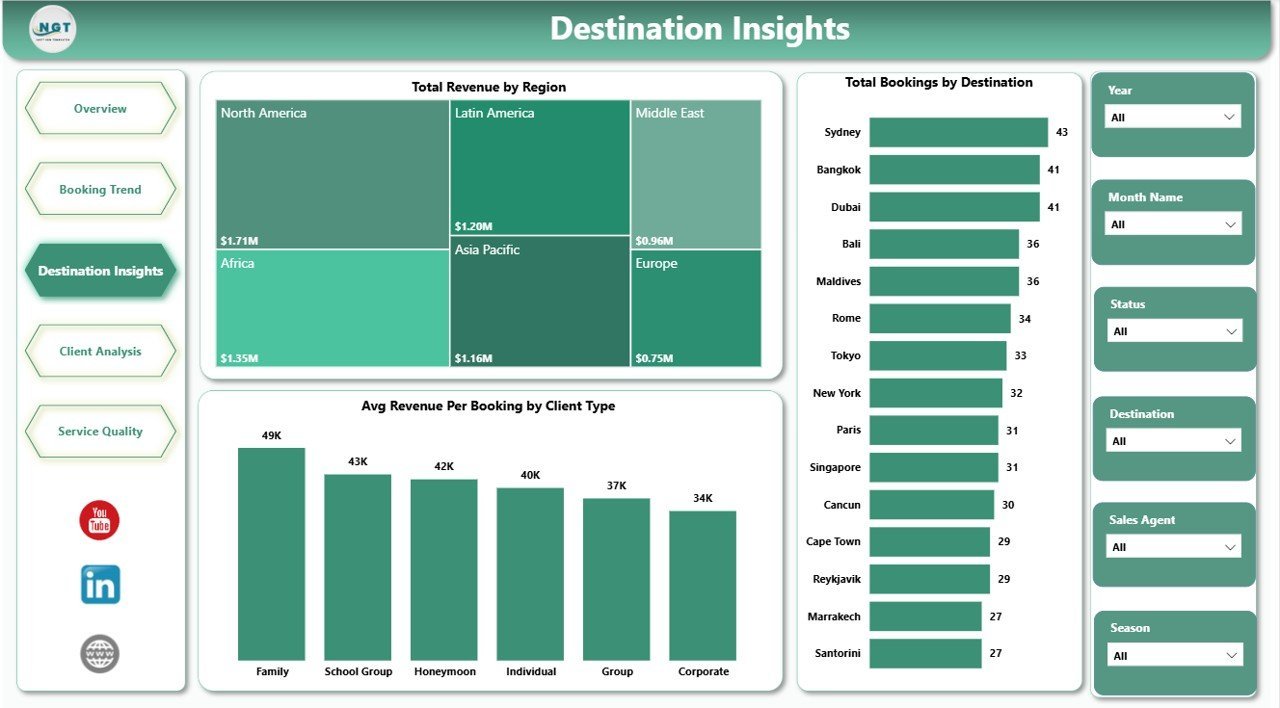
The Destination Insights page helps managers understand where revenue and bookings are coming from. It supports regional planning, destination portfolio review, and client-type revenue analysis.
Total Revenue by Region compares regional revenue contribution. It helps identify strong travel markets and regions that may need additional sales focus.
Total Bookings by Destination shows booking count by destination. This helps teams understand demand concentration and plan operational capacity.
Avg Revenue Per Booking by Client Type compares average booking value across client groups. It helps identify premium segments and groups that may need pricing or package changes.
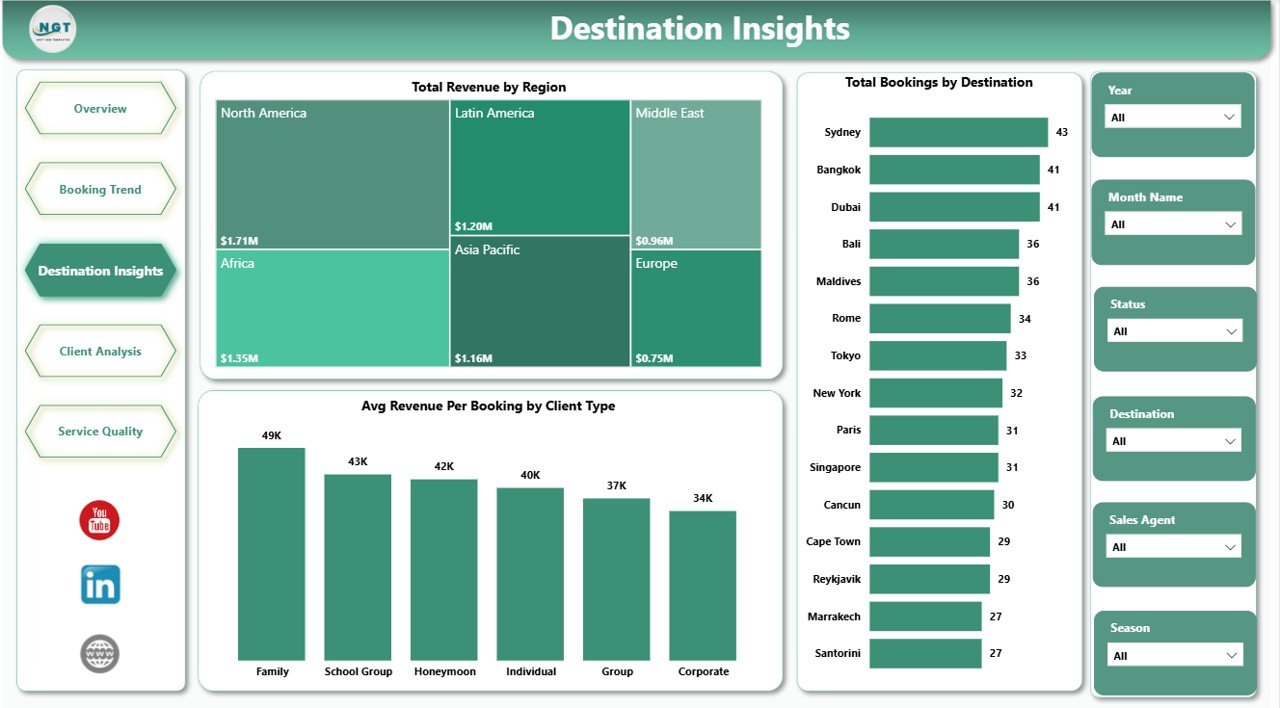
Destination Insights
4. Client Analysis
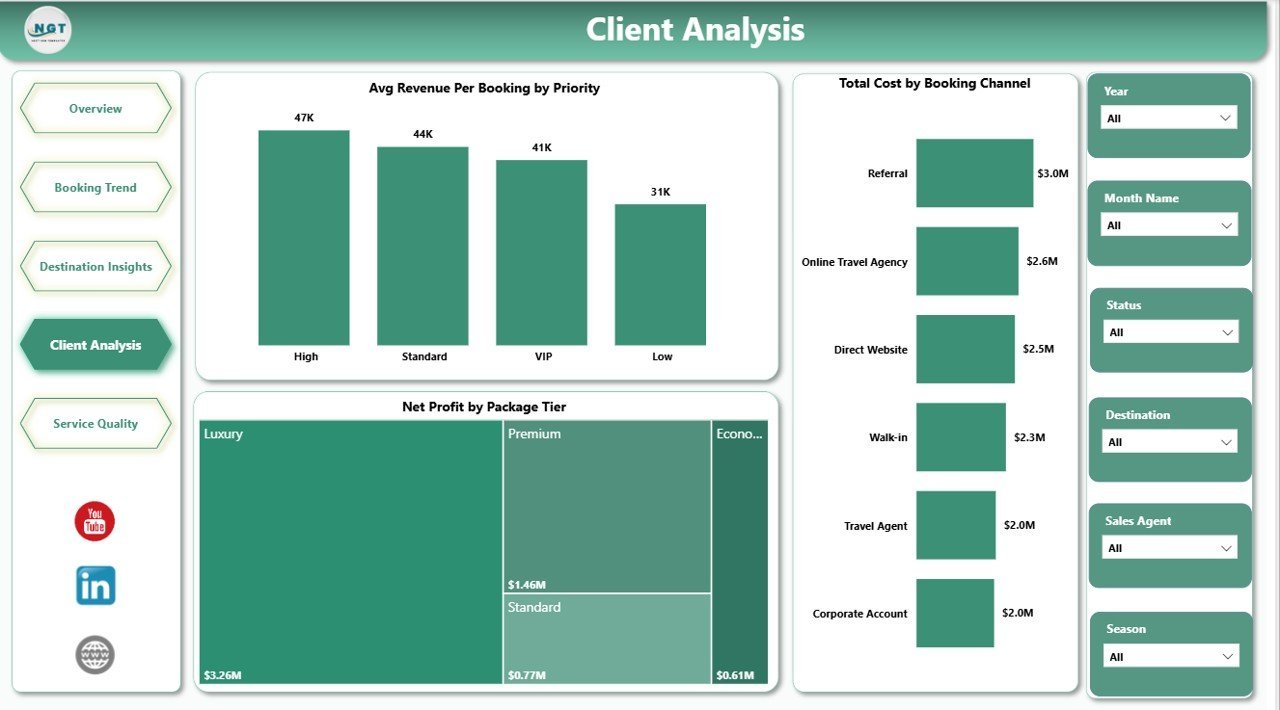
The Client Analysis page connects client priority, booking channel, and package tier with revenue and cost. It is helpful for sales reviews, client segmentation, and package strategy.
Avg Revenue Per Booking by Priority shows whether high-priority bookings produce stronger average revenue. It helps managers align service effort with commercial value.
Total Cost by Booking Channel compares cost across booking sources. It helps identify channels that may create higher servicing cost or require process improvement.
Net Profit by Package Tier compares profitability across package tiers. It helps DMC teams decide whether budget, standard, premium, or luxury packages deserve more focus.
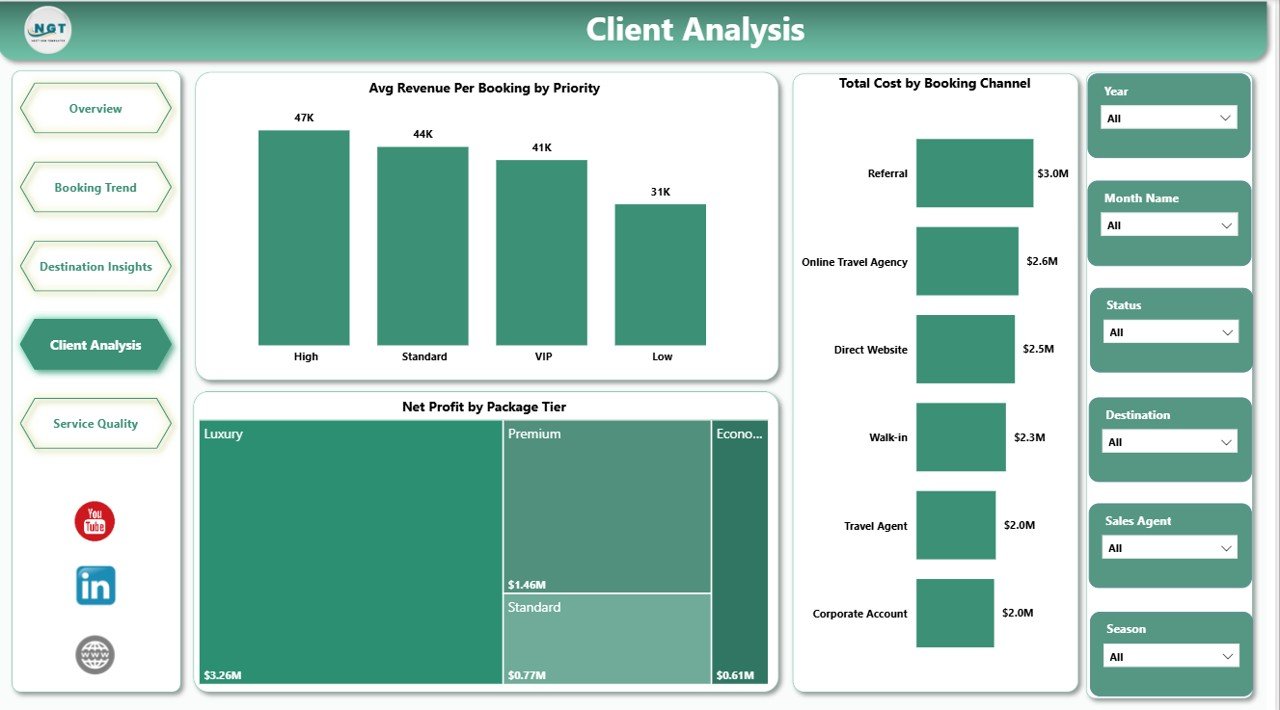
Client Analysis
5. Service Quality
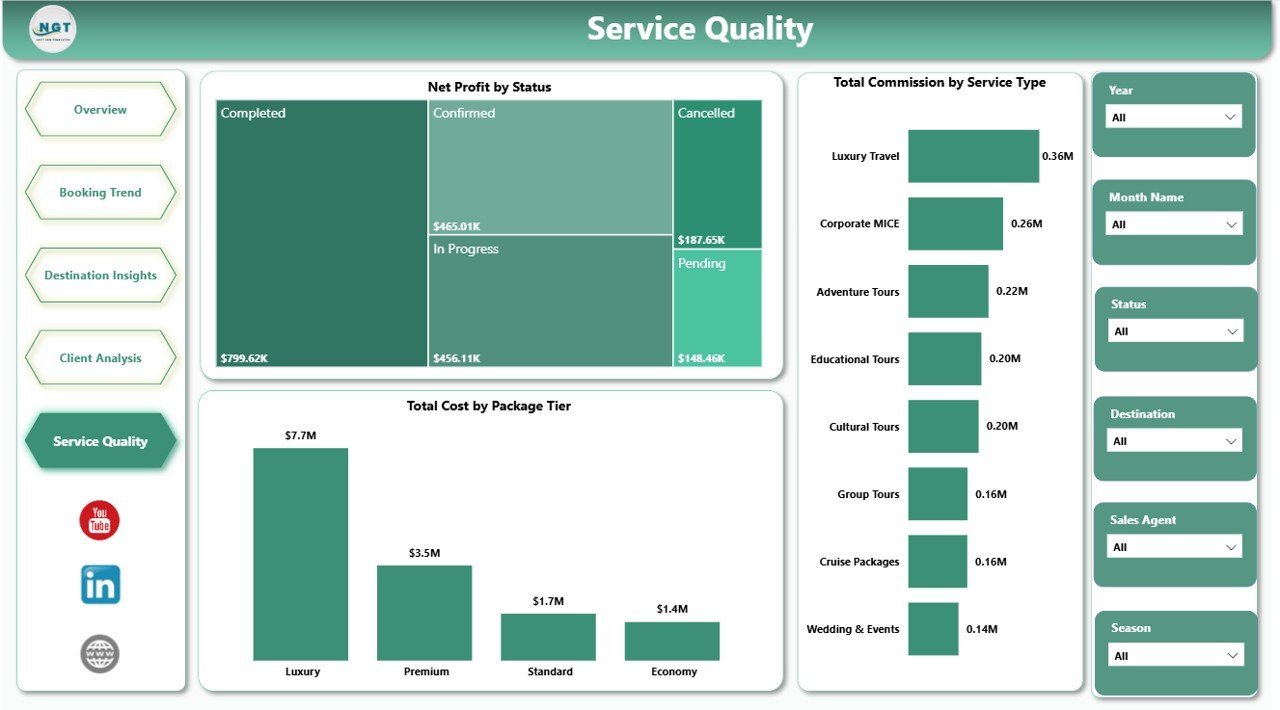
The Service Quality page links status, commission, service type, and package tier to cost and profit. It supports operations teams that need to improve service delivery while protecting margin.
Net Profit by Status shows profitability by operational status. It helps users see whether completed, pending, cancelled, delayed, or other statuses are affecting profit.
Total Commission by Service Type compares commission by service category. This helps teams understand where partner or agent commissions are concentrated.
Total Cost by Package Tier compares cost across package tiers. It helps managers understand whether higher-value packages also carry higher delivery costs.
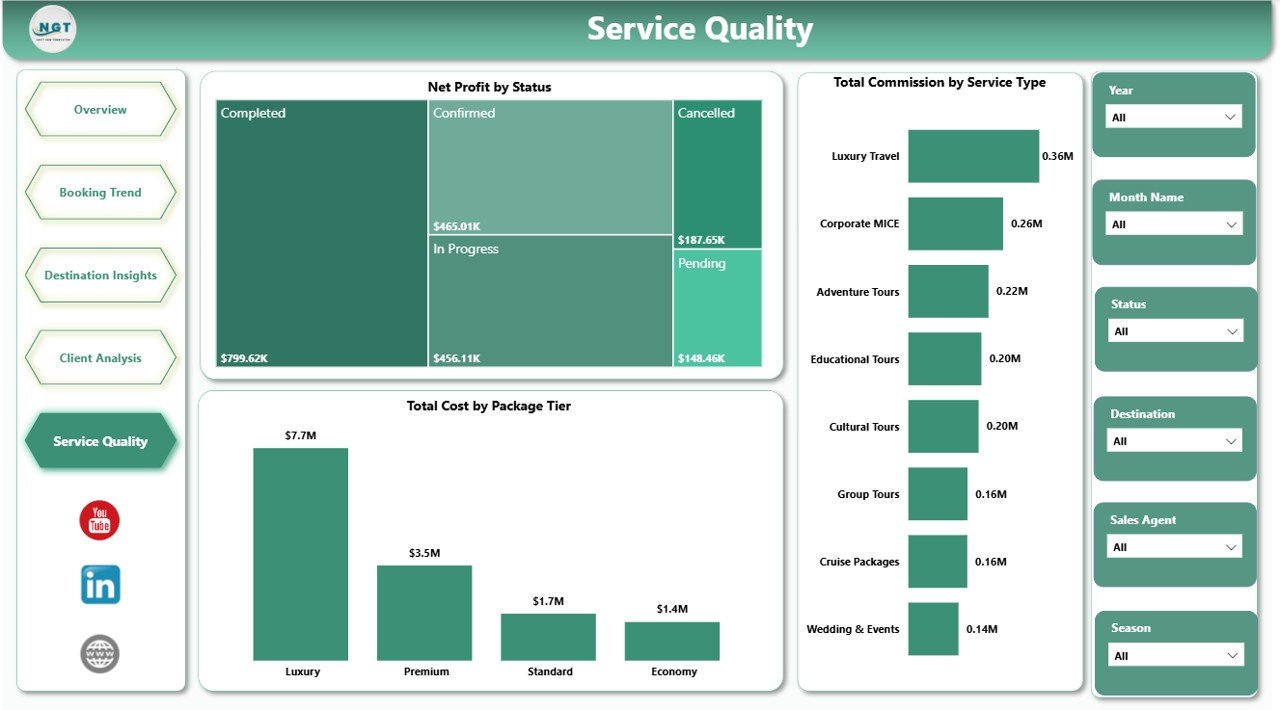
Service Quality
Destination Management Companies Dashboard in Power BI vs. Tableau vs. Paid Travel SaaS – Where This Fits
| Feature | This Power BI Dashboard | Tableau or Qlik Alternative | Paid Travel SaaS |
|---|---|---|---|
| Cost | $17.99 one-time | License or custom build cost | Monthly or annual subscription |
| Platform | Power BI Desktop / Power BI Service | BI platform setup required | Vendor-hosted cloud system |
| Setup time | Open PBIX, replace/connect data, refresh | Build workbook and data model | Implementation and onboarding |
| Real-time team collaboration | Available if published to Power BI Service | Available through platform cloud | Usually included with seats |
| Mobile access | Available through Power BI mobile/service | Available through vendor apps | Usually included |
| Customizable fields | Editable report and model | Editable with BI skills | Limited by vendor settings |
| Share with link | Possible through Power BI Service permissions | Possible with cloud setup | Usually login controlled |
| Year-1 cost at 5 users | $17.99 plus Microsoft licensing you already use | Usually much higher | Often hundreds or thousands |
| DMC reporting structure | Built in across 5 pages | Must be designed | Depends on vendor module |
Who This Template Is For – and Who It’s Not For
This template is for destination management companies, inbound tour operators, MICE travel teams, event travel planners, tourism operations teams, finance analysts, business owners, and reporting analysts who need a Power BI dashboard for revenue, pax, discounts, costs, bookings, destinations, client types, packages, service quality, and profit.
It is not a live booking engine, CRM, accounting system, supplier portal, payment system, or reservation management platform. Use it as a reporting layer after your approved operational data has been exported, connected, or prepared for Power BI.
How to Use the Destination Management Companies Dashboard in Power BI
- Download and unzip the file.
- Open the PBIX file in Power BI Desktop.
- Replace the sample data or connect your approved DMC data source.
- Refresh the report to update cards, charts, slicers, and pages.
- Use slicers to filter by time period, destination, service type, client type, package tier, booking channel, status, region, and priority.
- Customize visuals, colors, labels, fields, and measures as needed.
- Publish to Power BI Service only if it matches your Microsoft licensing and data governance rules.
Real-World Use Cases
Anita, DMC Operations Manager: Anita reviews pax by quarter, cost by month, and profit by status before weekly operations meetings to plan staffing and vendor follow-up.
Rahul, Tourism Business Owner: Rahul compares revenue by destination, profit margin by destination, and package-tier profit to decide which destinations and packages need more promotion.
Maria, Event Travel Coordinator: Maria uses client priority, booking channel, and service type views to improve delivery planning for group travel and corporate events.
Frequently Asked Questions
What KPI cards are included?
The Overview page includes Total Revenue, Total Pax, Total Discount, Total Cost, and Net Profit.
Do I need Power BI Desktop?
Yes. Open the PBIX file in Power BI Desktop. Microsoft provides Power BI Desktop as the main authoring tool for PBIX reports.
Can I use my own DMC data?
Yes. You can replace the sample data or connect your own approved source, then refresh the report.
Can I customize the report pages?
Yes. The PBIX file is editable, so you can adjust visuals, fields, DAX measures, colors, and report pages.
Is this a booking management system?
No. This is a Power BI reporting dashboard. It does not manage bookings, payments, CRM records, or supplier workflows.
Can I share it with my team?
Yes, you can share the PBIX internally or publish through Power BI Service according to your Microsoft licensing and data security policies.
About the Author
Built by PK – Microsoft Certified Professional with 15+ years of Excel, Google Sheets, and Power BI experience. Founder of NextGenTemplates, reaching 300K+ subscribers across YouTube channels. Every template is hand-built and tested before release.
Explore Related Templates
Browse more Power BI templates and Power BI Dashboard templates. Related templates include Destination Management Companies Dashboard in Excel, Destination Management Companies KPI Dashboard in Power BI, and Medical Tourism KPI Dashboard in Power BI.
Ready to analyze DMC performance in Power BI? Download the Destination Management Companies Dashboard in Power BI, connect your data, refresh the report, and start reviewing revenue, pax, cost, bookings, destinations, clients, and service quality today.
Watch the step-by-step video tutorial:































