

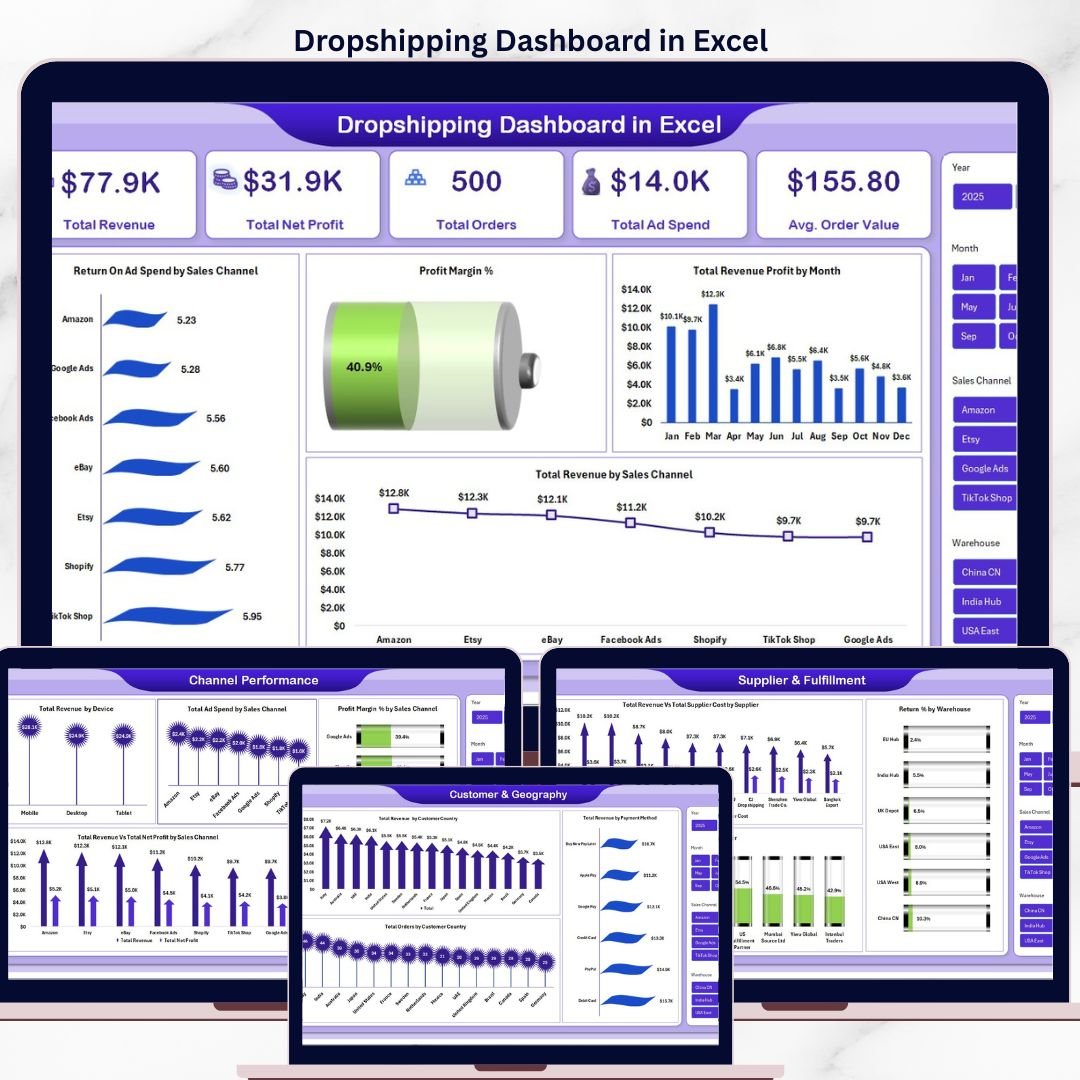


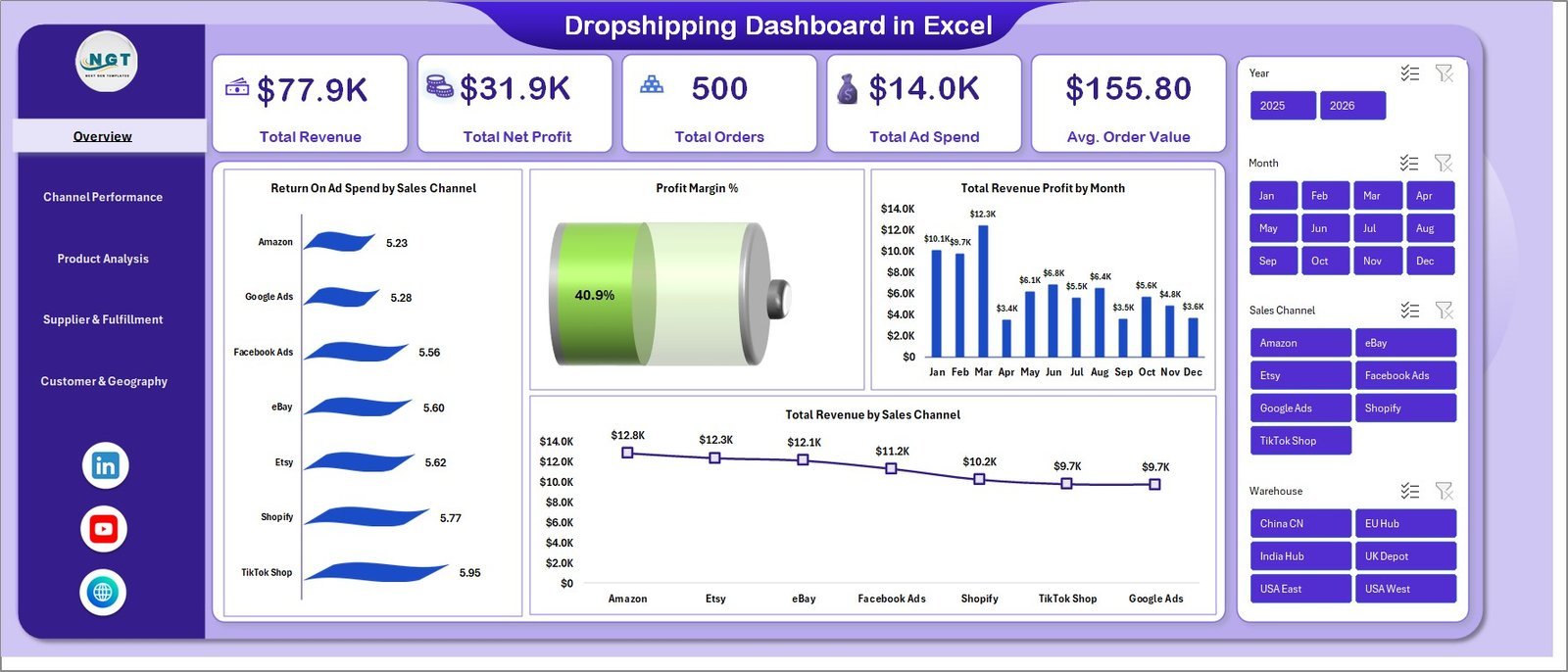

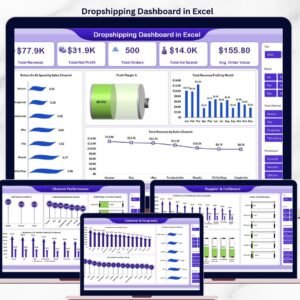
The Dropshipping Dashboard in Excel tracks 5 core KPIs (Total Revenue, Net Profit, Orders, Ad Spend, AOV) across 5 interactive analysis pages and 17+ pre-built charts covering sales channels, products, suppliers, and customer geography. Setup takes under 10 minutes — replace the sample data and every chart, slicer, and KPI card refreshes automatically through the built-in pivot engine.
🌍 Join 10,000+ customers in 180+ countries using NextGenTemplates to replace paid SaaS analytics tools with one-time-purchase Excel, Google Sheets, Power BI, and HTML templates.
✅ Instant download · One-time payment · No subscription · No per-user fees · Lifetime access
🔑 Key Features of the Dropshipping Dashboard in Excel
📊 5-Page Interactive Analytics Suite – The dashboard covers Overview, Channel Performance, Product Analysis, Supplier & Fulfillment, and Customer & Geography. Each page filters together through shared slicers, so a single click on a date range, sales channel, or supplier instantly refreshes every chart and KPI card across all five tabs.
💰 5 Executive KPI Cards – The Overview page surfaces Total Revenue, Total Net Profit, Total Orders, Total Ad Spend, and Average Order Value. These are the exact five numbers most dropshipping operators need to see before anything else, calculated dynamically from the Data sheet using SUMIFS-driven formulas.
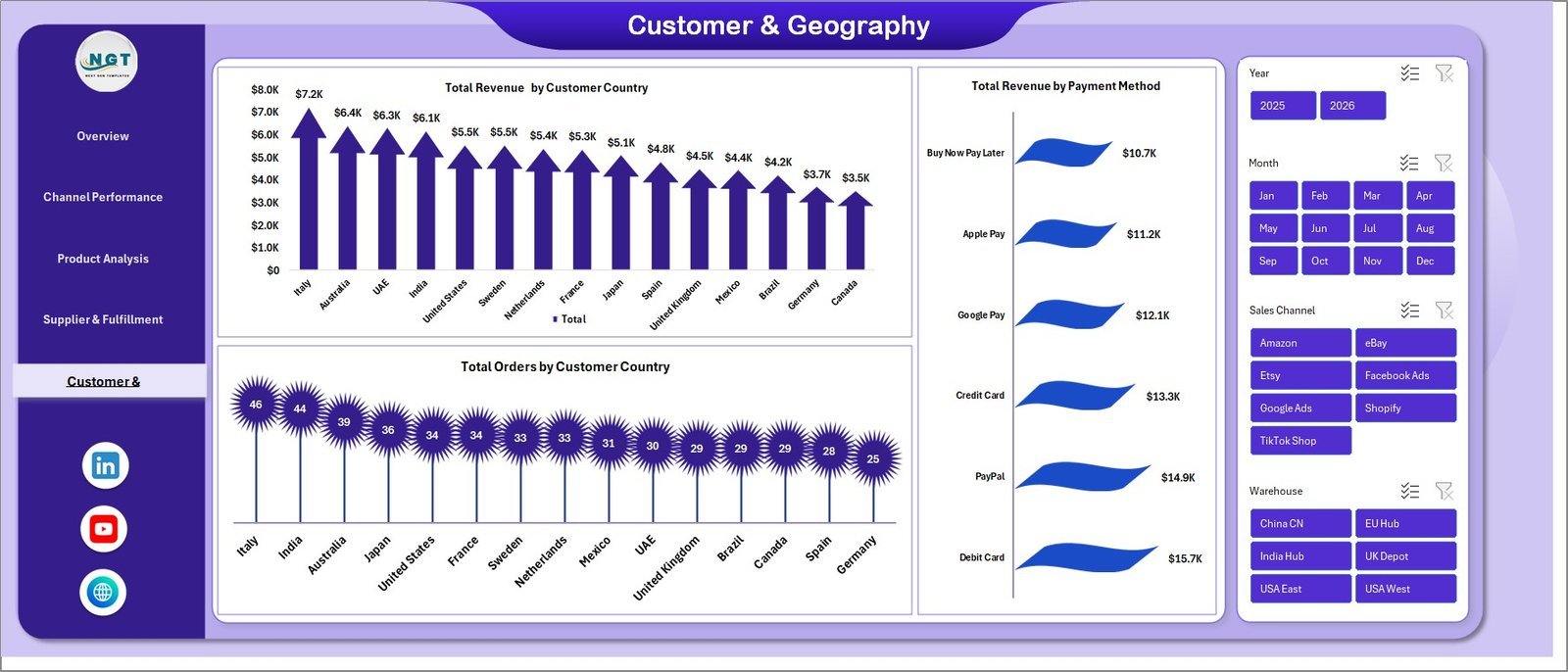
📈 17+ Pre-Built Charts – Every visual is connected to a pivot table on the Support sheet. This includes Return On Ad Spend by Sales Channel, Profit Margin %, Total Revenue Profit by Month, Total Revenue by Sales Channel, Total Revenue by Device, Profit Margin % by Sales Channel, Total Revenue Vs Total Net Profit by Category, Avg. Rating by Category, Total Revenue Vs Total Supplier Cost by Supplier, Return % by Warehouse, Delivery % by Supplier, Total Revenue by Customer Country, Total Revenue by Payment Method, and more.
🎛️ Multi-Slicer Filtering – Slicers on every page let you filter by Sales Channel (Shopify, Amazon, eBay, Etsy, TikTok Shop), Date Range, Country, Supplier, Category, and Device. A single slicer click cascades across the entire dashboard.
🔄 One-Click Refresh Architecture – After updating the Data sheet, click Data > Refresh All in the Excel ribbon and every pivot, chart, and KPI updates simultaneously. No formulas to drag, no ranges to extend.
📦 Supplier & Fulfillment Visibility – Track which suppliers cost the most relative to revenue, which warehouses generate the highest return rates, and which suppliers have the strongest on-time delivery percentages — critical for dropshipping where you don’t control the inventory.
🌐 Customer Geography Analytics – See revenue and order volume by customer country and payment method, helping you decide where to scale ad spend and which payment options drive the highest conversion.
📦 What’s Inside the Dropshipping Dashboard in Excel
The file ships as a single .xlsx with 7 sheets:
📌 Page 1 — Overview: 5 KPI cards (Total Revenue, Net Profit, Orders, Ad Spend, AOV) plus charts for Return On Ad Spend by Sales Channel, Profit Margin %, Total Revenue Profit by Month, and Total Revenue by Sales Channel.
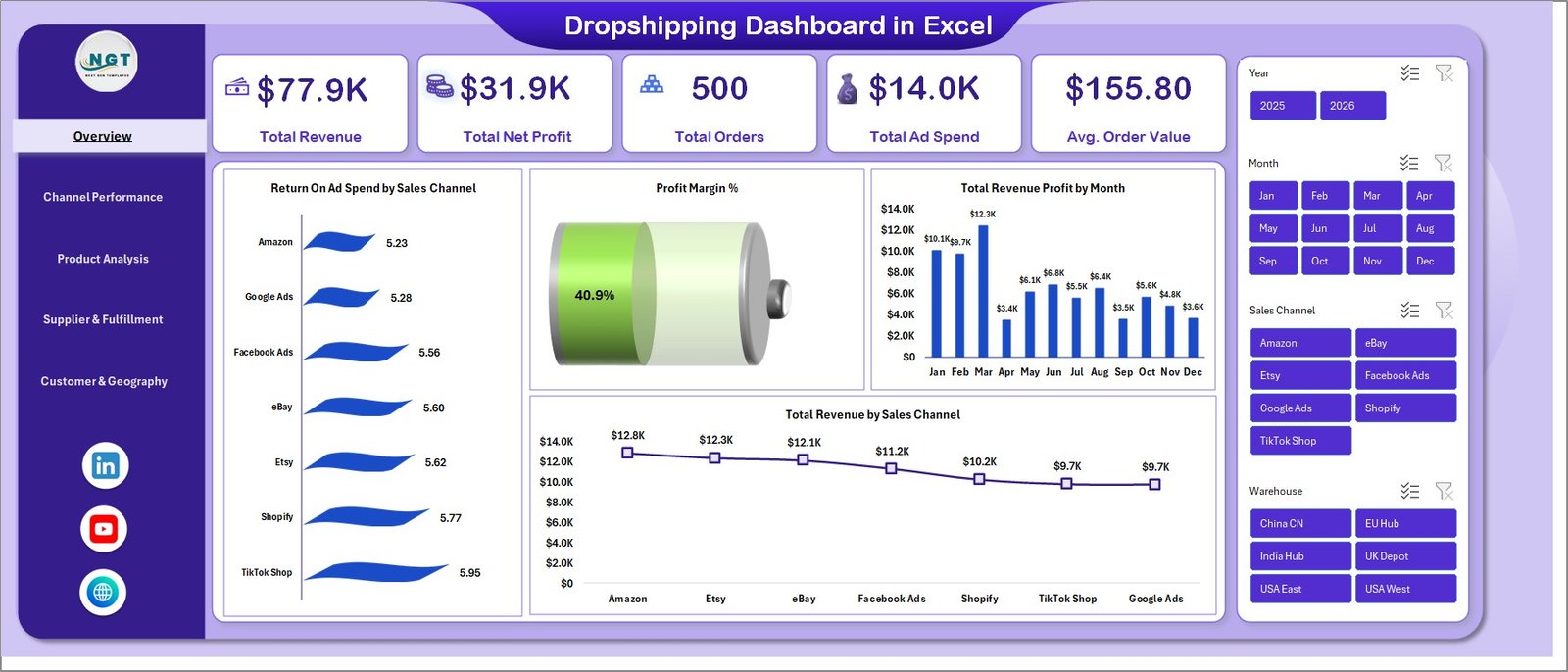
Dropshipping Dashboard in Excel
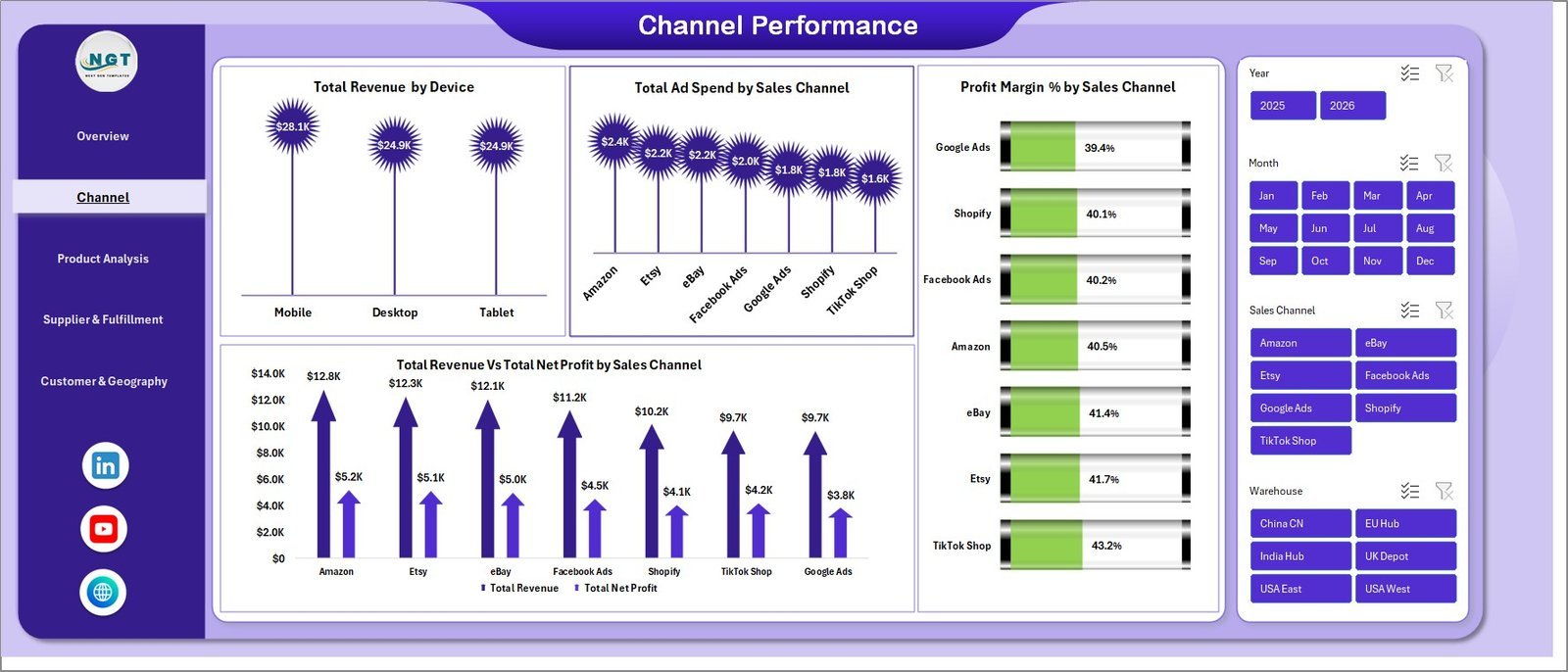
📌 Page 2 — Channel Performance: Total Revenue by Device, Total Ad Spend by Sales Channel, Profit Margin % by Sales Channel, and Total Revenue Vs Total Net Profit by Sales Channel — designed to answer “which channel is actually profitable, not just busy?”
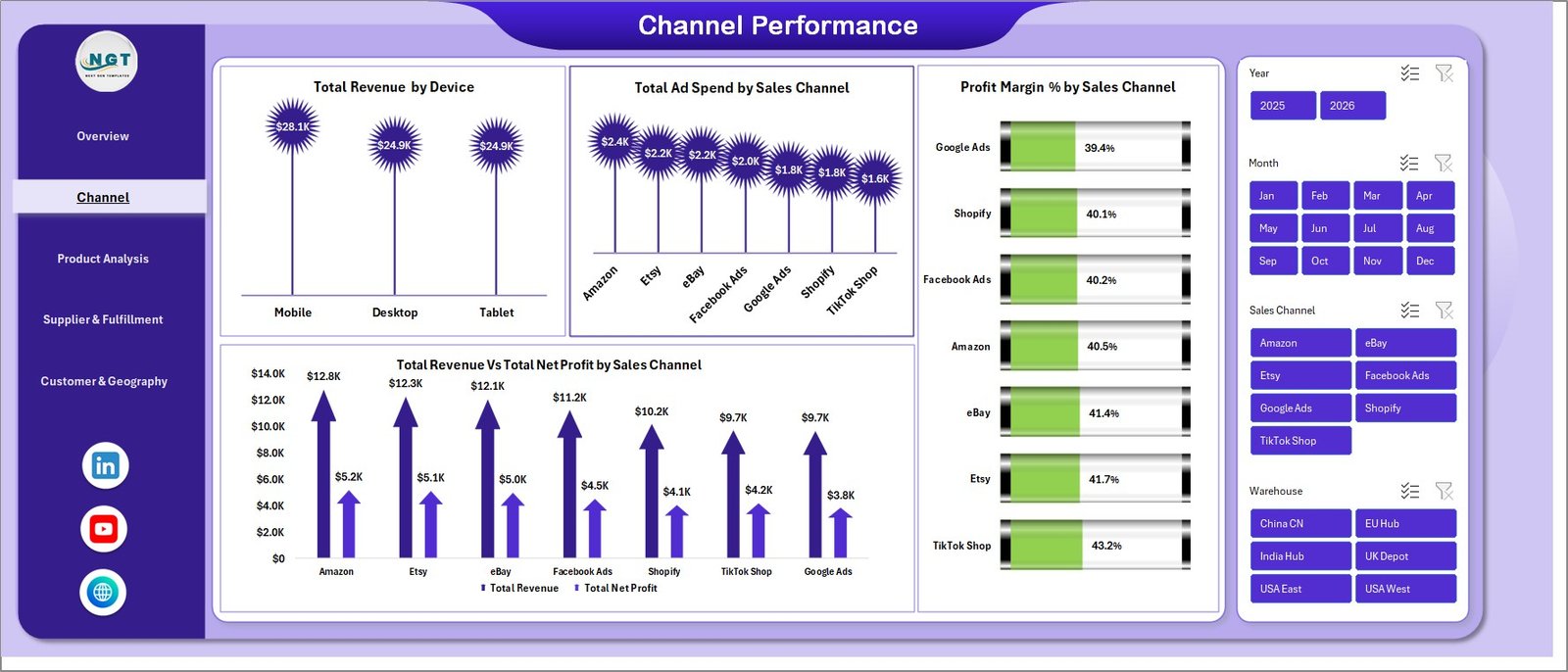
Channel Performance
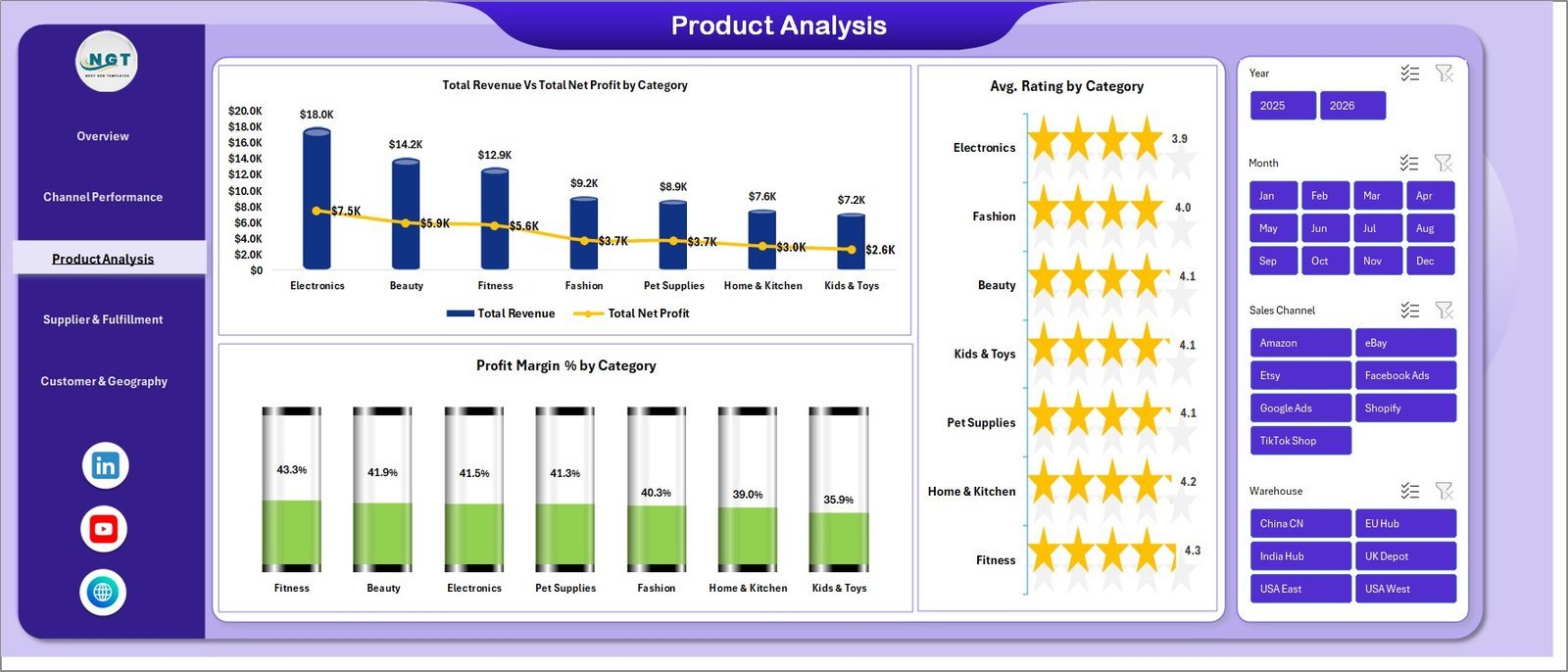
📌 Page 3 — Product Analysis: Total Revenue Vs Total Net Profit by Category, Avg. Rating by Category, and Profit Margin % by Category. Identify hero SKUs and dead inventory at a glance.
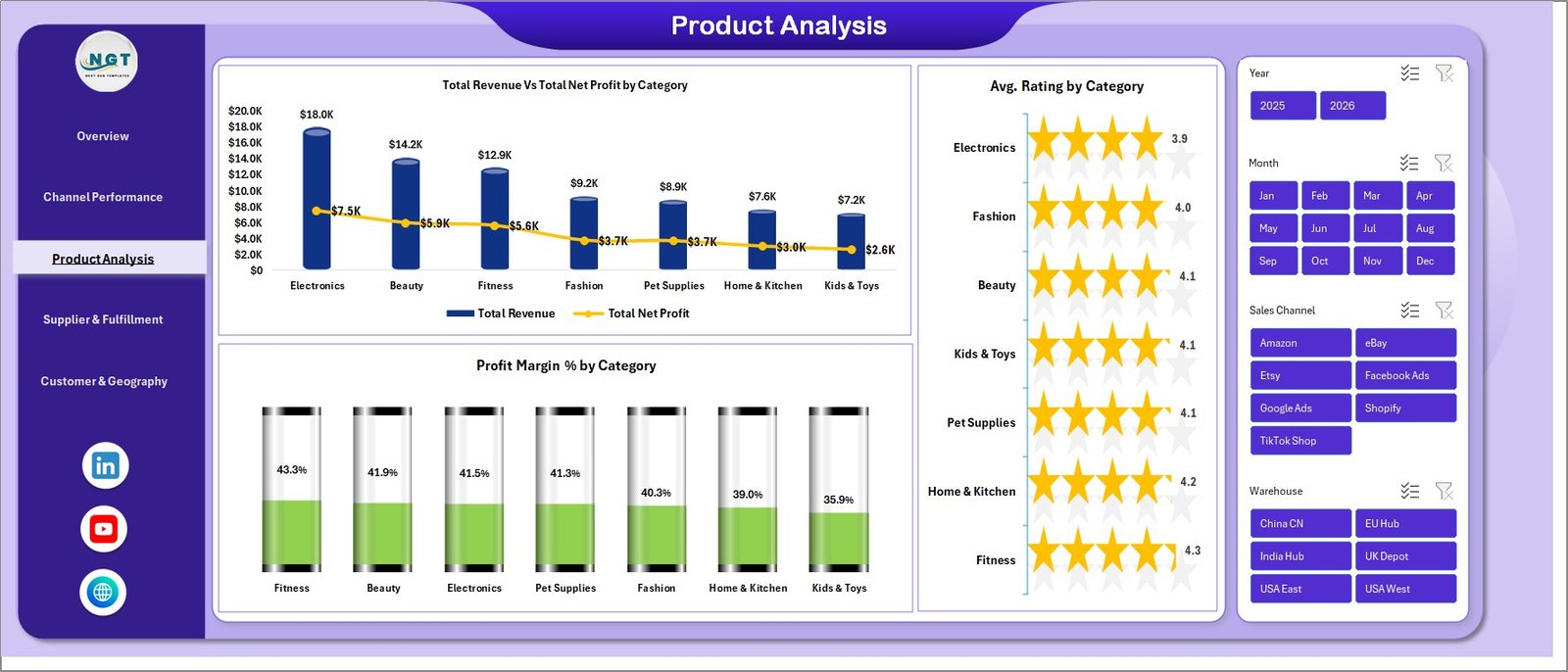
Product Analysis
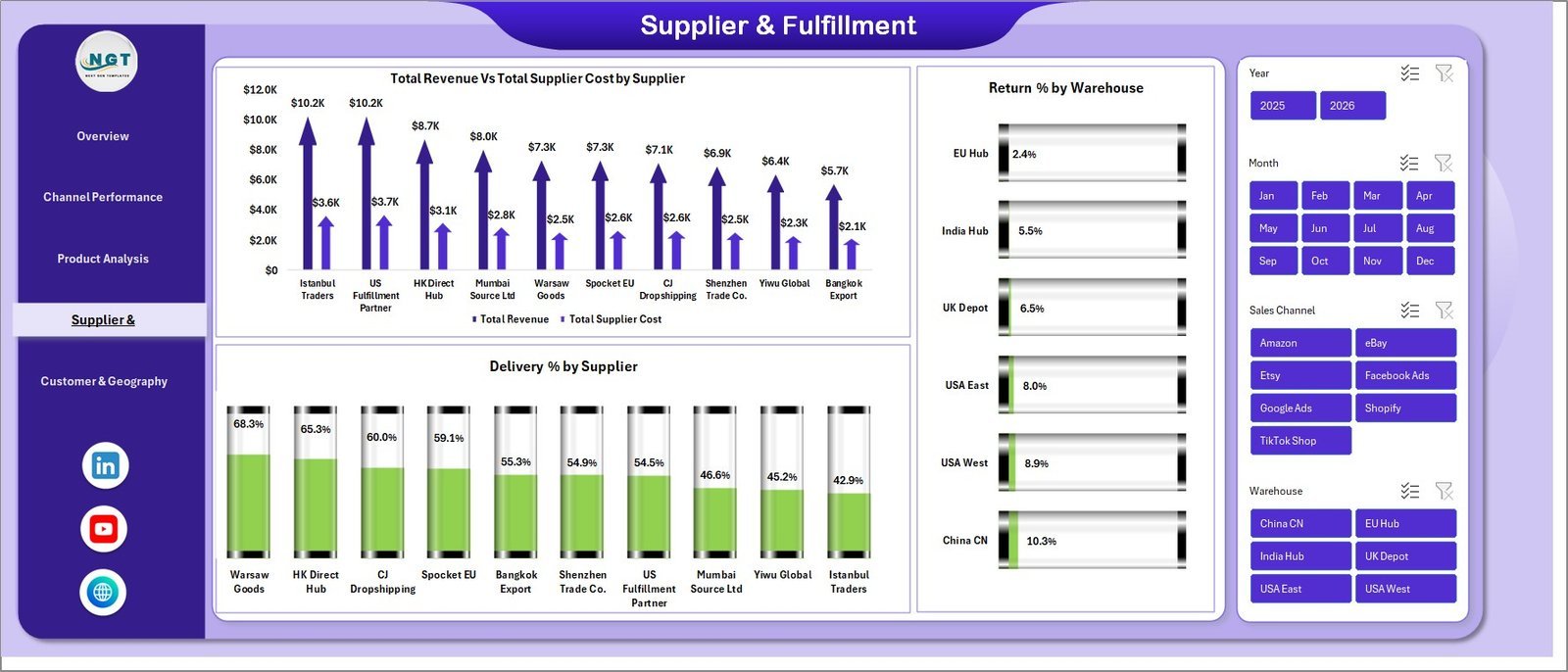
📌 Page 4 — Supplier & Fulfillment: Total Revenue Vs Total Supplier Cost by Supplier, Return % by Warehouse, and Delivery % by Supplier. Critical for any operator running 3+ suppliers.
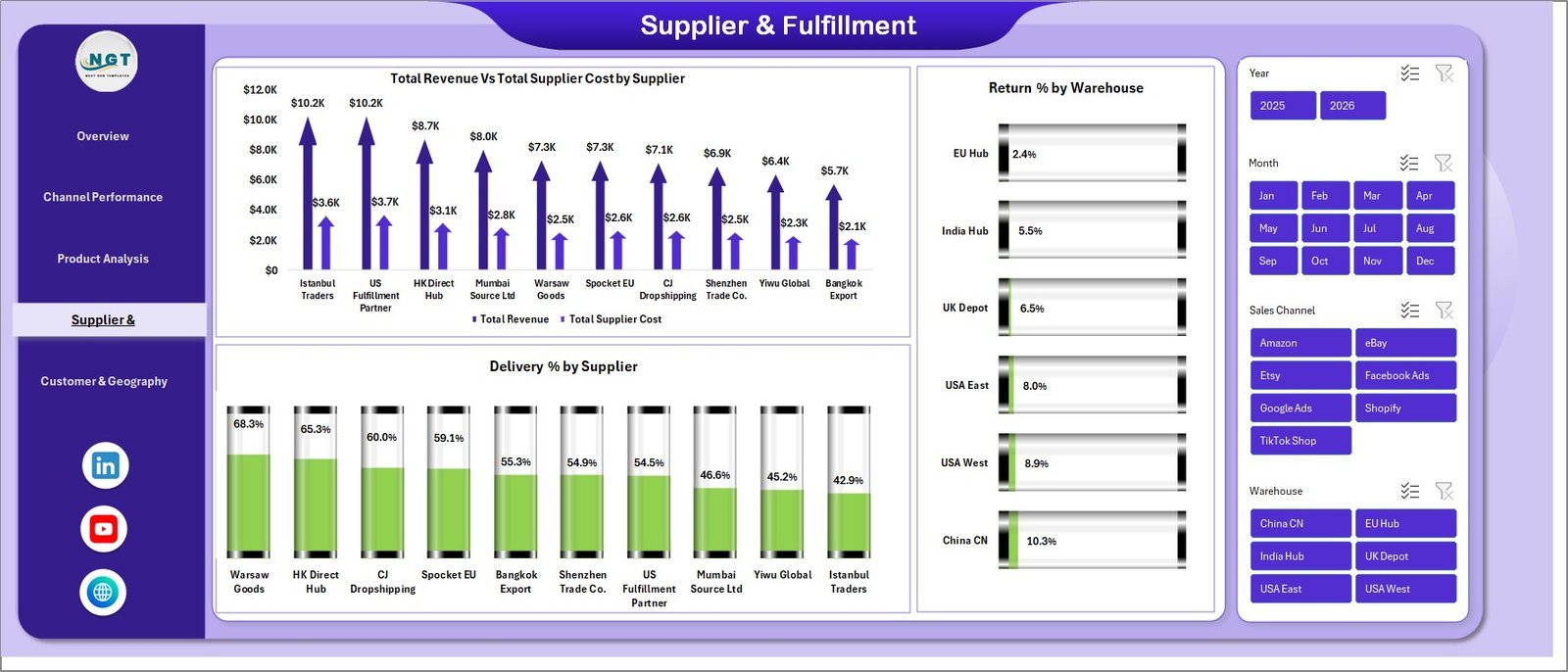
Supplier & Fulfillment
📌 Page 5 — Customer & Geography: Total Revenue by Customer Country, Total Revenue by Payment Method, and Total Orders by Customer Country.
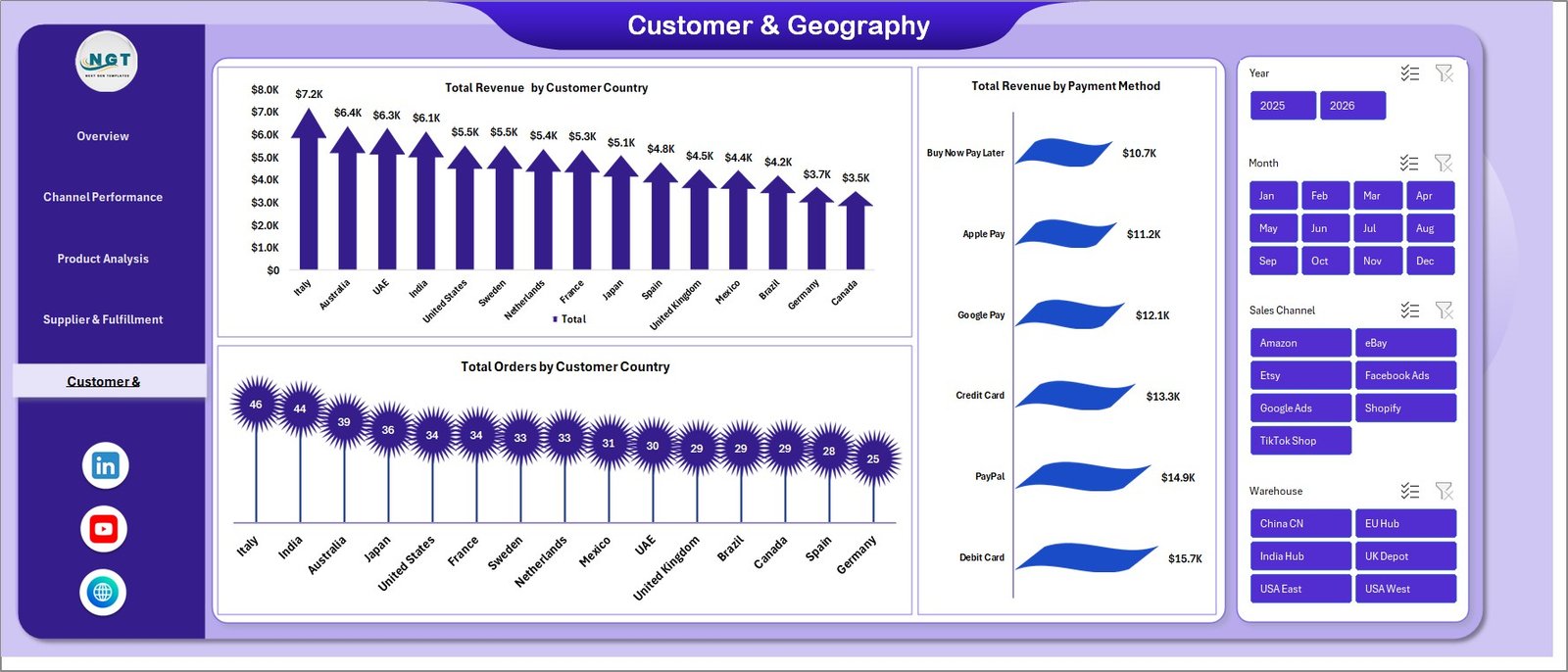
Customer & Geography
📌 Sheet 6 — Data: The single source of truth. Replace the sample rows with your own order-level data in the same column format and the dashboard updates after one Refresh All click.

Data Sheet tab
📌 Sheet 7 — Support: Hidden-by-default sheet containing all pivot tables that drive the dashboard. Keep hidden in production use.

Support sheet tab
📊 Dropshipping Dashboard in Excel vs. Google Sheets vs. Triple Whale / Polar — Where This Fits
| Feature | Dropshipping Dashboard in Excel | Google Sheets equivalent | Triple Whale / Polar |
|---|---|---|---|
| Cost | $17.99 one-time | $9-15 one-time | $129-499 / month |
| Platform | Microsoft Excel (offline) | Google Sheets (browser) | Cloud SaaS |
| Setup time | Under 10 minutes | Under 15 minutes | 2-5 days (integrations) |
| Sales channel breakdown (Shopify, Amazon, eBay, TikTok) | ✅ Manual paste | ✅ Manual paste | ✅ Auto-sync |
| ROAS by channel | ✅ Pre-built | ✅ Pre-built | ✅ Auto-pulled |
| Supplier cost & margin tracking | ✅ Pre-built | Manual setup | ❌ Not native |
| Works offline / private data | ✅ | ❌ | ❌ |
| Year-1 cost at 5 users | $17.99 | $9-15 | $1,548 – $5,988 |
| Customizable formulas | ✅ Full Excel access | ✅ Apps Script | Limited (UI only) |
For dropshippers who want channel ROAS, supplier margin, and customer geography in one file without paying $1,500+ per year for a SaaS analytics suite, the Dropshipping Dashboard in Excel sits in the sweet spot.
👥 Who This Template Is For — and Who It’s Not For
✅ This template is built for:
- Solo dropshippers and small teams ($10K-$500K monthly revenue) running Shopify, WooCommerce, or multi-marketplace stores
- Operators selling on 2+ channels (Shopify + Amazon, Etsy + TikTok Shop, etc.) who need a single ROAS view
- Stores using 3+ dropshipping suppliers who need supplier-level margin and delivery tracking
- Agencies or consultants delivering monthly performance reports to dropshipping clients
- Excel-comfortable founders who don’t want to pay $129-499/month for cloud analytics
❌ This template is NOT for:
- Stores needing real-time API sync with Shopify/Meta Ads/Google Ads (use Triple Whale or Polar)
- Teams that work entirely in Google Sheets and won’t open Excel files
- Enterprises requiring SOC 2-compliant cloud BI (use Looker or Power BI Premium)
- Anyone wanting a real-time mobile app — this is a desktop Excel file
⚙️ How to Use the Dropshipping Dashboard
- Download and unzip the file, then open it in Microsoft Excel (2016 or later, or Microsoft 365).
- Open the Data sheet and replace the sample rows with your own order-level data — keep the column headers exactly as-is.
- Go to Data > Refresh All in the Excel ribbon. Every pivot, chart, and KPI updates in 1-2 seconds.
- Use slicers at the top of each page to filter by sales channel, date range, supplier, country, or category.
- Customize colors by editing the chart styles or theme — all charts inherit from the workbook theme.
- Hide the Support sheet when sharing with stakeholders (right-click tab > Hide).
💼 Real-World Use Cases
Marcus runs a 4-person Shopify dropshipping team selling pet accessories on Shopify + Amazon + TikTok Shop. He uses the Dropshipping Dashboard in Excel every Monday morning to review the previous week’s ROAS by channel — last quarter he killed his TikTok Shop spend after the dashboard surfaced a 0.8x ROAS while Shopify direct was running at 3.2x. Replaced his $199/month Triple Whale subscription with this $17.99 file.
Priya is a Mumbai-based ecommerce consultant managing 7 dropshipping clients. She drops each client’s monthly export into a copy of this template and sends a 5-page PDF report with branded styling. Setup takes 8 minutes per client. Before this, she was spending 3 hours per client building reports from scratch in Google Sheets.
Jamie operates a solo print-on-demand store with 12 suppliers across Aliexpress, Printful, and Spocket. The Supplier & Fulfillment page surfaced that one supplier was running a 14% return rate vs. 3% for the rest — they swapped suppliers and recovered roughly $4,200/month in margin. The dashboard paid for itself 200x over.
❓ Frequently Asked Questions
What KPIs does the Dropshipping Dashboard in Excel track?
The Dropshipping Dashboard in Excel tracks 5 core KPIs (Total Revenue, Total Net Profit, Total Orders, Total Ad Spend, Average Order Value) plus 17+ chart-level metrics including ROAS by channel, profit margin % by category, supplier cost vs revenue, return rate by warehouse, and revenue by customer country.
How long does setup take?
Setup takes under 10 minutes. Open the Dropshipping Dashboard in Excel, paste your order-level data into the Data sheet keeping the column headers as-is, and click Data > Refresh All. Every chart, KPI card, and slicer updates automatically through the pre-built pivot engine on the Support sheet.
How does this compare to Triple Whale or Polar?
The Dropshipping Dashboard in Excel is a $17.99 one-time purchase versus Triple Whale’s $129-499 monthly subscription. The trade-off is that this template requires manual data import (CSV export from Shopify or marketplace), while Triple Whale auto-syncs via API. For stores under $500K monthly revenue, the Excel option saves $1,500-$6,000 per year.
Which sales channels does the Dropshipping Dashboard support?
The Dropshipping Dashboard supports any sales channel you have data for — the sample dataset uses Shopify, Amazon, eBay, Etsy, and TikTok Shop, but you can rename or add channels in the Data sheet column. The slicer auto-populates from your data, so adding a new channel takes zero formula edits.
Can I customize the colors and add my logo?
Yes. The Dropshipping Dashboard in Excel uses standard Excel chart formatting, so you can edit colors via the workbook theme, replace fonts, and insert your logo on any page. The pivot tables and slicers are unlocked, so layout is fully editable.
Does it work on Mac and on older Excel versions?
The Dropshipping Dashboard runs on Excel 2016 and later for Windows and Mac, and on Microsoft 365. Slicers and pivot tables are supported in all of these. It is not compatible with Excel 2013 or earlier — those versions have limited slicer features.
Is the data private?
Yes. The Dropshipping Dashboard in Excel is a local file — your order data, supplier costs, and customer information stay on your computer. There’s no cloud sync, no telemetry, no third-party access. This is a key advantage over SaaS analytics tools that store your data on their servers.
👤 About the Author
Built by PK — Microsoft Certified Professional with 15+ years of Excel, Google Sheets, and Power BI experience. Founder of NextGenTemplates, reaching 300K+ subscribers across YouTube channels (@PK-AnExcelExpert, @NextGenTemplates, @NeoTechNavigators). Every template is hand-built and tested before release.
🔗 Explore Related Templates
Looking for adjacent templates? Browse our full Excel Dashboard Templates library, or pick from these direct fits:
- 🛒 Sales Dashboard For Online Store in Excel — broader online-store revenue tracker
- 🏬 Etsy Seller Analytics Dashboard in Excel — for sellers focused exclusively on Etsy
- 🛍️ Abandoned Cart Recovery KPI Dashboard in Excel — pair with this dashboard to plug revenue leaks
- 📈 Retail and E-commerce Growth Metrics KPI Dashboard — high-level KPI scorecard view
- 📊 Also available as: Shopify Store Dashboard in Google Sheets for teams on Google Sheets
📖 Click here to read the Detailed Blog Post
🎥 Visit our YouTube channel for step-by-step video tutorials
👉 YouTube.com/@NextGenTemplates
Watch the step-by-step video tutorial:
YouTube
Compatibility and Requirements
- Works in Microsoft Excel desktop (Excel 2016 or later, or Microsoft 365).
- The dashboard filters with slicers on every page. Microsoft explains them in Use slicers to filter data.



























Reviews
There are no reviews yet.