

The Subscription Box Dashboard in Excel tracks 5 headline KPIs across 5 interactive pages, with 16+ pre-built charts and slicers covering subscription plan, box category, region, channel, and month. Setup takes under 10 minutes — paste your subscription order data into the Data sheet, hit Refresh All, and every card and chart on the Overview, Sales Trend, Plan Analysis, Customer Insights, and Operations pages updates automatically.
🌍 Join 8,400+ teams in 40+ countries using NextGenTemplates to replace paid SaaS tools with one-time-purchase Excel, Google Sheets, Power BI, and HTML templates.
✅ Instant download · One-time payment · No subscription · No per-user fees · Lifetime access
Subscription Box Dashboard in Excel
🔑 Key Features of Subscription Box Dashboard in Excel
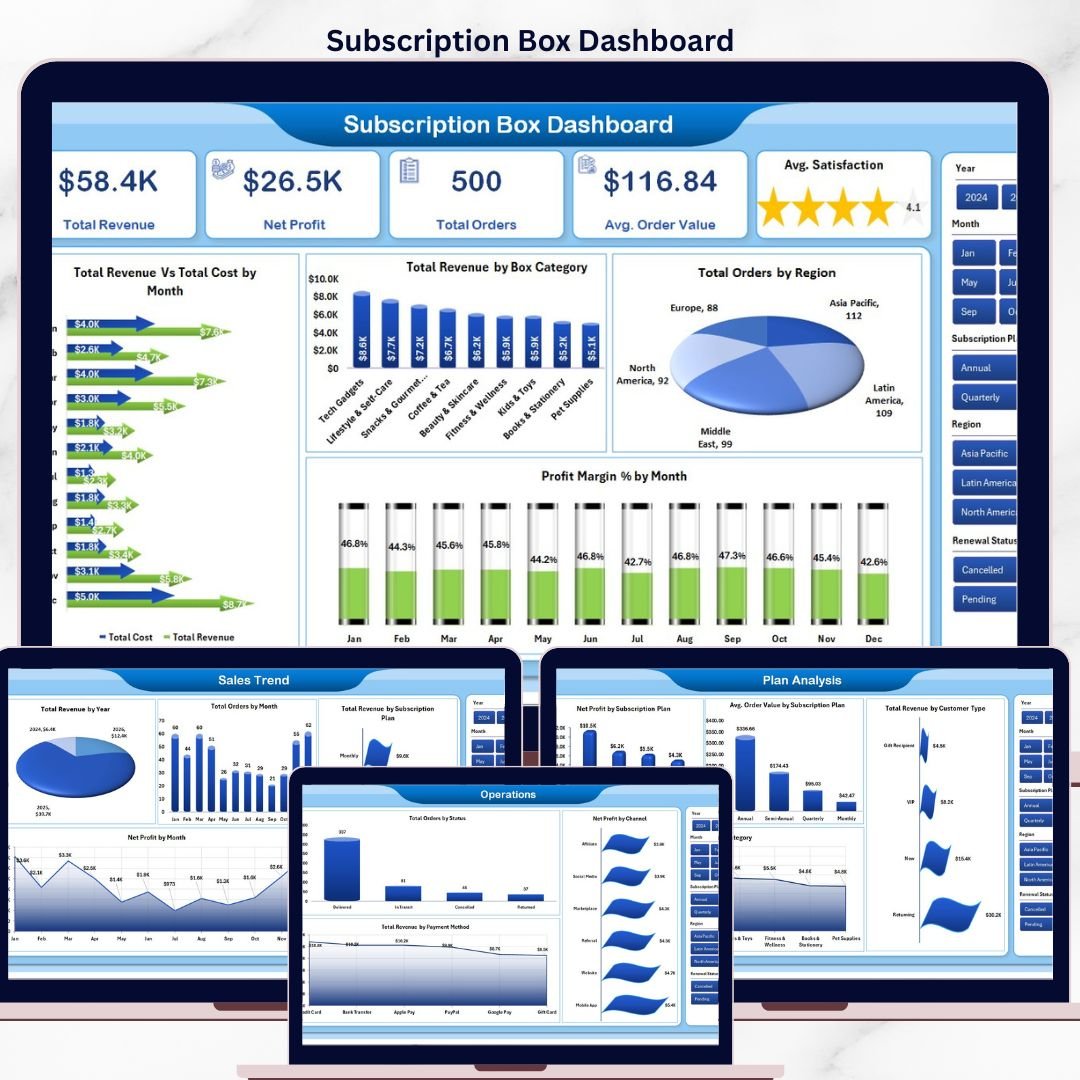
🔹 5 KPI cards on the Overview page — Total Revenue, Net Profit, Total Orders, Avg. Order Value, and Avg. Satisfaction. Every card recalculates instantly when you replace sample data with your own subscription order data.
🔹 16+ interactive charts across 5 pages — including Total Revenue Vs Total Cost by Month, Total Revenue by Box Category, Total Orders by Region, Profit Margin % by Month, Net Profit by Subscription Plan, and Avg. Order Value by Customer Type.
🔹 Multiple slicers on every page — filter the entire dashboard by subscription plan, box category, region, channel, or month with one click.
🔹 Five dedicated analysis pages — Overview, Sales Trend, Plan Analysis, Customer Insights, and Operations — each focused on a specific decision-making angle for subscription box operators.
🔹 Pre-formatted Data Sheet with sample subscription orders covering plan, category, region, channel, payment method, satisfaction score, order status, and renewal status.
🔹 Hidden Support sheet housing all pivot tables that power the dashboard — refresh once via Data → Refresh All and every chart updates.
🔹 Works offline on Microsoft Excel for Windows, Mac, and Excel for the web. No add-ins, no internet dependency, no recurring fees.
🔹 Designed for Excel Dashboard Templates users who want a ready-made e-commerce reporting tool without learning Power Pivot or DAX.
📦 What’s Inside the Subscription Box Dashboard in Excel
The workbook contains 7 tabs that work together as one connected reporting system. Below is a tab-by-tab breakdown.
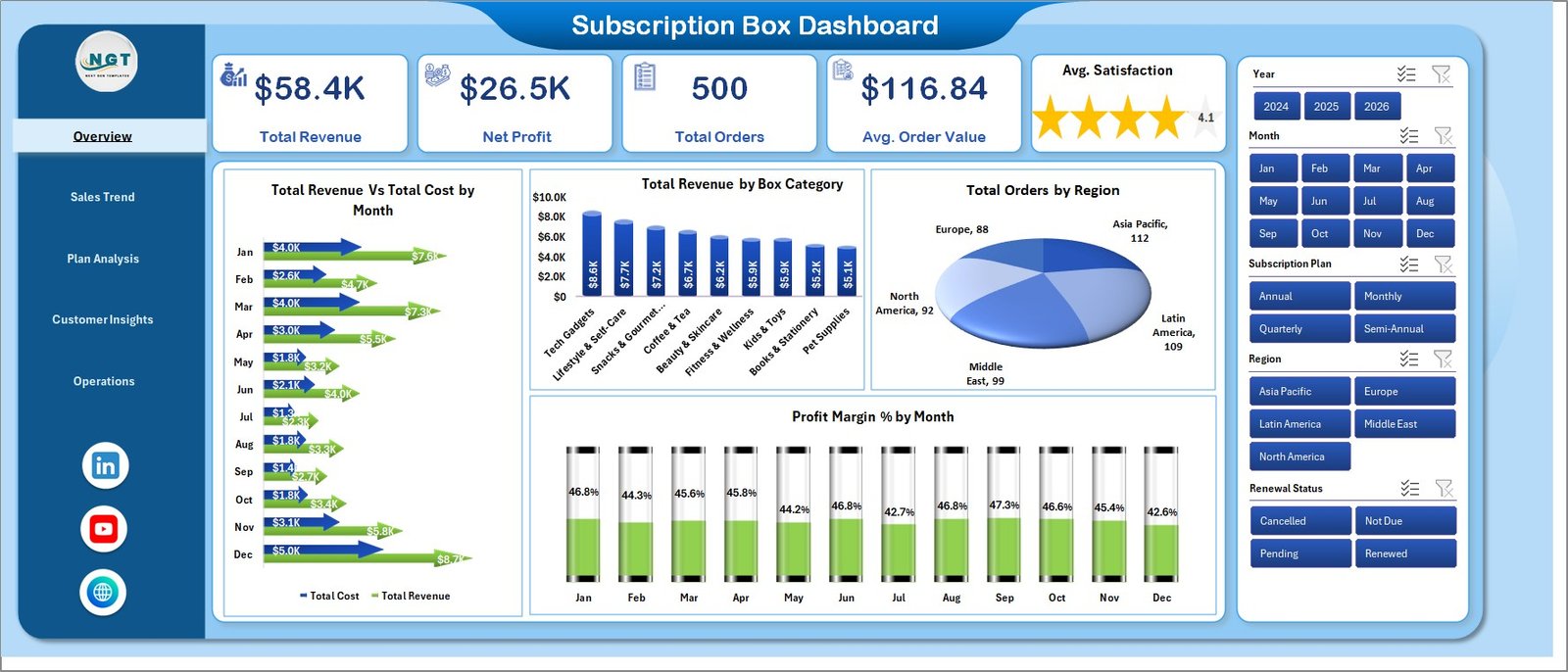
🔹 Overview Page — At the top of the sheet you’ll find KPI cards showing Total Revenue, Net Profit, Total Orders, Avg. Order Value, and Avg. Satisfaction. Below the cards, four charts deliver the high-level analysis: Total Revenue Vs Total Cost by Month compares income against expenses month-over-month so you can spot margin compression early; Total Revenue by Box Category shows which box themes drive the most income; Total Orders by Region reveals geographic concentration of orders; and Profit Margin % by Month tracks how efficiently each month converts revenue into profit. Multiple slicers on the page filter every card and chart in one click.
Overview Page
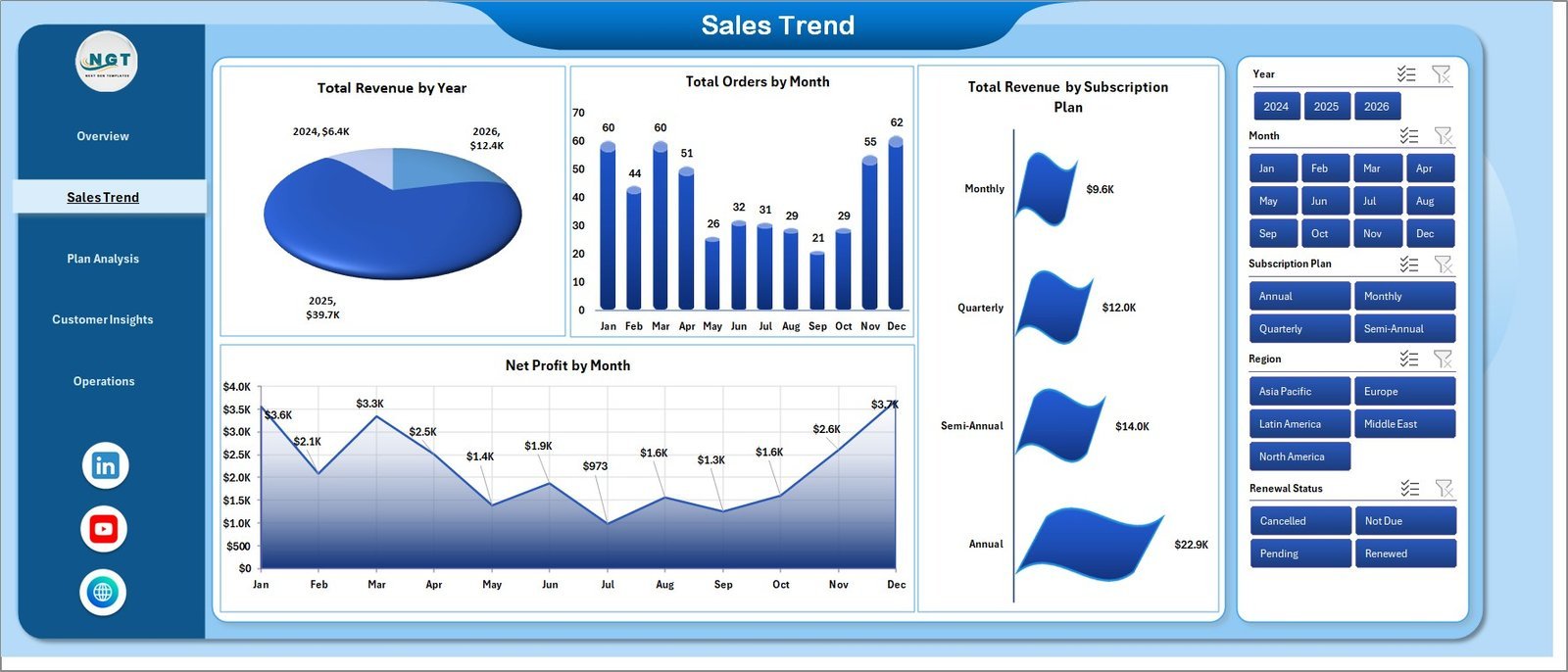
🔹 Sales Trend — A dedicated trend page covering Total Revenue by Year for long-term growth, Total Orders by Month for seasonality patterns, Total Revenue by Subscription Plan to compare monthly vs quarterly vs annual plans, and Net Profit by Month to map profit cycles across the year.
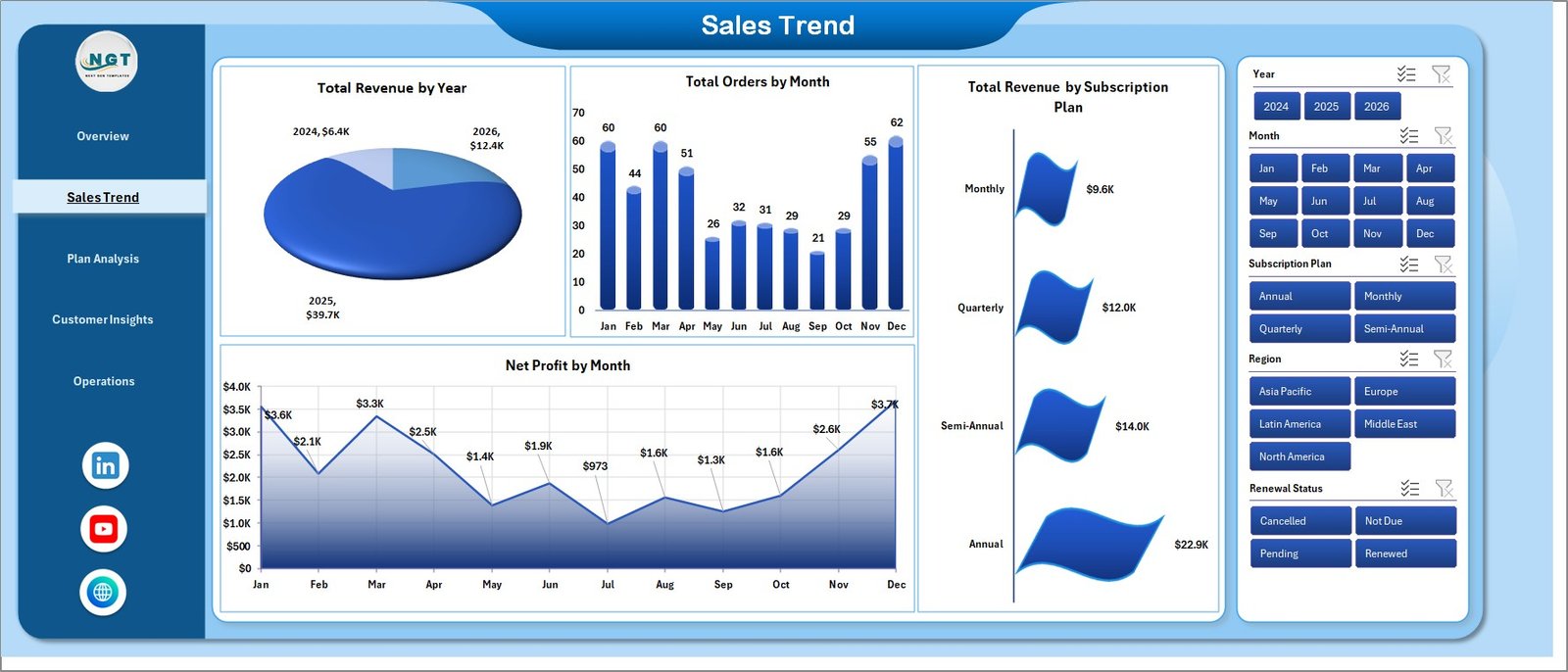
Sales Trend
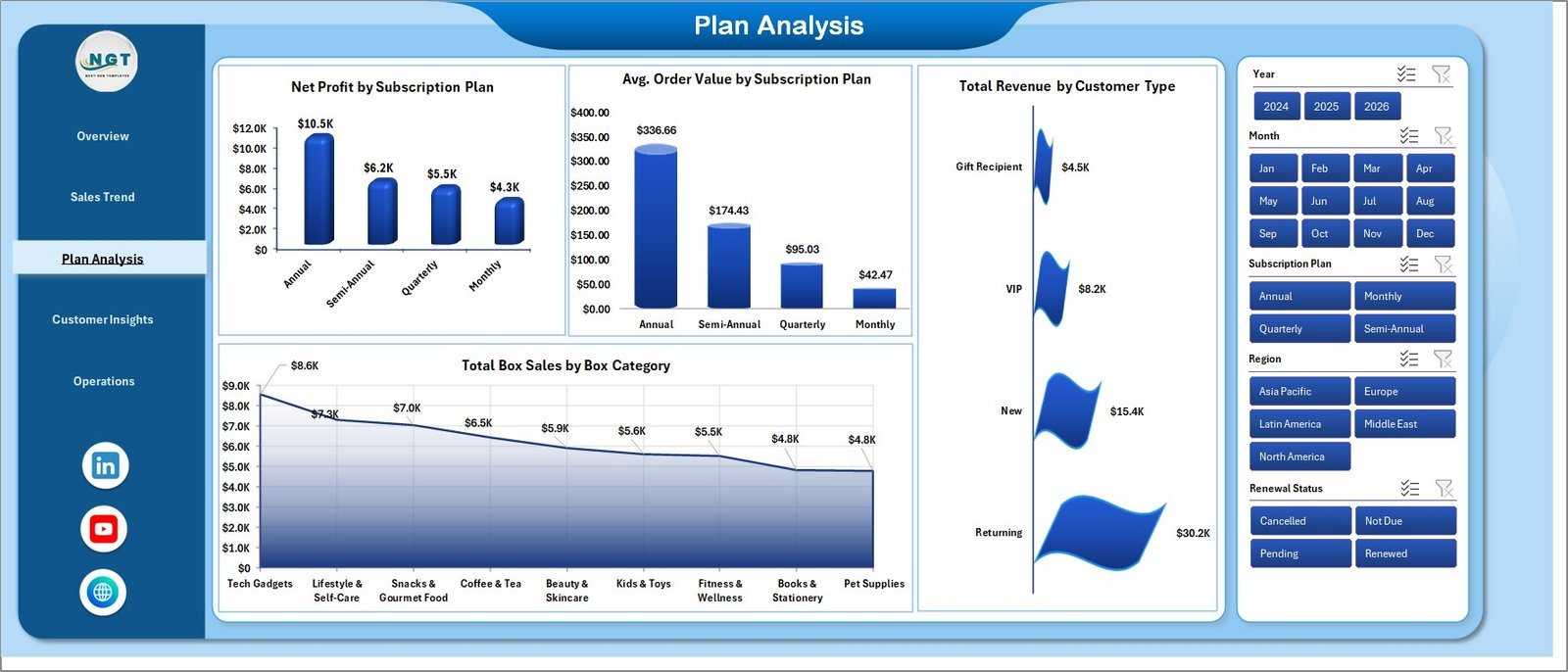
🔹 Plan Analysis — Plan-level profitability with Net Profit by Subscription Plan, Avg. Order Value by Subscription Plan, Total Revenue by Customer Type (new vs returning), and Total Box Sales by Box Category. Use this page to decide which plans to promote, retire, or reprice.
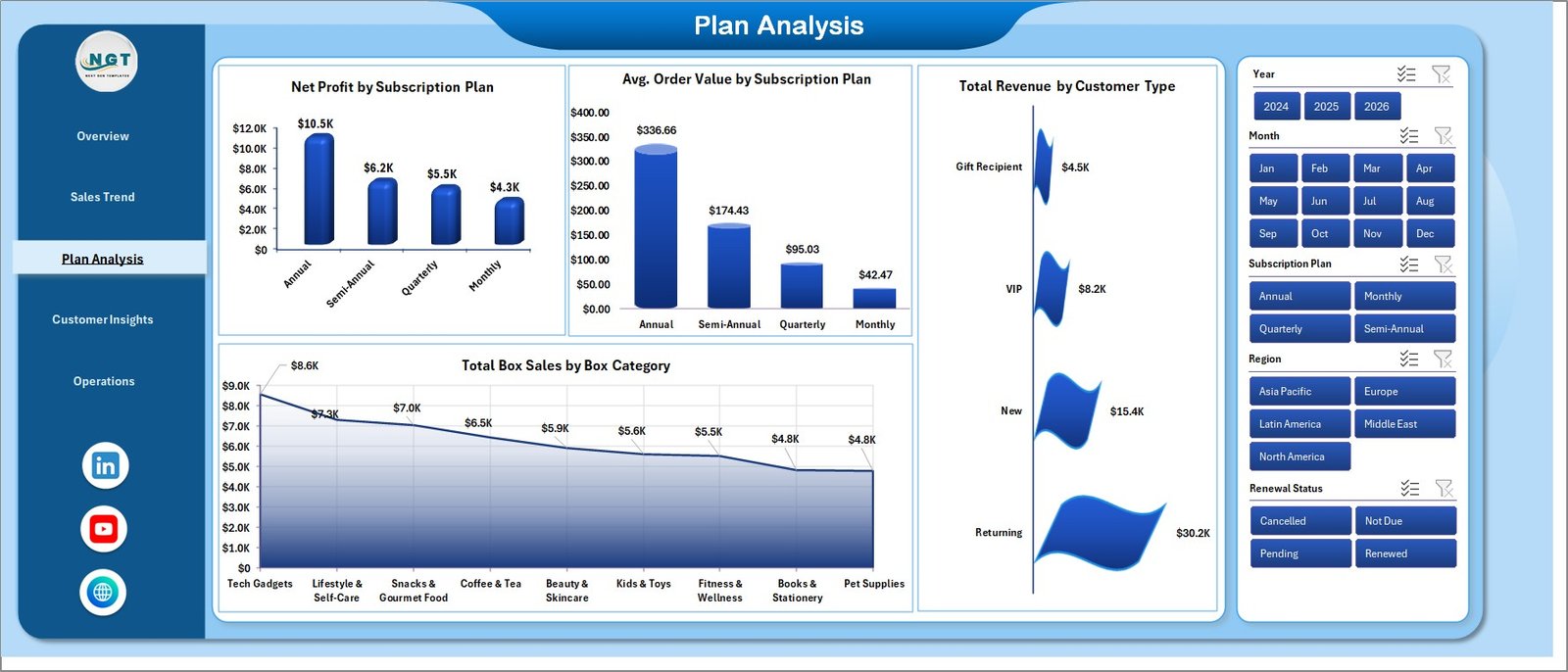
Plan Analysis
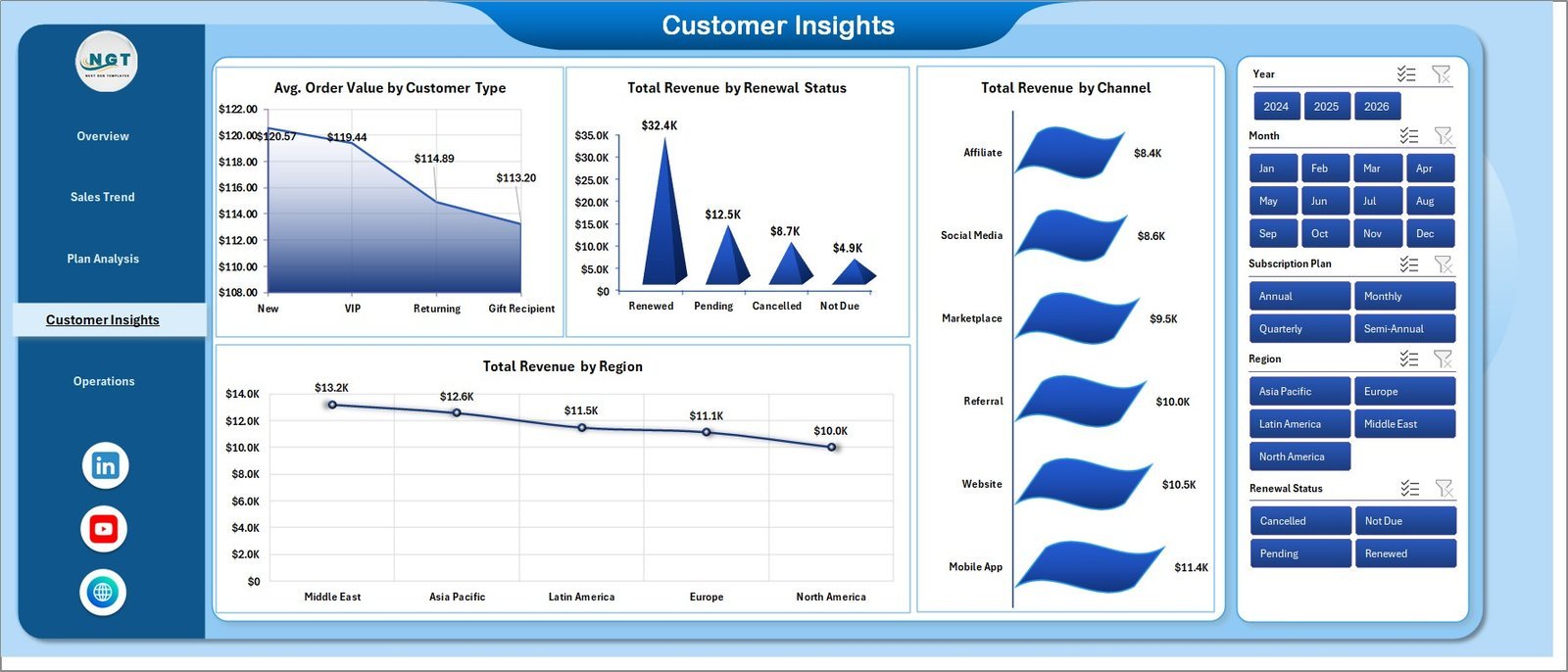
🔹 Customer Insights — Four customer-focused charts: Avg. Order Value by Customer Type, Total Revenue by Renewal Status (active, paused, cancelled), Total Revenue by Channel (web, app, retail partner), and Total Revenue by Region. This page tells you where retention is healthy and where churn is eating into revenue.
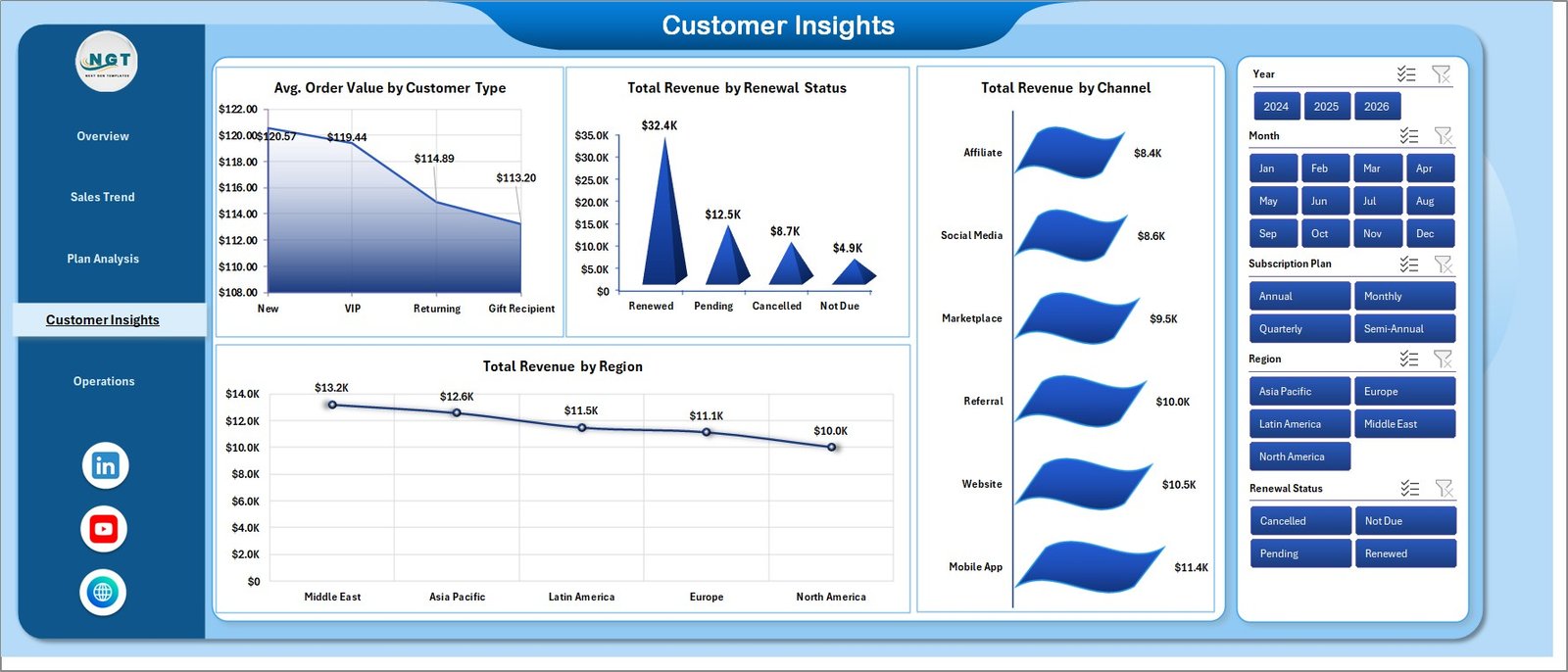
Customer Insights
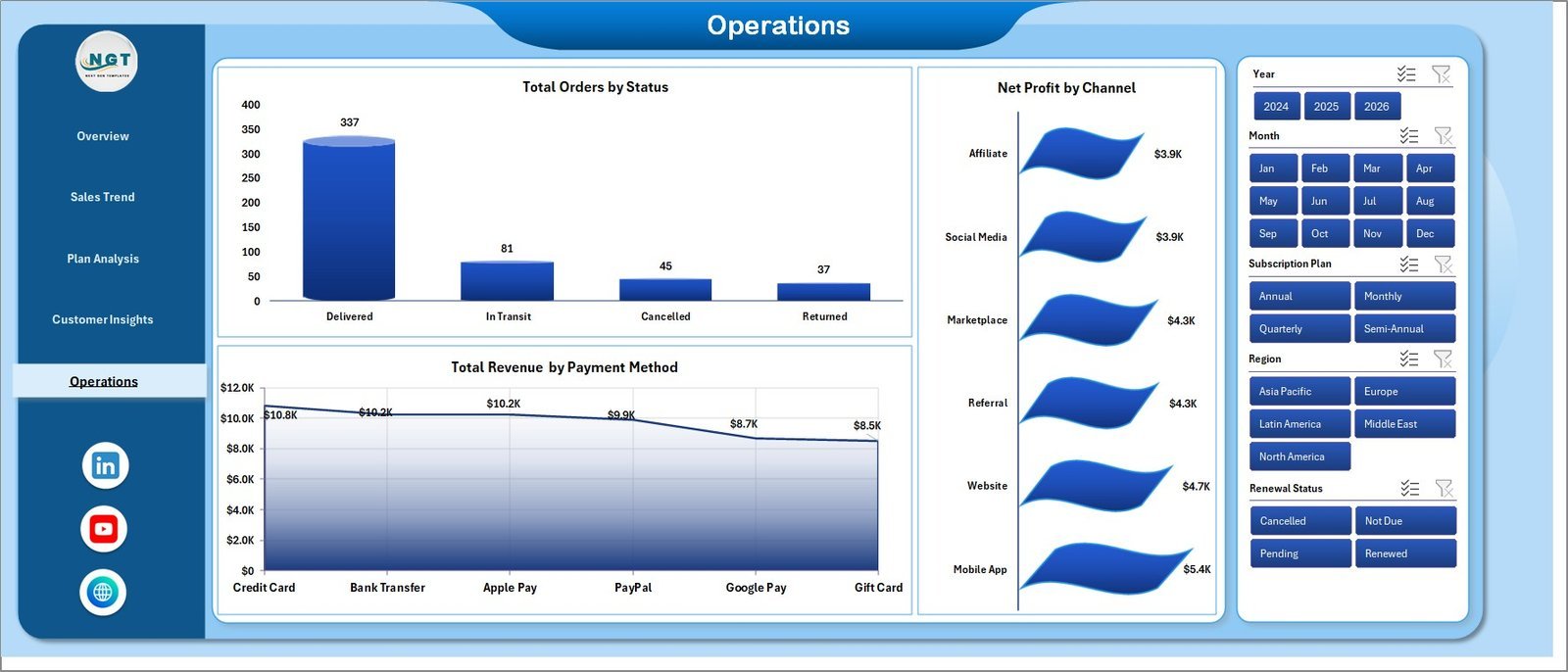
🔹 Operations — Three operational charts focused on fulfilment and payments: Total Orders by Status (shipped, processing, returned), Net Profit by Channel, and Total Revenue by Payment Method. Use this page in operations stand-ups to surface bottlenecks.
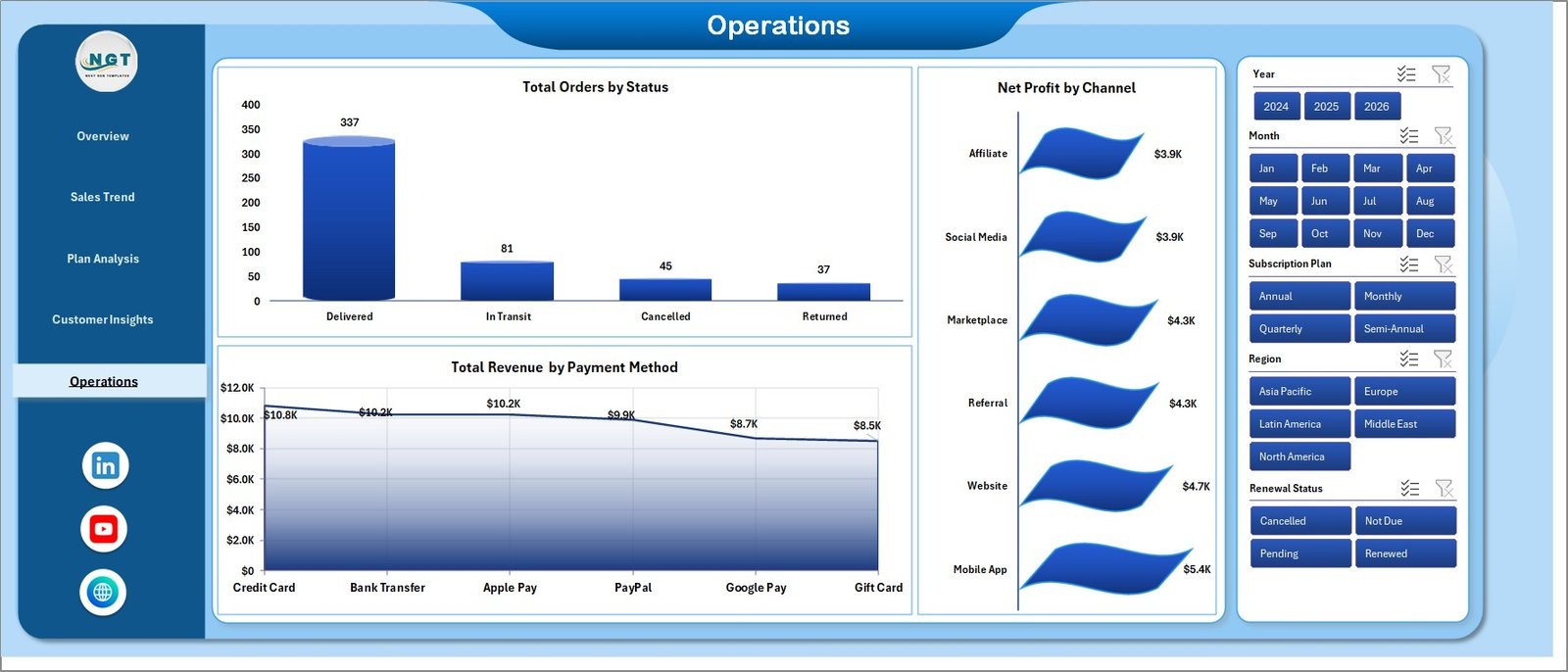
Operations
🔹 Data Sheet tab — Add your subscription order data in the same column format. Pre-populated headers cover order ID, date, plan, box category, region, channel, payment method, customer type, renewal status, order status, revenue, cost, and satisfaction score.

Data Sheet tab
🔹 Support sheet tab — Houses the pivot tables that drive every chart. Click Data → Refresh All after updating the Data sheet and every pivot rebuilds automatically. Keep this sheet hidden during day-to-day use.

Support sheet tab
📊 Subscription Box Dashboard in Excel vs. Google Sheets vs. Subbly / Cratejoy — Where This Fits
| Feature | Subscription Box Dashboard in Excel | Google Sheets equivalent | Subbly / Cratejoy Analytics |
|---|---|---|---|
| Cost | $17.99 one-time | $8-12 one-time | $39-159 / month + transaction fees |
| Platform | Microsoft Excel (Windows, Mac, Web) | Google Sheets (browser only) | Hosted SaaS only |
| Setup time | Under 10 minutes | Under 10 minutes | 2-5 days (full migration) |
| Works offline | ✅ Yes | ❌ Browser required | ❌ Cloud only |
| Customizable charts & KPIs | ✅ Fully editable | ✅ Editable | ❌ Locked templates |
| Year-1 cost at 3 users | $17.99 total | ~$10 total | $1,400-5,700+ per year |
| Data ownership | ✅ Local file you own | Cloud (Google account) | Locked in vendor system |
| Vendor lock-in risk | ✅ None | Low | High — exporting is painful |
For subscription box operators that want clear plan, region, and channel reporting without paying $40-160 per month for a hosted analytics suite, Subscription Box Dashboard in Excel sits in the sweet spot.
👥 Who This Template Is For — and Who It’s Not For
✅ This template is built for:
- Subscription box founders running 50-5,000 active subscribers who need monthly revenue, churn, and plan-mix visibility without paying for Subbly or Cratejoy analytics tiers.
- E-commerce operations managers tracking multiple box themes (beauty, snacks, books, hobby) and needing to spot which categories drive profit and which are bleeding margin.
- Finance and FP&A analysts at DTC brands who want a one-page board view of subscription performance built on Excel they already trust.
- Marketing teams running renewal campaigns who need a fast read on revenue by channel and renewal status by region.
❌ This template is NOT for:
- Enterprise subscription businesses with 100,000+ subscribers needing real-time dashboards backed by Snowflake, BigQuery, or Redshift.
- Teams that need automatic data sync from Stripe, Recharge, or Bold without any manual export step.
- Operations teams that need warehouse pick-and-pack workflow automation — this is a reporting dashboard, not a fulfilment system.
⚙️ How to Use the Subscription Box Dashboard in Excel
- Download & unzip the workbook and open it in Microsoft Excel (2016 or later recommended).
- Open the Data sheet and replace the sample rows with your own subscription order export from your billing platform.
- Keep the column headers unchanged — pivot tables read these names, so renaming them will break the dashboard.
- Click Data → Refresh All in the Excel ribbon. Every pivot in the Support sheet rebuilds and every chart on every page updates.
- Open the Overview page, click any slicer to filter the entire view by plan, box category, region, channel, or month.
- Cycle through the five pages — Overview → Sales Trend → Plan Analysis → Customer Insights → Operations — for the full performance read.
💼 Real-World Use Cases
Maya runs a beauty subscription box with 1,200 active subscribers. Every Monday she pastes the previous week’s Stripe export into the Data sheet, hits Refresh All, and the Plan Analysis page tells her whether the new “Quarterly Glow” plan is outperforming the monthly default — without paying for Subbly’s $99/month analytics tier.
Daniel is FP&A lead at a snack box DTC brand. He uses the Overview and Sales Trend pages in his monthly board pack to show Total Revenue Vs Total Cost by Month and Profit Margin % by Month. The template replaced a custom Power Query model that broke every time the schema changed.
Priya leads retention marketing for a book subscription company. She lives in the Customer Insights page — Total Revenue by Renewal Status tells her how much revenue is sitting in “paused” subscribers, and Total Revenue by Channel tells her where to focus winback emails next.
❓ Frequently Asked Questions
What KPIs does the Subscription Box Dashboard in Excel track?
The Subscription Box Dashboard in Excel tracks 5 headline KPIs — Total Revenue, Net Profit, Total Orders, Avg. Order Value, and Avg. Satisfaction — plus 16+ supporting charts covering revenue by plan, region, channel, box category, renewal status, payment method, and order status across 5 dedicated pages.
How does this compare to Subbly or Cratejoy analytics?
Subbly and Cratejoy charge $39-159 per month for hosted analytics, billed forever. The Subscription Box Dashboard in Excel is a $17.99 one-time purchase you own outright — no subscription, no per-user fee, and no vendor lock-in. The trade-off is you paste data manually instead of getting real-time sync.
How long does setup take?
Setup takes under 10 minutes for most users. Download the file, paste your subscription order export into the Data sheet keeping the column headers intact, then click Data → Refresh All. Every chart and KPI on all five pages updates automatically.
Can I customize the charts and KPI cards?
Yes. Every chart, slicer, and KPI cell is fully editable. You can add new KPIs by extending the pivot tables on the Support sheet, change colors to match your brand, or remove pages you don’t use. Excel skills equivalent to building a basic pivot table are enough.
Does this dashboard work on Mac and Excel for the web?
Yes. The Subscription Box Dashboard in Excel works on Microsoft Excel for Windows, Mac, and Excel for the web. No macros, no add-ins, and no internet connection required after download — pivot tables and slicers are native Excel features.
Do I need to enable macros to use this template?
No. The Subscription Box Dashboard in Excel uses only native Excel features — pivot tables, slicers, charts, and standard formulas. There are no macros or VBA scripts, so there’s nothing to enable and nothing for security software to block.
Can I add my own custom subscription plans or box categories?
Yes. Just type the new plan name or category into the Data sheet rows. After you click Data → Refresh All, the new value appears automatically in every slicer, chart, and KPI on the dashboard — no formula edits needed.
👤 About the Author
Built by PK — Microsoft Certified Professional with 15+ years of Excel, Google Sheets, and Power BI experience. Founder of NextGenTemplates, reaching 300K+ subscribers across YouTube channels (@PK-AnExcelExpert, @NextGenTemplates, @NeoTechNavigators). Every template is hand-built and tested before release.
🔗 Explore Related Templates
- Dropshipping Dashboard in Excel — sister e-commerce dashboard for dropshippers tracking suppliers, SKUs, and channel margin.
- Etsy Seller Analytics Dashboard in Excel — for sellers running an Etsy storefront alongside their subscription box.
- Subscription and SaaS Renewal Calendar in Excel — pair this with the dashboard to never miss a renewal date.
- SaaS Onboarding Dashboard in Excel — if you also run a SaaS arm alongside your subscription box.
- Browse the full Excel Dashboard Templates library or the Google Sheets Dashboards collection.
📖 Click here to read the Detailed Blog Post
🎥 Visit our YouTube channel for step-by-step video tutorials
👉 YouTube.com/@NextGenTemplates
📅 Last updated: May 2026