



The GDPR Compliance Checklist in Google Sheets is an essential tool for organizations looking to ensure they meet the requirements set by the General Data Protection Regulation (GDPR). This checklist helps organizations track and maintain compliance with GDPR regulations by ensuring that all necessary steps are followed. Google Sheets provides a flexible, collaborative platform to manage, update, and monitor GDPR compliance across your organization.
With the GDPR Compliance Checklist in Google Sheets, you can easily customize tasks, monitor progress, and ensure that your organization is fully aligned with GDPR requirements, minimizing the risk of data breaches and ensuring that your business respects customer privacy.

Key Features of the GDPR Compliance Checklist in Google Sheets
📋 Customizable Compliance Items
Tailored Data Protection Categories: Customize the checklist to cover key GDPR requirements such as consent management, data processing, data subject rights, and data protection impact assessments.
Dynamic Data Entry: Quickly input and update compliance data, ensuring that your checklist always reflects the most current GDPR standards and practices.
📊 Interactive Data Visualization
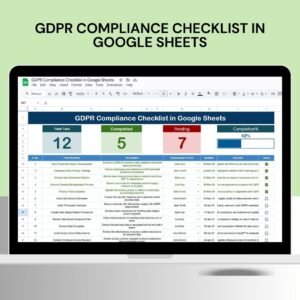
Progress Tracking: Utilize conditional formatting to track completed and pending tasks visually, offering an at-a-glance understanding of compliance progress.
Comprehensive Charts and Graphs: Use various chart types to analyze trends in compliance efforts, enabling you to easily identify areas that require more attention.
💻 Real-Time Collaboration and Accessibility
Multi-User Collaboration: Enable your team to work together by allowing multiple users to access and update the checklist simultaneously, ensuring data consistency and transparency.
Cloud-Based Access: Access the checklist from any device with internet connectivity, providing flexibility for remote teams and managers.
🛠 Automated Calculations and Reporting
Built-In Formulas: Use Google Sheets’ functions to automate calculations, such as completion percentages and compliance status, saving time and minimizing errors.
Scheduled Reporting: Set up automated email reports or notifications to keep stakeholders informed about GDPR compliance status, progress, and deadlines.
Benefits of Using Google Sheets for GDPR Compliance Tracking
✅ Cost-Effective Solution
Google Sheets is free to use and provides robust features to help you track GDPR compliance without the need for costly software or third-party tools.
✅ User-Friendly Interface
The simple and intuitive design of Google Sheets ensures that users with varying levels of technical expertise can easily utilize the checklist and monitor progress.
✅ Scalable and Flexible
As your business grows or new GDPR requirements are introduced, the checklist can be easily modified to accommodate additional tasks, regulations, or compliance efforts.
Getting Started with Your GDPR Compliance Checklist in Google Sheets
Define GDPR Compliance Requirements: Identify key GDPR obligations that your organization must meet, such as data consent, security measures, or data subject rights.
Develop Checklist Items: Create detailed tasks under each category to ensure that all compliance aspects are covered.
Assign Responsibilities: Designate team members to specific tasks, ensuring accountability and clear ownership for GDPR compliance actions.
Set Deadlines: Establish deadlines for each compliance task to ensure that GDPR obligations are met in a timely manner.
Monitor and Update: Regularly review and update the checklist to stay aligned with evolving GDPR regulations or internal policies.
By using the GDPR Compliance Checklist in Google Sheets, your organization can streamline GDPR compliance efforts, enhance collaboration, and ensure that customer data is protected in accordance with regulatory standards.
Click here to read the Detailed blog post
GDPR Compliance Checklist in Google Sheets
Visit our YouTube channel to learn step-by-step video tutorials
YouTube.com/@PKAnExcelExpert
Compatibility and Requirements
- Works in Google Sheets. You need a free Google account and a web browser.
- Several people can open and update the checklist at the same time. Google explains how to get started in Google Sheets: Sign-in.
Frequently Asked Questions
What does the GDPR Compliance Checklist in Google Sheets cover?
You can set up categories for consent management, data processing, data subject rights and data protection impact assessments, then add detailed tasks under each one.
Can my team work on the checklist together?
Yes. Multiple users can open and update the sheet at the same time from any device with internet access.
How do I see which tasks are done?
Conditional formatting shows completed and pending tasks visually. Built-in formulas calculate completion percentages and compliance status.
Can I assign tasks and deadlines?
Yes. The steps in the getting-started guide cover assigning each task to a team member and setting a deadline for every compliance item.
Is there an Excel version of this checklist?
Yes. See the GDPR Compliance Checklist Template in Excel.
Related Compliance Templates
- GDPR Compliance Checklist Template in Excel: the same checklist for Excel users
- Compliance Audit Tracker in Google Sheets: track audit findings and follow-ups
- GDPR Compliance Tracking Checklist in Excel: a tracking view of GDPR tasks
- Internal Audit Compliance Checklist in Excel: checks for internal audits
- Project Management Checklist in Google Sheets: another Google Sheets checklist
Browse all Google Sheets checklists.















Reviews
There are no reviews yet.