🎉 Black Friday Sale: 40% OFF everything with code BF40 · ends 1 Dec  Shop now →

Compliance Audit Tracker in Google Sheets

Google Sheets - instant download

Original price was: ₹1,299.00.Current price is: ₹699.00.
Details, requirements and demo below
Sale!

Compliance Audit Tracker in Google Sheets

Original price was: ₹1,299.00.Current price is: ₹699.00.

🚨 Simplify and supercharge your compliance process with our Compliance Audit Tracker in Google Sheets – your all-in-one audit command center!

✨ Key Features
🔹 Real-Time Visual Dashboard – Instantly see compliance status across departments
🔹 Single Sheet Simplicity – Manage everything in one tab
🔹 Drop-Down Task Assignment – Assign owners to each finding
🔹 Deadline Tracking – Never miss due dates again
🔹 Severity-Based Prioritization – Focus on what matters most
🔹 Status Monitoring – From pending to resolved, stay in control
🔹 Fully Customizable – Tailor columns and layout to your needs
🔹 Google Sheets Compatibility – Share and collaborate with ease
🔹 Time-Saving Automation – Auto-updating charts and live metrics
🔹 Compliance Across Teams – Perfect for HR, finance, legal, and quality control

Customize this template for your business (optional)

Handled by email: we contact you within 1 business day. One revision round included. What is included

- +

💡 Buy any 2 templates and save 20% automatically at checkout.

Included in All-Access Templates. Get this plus 7,000+ templates for ₹4,999.00 a year. Compare plans →
Pricing country
Prices follow your selected country; checkout uses your billing country.
Google Sheets Complete Course: Beginner to Advanced courseLaunch offer
🎓 NEXTGENTEMPLATES ACADEMY
Want to build Google Sheets like this yourself?
Google Sheets Complete Course: Beginner to Advanced

Formulas, lookups, QUERY, dynamic arrays, pivot tables, charts, live data and Apps Script, ending with an interactive sales dashboard. 74 lessons by PK with a practice file for every lesson.

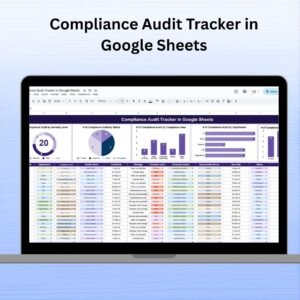
In today’s complex business landscape, regulatory compliance is not optional—it’s essential. That’s where the Compliance Audit Tracker in Google Sheets comes in. This ready-to-use, cloud-based template helps you track, manage, and resolve compliance audit issues in a streamlined, visual, and collaborative way. Whether you’re overseeing internal audits, third-party inspections, or departmental reviews, this tracker ensures every finding is monitored and resolved efficiently.

Compliance Audit Tracker in Google Sheets

✅ Key Features of the Compliance Audit Tracker

📊 Real-Time Dashboard with Visual Insights

  • Visual charts for Audit by Severity, Audit by Status, Audit by Department, Compliance Area, and Responsible Person

  • Live progress indicators keep teams aligned and up-to-date

📝 Centralized Tracker Sheet

  • One single sheet to manage all audit entries

  • Includes details like Findings, Corrective Actions, Severity Level, Responsible Person, Due Date, and Status

  • Color-coded charts instantly show progress and bottlenecks

📅 Due Date Management

  • Assign deadlines to every action item and get clear visibility into overdue or pending tasks

🧩 Fully Editable & Customizable

  • Add, remove, or edit columns to suit your organizational structure

  • Tailor it to track financial, health, IT, HR, or operational audits


📦 What’s Inside the Compliance Audit Tracker

  • ✅ Tracker Sheet Tab – The core working sheet with data and dynamic charts

  • ✅ Auto-updating Charts – Including severity breakdowns, status analysis, and departmental distribution

  • ✅ Drop-down lists for assigning responsible persons

  • ✅ Color-coded status labels for quick status checks

  • ✅ Real-time collaboration support via Google Sheets


🛠️ How to Use the Compliance Audit Tracker

1️⃣ Enter Audit Details – Start logging audits by department, compliance area, and findings
2️⃣ Assign Responsibilities – Tag a team member in charge of each corrective action
3️⃣ Set Deadlines – Add a due date to avoid compliance delays
4️⃣ Track Progress – Use the Status column to mark items as Pending, In Progress, or Resolved
5️⃣ Visualize Status – Let the automated charts do the reporting for you

No more chasing spreadsheets or wondering who’s doing what — everything is visible at a glance.


👥 Who Can Benefit from This Tracker

🔸 Compliance Officers – Centralized audit management and instant updates
🔸 Department Heads – Track audit progress within specific teams
🔸 HR & Admin Teams – Monitor policy-related compliance effortlessly
🔸 Quality Assurance Teams – Record ISO, safety, and SOP non-compliances
🔸 Small to Large Enterprises – Perfect for internal audits, regulatory prep, or vendor evaluations

Whether you’re a startup ensuring basic compliance or a large corporation handling multiple audits — this tool brings visibility, accountability, and control.


🔗 Click here to read the Detailed blog post

Watch the step-by-step video Demo:


🔔 Visit our YouTube channel to learn step-by-step video tutorials

Compatibility and Requirements

  • Works in Google Sheets with a free Google account and a web browser. No installation is needed.
  • The Responsible Person column uses a drop-down list. Google’s guide to creating an in-cell dropdown list shows how to edit the names.

Frequently Asked Questions

What does the Compliance Audit Tracker record?

Each audit entry has the department, compliance area, findings, corrective actions, severity level, responsible person, due date and status.

Which charts are on the tracker?

Audit by Severity, Audit by Status, Audit by Department, Compliance Area and Responsible Person. The charts update as you add or change entries.

What status values does it use?

Mark each item as Pending, In Progress or Resolved in the Status column. The color-coded labels show progress at a glance.

Can I use it for other kinds of audits?

Yes. Add, remove or edit columns to track financial, health, IT, HR or operational audits.

Is there an Excel version?

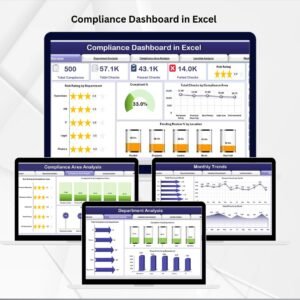
Yes, the Compliance Audit Tracker in Excel is available for teams that work in Excel.

Related Compliance Templates

Browse all Google Sheets tracker templates or the quality control templates.
Frequently asked questions

How do I get my own copy?
After purchase you get a link to the Google Sheet. Open it while signed in to your Google account and use File > Make a copy - the copy in your Google Drive is fully yours and editable.
Do I need a paid Google account? Will it expire?
No. A free Google account is enough, and your copy lives in your own Google Drive - it never expires and there is nothing to renew.
Does it work on Mac, phone or tablet?
Yes - in any browser on Windows, Mac or Chromebook, and in the Google Sheets mobile app for viewing and quick entries.
Can I share it with my team?
Yes. Share your copy with colleagues using Google's normal sharing, with view or edit rights as you choose.
Can I change the design and formulas?
Yes, your copy is fully editable - colours, labels, logo, formulas and charts. If a range is protected, use Data > Protect sheets and ranges to remove it in your copy.
Are there macros or add-ons?
No macros or add-ons - it uses normal Google Sheets formulas and charts.
Is it a one-time payment or a subscription?
One-time payment. No subscription, no per-user fees and nothing to renew - the file is yours to keep.
How do I get the file after payment?
Instantly. The download link appears on screen after checkout, is emailed to you, and stays under My Account > Downloads on our website. If the email does not arrive within a few minutes, check your spam or promotions folder.
Is a user manual included?
Most of our newer products include a PDF user manual in the download. If yours does not have one, message us with your order number and we will send it.
Do I get free updates?
Bug fixes are always free - if something does not work as described, we fix it and send you the corrected file. New versions with new features are not included in the price, unless this product's description says otherwise.
Can you customise it for me?
Yes. Small changes to this template (your columns, categories, logo, colours, minor layout) cost the template price plus $40-80 (Rs 3,000-6,000 + GST), quoted once you send your list. A fully custom build is usually $100-200 (Rs 8,000-18,000 + GST) with two revision rounds. Email your requirements to [email protected] or message us on WhatsApp.
Can I use it for my business or my clients?
Yes, for your own personal or internal business use, for as long as you like. Reselling or redistributing the template is not allowed.
What is your refund policy?
Because these are digital downloads, they are non-refundable once delivered - except when the product does not match its description (report it within 48 hours of purchase) or there is a technical problem our team cannot fix within 72 hours. Email [email protected] with your order number.
How do I get help?
Email [email protected] (Mon-Fri, 10 AM-7 PM IST) or message us on WhatsApp +91 80770 90260 (chat only, no calls). Please include your order number.

Still have a question? Click Need help? at the bottom-left to ask our assistant, or message us on WhatsApp.

Application

Google Sheets

Template Type

Tracker

Price

Paid

Business Or Department

IT and Software Development

Reviews

There are no reviews yet.

Only logged in customers who have purchased this product may leave a review.

You may also like…

Compliance Audit Tracker in Google SheetsCompliance Audit Tracker in Google Sheets
Original price was: ₹1,299.00.Current price is: ₹699.00.
- +
Scroll to Top