

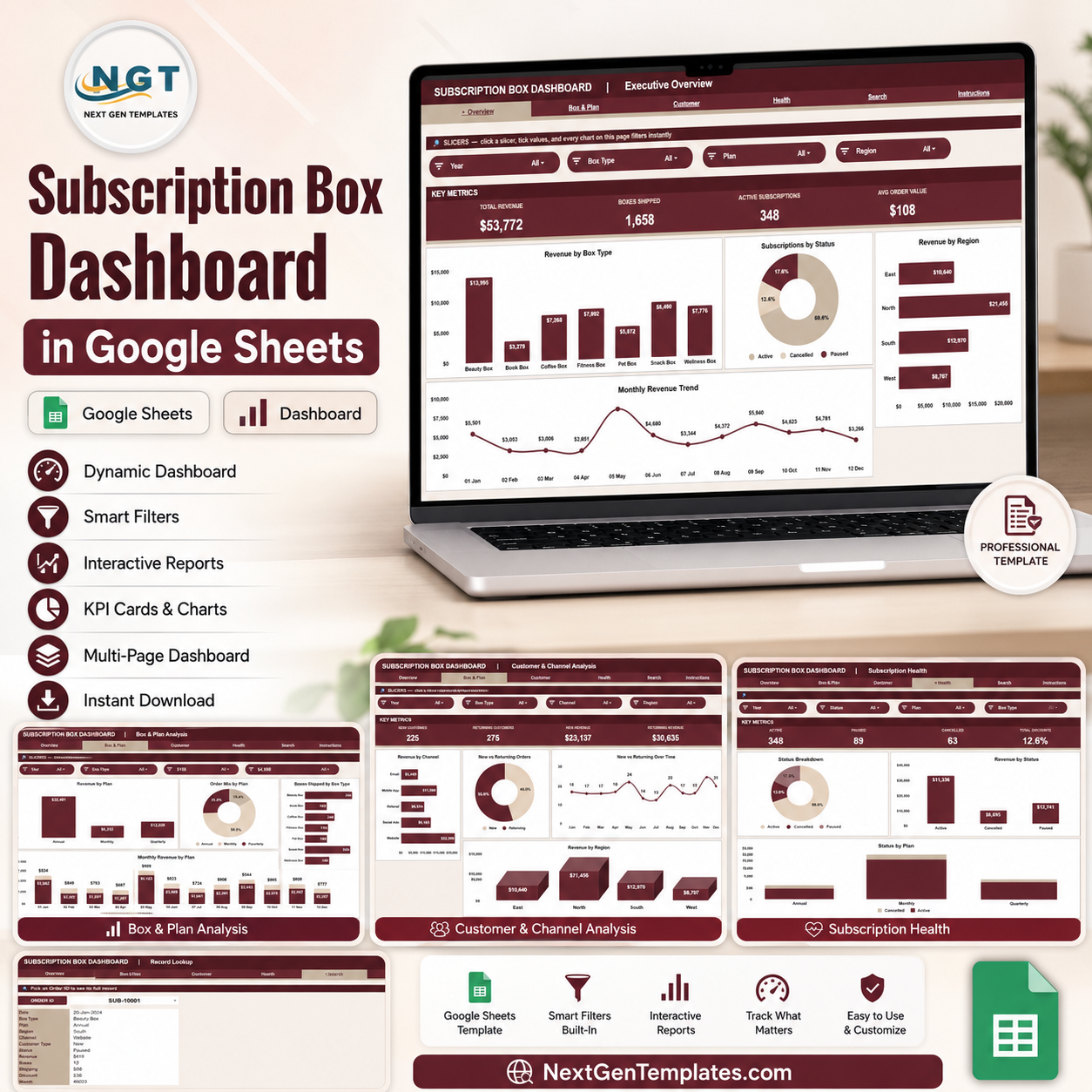
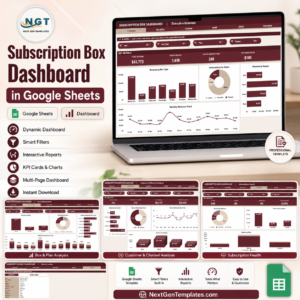
The Subscription Box Dashboard in Google Sheets tracks 4 headline KPIs — Total Revenue, Boxes Shipped, Active Subscriptions, and Average Order Value — across 4 analysis pages with 15 pre-built charts, a dedicated order Search sheet, and slicer filters on every page. Setup takes under 10 minutes: paste your order data into the Data sheet and every card, chart, and lookup updates automatically.
🌍 Join 8,400+ teams in 40+ countries using NextGenTemplates to replace paid SaaS tools with one-time-purchase Excel, Google Sheets, Power BI, and HTML templates.
✅ Instant download · One-time payment · No subscription · No per-user fees · Lifetime access
🔑 Key Features of the Subscription Box Dashboard in Google Sheets
📌 4 KPI cards on the Overview page — Total Revenue, Boxes Shipped, Active Subscriptions, and Avg Order Value give you the health of your subscription box business in one glance, recalculated live from your data.
📌 15 pre-built charts across 4 analysis pages — the dashboard covers revenue by box type, plan, region, channel, and month, plus order mix, new vs returning customers, and subscription status breakdowns.
📌 Slicers for one-click filtering — every dashboard page includes multiple slicers, so you can filter the whole view by box type, plan, region, channel, customer type, or status without touching a single formula.
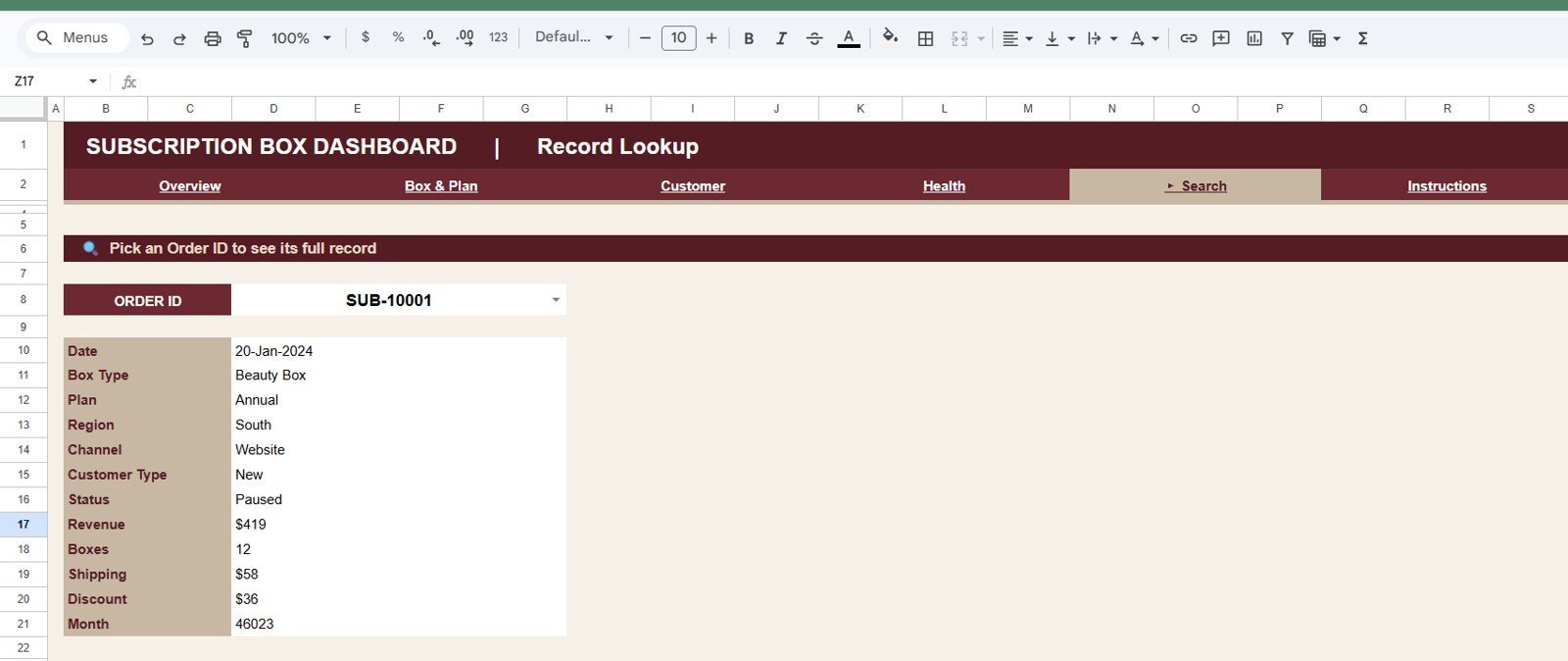
📌 Order-level Search sheet — pick any Order ID from a dropdown and the sheet instantly shows Date, Box Type, Plan, Region, Channel, Customer Type, Status, Revenue, Boxes, Shipping, Discount, and Month for that order.
📌 Single Data sheet input — all pages read from one structured Data sheet. Add or paste rows in the same format and the entire dashboard refreshes automatically.
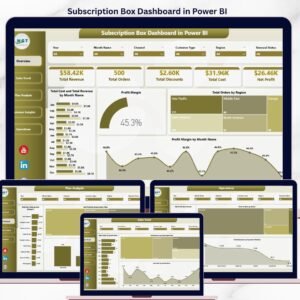
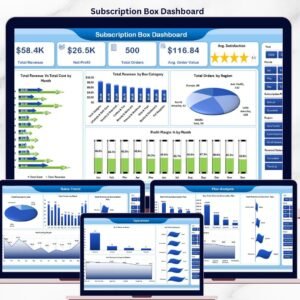
Looking for the same layout on another platform? This template is also available as the Subscription Box Dashboard in Excel and the Subscription Box Dashboard in Power BI, and it sits alongside our other Google Sheets Dashboards.
📦 What’s Inside the Subscription Box Dashboard in Google Sheets
Page 1: Overview
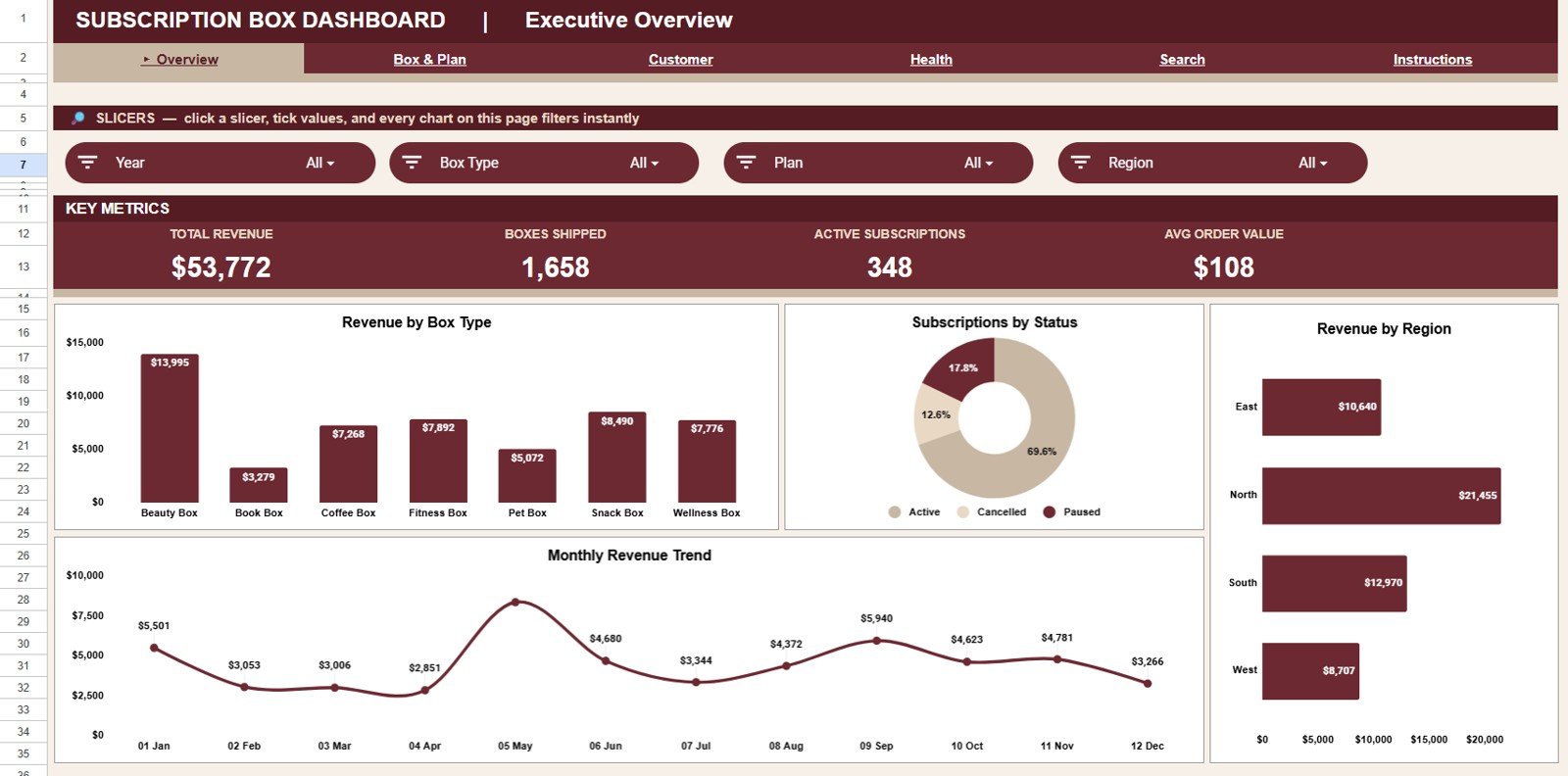
The Overview page shows 4 KPI cards — Total Revenue, Boxes Shipped, Active Subscriptions, and Avg Order Value — with slicers at the top to filter the entire page instantly. Charts include Revenue by Box Type, Subscriptions by Status, Revenue by Region, and Revenue by Month, so you see product mix, retention, geography, and trend in one screen.
Page 2: Box & Plan Analysis
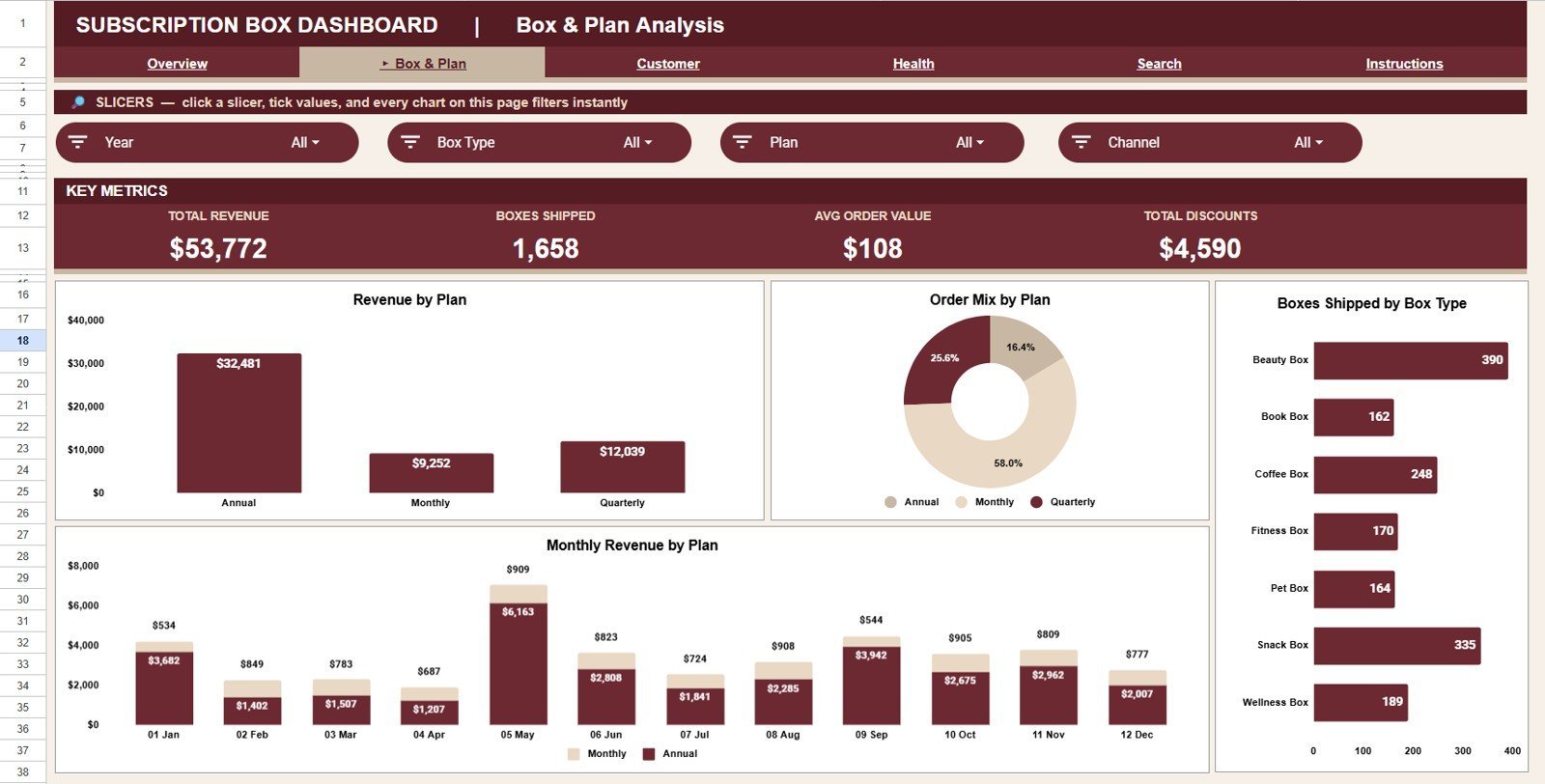
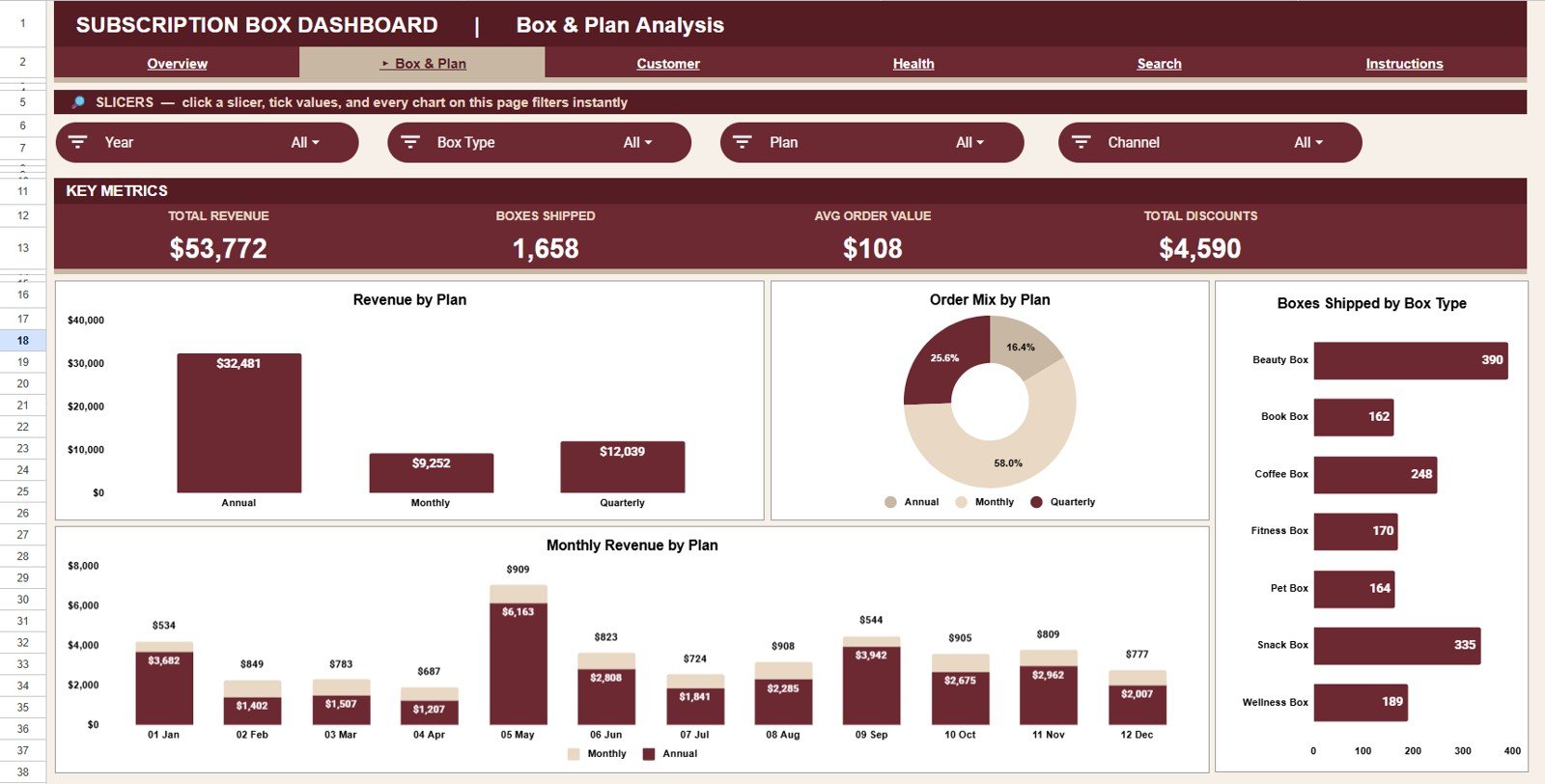
This page breaks performance down by product and billing plan. Charts include Revenue by Plan, Order Mix by Plan, Monthly Revenue by Plan, and Boxes Shipped by Box Type — perfect for deciding which plans to promote and which boxes to retire.
Page 3: Customer & Channel Analysis
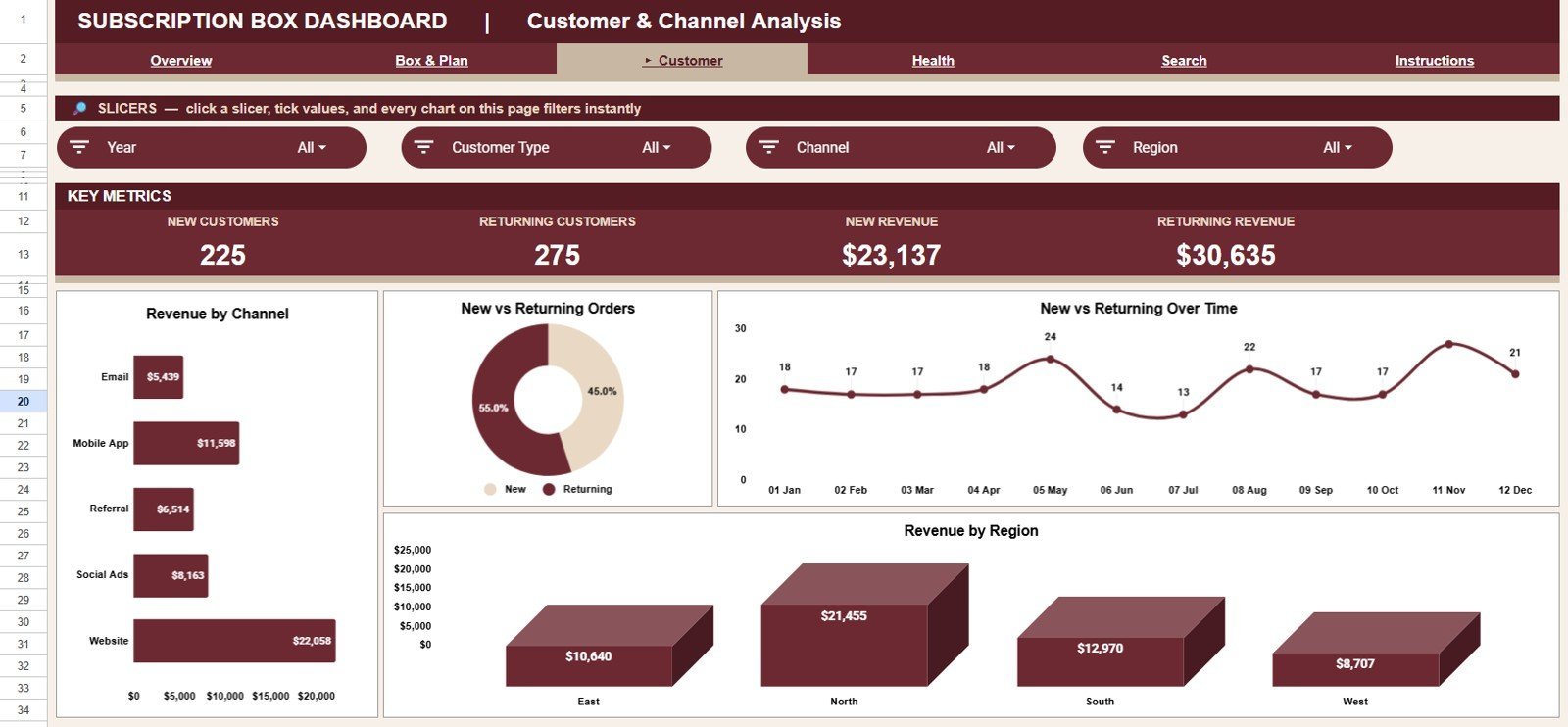
This page shows where your orders come from and who places them. Charts include Revenue by Channel, Orders by Customer Type, New vs Returning by Month, and Revenue by Region — so you can compare acquisition channels and monitor repeat-purchase behavior over time.
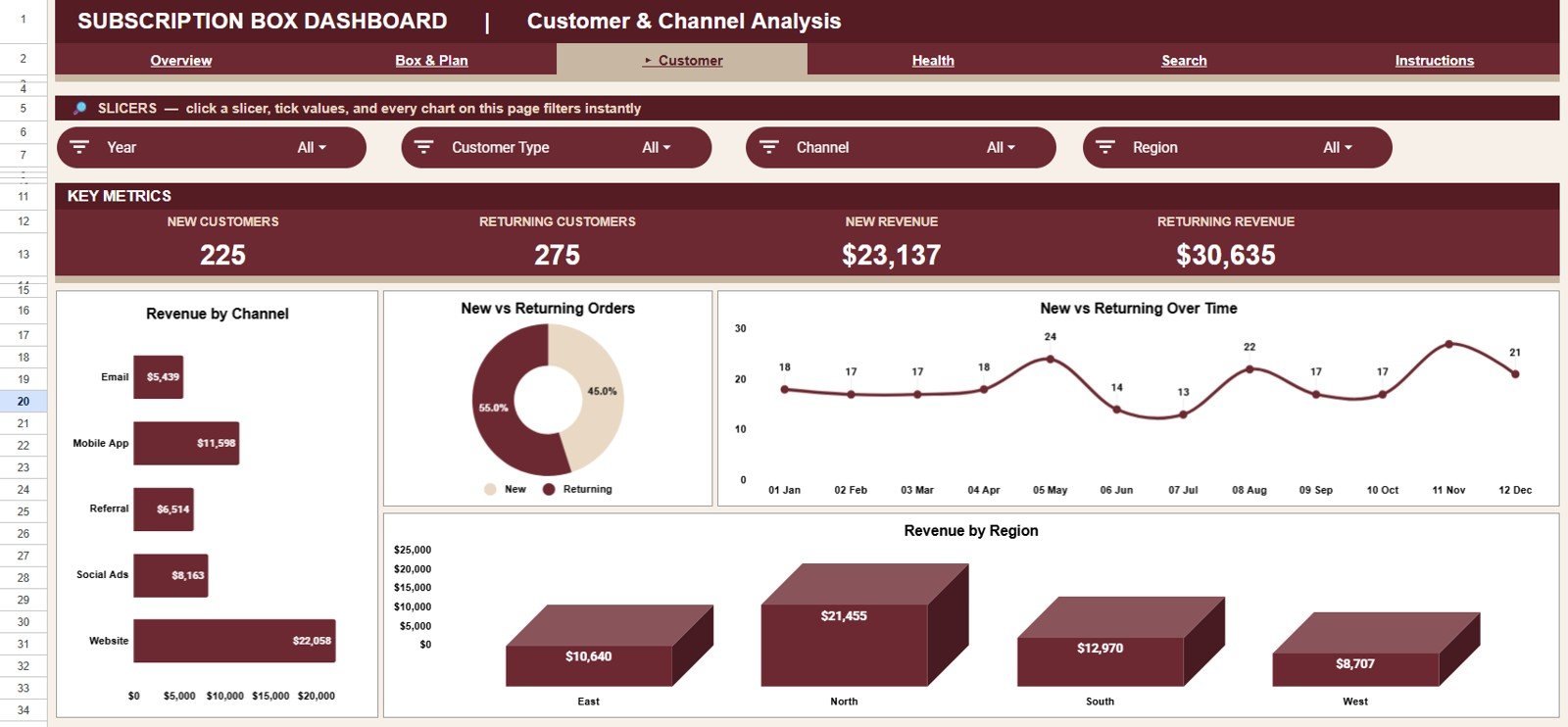
Page 4: Subscription Health
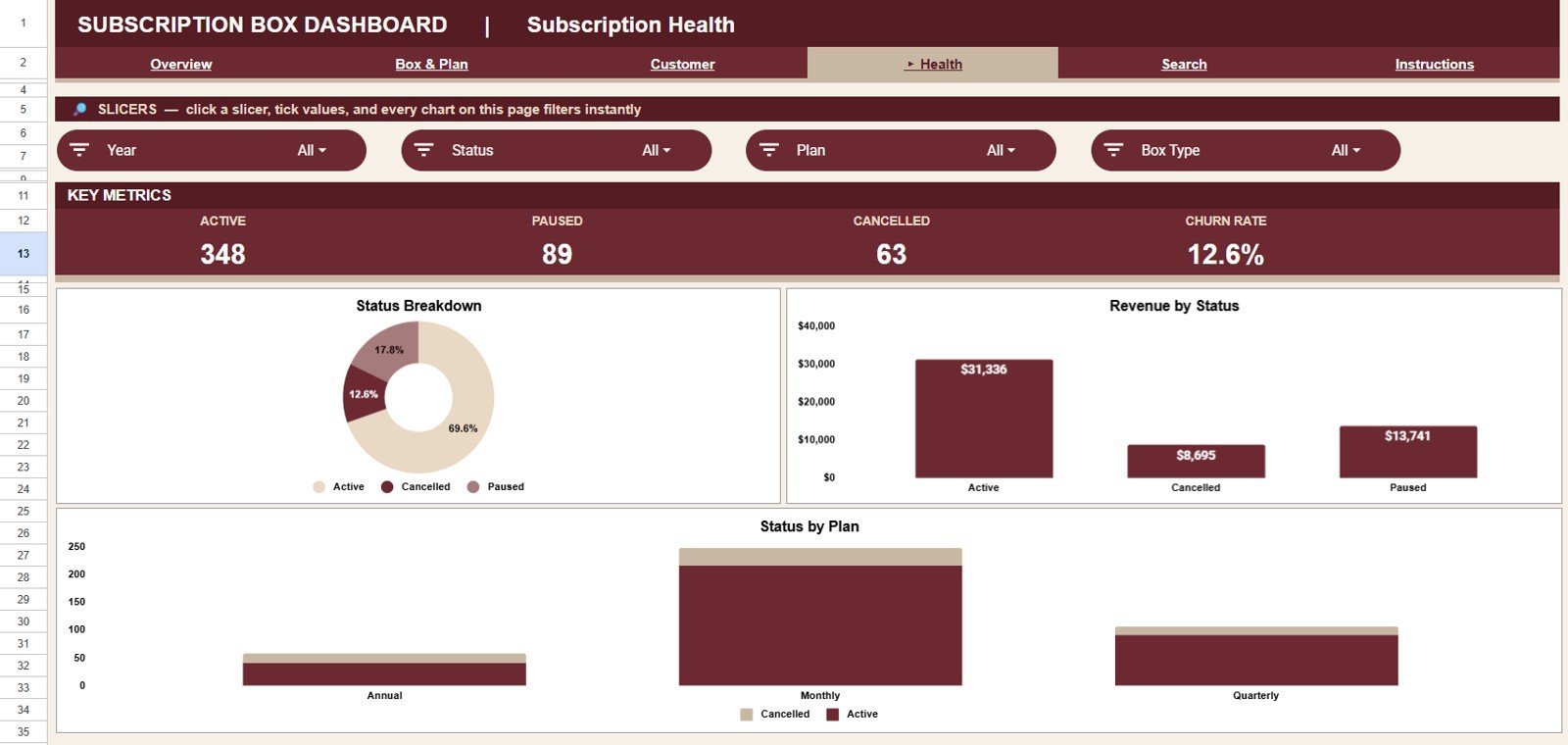
This page focuses on retention and churn risk. Charts include Subscriptions by Status, Revenue by Status, and Status by Plan, showing exactly how many subscriptions are active, paused, or cancelled — and which plans they belong to.
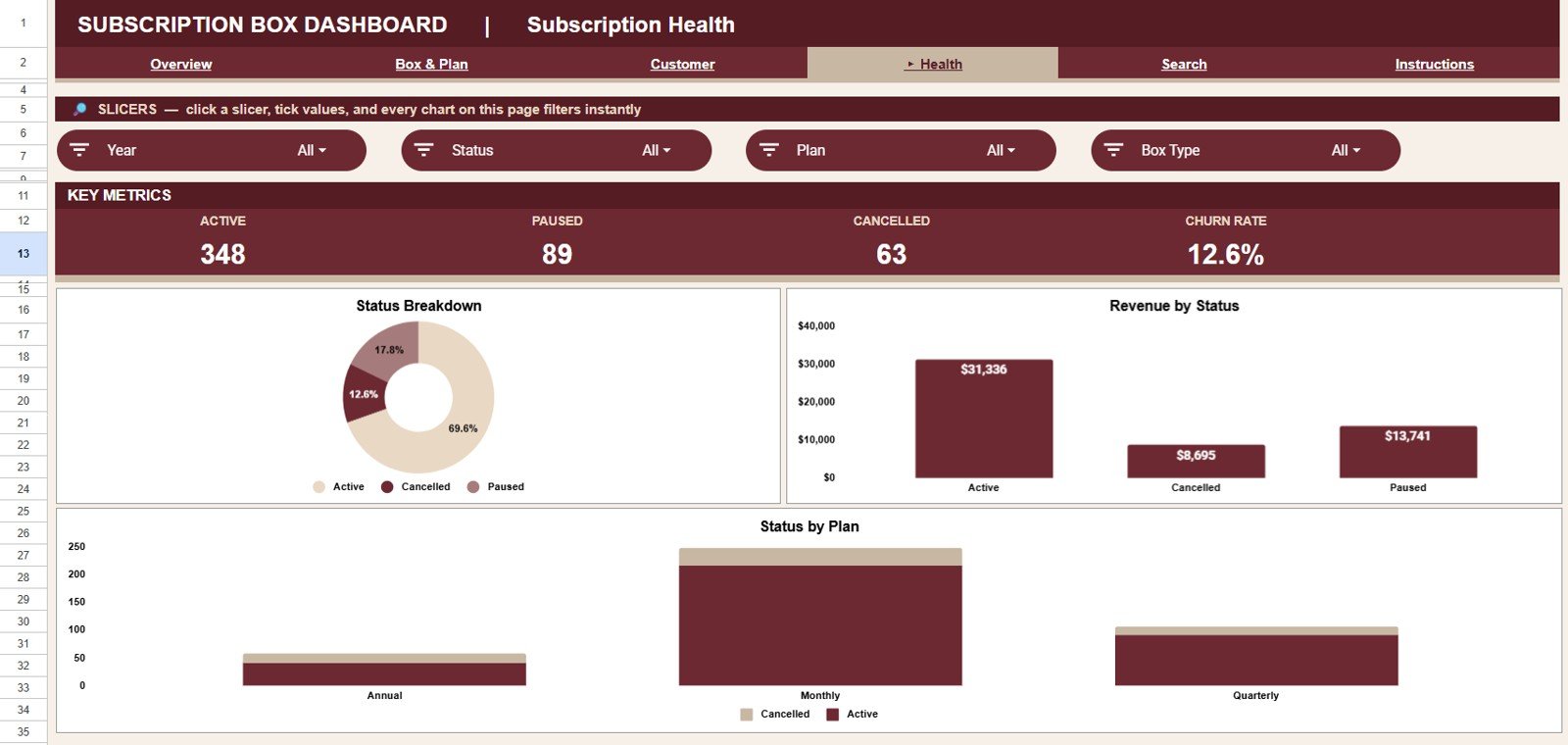
Search Sheet Tab
Pick an Order ID and view the full record instantly. The lookup shows Date, Box Type, Plan, Region, Channel, Customer Type, Status, Revenue, Boxes, Shipping, Discount, and Month — ideal for handling customer queries without scrolling through raw data.
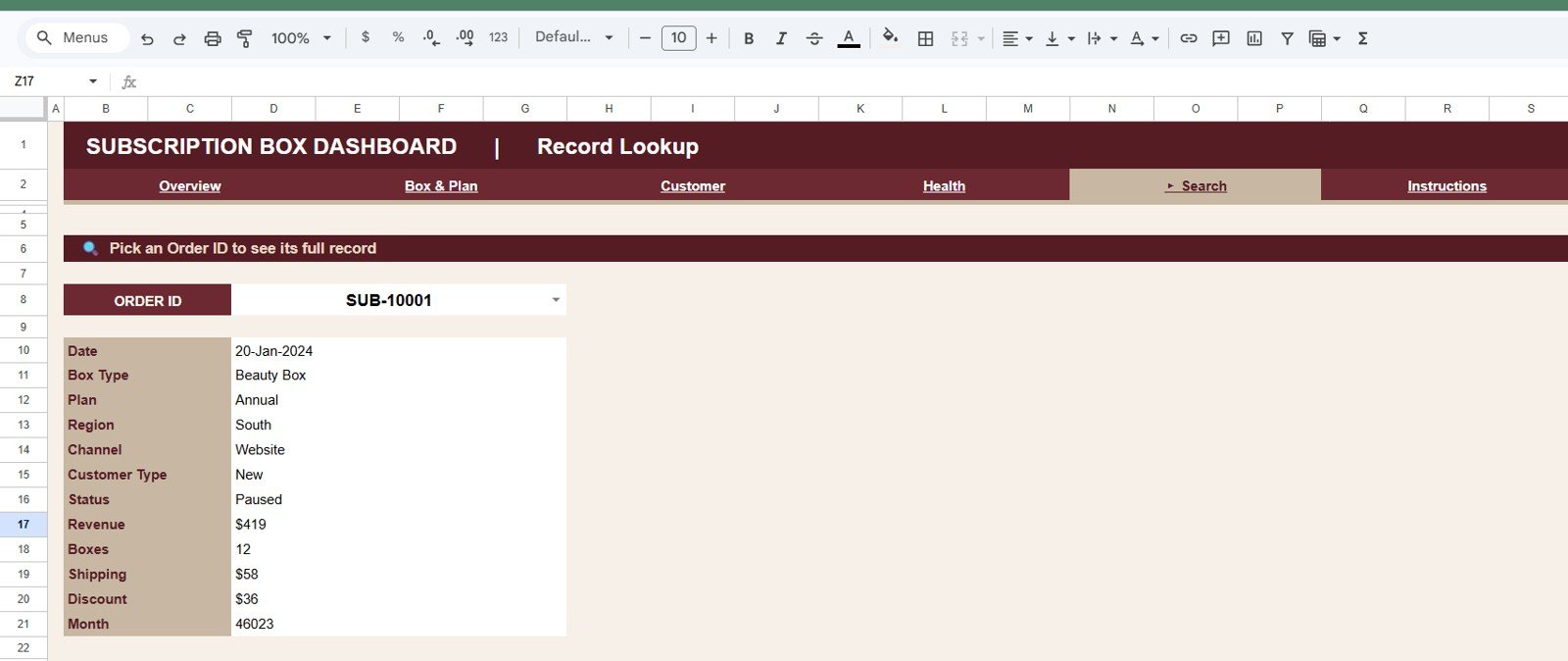
Data Sheet Tab
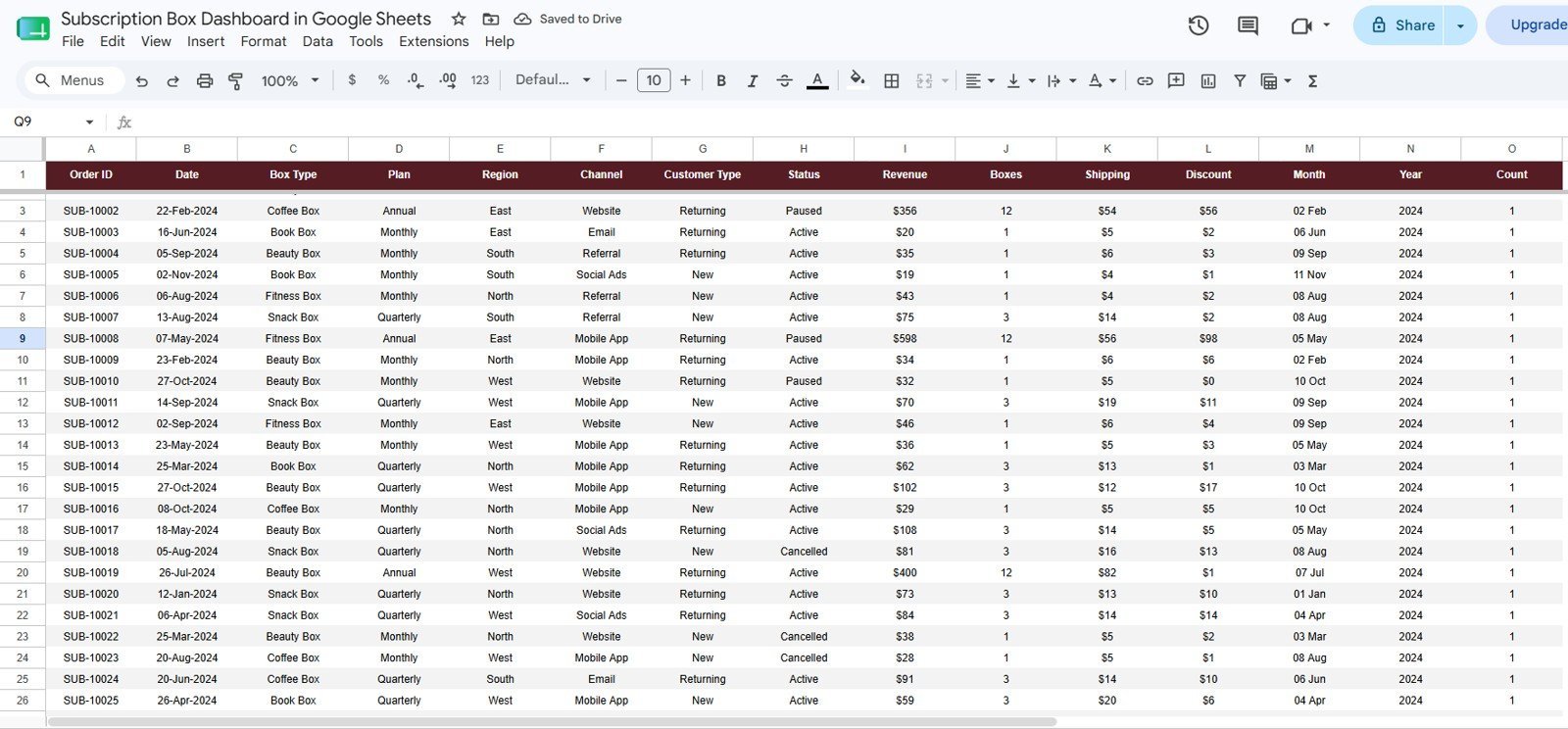
This is the single input sheet for the whole dashboard. Add your orders in the same column format and every page — KPIs, charts, slicers, and the Search sheet — updates automatically.
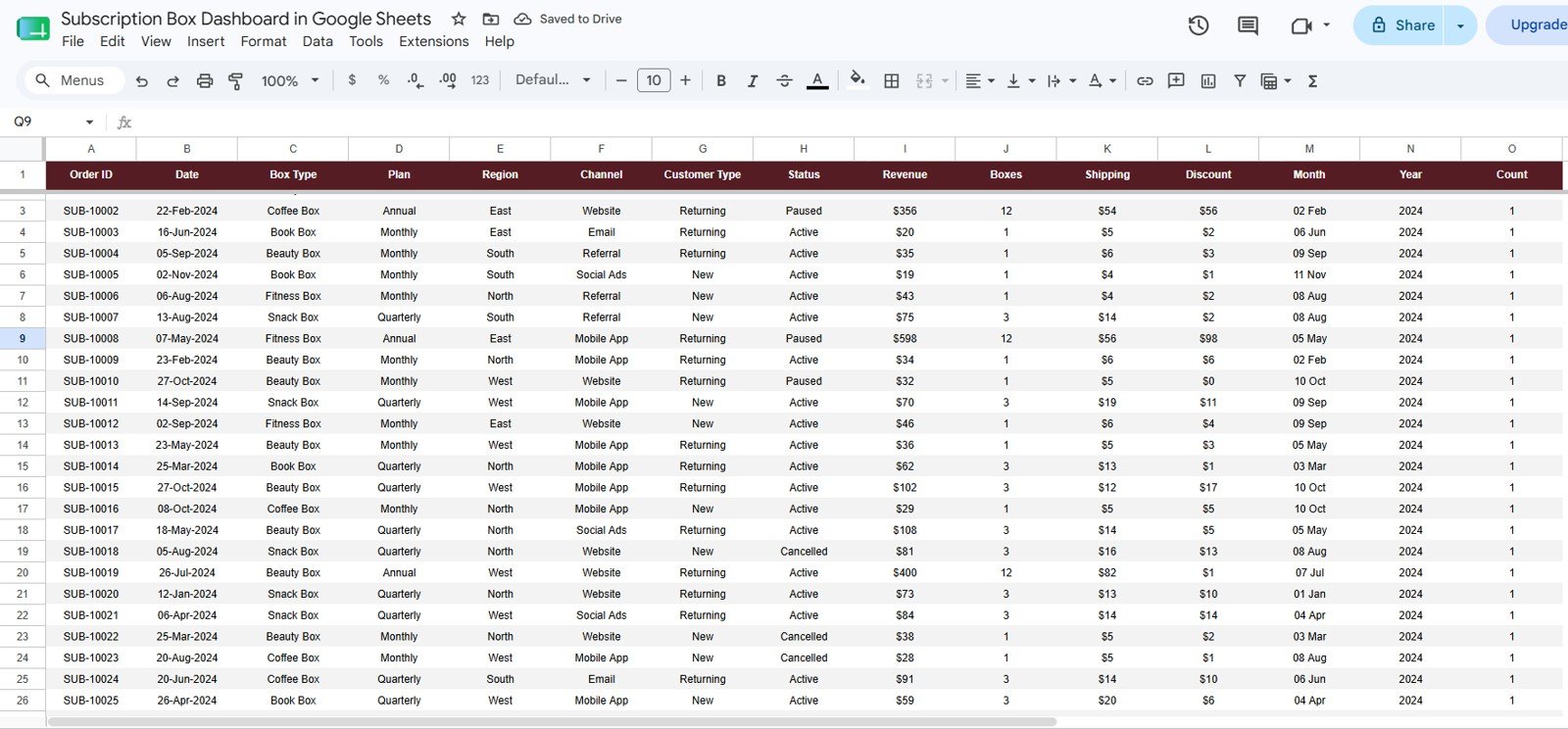
📊 Subscription Box Dashboard in Google Sheets vs. Excel Dashboard vs. Cratejoy/Subbly — Where This Fits
| Feature | Subscription Box Dashboard in Google Sheets | Microsoft Excel Dashboard | Cratejoy / Subbly Analytics |
|---|---|---|---|
| Cost | $9.99 one-time ✅ | $17.99 one-time + Excel license | $39–$119 / month platform fees |
| Platform | Any browser, free Google account ✅ | Desktop Excel required | Locked to their platform |
| Setup time | Under 10 minutes ✅ | Under 15 minutes | Full store migration required |
| Real-time team collaboration | Yes — native Google Sheets sharing ✅ | Limited (OneDrive co-authoring) | Per-seat pricing |
| Mobile access | Google Sheets app ✅ | Excel mobile (limited) | Yes |
| Customizable fields & charts | Fully editable ✅ | Fully editable | Fixed reports only |
| Share with a link | Yes ✅ | File-based sharing | Account required |
| Order-level search lookup | Built-in Search sheet ✅ | Depends on template | Yes |
| Year-1 cost at 5 users | $9.99 total ✅ | $17.99 + licenses | $468–$1,428+ |
For subscription box sellers who want real analytics without paying monthly platform fees, the Subscription Box Dashboard in Google Sheets sits in the sweet spot.
👥 Who This Template Is For — and Who It’s Not For
✅ This template is built for:
- 🎯 Subscription box founders selling on Shopify, WooCommerce, Etsy, or their own site who track orders in spreadsheets
- 🎯 Small e-commerce teams (1–20 people) that need shared, browser-based reporting without new software
- 🎯 Side-hustle box sellers who want investor- or partner-ready charts from day one
- 🎯 Operations and fulfillment managers tracking boxes shipped by box type and region
❌ This template is NOT for:
- 🚫 Enterprise subscription brands needing automated API syncs from Stripe or Recharge — this is manual/paste-in data entry
- 🚫 Teams that require cohort-level churn modeling or LTV forecasting — this dashboard reports statuses and revenue, not predictive analytics
⚙️ How to Use the Subscription Box Dashboard in Google Sheets
- Purchase and download — your file includes a PDF guide with the Google Sheets copy link.
- Click the link to create your own editable copy in Google Drive.
- Open the Data sheet and replace the sample orders with your own, keeping the same column format.
- Use the slicers on each page to filter by box type, plan, region, channel, customer type, or status.
- Use the Search sheet to look up any Order ID and see the full order record instantly.
💼 Real-World Use Cases
Maya runs a specialty coffee subscription box with 450 active subscribers. She pastes her weekly Shopify order export into the Data sheet, then uses the Subscription Health page to catch paused and cancelled plans early — winning back roughly a dozen subscribers a month with targeted emails, without paying $99/month for platform analytics.
Daniel sells a quarterly book box as a side business. He uses the Box & Plan Analysis page to compare his monthly vs quarterly plans, and discovered his quarterly plan drives a higher Avg Order Value — so he now promotes it first on his landing page.
Priya manages fulfillment for a snack box brand shipping to 4 regions. The Customer & Channel Analysis page shows her which channels bring returning customers, while Boxes Shipped by Box Type helps her plan inventory before each shipping cycle.
❓ Frequently Asked Questions
What KPIs does the Subscription Box Dashboard in Google Sheets track?
The Subscription Box Dashboard in Google Sheets tracks 4 headline KPIs — Total Revenue, Boxes Shipped, Active Subscriptions, and Avg Order Value — plus 15 charts covering box types, plans, regions, channels, customer types, and subscription status. Everything updates automatically from the Data sheet.
How long does setup take?
Under 10 minutes. Open the copy link from your download, make your own copy in Google Drive, and paste your orders into the Data sheet. The Subscription Box Dashboard in Google Sheets recalculates every KPI card and chart instantly.
How does this compare to Cratejoy or Subbly analytics?
Cratejoy and Subbly charge $39–$119 per month and require you to run your store on their platform. The Subscription Box Dashboard in Google Sheets is a $9.99 one-time purchase that works with orders from any store — Shopify, WooCommerce, Etsy, or offline sales.
Can I filter the dashboard by box type, plan, or region?
Yes. Every page of the Subscription Box Dashboard in Google Sheets includes slicers, so you can filter all KPIs and charts by box type, plan, region, channel, customer type, or status in one click — no formulas needed.
Do I need any add-ons or Apps Script knowledge?
No. The Subscription Box Dashboard in Google Sheets is built with native Google Sheets features only — pivot-style summaries, charts, and slicers. If you can copy and paste data, you can run this dashboard.
Is this a one-time payment?
Yes. You pay $9.99 once and own the Subscription Box Dashboard in Google Sheets forever — instant download, lifetime access, unlimited use inside your business, and no per-user or monthly fees.
👤 About the Author
Built by PK — Microsoft Certified Professional with 15+ years of Excel, Google Sheets, and Power BI experience. Founder of NextGenTemplates, reaching 300K+ subscribers across YouTube channels (@PK-AnExcelExpert, @NextGenTemplates, @NeoTechNavigators). Every template is hand-built and tested before release.
🔗 Explore Related Templates
- 📊 Subscription Business Dashboard in Google Sheets — SaaS-style MRR and renewal tracking in the same platform
- 📈 Subscription Box KPI Scorecard in Excel — MTD/YTD scorecard view with traffic-light indicators
- 🗓️ Subscription and SaaS Renewal Calendar in Excel — never miss a renewal date again
Also available as: Excel version · Power BI version
📖 Click here to read the Detailed Blog Post<
Watch the step-by-step video Demo:
🎥 Visit our YouTube channel for step-by-step video tutorials
👉 YouTube.com/@NextGenTemplates
📅 Last updated: July 2026































Reviews
There are no reviews yet.