

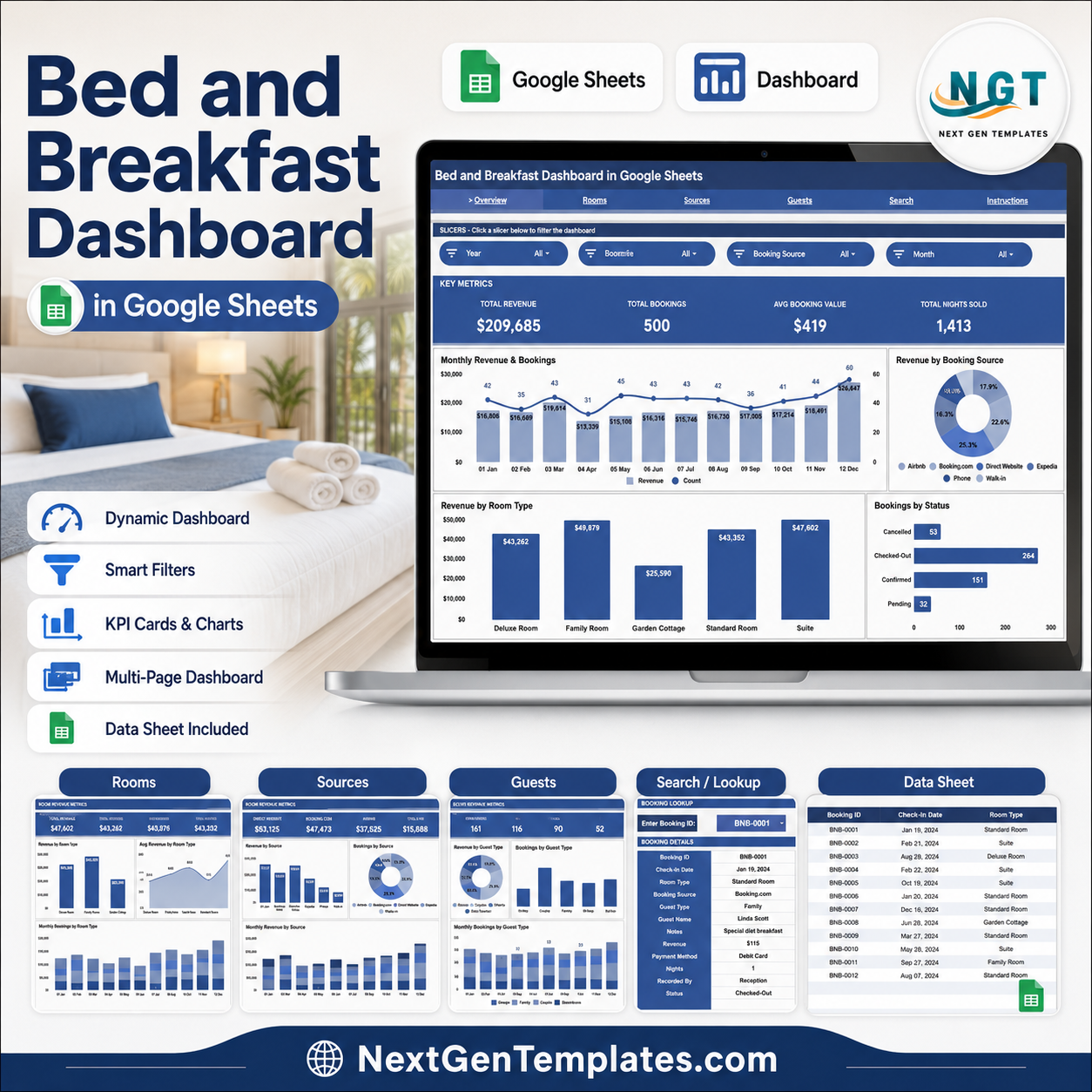
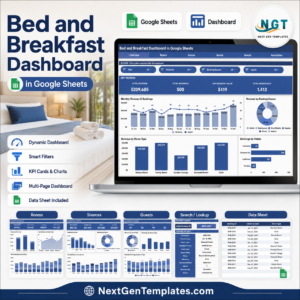
The Bed and Breakfast Dashboard in Google Sheets tracks 4 headline KPIs and 16 interactive charts across 4 analysis pages, with a Booking ID search tab and a structured Data sheet. Setup takes under 10 minutes — paste your reservations into the Data sheet and every card, chart and slicer updates automatically.
🌍 Join 8,400+ teams in 40+ countries using NextGenTemplates to replace paid SaaS tools with one-time-purchase Excel, Google Sheets, Power BI, and HTML templates.
✅ Instant download · One-time payment · No subscription · No per-user fees · Lifetime access
🔑 Key Features of the Bed and Breakfast Dashboard in Google Sheets
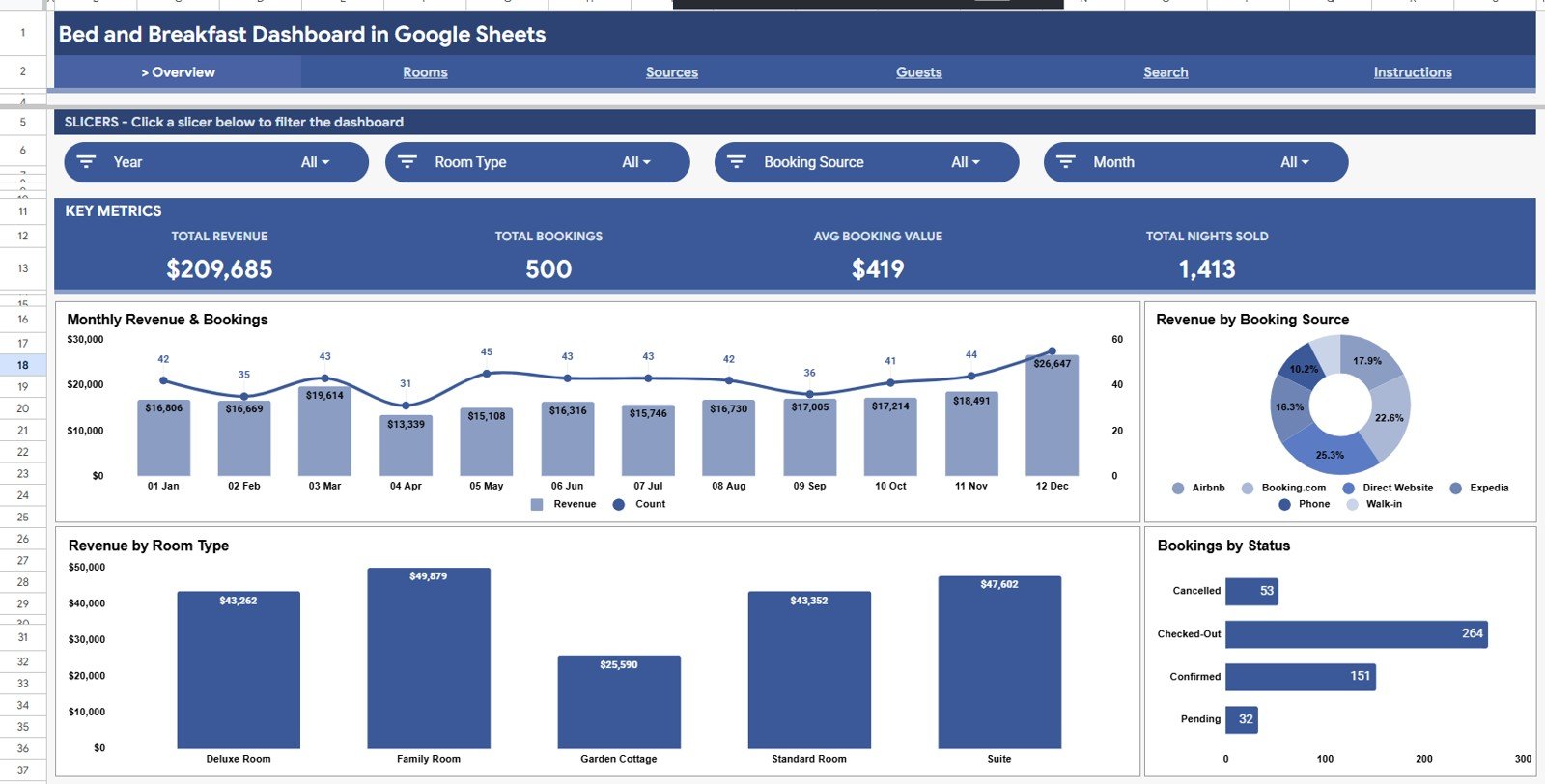
- 📊 4 KPI cards sit at the top of the Overview page — Total Revenue, Total Bookings, Average Booking Value and Total Nights Sold — giving you the health of your B&B at a glance.
- 📈 16 charts across 4 pages break revenue and bookings down by month, room type, booking source, guest type and status, so you always know what is driving income.
- 🎛️ Slicers let you filter the whole dashboard by Month, Room Type, Booking Source, Guest Type and Status in a single click — the cards and charts refresh instantly.
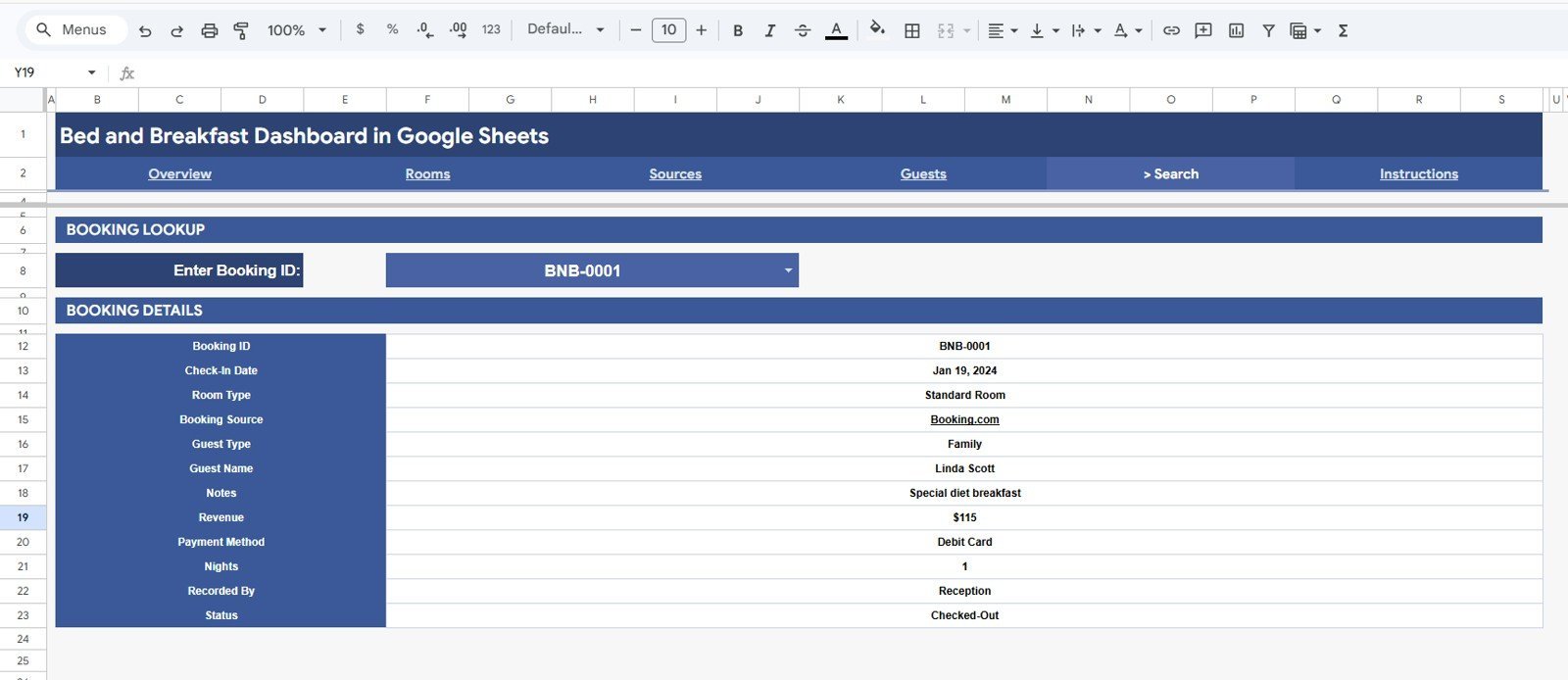
- 🔎 Booking ID search returns the full record for any reservation, including guest name, check-in date, nights, revenue, payment method and notes.
- 🟢 Pure Google Sheets — no scripts to enable, no plug-ins to install. It runs in any free Google account and shares with a link.
📦 What’s Inside the Bed and Breakfast Dashboard in Google Sheets
The template is organised into six tabs — four analysis pages plus a Search tab and a Data sheet — so you can move from a high-level overview down to a single booking in seconds.
Page 1: Overview
The Overview page opens with 4 KPI cards — Total Revenue, Total Bookings, Avg Booking Value and Total Nights Sold — and four charts: Revenue and Bookings by Month, Revenue by Booking Source, Revenue by Room Type, and Bookings by Status. Slicers above the cards filter every visual at once.
Page 2: Rooms Analysis
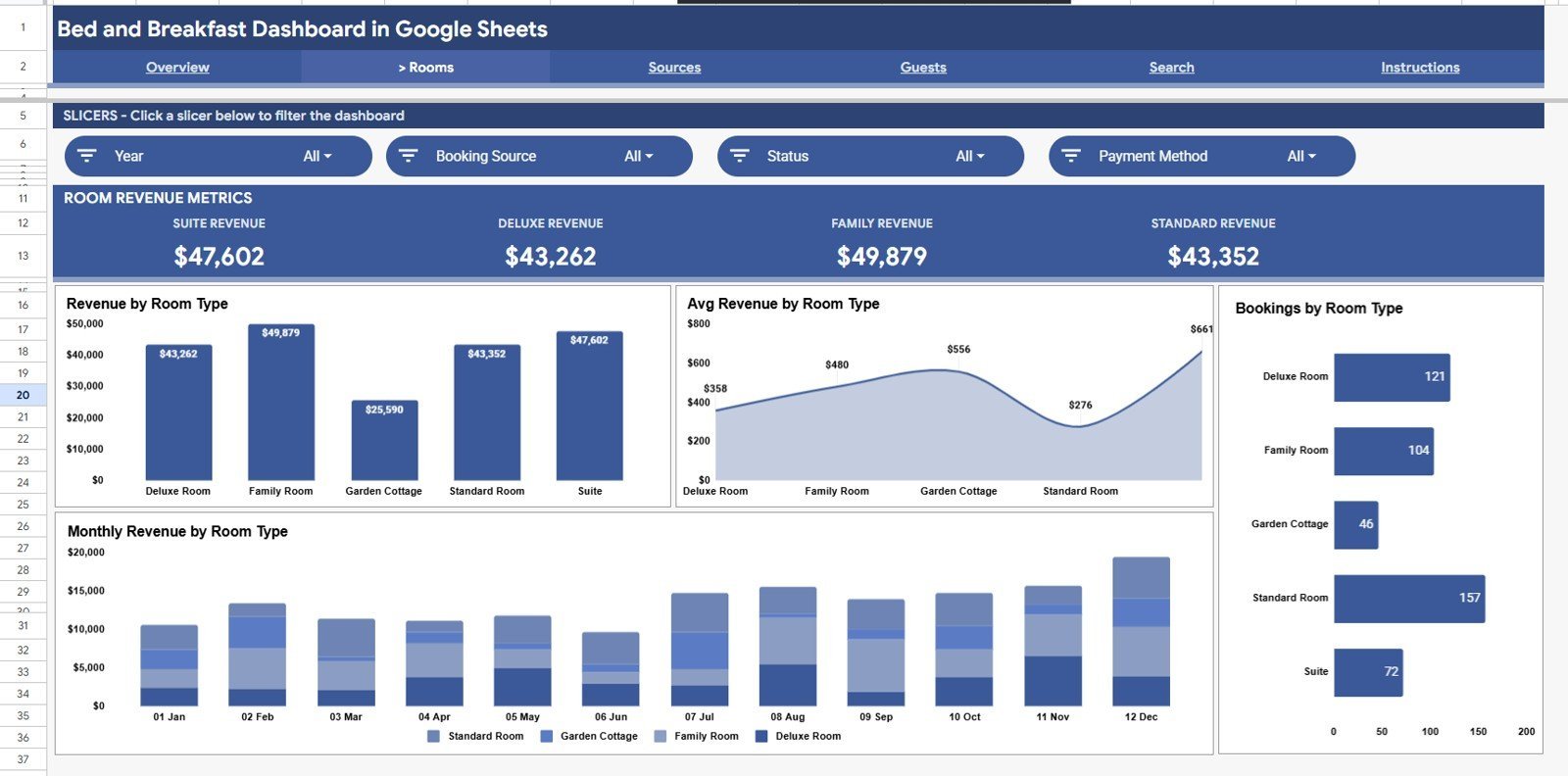
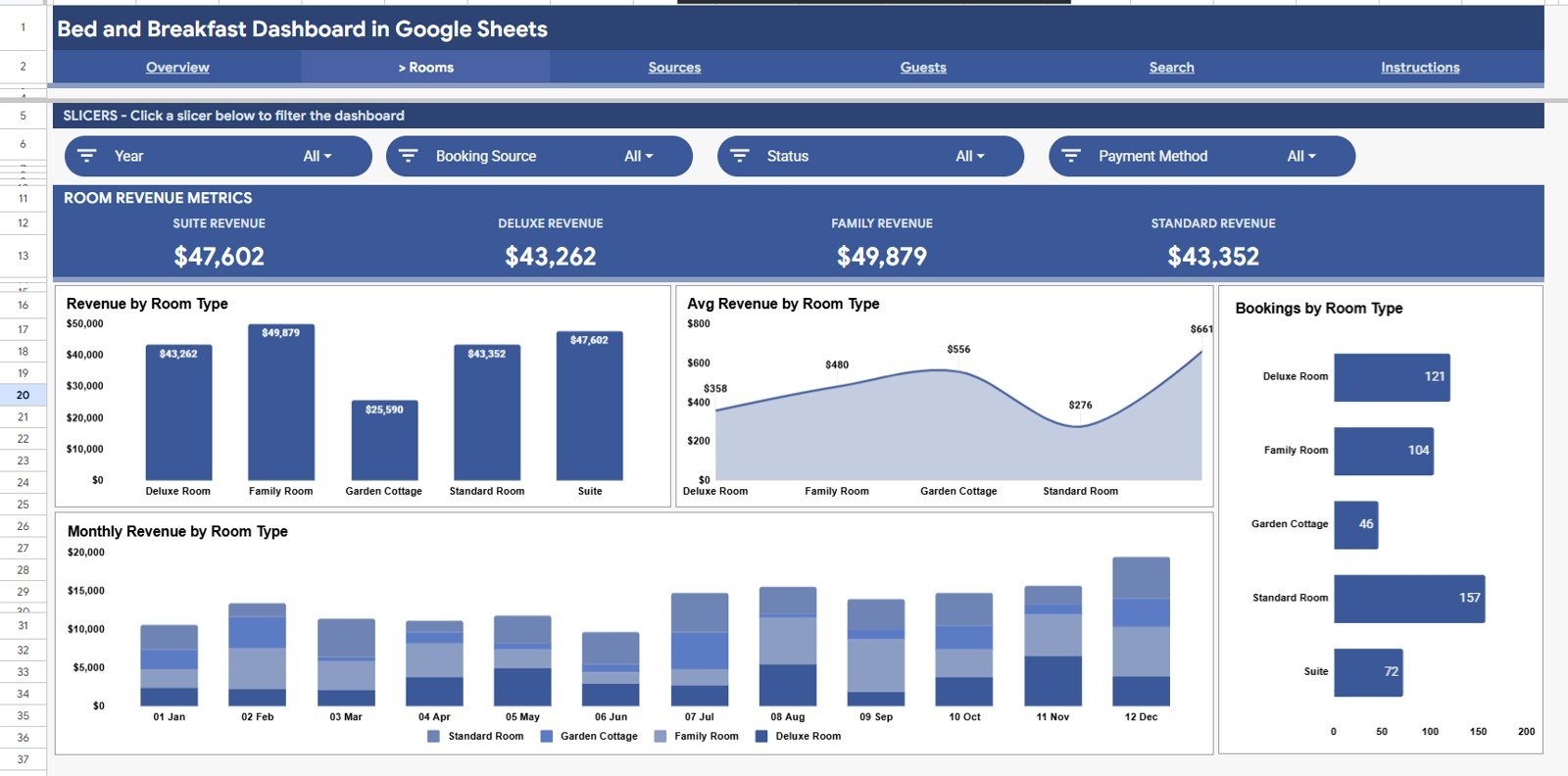
The Rooms Analysis page compares your room categories with four charts: Revenue by Room Type, Avg Revenue by Room Type, Bookings by Room Type, and Monthly Revenue by Room Type — showing which rooms earn the most and which fill most often.
Page 3: Sources Analysis
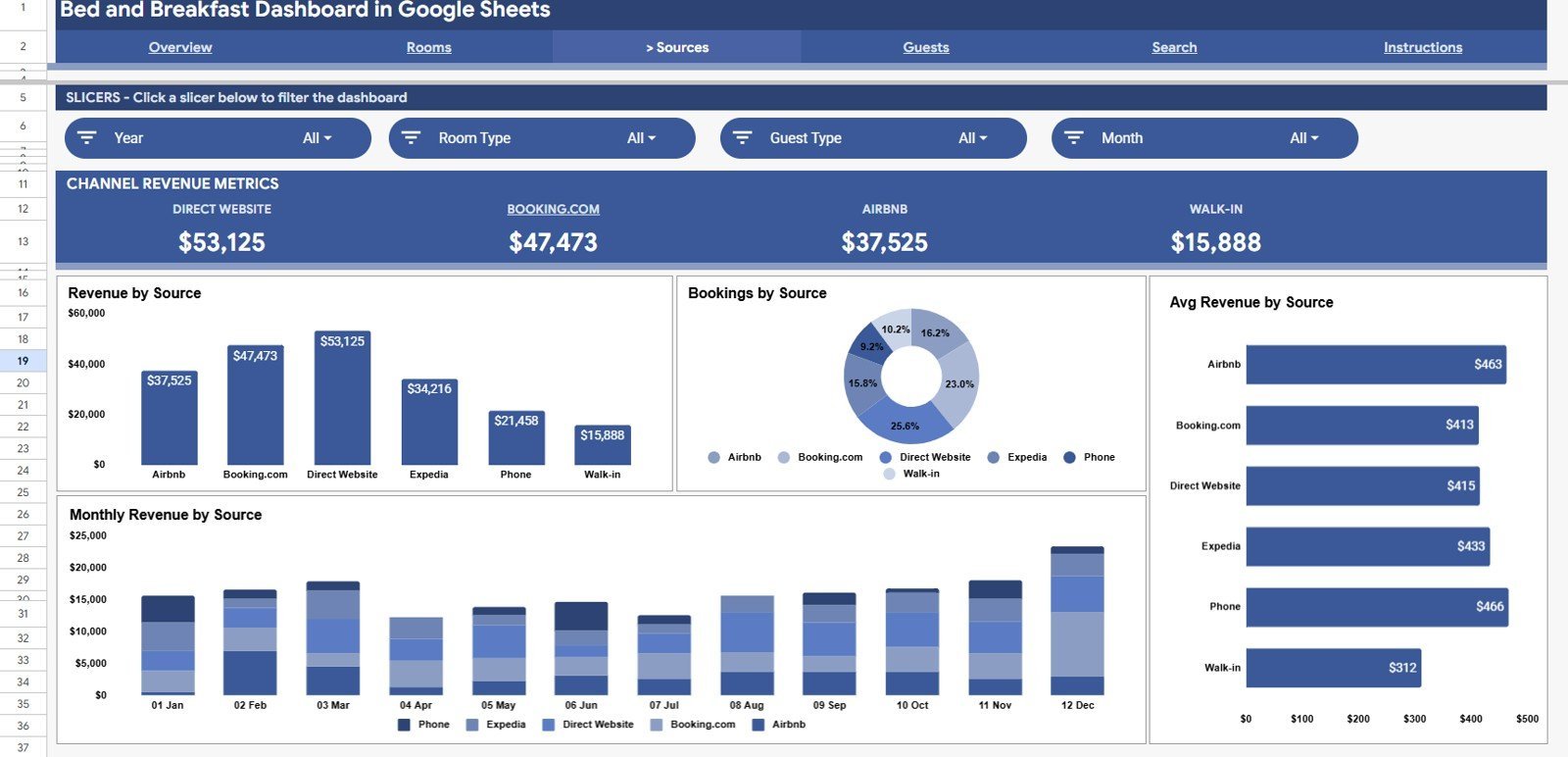
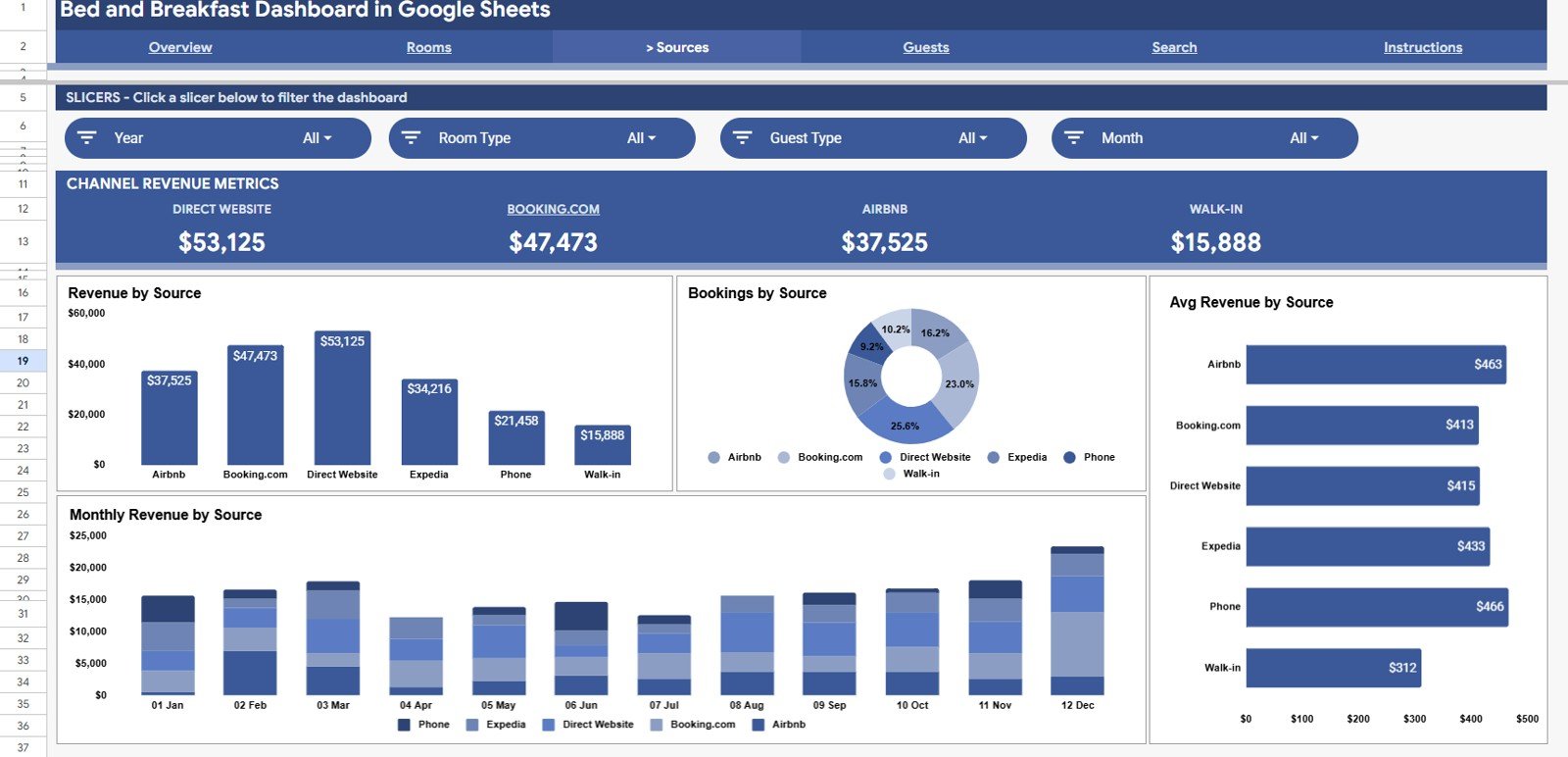
The Sources Analysis page breaks performance down by booking channel with Revenue by Source, Bookings by Source, Avg Revenue by Source, and Monthly Revenue by Source — so you can see whether Airbnb, Booking.com or direct bookings deliver the best value.
Page 4: Guests Analysis
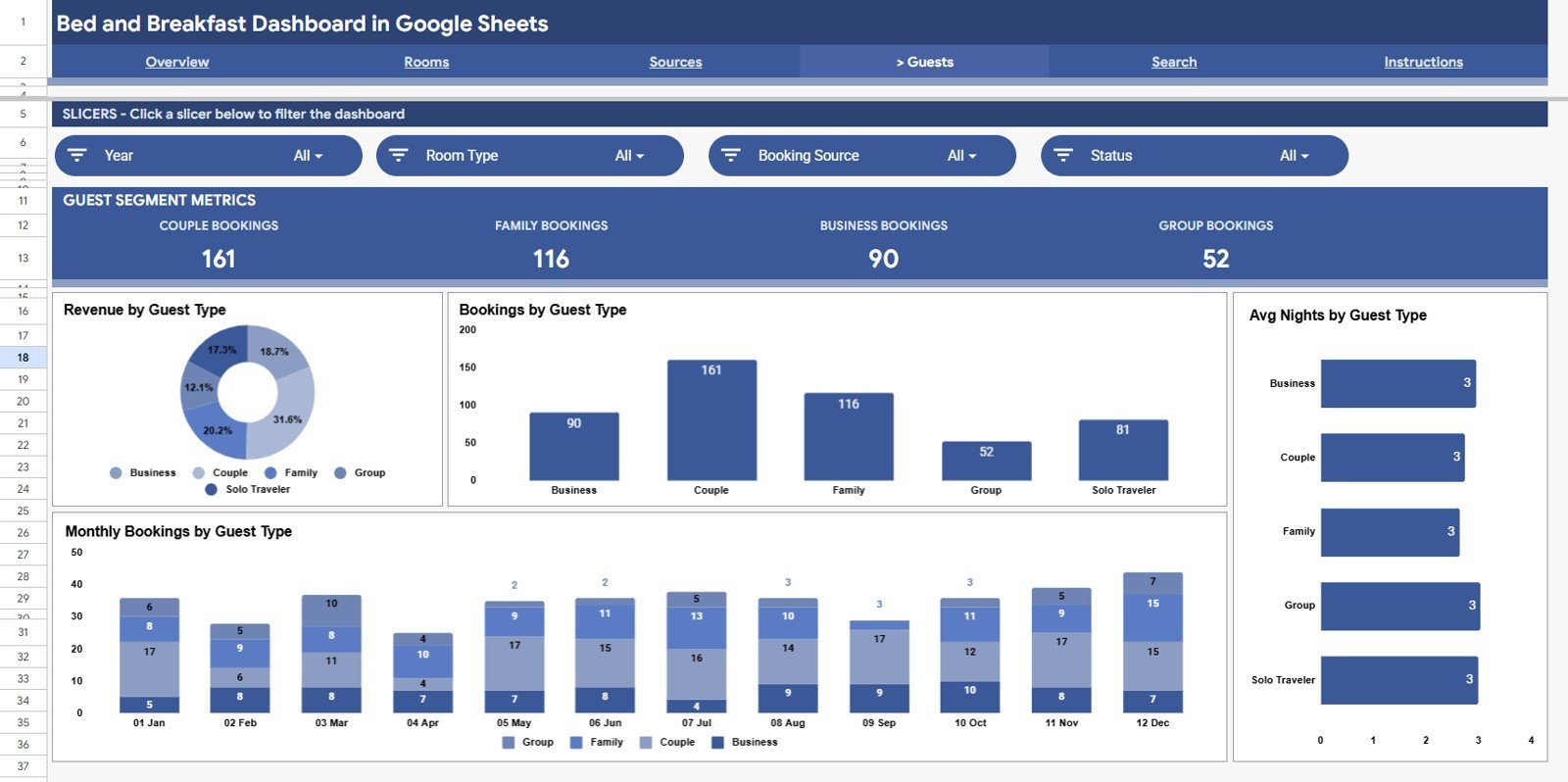
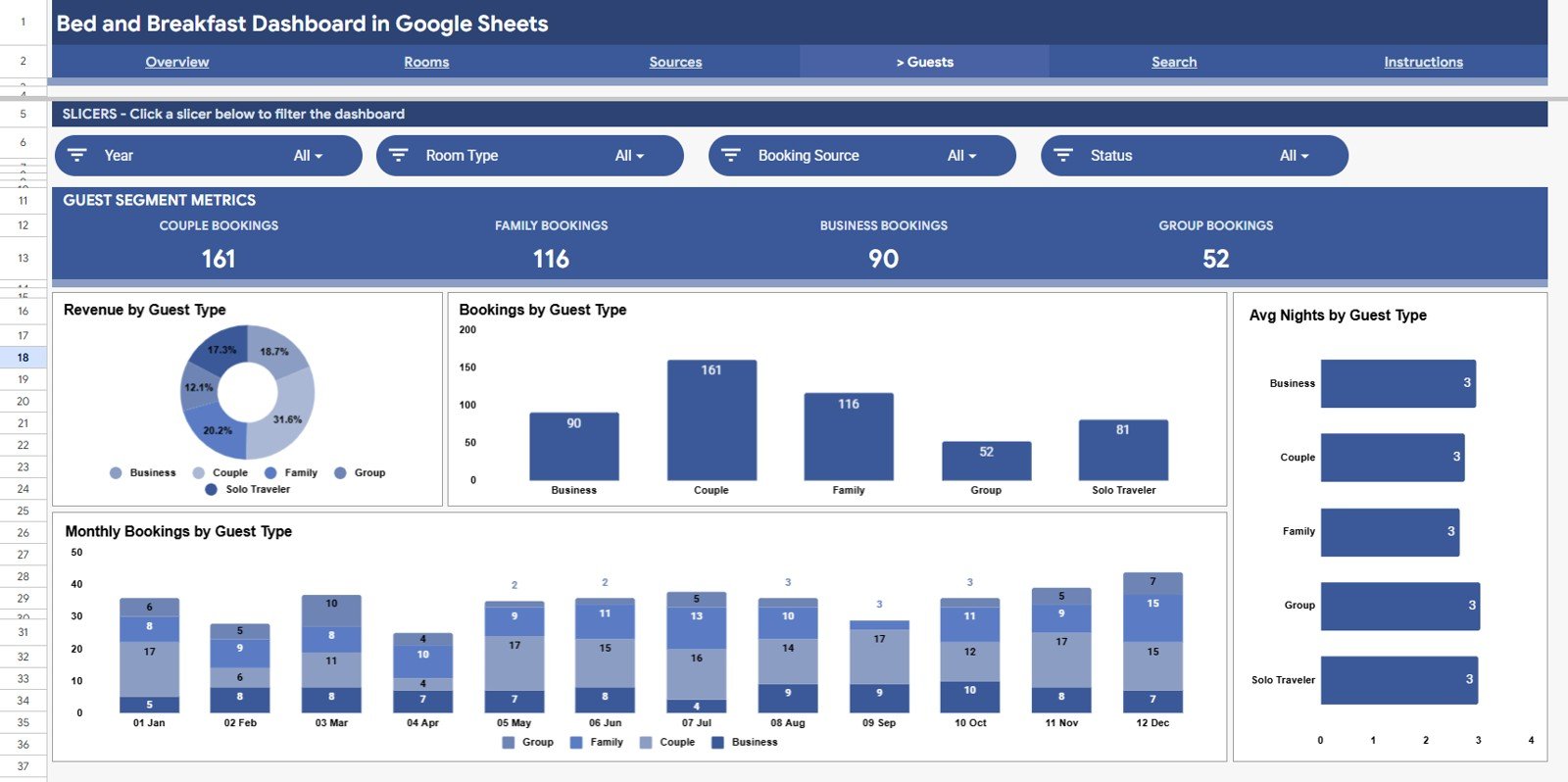
The Guests Analysis page profiles your visitors with Revenue by Guest Type, Bookings by Guest Type, Avg Nights by Guest Type, and Monthly Bookings by Guest Type — useful for spotting repeat guests and your most profitable guest segments.
Search Sheet
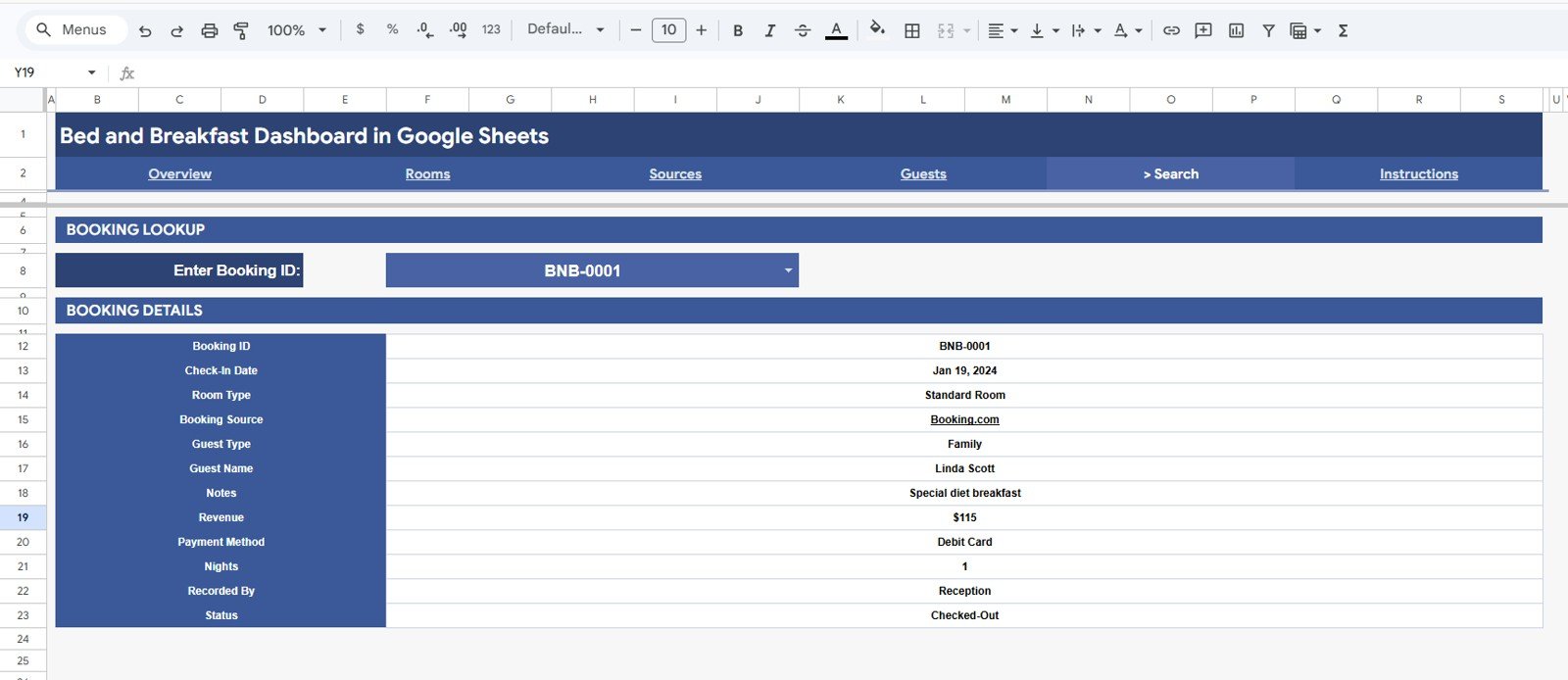
Type any Booking ID into the Search tab and instantly see its complete record: Check-In Date, Room Type, Booking Source, Guest Type, Guest Name, Notes, Revenue, Payment Method, Nights, Recorded By and Status.
Data Sheet
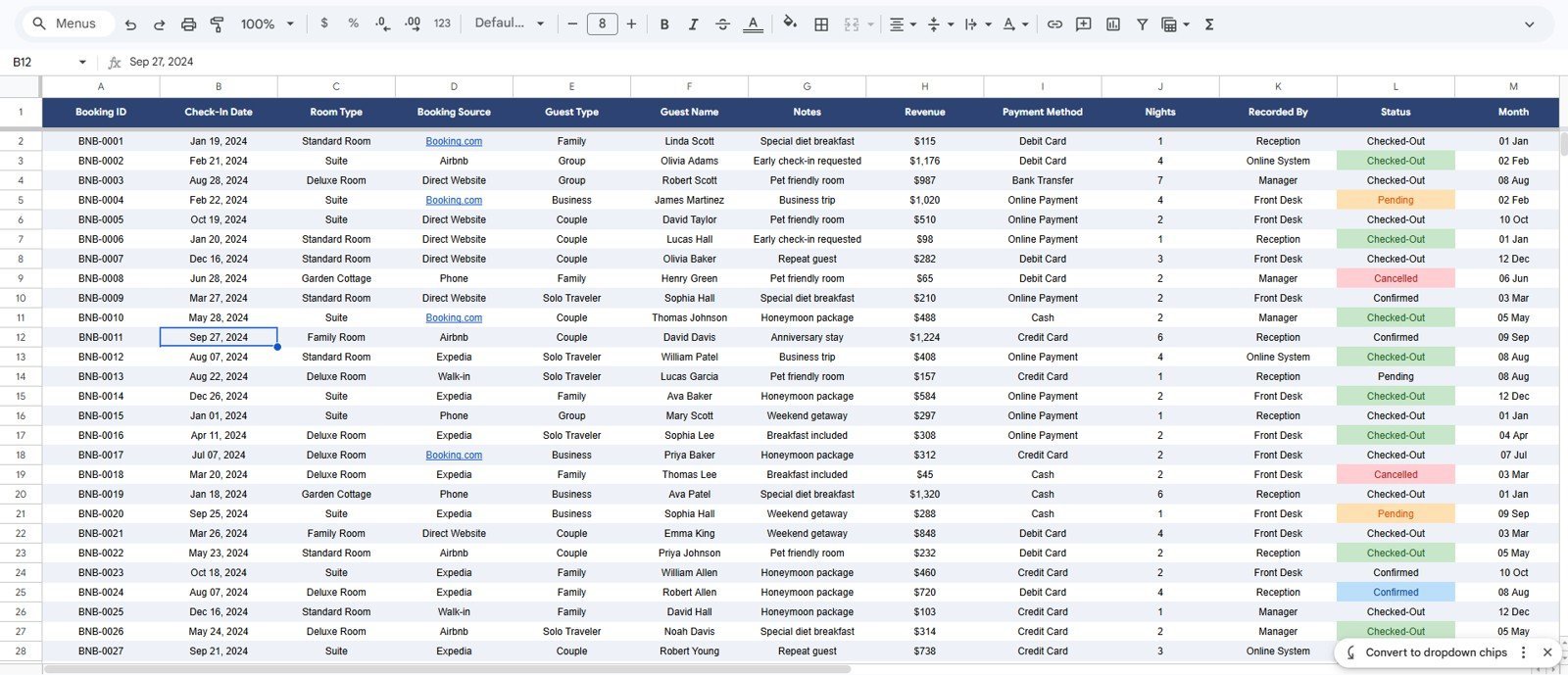
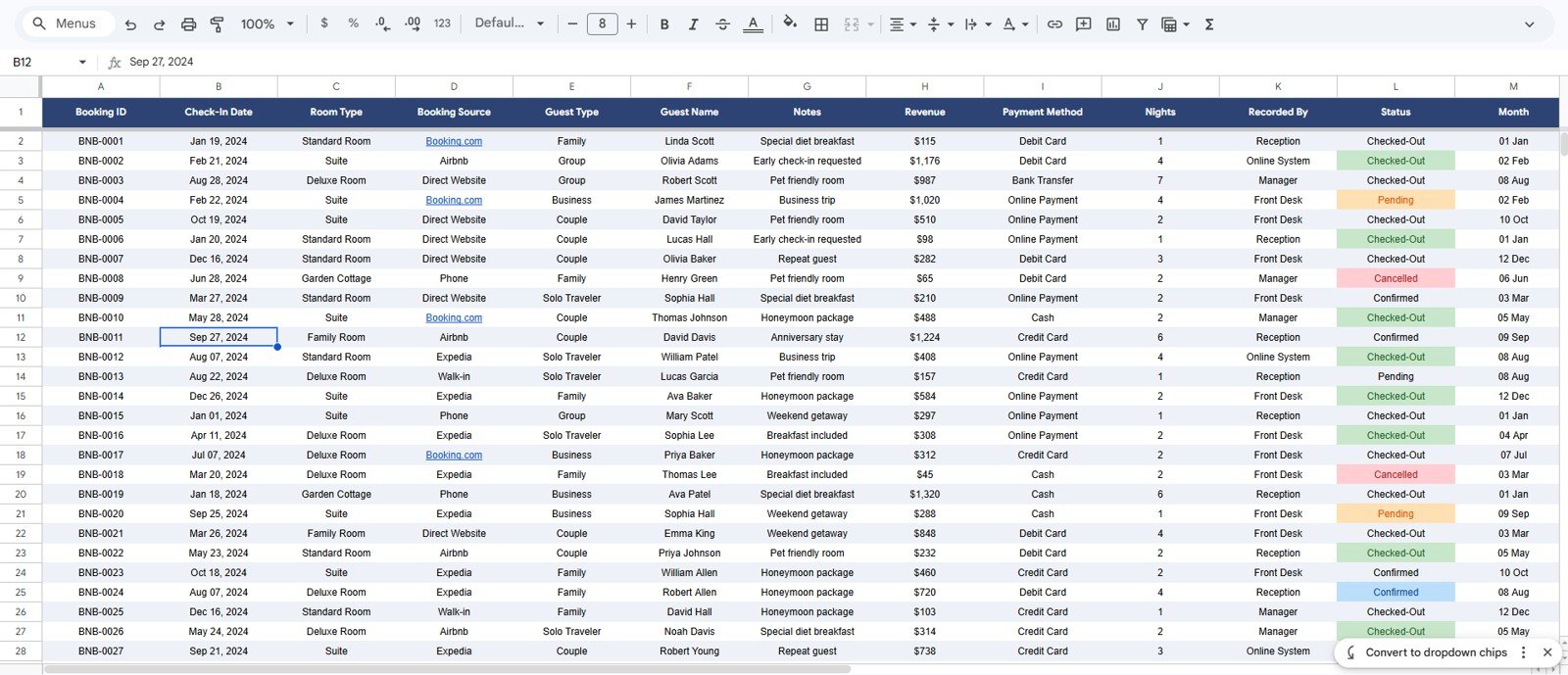
The Data sheet is where you enter every booking in the same column format. Add new rows as reservations come in and the entire dashboard — cards, charts and search — updates from this single source.
📊 Bed and Breakfast Dashboard: Google Sheets vs. Excel vs. Paid B&B Software — Where This Fits
| Feature | Bed and Breakfast Dashboard (Google Sheets) | Microsoft Excel Dashboard | Cloudbeds / Lodgify / Little Hotelier |
|---|---|---|---|
| Cost | $9.99 one-time | $13.99–$17.99 one-time | $30–$150 / month |
| Platform | Google Sheets (browser, any device) | Excel desktop | Cloud PMS / web app |
| Setup time | ✅ Under 10 minutes | ✅ Under 10 minutes | Days (onboarding) |
| Real-time team collaboration | ✅ Built in | Needs OneDrive | ✅ Yes |
| Mobile access | ✅ Google Sheets app | Limited | ✅ Yes |
| Share with link | ✅ One click | File send | ✅ Yes |
| Channel / OTA sync | Manual entry | Manual entry | ✅ Automated |
| Year-1 cost (small B&B) | ✅ $9.99 total | ~$17.99 total | $360–$1,800+ |
For owners who want clear booking and revenue analytics without paying a monthly PMS fee, the Bed and Breakfast Dashboard in Google Sheets sits in the sweet spot.
👥 Who This Template Is For — and Who It’s Not For
✅ This template is built for:
- Bed and breakfast, guesthouse and small inn owners with up to ~15 rooms.
- Airbnb and short-stay hosts who want monthly revenue, room and channel analysis in one place.
- Hospitality owners who prefer a one-time Google Sheets tool over a recurring PMS subscription.
❌ This template is NOT for:
- Large hotels needing automated OTA/channel-manager sync and real-time availability.
- Properties that require online guest booking, payment processing or housekeeping scheduling built in.
⚙️ How to Use the Bed and Breakfast Dashboard in Google Sheets
- Open the PDF in your download and click the Google Sheets copy link to create your own editable copy in Google Drive.
- Go to the Data sheet and paste your bookings into the existing column format.
- Open the Overview page and use the slicers to filter by Month, Room Type, Source, Guest Type or Status.
- Review the Rooms, Sources and Guests pages to see what is driving revenue.
- Use the Search tab and a Booking ID to pull any single reservation’s full details.
💼 Real-World Use Cases
Maria runs a 6-room seaside B&B. She pastes each week’s bookings into the Data sheet and checks Revenue and Bookings by Month to see how the shoulder season is tracking — without paying $40 a month for a PMS dashboard.
James hosts three Airbnb cottages. He uses the Sources Analysis page to compare direct bookings against OTA channels, and the Guests Analysis page to see how many nights repeat guests book versus first-timers.
Priya manages a countryside guesthouse. Each morning she opens the Search tab, types a Booking ID, and reads the guest’s notes and payment method before check-in.
❓ Frequently Asked Questions
What KPIs does the Bed and Breakfast Dashboard in Google Sheets track?
The Bed and Breakfast Dashboard in Google Sheets tracks 4 KPI cards — Total Revenue, Total Bookings, Average Booking Value and Total Nights Sold — plus 16 charts covering room type, booking source, guest type and monthly trends. Every metric updates when you add bookings.
Do I need any add-ons or scripts to use it?
No. The Bed and Breakfast Dashboard in Google Sheets runs entirely on native Google Sheets features. There are no macros or plug-ins to enable — just make your own copy and start entering bookings.
How long does setup take?
Setup takes under 10 minutes. Copy the template to your Google Drive, paste your reservations into the Data sheet in the existing format, and the cards, charts and slicers populate automatically.
How does this compare to paid B&B software like Cloudbeds or Lodgify?
Paid B&B platforms cost $30–$150 per month and add channel sync and online booking. The Bed and Breakfast Dashboard in Google Sheets is a one-time $9.99 analytics tool — ideal if you want revenue and booking insight without a monthly subscription.
Can I filter the dashboard by room type or booking source?
Yes. Slicers on the Overview page let you filter by Month, Room Type, Booking Source, Guest Type and Status, and dedicated Rooms, Sources and Guests pages break each dimension down further.
Will it work for an Airbnb or short-stay host?
Absolutely. Short-stay hosts use the Sources Analysis page to compare channels and the Guests Analysis page to track repeat stays, making the Bed and Breakfast Dashboard in Google Sheets a fit for Airbnb-style rentals too.
👤 About the Author
Built by PK — Microsoft Certified Professional with 15+ years of Excel, Google Sheets, and Power BI experience. Founder of NextGenTemplates, reaching 300K+ subscribers across YouTube channels (@PK-AnExcelExpert, @NextGenTemplates, @NeoTechNavigators). Every template is hand-built and tested before release.
🔗 Explore Related Templates
Browse more Google Sheets Dashboards or stay in the same vertical with these picks:
- Hotel Hospitality Revenue Dashboard in Google Sheets — broader revenue view for larger properties.
- Airbnb Host Dashboard in Google Sheets — purpose-built for short-stay hosts.
- Hospitality & Guest Booking Performance Dashboard in Google Sheets — deeper booking-performance metrics.
- Rental Property Investment Dashboard in Google Sheets — for owners tracking property returns.
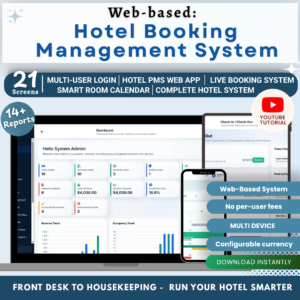
Also available for bigger operations: the Hotel Booking Management System web app with logins and role-based access.
📖 Click here to read the Detailed Blog Post<
Watch the step-by-step video Demo:
/h3>
🎥 Visit our YouTube channel for step-by-step video tutorials
👉 YouTube.com/@NextGenTemplates

































Reviews
There are no reviews yet.