



The Luxury Spa KPI Dashboard in Excel is an essential tool for spa owners, managers, and operators looking to optimize the performance of their spa business. Whether you’re managing a small boutique spa or a large wellness center, this Excel-based dashboard allows you to track key performance indicators (KPIs) such as revenue, appointment scheduling, customer satisfaction, staff performance, and more, ensuring your spa delivers exceptional service while maintaining operational efficiency.
With real-time tracking and customizable features, this dashboard empowers you to monitor your spa’s financial health, client satisfaction, and operational efficiency, helping you make data-driven decisions to improve service and grow your business.

Key Features of the Luxury Spa KPI Dashboard in Excel:
💆♀️ Appointment and Service Tracking
Monitor appointments, treatment types, and service durations to ensure efficient scheduling, reduce wait times, and improve client satisfaction.
💰 Revenue and Profitability Monitoring
Track revenue from different spa services, such as massages, facials, and wellness treatments, and evaluate profitability to ensure your business remains financially healthy.
📊 Customer Satisfaction and Retention
Monitor customer feedback, satisfaction ratings, and repeat customer visits to maintain high service standards and foster client loyalty.
👨⚕️ Staff Performance and Productivity
Track staff performance based on the number of appointments completed, customer feedback, and service quality to ensure high levels of staff efficiency and service excellence.
📅 Seasonal and Peak Performance Analysis
Analyze seasonal trends, peak hours, and revenue performance during high-demand periods, such as holidays or special events, to optimize staffing and service availability.
🚀 Why You’ll Love the Luxury Spa KPI Dashboard in Excel:
✅ Track Appointments and Services – Monitor bookings, treatment types, and service times to optimize scheduling and reduce client wait times.
✅ Maximize Revenue – Track revenue for different services and assess profitability to ensure that your spa remains financially viable.
✅ Improve Client Satisfaction – Monitor client satisfaction, reviews, and repeat visits to provide high-quality experiences and increase customer loyalty.
✅ Optimize Staff Performance – Track staff efficiency, client feedback, and service quality to maintain a high standard of care and performance.
✅ Manage Peak Periods Effectively – Use seasonal performance data to optimize staffing, pricing, and service availability during peak times.
✅ Fully Customizable and Interactive – Customize the dashboard to meet the specific needs of your spa, with interactive features for real-time tracking and insights.
What’s Inside the Luxury Spa KPI Dashboard in Excel:
Appointment and Service Tracker: Track the number of appointments, service types, and service durations to optimize spa operations.
Revenue and Profitability Monitoring: Track revenue by service type (e.g., massages, facials, body treatments) and calculate profitability to monitor financial health.
Customer Satisfaction Tracking: Collect client feedback, track satisfaction ratings, and identify areas for improvement to ensure customer satisfaction.
Staff Performance: Monitor staff productivity and performance based on the number of services completed, client reviews, and overall efficiency.
Peak and Seasonal Performance: Analyze performance during peak times and seasonal trends to optimize staffing and services for maximum revenue.
Custom Reports: Generate detailed reports summarizing key metrics such as appointment volume, revenue, customer satisfaction, and staff performance.
How to Use the Luxury Spa KPI Dashboard in Excel:
1️⃣ Download the Template – Instantly access your Excel file upon purchase.
2️⃣ Input Appointment and Revenue Data – Enter appointment details, service types, client feedback, and revenue data to begin tracking key metrics.
3️⃣ Monitor Key Metrics – Use the dashboard to track appointments, revenue, customer satisfaction, and staff performance in real-time.
4️⃣ Evaluate Financial Performance – Track service revenue, profitability, and seasonal trends to assess the financial health of your spa.
5️⃣ Generate Reports – Create custom reports summarizing key performance metrics to inform business strategies and improve decision-making.
Who Can Benefit from the Luxury Spa KPI Dashboard in Excel:
Spa Owners and Managers
Spa Service Providers (e.g., Massage Therapists, Estheticians)
Financial Analysts in the Spa and Wellness Industry
Customer Service Teams
Marketing and Sales Teams in Spas
Business Owners in the Wellness and Spa Industry
Administrative and Operations Staff
Staff Performance Managers
The Luxury Spa KPI Dashboard in Excel is the perfect tool for managing and optimizing your spa business. By tracking key performance metrics such as appointments, revenue, customer satisfaction, and staff performance, this dashboard ensures your spa operates efficiently while delivering exceptional client care.
Click here to read the Detailed blog post
https://www.pk-anexcelexpert.com/luxury-spa-kpi-dashboard-in-excel/
Visit our YouTube channel to learn step-by-step video tutorials
Youtube.com/@PKAnExcelExpert
Compatibility and Requirements
- Works in Microsoft Excel desktop (Excel 2016 or later, or Microsoft 365).
- The KPI views and charts are built into the workbook. Microsoft explains Excel charts in Create a chart from start to finish.
Frequently Asked Questions
Which spa KPIs does the dashboard track?
Appointments and service durations, revenue and profitability by service, customer satisfaction and repeat visits, staff performance, and seasonal and peak-time results.
Can I see revenue by treatment?
Yes. Revenue is tracked by service type, such as massages, facials and body treatments, so you can compare profitability.
Can I measure staff performance?
Yes. Staff are tracked on the number of services completed, client reviews and overall efficiency.
What data do I enter?
Appointment details, service types, client feedback and revenue data.
Is there a Google Sheets version?
Yes. The Luxury Spa KPI Dashboard in Google Sheets covers the same KPIs in Google Sheets.
Related Spa and Salon Templates
- Luxury Spa KPI Dashboard in Google Sheets: the same KPIs in Google Sheets
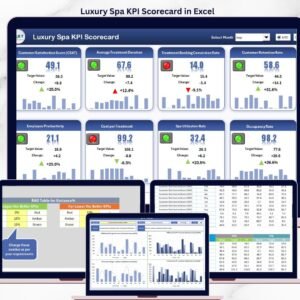
- Luxury Spa KPI Scorecard in Excel: a scorecard view of spa KPIs
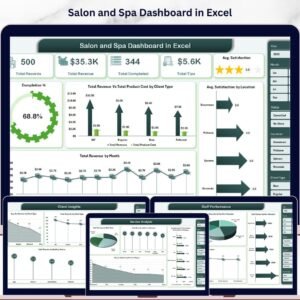
- Salon and Spa Dashboard in Excel: salon and spa analysis in Excel
- Salon and Spa Dashboard in Power BI: the same analysis in Power BI
- KPI Dashboard Library (Excel): 15 Excel KPI dashboards in one download
Browse all Excel KPI dashboards or the Excel dashboards.












Reviews
There are no reviews yet.