

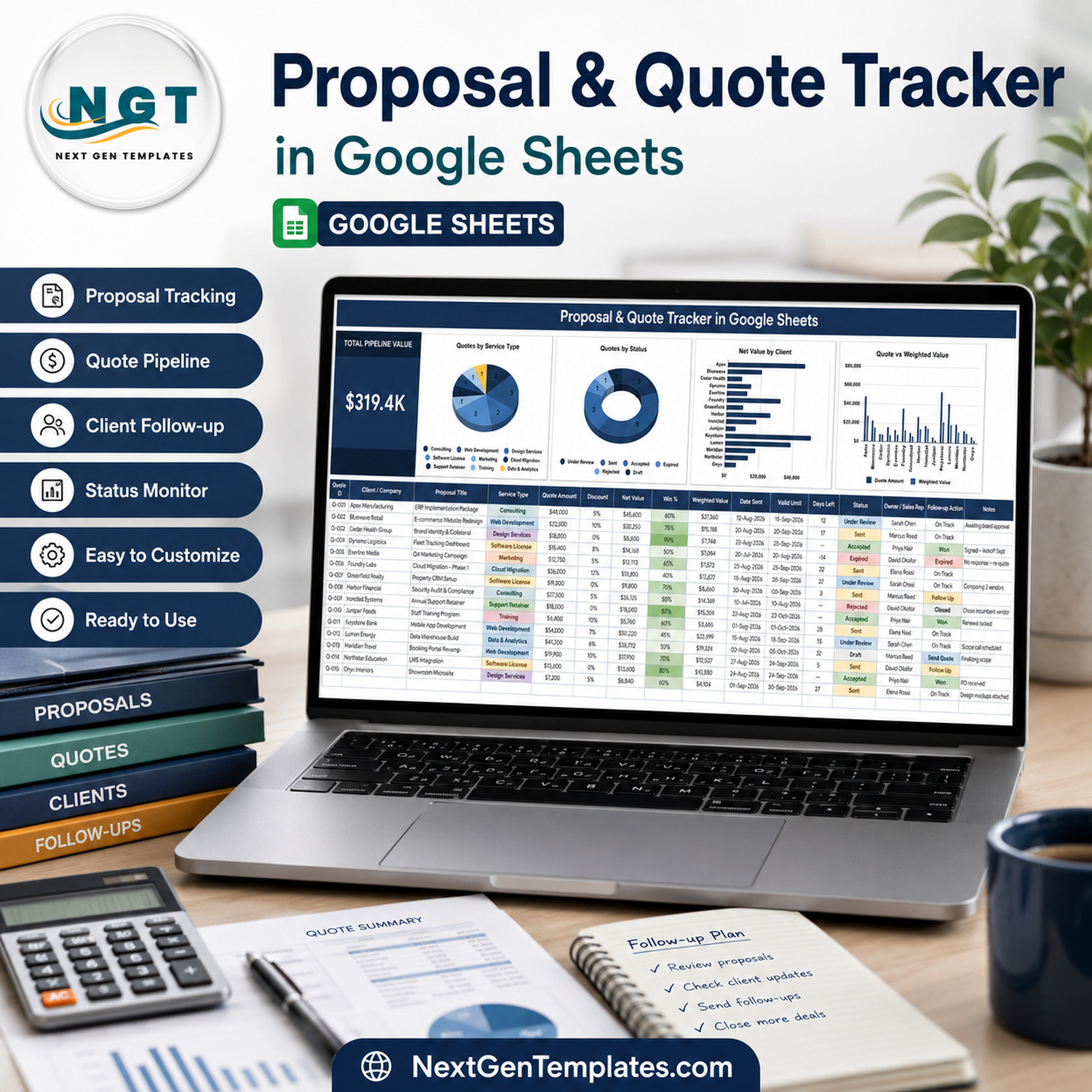

Turn an active quotation pipeline into one decision-ready screen. The Proposal & Quote Tracker in Google Sheets combines a $319.4K sample pipeline card, four visual analyses and a detailed 15-column quote register in one editable view. Sales teams, consultants, agencies and contractors can monitor amounts, discounts, net values, win percentages, weighted values, validity dates, status, ownership and follow-up actions without adding another monthly software subscription. Buy once, create your own Google Drive copy and replace the demonstration data with your proposals.
Key Features of Proposal & Quote Tracker in Google Sheets
- Total Pipeline Value: a headline card summarises the open quotation value represented in the tracker.
- Four business charts: review Quotes by Service Type, Quotes by Status, Net Value by Client, and Quote vs Weighted Value.
- Commercial detail: keep quote amount, discount, net value, win percentage and weighted value together.
- Expiry awareness: record Date Sent, Valid Until and Days Left for each proposal.
- Clear ownership: assign an Owner / Sales Rep and record the next Follow-up Action.
- Status monitoring: use visible stages such as Draft, Sent, Under Review, Accepted, Rejected and Expired.
- Flexible context: add a proposal title, service type, client/company and notes for every quote.
- Google Sheets access: manage the tracker in your own Drive copy and share it using native permissions.
What’s Inside This Proposal Pipeline Tracker
The dashboard and quote register
The product centres on one wide working view. At the top, the pipeline card and four charts answer common review questions: How much value is being pursued? Which services generate quotes? How are quotes distributed by status? Which clients represent the most net value? How does full quote value compare with probability-weighted value?
The register below keeps the evidence behind those summaries visible. Its columns are Quote ID, Client / Company, Proposal Title, Service Type, Quote Amount, Discount, Net Value, Win %, Weighted Value, Date Sent, Valid Until, Days Left, Status, Owner / Sales Rep, Follow-up Action and Notes.

Proposal pipeline, quote status, client value and follow-up details in one view
Google Sheets Tracker vs. Excel vs. Paid CRM – Where This Fits
| Consideration | This Google Sheets tracker | Excel workbook | Paid CRM or quoting SaaS |
|---|---|---|---|
| Cost | One-time template purchase | Template plus Excel licence | Usually recurring per-user fee |
| Platform | Browser-based Google Sheets | Microsoft Excel | Vendor-hosted application |
| Collaboration | Native Drive sharing | Depends on Microsoft setup | Usually included |
| Pipeline visuals | One KPI card and four charts | Depends on workbook design | Usually configurable |
| Quote fields | 15 visible tracking columns | Customisable | Plan and permissions dependent |
| Automated emailing, approvals and e-signature | Not included | Not normally included | May be included |
This template is a transparent management tracker, not a quote-generation engine. It is a strong fit when the team wants one editable pipeline register and a compact visual review. A CRM or dedicated proposal platform is a better fit when you need automated document generation, email sequences, approval routing, e-signatures or accounting integration.
Who This Template Is For – and Who It’s Not For
It suits freelance professionals, consulting teams, creative and digital agencies, B2B service businesses, sales coordinators and contractors that issue proposals and need a consistent review process. The visible service-type examples also make it adaptable to mixed-service portfolios.
It is not a full CRM, accounting system, contract repository, tax calculator or e-signature application. It does not send client reminders, validate legal terms, generate PDF quotations or guarantee sales forecasts. Commercial assumptions such as Win % should be reviewed by the responsible manager.
How to Use the Proposal & Quote Tracker
- Open the PDF supplied after purchase and use its link to create your own Google Sheets copy.
- Replace the sample clients, proposal titles and service types with your own pipeline.
- Enter the quote amount, discount and relevant commercial values for each row.
- Set the probability in Win % using your team’s agreed forecasting method.
- Maintain Date Sent, Valid Until, Status, Owner / Sales Rep and Follow-up Action.
- Review the headline value and four charts during sales or operations meetings.
- Use Google’s file-sharing controls to grant appropriate viewer or editor access.
Real-World Use Cases
A consulting practice
Ravi tracks implementation proposals by client, compares quote and weighted value, and uses Follow-up Action to keep the next commercial step visible.
A creative agency
Maya separates design, marketing, web development and retainer proposals by Service Type, then checks which category produces the most quotation activity.
A contracting business
Daniel reviews validity dates and Days Left before pricing expires, while the status chart helps the team distinguish sent work from accepted, rejected or expired quotes.
Frequently Asked Questions
Does the tracker create proposal documents?
No. It monitors proposal and quotation records; it does not generate client-facing documents.
How is weighted value used?
The view pairs quote value with a Win % and Weighted Value field so teams can record a probability-adjusted planning amount. Your organisation should define how probabilities are assigned.
Can I change statuses and service types?
The sheet is editable, so you can adapt labels to your workflow. Review any connected formulas or charts after structural changes.
Does it send follow-up reminders?
No. Follow-up Action is a visible tracking field, not an automated notification service.
Can multiple people work in the tracker?
Yes, when you share your Drive copy with them. Apply permissions appropriate to commercial data.
Is it a sales forecast?
It supports pipeline review, but results depend on the values and probabilities your team enters. It does not predict or guarantee revenue.
About the Author
Built by PK – Microsoft Certified Professional with 15+ years of Excel, Google Sheets, and Power BI experience. Founder of NextGenTemplates, reaching 300K+ subscribers across YouTube channels. Every template is hand-built and tested before release.
Explore Related Templates
For deeper workflows, see the Freelancer & Agency Project Management System, Business Consulting Client Management System and Architecture Firm Project Management System. Browse the full Google Sheets tracker collection for more focused records.
Make every active quotation easier to review. Add this tracker to your sales toolkit, replace the sample pipeline and keep the value, status, expiry and next action visible in one place.
Last updated: September 2026.
Compatibility and Requirements
- Works in Google Sheets. You need a free Google account and a web browser.
- You create your own copy in Google Drive from the PDF link supplied after purchase, then replace the sample data with your own quotes.
- Google explains how charts work in Add and edit a chart or graph, which helps if you adjust the four charts.
Related Proposal and Sales Templates
- Corporate Event Proposal Tracker in Google Sheets: a proposal register for event quotes
- Corporate Event Proposal Tracker in Excel: the same type of tracker for Excel
- Monthly Sales Tracker and Report in Google Sheets: track sales results after quotes are won
- Daily RFQ and Quote Comparison Management System Web App: compare supplier quotes
- Google Sheets Business Pack (Pro): 14 business templates in one download
Browse all Google Sheets templates.

































Reviews
There are no reviews yet.