

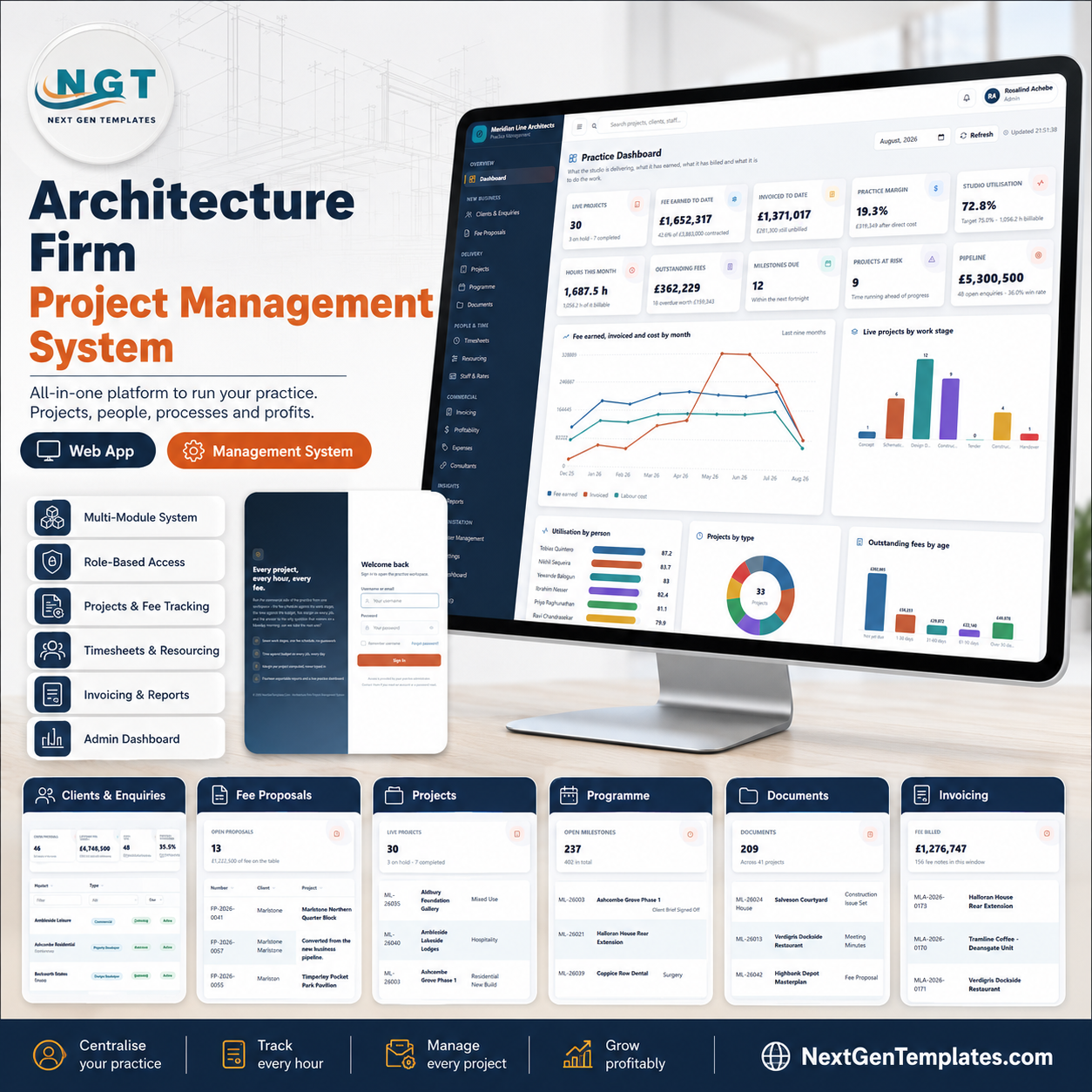
The Architecture Firm Project Management System is a working Google Apps Script web app that runs the commercial side of an architecture practice: 20 modules, 6 sign-in roles, a 7-stage fee schedule and 10,811 seeded records across 22 sheets so every screen is alive the moment you deploy it. The demo practice carries 44 projects worth GBP 3,883,000 of contracted fee, 7,414 timesheet lines, 173 fee notes and 106 consultant appointments. You get the full source – Code.gs and Index.html – plus a Word user manual, and it runs in your own Google account with no subscription and no per-seat fee. Deploy it in about 15 minutes, or try the live demo below first. Instant download, lifetime access, free updates.
Try the Live Demo Before You Buy
We have deployed this web app in our own Google account so you can test every page, every role and every report – with the full seeded practice behind it – before purchasing. No signup, no email required.
Test Login Credentials
Sign in as admin to see all 20 modules including User Management, List Management, Settings and the Audit Log – then sign back in as design to watch fees, charge-out rates and margins disappear from every screen. That contrast is the product.
These credentials are public on purpose. The demo is a shared instance seeded with the fictional practice “Meridian Line Architects” and it resets – it is not anybody’s live data, and you are not buying a shared system. What you get after purchase: the full source (Code.gs + Index.html), the Word user manual and a step-by-step deployment guide, so you can stand up your own private copy in your own Google account in about 15 minutes.
Key Features of the Architecture Firm Project Management System
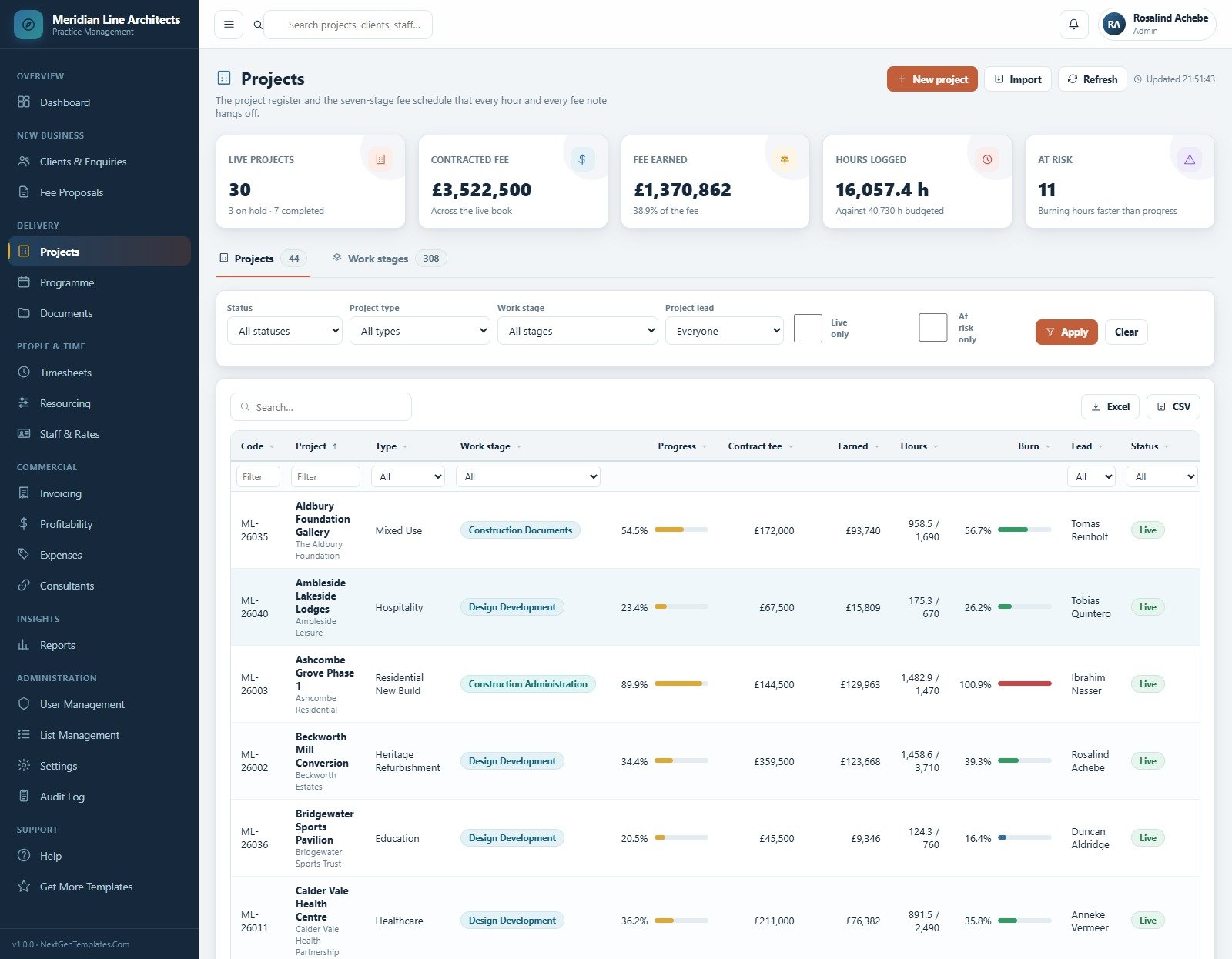
The seven-stage fee schedule is the spine. Accepting a fee proposal opens the project and writes its work stages – Concept, Schematic Design, Design Development, Construction Documents, Tender, Construction Administration and Handover. The demo carries 308 stage rows across 44 projects. Move a stage percentage and the fee earned, the WIP, the billable amount and the margin all move with it.
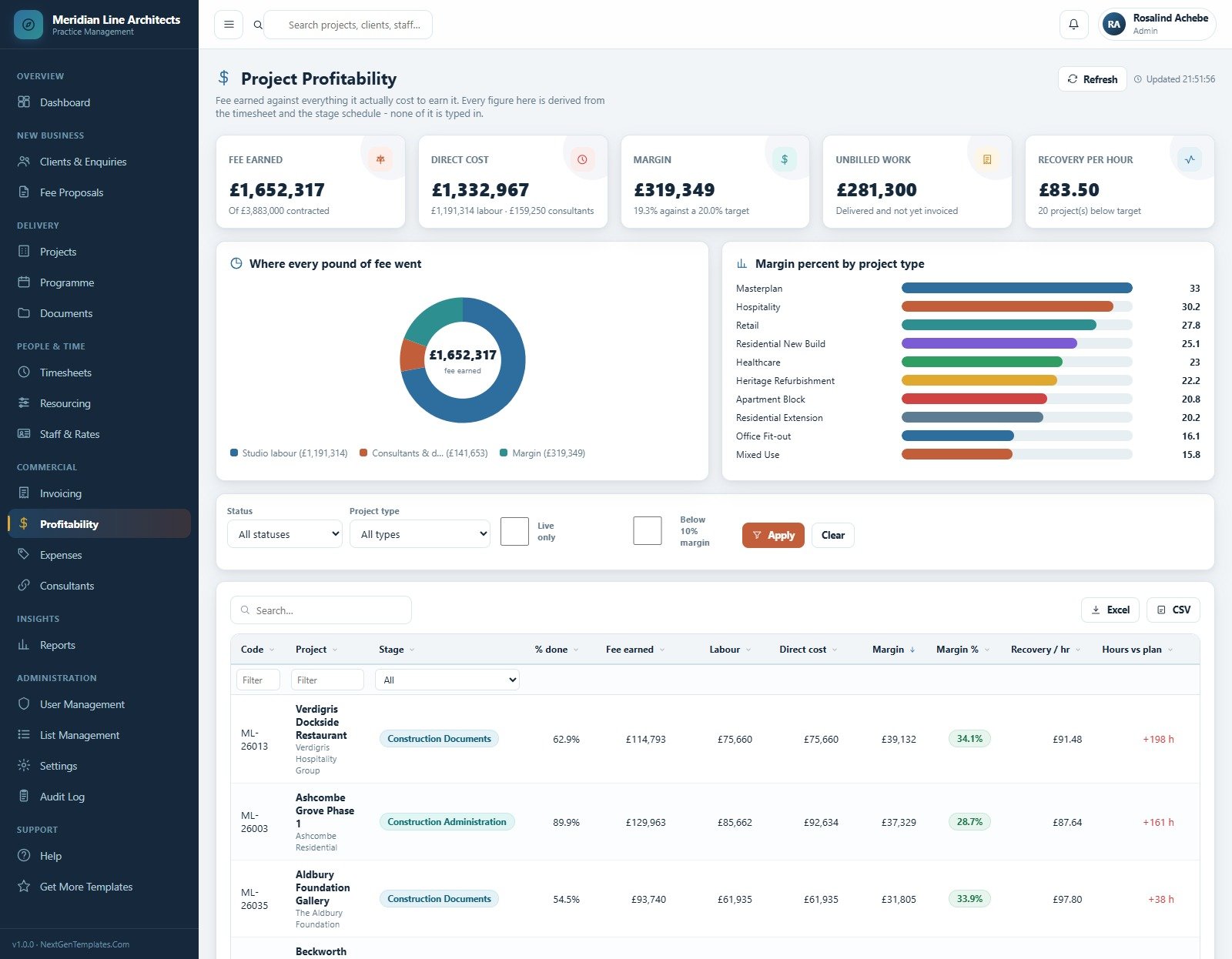
Margin is computed, never typed. Fee earned is stage fee multiplied by percent complete. Labour cost is the timesheet valued at each person’s cost rate, not their charge-out rate. Margin is the difference. In the demo that reconciles to GBP 1,652,317 earned against GBP 1,332,967 of direct cost – GBP 1,191,314 of studio labour and GBP 159,250 of consultants – leaving a 19.3 per cent practice margin against a 20.0 per cent target.
Six roles, checked twice. Permissions decide what appears in the sidebar and are checked again on the server before any endpoint touches data. Edit the page in your browser as Design Staff and you still cannot read the invoicing module.
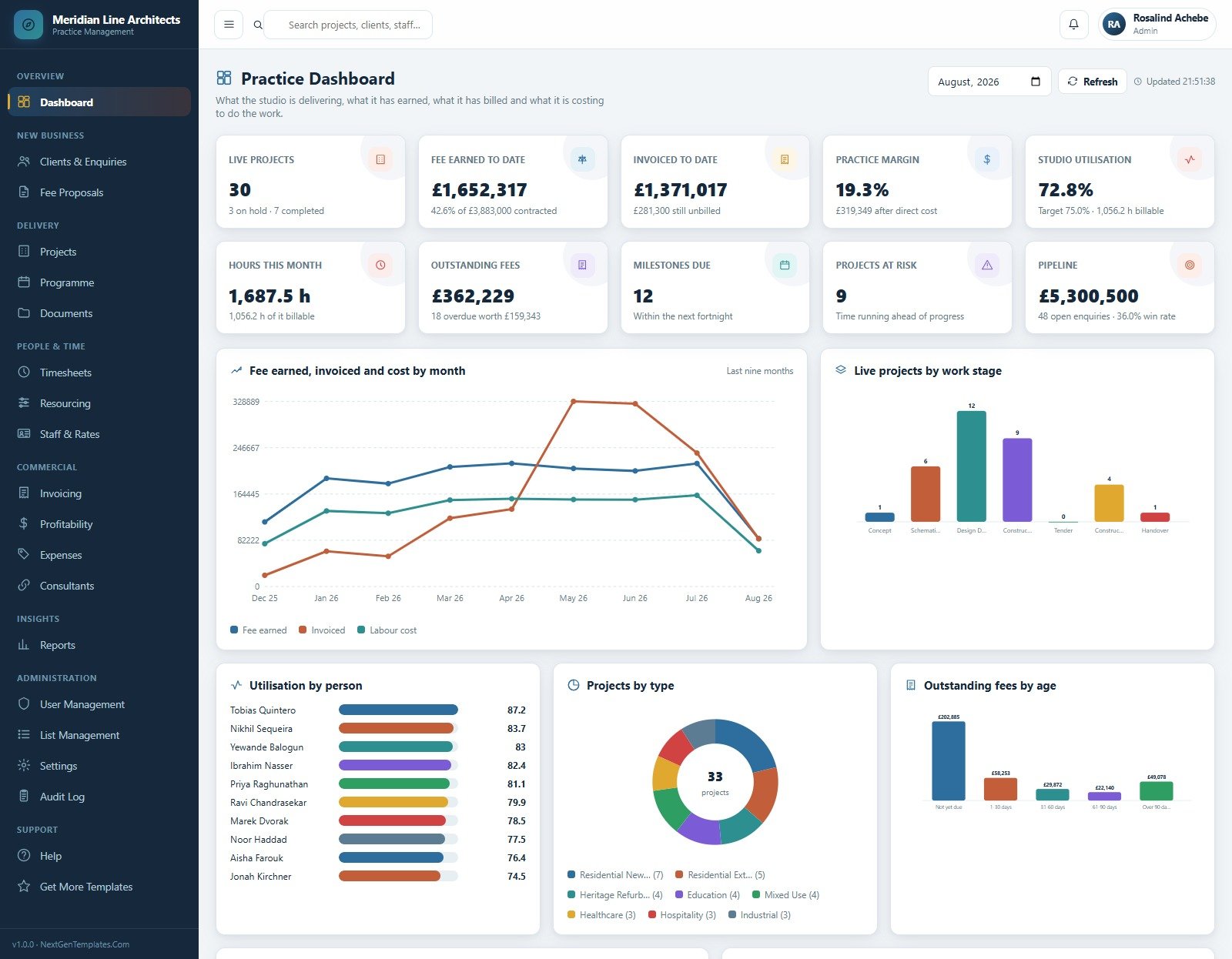
A live practice dashboard. Ten KPI cards – live projects, fee earned to date, invoiced to date, practice margin, studio utilisation, hours this month, outstanding fees, milestones due, projects at risk and pipeline – over five charts: Fee earned, invoiced and cost by month; Live projects by work stage; Utilisation by person; Projects by type; and Outstanding fees by age.
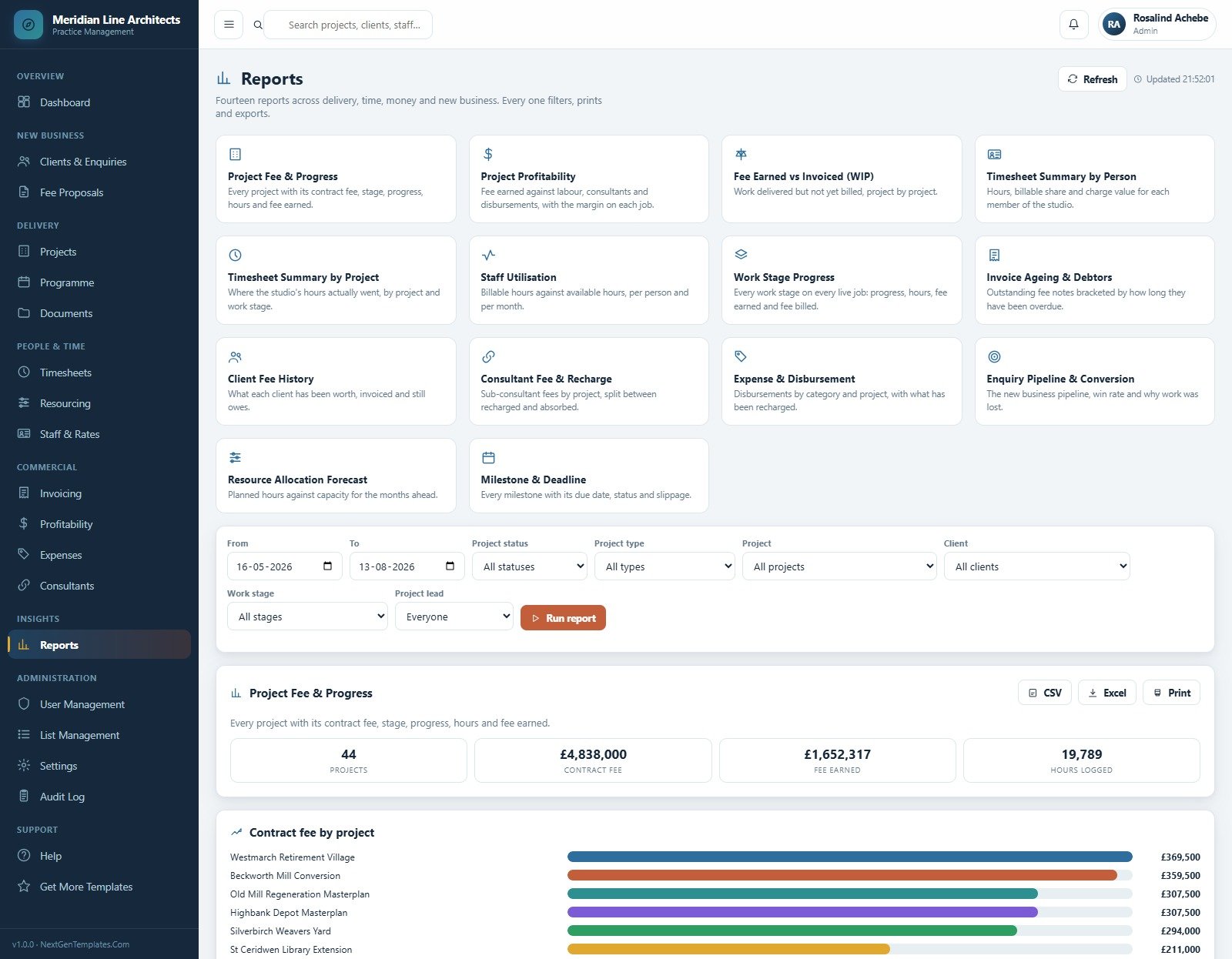
Fourteen exportable reports. Project Fee & Progress, Project Profitability, Fee Earned vs Invoiced (WIP), Timesheet Summary by Person, Timesheet Summary by Project, Staff Utilisation, Work Stage Progress, Invoice Ageing & Debtors, Client Fee History, Consultant Fee & Recharge, Expense & Disbursement, Enquiry Pipeline & Conversion, Resource Allocation Forecast and Milestone & Deadline. Every one filters, prints and exports to CSV or Excel.
Everything configurable is in Settings. Nine setting groups – Business, Finance, Numbering, Operations, Print, Email, Theme, Security and Archive – plus 32 dropdown lists holding 229 values in List Management, so the project types, work stages, expense categories and consultant disciplines are yours to rewrite.
What’s Inside the Architecture Firm Project Management System
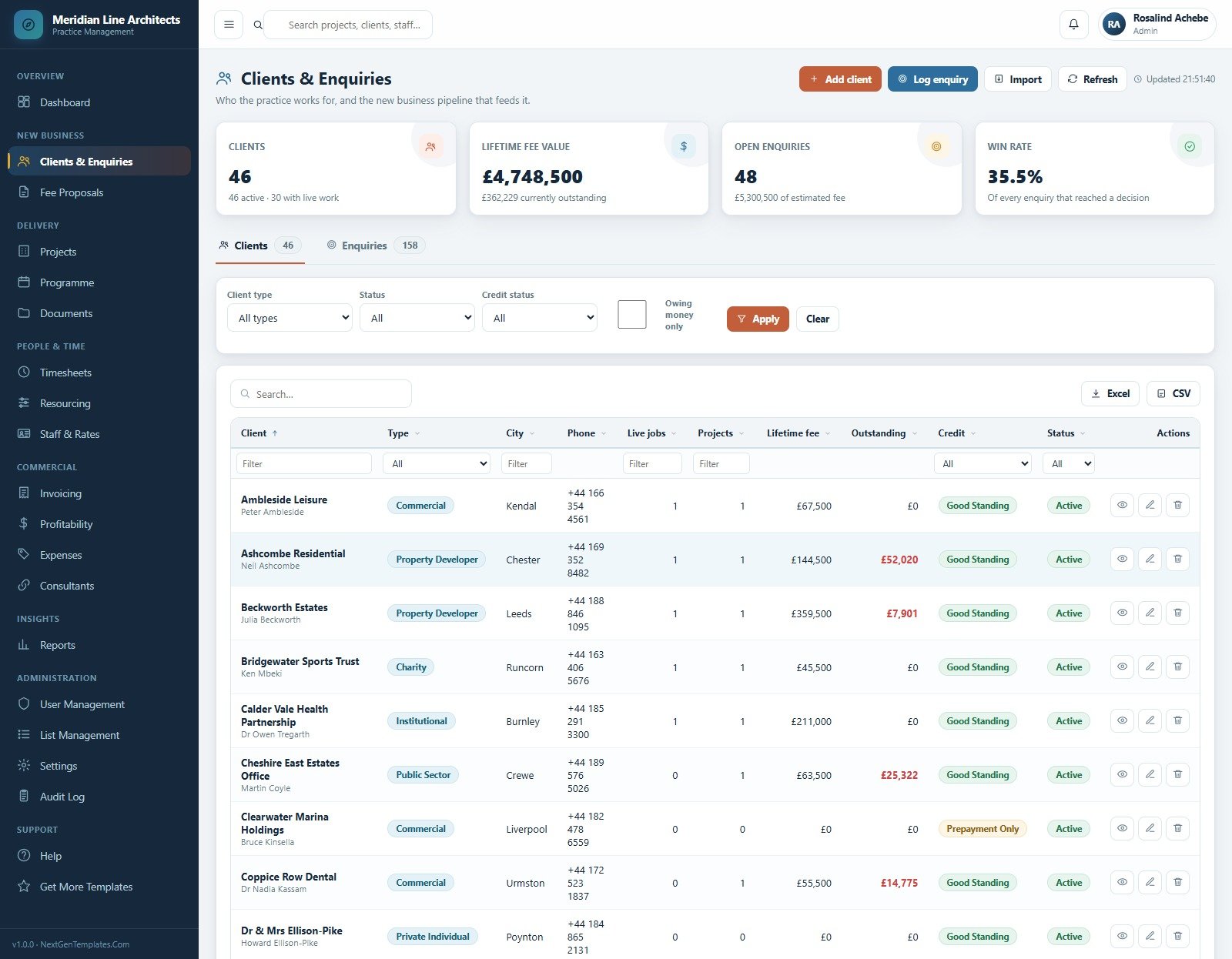
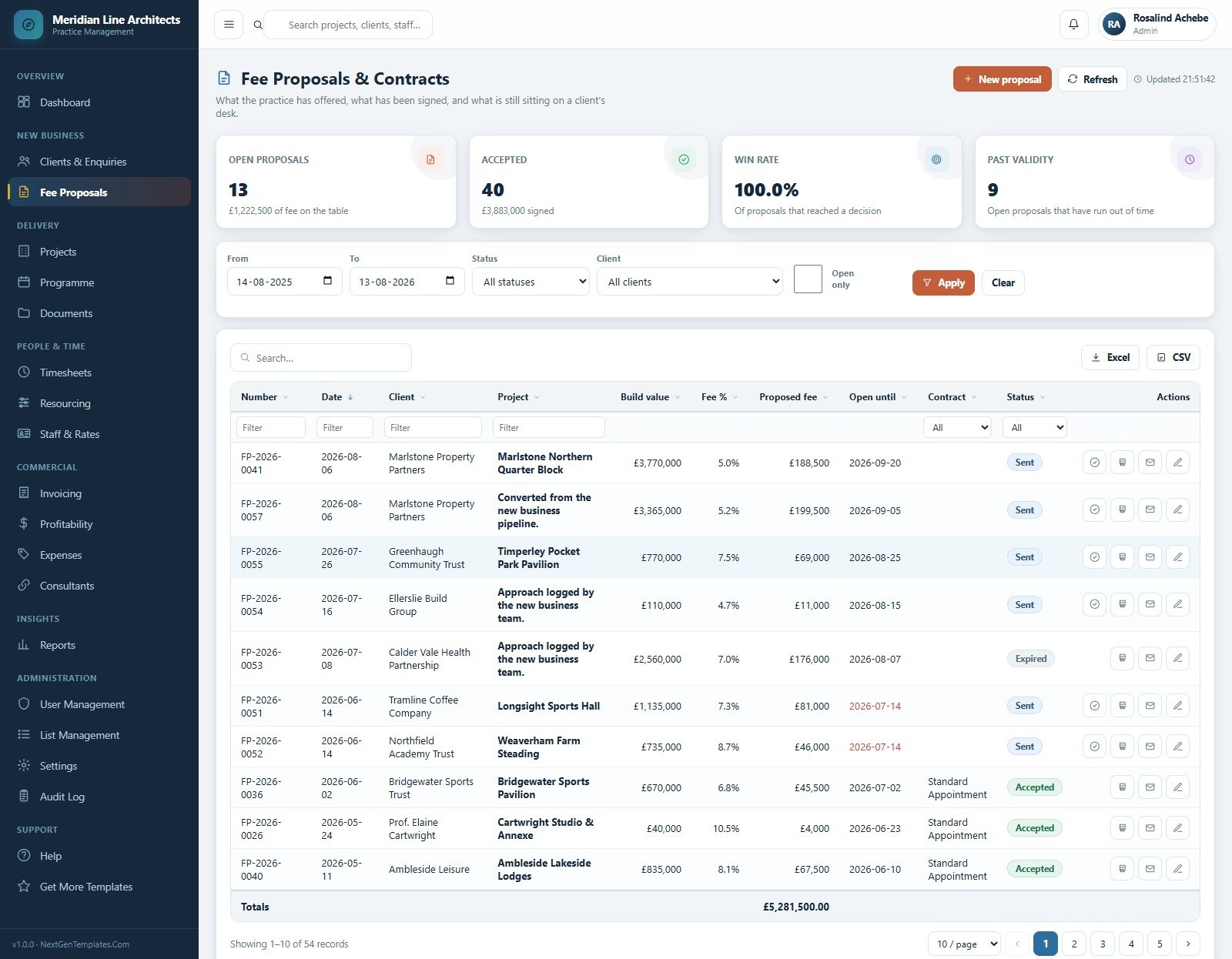
New business. Clients & Enquiries holds 46 clients worth GBP 4,748,500 of lifetime fee alongside 158 enquiries and a 35.5 per cent win rate. Fee Proposals & Contracts tracks 54 proposals – 13 open on GBP 1,222,500 of fee, 40 accepted on GBP 3,883,000 signed, and 9 that have run past their validity date.
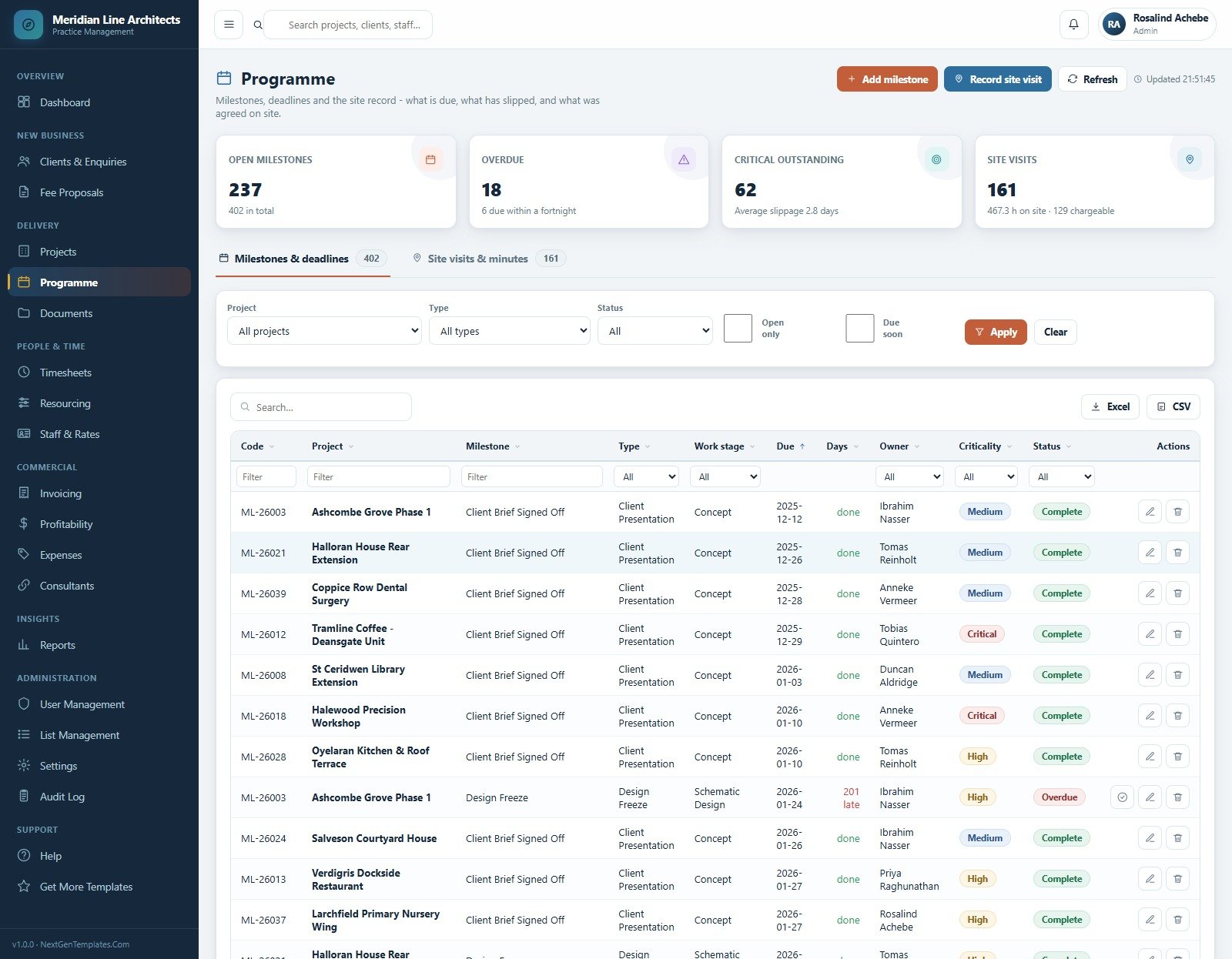
Delivery. Projects is the register plus the work-stage tab, showing progress, contract fee, fee earned, hours against budget, burn rate and lead for each of 44 jobs. Programme carries 402 milestones (237 open, 18 overdue, average slippage 2.8 days) and 161 site visits totalling 467.3 hours, 129 of them chargeable. Documents is a 209-entry issue register across 41 projects with revision, issue date and issuer.
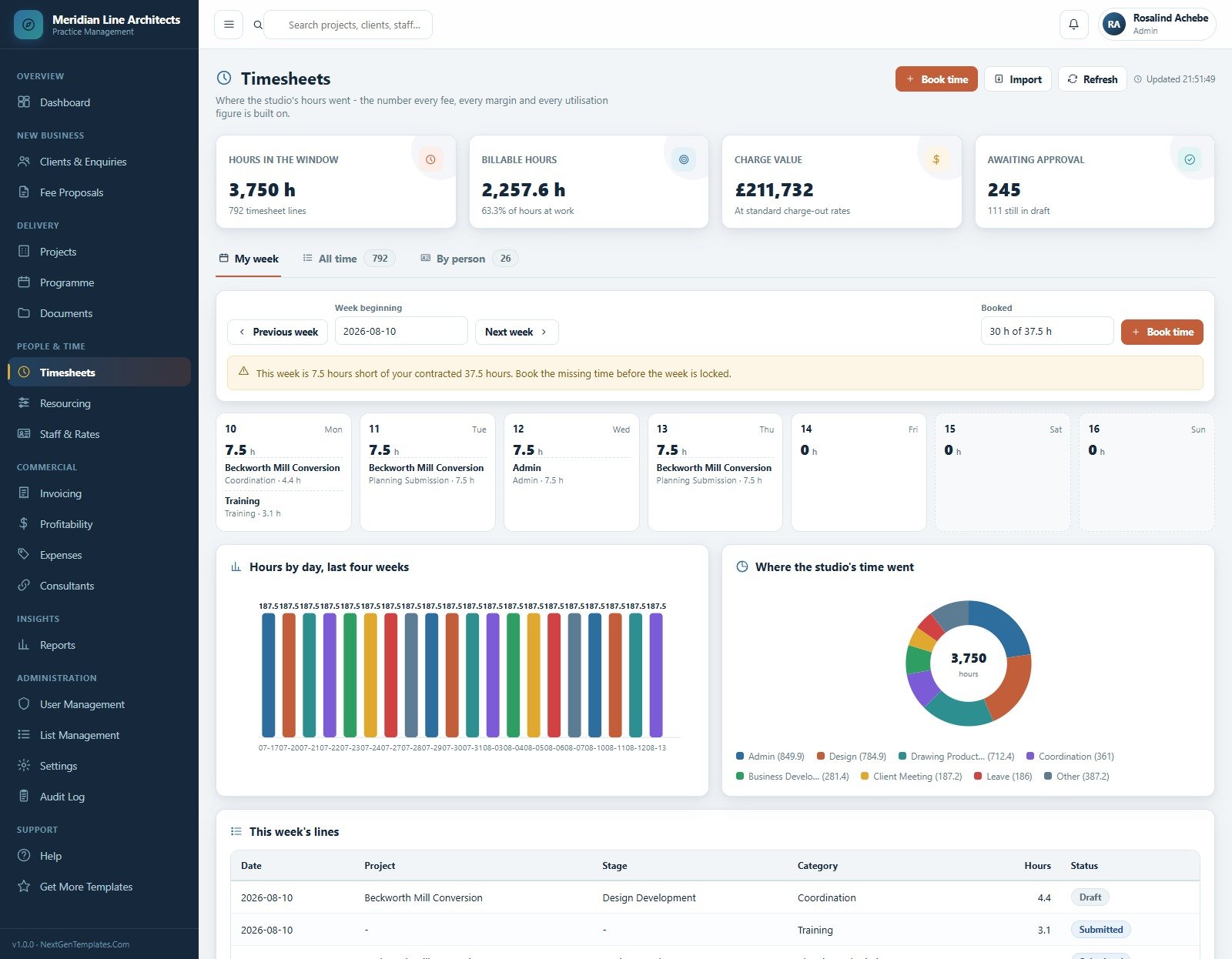
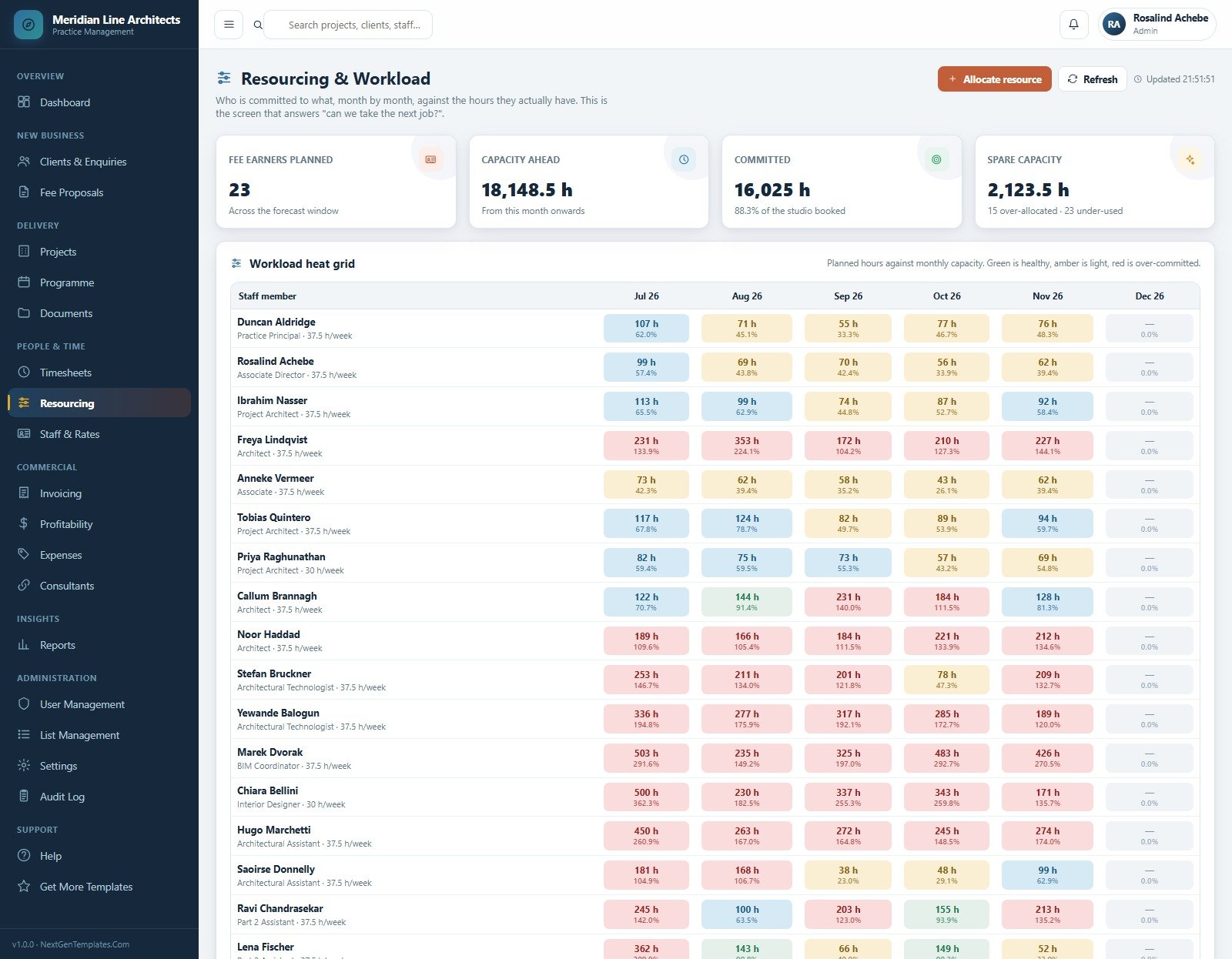
People and time. Timesheets gives each person a week grid with a short-hours warning, plus all-time and by-person tabs over 7,414 lines. Resourcing is a workload heat grid of planned hours against monthly capacity – green healthy, amber light, red over-committed – which is the screen that answers “can we take the next job?”. Staff & Rates holds 26 people with charge-out rate, cost rate, hours, billable hours, utilisation and target.
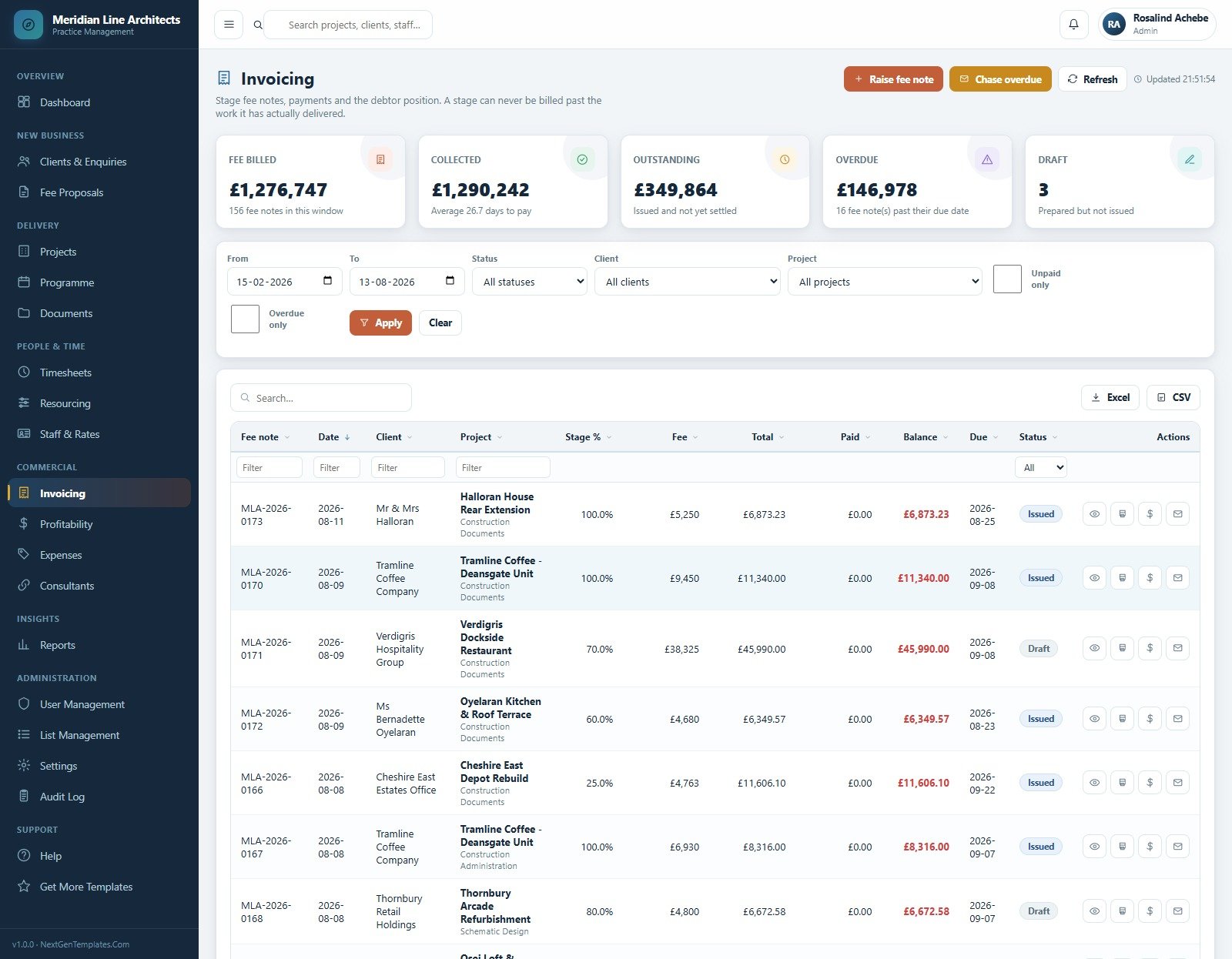
Commercial. Invoicing raises stage fee notes and will not let a stage be billed past the work it has actually delivered; the demo shows GBP 1,276,747 billed over 156 notes with GBP 146,978 overdue. Profitability, Expenses & Disbursements (GBP 159,983 across 218 entries, split into recharged and absorbed) and Consultants (22 firms, 106 appointments, PI insurance expiry per firm) complete the money side.
Administration. User Management, List Management, Settings, a 128-row Audit Log covering every create, change, approval, fee note and sign-in, and a database archive that copies the file to Drive and trims only closed transactions.
Architecture Firm Project Management System vs. Spreadsheets vs. Paid Practice SaaS – Where This Fits
| This web app | A folder of spreadsheets | Paid practice SaaS (Monday.com, Smartsheet, Deltek) | |
|---|---|---|---|
| Cost | USD 39.99 once | Free, plus the hours you spend repairing it | USD 20-45 per user per month |
| Platform | Google Apps Script + a Google Sheet you own | Excel or Sheets files | Vendor cloud |
| Setup time | About 15 minutes, seeded and ready | Weeks of building | Days to weeks, often with paid onboarding |
| Real-time team collaboration | Yes – one shared database, six roles | Version conflicts | Yes |
| Mobile access | Yes – responsive browser app | Painful | Yes |
| Customisable fields | Yes – 32 dropdown lists and full source | Yes | Only what the vendor exposes |
| Share with a link | Yes – your own deployment URL | File sharing only | Yes |
| Year-1 cost at 5 users | USD 39.99 | USD 0 plus rebuild time | USD 1,200-2,700 |
| Fee earned from a stage schedule | Built in, seven stages | Hand-maintained | Usually an add-on module |
| Margin at cost rate, not charge rate | Built in | Rarely done correctly | Yes, on higher tiers |
| You own the source code | Yes – Code.gs and Index.html | N/A | No |
Who This Template Is For – and Who It’s Not For
It is for independent architecture and design practices of roughly 5 to 60 people that already win work on staged fee proposals and need one place for the fee schedule, the timesheet and the margin; practice managers who currently reconcile three spreadsheets every month; interior design, landscape and multidisciplinary studios that bill the same way; and developers who want a finished Apps Script codebase to rebrand and resell to a client.
It is not for anyone who needs CAD or BIM – there is no drawing, model or clash detection here, and drawing issue is a register, not a viewer. It is not accounting software: it does not post a ledger, file accounts or calculate tax, and you will still export to your accountant. It performs no planning, building-regulations, structural, fire or professional-registration checks of any kind, and nothing in it constitutes professional, legal or financial advice. Sole practitioners with three live jobs will find it heavier than they need. If what you actually want is a drawing issue and approval workflow, buy the Architect Drawing Approval Management System Web App instead.
How to Use the Architecture Firm Project Management System
- Try the demo first. Open the live demo above and sign in as
admin, then asdesign. Ten minutes there will tell you more than this page can. - Deploy your own copy. Create a Google Sheet, open Extensions > Apps Script, paste
Code.cs.txtintoCode.gs, create an HTML file named exactlyIndexand pasteIndex.txtinto it, then save. - Run setup once. Choose the
setupfunction and press Run. It builds all 22 sheets, seeds the demo practice and creates the six accounts. It is idempotent, so you can run it again any time. - Publish the web app. Deploy > New deployment > Web app, Execute as Me, Who has access Anyone. Copy the URL and sign in as admin.
- Change every password and put your own practice name, address, currency, tax rate and payment terms into Settings > Business and Settings > Finance.
- Enter your people with both rates. Charge-out and fully absorbed cost rate – every margin in the product is computed at the cost rate, so this step decides whether the numbers are true.
- Reseed or clear the demo practice from the Practice menu, then import your own clients, projects and staff through the CSV wizards.
- Settle into the weekly rhythm – book time daily, move stage percentages weekly, raise fee notes on a fixed day each month, and read Profitability before you price the next job.
Real-World Use Cases
Marisol, practice manager at a 22-person studio. Every month she rebuilt a WIP spreadsheet from the timesheet export and the invoice list. Now she opens Fee Earned vs Invoiced (WIP), sees GBP 281,300 of delivered-but-unbilled work by project, and raises the fee notes in the same session. Month-end went from a day and a half to an afternoon.
Duncan, principal of a practice bidding for a GBP 3.7m mixed-use block. Before committing he opens Resourcing and reads the heat grid: four people are already over 130 per cent for the next three months. He phases the fee proposal around that instead of promising a start date the studio cannot meet.
Ibrahim, project architect on a heritage refurbishment. He watches Projects show 100.9 per cent burn against 89.9 per cent progress on one job and raises it at the design review while the overrun is still four weeks of fee rather than fourteen. He never sees the practice margin – his role deliberately does not carry it.
Frequently Asked Questions
Can I try it before buying?
Yes. The live demo above is a full deployment with all 20 modules and all 10,811 seeded records. Sign in with any of the six accounts in the table. The demo resets periodically, so nothing you type there is kept.
Does this replace my accounting software?
No. It records the fee notes, payments, disbursements and margins you enter, and it exports them. It does not post a ledger, file accounts or calculate tax, and it makes no accounting or tax representation of any kind.
Does it check planning, building regulations or structural compliance?
No. It stores whatever project, milestone and document records you enter. It performs no code, permit, structural, fire-safety or professional-registration checks, and it is not a substitute for professional judgement.
Where does the data live, and who can see it?
In a Google Sheet inside your own Google account. Nothing is sent to us. You control who can open the deployment and which of the six roles each person holds.
Can I change the currency, the work stages and the branding?
Yes. The seeded practice uses GBP; the currency symbol, tax percentage, payment terms, numbering, print size and theme colours all sit in Settings, and the seven work stages plus 31 other dropdown lists are editable in List Management. You also have the full source, so you can add a module.
How many people can use it at once?
It is a Google Apps Script web app over a Google Sheet, so it is comfortable for a studio-sized team. A busy practice books thousands of timesheet lines a year, which is why the Settings > Archive tool copies the database to Drive and trims only closed transactions while leaving clients, staff, live projects, unpaid fee notes and open milestones untouched.
What exactly do I download?
A ZIP containing Code.cs.txt, Index.txt and the user manual PDF. No subscription, no licence key, no per-seat fee.
About the Author
Built by PK – Microsoft Certified Professional with 15+ years of Excel, Google Sheets, and Power BI experience. Founder of NextGenTemplates, reaching 300K+ subscribers across YouTube channels. Every template is hand-built and tested before release.
Explore Related Templates
- Architect Drawing Approval Management System Web App – the drawing issue and approval side of the same practice.
- App Development Project Management System Web App – the same fee, timesheet and margin engine aimed at software delivery.
- Auditing Firm Management System Web App – another professional-services practice system with roles, WIP and recovery.
- Architecture & Design Dashboard in Power BI and Architecture and Design KPI Dashboard in Excel – reporting layers if you already have the operational data elsewhere.
- Browse every system in Web Apps.
Read the full walkthrough: Architecture Firm Project Management System Web App – module-by-module guide.
Add to cart to download the source, the user manual and the deployment guide immediately – or open the live demo and sign in as all six roles first. Instant download, lifetime access, free updates.
Last updated: 19 August 2026 · Version 1.0.0






























Reviews
There are no reviews yet.