

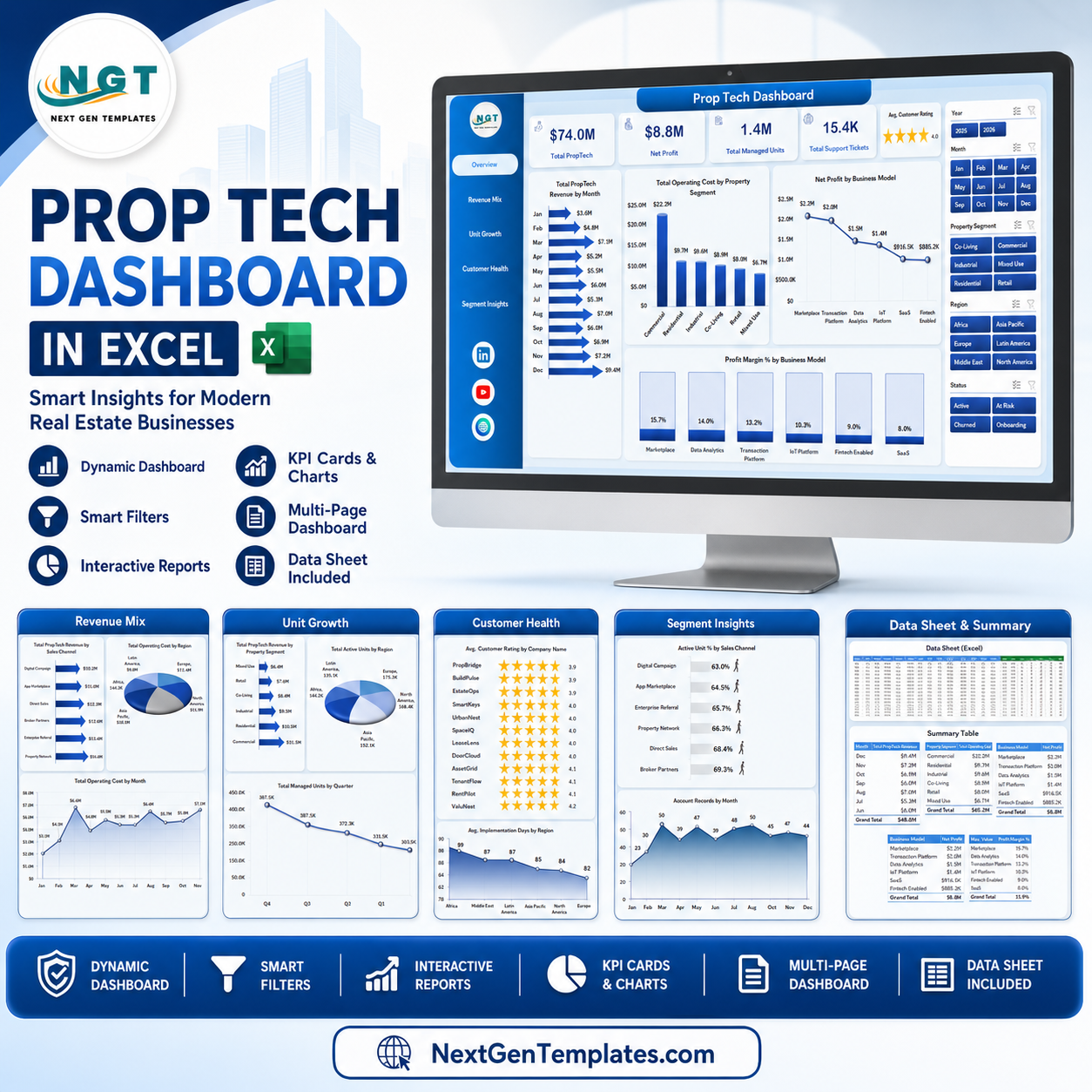



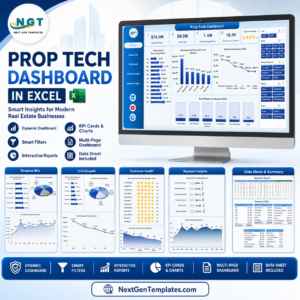
Prop Tech Dashboard in Excel gives property technology teams a ready-to-use workbook for tracking revenue, net profit, managed units, support tickets, customer ratings, implementation days, active unit %, operating cost, sales channels, regions, property segments, and business models. Instead of reviewing CRM exports, support logs, onboarding files, and finance sheets separately, you can keep a structured Excel dashboard with slicers, KPI cards, charts, a data sheet, and refreshable pivot support. Built by PK – Microsoft Certified Professional with 15+ years of Excel, Google Sheets, and Power BI experience and 300K+ subscribers across YouTube channels, this template is a one-time download with no monthly SaaS fee.
Key Features of Prop Tech Dashboard in Excel
- 7 worksheet structure: Overview, Revenue Mix, Unit Growth, Customer Health, Segment Insights, Data Sheet, and Support Sheet.
- 5 executive KPI cards: Total PropTech Revenue, Net Profit, Total Managed Units, Total Support Tickets, and Avg. Customer Rating.
- 22 dashboard chart views: Analyze revenue, cost, profit, units, ticket volume, customer health, regions, channels, and company performance.
- Interactive slicers: Filter the workbook by available dimensions such as month, region, segment, company, status, channel, and business model.
- Refreshable pivot engine: Update the Data Sheet, click Refresh All, and the dashboard visuals recalculate.
- Editable Excel format: Customize labels, charts, fields, colors, formulas, and pivot layouts inside Microsoft Excel.
What’s Inside the Prop Tech Dashboard in Excel
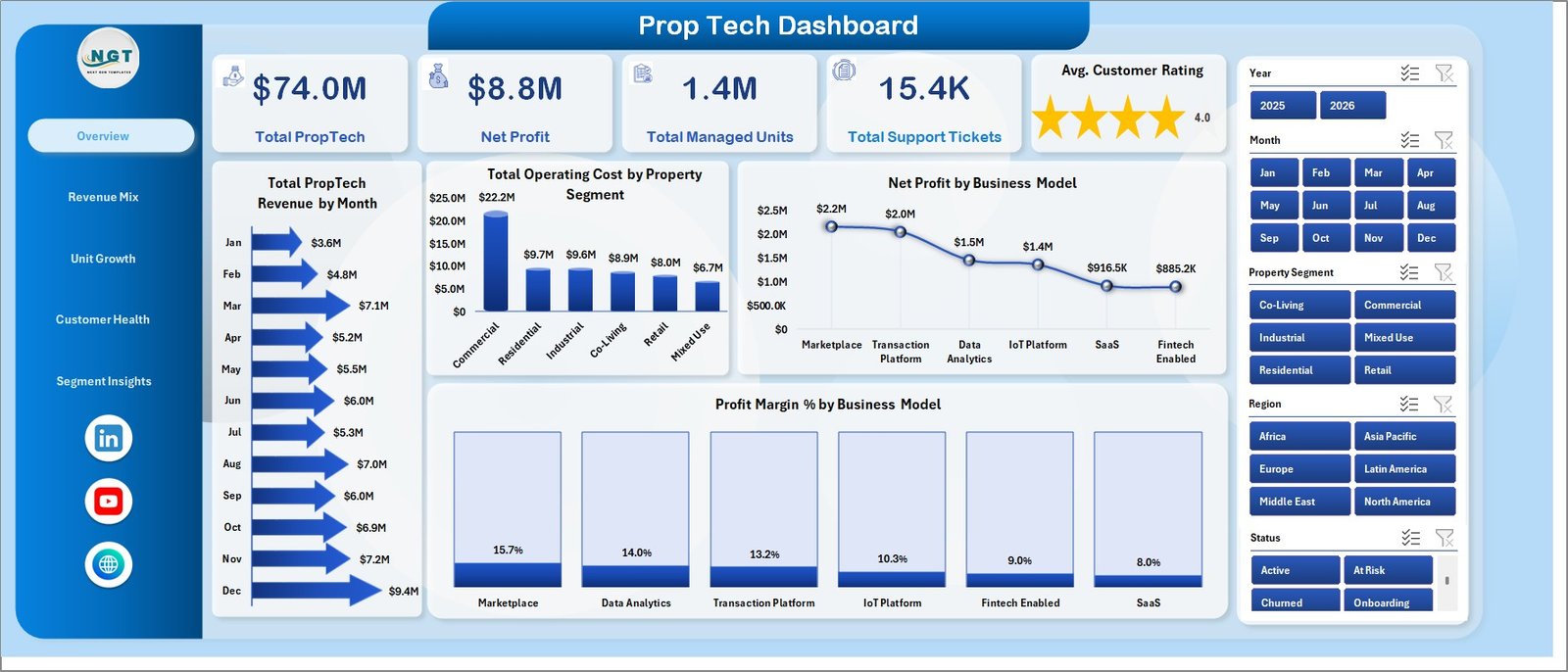
1 – Overview Page
The Overview page gives a leadership snapshot of the PropTech business. Cards show Total PropTech Revenue, Net Profit, Total Managed Units, Total Support Tickets, and Avg. Customer Rating so teams can compare growth, profitability, operations, and customer experience in one view.
Total PropTech Revenue by Month: This chart shows monthly revenue movement and helps identify stronger sales periods, slower months, and seasonality.
Total Operating Cost by Property Segment: This chart compares cost by property segment so teams can see which segment is more expensive to serve.
Net Profit by Business Model: This view compares profit across business models and helps founders understand where the business is making money.
Profit Margin % by Business Model: This chart compares margin efficiency, which is useful when a smaller model has stronger profitability.
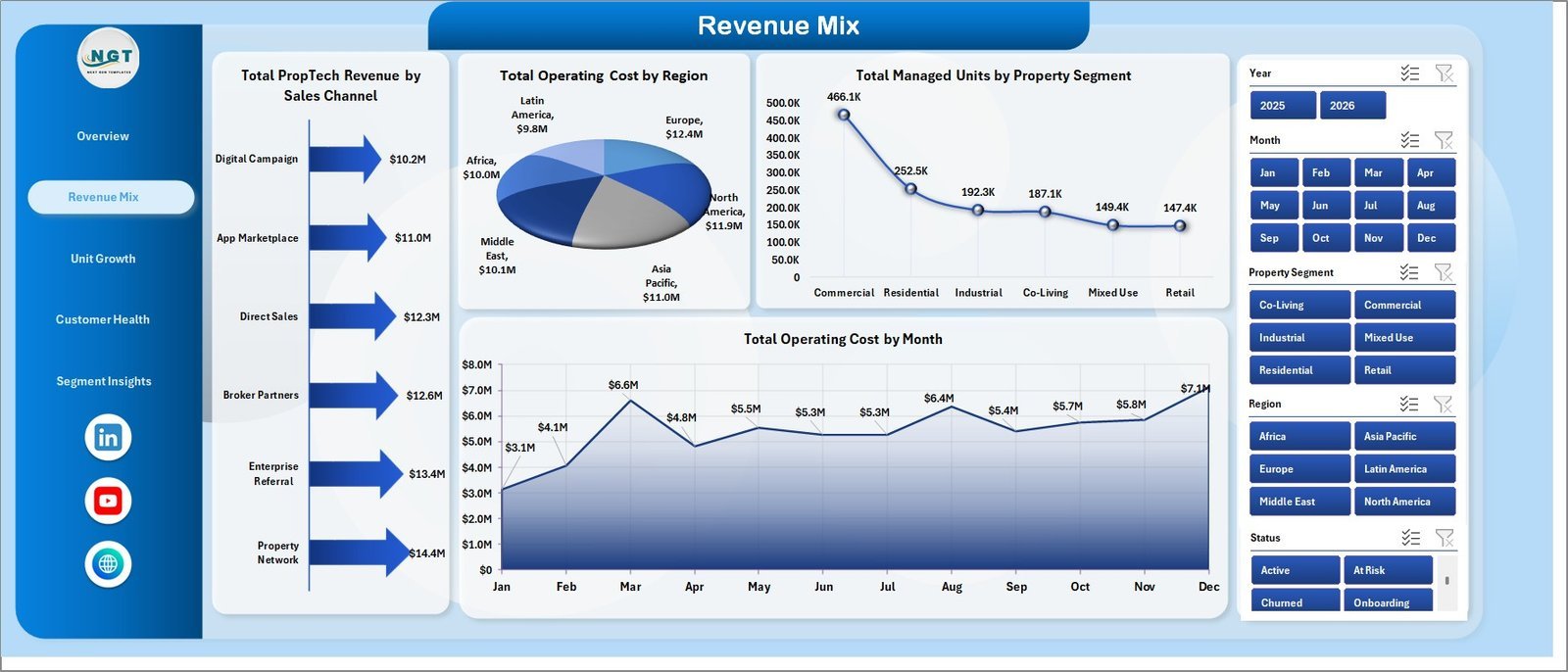
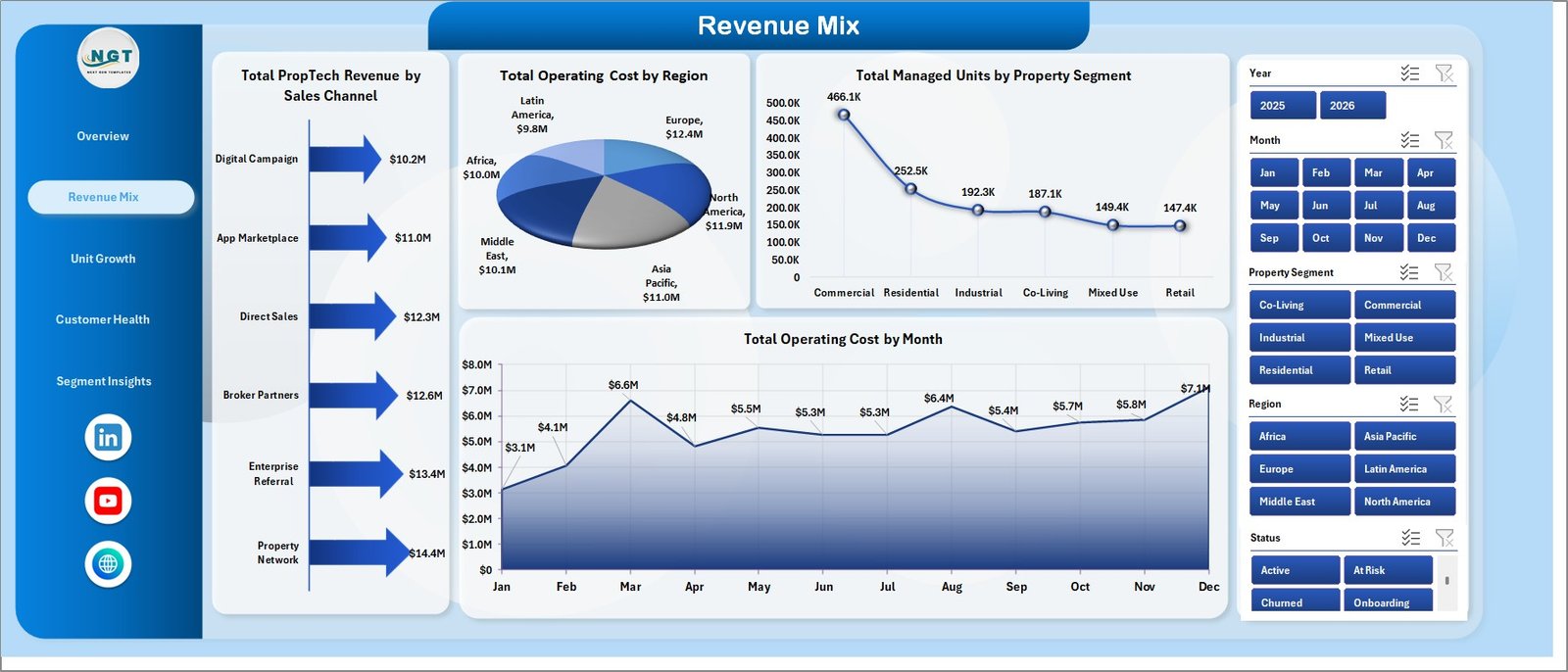
2 – Revenue Mix
The Revenue Mix page explains where revenue comes from and where operating cost is concentrated.
Total PropTech Revenue by Sales Channel: Compare direct sales, partner channels, referrals, online acquisition, or other channels to see which source drives meaningful revenue.
Total Operating Cost by Region: Review regional cost levels to identify markets where support, implementation, or operations may be heavier.
Total Managed Units by Property Segment: See how managed units are distributed across property segments and where the customer base is concentrated.
Total Operating Cost by Month: Track monthly cost movement and compare spikes with revenue growth.
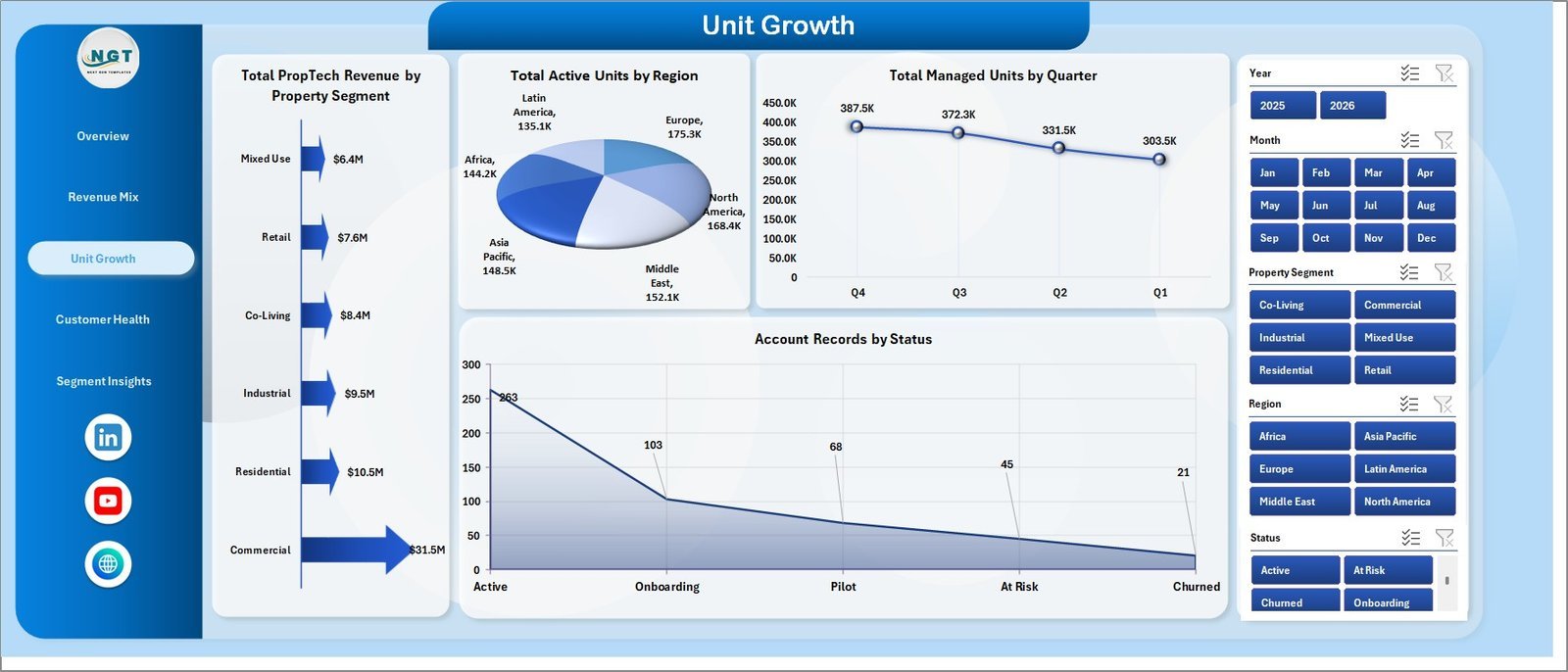
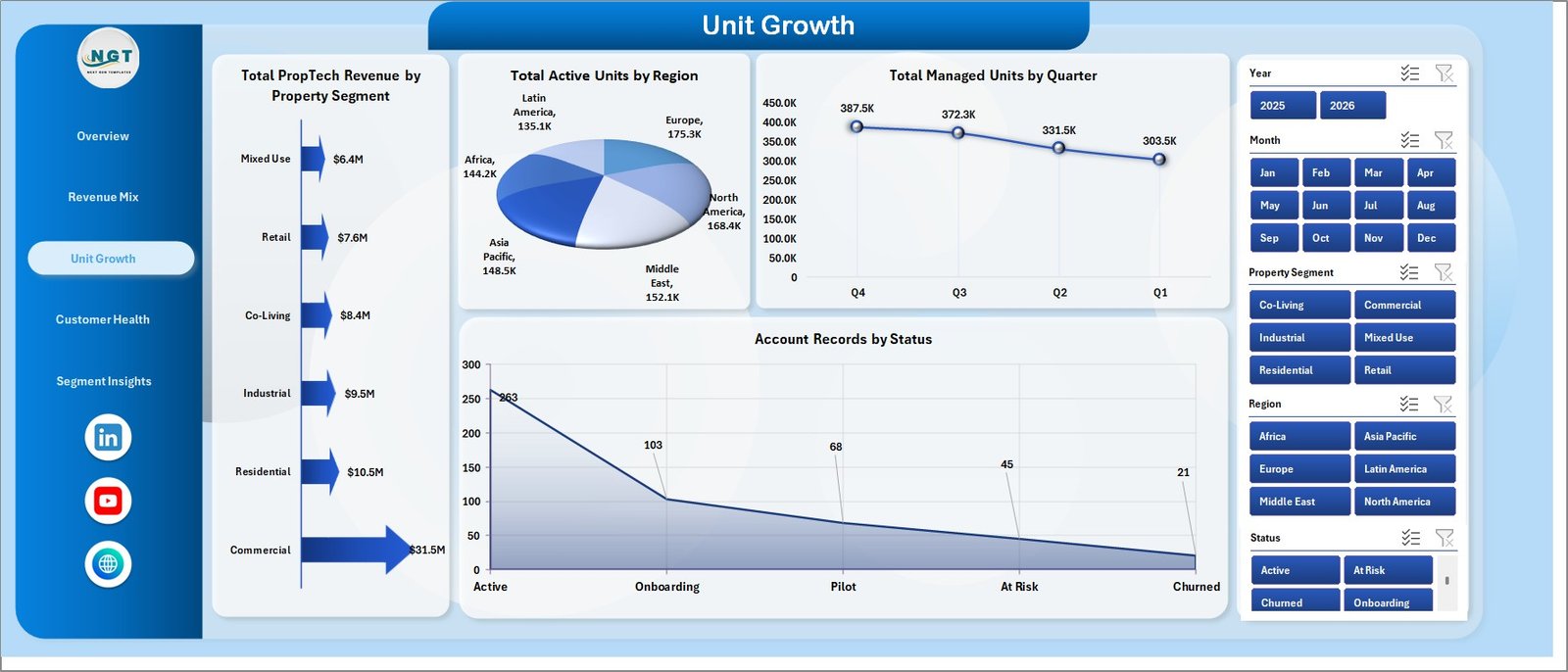
3 – Unit Growth
The Unit Growth page focuses on adoption, active units, managed unit movement, and account status.
Total PropTech Revenue by Property Segment: Compare revenue contribution by property segment and identify which market types create the most commercial value.
Total Active Units by Region: Review active usage by region so customer success teams can prioritize adoption support.
Total Managed Units by Quarter: Track managed unit movement over quarters for investor updates and quarterly reviews.
Account Records by Status: Compare account counts by status such as active, pending, onboarding, churned, or inactive.
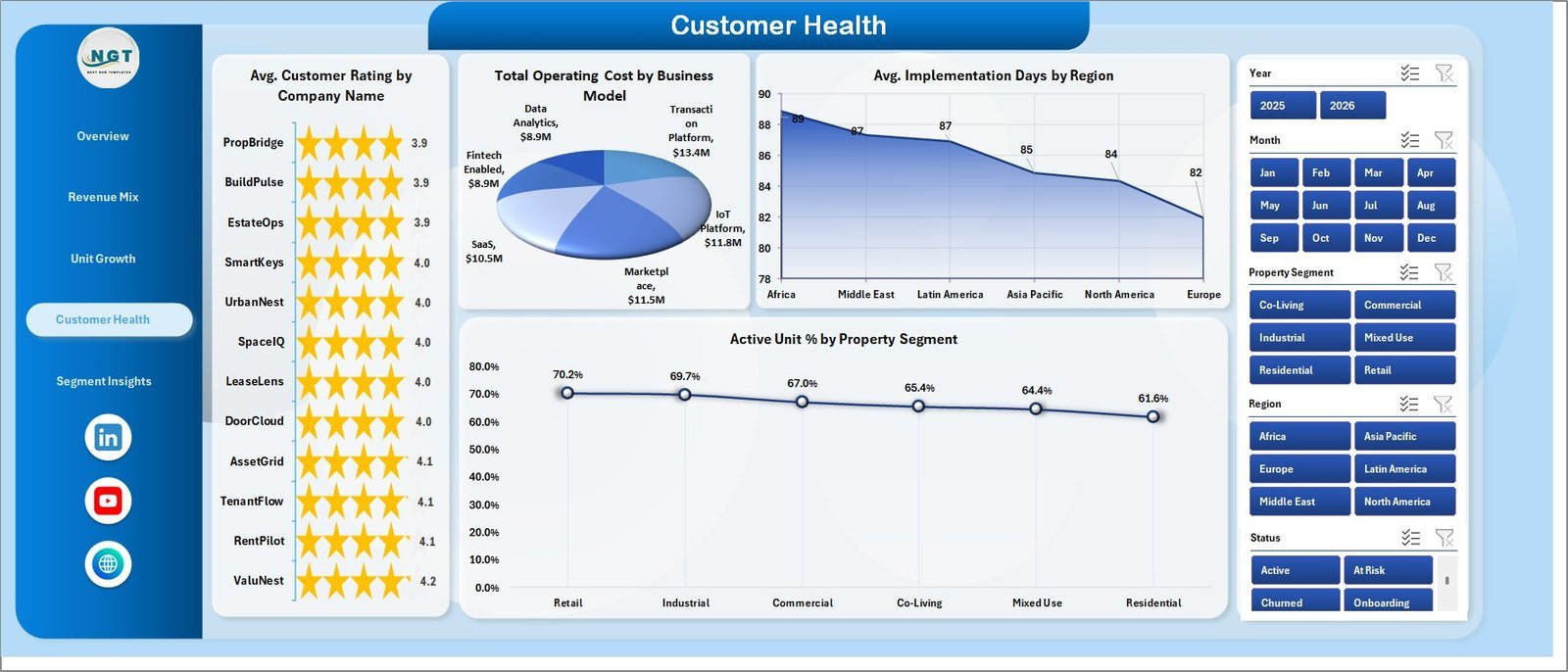
4 – Customer Health
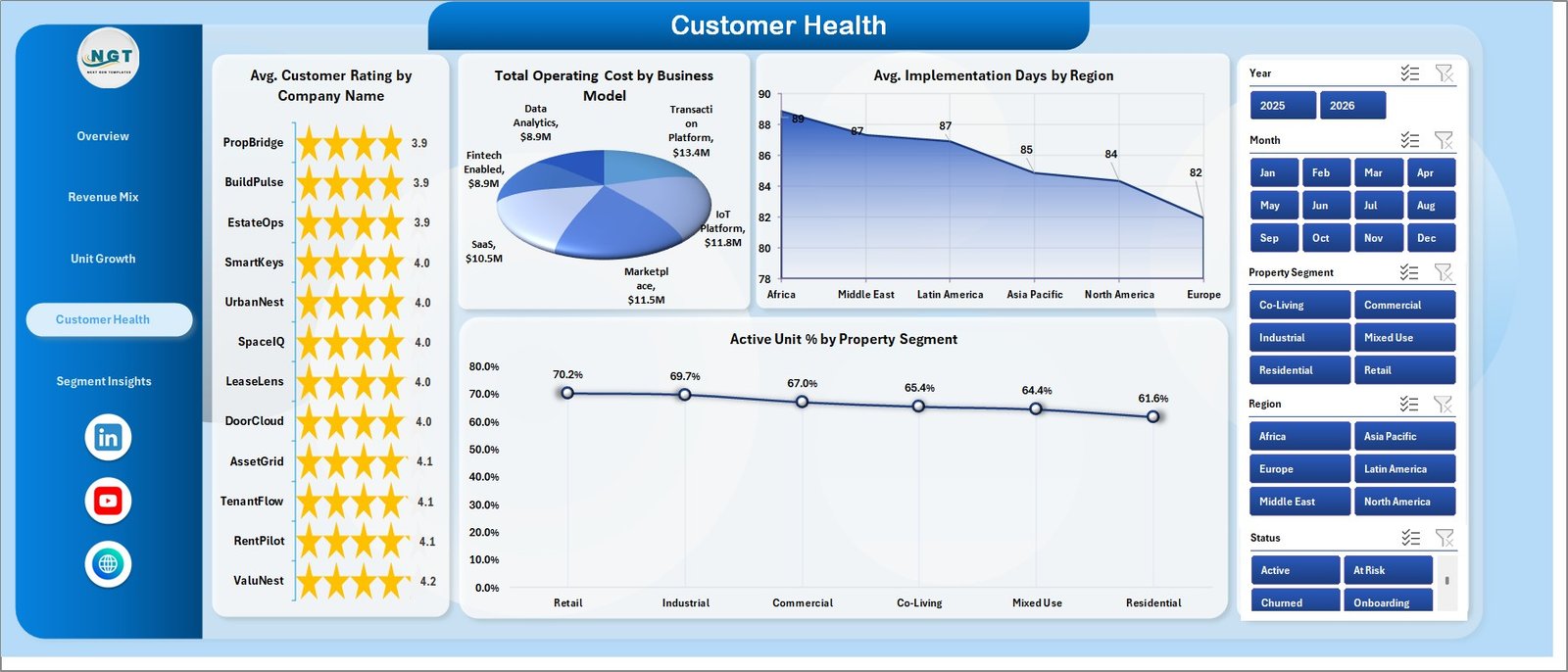
The Customer Health page connects ratings, implementation time, active unit percentage, and operating cost.
Avg. Customer Rating by Company Name: Compare customer rating across companies to identify accounts needing support or advocacy attention.
Total Operating Cost by Business Model: Review the cost base behind each model and evaluate whether pricing, scale, or service effort is driving profit.
Avg. Implementation Days by Region: Compare onboarding speed by region and spot training, data, or process issues.
Active Unit % by Property Segment: Separate signed unit volume from actual product usage by segment.
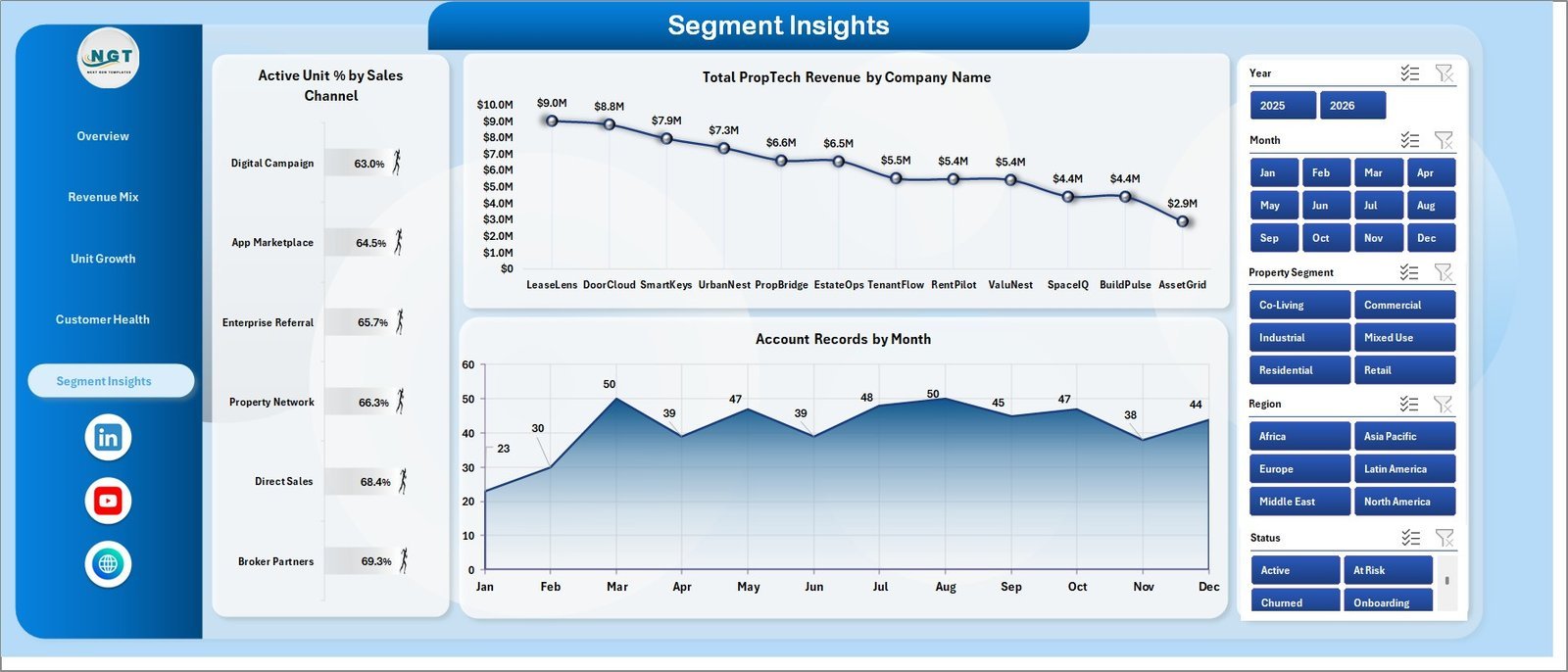
5 – Segment Insights
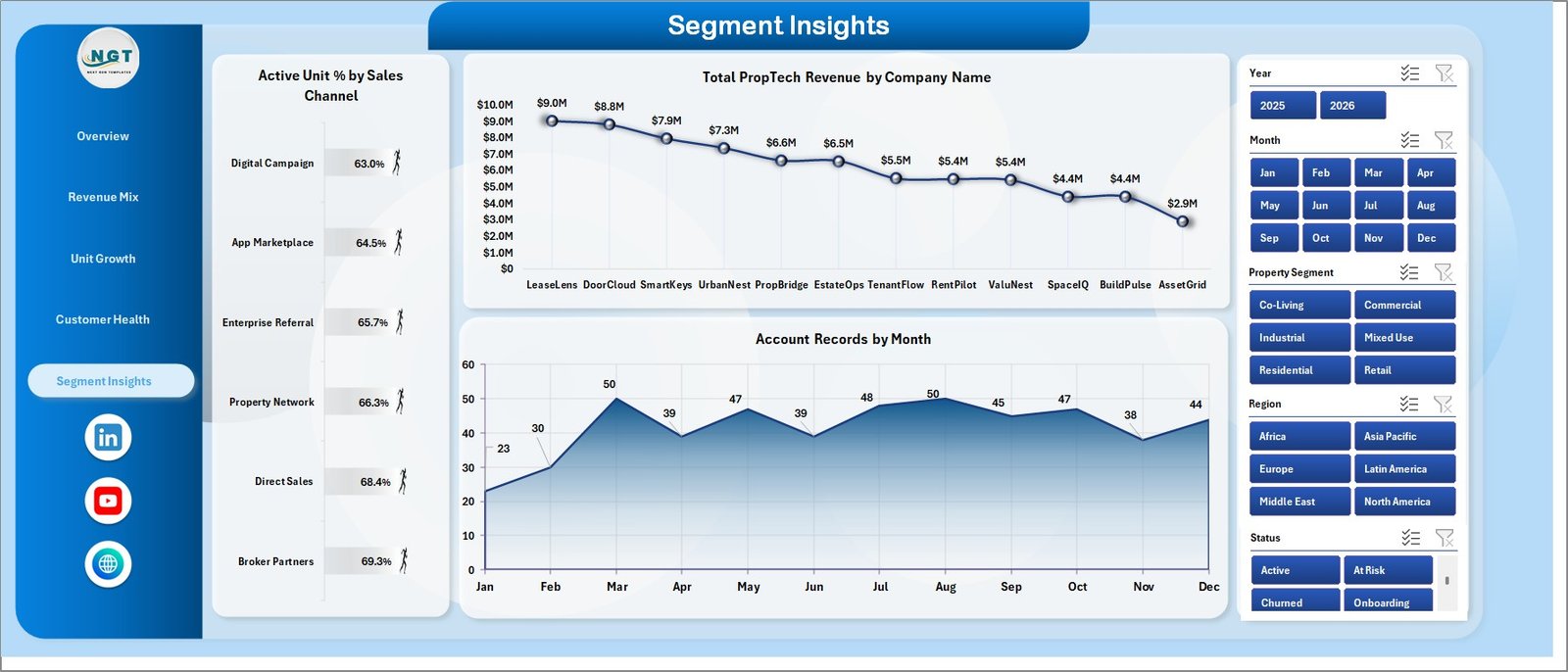
The Segment Insights page gives a compact view of channel adoption, company revenue, and account-record timing.
Active Unit % by Sales Channel: Compare product usage quality by acquisition channel and identify channels that may need stronger onboarding.
Total PropTech Revenue by Company Name: Rank companies by revenue contribution for retention, expansion, and executive review.
Account Records by Month: Track account record activity across months to explain acquisition, onboarding, or customer activity trends.
6 – Data Sheet Tab
The Data Sheet is where you add your PropTech records in the same format as the sample data. Keep the column structure consistent so the pivot tables and dashboard charts continue working correctly.

7 – Support Sheet
The Support Sheet contains the pivot tables used to create the dynamic dashboard. After updating the Data Sheet, go to the Data tab in the Excel Ribbon and click Refresh All. All pivots and charts will refresh, and this sheet can be kept hidden.

Prop Tech Dashboard in Excel vs. Google Sheets vs. Paid CRM/SaaS – Where This Fits
| Feature | This Excel dashboard | Google Sheets alternative | Paid CRM/SaaS |
|---|---|---|---|
| Cost | $17.99 sale price, one-time | Template cost or internal build time | Recurring subscription |
| Platform | Microsoft Excel | Browser spreadsheet | Vendor-hosted platform |
| Setup time | Replace data and refresh | Build formulas and charts manually | Implementation and configuration |
| Customizable fields | Editable workbook | Editable sheet | Often limited by vendor settings |
| Year-1 cost at 5 users | $17.99 plus any Microsoft licensing | Template plus setup time | Can become hundreds or thousands |
| PropTech KPIs | Revenue, profit, units, tickets, rating, implementation, and active unit % | Must be built or adapted | Depends on purchased modules |
Who This Template Is For – and Who It’s Not For
Best for: PropTech founders, revenue teams, customer success managers, operations analysts, real estate technology consultants, and property management software teams that need Excel-based performance reporting.
Not ideal for: teams that require live CRM sync, automated support-ticket ingestion, user-level permissions, transactional workflows, or a fully managed SaaS reporting warehouse.
How to Use the Prop Tech Dashboard in Excel
- Download and unzip the product file.
- Open the workbook in Microsoft Excel.
- Go to the Data Sheet and replace sample records with your own data.
- Keep the same column layout so pivots can refresh cleanly.
- Open the Excel Data ribbon and click Refresh All.
- Use slicers to filter the Overview, Revenue Mix, Unit Growth, Customer Health, and Segment Insights pages.
Real-World Use Cases
Maya, a PropTech founder, reviews revenue by month, net profit by business model, and active unit % before investor update meetings.
Daniel, a customer success lead, checks customer rating by company, support tickets, and implementation days by region before weekly account reviews.
Priya, an operations analyst, uses managed units by quarter and operating cost by region to explain expansion and cost trends to leadership.
Frequently Asked Questions
What does the Prop Tech Dashboard in Excel track?
It tracks PropTech revenue, net profit, managed units, support tickets, customer ratings, operating cost, implementation days, active unit %, regions, channels, segments, companies, and account status.
Can I replace the sample data?
Yes. Replace the sample records in the Data Sheet while keeping the same column format, then click Refresh All in Excel.
Does it use pivot tables?
Yes. The Support Sheet contains pivot tables that power the dashboard charts dynamically.
Can I hide the Support Sheet?
Yes. After setup, you can keep the Support Sheet hidden because users usually only need the dashboard and data tabs.
Do I need Power BI or a SaaS dashboard tool?
No. This is an Excel dashboard template. You only need Microsoft Excel to update the data and refresh the workbook.
Is this a one-time purchase?
Yes. It is sold as a downloadable ZIP file from NextGenTemplates with a one-time price.
About the Author
Built by PK – Microsoft Certified Professional with 15+ years of Excel, Google Sheets, and Power BI experience. Founder of NextGenTemplates, reaching 300K+ subscribers across YouTube channels. Every template is hand-built and tested before release.
Explore Related Templates
- Read the detailed blog walkthrough.
- Property Management KPI Dashboard in Excel
- Hotel Revenue RevPAR Dashboard in Excel
- Mutual Funds Dashboard in Excel
- Browse more Excel Dashboard Templates and MS Excel Templates.
Download the Prop Tech Dashboard in Excel when you want a refreshable workbook for PropTech revenue, units, customer health, support, cost, channel, region, and segment reporting.
Last updated: July 28, 2026.
Watch the demo video:
Compatibility and Requirements
- Works in Microsoft Excel desktop (Excel 2016 or later, or Microsoft 365).
- The dashboard uses slicers and pivot tables. Excel explains slicers in Use slicers to filter data.
More Questions About This Template
Is there a Power BI version of a property dashboard?
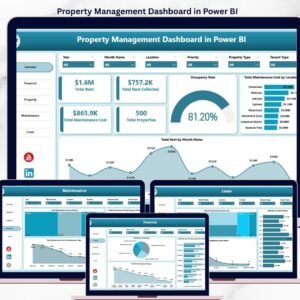
Yes. See the Property Management Dashboard in Power BI.
Is there a Google Sheets version of a property dashboard?
Yes. See the Property Management Dashboard in Google Sheets.
Related Property and Tech Dashboards
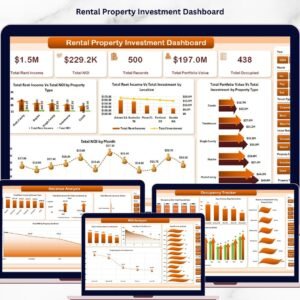
- Rental Property Investment Dashboard in Excel: Excel dashboard for rental property investment
- Property Management Dashboard in Power BI: the property dashboard in Power BI
- Technology KPI Dashboard in Excel: technology KPIs in Excel
- Technical Support KPI Dashboard in Excel: a closer look at support metrics
Browse all IT templates and Excel dashboards.





























Reviews
There are no reviews yet.