



Managing a pharmacy efficiently requires constant tracking of performance metrics such as sales, prescriptions, inventory, and customer satisfaction. The Pharmacy KPI Dashboard in Google Sheets is a ready-to-use, interactive dashboard that helps pharmacy managers and owners monitor key performance indicators (KPIs), analyze trends, and make data-driven decisions for better profitability and service delivery.
This easy-to-customize template combines the power of Google Sheets with visual analytics to help you compare Month-to-Date (MTD) and Year-to-Date (YTD) results, track progress against targets, and identify operational bottlenecks — all in one place.
Whether you manage a single pharmacy or multiple branches, this dashboard ensures complete visibility into your performance metrics. 🚀

🔑 Key Features of the Pharmacy KPI Dashboard in Google Sheets
📊 Dashboard Sheet Tab
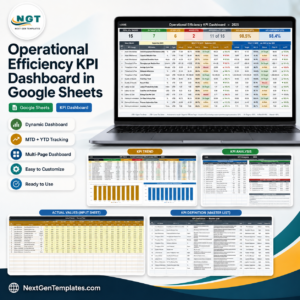
The main dashboard provides a snapshot of overall pharmacy performance through KPI cards and visual indicators.
Highlights Include:
Month Selection Dropdown (Range D3): Dynamically updates data for the selected month
MTD Metrics: Compare Actual vs. Target vs. Previous Year data with color-coded arrows
YTD Metrics: Evaluate year-to-date performance for a broader perspective
Visual Indicators: Quickly identify underperforming KPIs with traffic lights and arrows
This view enables real-time decision-making with a single glance.
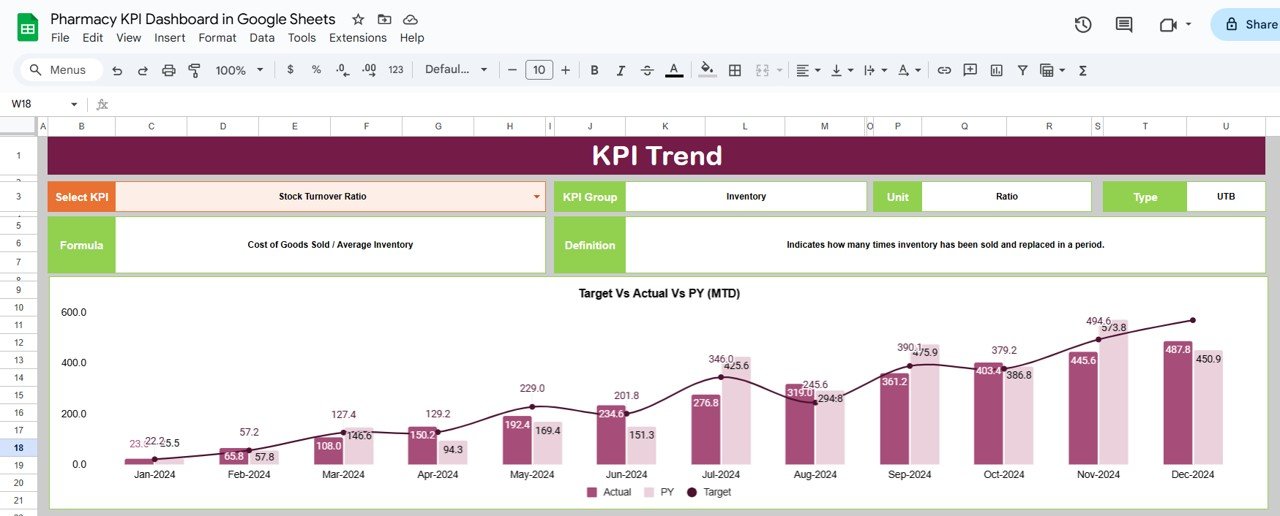
📈 KPI Trend Sheet Tab
Dive deeper into individual KPI analysis with trend visuals and detailed breakdowns:
Select KPI from a dropdown (Range C3)
View KPI Group, Unit, and Type (UTB or LTB)
Analyze trends over months and compare progress
This helps pinpoint areas for improvement and optimize pharmacy operations.
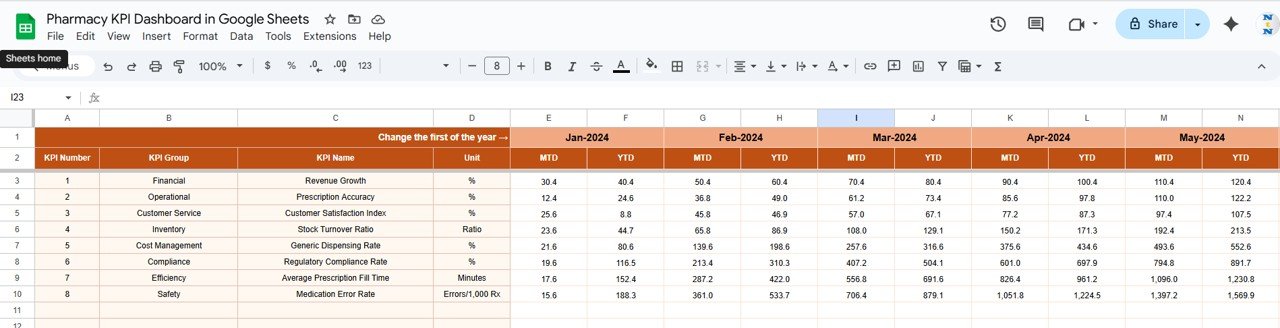
🧾 Actual Numbers Sheet Tab
Record all actual performance data for each month:
Input MTD and YTD figures
Change the first month of the year (Range E1) for flexible reporting
Accurate entries here keep your dashboard current and insightful.
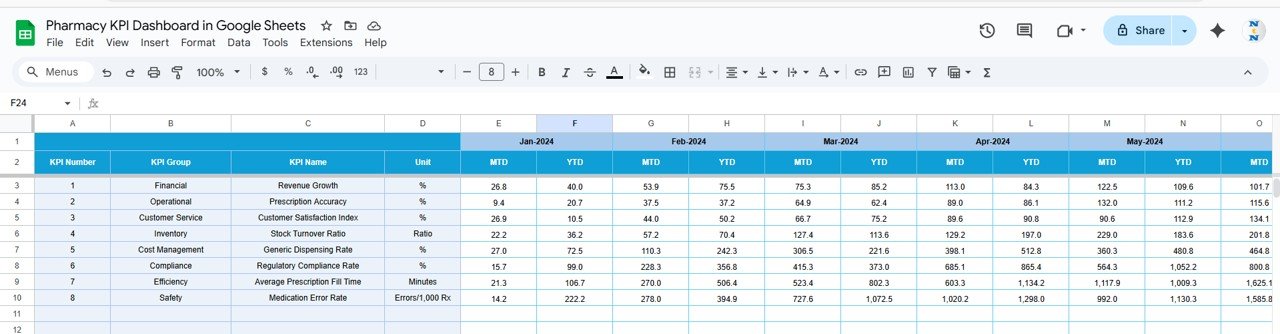
🎯 Target Sheet Tab
Define performance goals for each KPI:
Input MTD and YTD targets
Compare against actual results
This allows managers to stay aligned with business objectives and improve accountability.
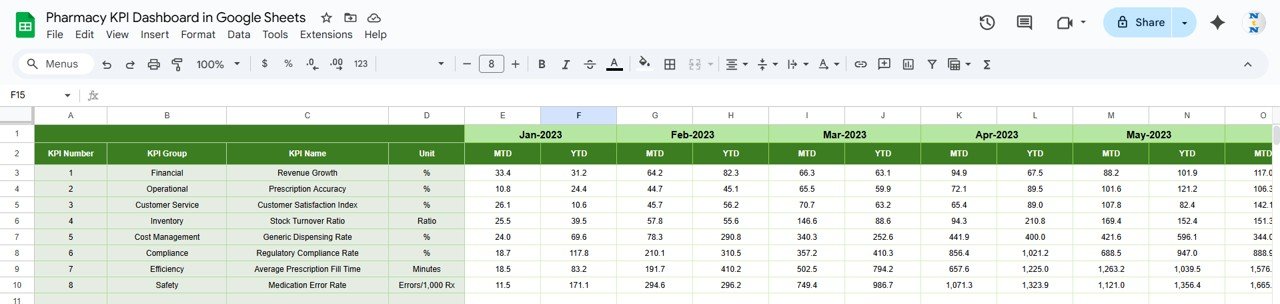
📅 Previous Year Numbers Sheet Tab
Input last year’s metrics for year-over-year comparison.
Identify seasonal patterns, track improvement, and evaluate progress over time.
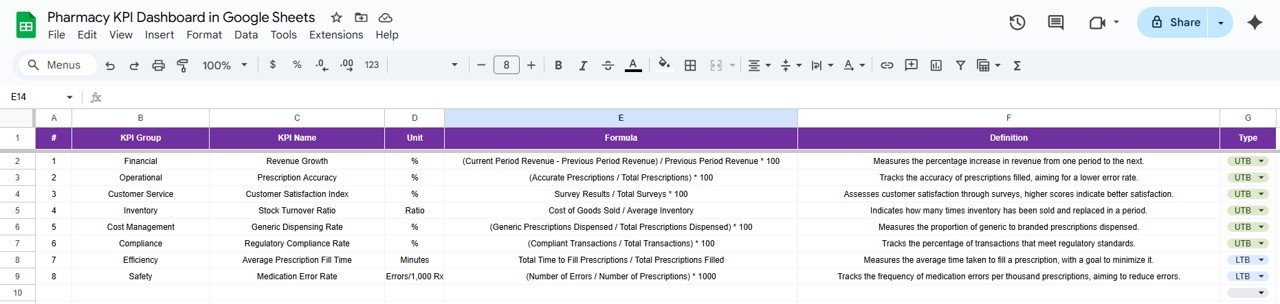
📘 KPI Definition Sheet Tab
Maintain clarity and consistency with detailed KPI definitions:
KPI Name, Group, Unit, Formula, and Definition
Specify KPI Type (Lower-the-Better or Upper-the-Better)
This sheet acts as your reference guide for all performance metrics.
🌟 Advantages of Using the Pharmacy KPI Dashboard
✅ Centralized Performance Data: Track all operational KPIs in one place
📈 Real-Time Insights: Get instant updates with every new data entry
💊 Optimized Operations: Improve inventory turnover, reduce stockouts, and boost service quality
📅 MTD & YTD Comparison: Evaluate monthly and annual progress simultaneously
🧠 Data-Driven Decisions: Empower managers to act proactively, not reactively
🧾 Customizable Design: Easily add new KPIs or modify formulas to fit your needs
👥 Collaboration Ready: Google Sheets enables multi-user editing for large pharmacy teams
🧠 Best Practices for Using the Dashboard
Update Regularly: Input MTD and YTD figures as soon as data is available
Segment KPIs: Track separately for sales, inventory, and customer satisfaction
Monitor Trends: Review previous year comparisons to identify recurring challenges
Use Conditional Formatting: Leverage arrows and colors to highlight performance shifts
Set Clear Targets: Define realistic yet ambitious goals for every metric
Review Monthly: Present dashboard summaries in management reviews
💼 How This Dashboard Helps Pharmacy Managers
💊 Streamline Inventory Management: Track stockouts, turnover rates, and expired stock to reduce losses
🧾 Boost Profitability: Identify trends in sales and prescription volumes
👥 Enhance Customer Satisfaction: Monitor service times and patient feedback
📦 Improve Compliance: Maintain accurate performance records
📊 Enable Smarter Decisions: Visualize performance in real time to support data-backed strategies
With this Google Sheets dashboard, you’ll transform your pharmacy’s raw data into actionable intelligence for growth, efficiency, and service excellence. 🌟
🔗 Click here to read the Detailed blog post
Watch the step-by-step video Demo:
🔗 Visit our YouTube channel to learn step-by-step video tutorials
Compatibility and Requirements
- Works in Google Sheets. You need a free Google account and a web browser.
- You pick the month from a dropdown on the Dashboard sheet and the KPI from a dropdown on the KPI Trend sheet. Google explains dropdowns in Create an in-cell dropdown list.
Frequently Asked Questions
Which sheets are included?
Six sheets: Dashboard, KPI Trend, Actual Numbers, Target, Previous Year Numbers and KPI Definition.
How do I update the dashboard?
Enter your MTD and YTD figures in the Actual Numbers sheet and your goals in the Target sheet. Then choose a month in cell D3 on the Dashboard sheet and the KPI cards update.
Can I compare this year with last year?
Yes. Add last year’s figures to the Previous Year Numbers sheet. The Dashboard shows Actual, Target and Previous Year side by side, with color-coded arrows.
How do I see the trend for one KPI?
Open the KPI Trend sheet and select a KPI in cell C3. It shows the KPI group, the unit and the type (Lower-the-Better or Upper-the-Better) with the monthly trend.
Can I change the first month of the year?
Yes. Change the first month in cell E1 on the Actual Numbers sheet.
Is there an Excel or Power BI version?
Yes. See the Pharmacy KPI Dashboard in Excel and the Pharmacy KPI Dashboard in Power BI.
Related Pharmacy Templates
- Pharmacy KPI Dashboard in Excel: the same KPI dashboard in Excel
- Pharmacy KPI Dashboard in Power BI: the Power BI edition
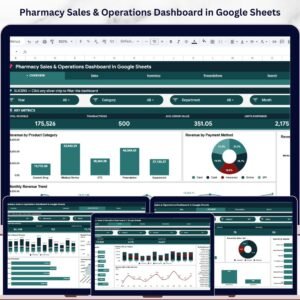
- Pharmacy Sales & Operations Dashboard in Google Sheets: a sales and operations view in Google Sheets
- Pharmacy Stock Expiry Calendar in Google Sheets: track stock expiry dates
- Google Sheets Business Pack (Pro): 14 business templates in one download
Browse all Google Sheets KPI dashboards.






















Reviews
There are no reviews yet.