


Equipment failures cost US manufacturers an average of $25,000 per hour in unplanned downtime, with heavy industry losses climbing past $125,000/hour, according to the 2024 MaintainX and ABB State of Maintenance reports. Yet 57% of facilities still rely on some form of run-to-failure maintenance, and most small maintenance teams manage everything through scattered notebooks, emails, and one-off spreadsheets. The Equipment Maintenance Log Tracker in Google Sheets is a ready-to-use, cloud-based solution for facility managers, maintenance supervisors, and in-house technicians who want structured logging, cost visibility, and technician workload tracking — without the $20-$120/user/month price tag of a full CMMS.
This tracker replaces the chaos of paper logs and random WhatsApp updates with one centralized Google Sheet your whole team can access from any phone, tablet, or browser. Whether you maintain HVAC systems, production line machinery, IT hardware, or commercial property assets, the template gives you a single source of truth for every maintenance activity — who did what, when, at what cost, and when it’s due again. No software installs, no licensing fees, no training sessions. Just open the sheet and start logging.

Why Small Maintenance Teams Need a Better Log in 2026
- Unplanned downtime costs have risen 32% over the past seven years — even small facilities are now absorbing losses of $25,000/hour when a critical asset goes down.
- 42% of unplanned downtime is caused by equipment failure, much of it traceable to missed preventive maintenance and lost service history.
- Reactive repairs typically cost 3-10× more than the same work scheduled in advance, according to Siemens’ True Cost of Downtime research.
- Average manufacturers face roughly 800 hours per year of unplanned machine downtime — more than 15 hours of paid non-productive time every week.
For teams running 5-50 assets, full CMMS platforms like UpKeep ($20-$55/user/month), MaintainX ($16-$49/user/month), or Limble ($45+/user/month) are genuinely overkill. A 10-person maintenance team on UpKeep Premium pays $550/month — $6,600 a year — before add-ons. For a small facilities team, property management company, or a lean manufacturer just trying to escape paper logs, a structured Google Sheets template delivers 80% of the core value at less than 1% of the cost.
What’s Inside the Equipment Maintenance Log Tracker
Dashboard With Live Charts
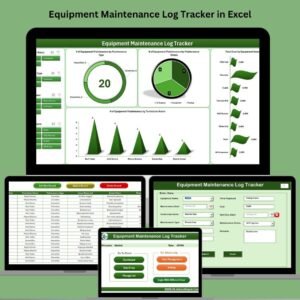
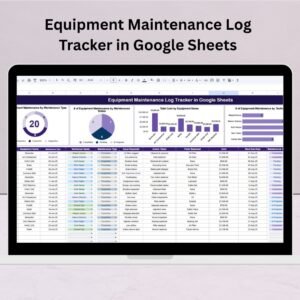
The dashboard tab updates automatically as you log new maintenance activities. Four core visualizations give you an at-a-glance view of your maintenance operation:
- Maintenance Count by Type — See the split between Preventive, Corrective, and Emergency maintenance. Healthy operations lean heavily preventive; a sudden spike in emergency work is an early warning.
- Maintenance Count by Status — Completed, In Progress, and Pending at a glance. Surface backlog before it becomes a crisis.
- Total Cost by Equipment — Rolling cost view per asset. Quickly identify which machines are draining your budget and may be candidates for replacement.
- Workload by Technician — Task distribution across your team. Spot overload, uneven assignment, and coverage gaps.
Structured Data Entry Log
Every maintenance event is captured with the fields that actually matter for audit trails, warranty claims, and cost analysis:
- Unique ID (auto-incremented)
- Equipment Name
- Maintenance Date
- Technician Name
- Maintenance Type (Preventive / Corrective / Emergency)
- Issue Reported
- Action Taken
- Parts Replaced
- Cost
- Next Due Date
- Maintenance Status
- Remarks
Every entry you make flows straight into the dashboard — no manual chart refresh, no pivot table setup, no Apps Script coding required.
🛠️ Stop tracking maintenance in a notebook.
Get a structured Google Sheets log with charts, technician workload view, and cost-by-equipment tracking — instantly, with no software to install.
Equipment Maintenance Log Tracker vs. Alternatives
| Feature | Our Google Sheets Tracker | Full CMMS (UpKeep / MaintainX / Limble) | Paper Logs / Ad-hoc Spreadsheets |
|---|---|---|---|
| Pricing | One-time $6.99 | $16-$120/user/month (recurring) | Free but unstructured |
| Team Access | Unlimited users (Google Sheets sharing) | Per-user license fees | Manual handoff between staff |
| Dashboard & Charts | Built-in, auto-refreshing | Advanced BI reports (often gated to premium tiers) | None |
| Mobile Access | Google Sheets mobile app | Dedicated mobile app (usually strong) | Photos of handwritten logs |
| Setup Time | Under 5 minutes | Days to weeks of onboarding; implementation packages $500-$5,000+ | None |
| Offline Mobile Editing | Limited (Sheets offline mode) | Full offline (higher tiers) | Yes (paper) |
| IoT / Sensor Integration | ❌ | ✅ (enterprise tiers) | ❌ |
| Best For | Teams with 5-50 assets wanting structured logging | Large multi-site enterprises with 100+ assets and IoT | Teams still figuring out if they need tracking |
We’ll be upfront — if you run a multi-plant operation with hundreds of assets, IoT condition sensors, and multiple technician shifts per site, a full CMMS like UpKeep or MaintainX is the right call. This tracker is built for the gap between paper logs and enterprise software — where the majority of small operations actually live.
Who Uses This Template
| Role / Industry | Primary Use Case |
|---|---|
| Facilities Managers | HVAC, plumbing, electrical systems across office or commercial buildings |
| Small Manufacturers | CNC machines, compressors, conveyors, production line assets |
| Property Managers | Apartment complexes, commercial real estate, Airbnb portfolios |
| IT Hardware Teams | Server rooms, network equipment, printers, end-user device refresh |
| Fleet & Logistics | Vehicle service, forklifts, material handling equipment |
| Restaurants & QSR | Ovens, fryers, walk-in freezers, dishwashers, POS hardware |
| Schools & Healthcare | Classroom tech, medical equipment, lab instruments, building systems |
Benefits You’ll See in the First 30 Days
- 🔄 Centralized log — every maintenance activity in one sheet, not scattered across notebooks, emails, and memory
- 📈 Visual KPIs — charts for cost, workload, and completion status refresh automatically
- 🔧 Plan preventive & corrective maintenance side-by-side to shift toward a proactive mix
- 🛡️ Safety and compliance paper trail — documented inspections, repairs, and parts replacements for audits
- 💸 Reduce breakdowns and emergency repair premiums — the data alone typically catches recurring issues
- 🤝 Real-time team collaboration via native Google Sheets sharing
- 🖥️ Works on any device — desktop, iOS, Android, no install
How to Use the Tracker (Step-by-Step)
- Purchase and open the PDF. It contains your Google Sheets copy link.
- Click the link — Google will prompt you to Make a copy into your own Drive. Your copy is private to you.
- Share with your team at the access level you want (Editor for technicians, Viewer for managers).
- Start logging. Every time a maintenance task is completed, add a new row to the Data Entry sheet.
- Set the “Next Due Date” on preventive tasks so nothing falls through the cracks.
- Review the dashboard weekly. Watch for rising emergency counts, recurring high-cost assets, and uneven technician load.
- Archive annually. Duplicate the sheet at year-end to preserve historical data for trend analysis.
Optional Upgrades You Can Add Later
- Conditional formatting to highlight overdue tasks in red and high-cost entries in amber.
- Data validation dropdowns on Maintenance Type and Status to prevent typos and inconsistent reporting.
- Google Calendar integration — sync Next Due Dates so tasks appear on your team calendar.
- Google Apps Script email alerts for overdue tasks or high-cost flags.
- QR code labels on equipment that open the relevant sheet row on a phone.
- Priority and department columns for teams managing multiple locations.
Best Practices From High-Performing Maintenance Teams
- Log immediately after service — not “later today.” Same-day logs are the difference between reliable data and fiction.
- Never leave “Next Due Date” blank on preventive actions. A missed PM is a future emergency repair.
- Review cost-by-equipment monthly. An asset consuming more than 60% of its replacement value per year in maintenance is a replacement candidate.
- Use the Remarks column for patterns — if the same equipment shows up three times in a month with similar issues, it’s not bad luck, it’s a root cause.
- Track MTBF and MTTR informally by reviewing Maintenance Date gaps for each asset. Rising MTBF means your PM program is working.
Related Templates You May Need
- Equipment Maintenance Log Tracker in Excel — same structure, Excel version, $9.99
- Inventory Management System V3.0 in Excel — pair with spare parts tracking
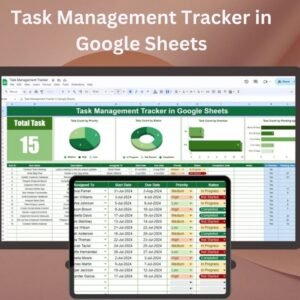
- Task Management Tracker in Google Sheets — general team task workflow
- Incident Report Tracker in Excel — log safety incidents alongside maintenance
- Finance Summary Dashboard in Excel — roll up maintenance costs into financial reporting
- All Google Sheets Trackers — full catalog
- All Excel & Google Sheets Dashboards
Frequently Asked Questions
Does this replace a full CMMS like UpKeep, MaintainX, or Limble?
For teams with 5-50 assets, single-site operations, and no IoT sensor integration needs — yes, this delivers the core value a small team actually uses. For multi-plant operations with condition-based monitoring, barcoded parts inventory, and automated PM triggers from meter readings, a full CMMS is worth the $20-$120/user/month investment. This tracker is built for the 70%+ of maintenance teams that aren’t there yet and may never need to be.
Do I need any Google Sheets or Apps Script experience?
No. The template is ready to use out of the box. All charts, formulas, and dashboard logic are pre-built. You only need to know how to type into a cell and share a Google Sheet.
Can I use this on Excel?
This specific template is built for Google Sheets and uses Google-native chart behaviors. If you prefer Excel, we offer a dedicated Equipment Maintenance Log Tracker in Excel at $9.99 with equivalent features.
How many users can I share the sheet with?
Google Sheets supports up to 100 concurrent editors per file and unlimited viewers — far beyond what a typical maintenance team needs. There’s no per-user fee from our side.
Does it work on mobile phones?
Yes. The Google Sheets mobile app (iOS and Android) lets technicians log maintenance directly from the field. Charts render on mobile but are easier to review on a tablet or desktop.
Can technicians edit without seeing other assets or teams’ data?
Not natively within a single sheet — Google Sheets permissions are sheet-level or file-level. For strict role-based visibility, a full CMMS is the right tool. For most small teams, the trust model of “everyone sees everything” is actually a feature, not a bug.
How is this different from just starting my own spreadsheet?
The structure is the hard part. Deciding which 12 fields to capture, how the dashboard formulas aggregate, which chart types surface the right insights, and how the sheet stays usable after 500 maintenance events — all of that is already done. You save roughly 8-20 hours of setup time for the price of a restaurant lunch.
Is the dashboard customizable?
Yes. Every chart is a standard Google Sheets chart linked to the data table. You can change chart types, colors, axis formatting, or add your own additional charts without breaking the template.
What if I have more than 50 assets?
The template works at 200+ rows comfortably. Beyond ~500 entries, you may want to start a new annual sheet. If you’re already tracking thousands of work orders per year across multiple sites, you’ve outgrown spreadsheet-based tracking and should evaluate a CMMS.
Do I get lifetime access to updates?
The copy of the sheet in your Drive is yours forever — there’s no subscription, no expiring license, no cloud-side kill switch. If we release an updated version of the template, you can optionally repurchase or download free minor updates when announced.
Read the Full Blog Post on NeoTechNavigators
For the full step-by-step walkthrough, screenshots, and implementation tips, read the detailed guide on our Google Sheets blog: Equipment Maintenance Log Tracker in Google Sheets — Full Guide.
Watch the Walkthrough Video
See the tracker in action — from opening the sheet to logging your first maintenance task and reading the dashboard:
https://youtube.com/@NeotechNavigators
🎥 Subscribe to YouTube.com/@NeotechNavigators for weekly Google Sheets tutorials, dashboard templates, and Apps Script automation walkthroughs.
Ready to stop losing hours a week to disorganized maintenance logs?
Download the Equipment Maintenance Log Tracker for Google Sheets — one-time $6.99, unlimited team access, works on any device.


















Reviews
There are no reviews yet.