

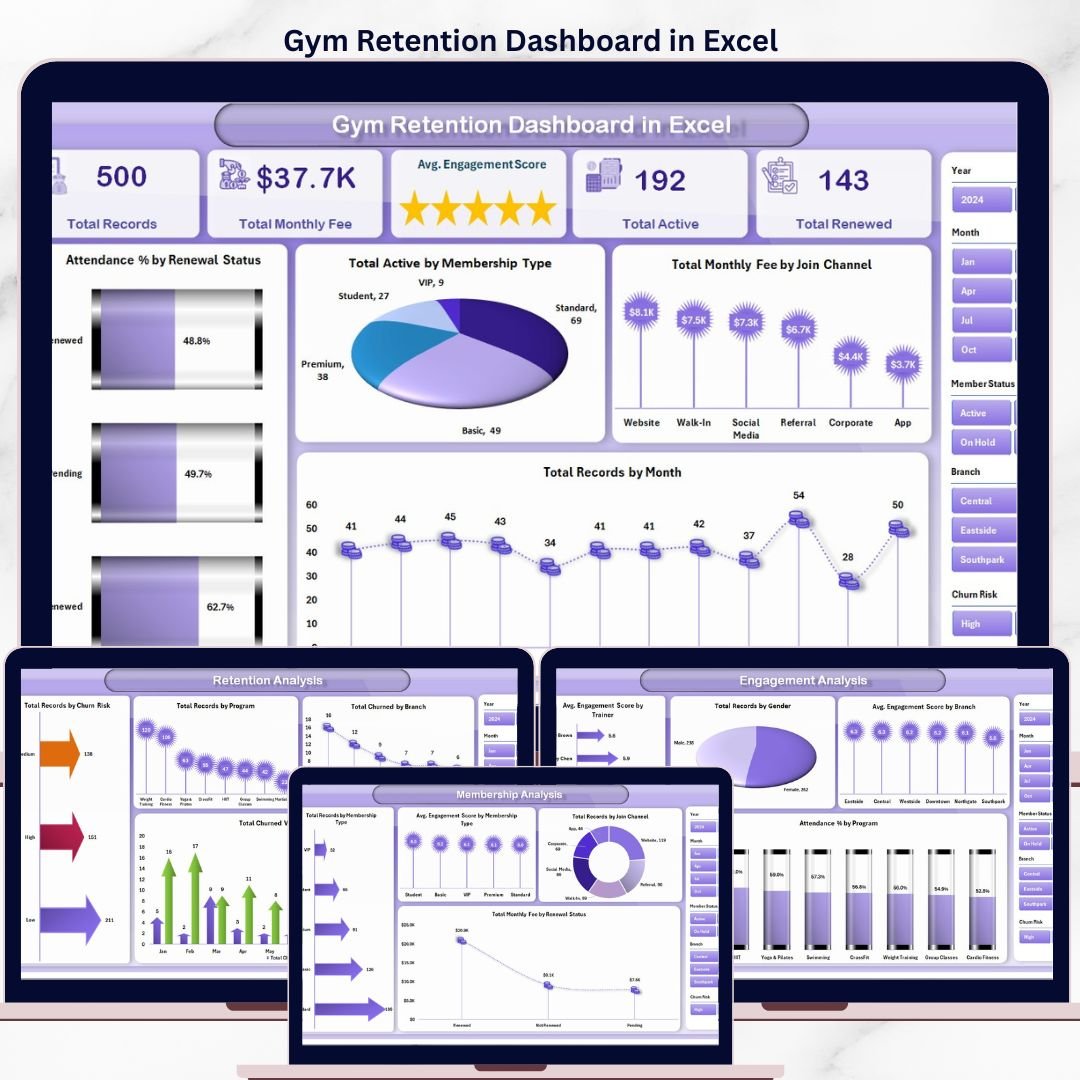


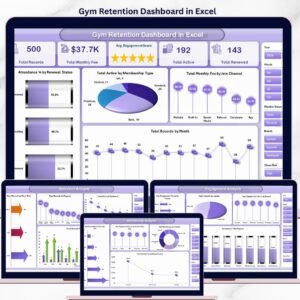
The Gym Retention Dashboard in Excel tracks 15 KPIs across 5 interactive pages, featuring 14 pre-built charts and dynamic slicers for instant filtering. Setup takes under 10 minutes — replace the sample data and every chart and KPI card updates automatically via pivot tables.
🌍 Join 8,400+ teams in 40+ countries using Nextgen Templates to replace paid SaaS tools with one-time-purchase Excel, Google Sheets, Power BI, and HTML templates.
✅ Instant download · One-time payment · No subscription · No per-user fees · Lifetime access
🔑 Key Features of Gym Retention Dashboard in Excel
🔹 5 dedicated analysis pages — Overview, Membership Analysis, Retention Analysis, Engagement Analysis, and Revenue Analysis, each built around a specific question gym managers ask daily.
🔹 15 KPIs tracked in real time — including Total Records, Total Monthly Fee, Avg. Engagement Score, Total Active Members, and Total Renewed, surfaced as prominent KPI cards on the Overview page.
🔹 14 pre-built pivot-driven charts — covering churn risk segmentation, trainer engagement scoring, join channel revenue, branch-level retention, and monthly fee trends. This dashboard definitively tracks member renewal rates, churn risk by segment, and revenue per membership type.
🔹 Dynamic slicers for instant filtering — filter the entire dashboard by membership type, branch, renewal status, or join channel without writing a single formula.
🔹 Churn Risk segmentation built in — the Retention Analysis page classifies members by churn risk level (High, Medium, Low), so you can prioritize outreach before members cancel.
🔹 Attendance % analysis across programs and renewal status — directly links attendance behaviour to renewal outcomes, a key insight for gym managers designing retention programs.
🔹 Pivot-powered Support Sheet — all charts are fed by pivot tables. After updating data, click Refresh All in the Excel Data tab and the entire dashboard refreshes in seconds.
🔹 Multi-branch ready — Revenue and Retention pages both include branch-level breakdowns so you can compare performance across locations side by side.
📦 What’s Inside the Gym Retention Dashboard in Excel
📊 Page 1 — Overview
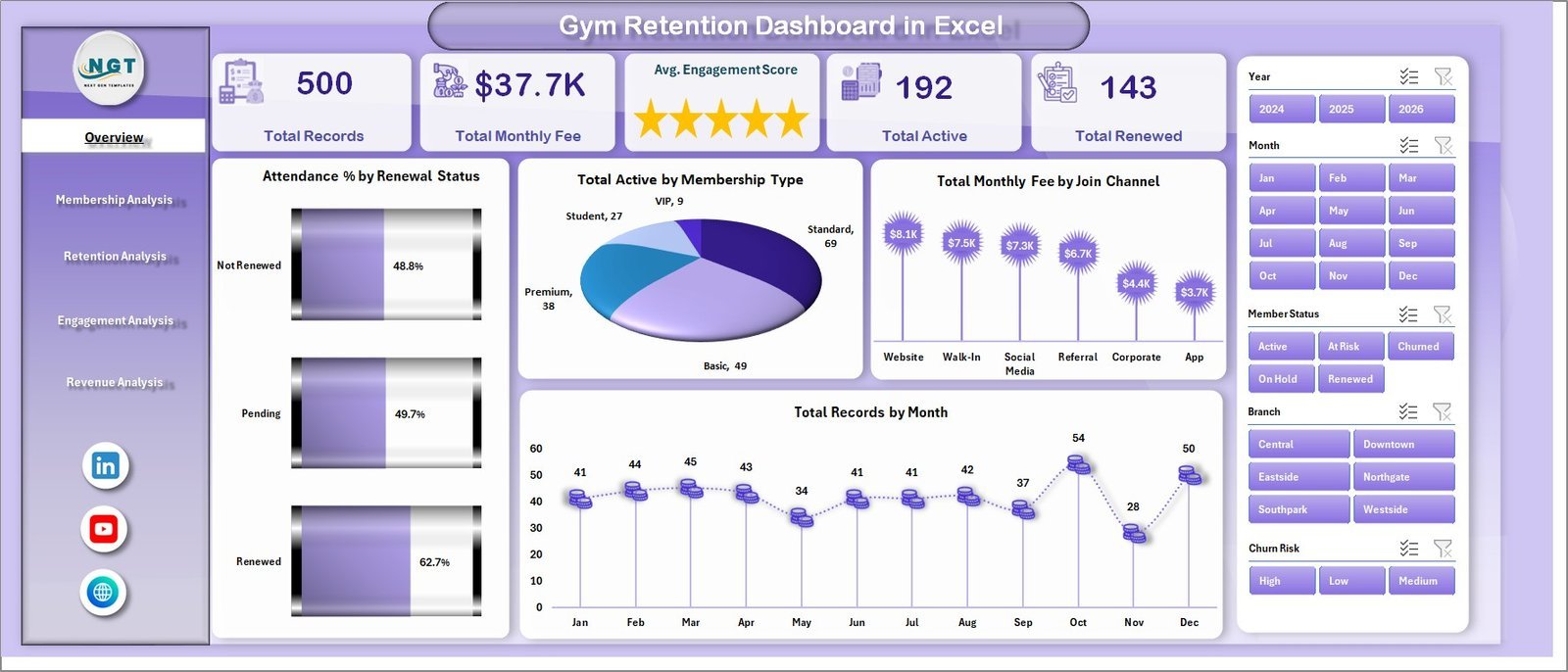
Five KPI cards (Total Records, Total Monthly Fee, Avg. Engagement Score, Total Active, Total Renewed) give an at-a-glance health check. Four charts surface key patterns: Attendance % by Renewal Status, Total Active by Membership Type, Total Monthly Fee by Join Channel, and Total Records by Month.
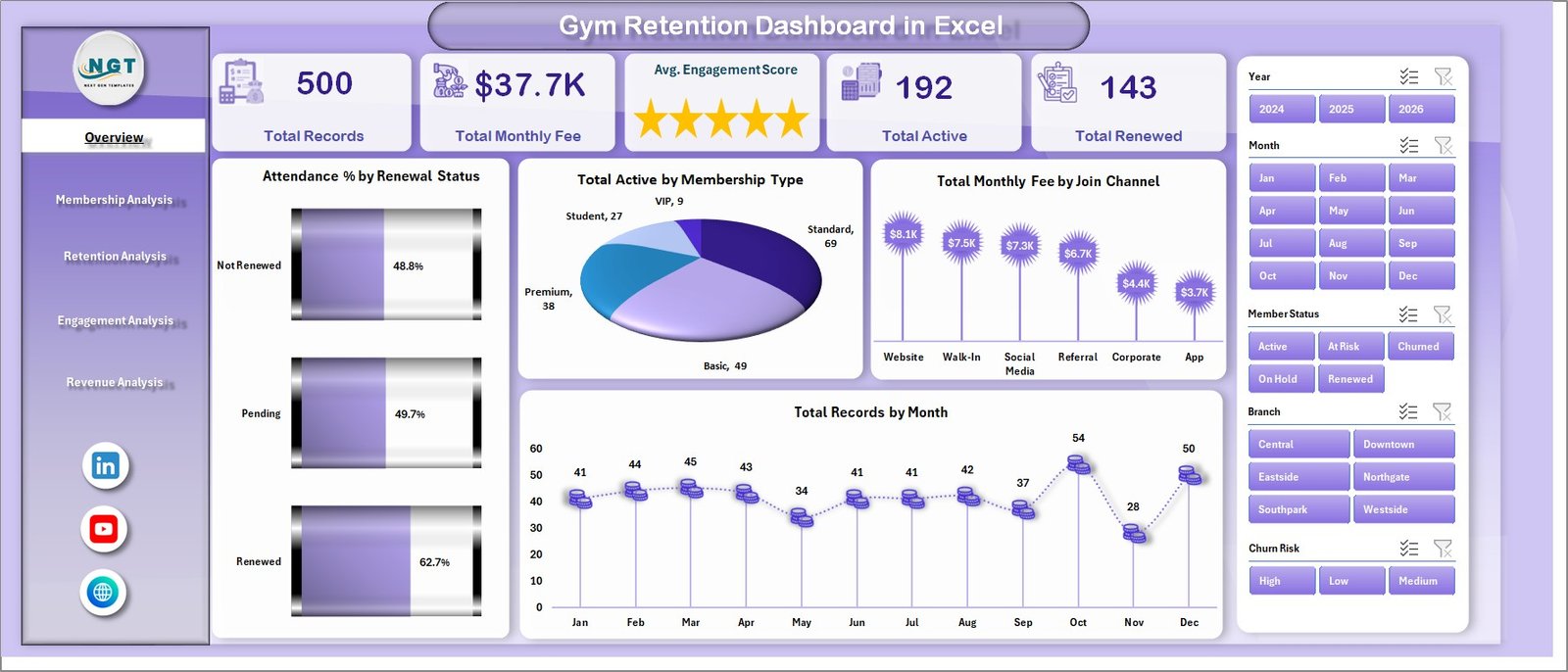
Gym Retention Dashboard in Excel – Overview Page
📊 Page 2 — Membership Analysis
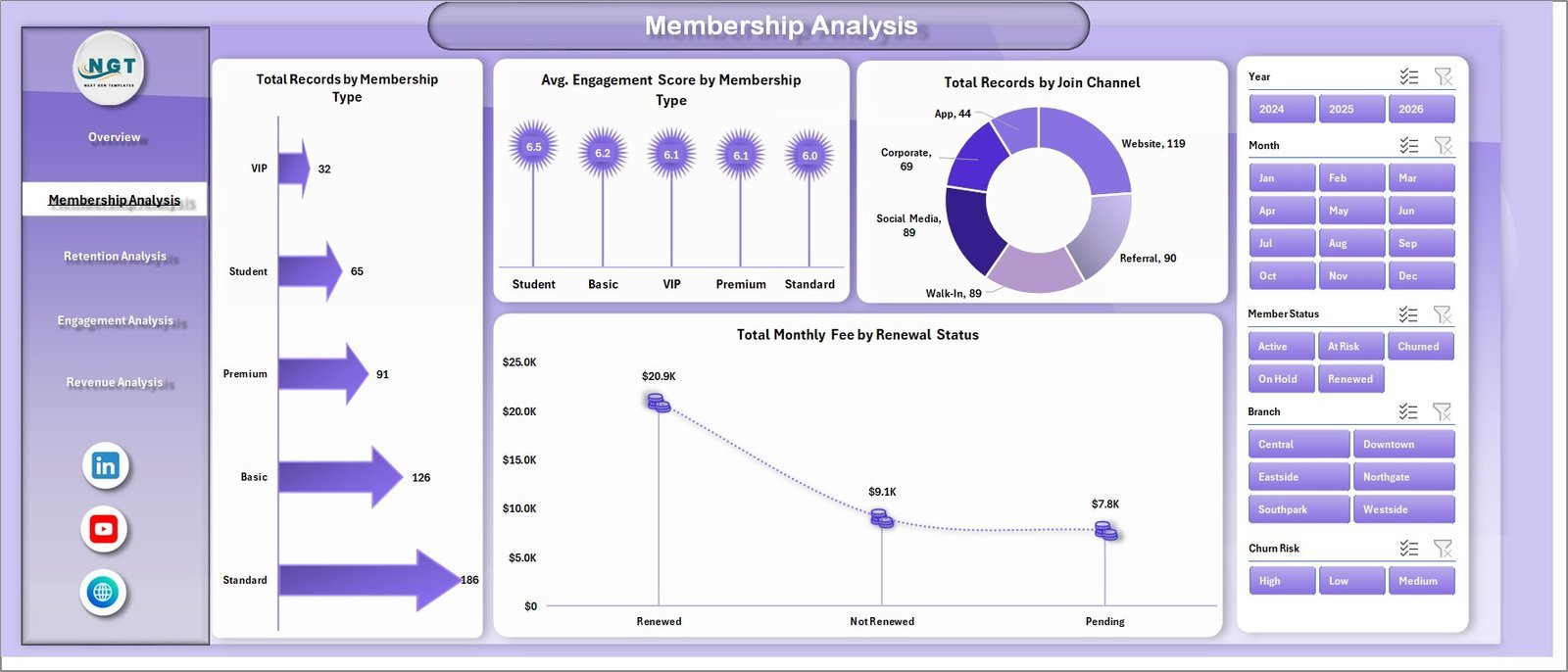
Four charts reveal tier performance: Total Records by Membership Type, Avg. Engagement Score by Membership Type, Total Records by Join Channel, and Total Monthly Fee by Renewal Status. Shows which tiers generate the most revenue and which join channels produce the most engaged members.
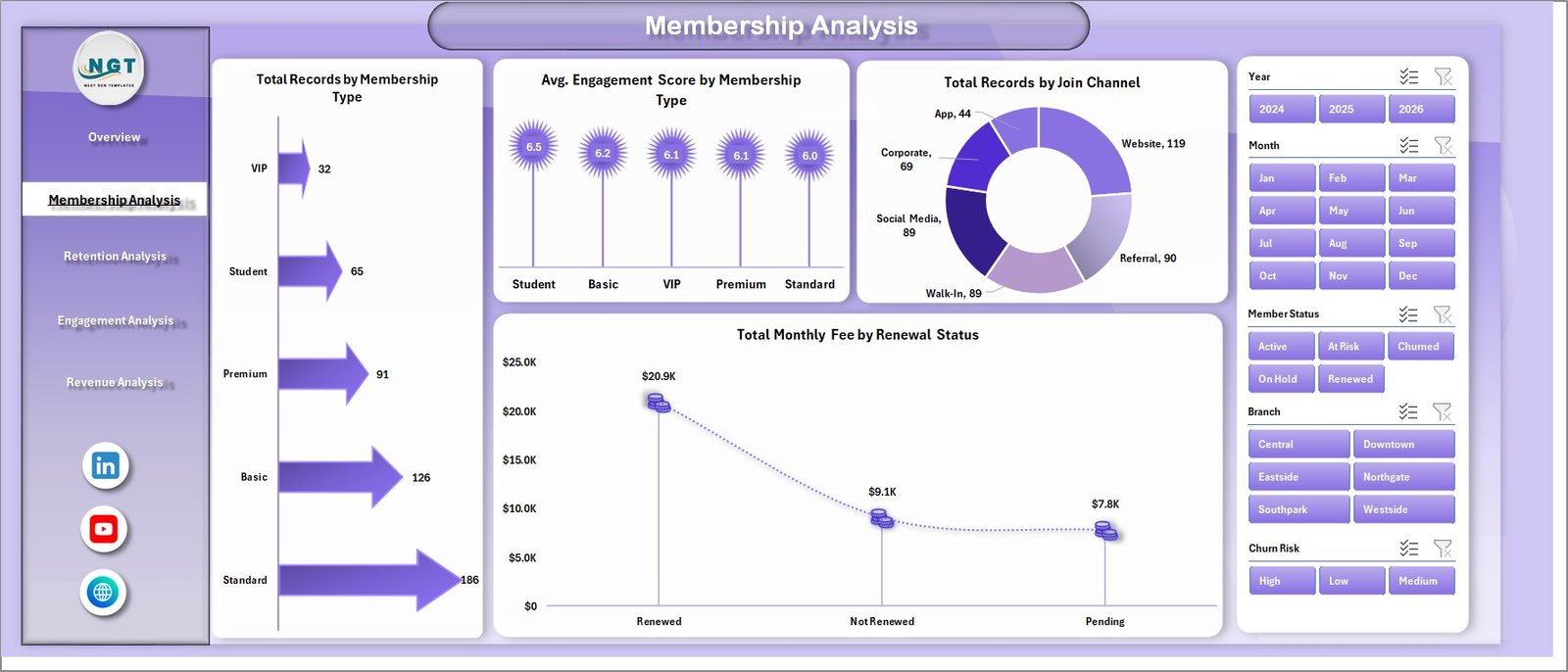
Gym Retention Dashboard in Excel – Membership Analysis Page
📊 Page 3 — Retention Analysis
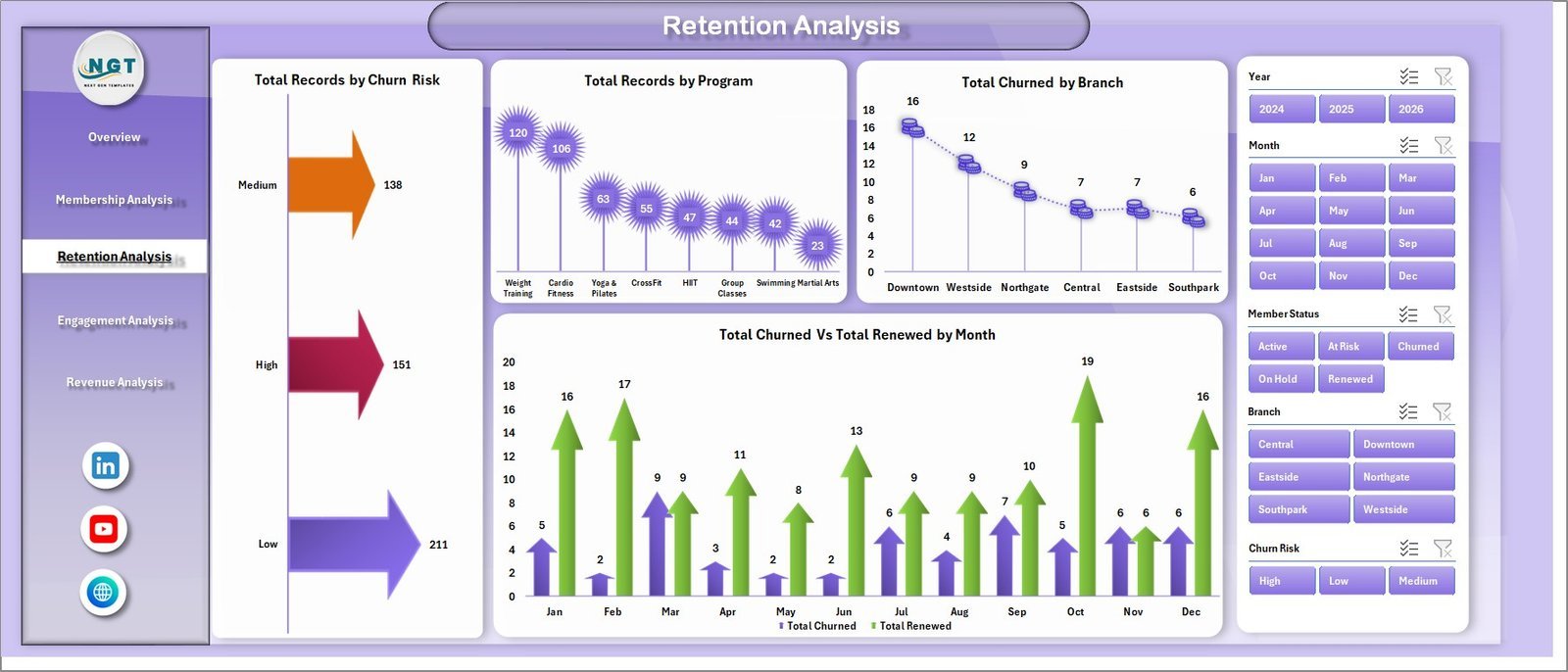
Four retention-focused charts: Total Records by Churn Risk, Total Records by Program, Total Churned by Branch, and Total Churned vs Total Renewed by Month. The churn risk breakdown lets you identify at-risk member segments before they leave.
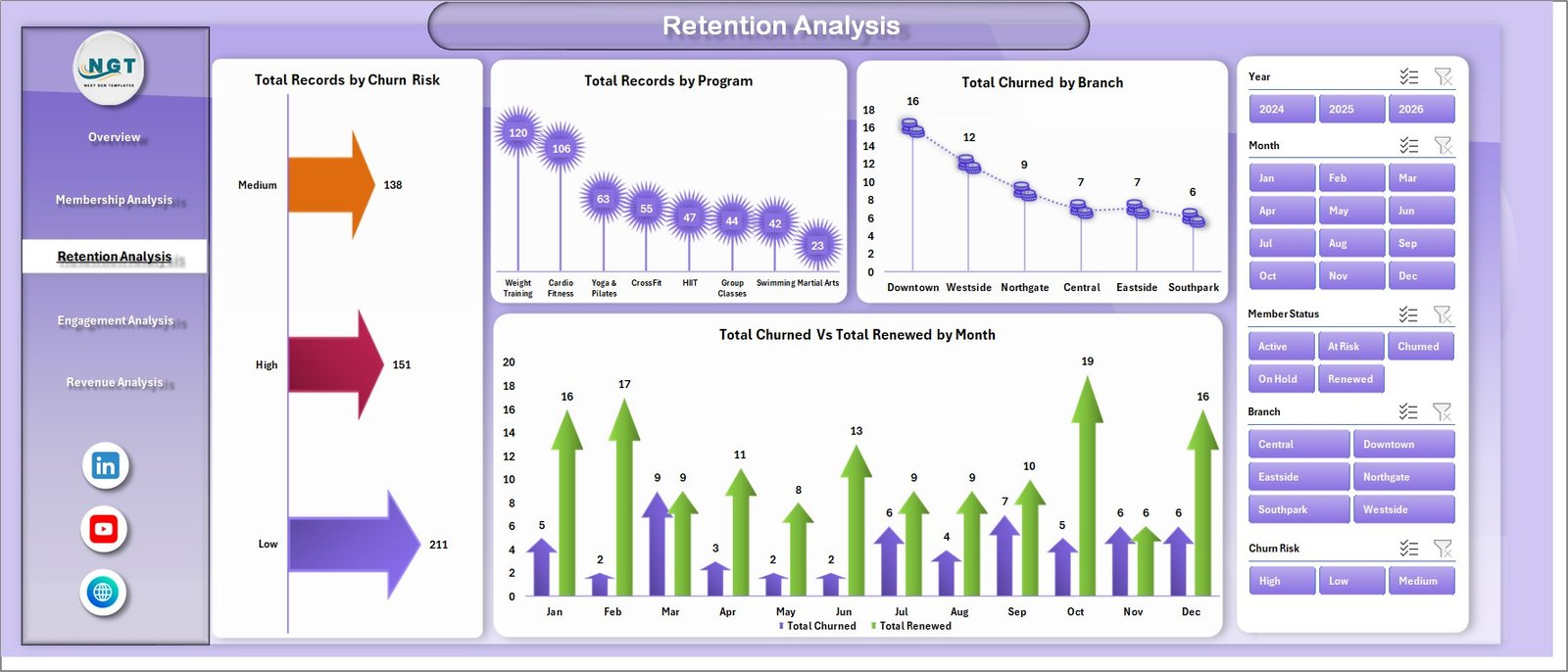
Gym Retention Dashboard in Excel – Retention Analysis Page
📊 Page 4 — Engagement Analysis
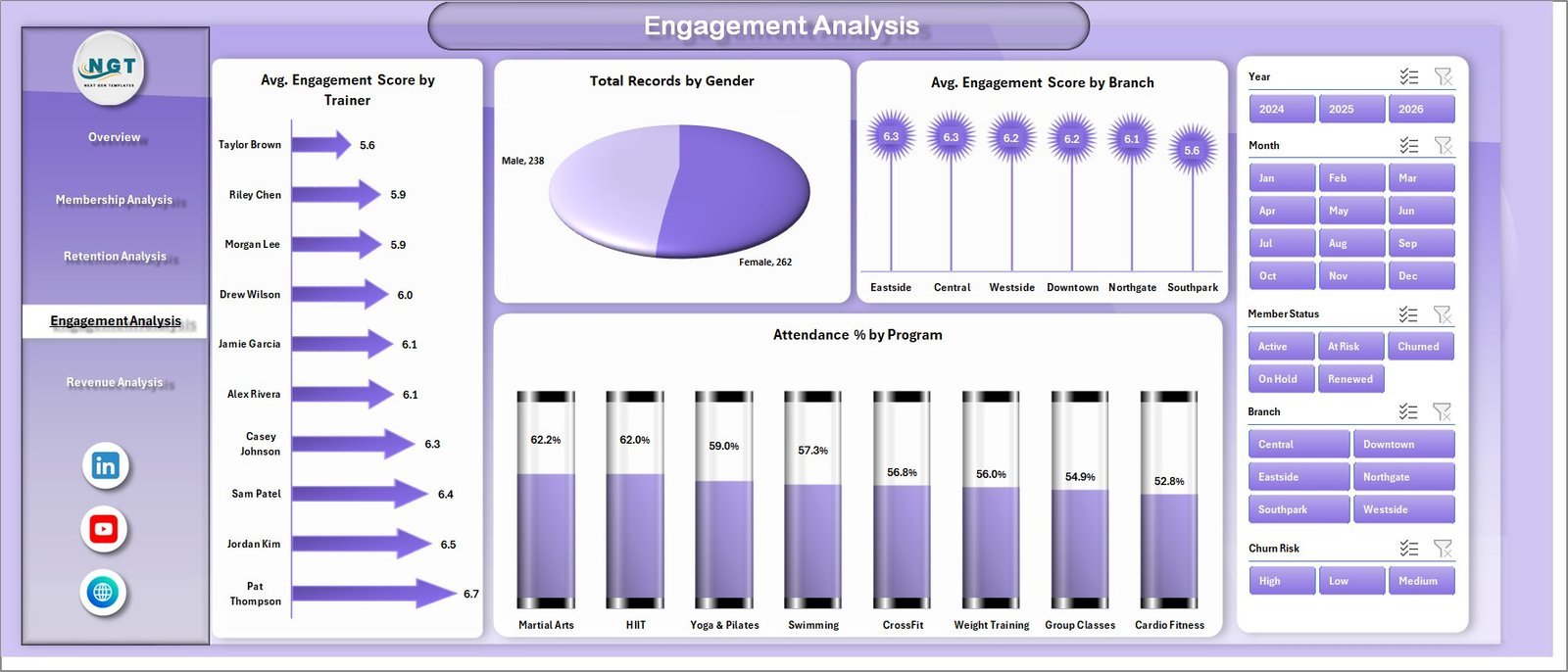
Four engagement charts: Avg. Engagement Score by Trainer, Total Records by Gender, Avg. Engagement Score by Branch, and Attendance % by Program. Pinpoints which trainers and programs drive the highest engagement — critical for retention strategy.
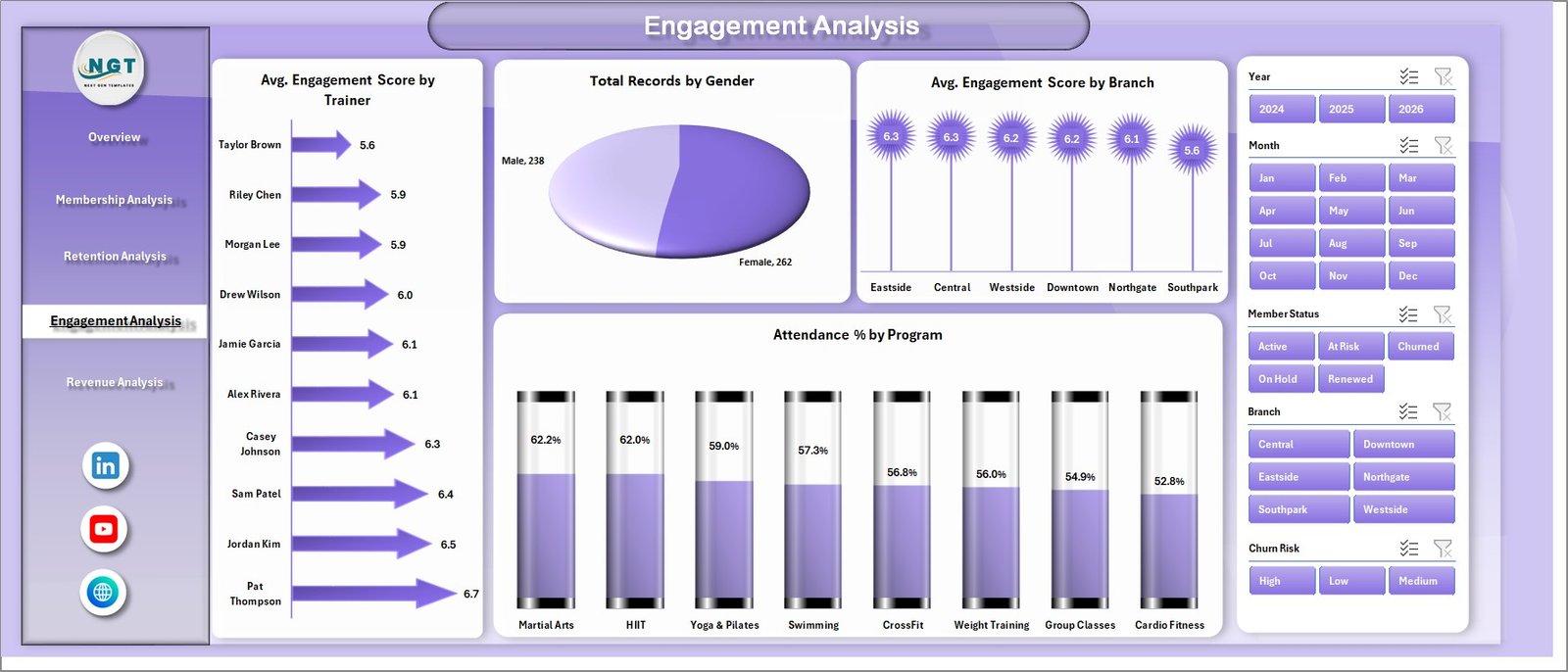
Gym Retention Dashboard in Excel – Engagement Analysis Page
📊 Page 5 — Revenue Analysis
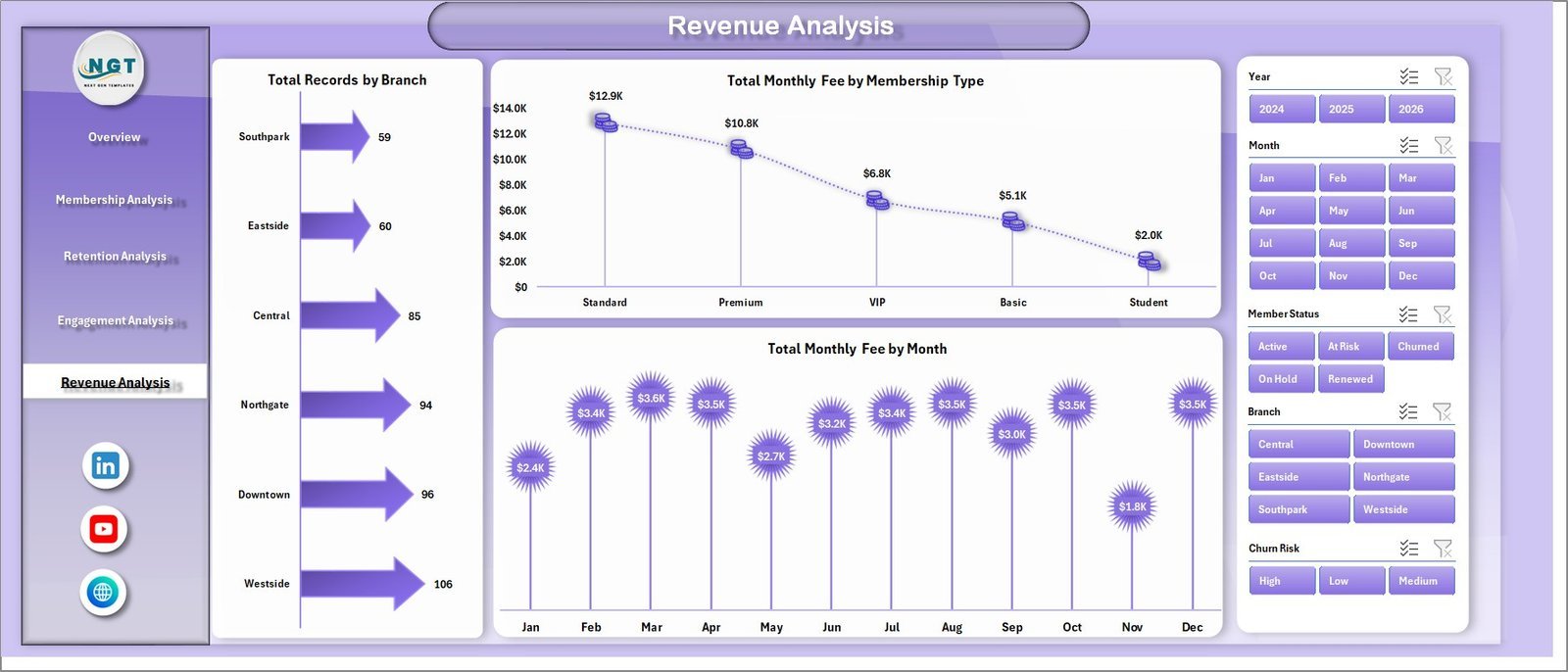
Three revenue charts: Total Records by Branch, Total Monthly Fee by Membership Type, and Total Monthly Fee by Month. Tracks where your monthly recurring revenue originates and how it trends over time.
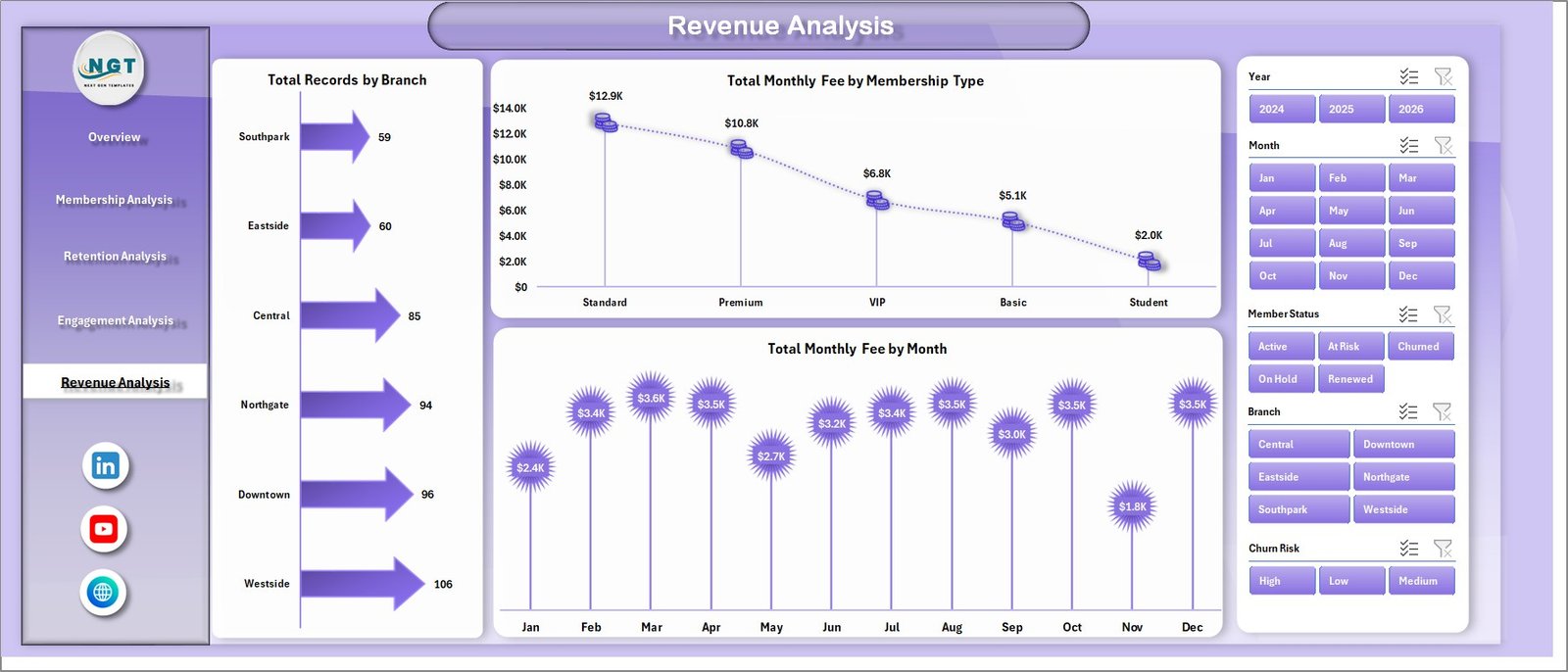
Gym Retention Dashboard in Excel – Revenue Analysis Page
📊 Data Sheet
Enter member records in this structured sheet. Each row represents one member with columns for membership type, join channel, renewal status, churn risk, engagement score, attendance %, monthly fee, branch, and more. Replace sample data to begin.

Gym Retention Dashboard in Excel – Data Sheet
📊 Support Sheet
Contains all pivot tables powering the 14 charts. Can be kept hidden during normal use. After updating data, go to Data tab → click Refresh All → all pivots and charts update instantly.

Gym Retention Dashboard in Excel – Support Sheet
📊 Gym Retention Dashboard in Excel vs. Google Sheets vs. GymMaster — Where This Fits
| Feature | Gym Retention Dashboard in Excel | Google Sheets Version | GymMaster / ClubReady (SaaS) |
|---|---|---|---|
| Cost | $17.99 one-time ✅ | $9.99 one-time | $65–150/month |
| Platform | Microsoft Excel ✅ | Google Sheets (browser) | Cloud SaaS (browser) |
| Setup Time | Under 10 minutes ✅ | Under 10 minutes | 1–5 hours (onboarding) |
| Churn Risk Segmentation | ✅ Built in | ✅ Built in | ✅ Built in |
| Works Offline | ✅ Full Excel offline | ❌ Needs internet | ❌ Needs internet |
| Customisable Fields | ✅ Fully editable | ✅ Fully editable | ⚠️ Limited (locked fields) |
| No Per-User Fees | ✅ Unlimited users | ✅ Unlimited users | ❌ Per-seat pricing |
| Year-1 Cost (5 users) | $17.99 ✅ | $9.99 | $780–$1,800 |
| Trainer Engagement Scoring | ✅ Per trainer avg. score | ✅ Per trainer avg. score | ⚠️ Add-on in higher tiers |
For gym managers who want churn risk visibility and revenue analysis without a monthly SaaS fee, the Gym Retention Dashboard in Excel sits in the sweet spot.
👥 Who This Template Is For — and Who It’s Not For
✅ This template is built for:
- Gym owners and fitness studio managers tracking member retention across 1–5 locations
- Fitness business analysts presenting monthly churn and revenue reports to leadership
- Boutique fitness operators managing 50–500 member records in Microsoft Excel
- Operations managers replacing expensive gym software with a fully customisable Excel solution
❌ This template is NOT for:
- Enterprise gym chains (50+ locations) needing live API integrations and real-time member portals
- Users with no Excel experience — basic data entry into the Data Sheet is required
- Businesses needing automatic payment processing or member-facing booking systems
⚙️ How to Use the Gym Retention Dashboard in Excel
- Download and open the file in Microsoft Excel (2016 or later recommended)
- Navigate to the Data Sheet and replace all sample data with your own member records
- Ensure each row includes membership type, join channel, renewal status, churn risk, engagement score, and branch
- Go to the Data tab in the Excel Ribbon and click Refresh All — all pivot tables and charts update automatically
- Use slicers on each dashboard page to filter by membership type, branch, or renewal status
- Keep the Support Sheet hidden during normal use; unhide it if you need to modify pivot table structures
💼 Real-World Use Cases
Marcus manages a 3-location fitness chain in the UK. Each month he pastes fresh member data into the Data Sheet, clicks Refresh All, and within seconds the Retention Analysis page shows which branches have the highest churn risk. He used to spend 3 hours building this manually — now it takes 15 minutes from data to decision.
Priya runs a boutique yoga and strength studio with 200 active members. She uses the Engagement Analysis page to identify which trainers score above average, then pairs at-risk members (flagged in Retention Analysis) with high-performing trainers. Member renewals improved 18% in her first three months using the Gym Retention Dashboard in Excel.
David is the operations lead for a CrossFit box network with 4 locations. He uses Revenue Analysis to compare monthly fee trends branch-by-branch and Membership Analysis to understand which join channels produce members who stay longest. The dashboard replaced a $120/month analytics subscription.
❓ Frequently Asked Questions
What KPIs does the Gym Retention Dashboard in Excel track?
The Gym Retention Dashboard in Excel tracks 15 KPIs including Total Records, Total Monthly Fee, Avg. Engagement Score, Total Active Members, Total Renewed, Attendance %, Churn Risk segments, and revenue by membership type and branch. All metrics update automatically after a Refresh All.
Do I need advanced Excel skills to use this dashboard?
No. The Gym Retention Dashboard in Excel is designed for gym managers with basic Excel experience. You only enter data in the Data Sheet and click Refresh All. No formula editing, VBA knowledge, or pivot table experience required.
Can I add more branches or membership types?
Yes. Extend the Data Sheet with new branches, membership types, or join channels and the pivot tables pick them up automatically on the next Refresh All. No structural changes to the dashboard are needed.
How is this different from the Gym Fitness Business Dashboard in Excel?
The Gym Retention Dashboard in Excel focuses specifically on member retention, churn risk segmentation, engagement scoring, and renewal analysis. The Gym Fitness Business Dashboard in Excel covers broader gym operations including revenue, scheduling, and facility utilisation.
How does this compare to GymMaster or ClubReady?
GymMaster and ClubReady cost $65–150 per month and include member booking portals. The Gym Retention Dashboard in Excel costs $17.99 once and delivers churn risk, engagement, and retention analytics without the monthly subscription. Best for gyms that already handle bookings via another system.
What version of Excel is required?
The Gym Retention Dashboard in Excel works with Microsoft Excel 2016 and later, including Microsoft 365. It is not compatible with Excel Online (browser) due to slicer functionality limitations.
Is a Google Sheets version available?
Yes. The Gym Retention Dashboard in Google Sheets is available separately for teams preferring browser-based access and real-time collaboration.
👤 About the Author
Built by PK — Microsoft Certified Professional with 15+ years of Excel, Google Sheets, and Power BI experience. Founder of Nextgen Templates, reaching 300K+ subscribers across YouTube channels (@PK-AnExcelExpert, @NextGenTemplates, @NeoTechNavigators). Every template is hand-built and tested before release.
🔗 Explore Related Templates
💪 Gym Fitness Business Dashboard in Excel — broader gym operations analytics covering revenue, scheduling, and member demographics.
🧘 Yoga & Wellness Studio Dashboard in Excel — retention and revenue analytics for yoga and wellness studios.
📊 Gym Retention Dashboard in Google Sheets — same retention analytics in a browser-based Google Sheets format.
Browse all Excel Dashboard Templates or explore Health & Safety Templates on NextGenTemplates.
📖 Click here to read the Detailed Blog Post
🎥 Visit our YouTube channel for step-by-step video tutorials
👉 YouTube.com/@NextGenTemplates
Watch the step-by-step video tutorial:
YouTube
📅 Last updated: May 2026































Reviews
There are no reviews yet.