



The Fleet Maintenance Calendar in Excel is a must-have tool for managing and scheduling maintenance tasks for your vehicles or fleet of cars, trucks, or equipment. Whether you’re a small business owner or part of a larger fleet management team, this template helps you organize and track routine maintenance, repairs, and inspections to ensure your fleet remains in top working condition.
This user-friendly Excel template allows you to schedule maintenance tasks, monitor service history, and track the condition of each vehicle. It helps prevent unexpected breakdowns, extend the lifespan of your fleet, and ensure safety and compliance with regulatory standards.
Key Features of the Fleet Maintenance Calendar in Excel
🛠️ Comprehensive Vehicle Maintenance Tracking
Track all maintenance tasks, including routine inspections, oil changes, tire rotations, and repairs. Keep a detailed record of the service history for each vehicle in your fleet.
⚡ Real-Time Maintenance Monitoring
Stay updated on the maintenance status of each vehicle. Log completed tasks and schedule upcoming maintenance to avoid overdue services and ensure timely repairs.
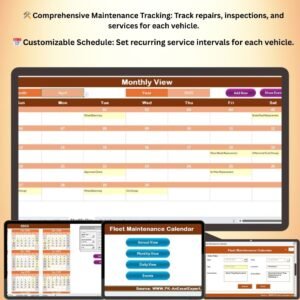
📅 Customizable Maintenance Schedule
Create a custom schedule for each vehicle based on its specific maintenance needs. Set up recurring maintenance reminders and track service intervals, so you never miss a critical task.
📈 Maintenance History & Reports
Maintain a comprehensive history of all services performed, along with dates, costs, and details. Easily generate reports to evaluate the overall health of your fleet and identify any potential issues early.
🖥️ User-Friendly Interface
The template’s intuitive design makes it simple to track and manage your fleet’s maintenance tasks. It requires no technical expertise and helps you stay organized without complexity.
Why You’ll Love the Fleet Maintenance Calendar in Excel

✅ Prevent Unexpected Breakdowns
Stay on top of scheduled maintenance and avoid costly breakdowns by tracking service tasks and ensuring your vehicles are properly maintained.
✅ Track Fleet Maintenance History
Log all service history for each vehicle, including inspections, repairs, and replacements, to ensure compliance and help plan future repairs.
✅ Save Time and Money
By staying ahead of regular maintenance, you can reduce repair costs, extend the lifespan of your fleet, and minimize downtime.
✅ Ensure Safety and Compliance
Ensure that all required inspections and services are performed on time, keeping your fleet safe, roadworthy, and compliant with regulations.
✅ Simplify Fleet Management
With everything organized in one place, managing your fleet’s maintenance needs becomes easier, more efficient, and stress-free.
What’s Inside the Fleet Maintenance Calendar in Excel?
- Vehicle Maintenance Tracker: Log all maintenance tasks for each vehicle in your fleet, including repairs, oil changes, inspections, and more.
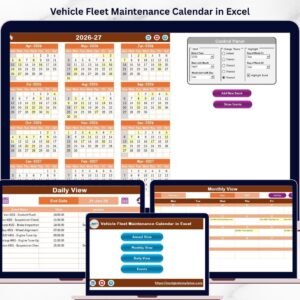
- Scheduled Maintenance Calendar: Schedule regular maintenance tasks and track due dates to ensure timely service.
- Maintenance History & Costs: Keep detailed records of past services, repairs, and associated costs for each vehicle.
- Maintenance Reports: Generate reports to evaluate your fleet’s maintenance history and identify patterns or areas that need attention.
- Customizable Maintenance Intervals: Set up specific maintenance intervals for different vehicle types or models, ensuring appropriate care for each.
How to Use the Fleet Maintenance Calendar in Excel
1️⃣ Download the Template: Get instant access to your fleet maintenance calendar.
2️⃣ Input Vehicle Information: Enter details about each vehicle, including make, model, and maintenance requirements.
3️⃣ Track Maintenance Tasks: Log completed maintenance tasks and set up future service intervals.
4️⃣ Monitor Fleet Health: Use the reports to assess the health of your fleet, track costs, and stay on top of upcoming service needs.
Who Can Benefit from the Fleet Maintenance Calendar in Excel?
🔹 Fleet Managers
🔹 Small Business Owners with a Fleet of Vehicles
🔹 Vehicle Maintenance Supervisors
🔹 Operations Managers Responsible for Equipment and Vehicle Management
🔹 Logistics and Delivery Companies
🔹 Any Business or Organization with Multiple Vehicles to Manage
Stay organized and keep your fleet in optimal condition with the Fleet Maintenance Calendar in Excel. Prevent breakdowns, track costs, and ensure your vehicles are always road ready.
Click here to read the Detailed blog post
Visit our YouTube channel to learn step-by-step video tutorials
Youtube.com/@PKAnExcelExpert
Compatibility and Requirements
- Works in Microsoft Excel desktop (Excel 2016 or later, or Microsoft 365).
- New to Excel? Microsoft’s Excel for Windows training course covers the basics.
Frequently Asked Questions
What maintenance can I log?
Repairs, oil changes, tire rotations, inspections and other tasks for each vehicle in your fleet.
Does it keep service costs?
Yes. The maintenance history keeps past services and repairs with dates, costs and details for each vehicle.
Can different vehicles have different service intervals?
Yes. You can set maintenance intervals for different vehicle types or models.
What vehicle details do I enter?
Make, model and maintenance requirements for each vehicle.
Related Fleet Templates
- Vehicle Fleet Maintenance Calendar in Excel: another fleet service calendar
- Fleet Management KPI Dashboard in Excel: track fleet KPIs
- Fleet Management Dashboard in Excel: fleet reporting in one view
- Vehicle Maintenance Checklist in Excel: a checklist for each service
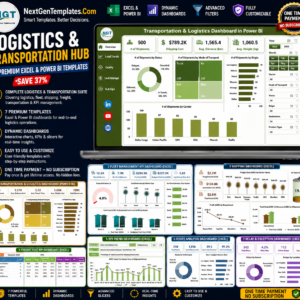
- Logistics and Transportation Hub: 7 Excel and Power BI templates in one bundle
Browse all Excel calendars or the Excel logistics templates.



























Reviews
There are no reviews yet.