

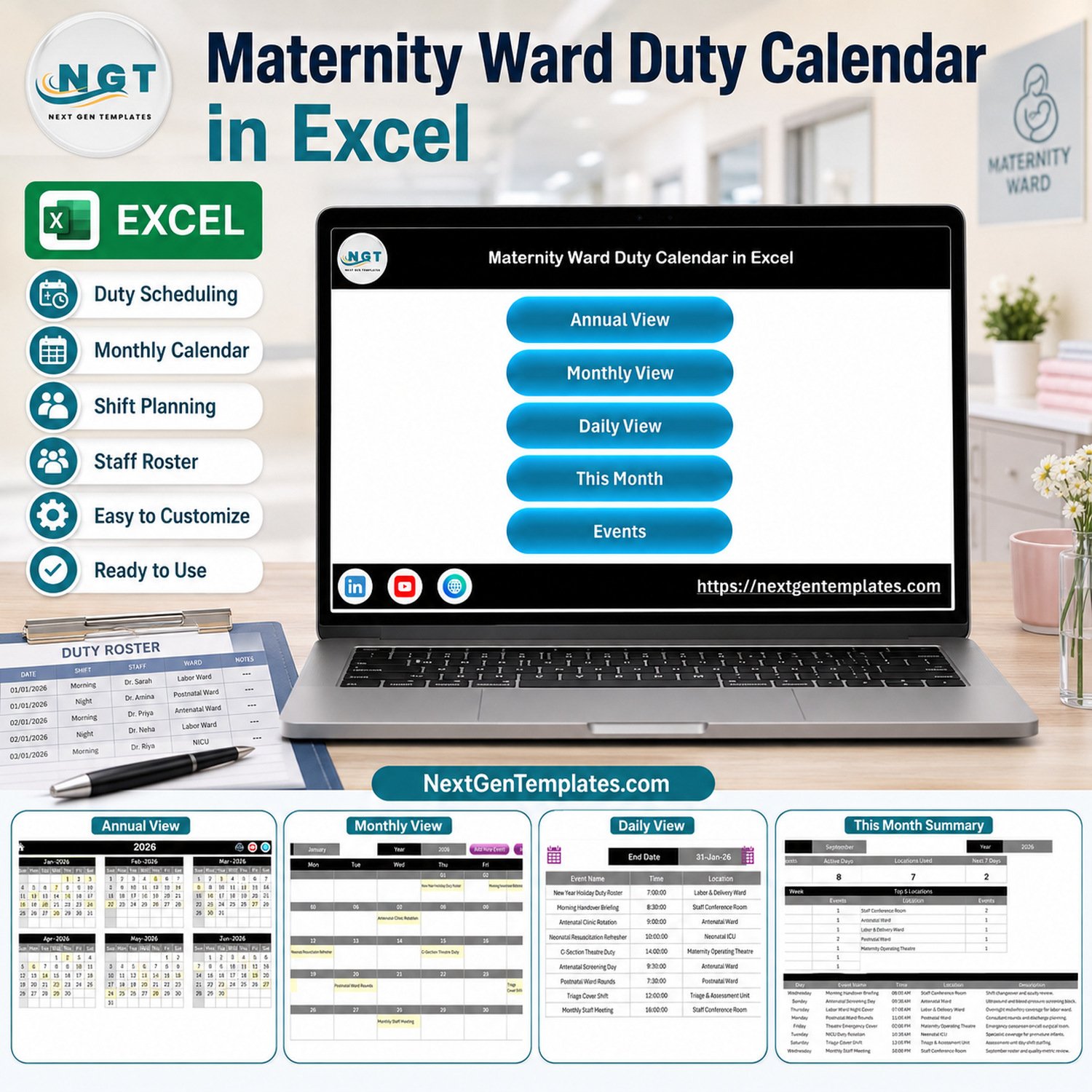

Maternity Ward Duty Calendar in Excel gives ward administrators one reusable place to organize dated duties, handovers, meetings, training sessions, ward rounds, and other operational events. The workbook includes 5 linked views, 12 months in the annual calendar, a date-range list, a current-month summary, and an editable event register. It is a one-time download rather than a per-user subscription, and sample data can be replaced with your own administrative schedule. This is a scheduling aid only: it does not make clinical decisions, monitor patients, calculate safe staffing levels, or replace an approved hospital workforce or EHR system.

Key Features of Maternity Ward Duty Calendar in Excel
- Five connected views: Home, Annual View, Monthly View, Daily View, This Month, and the Events register are reached from clear navigation controls.
- Year-at-a-glance planning: review all 12 months on one sheet and identify event dates quickly.
- Month and year selectors: move to the period you need without rebuilding the layout.
- Date-range event list: choose start and end dates to review detailed scheduled items.
- Current-month summary: see event count, active days, locations used, the next seven days, weekday distribution, and top locations.
- Editable event database: record date, event name, time, location, and an administrative description.
- VBA entry form: add an event from a guided form after enabling macros in Excel for Windows desktop.
What’s Inside This Excel Calendar
Annual View
The annual sheet displays January through December for the selected year. Highlighted dates make scheduled events easier to spot during operational planning.

Monthly View
Select a month and year to see events placed on calendar dates. Add New Event and Show Events controls support routine schedule maintenance.

Daily View and This Month Summary
The Daily View filters the register between two dates and shows event, time, location, and description. This Month summarizes administrative activity without interpreting clinical performance.


Events Register and Entry Form
The Events sheet is the editable source list. The form provides Date, Event Name, Time, Location, and Description fields. Keep entries operational and avoid storing patient names or unnecessary sensitive personal information.


Excel Calendar vs. Google Sheets vs. Paid Workforce SaaS – Where This Fits
| Consideration | This Excel calendar | Google Sheets calendar | Paid workforce SaaS |
|---|---|---|---|
| Cost | One-time purchase | One-time template purchase | Usually recurring |
| Best use | Local administrative event planning | Shared lightweight planning | Formal workforce operations |
| Offline use | Yes, in desktop Excel | Limited | Varies |
| Real-time collaboration | No | Yes | Usually |
| Macros | Required for form and buttons | Not applicable | Not applicable |
| Compliance controls | Not included | Not included | Vendor-specific |
Who This Template Is For – and Who It’s Not For
It fits maternity ward coordinators, administrative assistants, nursing education coordinators, and small clinics that need a visual calendar for meetings, duty notes, training, handovers, and planned operational events. It is not a clinical decision-support tool, patient record, acuity model, legal staffing calculator, payroll system, or guarantee of regulatory compliance.
How to Use This Excel Calendar
- Download and unzip the package.
- Open the .xlsm file in Microsoft Excel for Windows desktop and enable macros from a trusted location; review Microsoft’s macro security guidance.
- Replace sample operational events in the Events sheet.
- Use the entry form or edit the register directly.
- Select the required year, month, or date range in the calendar views.
- Validate every duty assignment against your organization’s approved roster and policies before circulation.
Real-World Use Cases
A ward coordinator can map handover briefings and staff meetings across a month. A training lead can list refresher sessions and orientation dates. An administrative manager can review upcoming operational coverage notes by date and location before transferring approved assignments into the hospital’s official system.
The file can also support advance planning for non-clinical room bookings, audit preparation meetings, equipment orientation sessions, and recurring team reviews. Because the source register remains visible, a reviewer can check exactly which date, time, and location produced each calendar entry. That transparency is useful when a schedule is prepared by one person and reviewed by another.
Frequently Asked Questions
Does this create a legally compliant staff roster?
No. It organizes administrative events; staffing approval and compliance remain with your organization.
Does it store or monitor patient data?
No patient-monitoring features are included. Avoid entering patient identifiers or sensitive clinical details.
Which Excel version is required?
Use Microsoft Excel for Windows desktop. The form and navigation automation require macros.
Can I change the sample events?
Yes. Replace the examples with your own approved operational schedule.
Can multiple people edit simultaneously?
This edition is designed for desktop Excel, not real-time co-editing. Consider the Google Sheets edition for lightweight shared access.
Is a user manual included?
Yes. The ZIP contains the macro-enabled workbook and Excel Calendar User Manual PDF.
Can the workbook send reminders automatically?
No. It displays and summarizes entered events but does not send email, SMS, or mobile notifications.
About the Author
Built by PK – Microsoft Certified Professional with 15+ years of Excel, Google Sheets, and Power BI experience. Founder of NextGenTemplates, reaching 300K+ subscribers across YouTube channels. Every template is hand-built and tested before release.
Explore Related Templates
Compare the Nurse Duty Roster Calendar in Excel, Patient Discharge Planning Calendar in Excel, and Ambulance Duty Calendar in Excel. Browse more Excel calendar templates and health and safety templates.
Organize maternity ward administrative events in one practical workbook. Download the calendar, replace the sample schedule, and review it under your hospital’s normal approval process.
Last updated: September 10, 2026.
Watch the demo video:
Compatibility and Requirements
- Works in Microsoft Excel desktop on Windows with macros enabled. The entry form and navigation buttons use VBA.
- It does not run in Excel for the web, Google Sheets or mobile apps.
- Microsoft explains how to turn macros on in Enable or disable macros in Microsoft 365 files.






























Reviews
There are no reviews yet.