



Managing research and development (R&D) projects in education has always been complex. With the rise of artificial intelligence (AI), the need for structured planning, event tracking, and milestone monitoring has never been greater. Universities, training institutes, and research organizations often struggle with scattered schedules and uncoordinated events. That’s where our Education R&D AI Implementation Calendar in Excel comes in — a powerful, ready-to-use tool designed to bring order, clarity, and efficiency to AI adoption in education.
This Excel-based calendar consolidates everything — from workshops and faculty training sessions to compliance reviews and funding deadlines — into a single interactive platform. Whether you are planning long-term AI research, organizing student hackathons, or scheduling faculty development programs, this tool ensures you never miss a milestone.
🔑 Key Features of the Education R&D AI Implementation Calendar
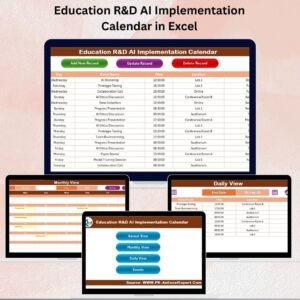
📅 Five Dedicated Views – Home, Annual, Monthly, Daily, and Events sheet tabs for structured scheduling.
🎯 Annual Planning – Visualize the entire year at once with customizable highlights and themes.
🗓️ Monthly & Daily Scheduling – Stay focused on upcoming deadlines with flexible, detailed views.
🖱️ Quick Navigation Buttons – Jump instantly between views and save time with a single click.
📝 Structured Events Database – Store all event details (ID, Date, Event Name, Time, Location, Description).
🎨 Customizable Themes – Choose from five built-in color themes to match your institutional branding.
📍 Highlighting Options – Mark weekends, important days, or special events for better visibility.
🛠️ Easy Event Management – Add, update, or delete records with user-friendly forms.
✅ Practical & Time-Saving – No need for complex software; everything is built into Excel.
📦 What’s Inside the Education R&D AI Implementation Calendar
This template is designed with five powerful worksheet tabs, each with unique functionality:
Home Sheet – Acts as the control panel with navigation buttons to all other views.

Annual View – Displays a 12-month calendar with customizable themes and highlight options.
Monthly View – Provides a focused view of one month, showing multiple events per day.
Daily View – Lets you filter events for a date range and track workshops or short-term projects closely.
Events Sheet – A complete database of all events, with add, update, and delete options for structured management.
This structure ensures a seamless user experience and helps educators and researchers stay organized throughout the year.
🛠️ How to Use the Education R&D AI Implementation Calendar
Start from the Home Sheet – Use navigation buttons to access Annual, Monthly, or Daily views.
Plan Long-Term Goals – Use the Annual View to schedule AI adoption milestones and compliance reviews.
Schedule Monthly Events – Switch to the Monthly View to plan faculty training, workshops, or student hackathons.
Track Short-Term Projects – Use the Daily View to manage ongoing experiments or week-long sessions.
Maintain Event Records – Log all activities into the Events Sheet for structured data storage.
Customize Appearance – Personalize the calendar with themes and event highlighting for easier tracking.
👥 Who Can Benefit from This Calendar?
🏫 Universities & Colleges – Plan academic AI research and faculty workshops.
📚 Training Organizations – Organize AI-based programs, events, and certifications.
🔬 Research Labs – Track experiments, model training, and review schedules.
👩🏫 Educators & Faculty – Manage teaching schedules, training, and R&D tasks.
🎓 Students & Coordinators – Stay on top of AI projects, hackathons, and events.
📖 Click here to read the Detailed Blog Post
Visit our YouTube channel to learn step-by-step video tutorials
Watch the step-by-step video tutorial:
Compatibility and Requirements
- Works in Microsoft Excel desktop (Excel 2016 or later, or Microsoft 365).
- The Events sheet stores the data and the Annual, Monthly and Daily views read from it. Microsoft explains how to print any view in Print a worksheet or workbook.
Frequently Asked Questions
Which sheets are included?
Five sheets: Home, Annual View, Monthly View, Daily View and Events.
What details can I store for each event?
The Events sheet holds an ID, date, event name, time, location and description. You can add, update or delete records with the forms provided.
Can I change the look of the calendar?
Yes. The Annual View has five built-in color themes, and you can highlight weekends, important days or special events.
How do I move between views?
Use the navigation buttons on the Home sheet to open the Annual, Monthly or Daily view with one click.
Is there a version for another education team?
Yes. See the Education IT AI Implementation Calendar in Excel and the Education Operations AI Implementation Calendar in Excel.
Related Education and Calendar Templates
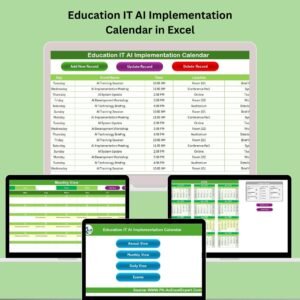
- Education IT AI Implementation Calendar in Excel: the same calendar for IT teams in education
- Education Operations AI Implementation Calendar in Excel: for school and campus operations
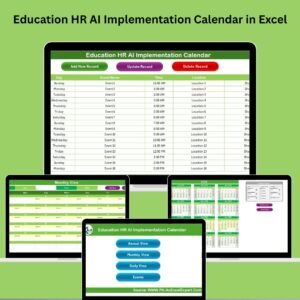
- Education HR AI Implementation Calendar in Excel: for staff and training schedules
- R&D AI Implementation Calendar in Excel: the general R&D edition
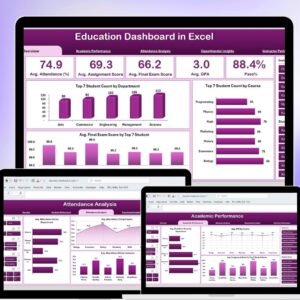
- Education Dashboard in Excel: a dashboard for education data
Browse all Excel calendar templates.

























Reviews
There are no reviews yet.