
🎉 Black Friday Sale: 40% OFF everything with code BF40 · ends 1 Dec  Shop now →

Elevator Maintenance Checklist in Google Sheets

Google Sheets - instant download

Original price was: ₹799.00.Current price is: ₹349.00.
Details, requirements and demo below
Sale!

Elevator Maintenance Checklist in Google Sheets

Original price was: ₹799.00.Current price is: ₹349.00.

🛠️ Streamline Elevator Maintenance Like a Pro!
Keep your elevators running smoothly and safely using our Google Sheets Checklist! Designed for property managers, maintenance heads, and building admins.

✨ Key Features:
🔹 Prebuilt Checklist Template – Track every elevator task
🔹 Dropdowns for Task Assignment – Improve accountability
🔹 Visual Progress Bar – See completed vs pending at a glance
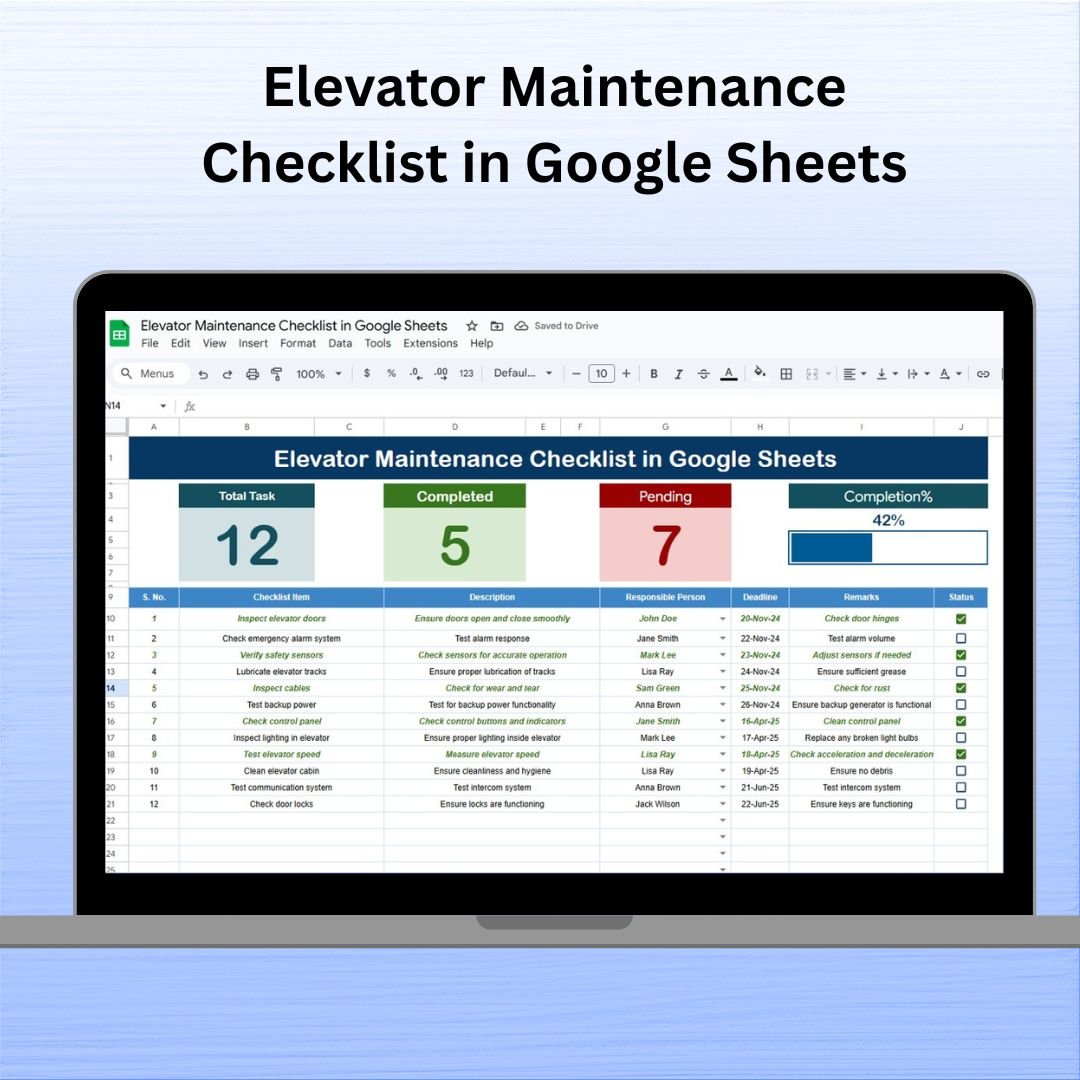
🔹 Top Section KPIs – Total tasks, pending, and done
🔹 Customizable Columns – Add deadlines, remarks, and more
🔹 ✔ or ✘ Status Update – One-click task tracking
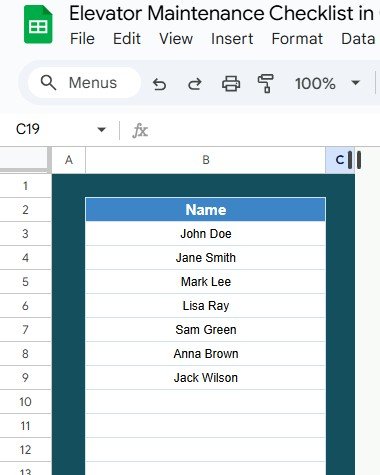
🔹 List Sheet for Staff – Manage responsible persons
🔹 Fully Editable & Shareable – Google Drive-ready
🔹 Use for One or Multiple Elevators – Duplicate & customize
🔹 Perfect for Safety Audits – Keep documentation up-to-date

Customize this template for your business (optional)

Handled by email: we contact you within 1 business day. One revision round included. What is included

- +

💡 Buy any 2 templates and save 20% automatically at checkout.

Included in All-Access Templates. Get this plus 7,000+ templates for ₹4,999.00 a year. Compare plans →
Pricing country
Prices follow your selected country; checkout uses your billing country.
Google Sheets Complete Course: Beginner to Advanced courseLaunch offer
🎓 NEXTGENTEMPLATES ACADEMY
Want to build Google Sheets like this yourself?
Google Sheets Complete Course: Beginner to Advanced

Formulas, lookups, QUERY, dynamic arrays, pivot tables, charts, live data and Apps Script, ending with an interactive sales dashboard. 74 lessons by PK with a practice file for every lesson.

Managing elevator maintenance has never been this easy! The Elevator Maintenance Checklist in Google Sheets is a powerful and ready-to-use template designed to simplify your elevator upkeep process. Whether you’re managing a commercial complex, residential tower, or office building, this tool gives you full control and visibility over every maintenance task—boosting compliance, safety, and reliability.

From tracking task statuses to assigning responsibilities and monitoring progress, this spreadsheet ensures zero oversight and 100% accountability.
Elevator Maintenance Checklist in Google Sheets

✅ Key Features of the Elevator Maintenance Checklist 🚀

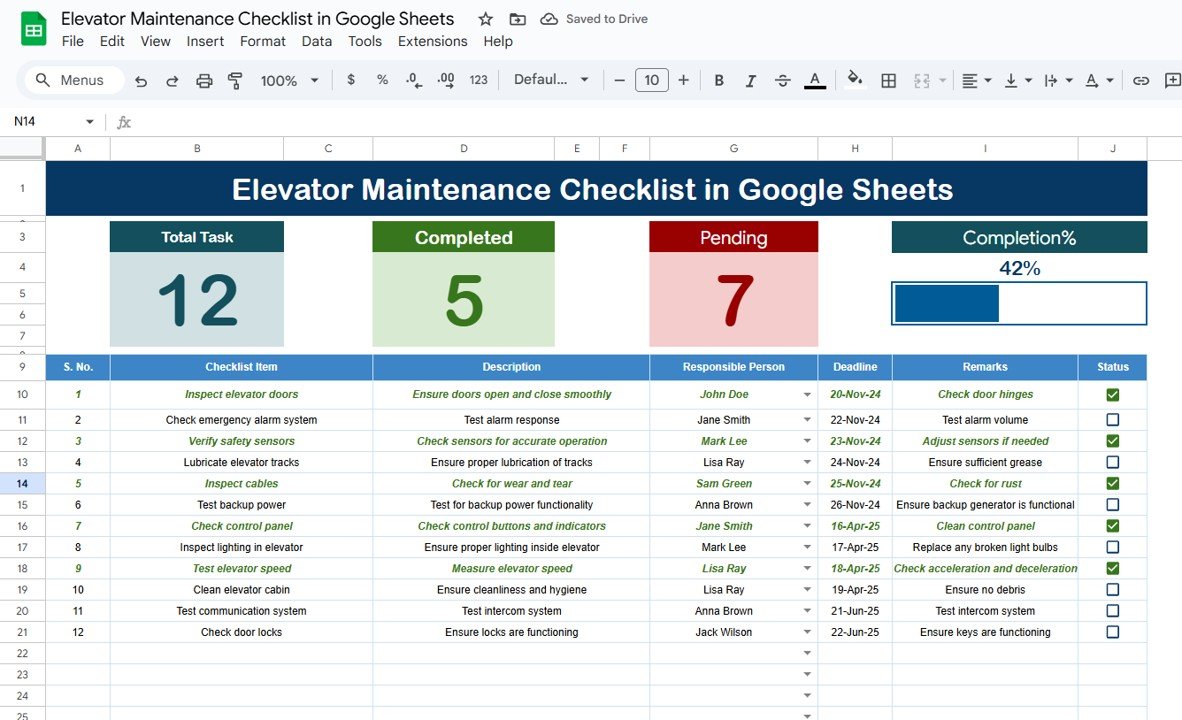
🧾 Pre-built Maintenance Checklist Sheet
Easily record every task with built-in fields for serial numbers, checklist items, deadlines, and remarks.

📊 Visual Progress Tracking
Monitor maintenance performance at a glance using:

  • ✅ Total Count

  • ✅ Completed Count

  • ✅ Pending Count

  • ✅ Progress Bar for real-time task completion

📌 Status Column
Quickly update each task as ✔ (Completed) or ✘ (Pending)—zero confusion, just clear progress.

📋 Dropdown Assignment
Assign tasks with ease using a built-in dropdown for Responsible Persons pulled from the List Sheet.


📦 What’s Inside the Elevator Maintenance Checklist 📁

This template is neatly organized into two practical worksheet tabs:

  1. Elevator Maintenance Checklist (Main Sheet)

    • Serial No.

    • Checklist Item (e.g., inspect cables, test safety brakes)

    • Description

    • Responsible Person (from dropdown list)

    • Deadline

    • Remarks

    • Status (✔ or ✘)

    • Top-level KPIs for overall progress

  2. List Sheet Tab

    • A clean list of Responsible Persons

    • Automatically populates dropdown menus in the main checklist

    • Improves task allocation & clarity


🔧 How to Use the Elevator Maintenance Checklist 🧑‍🔧

Using this tool is simple:

  1. 📝 Enter all your elevator maintenance tasks into the main checklist

  2. 👤 Assign each task to a team member using the dropdown list

  3. 📅 Set deadlines and add notes if needed

  4. ✅ Mark tasks as completed once done (✔)

  5. 📊 Watch the Progress Bar reflect your real-time performance

Bonus: Duplicate the sheet if you want separate checklists for each elevator in your building!


🏢 Who Can Benefit from This Template?

This template is ideal for:

🛎️ Facility Managers – Oversee routine elevator servicing effortlessly
🏬 Building Admins – Track task completion in high-rise buildings
🏘️ Apartment Complex Operators – Ensure tenant safety through timely checks
👷 Maintenance Teams – Assign duties, reduce backlogs, stay accountable
🏢 Commercial Office Supervisors – Streamline vendor collaboration

If you manage elevators, this tool is your safety net.


🚀 Why Building Managers Love This Template

✅ All tasks in one place – never miss an inspection
✅ Visual tracking for quick management reporting
✅ Built-in dropdowns = smarter task delegation
✅ Fully editable & Google Drive-compatible
✅ Mobile-friendly & team-share ready
✅ Helps maintain compliance & reduce liability risks
✅ Prevents costly elevator downtimes with early intervention


📘 Click here to read the Detailed blog post

Watch the step-by-step video Demo:


📺 Visit our YouTube channel to learn step-by-step video tutorials

Compatibility and Requirements

  • Runs in Google Sheets with a free Google account and a web browser.
  • Nothing to install. You open the file in Google Sheets and work in your browser.
  • The Responsible Person column uses a dropdown fed from the List sheet. Google explains dropdowns in Create an in-cell dropdown list.

Frequently Asked Questions

Which sheets are in the file?

Two: the Elevator Maintenance Checklist main sheet and a List sheet with the names of responsible people.

What columns does the checklist have?

Serial No., Checklist Item, Description, Responsible Person, Deadline, Remarks and Status.

How do I mark a task as done?

Set its Status to the tick mark. The Total, Completed and Pending counts and the progress bar update on their own.

Can I use it for several elevators?

Yes. Duplicate the sheet to keep a separate checklist for each elevator in the building.

Related Elevator and Maintenance Templates

Browse all Google Sheets checklists or the Google Sheets templates.
Frequently asked questions

How do I get my own copy?
After purchase you get a link to the Google Sheet. Open it while signed in to your Google account and use File > Make a copy - the copy in your Google Drive is fully yours and editable.
Do I need a paid Google account? Will it expire?
No. A free Google account is enough, and your copy lives in your own Google Drive - it never expires and there is nothing to renew.
Does it work on Mac, phone or tablet?
Yes - in any browser on Windows, Mac or Chromebook, and in the Google Sheets mobile app for viewing and quick entries.
Can I share it with my team?
Yes. Share your copy with colleagues using Google's normal sharing, with view or edit rights as you choose.
Can I change the design and formulas?
Yes, your copy is fully editable - colours, labels, logo, formulas and charts. If a range is protected, use Data > Protect sheets and ranges to remove it in your copy.
Are there macros or add-ons?
No macros or add-ons - it uses normal Google Sheets formulas and charts.
Is it a one-time payment or a subscription?
One-time payment. No subscription, no per-user fees and nothing to renew - the file is yours to keep.
How do I get the file after payment?
Instantly. The download link appears on screen after checkout, is emailed to you, and stays under My Account > Downloads on our website. If the email does not arrive within a few minutes, check your spam or promotions folder.
Is a user manual included?
Most of our newer products include a PDF user manual in the download. If yours does not have one, message us with your order number and we will send it.
Do I get free updates?
Bug fixes are always free - if something does not work as described, we fix it and send you the corrected file. New versions with new features are not included in the price, unless this product's description says otherwise.
Can you customise it for me?
Yes. Small changes to this template (your columns, categories, logo, colours, minor layout) cost the template price plus $40-80 (Rs 3,000-6,000 + GST), quoted once you send your list. A fully custom build is usually $100-200 (Rs 8,000-18,000 + GST) with two revision rounds. Email your requirements to [email protected] or message us on WhatsApp.
Can I use it for my business or my clients?
Yes, for your own personal or internal business use, for as long as you like. Reselling or redistributing the template is not allowed.
What is your refund policy?
Because these are digital downloads, they are non-refundable once delivered - except when the product does not match its description (report it within 48 hours of purchase) or there is a technical problem our team cannot fix within 72 hours. Email [email protected] with your order number.
How do I get help?
Email [email protected] (Mon-Fri, 10 AM-7 PM IST) or message us on WhatsApp +91 80770 90260 (chat only, no calls). Please include your order number.

Still have a question? Click Need help? at the bottom-left to ask our assistant, or message us on WhatsApp.

Application

Google Sheets

Template Type

Checklist

Price

Paid

Business Or Department

Maintenance and Facilities

Reviews

There are no reviews yet.

Only logged in customers who have purchased this product may leave a review.

You may also like…

Elevator Maintenance Checklist in Google SheetsElevator Maintenance Checklist in Google Sheets
Original price was: ₹799.00.Current price is: ₹349.00.
- +
Scroll to Top