

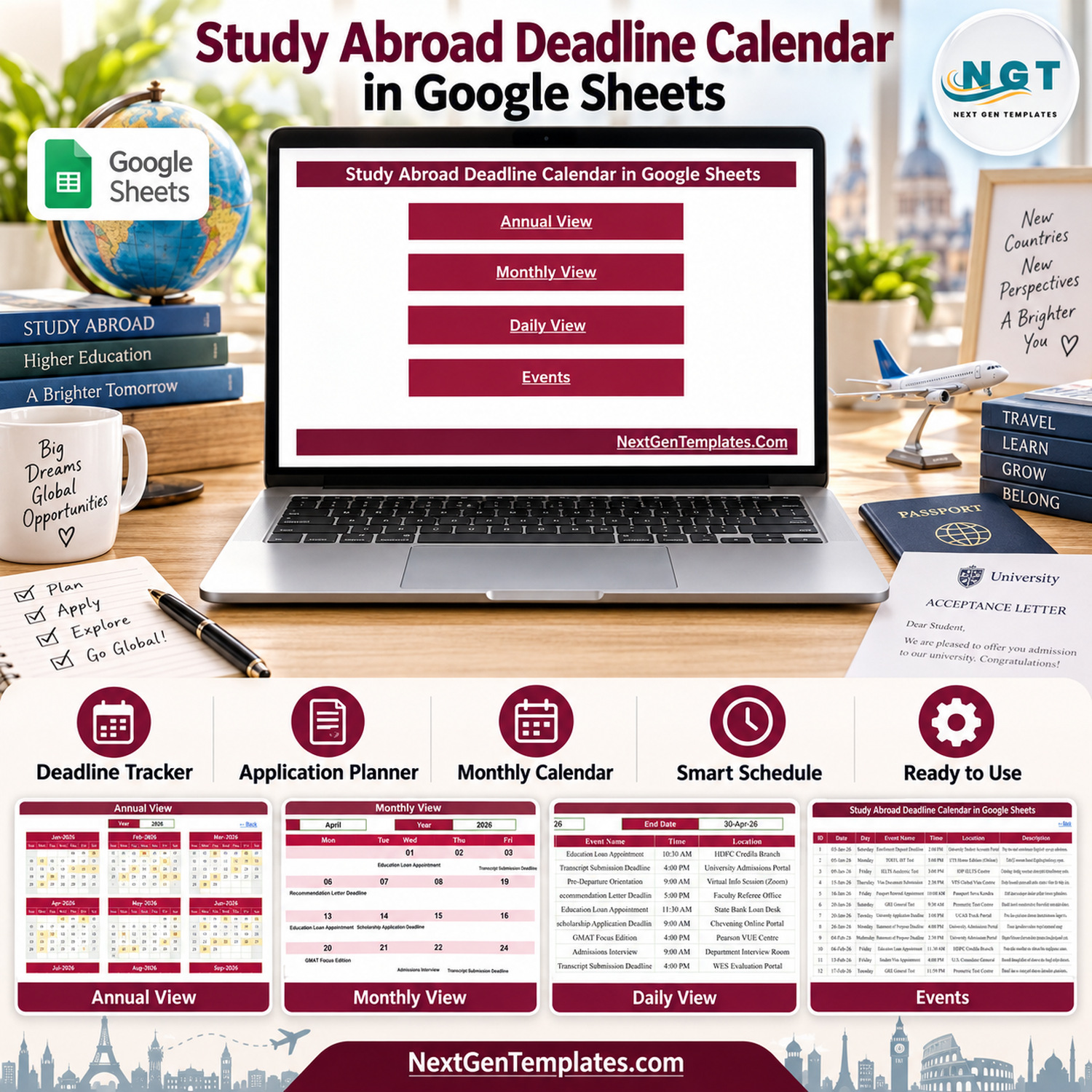
The Study Abroad Deadline Calendar in Google Sheets keeps every application, English test, admissions exam, scholarship, loan, passport and visa date of an overseas study plan in one shared spreadsheet. It opens on a Home menu with four connected views (Annual, Monthly, Daily and Events) and ships with 100 sample events spread across all 12 months of 2026, so you can see exactly how it behaves before you type a single date of your own.
Students, parents, education counsellors and admissions consultants use it to answer one question fast: what is due next, at what time, and where? Every entry carries a date, day, event name, time, location and description, and that one Events list feeds the yearly grid, the month calendar and the date-range list. Because it lives in Google Drive, a student and a parent or counsellor can work from the same copy on any device. Think of it as a study abroad deadline tracker, a university application deadline calendar and a study abroad planner template rolled into one Google Sheets deadline calendar.
✅ Instant download · One-time payment · No subscription · Works in a free Google account · Lifetime access

🔑 Key Features of the Study Abroad Deadline Calendar in Google Sheets
🏠 Home menu: four large buttons jump straight to Annual View, Monthly View, Daily View and Events, and every view has a Back link to return home.
📅 Annual View: all twelve months of the selected year on one page, with every date that carries an event shaded. It is the quickest way to spot a crowded month, such as a February holding an application deadline, a GRE sitting, a GMAT slot and a financial-aid deadline within a few weeks.
🗓️ Monthly View: pick a month and a year from the drop-downs and the calendar redraws with the event name printed inside each day. When a day holds more than one event, the cell shows the first one plus a “1 more…” style counter.
📋 Daily View: type a start date and an end date and a live FILTER lists every event in that window with ID, date, day, event name, time, location and description. It works well as a 30-day to-do list for an application season.
📝 Events register: one table with ID, Date, Day, Event Name, Time, Location and Description. Add, edit or delete rows directly and every view updates.
🎓 Realistic study-abroad sample data: 100 events across 22 event types, from University Application Deadline, Statement of Purpose Deadline and Recommendation Letter Deadline to TOEFL iBT, IELTS Academic, GRE General and GMAT Focus Edition tests, Education Loan Appointment, Student Visa Appointment and Pre-Departure Orientation.
🔁 Reusable for future intakes: the Year drop-down on the Annual and Monthly views covers 36 years, starting five years before the current year, so the same file carries you from one intake to the next.
📦 What’s Inside the Spreadsheet
Home
A clean navigation page with one button per view. Nothing to configure; share the sheet and anyone with access can find their way around.
Annual View
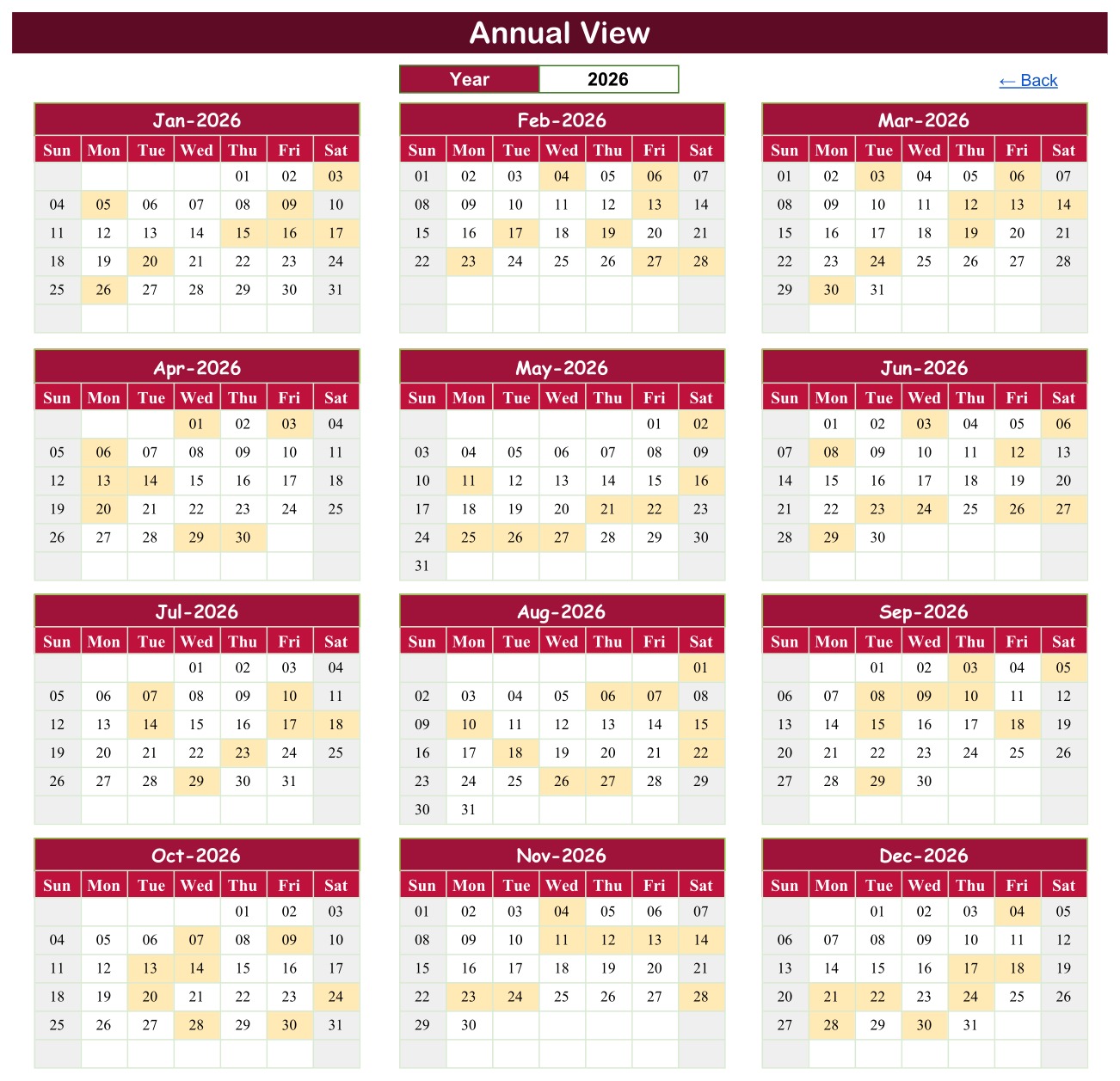
Choose a year and twelve mini calendars (January to December) redraw on a Sunday-to-Saturday grid. Dates that carry at least one event are shaded, so a whole application cycle is visible at a glance.
Monthly View

Month and Year drop-downs drive a full-width calendar. In the April 2026 sample you can read an Education Loan Appointment on the 1st, a Transcript Submission Deadline on the 3rd with one more event behind it, a Recommendation Letter Deadline on the 6th, a Scholarship Application Deadline on the 14th, a GMAT Focus Edition sitting on the 20th and an Admissions Interview on the 29th.
Daily View

Enter any Start Date and End Date. The sample shows 01-Apr-26 to 30-Apr-26, which returns nine events, including both items on 03-Apr-26 that the Monthly View summarises as “1 more…”.
Events

The master list. The sample holds 100 events dated 03-Jan-26 to 30-Dec-26 across 31 locations, such as University Admissions Portal, Virtual Info Session (Zoom), Prometric Test Centre, Pearson VUE Centre, British Council Test Centre, VFS Global Visa Centre and Financial Aid Office. The Daily View filter reads up to roughly 990 rows, so there is plenty of room for a whole family’s or a small consultancy’s plan.
📊 Google Sheets vs. Excel vs. Paid Planning Apps
| Feature | This Google Sheets template | Study Abroad Deadline Calendar in Excel | Paid application-planning apps |
|---|---|---|---|
| Price model | One-time purchase | One-time purchase | Often monthly or per-student |
| Runs on | Any browser, Windows, Mac, Chromebook, phone | Desktop Excel for Windows, macros enabled | Vendor’s app or website |
| Views | Annual, Monthly, Daily, Events | Annual, Monthly, Daily, This Month, Events | Varies |
| Sharing with parent or counsellor | Built in (Google Drive sharing) | Send the file | Usually per-seat accounts |
| Data entry | Type straight into the Events table | Macro entry form | App forms |
| Automatic reminders | No | No | Often yes |
| Your data stays in your own account | Yes, your Google Drive | Yes, your PC | Stored by the vendor |
Prefer desktop Excel with an entry form and a This Month summary? See the Study Abroad Deadline Calendar in Excel. The two editions carry their own sample lists, so do not expect identical events.
👥 Who This Template Is For and Who It’s Not For
Good fit:
- Students applying to universities abroad who want one list of every deadline, test date and appointment
- Parents who want to see the whole application year without chasing emails
- School and independent education counsellors planning a cohort’s application season
- Small study-abroad consultancies that need a simple, shareable deadline calendar
Not a fit:
- Anyone who needs automatic email, SMS or push reminders
- Agencies that need a full student CRM with documents, fees and case notes (see the Immigration Consultancy web app below)
- Anyone looking for official deadline data; you enter your own dates from each institution’s website
⚙️ How to Use the Study Abroad Deadline Calendar in Google Sheets
- Open the PDF in your download and click the link to make your own copy in Google Drive.
- Go to Events, delete the sample rows and type your own deadlines: date, day, event name, time, location and description.
- Check the official date for every university, test, scholarship and visa step on the organiser’s own website before you enter it.
- Open Annual View and pick the year to see which months are crowded.
- Use Monthly View for the month ahead and Daily View for a custom window such as the next four weeks.
- Share the sheet with a parent or counsellor (view or edit) from the Google Sheets Share button.
💼 Real-World Use Cases
🎯 Masters applicant: lines up GRE and TOEFL iBT dates ahead of Statement of Purpose and Recommendation Letter deadlines, then books the Education Loan Appointment and Student Visa Appointment after the offer.
👨👩👧 Family planning an undergraduate move: tracks the University Application Deadline, Financial Aid Deadline, Enrollment Deposit Deadline, Passport Renewal Appointment and Accommodation Application Deadline in one shared sheet.
🧭 Education counsellor: uses Annual View to see where the busiest weeks fall and Daily View to print a fortnight’s action list for a session.
📌 Honest Limits You Should Know
- No alerts or reminders. The sheet contains no Apps Script, so it sends no emails, notifications or reminders. Open it regularly, or add your own Google Calendar reminders for the most important dates.
- Sample dates are examples only. The 100 sample events are illustrative and are not official deadlines or test dates. Real deadlines vary by institution, country, intake and year, and change often.
- Not affiliated. NextGenTemplates is not affiliated with or endorsed by UCAS, Common App, ETS, IDP, the British Council, Pearson VUE, Prometric, GMAC, Chevening, FAFSA, VFS Global, any embassy, consulate, passport office, bank or university. Names in the sample data are used only to make the example realistic.
- Not advice. The template is an organiser. It gives no admissions, immigration, visa or financial advice.
- Monthly View shows one event name per day plus a “more” counter. Use Daily View to see every event on a busy date.
- No clash or double-booking check. Two events at the same time are both accepted.
- The Day column is typed text. If you change a date, update the Day next to it (or replace it with a formula such as =TEXT(B5,”dddd”)).
- Privacy. The sample holds no student names or ID numbers. If a counsellor tracks several students, use initials or codes and never store passport, visa or bank numbers in a shared sheet.
❓ Frequently Asked Questions
Does the Study Abroad Deadline Calendar in Google Sheets send deadline reminders?
No. It is a plain Google Sheets file without Apps Script, so it cannot send alerts. It shows every deadline clearly; reminders are up to you.
Are the sample deadlines real?
No. They are illustrative examples for 2026 and do not match official dates published by any university, test body or visa office. Replace them with the dates you confirm from each official source.
Do I need a paid Google account?
No. A free Google account is enough to make your copy and use every view.
Can I use it for years after 2026?
Yes. The Year drop-down covers 36 years starting five years before the current year. Enter events with the new dates and pick the year.
Can a parent or counsellor see the same calendar?
Yes. Share your copy from Google Drive with view or edit access, exactly as you would any Google Sheet.
Is there an Excel version?
Yes, the Study Abroad Deadline Calendar in Excel adds a macro entry form and a This Month summary for desktop Excel on Windows.
👤 About the Author
Built by PK, founder of NextGenTemplates.com and the PK: An Excel Expert YouTube channel, who has been creating spreadsheet templates and tutorials for over a decade.
🔗 Explore Related Templates
- Scholarship Deadline Calendar in Google Sheets
- Admission Season Calendar in Google Sheets
- Exam Timetable Calendar in Google Sheets
- Immigration Consultancy Management System Web App
- Student Exchange Programs Dashboard in Excel
📖 Read the full guide: the full study abroad planning guide on NeoTech Navigators
🎥 Visit our YouTube channel for step-by-step video tutorials: youtube.com/@PKAnExcelExpert<
Watch the step-by-step video Demo:





























Reviews
There are no reviews yet.