



The Academic Year Calendar in Excel is an essential tool designed to help students, teachers, and educational administrators stay organized and manage their academic year effectively. This fully customizable and easy-to-use Excel calendar helps you track important dates such as school terms, holidays, exams, and other key events throughout the year.
With features like automatic date calculations, holiday tracking, and the ability to add custom events, this calendar offers everything you need to plan and organize the academic year. Whether you’re a student organizing your school schedule, a teacher planning classes and exams, or an administrator overseeing the academic calendar, this tool ensures you’re always on top of important deadlines

.
Key Features of the Academic Year Calendar in Excel:
📅 Complete Academic Year Overview
Track your entire academic year in one place, including school terms, holidays, exam schedules, and other important dates. View the whole year or focus on specific months for detailed planning.
🎓 Customizable Terms and Dates
Easily customize school terms, semester dates, exam periods, and holidays to suit your academic institution’s calendar. You can modify the calendar to fit any school or university’s schedule.
🔄 Automatic Date Adjustments
The calendar automatically adjusts based on the year you input, ensuring that holidays and term dates align with the correct days and months of the academic year.
📚 Class and Exam Scheduling
Add and track important events such as classes, exams, assessments, and parent-teacher meetings. Stay organized and ensure you never miss a key academic date.
🗓️ Monthly and Yearly Views
Get a full-year overview or switch to a detailed monthly view. This flexibility helps you stay organized and plan ahead, whether you’re looking at the entire year or specific months.
🚀 Why You’ll Love the Academic Year Calendar in Excel:
✅ Stay Organized – Keep all academic dates, events, and schedules in one place to ensure you never miss important deadlines or events.
✅ Save Time – The automatic date adjustments and easy-to-use interface allow you to quickly set up the entire academic calendar without any hassle.
✅ Improve Scheduling – Easily track class schedules, exams, and other activities, and make changes as needed to adapt to any unforeseen circumstances.
✅ Tailor to Your Needs – Customize the calendar to fit your school or institution’s unique academic calendar, including terms, holidays, and special events.
✅ User-Friendly Interface – Simple design with clear layout, making it easy for anyone to navigate and update as necessary.
✅ Perfect for Students and Educators – Whether you’re tracking exams, school terms, or holidays, this tool is suitable for both students and educators alike.
What’s Inside the Academic Year Calendar in Excel:
- Annual Calendar Overview: A full-year view to track school terms, holidays, and other key events.
- Customizable Dates: Input and edit school terms, exam dates, holidays, and special events as per your academic institution’s schedule.
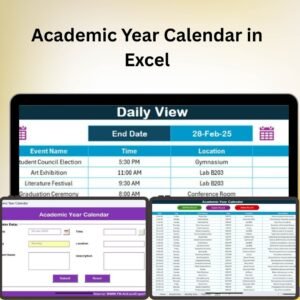
- Month-by-Month Breakdown: A detailed monthly view to help you track events and deadlines for each specific month.
- Event Tracking: Easily track and manage important events such as parent-teacher meetings, class assessments, and holidays.
- Automatic Updates: The calendar automatically adjusts the year, updating all dates accordingly.
- Print-Ready Format: The calendar is designed for easy printing, allowing you to have a physical copy of your academic year calendar for quick reference.
How to Use the Academic Year Calendar in Excel:
1️⃣ Download the Template – Instantly access your Excel file upon purchase.
2️⃣ Set Your Academic Year – Input the start and end dates of your academic year, and the calendar will automatically adjust.
3️⃣ Customize Your Terms and Dates – Add or modify school terms, holidays, and exam dates as per your academic institution’s schedule.
4️⃣ Track Events – Use the calendar to track important dates such as assessments, holidays, and special events.
5️⃣ Print and Plan – Print your calendar for quick reference or share it with others to keep everyone informed.
Who Can Benefit from the Academic Year Calendar in Excel:
- Students
- Teachers
- Educational Administrators
- School Planners
- University Staff
- Parents and Guardians
- Anyone involved in managing an academic calendar
The Academic Year Calendar in Excel is the perfect tool for organizing the academic year and ensuring that every important date is tracked and managed effectively. Whether you’re a student, educator, or administrator, this calendar will help you stay organized and prepared.
Click here to read the Detailed blog post
https://www.pk-anexcelexpert.com/academic-year-calendar-in-excel/
Visit our YouTube channel to learn step-by-step video tutorials
Youtube.com/@PKAnExcelExpert
Compatibility and Requirements
- Works in Microsoft Excel desktop (Excel 2016 or later, or Microsoft 365).
- Prints from Excel for a paper copy of the year.
- Prefer to work in a browser? The Academic Year Calendar in Google Sheets covers the same year plan.
Frequently Asked Questions
How do I set up the Academic Year Calendar for my school year?
Enter the start and end dates of your academic year. The calendar adjusts its dates to match.
Can I add my own terms, holidays and exam dates?
Yes. Add or change school terms, semester dates, exam periods, holidays and events such as parent-teacher meetings to match your school or university.
Does it have a monthly view?
Yes. Use the full-year overview to see the whole academic year, or the month-by-month view for detailed planning.
Can I print it?
Yes. The calendar is set up for printing, so you can keep a paper copy or share it with staff and parents.
Related School Calendar Templates
- Academic Year Calendar in Google Sheets: the same calendar in Google Sheets.
- Exam Timetable Calendar in Excel: plan exam dates and papers.
- Board Exam Revision Calendar in Excel: a revision plan before board exams.
- Exam Preparation Checklist Template in Excel: track exam preparation tasks.
- Education & School Management Bundle: 8 Excel and Google Sheets templates for schools.
Browse all Excel calendar templates or the education templates.









Reviews
There are no reviews yet.