



The Scholarship Deadline Calendar in Google Sheets keeps every application date, document due date and award milestone in 5 linked tabs: a Home menu, an Annual View, a Monthly View, a Daily View and an Events list. It ships with 100 sample entries (IDs 1 to 100) dated 1 January to 27 December 2026, covering 20 event types at 27 locations, with 8 or 9 entries in every month and every sample weekday correct. The views read straight from the Events tab, so there is no Apps Script and no add-on to install.
🎓 Built by the team behind NextGenTemplates and the @PKAnExcelExpert YouTube channel, and checked against the live sheet before release.
✅ Instant download · One-time payment · No subscription · Works with a free Google account · Make a copy and start planning
🔑 Key Features of the Scholarship Deadline Calendar in Google Sheets
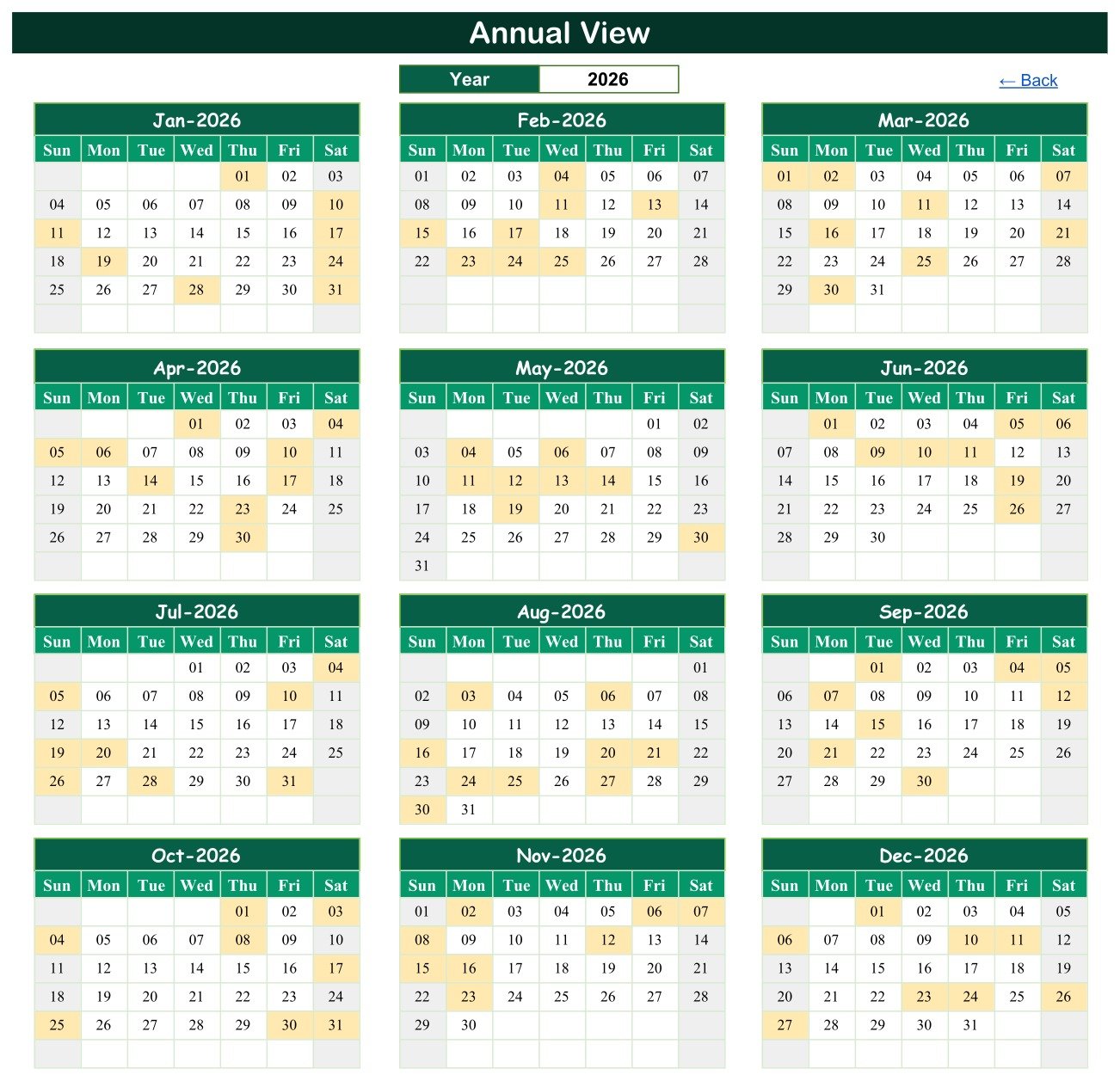
📅 Annual View with a year selector – pick a year and twelve month grids redraw for it. Any day holding at least one deadline or appointment is shaded, so crowded application seasons and quiet stretches show at a glance.
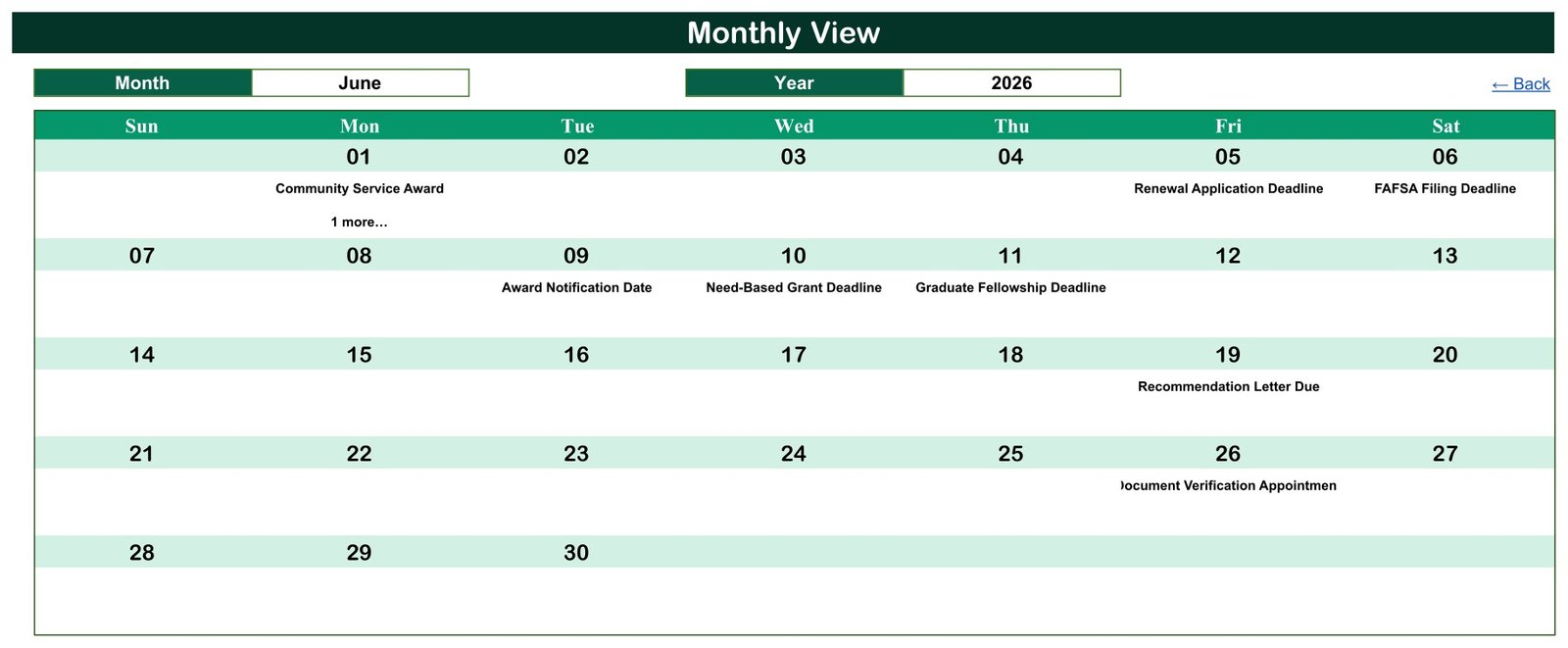
🗓️ Monthly View with Month and Year dropdowns – a Sunday-to-Saturday grid prints the entry name under each date. When two entries share a day, the grid shows the first one and a “1 more…” note, as on 1 June 2026.
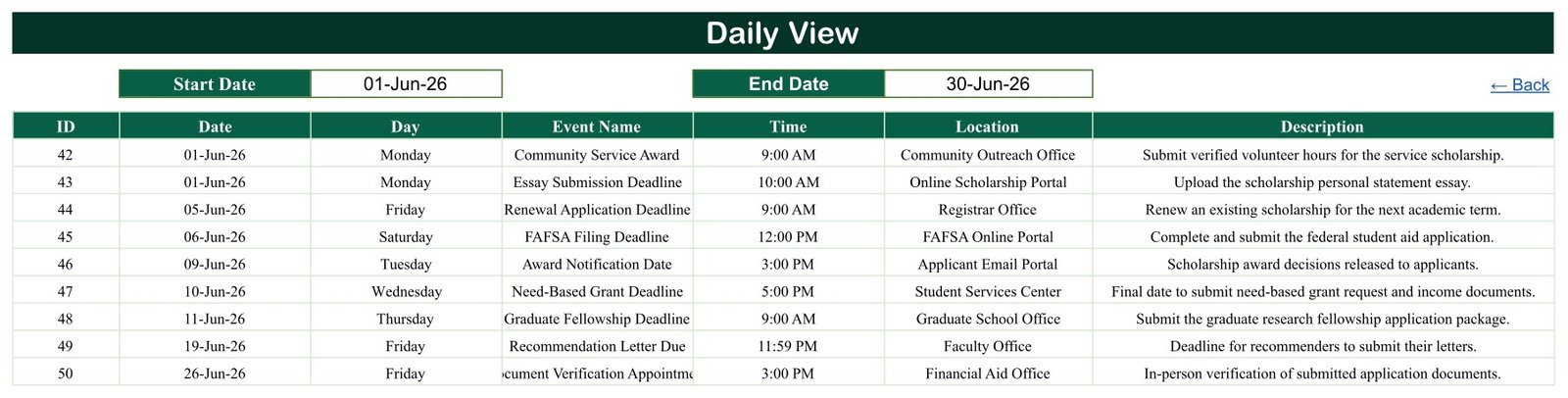
📋 Daily View by date range – type a Start Date and an End Date and the table lists every entry in that window with its ID, Date, Day, Event Name, Time, Location and Description. The June 2026 sample returns entries 42 to 50.
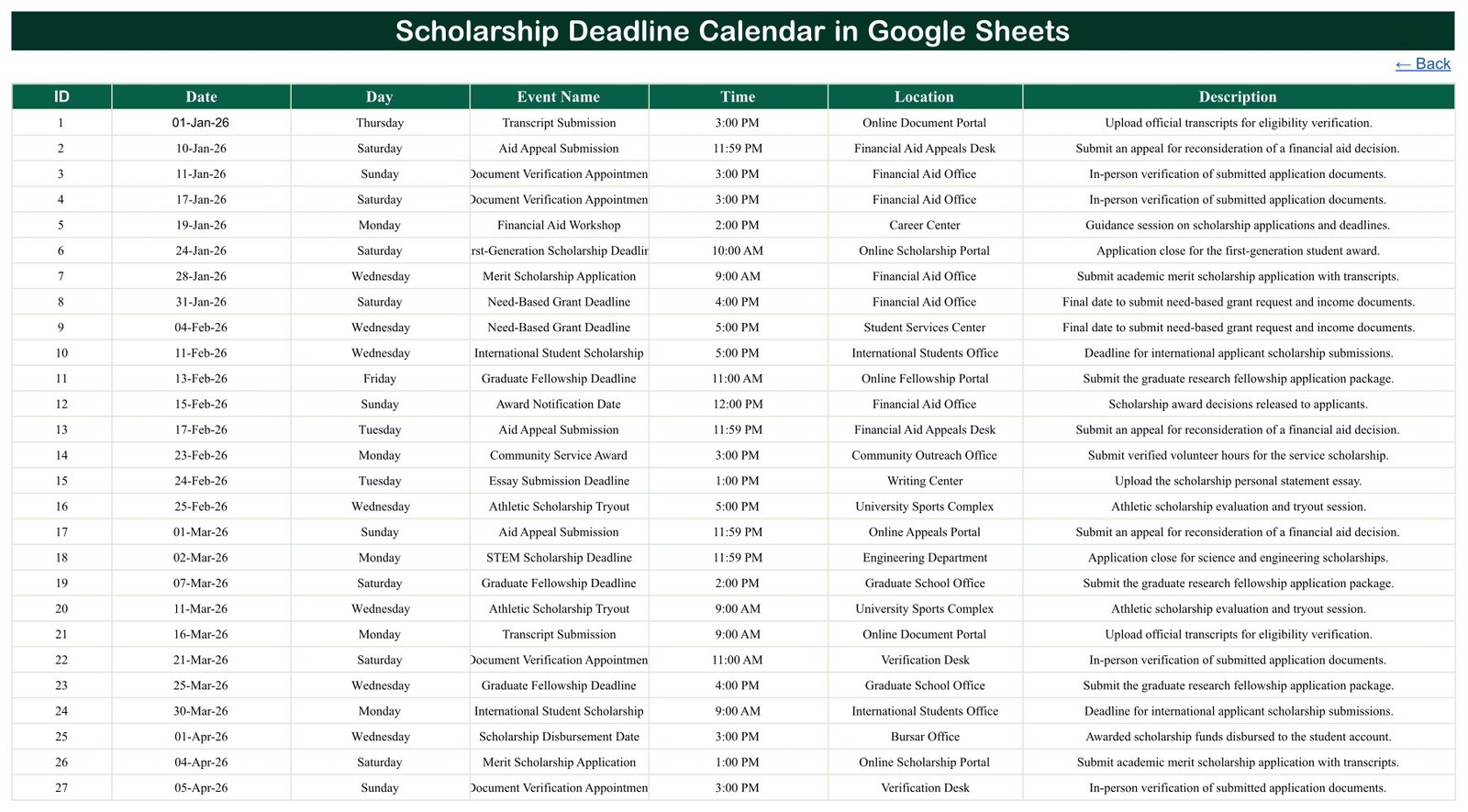
🗂️ One Events tab feeds everything – seven columns (ID, Date, Day, Event Name, Time, Location, Description), so every view updates the moment you add or edit a row.
🎓 Sample data written for scholarship season – Merit Scholarship Application, Need-Based Grant Deadline, Graduate Fellowship Deadline, Essay Submission Deadline, Recommendation Letter Due, Transcript Submission, Finalist Interview Round, Award Notification Date and Scholarship Disbursement Date, among 20 types. All entries are fictional examples, not real programme dates.
🔗 Click-through navigation – four Home buttons open each view and every tab carries a “Back” link, so students and parents who rarely use spreadsheets can still find their way around.
📦 What’s Inside the Scholarship Deadline Calendar
Home
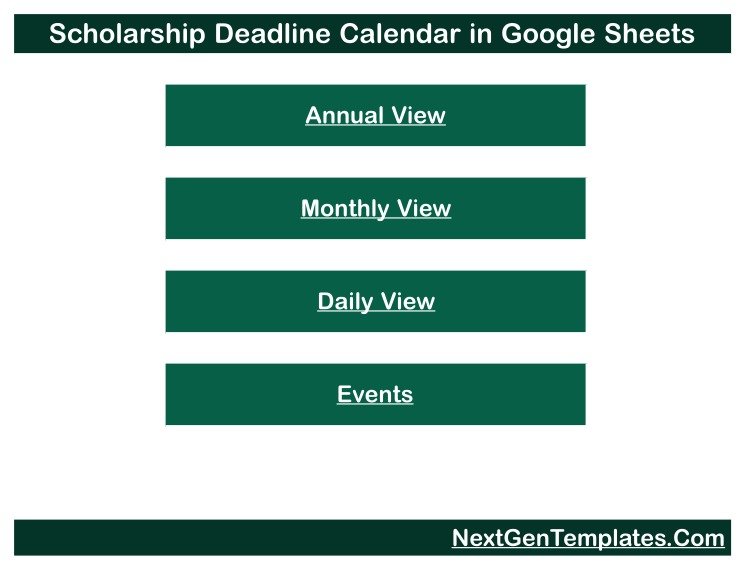
The start page holds four buttons – Annual View, Monthly View, Daily View and Events – under the calendar title, so anyone opening the file lands on a simple menu.
Annual View
Twelve month grids for the year chosen in the Year box. Shaded days carry a deadline, interview or payout, so a student or counsellor can see the rhythm of the whole year before committing to more applications.
Monthly View
Choose a Month and a Year to get a full-width grid with each entry under its date. The June 2026 example shows Community Service Award, Renewal Application Deadline, FAFSA Filing Deadline, Award Notification Date, Need-Based Grant Deadline, Graduate Fellowship Deadline, Recommendation Letter Due and Document Verification Appointment.
Daily View
Set a Start Date and End Date to list every entry in between, with time, location and description – handy for a weekly checklist or a briefing for a family or a class of applicants.
Events
The master list of 100 sample entries. Locations mix offices (Financial Aid Office, Registrar Office, Bursar Office, Graduate School Office) with online portals and a Zoom interview, and start times run from 9:00 AM to 11:59 PM, the classic online cut-off. Replace these rows with your own list.
📊 Google Sheets Calendar vs. Microsoft Excel Calendar vs. Paid Scholarship Apps – Where This Fits
| Feature | Scholarship Deadline Calendar (Google Sheets) | Microsoft Excel calendar | Paid scholarship-search or application apps |
|---|---|---|---|
| Cost | ✅ $4.99 one-time (regular $8.99) | Template price plus an Excel licence | Free tiers with upsells, or a subscription |
| Platform | ✅ Any browser with a Google account | Excel desktop | Vendor app and website |
| Setup time | ✅ Make a copy, replace the sample rows | Open the file, replace the sample rows | Create a profile, answer eligibility questions |
| Share with a parent or counsellor | ✅ Built-in Google Sheets sharing | Needs OneDrive or SharePoint | Usually single-user |
| Mobile access | ✅ Google Sheets app (views are easiest on a laptop) | Excel mobile app | ✅ Dedicated app |
| Any scholarship, grant or fellowship | ✅ Type any name in the Events tab | ✅ Yes | Limited to the vendor’s database |
| Annual, monthly and date-range views | ✅ All three included | Depends on the template | Usually a list or dashboard |
| Scholarship search and reminders | ❌ Not included | ❌ Not usually included | ✅ Typically included |
| Where your data lives | ✅ Your own Google Drive | Your own files | Vendor servers |
For students and counsellors who already know which awards they are chasing and just need every date in one shared place, this Google Sheets calendar sits in the sweet spot.
👥 Who This Template Is For – and Who It’s Not For
✅ This template is built for:
- High-school seniors, undergraduates and graduate students applying to several scholarships, grants or fellowships in one year
- School counsellors and college advisers keeping one shared deadline list for a group of applicants
- Parents helping a student keep essays, transcripts and recommendation letters on time
❌ This template is NOT for:
- Anyone looking for a scholarship search engine – it holds only the dates you type in and finds no awards
- Scholarship providers who need an application-management system with applicant records, scoring or payments
- Anyone who must work offline in desktop Excel – an Excel edition is in preparation
⚙️ How to Use the Scholarship Deadline Calendar
- Download the PDF after purchase and click its Google Sheets link.
- Sign in with a Google account and choose File > Make a copy to save your own editable version (Google Docs Editors Help: create, view or download a file).
- Open the Events tab and overwrite the 100 sample rows with your own dates – ID, Date, Day, Event Name, Time, Location and Description.
- Type the Day to match each Date; the Day column is typed text, not a formula.
- Pick a year in Annual View and a month in Monthly View to check the plan.
- Set a Start Date and End Date in Daily View to list the next week or month of deadlines.
💼 Real-World Use Cases
A high-school senior applying to seven awards enters every essay deadline, recommendation-letter date and finalist interview, then checks the Annual View to spot the month where three deadlines cluster and starts those essays early.
A college counsellor keeps one copy for a small cohort, logs transcript submissions and financial aid workshops, and runs the Daily View each Monday to remind students what is due that week.
A graduate student tracks fellowship deadlines, a document verification appointment and the expected award notification and disbursement dates, sharing view-only access with a supervisor.
❓ Frequently Asked Questions
What is included in the Scholarship Deadline Calendar in Google Sheets?
You get a PDF with the Google Sheets copy link. The sheet has a Home menu, Annual View, Monthly View, Daily View and an Events tab holding 100 fictional entries across 20 event types and 27 locations, ready for you to replace.
Are the sample deadlines real?
No. The sample dates, times and places are illustrations only, including the entries named after federal aid filing. Always take real deadlines from the scholarship provider or your financial aid office and enter them yourself. The template does not guarantee eligibility or funding.
Do I need Microsoft Excel?
No. The template runs in Google Sheets in any modern browser. You need a Google account to open the link and use File > Make a copy. Nothing is installed and no macros or scripts run.
What happens when two deadlines fall on the same day?
The Events tab and Daily View list both entries in full. The Monthly View shows the first entry for that date plus a “1 more…” note, so check the Daily View for busy days. The 2026 sample has two such dates.
Does it send deadline reminders?
No. It is a planning calendar with no email or notification feature. Many students pair it with their phone calendar for alerts and use the sheet as the master list.
👤 About the Author
Built by PK – Microsoft Certified Professional with 15+ years of Excel, Google Sheets and Power BI experience, and founder of NextGenTemplates. Tutorials run across the @PKAnExcelExpert, @NextGenTemplates and @NeoTechNavigators YouTube channels. Every template is hand-built and tested before release.
🔗 Explore Related Templates
📝 Preparing the paperwork? The Scholarship Application Checklist in Google Sheets ticks off each document, and the Scholarship Application Data Entry System in Excel logs applications in a form.
🏫 For the rest of the academic year, pair it with the Exam Timetable Calendar in Google Sheets and the School Fee Due Calendar.
💰 Saving for tuition? The College Savings Goal Tracker in Google Sheets follows the money side, and programme managers can review results in the Scholarship Program KPI Dashboard in Google Sheets – a different template built for providers.
🗂️ Browse every Google Sheets calendar template in the store.
📖 Click here to read the Detailed Blog Post
🎥 Visit our YouTube channel for step-by-step video tutorials
👉 YouTube.com/@NextGenTemplates
Watch the step-by-step video Demo:
📅 Last updated: September 2026































Reviews
There are no reviews yet.