

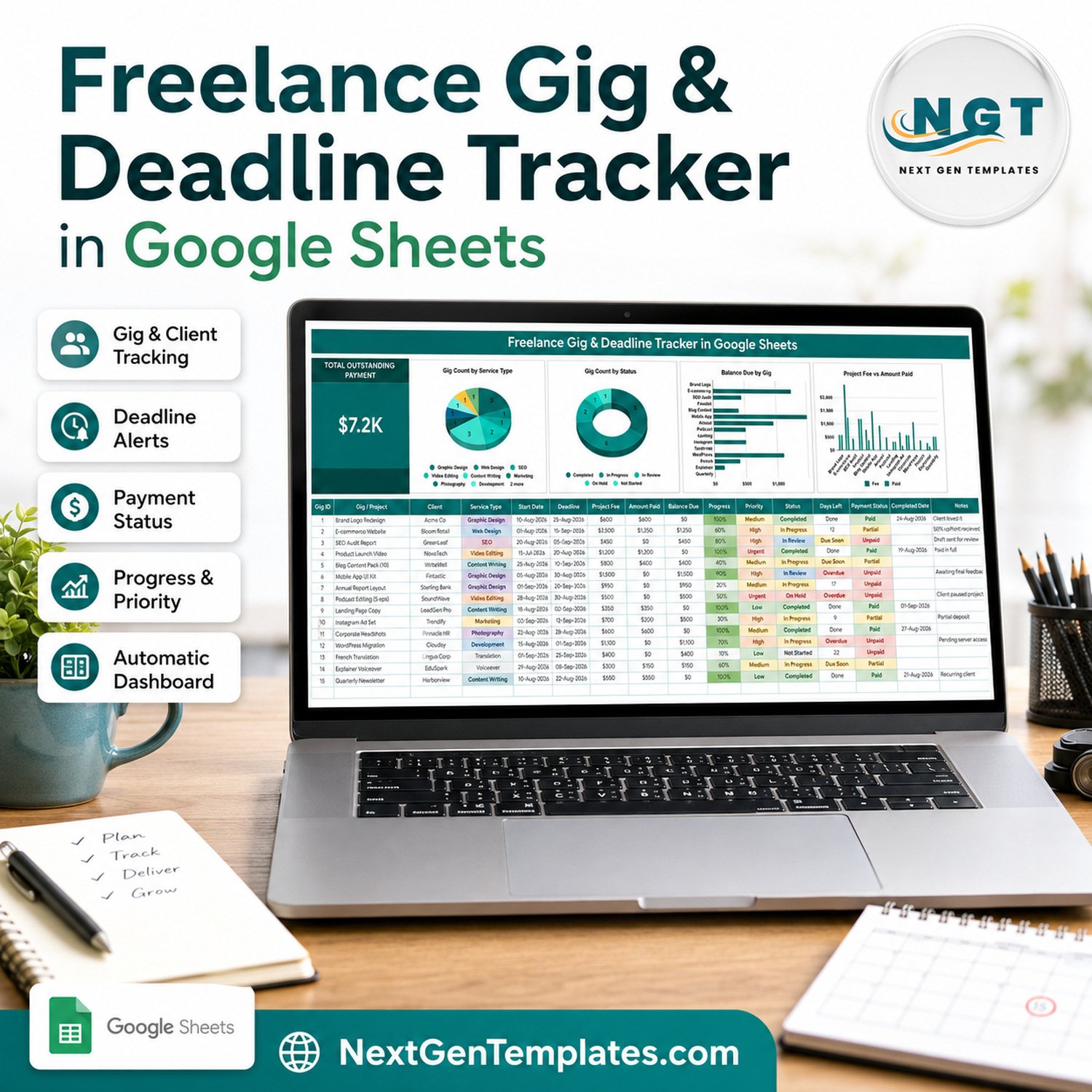

The Freelance Gig Deadline Tracker in Google Sheets logs 16 columns for every gig, calculates 4 of them for you, and drives 4 live charts plus one headline card from a single table. The sample file carries 15 worked gigs worth $12,500 in project fees, $5,300 collected and $7.2K still outstanding – the exact figure the big card shows. Setup takes under 10 minutes: delete the sample rows, type your own gigs, and every chart and total redraws.
🌍 Join 8,400+ teams in 40+ countries using NextGenTemplates to replace paid SaaS tools with one-time-purchase Excel, Google Sheets, Power BI and HTML templates.
✅ Instant download · One-time payment · No subscription · No per-user fees · Lifetime access
🔑 Key Features of the Freelance Gig Deadline Tracker in Google Sheets
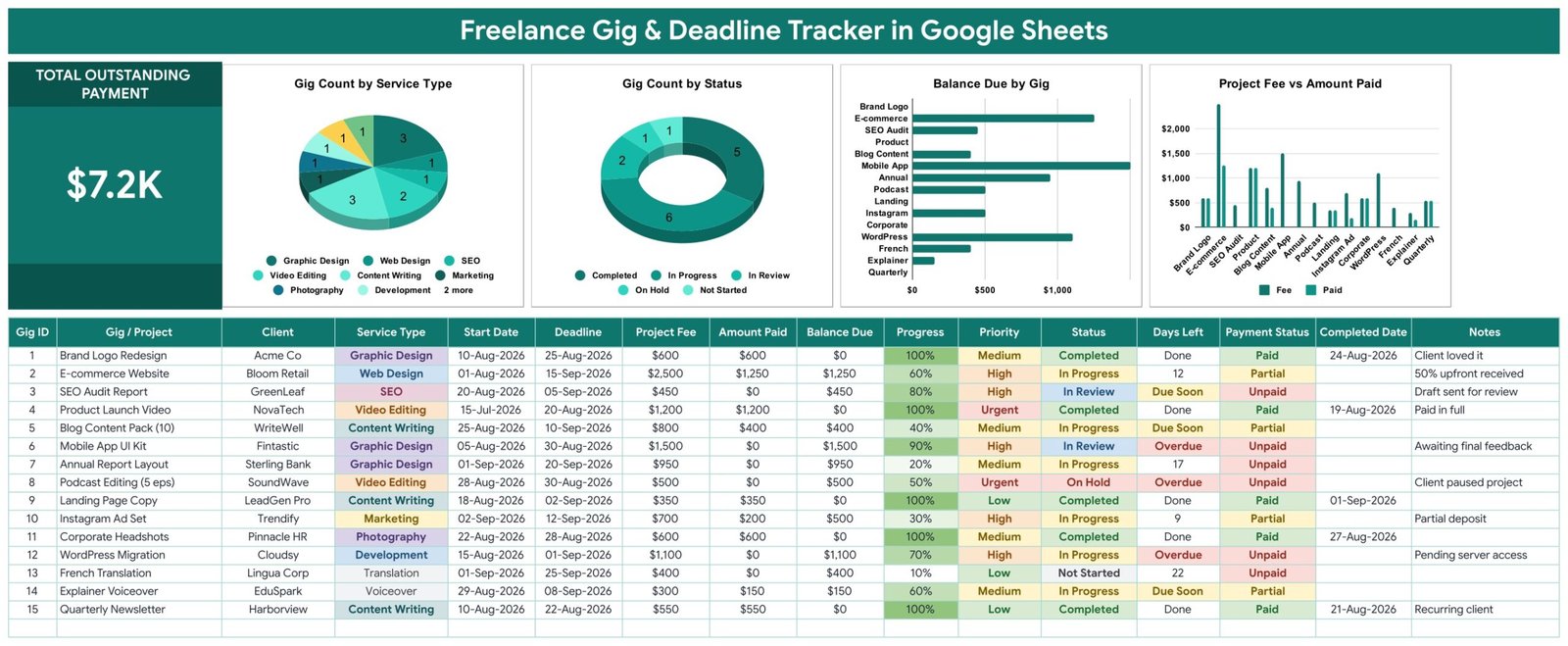
- 📋 16 columns per gig – Gig ID, Gig / Project, Client, Service Type, Start Date, Deadline, Project Fee, Amount Paid, Balance Due, Progress, Priority, Status, Days Left, Payment Status, Completed Date and Notes. One row per job, nothing hidden anywhere else.
- 🧮 4 self-filling columns – Gig ID, Balance Due (Project Fee minus Amount Paid), Days Left and Payment Status are ordinary formulas. You never type them, and they stay blank until you enter a gig.
- ⏰ A Days Left column that changes wording, not just numbers – it counts down to the Deadline, switches to Due Soon inside the final week, switches to Overdue once the date has passed, and reads Done as soon as Status is Completed. In the sample file that is 3 Overdue, 3 Due Soon, 4 still counting and 5 Done.
- 💰 Payment Status derived from the money, not from memory – Paid, Partial or Unpaid is worked out from Project Fee against Amount Paid, so a half-paid deposit shows as Partial the moment you log it.
- 📈 One headline card – TOTAL OUTSTANDING PAYMENT adds every Balance Due into a single number, so the answer to “how much am I owed right now?” is always on screen.
- 📊 4 live charts – Gig Count by Service Type, Gig Count by Status, Balance Due by Gig, and Project Fee vs Amount Paid. The last one plots two series side by side so an underpaid gig is visible without reading a single number.
- 🎯 3 dropdowns from one editable List tab – Service Type, Priority and Status all read rows 2 to 500 of the List tab. Add “Motion Graphics” there and it appears in the dropdown straight away, with no data-validation editing.
- 🗑️ No helper tables – all 4 charts read the data columns directly from rows 16 to 1000 using the built-in Aggregate option, so a new gig appears in every chart immediately and there is no hidden calculation block to break.
- 📝 15 worked sample gigs – 10 service types, 5 statuses, 4 priority levels and 15 real client names spanning 15-Jul-2026 to 20-Sep-2026. Delete them in one sweep when you start.
- 🎨 Colours and currency both editable – the palette lives in a single
const C = {...}block at the top of the script, and the money columns are plain $ number formats you can switch to ₹, € or £ through Format → Number.
📦 What’s Inside the Freelance Gig & Deadline Tracker
Page 1: The Tracker Sheet
The working page. A TOTAL OUTSTANDING PAYMENT card sits on the left at $7.2K, followed by Gig Count by Service Type, Gig Count by Status, Balance Due by Gig and Project Fee vs Amount Paid. Below them the 16-column table holds every gig, with coloured chips on Service Type, Priority, Status and Payment Status and a green fill that grows with Progress.
Page 2: How to Use
A plain-English setup page written into the file itself. It explains which rows to overwrite, which four columns calculate themselves, how the Days Left wording is decided, how the List tab feeds the dropdowns, and the one-time 10-second step that turns the dropdowns into coloured chips.

Page 3: Explore More Templates
An in-file index of related NextGenTemplates products with a WELCOME15 coupon code, category links and prices, so the next template you need is one click away rather than a search.

A fourth tab, List, holds the dropdown values. Four tabs in total – tracker, List, How to Use and Explore More Templates. There is nothing else to learn.
📊 This Tracker vs. an Excel Gig Sheet vs. Freelance SaaS — Where This Fits
| Feature | Freelance Gig & Deadline Tracker (Google Sheets) | Excel gig tracker on your laptop | Bonsai / HoneyBook / Dubsado |
|---|---|---|---|
| Cost | $6.99 one-time ✅ | $0–$40 one-time, plus your build time | $21–$79 per user / month |
| Platform | Google Sheets, any browser ✅ | Desktop Excel | Vendor web app |
| Setup time | Under 10 minutes ✅ | Hours if you build the charts yourself | 1–2 days of onboarding |
| Real-time collaboration | Built in – share the sheet ✅ | Only via OneDrive co-authoring | Yes, per seat |
| Mobile access | Google Sheets mobile app ✅ | Excel mobile, limited charts | Yes |
| Customisable fields | Edit any column or the List tab ✅ | Yes, if you know the formulas | Fixed schema, paid tiers unlock more |
| Share with a link | Yes, view or edit ✅ | No, you email a file | Client portal on higher plans |
| Deadline wording (Due Soon / Overdue / Done) | Automatic in the Days Left column ✅ | You write the formula | Notification-based |
| Year-1 cost at 2 freelancers | $6.99 total ✅ | Excel licence + your time | $504–$1,896 |
For solo freelancers and two-person studios who want deadlines and unpaid balances in one screen without paying a monthly seat fee, this tracker sits in the sweet spot.
👥 Who This Template Is For — and Who It’s Not For
✅ This template is built for:
- Solo freelancers juggling 5–40 live gigs across design, writing, video, development or translation
- Two- and three-person studios who want one shared sheet rather than three private spreadsheets
- Anyone whose real problem is chasing balances – the outstanding card and Payment Status column exist for exactly that
- Google Workspace users who want the file in Drive, on the phone, and shareable by link
❌ This template is NOT for:
- Agencies needing time-tracking, timesheets or per-hour billing – there is no timer and no hourly rate column
- Anyone who needs to issue invoices; this logs what an invoice is worth and whether it was paid, it does not produce a PDF invoice
- Teams needing automatic email or SMS deadline reminders – Days Left is a wording change on screen, not a notification
- Studios over roughly 40 concurrent gigs, where a database-backed project tool will serve you better
⚙️ How to Use It
- Open the PDF in your download and click the “Make a copy” link to put your own editable copy in Google Drive.
- Open the List tab and replace the sample Service Types, Priorities and Statuses with the ones you actually sell.
- Delete the 15 sample rows (16 to 30) and type your first gig: project, client, service type, start date, deadline, fee, amount paid, progress, priority and status.
- Leave Gig ID, Balance Due, Days Left and Payment Status alone – they fill in by themselves.
- Optional, once: select column D, then K, then L and set Data → Data validation → Advanced → Display style to Chip to get the coloured pills shown in the screenshots.
- Update Amount Paid whenever a client pays; the outstanding card, Balance Due and Payment Status all move together.
- Set Status to Completed and fill the Completed Date when you deliver – Days Left flips to Done.
💼 Real-World Use Cases
Maya is a freelance designer with nine live gigs. Two are logos, three are social packs, and the rest are website work. She sorts by Days Left every Monday morning, sees the two rows reading Overdue, and messages those two clients before touching anything else – without paying $39 a month for Dubsado.
Ravi writes long-form content for six agencies. His problem was never the writing, it was the 50% deposits. He filters Payment Status to Partial and Unpaid, reads the outstanding card, and sends three chase emails on the first of the month with the exact balances in front of him.
Lena and Tom run a two-person video studio. They share one copy of the sheet, tag each edit with Priority, and use Project Fee vs Amount Paid to spot the two jobs where the second instalment never arrived. Their previous system was a shared note and a lot of guessing.
❓ Frequently Asked Questions
What exactly does this tracker calculate for me?
Four columns: Gig ID, Balance Due (Project Fee minus Amount Paid), Days Left and Payment Status. It also totals every Balance Due into the TOTAL OUTSTANDING PAYMENT card and feeds four charts. Everything else – project, client, dates, fee, progress – you type once.
How does the Days Left column decide between Due Soon, Overdue and Done?
It compares today’s date with your Deadline. More than seven days away it shows a number, inside seven days it reads Due Soon, past the date it reads Overdue, and the moment Status is set to Completed it reads Done regardless of the date.
Can I add my own service types and statuses?
Yes. Service Type, Priority and Status read rows 2 to 500 of the List tab. Type a new value there and it is available in the dropdown immediately – you never open the data-validation dialog to add options.
Does it send deadline reminders by email?
No. The Freelance Gig Deadline Tracker in Google Sheets flags deadlines visually through the Days Left column and chart colours; it does not send email or push notifications. If automated reminders are essential, pair it with a Google Calendar entry per deadline.
How does this compare to Bonsai or HoneyBook?
Those tools issue invoices, take payments and run contracts for $21–$79 per user each month. This tracker does none of that. It answers “what is due, what is late and who still owes me” for $6.99 once, in a sheet you own and can restructure.
How long does setup take?
Under 10 minutes. Copy the sheet, swap the List tab values for your own services, delete the 15 sample rows and start typing. The optional chip-display step adds about 10 seconds per column.
Can I change the currency from dollars?
Yes. Project Fee, Amount Paid and Balance Due are plain number formats. Select the columns and use Format → Number to switch to rupees, euros, pounds or any other currency; no formula changes are needed.
👤 About the Author
Built by PK — Microsoft Certified Professional with 15+ years of Excel, Google Sheets and Power BI experience. Founder of NextGenTemplates, reaching 300K+ subscribers across YouTube channels (@PK-AnExcelExpert, @NextGenTemplates, @NeoTechNavigators). Every template is hand-built and tested before release.
🔗 Explore Related Templates
- Freelance Income & Expense Tracker in Google Sheets – the money half of the same job: what came in, what went out, what is left. It pairs directly with this tracker.
- Graphic Design Studio Dashboard in Google Sheets – a wider studio view once you are past a handful of gigs a month.
- Photography Dashboard in Google Sheets – shoot-based reporting for photographers running the same deadline problem.
- Graphic Design Agency Management System Web App – the step up when a spreadsheet stops being enough and you need roles and logins.
Browse the full Google Sheets Trackers collection, or the wider Google Sheets Templates library.
📖 Click here to read the Detailed Blog Post
🎥 Visit our YouTube channel for step-by-step video tutorials
👉 YouTube.com/@NextGenTemplates
Watch the step-by-step video Demo:
📅 Last updated: September 2026
Compatibility and Requirements
- Works in Google Sheets. You need a free Google account and a web browser.
- Service Type, Priority and Status are dropdowns fed by the List tab. Google explains dropdowns in Create an in-cell dropdown list.
More Questions About This Template
Which columns do I fill in and which fill themselves?
You type the project, client, service type, start date, deadline, fee, amount paid, progress, priority, status, completed date and notes. Gig ID, Balance Due, Days Left and Payment Status fill in by themselves.
Do I need to know formulas to use it?
No. The four calculated columns are already built. You delete the 15 sample rows and type your own gigs, and the card and charts update.
Is there a version for a single marketplace?
Yes. See the Freelance Marketplace Gig Tracker in Google Sheets.
Is there a calendar view for deadlines?
Yes. The Project Deadline Calendar in Google Sheets shows project deadlines on a calendar.
Is there an Excel or Power BI version for freelancers?
This tracker is for Google Sheets only. For Excel, see the Freelancer Project Calendar in Excel. For Power BI, see the Freelancer Business Dashboard in Power BI.
More Freelance Templates
- Freelance Marketplace Gig Tracker in Google Sheets: a gig tracker for marketplace work
- Project Deadline Calendar in Google Sheets: deadlines laid out on a calendar
- Freelance Business KPI Dashboard in Google Sheets: KPIs for your freelance business
- Freelancer Business Dashboard in Google Sheets: a business overview for freelancers
- Small Business Owner Essentials: 12 templates for owners in one download
Browse all Google Sheets project management templates.
































Reviews
There are no reviews yet.