

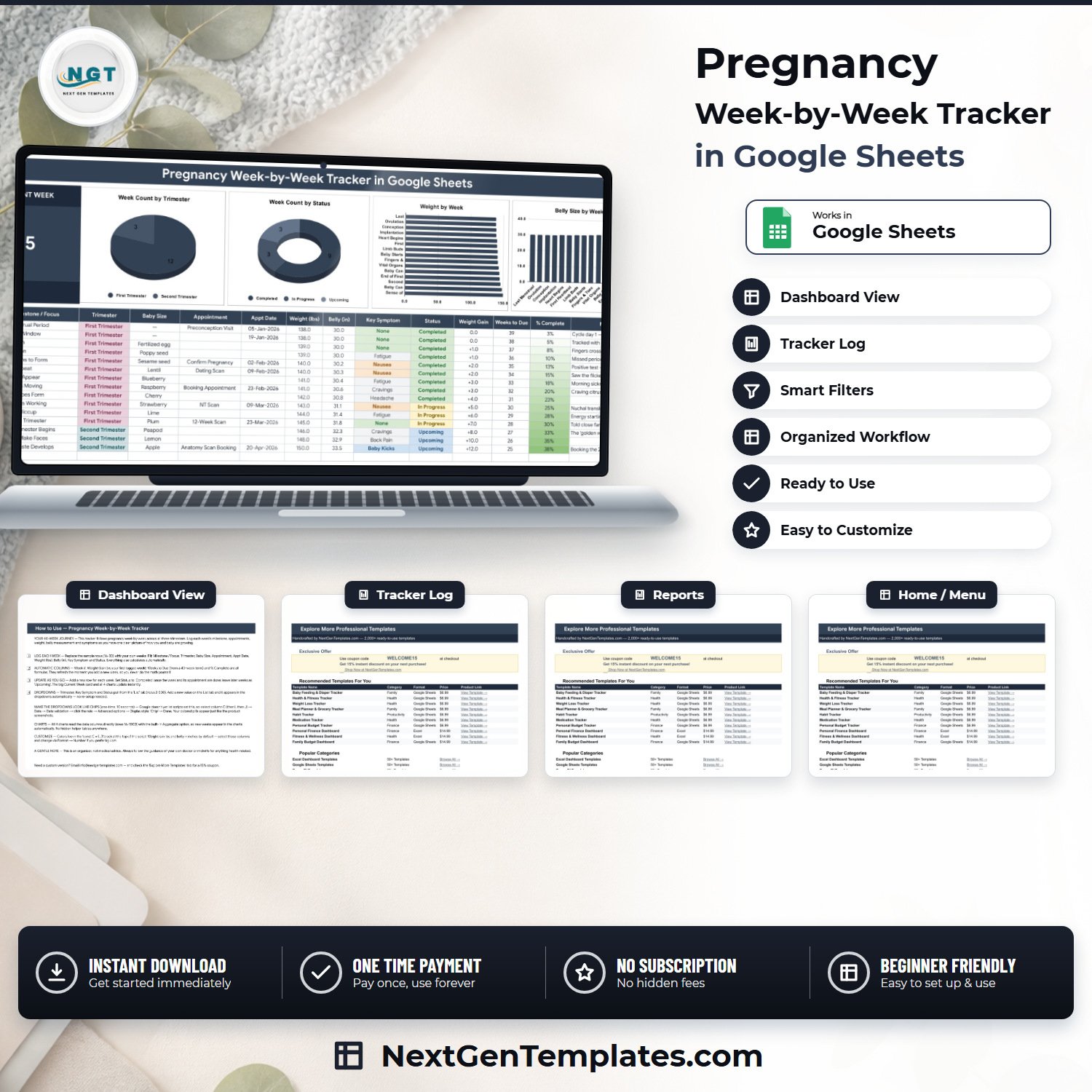

The Pregnancy Week-by-Week Tracker in Google Sheets is a one-page personal organiser for the 40 weeks of a pregnancy: a single week-by-week log with 14 columns, four of them formula-driven, one big Current Week card and four charts that read the log directly. You type the milestone, trimester, baby size, appointment, appointment date, weight, belly measurement, key symptom and status; the sheet fills in the Week #, the Weight Gain against your first logged week, the Weeks to Due left in a 40-week term and the % Complete. It ships with 15 sample weeks, 19 seeded dropdown values across three columns, and room for 985 rows without any re-setup. It is a personal organiser, not a medical record, not a clinical tool and not medical advice. One payment, no subscription, and it opens in any browser.Pregnancy Week-by-Week Tracker in Google Sheets
Key Features of the Pregnancy Week-by-Week Tracker in Google Sheets
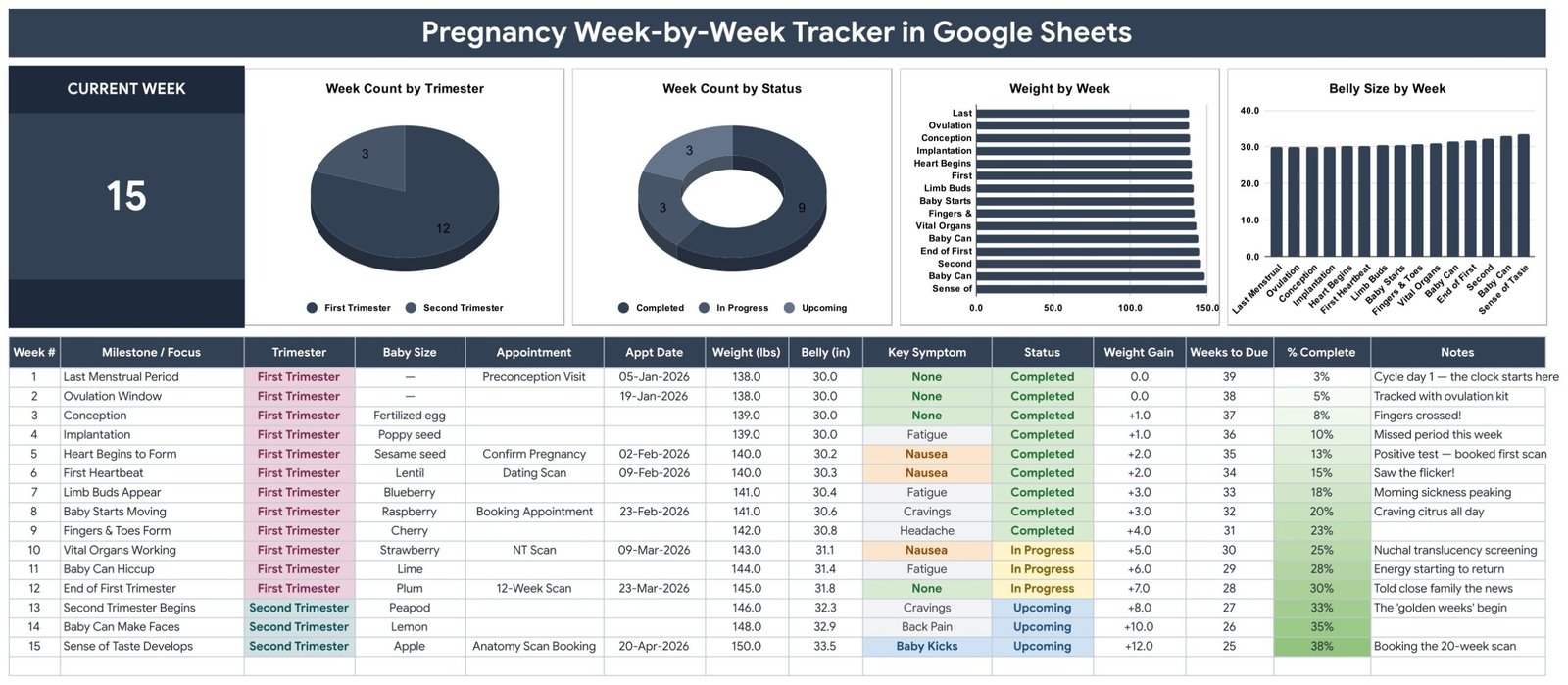
- One page, no tab-hopping – the Current Week card, all four charts and the full 14-column log sit on a single sheet called Pregnancy Tracker.Pregnancy Week-by-Week Tracker in Google Sheets
- Current Week card – one large number driven by
=IFERROR(MAX(A16:A1000),0), so it is simply the highest week number you have logged. Add week 16 and the card reads 16. - Four automatic columns – Week #, Weight Gain, Weeks to Due and % Complete are formulas. You never type them.
- Weight Gain you can read – each row’s gain is measured against your first logged week, so the sample runs 138.0 lbs at week 1 to 150.0 lbs at week 15 and the column reads +12.0.Pregnancy Week-by-Week Tracker in Google Sheets
- Weeks to Due and % Complete – both come off a plain 40-week term: week 1 shows 39 weeks to go and 3% complete, week 15 shows 25 and 38%. No due-date engine, no guesswork.Pregnancy Week-by-Week Tracker in Google Sheets
- An appointment column that stays with the week – Appointment and Appt Date sit in the same row as the milestone, so a dating scan or a 12-week scan is never in a separate calendar.Pregnancy Week-by-Week Tracker in Google Sheets
- Baby Size column – the familiar size-of-a-fruit note (poppy seed, lentil, plum, peapod, lemon, apple) typed alongside the week it belongs to.Pregnancy Week-by-Week Tracker in Google Sheets
- Four charts, no helper tables – Week Count by Trimester, Week Count by Status, Weight by Week and Belly Size by Week all read the data columns directly for rows 16 to 1000 using the built-in Aggregate option.
- Auto-expanding dropdowns – Trimester, Key Symptom and Status read rows 2 to 500 of the List tab. Add a value there and it appears in the dropdown immediately.Pregnancy Week-by-Week Tracker in Google Sheets
- Twelve seeded symptoms – None, Nausea, Fatigue, Back Pain, Heartburn, Cravings, Swelling, Braxton Hicks, Baby Kicks, Mood Swings, Headache and Insomnia, all editable.Pregnancy Week-by-Week Tracker in Google Sheets
- Stores nothing that identifies you – there is no name, date of birth, clinician, diagnosis, medication, dose, hospital number, insurance or claim field anywhere in the file.Pregnancy Week-by-Week Tracker in Google Sheets
What’s Inside the Pregnancy Week-by-Week Tracker in Google Sheets
The file has four tabs. Pregnancy Tracker carries the title banner, the Current Week card, four charts and the log table starting at row 16. List holds the three dropdown source columns with 19 seeded values: 3 trimesters (First, Second, Third), 4 statuses (Upcoming, In Progress, Completed, Missed) and 12 key symptoms. Instructions is a plain-English how-to page. Explore More Templates carries a 15 percent coupon and links to other NextGenTemplates products.
The log’s 14 columns are Week #, Milestone / Focus, Trimester, Baby Size, Appointment, Appt Date, Weight (lbs), Belly (in), Key Symptom, Status, Weight Gain, Weeks to Due, % Complete and Notes. The four charts are Week Count by Trimester, Week Count by Status, Weight by Week and Belly Size by Week. The 15 demonstration rows run from Last Menstrual Period to Sense of Taste Develops, with appointment dates in January to April 2026, and they are entirely fictional. In that sample the Current Week card reads 15, the trimester chart splits 12 first-trimester weeks against 3 second-trimester weeks, and the status chart splits 9 Completed, 3 In Progress and 3 Upcoming – the numbers reconcile, so you can check the logic before you trust it with your own weeks.
Google Sheets vs. a DIY Spreadsheet vs. a Pregnancy App – Where This Fits
| This template (Google Sheets) | A DIY spreadsheet you build | A pregnancy phone app | |
|---|---|---|---|
| Cost | One payment of $6.99 on sale | Your own build time | Free with ads, or a subscription |
| Platform | Google Sheets, any browser | Excel or Sheets, whichever you build in | The vendor’s phone app and cloud |
| Setup time | Minutes – make a copy and start logging | Hours of formula and chart work | Minutes, after creating an account |
| Where your entries live | Your own Google Drive | Your own device or Drive | The vendor’s servers |
| Mobile access | Google Sheets mobile app | Depends what you built | Native app |
| Appointments in the same row as the week | Yes – Appointment and Appt Date columns | Only if you build it | Usually a separate calendar screen |
| Weight and belly charted together | Yes – Weight by Week and Belly Size by Week | Only if you build it | Varies, and often behind a paywall |
| Customisable fields | Yes – add columns and dropdown values freely | Yes | Usually fixed |
| Formulas you can read and change | Yes, all four are plain cell formulas | Yes | No |
| Ads, upsells or data sharing | None – it is a spreadsheet | None | Common |
| Year-1 cost for one pregnancy | $6.99, once | $0 plus your time | Recurring, or paid in attention |
Who This Template Is For – and Who It’s Not For
It is for anyone who wants one tidy, private place to keep the week-by-week story of a pregnancy: what week it is, what the milestone was, which scan is booked and when, what the scale and the tape measure said, and how you felt. It suits people who would rather keep their own file in their own Drive than open an account on somebody else’s platform, and people who like arriving at a midwife or antenatal appointment with a clean printed page instead of a phone screenshot. It also suits partners, doulas and family members who are keeping notes alongside.
It is not for anyone who needs a medical record. It has no clinician, diagnosis, medication, dose, blood pressure, blood test or hospital-number fields, it is not a maternity notes system, and nothing in it is validated against any clinical standard. It does not calculate or confirm a due date, it does not estimate gestational age from a scan, and it will not tell you whether anything you log is normal – the Weeks to Due column is simply 40 minus the week number you typed. It is not a symptom checker and it raises no alerts. It also does not connect to a scale, a wearable, a blood-pressure cuff or any app.
How to Use the Pregnancy Week-by-Week Tracker in Google Sheets
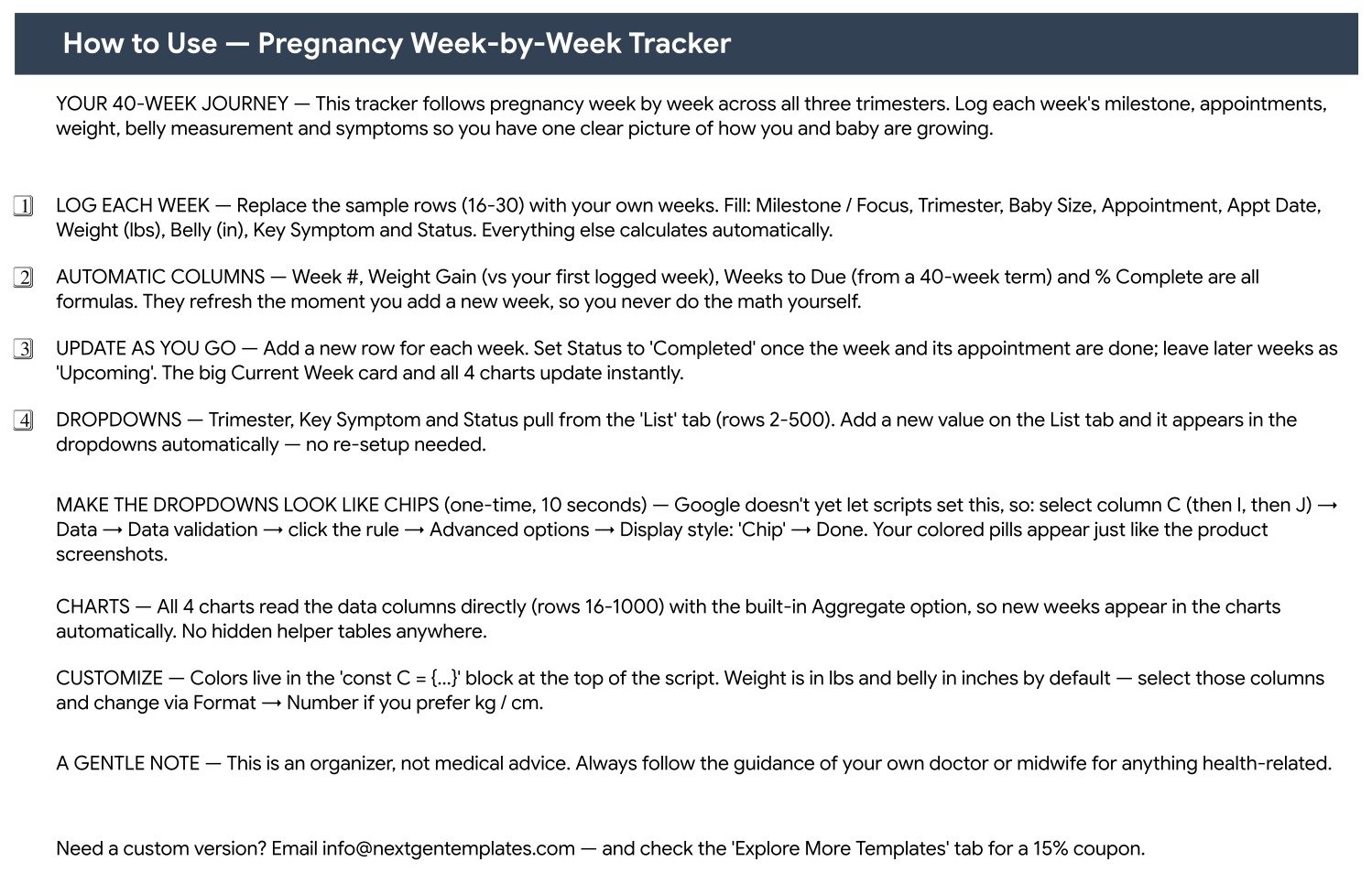
- Make your copy. Open the PDF in your download and click the “Make a copy” link. The copy lands in your own Google Drive and is yours to edit forever.
- Clear the demo weeks. Rows 16 to 30 hold the 15 sample weeks. Delete their contents and start your own.
- Log the week. Fill Milestone / Focus, Baby Size, Appointment, Appt Date, Weight (lbs), Belly (in) and Notes, and pick Trimester, Key Symptom and Status from the dropdowns. Week #, Weight Gain, Weeks to Due and % Complete fill themselves.
- Keep the status honest. Set Status to Completed once the week and its appointment are done, In Progress for the week you are in, and leave later weeks as Upcoming. The Current Week card and all four charts update as you go.
- Extend the dropdowns. Add a symptom, a status or a trimester label to the matching column on the List tab and it appears in the dropdown at once – no re-setup.
- Switch to kg and cm if you prefer. Weight is in pounds and belly in inches by default. Select those two columns and change the units through Format, Number – the formulas do not care which unit you use.
- Optional, ten seconds: to get the coloured pill styling shown in the screenshots, select column C (then I, then J), go to Data, Data validation, open the rule, Advanced options, and set Display style to Chip. Google does not let a script set that.
Real-World Use Cases
Aisha keeps the whole pregnancy in one tab. Every Sunday she adds a row: the week’s milestone, what the scale said, the tape measure, and one symptom from the dropdown. The Current Week card tells her where she is at a glance, and Weeks to Due counts down without her doing arithmetic on a phone.
Marco books the scans. He owns the Appointment and Appt Date columns, so the dating scan, booking appointment, NT scan and 12-week scan all sit on the week they belong to. Nothing lives in a separate calendar that somebody forgets to check.
Ruth prints a page for her midwife. Instead of scrolling an app in the waiting room, she prints the log. Weight, belly measurement, symptoms and notes are all legible in one table, in her own words, with nothing hidden behind a vendor’s scoring model.
Nadia and her sister share one file. They keep it in a private Drive folder and add two columns of their own for questions to ask at the next appointment. Because the four automatic columns are ordinary cell formulas, adding a column breaks nothing.
Frequently Asked Questions
Is this a medical record or medical advice?
Neither. It is a personal organiser – a spreadsheet that stores what you type into your own copy. It is not a maternity notes system, it is not validated against any clinical standard, and nothing in it should replace the guidance of your doctor or midwife. The Instructions tab says the same thing in its own words.
Does it calculate my due date?
No. There is no due-date calculator anywhere in the file. The Weeks to Due column subtracts the week number you typed from a 40-week term, and % Complete is that same week number over 40. If your care team has given you a different term or a revised date, use their number and treat these two columns as a rough countdown.
Will it tell me whether my weight gain or belly measurement is normal?
No. It charts what you log and nothing more. Weight Gain is the arithmetic difference from your first logged week – there is no target range, no threshold and no alert of any kind. Questions about weight, growth or measurements belong with your doctor or midwife.
How many weeks can I log?
The formulas and charts cover rows 16 to 1000, which is 985 rows. A 40-week pregnancy uses 40 of them, so there is room to keep several pregnancies in one file, or to log more than once a week if you want to.
Can I add my own symptoms or a different status?
Yes. Each dropdown reads rows 2 to 500 of its column on the List tab, so anything you add there appears in the dropdown straight away. Twelve symptoms and four statuses ship seeded, and none of them are locked.
Can I use kilograms and centimetres?
Yes. Weight and belly measurements are simply numbers – the columns are labelled lbs and inches, and you can relabel them and change the number format through Format, Number. Weight Gain keeps working because it is a subtraction, not a unit conversion.
Why don’t my dropdowns look like the coloured pills in the screenshots?
Because Google does not let a script switch that on. Select column C, then I, then J, open Data, Data validation, click the rule, Advanced options, and set Display style to Chip. It takes about ten seconds and the Instructions tab walks you through it.
Is the sample data real?
No. The 15 rows, their milestones, the appointment dates in early 2026 and the weight and belly figures are fictional demonstration data, there so you can see the formulas and charts working before you clear them.
Do I need Excel or a Google account?
A free Google account is all you need. The download is a PDF containing a “Make a copy” link; one click puts your own copy in your Drive. This is a Google Sheets template – it is not an Excel workbook and not a Power BI report.
About the Author
Built by PK – Microsoft Certified Professional with 15+ years of Excel, Google Sheets, and Power BI experience. Founder of NextGenTemplates, reaching 300K+ subscribers across YouTube channels. Every template is hand-built and tested before release.
Explore Related Templates
- Fertility & Ovulation Tracker in Google Sheets – the log for the months before this one begins.
- Period & Cycle Tracker in Google Sheets – a cycle log with the same one-page shape.
- Baby Budget & Expense Tracker in Google Sheets – the natural next file, for the cot, the pram and the rest.
- Doctor Appointments & Medical History Tracker in Google Sheets – visits, notes and history in one file.
- Body Measurements Tracker in Google Sheets – if you want measurements tracked beyond the 40 weeks.
- Supplement & Vitamin Tracker in Google Sheets – a companion log for what you take each day.
- Sleep Tracker in Google Sheets – for the nights that come with all of it.
- Browse every Google Sheets tracker or the full Google Sheets template shelf.
Get the Pregnancy Week-by-Week Tracker in Google Sheets for $6.99 (regular $12.99). Instant download, one payment, no subscription. Your download contains a PDF with the “Make a copy” link – one click and the template is yours, in your own Drive, editable forever.
Health note: this template is a personal organiser. It is not a medical device, not a medical record, not a diagnostic tool and not medical advice. Please consult your doctor, midwife or another qualified healthcare professional about your pregnancy and any health decision.
Watch the step-by-step video Demo:
Compatibility and Requirements
- Works in Google Sheets. You need a free Google account and a web browser, and the Google Sheets mobile app also opens it.
- Trimester, Key Symptom and Status are dropdowns that read the List tab. Google explains how they work in Create an in-cell dropdown list.































Reviews
There are no reviews yet.