🎉 Black Friday Sale: 40% OFF everything with code BF40 · ends 1 Dec  Shop now →

Weekly Project Plan (Gantt Chart) in Google Sheets

Google Sheets - instant download

Original price was: ₹1,299.00.Current price is: ₹699.00.
Details, requirements and demo below
Sale!

Weekly Project Plan (Gantt Chart) in Google Sheets

Original price was: ₹1,299.00.Current price is: ₹699.00.

📆 Plan and Track Projects with Our Color-Coded Gantt Chart in Google Sheets!
Stay organized, hit deadlines, and manage weekly tasks like a pro.

🔹 📋 Task Tracker Table – Add activities, start/end dates, status
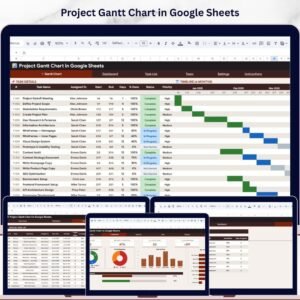
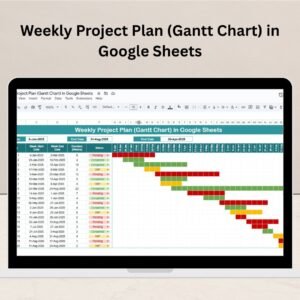
🔹 📊 Gantt Chart View – Week-by-week timeline with color codes
🔹 🟢 WIP, Pending, Completed – Use dropdowns to set task progress
🔹 🔄 Auto Updates – Gantt chart changes in real-time with task edits
🔹 📆 Weekly Breakdown – Visualize from January to September
🔹 📤 Share & Collaborate – Real-time access for your team or clients
🔹 🧩 Duplicate Rows Easily – Expand your plan with a few clicks
🔹 💼 Perfect for Any Industry – From agencies to engineering
🔹 📁 Ready-to-Use Format – No setup, no learning curve
🔹 🔧 Fully Customizable – Adjust dates, colors, and layout as needed

Customize this template for your business (optional)

Handled by email: we contact you within 1 business day. One revision round included. What is included

- +

💡 Buy any 2 templates and save 20% automatically at checkout.

Included in All-Access Templates. Get this plus 7,000+ templates for ₹4,999.00 a year. Compare plans →
Pricing country
Prices follow your selected country; checkout uses your billing country.
Google Sheets Complete Course: Beginner to Advanced courseLaunch offer
🎓 NEXTGENTEMPLATES ACADEMY
Want to build Google Sheets like this yourself?
Google Sheets Complete Course: Beginner to Advanced

Formulas, lookups, QUERY, dynamic arrays, pivot tables, charts, live data and Apps Script, ending with an interactive sales dashboard. 74 lessons by PK with a practice file for every lesson.

Effortlessly manage your projects with our Weekly Project Plan (Gantt Chart) in Google Sheets—a powerful, easy-to-use timeline tool that helps you stay ahead of deadlines, organize tasks, and monitor progress visually. Whether you’re managing a single project or juggling multiple tasks, this Gantt chart template turns chaos into clarity.Weekly Project Plan
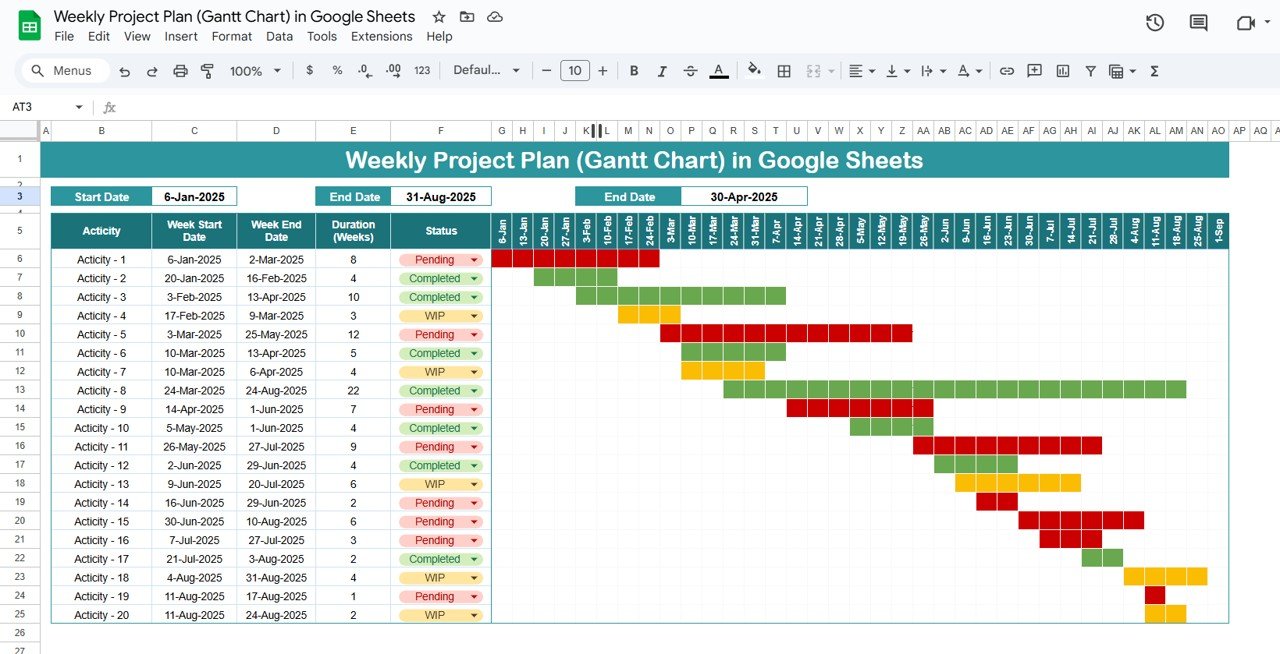
Weekly Project Plan
Weekly Project Plan

🛠️ Key Features of the Weekly Project Plan (Gantt Chart)

📋 Comprehensive Tracker Section

  • 🔸 List all your project activities with custom start & end dates

  • 🔸 Auto-calculated Duration (in weeks) for accurate scheduling

  • 🔸 Dropdown Status Column with three key options: Pending, WIP, Completed

📊 Interactive Gantt Chart

  • 📆 Weekly timeline from Jan to Sept 2025

  • 🎨 Conditional Color Formatting:

    • Grey for Pending

    • Yellow for Work in Progress

    • Green for Completed

  • 🧩 Easily visualize overlapping tasks and dependencies

📈 Real-Time Timeline Adjustments

  • Update task dates and statuses—watch the Gantt chart auto-adjust

  • Perfect for project managers looking to spot delays or bottlenecks in real-time

🧱 Dynamic Design

  • Fully customizable for any industry or team size

  • Duplicate rows to add more tasks—expand as your project grows


📦 What’s Inside the Weekly Project Plan (Gantt Chart)

Here’s what this robust template includes:

✅ Tracker Sheet Tab – Add/edit task data including:

  • Task Name

  • Start & End Dates

  • Auto Duration

  • Task Status (via dropdown)

✅ Gantt Chart Timeline – Week-based visual calendar from Jan to Sep 2025

  • Automatically formatted based on task status

  • Displays visual overlaps and scheduling risks

🧩 The best part? All changes in the Tracker auto-reflect on the Gantt chart—no manual updating needed!


🔍 How to Use the Weekly Project Plan (Gantt Chart)

1️⃣ Enter Activities – List your tasks in the Tracker Section
2️⃣ Define Start & End Dates – The duration will auto-calculate
3️⃣ Set Task Status – Use dropdowns to mark as Pending, WIP, or Completed
4️⃣ Monitor Gantt Chart – The chart auto-populates with matching color codes
5️⃣ Adjust On the Go – Update dates or status any time—your timeline stays live

It’s intuitive, clean, and takes less than 5 minutes to get started!


👥 Who Can Benefit from This Gantt Chart Template?

🧑‍💼 Project Managers – Visualize workload, manage progress, and track deadlines
📊 Agencies & Marketing Teams – Schedule campaigns and team tasks
🏗️ Construction or Engineering – Coordinate complex timelines with ease
👩‍💻 Freelancers & Consultants – Present structured plans to clients professionally
🎯 Startups & Remote Teams – Keep everyone aligned from anywhere

If you work with tasks, dates, and teams—this tool is built for you!


💡 Why This Template Stands Out

✅ No software needed – 100% Google Sheets, 100% online
✅ Color-coded Gantt Timeline – Visual, flexible, easy to read
✅ Auto-calculated durations – Save time and reduce manual errors
✅ Drop-down statuses – Easily track project stages
✅ Expandable format – Use it for 5 or 50 tasks—grows with your project
✅ Collaborative – Share with teams or clients instantly

With this Gantt chart, you’re not just planning—you’re managing smarter.


🔁 Click here to read the Detailed blog post Weekly Project Plan

Click here to read the Detailed blog post

🎥 Visit our YouTube channel to learn step-by-step video tutorials

Youtube.com/@NeotechNavigators

Watch the step-by-step video tutorial:

Compatibility and Requirements

  • A free Google account and a web browser. The template opens in Google Sheets, so there is nothing to install. Google’s guide How to use Google Sheets covers the basics.

Frequently Asked Questions

How is task duration calculated?

Enter a start date and an end date for each activity and the duration is calculated in weeks for you.

Which task statuses can I use?

The Status column has a dropdown with Pending, WIP and Completed. The Gantt bars turn grey, yellow or green to match.

Can I add more tasks?

Yes. Duplicate rows in the Tracker section to add tasks, and the Gantt chart picks them up.

Can I share the plan with my team or clients?

Yes. It is a Google Sheets file, so you can share it and update it together online.

Related Project Planning Templates

Browse all Google Sheets project management templates or the Google Sheets trackers.
Frequently asked questions

How do I get my own copy?
After purchase you get a link to the Google Sheet. Open it while signed in to your Google account and use File > Make a copy - the copy in your Google Drive is fully yours and editable.
Do I need a paid Google account? Will it expire?
No. A free Google account is enough, and your copy lives in your own Google Drive - it never expires and there is nothing to renew.
Does it work on Mac, phone or tablet?
Yes - in any browser on Windows, Mac or Chromebook, and in the Google Sheets mobile app for viewing and quick entries.
Can I share it with my team?
Yes. Share your copy with colleagues using Google's normal sharing, with view or edit rights as you choose.
Can I change the design and formulas?
Yes, your copy is fully editable - colours, labels, logo, formulas and charts. If a range is protected, use Data > Protect sheets and ranges to remove it in your copy.
Are there macros or add-ons?
No macros or add-ons - it uses normal Google Sheets formulas and charts.
Is it a one-time payment or a subscription?
One-time payment. No subscription, no per-user fees and nothing to renew - the file is yours to keep.
How do I get the file after payment?
Instantly. The download link appears on screen after checkout, is emailed to you, and stays under My Account > Downloads on our website. If the email does not arrive within a few minutes, check your spam or promotions folder.
Is a user manual included?
Most of our newer products include a PDF user manual in the download. If yours does not have one, message us with your order number and we will send it.
Do I get free updates?
Bug fixes are always free - if something does not work as described, we fix it and send you the corrected file. New versions with new features are not included in the price, unless this product's description says otherwise.
Can you customise it for me?
Yes. Small changes to this template (your columns, categories, logo, colours, minor layout) cost the template price plus $40-80 (Rs 3,000-6,000 + GST), quoted once you send your list. A fully custom build is usually $100-200 (Rs 8,000-18,000 + GST) with two revision rounds. Email your requirements to [email protected] or message us on WhatsApp.
Can I use it for my business or my clients?
Yes, for your own personal or internal business use, for as long as you like. Reselling or redistributing the template is not allowed.
What is your refund policy?
Because these are digital downloads, they are non-refundable once delivered - except when the product does not match its description (report it within 48 hours of purchase) or there is a technical problem our team cannot fix within 72 hours. Email [email protected] with your order number.
How do I get help?
Email [email protected] (Mon-Fri, 10 AM-7 PM IST) or message us on WhatsApp +91 80770 90260 (chat only, no calls). Please include your order number.

Still have a question? Click Need help? at the bottom-left to ask our assistant, or message us on WhatsApp.

Application

Google Sheets

Template Type

Charts and Visualization

Price

Paid

Business Or Department

Project Management

Reviews

There are no reviews yet.

Only logged in customers who have purchased this product may leave a review.

You may also like…

Weekly Project Plan (Gantt Chart) in Google SheetsWeekly Project Plan (Gantt Chart) in Google Sheets
Original price was: ₹1,299.00.Current price is: ₹699.00.
- +
Scroll to Top