

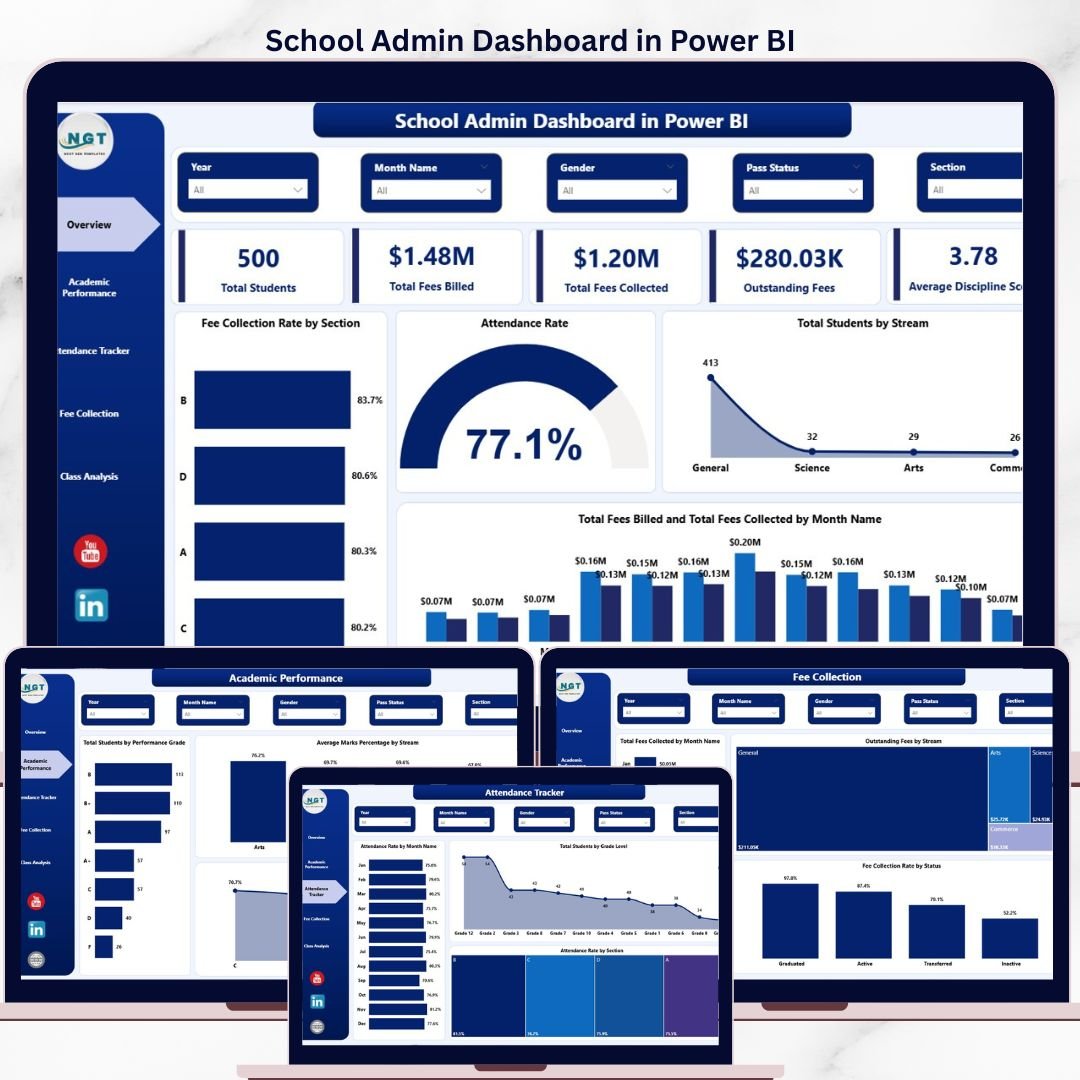
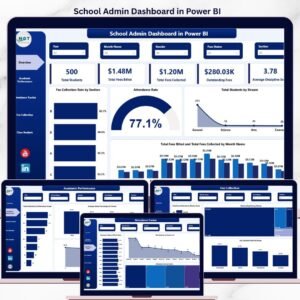
The School Admin Dashboard in Power BI tracks 5 administrative KPIs across 5 interactive report pages, with 16 pre-built visuals covering student enrollment, academic performance, attendance, fee collection, and class-level analysis. Setup takes under 10 minutes — connect your data source in Power BI Desktop and every page updates automatically.
🌍 Join 8,400+ teams in 40+ countries using Nextgen Templates to replace paid SaaS tools with one-time-purchase Power BI Dashboards.
✅ Instant download · One-time payment · No subscription · No per-user fees · Lifetime access
🔑 Key Features of School Admin Dashboard in Power BI
🔹 5-Page Interactive Report — The School Admin Dashboard in Power BI covers Overview, Academic Performance, Attendance Tracker, Fee Collection, and Class Analysis — giving school administrators a complete 360° operational view in one .pbix file.
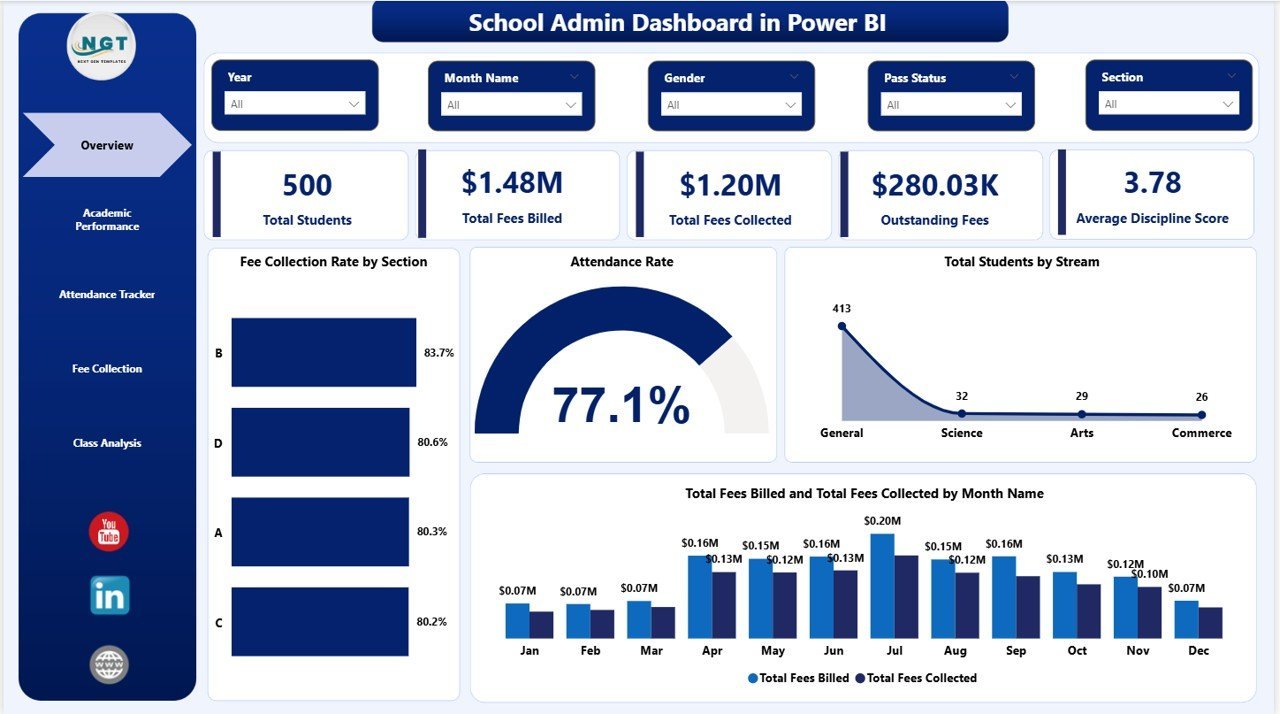
🔹 5 KPI Cards on Overview Page — Track Total Students, Total Fees Billed, Total Fees Collected, Outstanding Fees, and Average Discipline Score at a glance — all recalculated automatically with every slicer selection.
🔹 Multi-Slicer Filtering — Slice data by section, stream, grade level, month, or student status instantly. The School Admin Dashboard in Power BI responds dynamically without any manual recalculation.
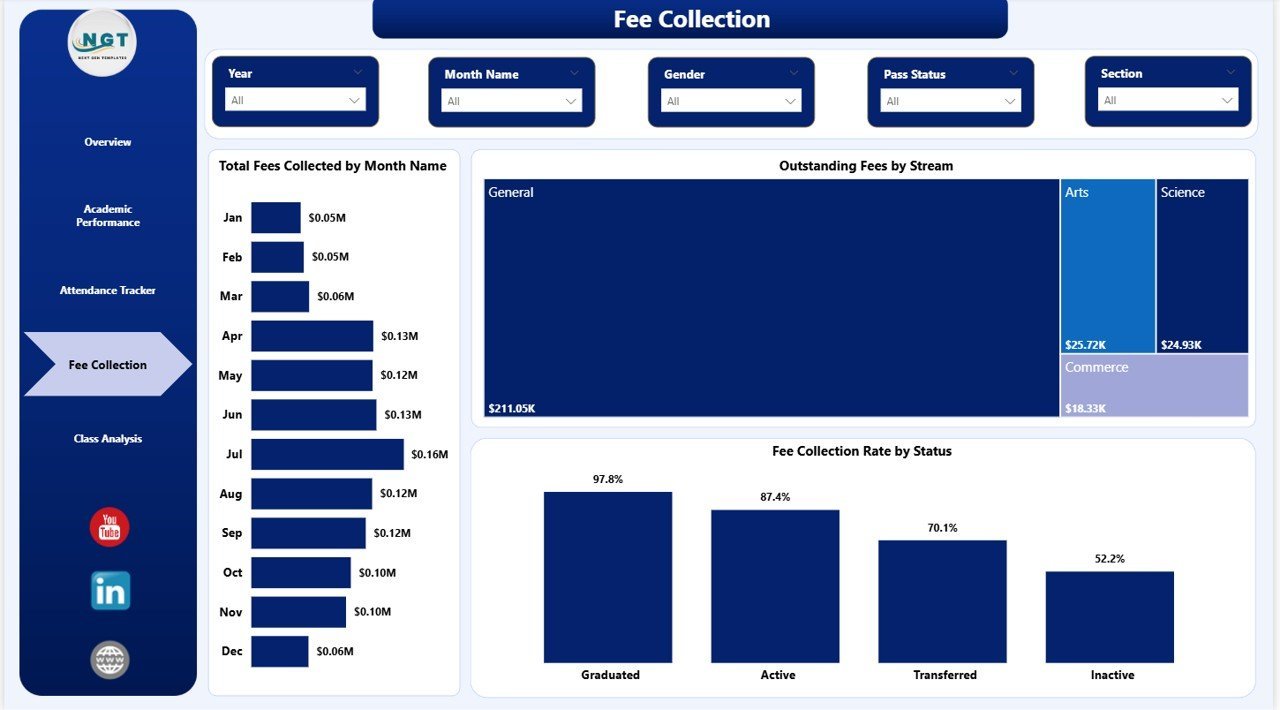
🔹 Fee Intelligence Built In — The Fee Collection page tracks Total Fees Collected by Month, Outstanding Fees by Stream, and Fee Collection Rate by Status — giving finance teams the data to identify late payers and collection gaps at a glance.
🔹 Attendance and Academic Analysis — Dedicated pages break down attendance rates by month, section, and grade level while academic analysis compares performance grades and marks percentage across streams and sections.
📦 What’s Inside the School Admin Dashboard in Power BI
1. Overview Page — High-level snapshot with 5 KPI cards (Total Students, Total Fees Billed, Total Fees Collected, Outstanding Fees, Average Discipline Score) plus 4 charts: Fee Collection Rate by Section, Attendance Rate, Total Students by Stream, and Total Fees Billed vs Collected by Month Name. Multiple slicers let you filter the entire dashboard instantly.
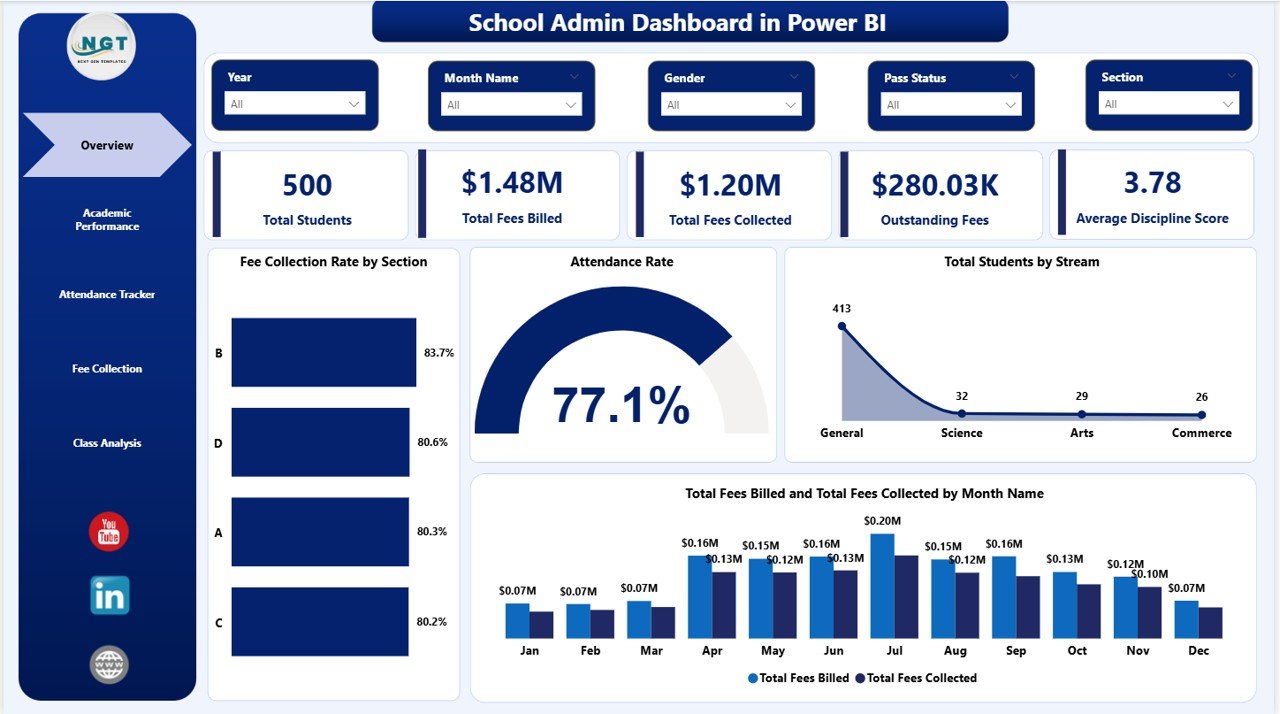
School Admin Dashboard in Power BI – Overview Page
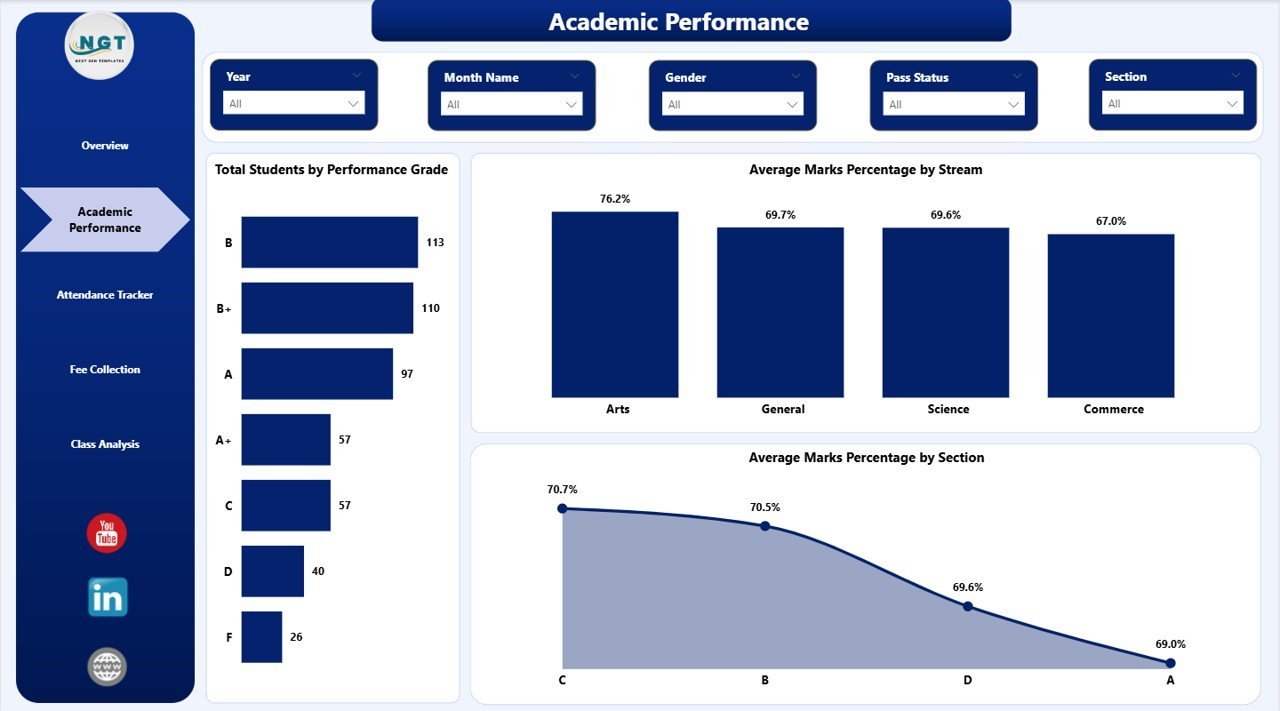
2. Academic Performance — Analyze student outcomes with Total Students by Performance Grade, Average Marks Percentage by Stream, and Average Marks Percentage by Section. Helps academic coordinators identify underperforming streams and sections early.
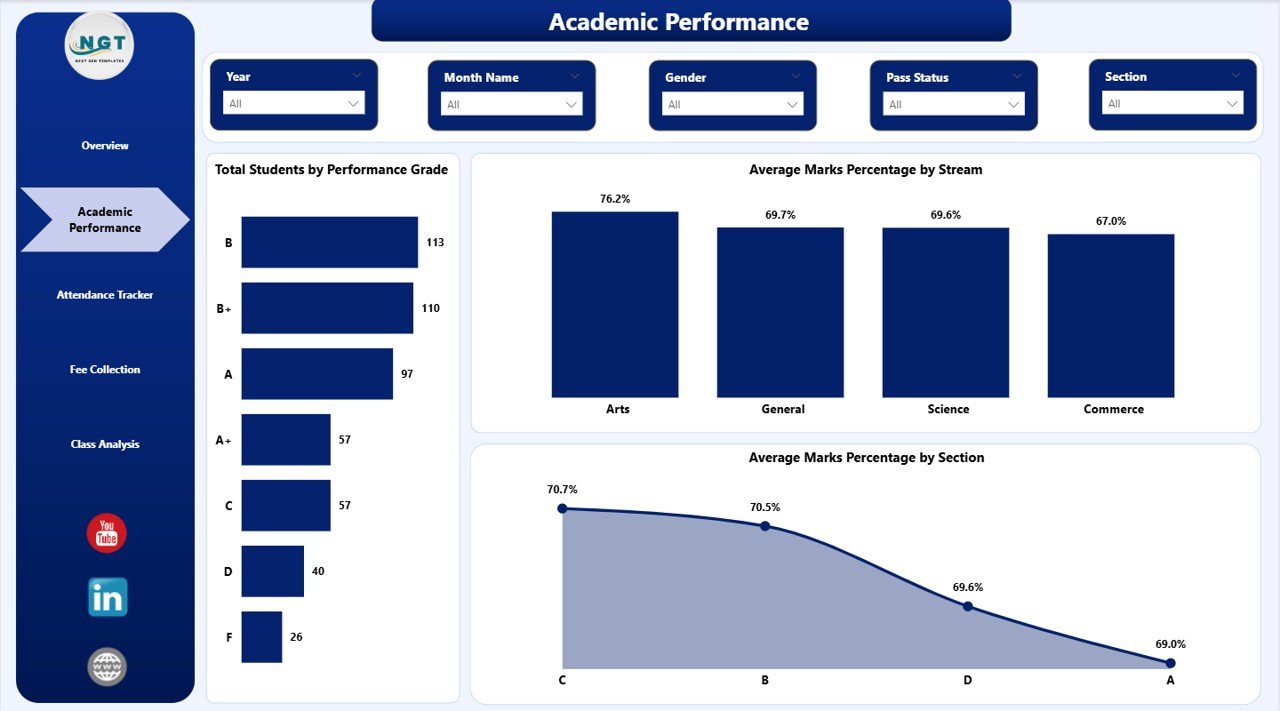
School Admin Dashboard in Power BI – Academic Performance Page
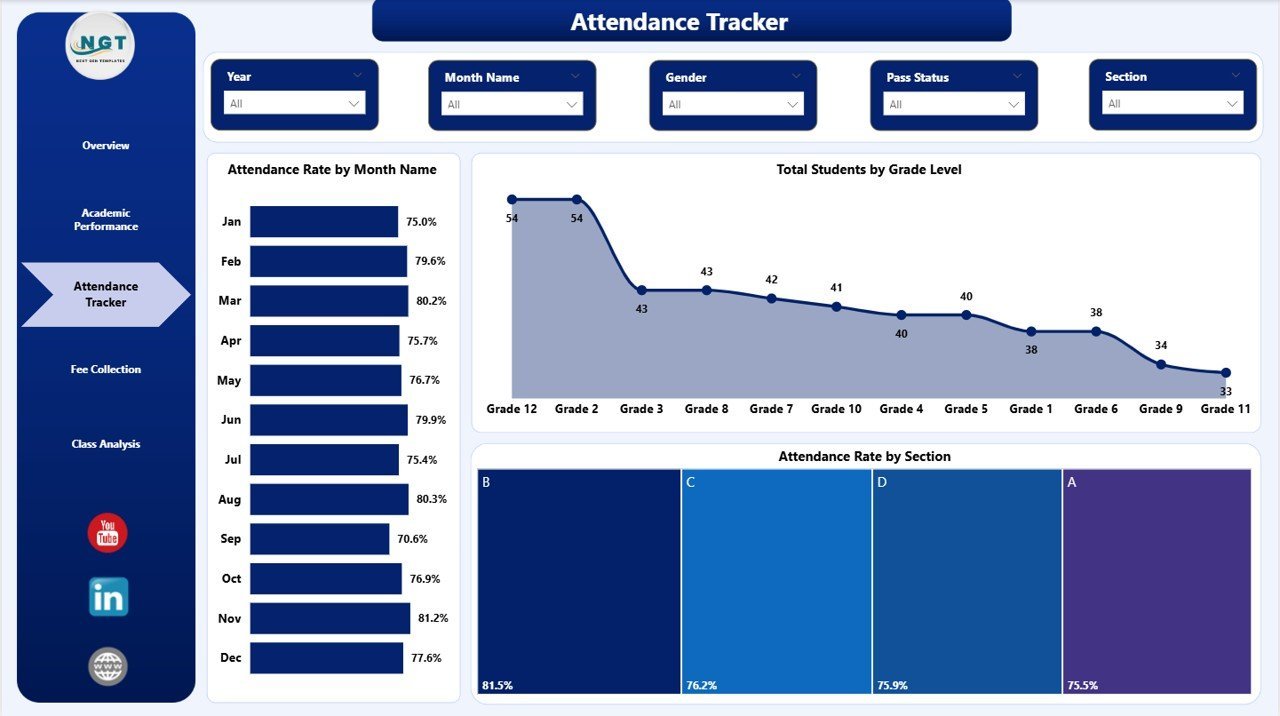
3. Attendance Tracker — Monitor monthly attendance trends with Attendance Rate by Month Name, Total Students by Grade Level, and Attendance Rate by Section. Spot chronic absenteeism patterns before they impact academic outcomes.
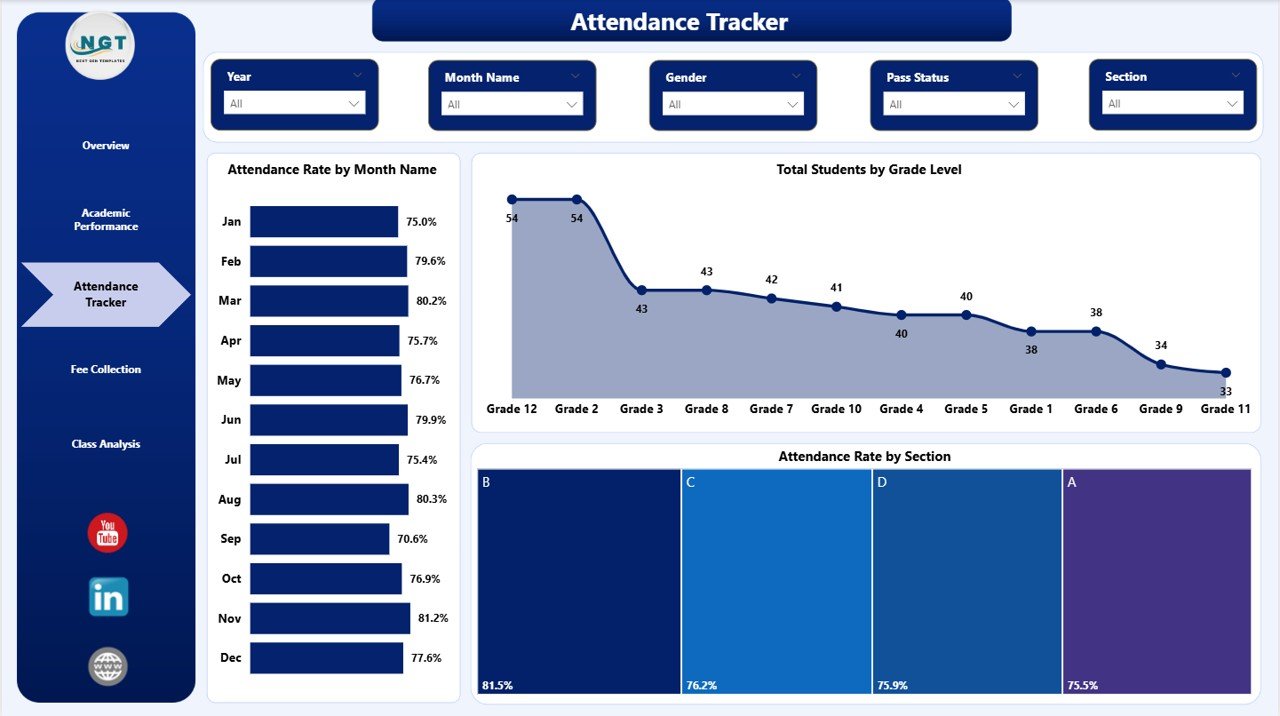
School Admin Dashboard in Power BI – Attendance Tracker Page
4. Fee Collection — Track revenue inflow with Total Fees Collected by Month Name, Outstanding Fees by Stream, and Fee Collection Rate by Status. Essential for bursars and finance officers managing fee recovery cycles.
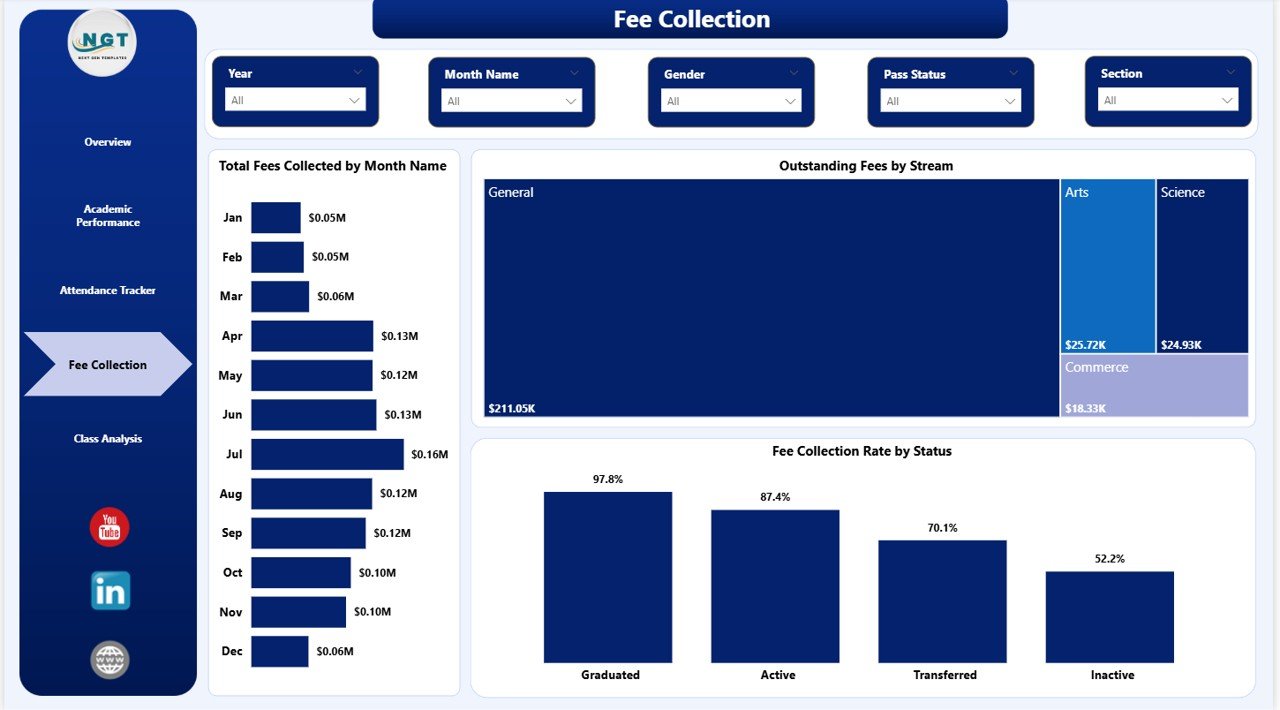
School Admin Dashboard in Power BI – Fee Collection Page
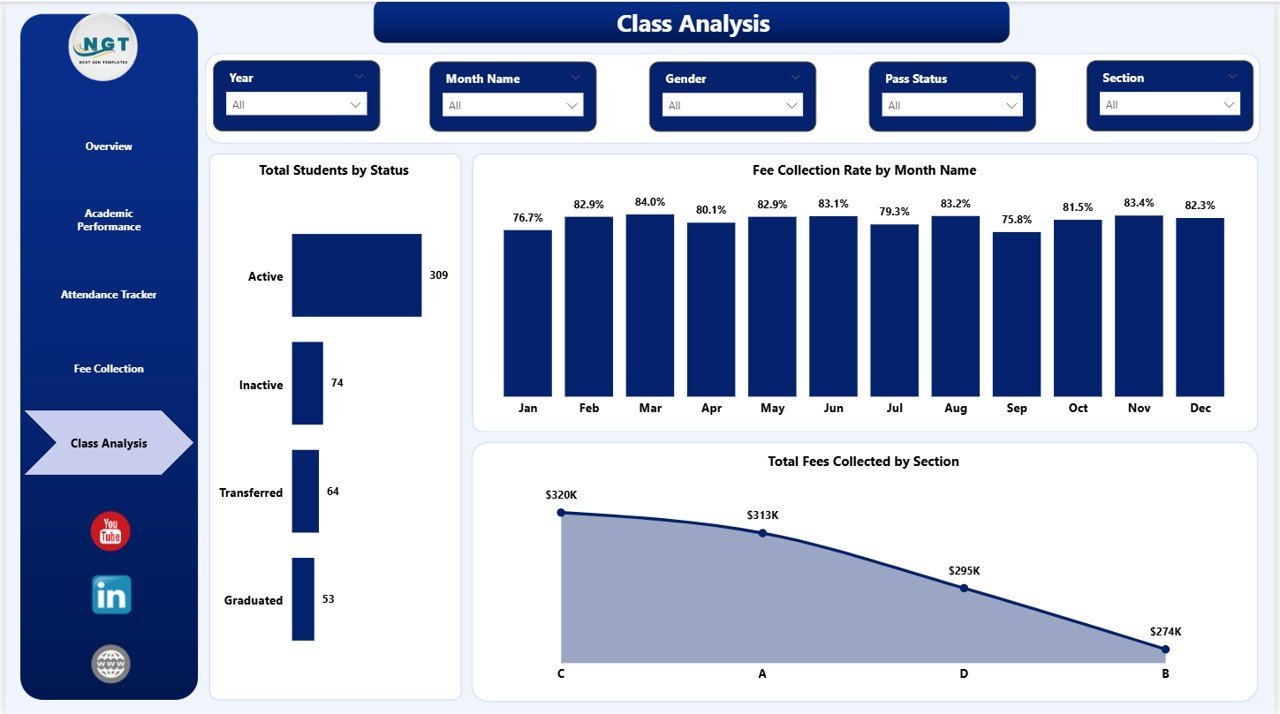
5. Class Analysis — Evaluate class-level metrics with Total Students by Status, Fee Collection Rate by Month Name, and Total Fees Collected by Section. Helps class teachers and department heads monitor their cohorts independently.
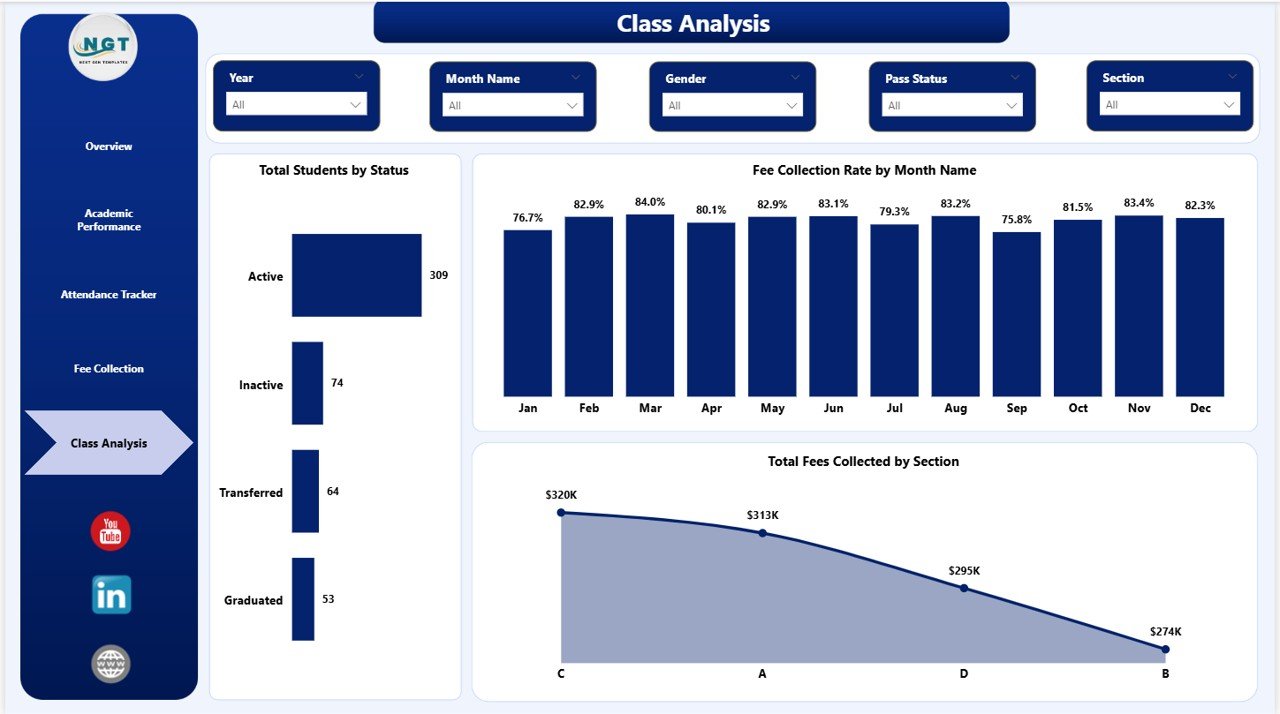
School Admin Dashboard in Power BI – Class Analysis Page
📊 School Admin Dashboard in Power BI vs. Tableau vs. School ERP — Where This Fits
| Feature | School Admin Dashboard in Power BI | Tableau for Education | School ERP (Fedena / Classe365) |
|---|---|---|---|
| Cost | $17.99 one-time | $70/user/month | $200–500/month |
| Platform | Power BI Desktop (free) | Tableau Desktop license needed | Web-based SaaS |
| Setup time | Under 10 minutes | Days + training | Weeks of onboarding |
| Student performance tracking | ✅ Built-in | Requires custom build | ✅ Built-in (costly) |
| Fee collection analysis | ✅ Dedicated page | Requires custom build | ✅ Built-in |
| Offline capability | ✅ Fully offline | ❌ Cloud-dependent | ❌ Cloud-only |
| Customizable fields | ✅ Fully editable .pbix | ✅ Yes | Limited without dev help |
| Year-1 cost (1 admin) | $17.99 | $840+ | $2,400+ |
For school administrators who need clear insight into students, fees, and attendance without paying thousands for ERP software, the School Admin Dashboard in Power BI sits in the sweet spot.
👥 Who This Template Is For — and Who It’s Not For
✅ This template is built for:
- School principals and administrators managing 200–2,000 student cohorts
- Finance officers and bursars monitoring fee collection and outstanding balances
- Academic coordinators analyzing grade-level and section-wise performance
- IT and data teams building reports for school board or leadership meetings
- Private schools, coaching institutes, and tutoring centers wanting data visibility without ERP costs
❌ This template is NOT for:
- Schools requiring real-time live database sync (this is file/Excel-data driven)
- Organizations needing a full student information system (SIS) with enrollment and grading workflows
- Teams without access to Power BI Desktop (free download from Microsoft)
⚙️ How to Use the School Admin Dashboard in Power BI
- Download and unzip the .pbix file from your purchase confirmation.
- Open in Power BI Desktop — free download from Microsoft.
- Replace sample data with your school’s student, attendance, and fee records.
- Refresh the report — all 5 pages, KPI cards, and visuals update automatically.
- Use slicers to filter by section, stream, grade level, or month for focused analysis.
- Share as PDF or via Power BI Service with leadership or department heads.
💼 Real-World Use Cases
Priya heads administration at a 600-student private school in Pune. She uses the School Admin Dashboard in Power BI to present enrollment trends, attendance rates by class section, and outstanding fee summaries to the school board — reports that previously took 3 hours to compile in Excel now take 15 minutes of data paste and refresh.
James manages finance for a chain of 4 tutoring centers. He tracks fee collection rate by status and outstanding fees by stream using this Power BI dashboard, identifying which centers have the highest overdue accounts before they cascade into cash flow problems.
Maria is an academic coordinator at a secondary school in Manila. She uses the Academic Performance page to compare average marks percentage across streams and sections each term, flagging underperforming cohorts for targeted intervention weeks before end-of-term exams.
❓ Frequently Asked Questions
What KPIs does the School Admin Dashboard in Power BI track?
The School Admin Dashboard in Power BI tracks 5 KPIs: Total Students, Total Fees Billed, Total Fees Collected, Outstanding Fees, and Average Discipline Score. All metrics update automatically when you replace the sample data with your school’s records.
Do I need a Power BI license to use this dashboard?
No paid license is required. The School Admin Dashboard in Power BI runs on Power BI Desktop, which is a free download from Microsoft. A paid Power BI Service subscription is only needed if you want to publish and share reports online — desktop use is fully free.
Can I customize this dashboard for my school’s structure?
Yes. The School Admin Dashboard in Power BI is fully editable in Power BI Desktop. You can rename sections, add grade levels, adjust the data model, and modify any visual to match your school’s specific layout and naming conventions.
How does this compare to school ERP software like Fedena or Classe365?
The School Admin Dashboard in Power BI costs $17.99 one-time versus $200–500/month for a full school ERP. It covers analytics for student management, fee collection, and attendance — the three areas where most administrators need weekly reporting — without the onboarding complexity of a full ERP implementation.
How long does setup take?
Setup takes under 10 minutes. Download the .pbix file, open it in Power BI Desktop, replace the sample data with your school’s records, and click Refresh. All 5 report pages and KPI cards update instantly — no formulas, no macros, no configuration needed.
Does this work for both primary and secondary schools?
Yes. The School Admin Dashboard in Power BI uses configurable grade level, stream, and section filters that adapt to any school structure. Replace the sample labels with your own grade and section naming conventions in the data source.
Is there an Excel version of this dashboard available?
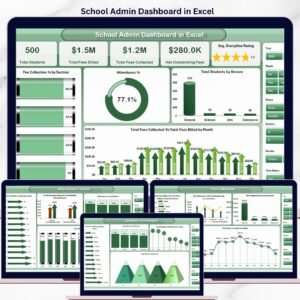
Yes. The School Admin Dashboard in Excel covers the same 5 analysis pages and KPI structure for teams who prefer Microsoft Excel with pivot tables and slicers.
👤 About the Author
Built by PK — Microsoft Certified Professional with 15+ years of Excel, Google Sheets, and Power BI experience. Founder of NextGenTemplates, reaching 300K+ subscribers across YouTube channels (@PK-AnExcelExpert, @NextGenTemplates, @NeoTechNavigators). Every template is hand-built and tested before release.
🔗 Explore Related Templates
🔹 School Admin Dashboard in Excel — Same 5-page structure in Microsoft Excel. Ideal for teams not using Power BI.
🔹 Driving School Dashboard in Power BI — Track student enrollment, instructor performance, and test pass rates for driving academies.
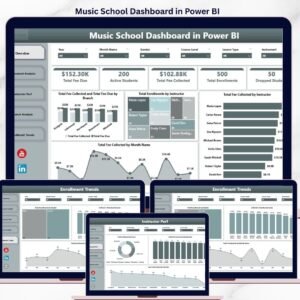
🔹 Music School Dashboard in Power BI — Purpose-built analytics for music schools covering enrollment, recitals, and fee collection.
💡 Browse all Power BI Dashboard Templates in our full catalog.
📖 Click here to read the Detailed Blog Post
🎥 Visit our YouTube channel for step-by-step video tutorials
👉 YouTube.com/@NextGenTemplates
Watch the step-by-step video tutorial:
YouTube

























Reviews
There are no reviews yet.