The Gym Retention Dashboard in Google Sheets tracks 4 high-level KPIs, 12 analytical charts across 4 analysis pages, and includes a member search page and structured data sheet — built for gym owners, fitness studio managers, and membership directors who need to understand why members leave, which branches retain best, and how monthly revenue ties back to member status. Setup takes under 10 minutes — open the PDF guide, click the Google Sheets link, replace sample data, and every chart updates automatically.
🌍 Join 8,400+ teams in 50+ countries using NextGenTemplates to replace paid SaaS tools with one-time-purchase Excel, Google Sheets, Power BI, and HTML templates.
✅ Instant download · One-time payment · No subscription · No per-user fees · Lifetime access
 Gym Retention Dashboard in Google Sheets
🔑 Key Features of Gym Retention Dashboard in Google Sheets
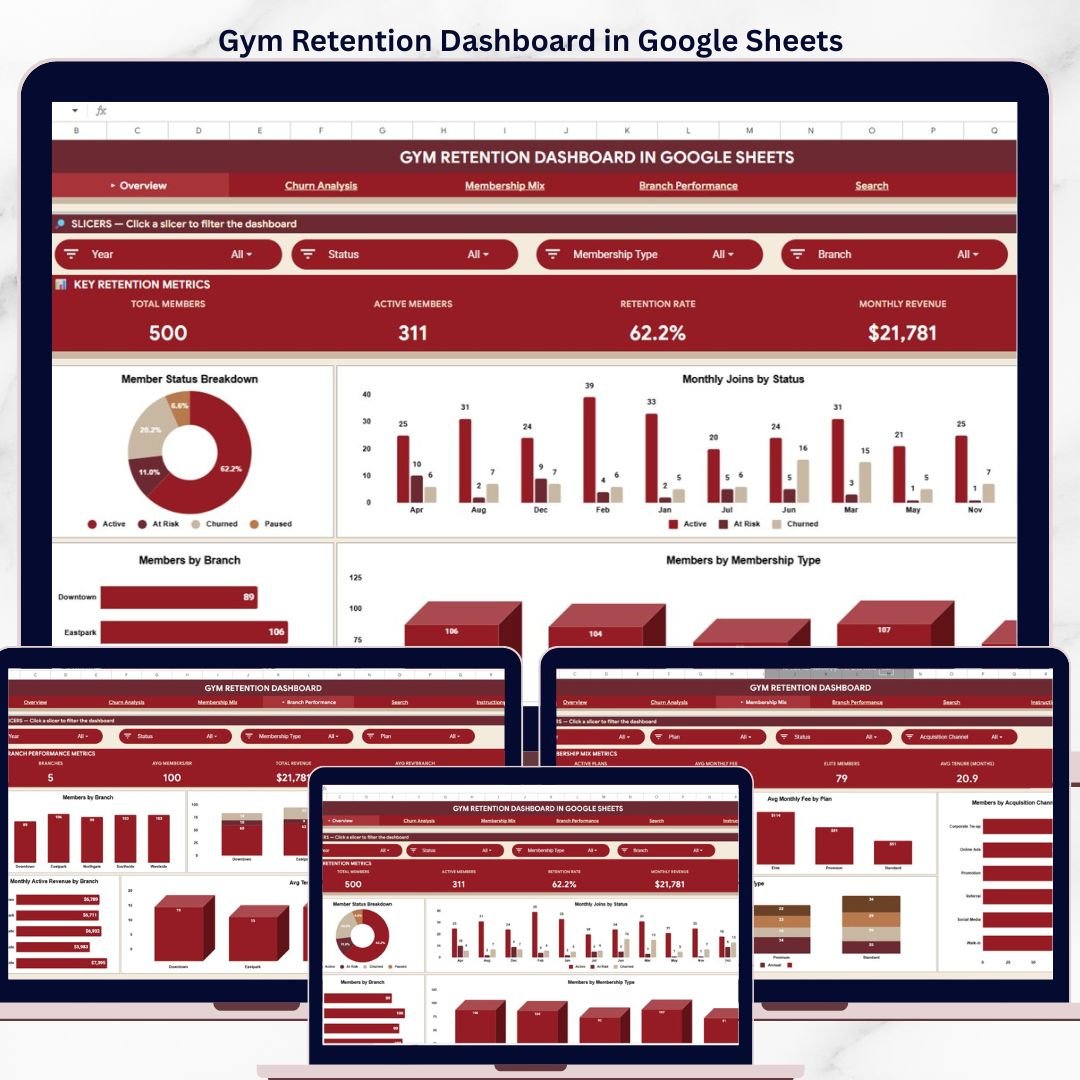
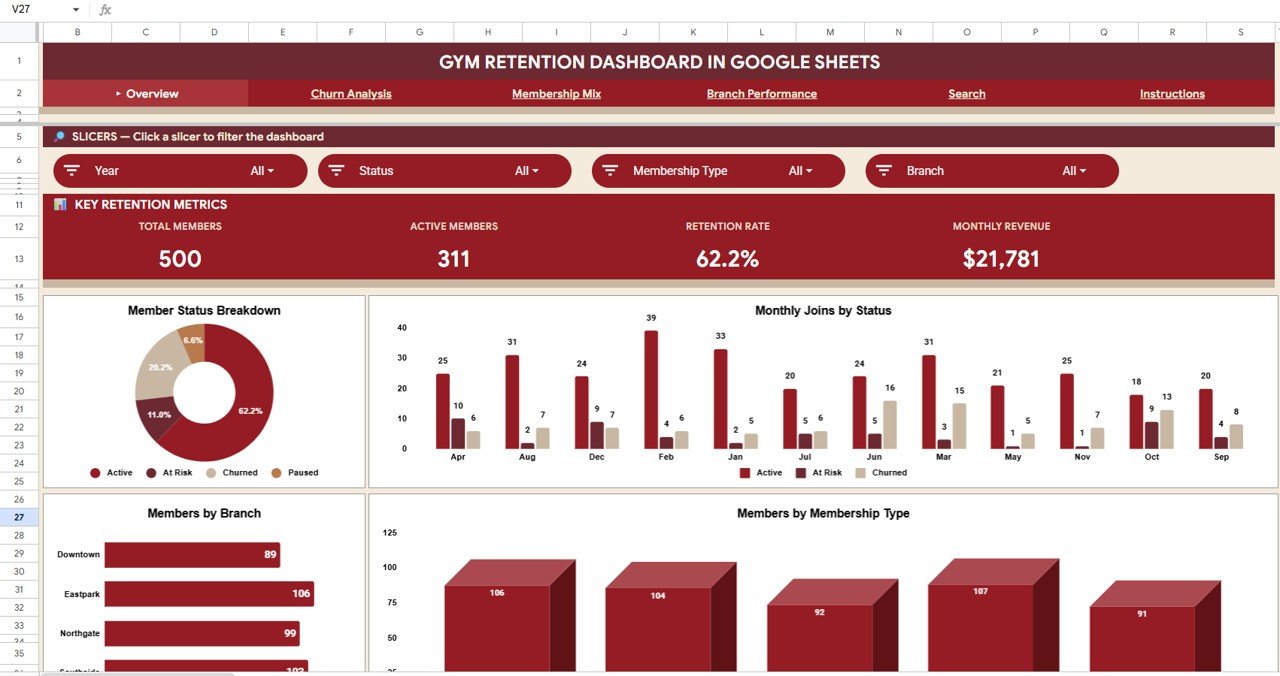
🔹 4 High-Level KPI Cards on the Overview Page — Total Members, Active Members, Retention Rate, and Monthly Revenue give you a one-glance read on whether your gym is growing or losing members, updated automatically from the data sheet.
🔹 6 Interactive Sheet Tabs — Overview, Churn Analysis, Membership Mix, Branch Performance, Search, and Data Sheet cover every angle of gym member retention from acquisition channel to churn reason, all in a single Google Sheets file.
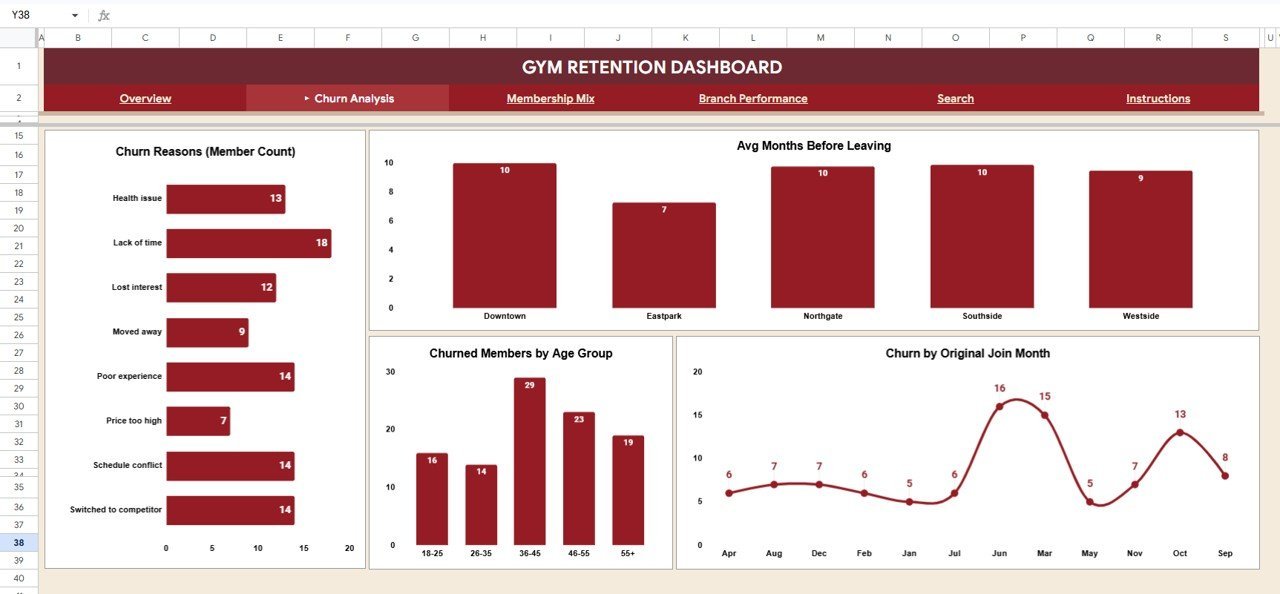
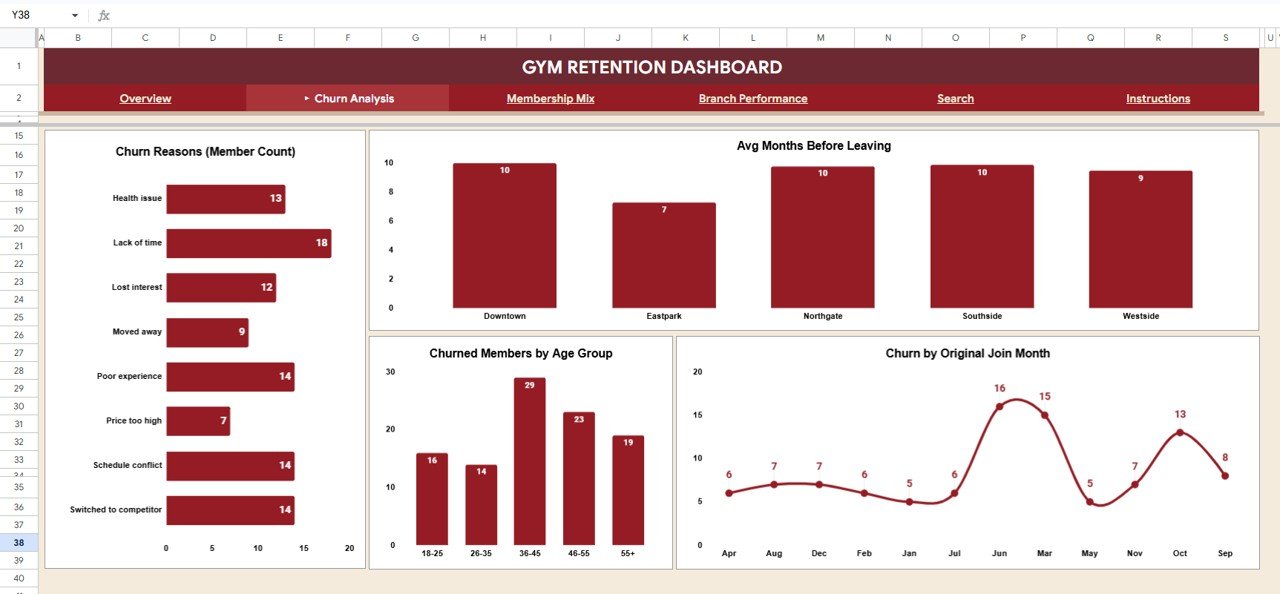
🔹 Churn Analysis Page — Dedicated analysis showing Member Count by Churn Reason, Avg Months Before Leaving by Branch, Churned Members by Age Group, and Churn by Original Join Month — the four metrics every retention strategy depends on.
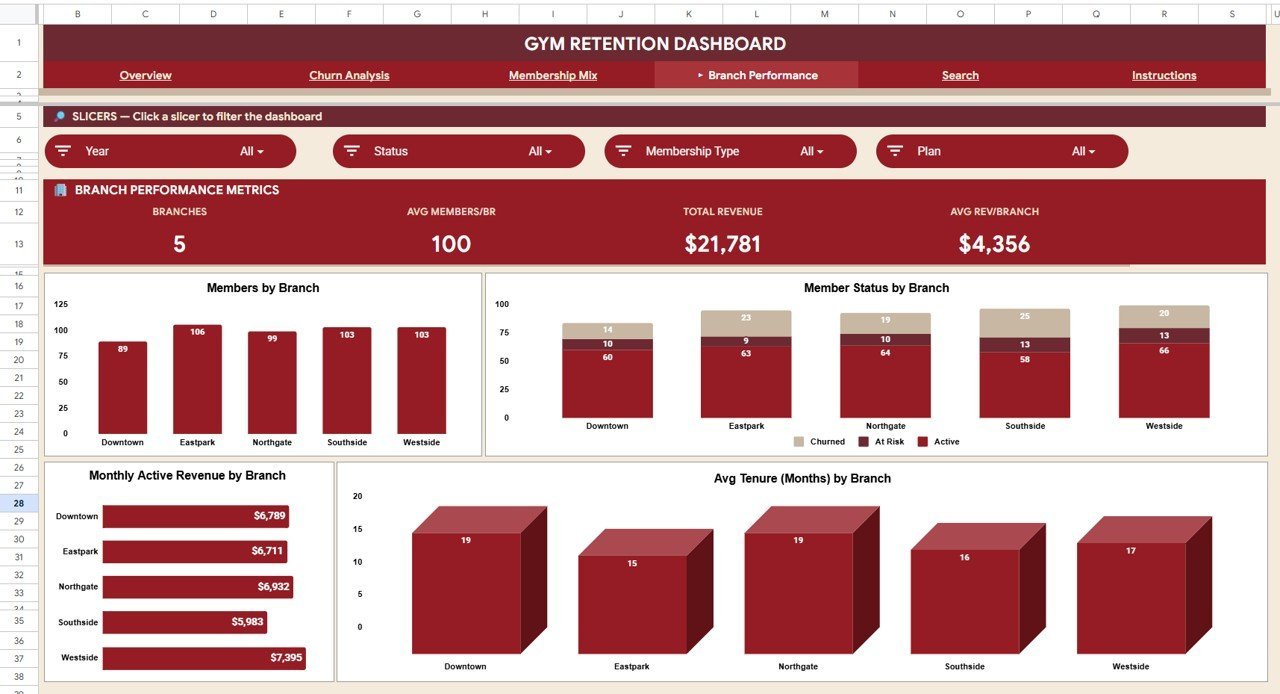
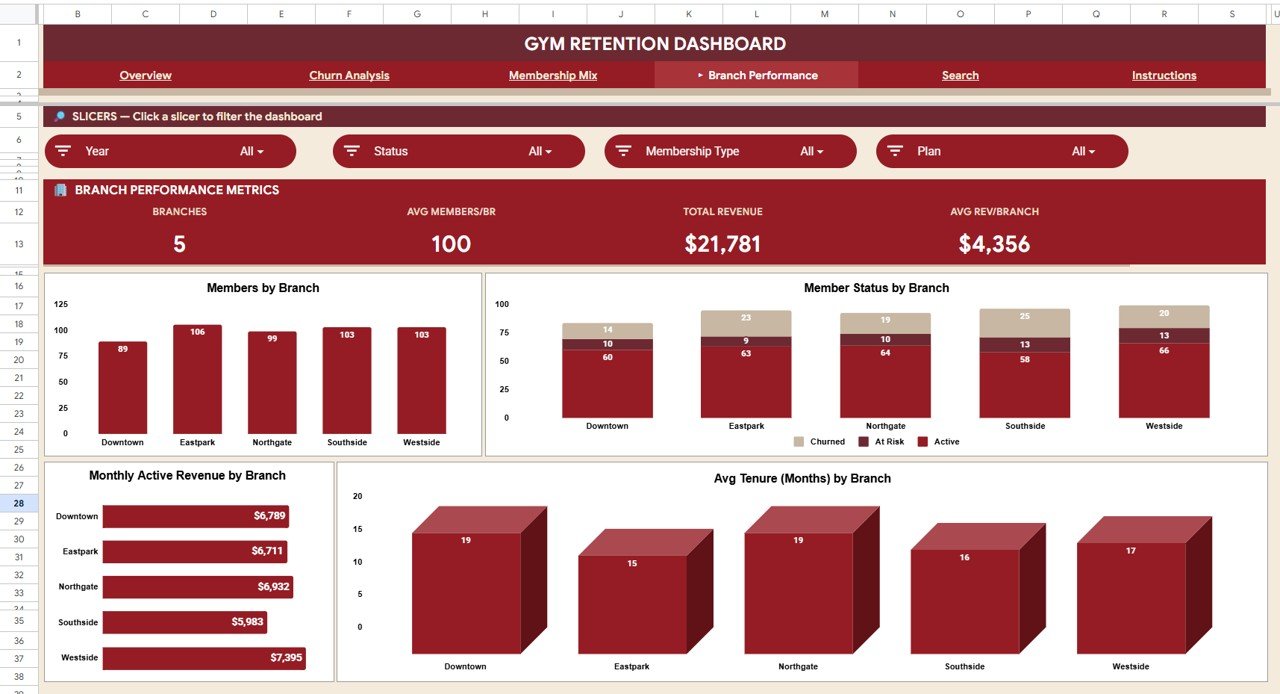
🔹 Branch-Level Retention Comparison — The Branch Performance page compares Members by Branch, Member Status by Branch, Monthly Active Revenue by Branch, and Avg Tenure (Months) by Branch side-by-side so multi-location operators can spot underperforming outlets instantly.
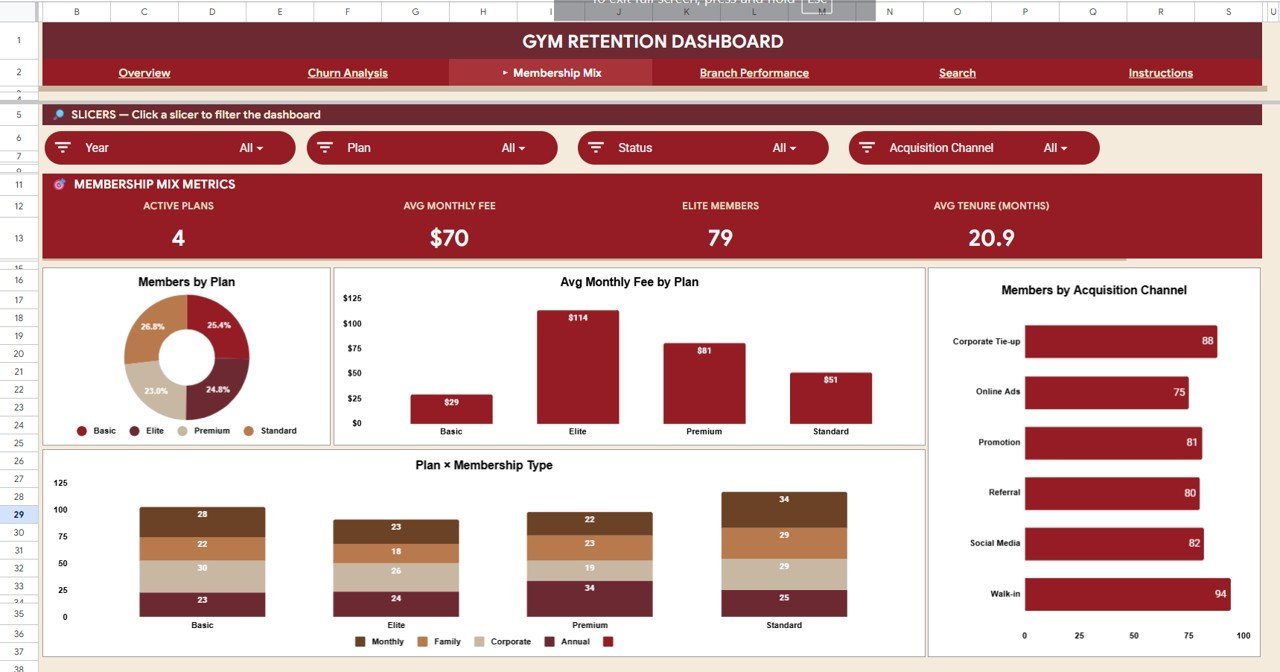
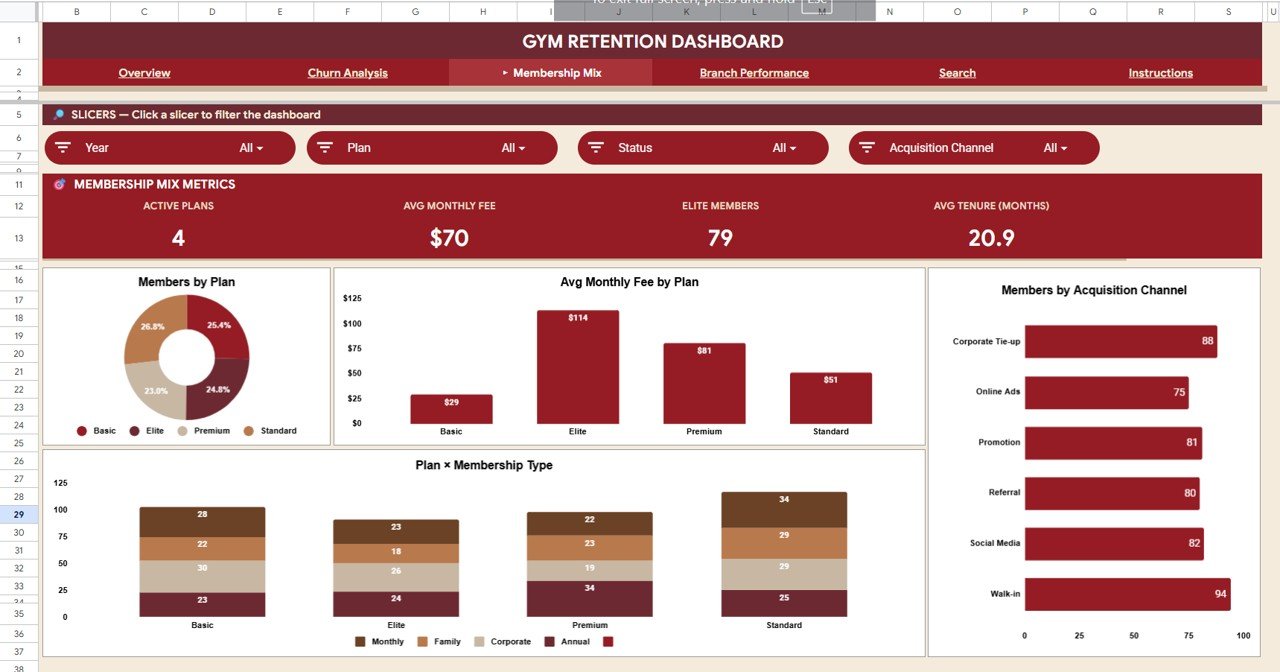
🔹 Membership Mix Breakdown — Understand your member portfolio with Members by Plan, Avg Monthly Fee by Plan, Members by Acquisition Channel, and Members by Plan and Membership Type — essential for pricing and acquisition decisions.
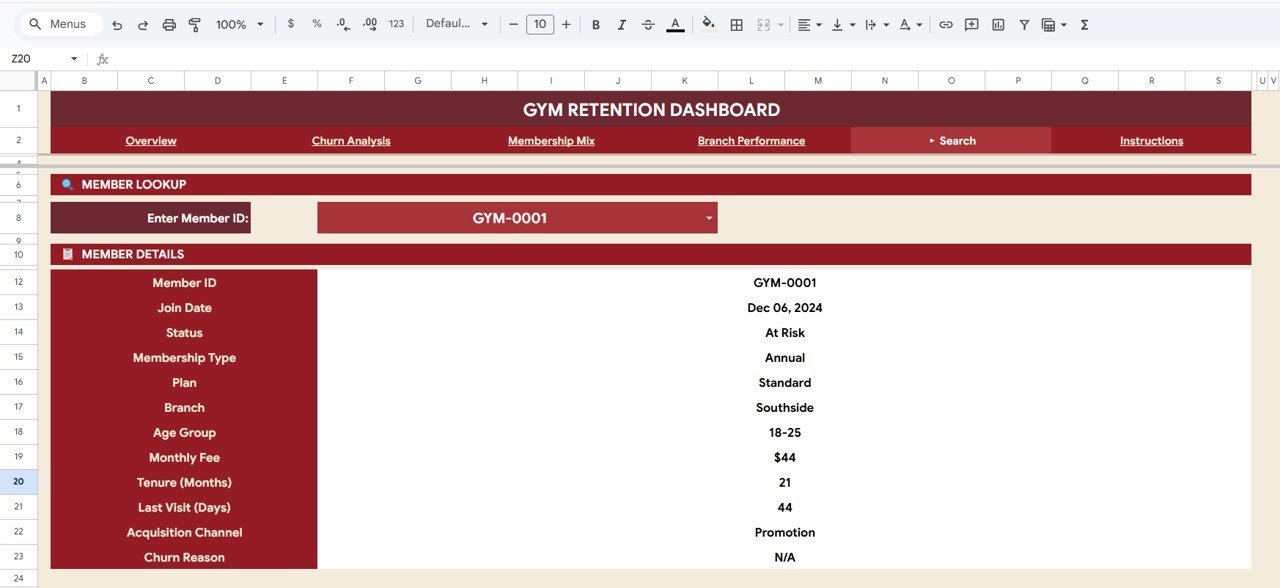
🔹 Instant Member Lookup — The Search page lets you select any Member ID from a dropdown and instantly view 12 fields: Member ID, Join Date, Status, Membership Type, Plan, Branch, Age Group, Monthly Fee, Tenure (Months), Last Visit (Days), Acquisition Channel, and Churn Reason.
🔹 Multiple Slicers on Overview — Filter the entire Overview page by branch, membership type, status, plan, or age group for focused retention analysis without writing formulas.
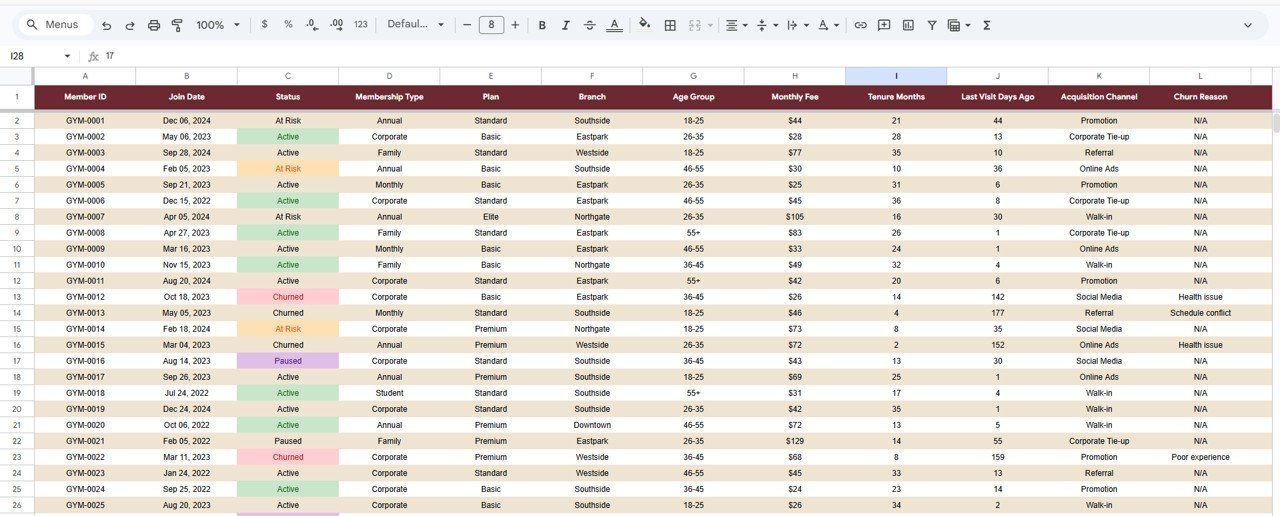
🔹 Clean Data Sheet — Add your gym member records in the provided column format and every dashboard page, chart, and KPI card updates automatically. No macros, no scripts, no advanced skills needed.
📦 What’s Inside the Gym Retention Dashboard in Google Sheets
This template contains 6 sheet tabs designed for gym member retention tracking and churn prevention:
1 — Overview Page
The landing page opens with 4 KPI cards (Total Members, Active Members, Retention Rate, Monthly Revenue) and interactive charts below — Members by Status shows the active vs churned vs frozen split, Monthly Joins by Status tracks how new member acquisition compares to cancellations month over month, Members by Branch reveals which locations hold the most members, and Members by Membership Type breaks down your member base by tier. Multiple slicers at the top let you filter the entire page instantly.
Gym Retention Dashboard in Google Sheets2 — Churn Analysis
The most critical page for retention strategy. Member Count by Churn Reason identifies the top reasons members cancel — whether it is relocation, pricing, dissatisfaction, or lack of time. Avg Months Before Leaving by Branch shows how long members stick around at each location before churning. Churned Members by Age Group reveals which demographics are most at risk. Churn by Original Join Month surfaces seasonal patterns in cancellations.
 Churn Analysis
3 — Membership Mix
Understand your member portfolio composition with four targeted charts. Members by Plan shows the distribution across monthly, quarterly, annual, and other plan types. Avg Monthly Fee by Plan reveals pricing effectiveness per tier. Members by Acquisition Channel tells you which marketing channel — referrals, social media, walk-ins, or ads — actually drives sign-ups. Members by Plan and Membership Type cross-references plan duration with membership tier for granular segmentation.
 Membership Mix
4 — Branch Performance
Multi-location gym operators will spend most of their time here. Members by Branch provides a headcount comparison. Member Status by Branch breaks down each location into active, churned, and frozen segments. Monthly Active Revenue by Branch tracks income per outlet over time. Avg Tenure (Months) by Branch highlights which locations keep members longest — a direct proxy for retention quality.
 Branch Performance
5 — Search
Select any Member ID from the dropdown and the page instantly displays all details for that member: Member ID, Join Date, Status, Membership Type, Plan, Branch, Age Group, Monthly Fee, Tenure (Months), Last Visit (Days), Acquisition Channel, and Churn Reason. Ideal for frontline staff reviewing member profiles before retention calls.
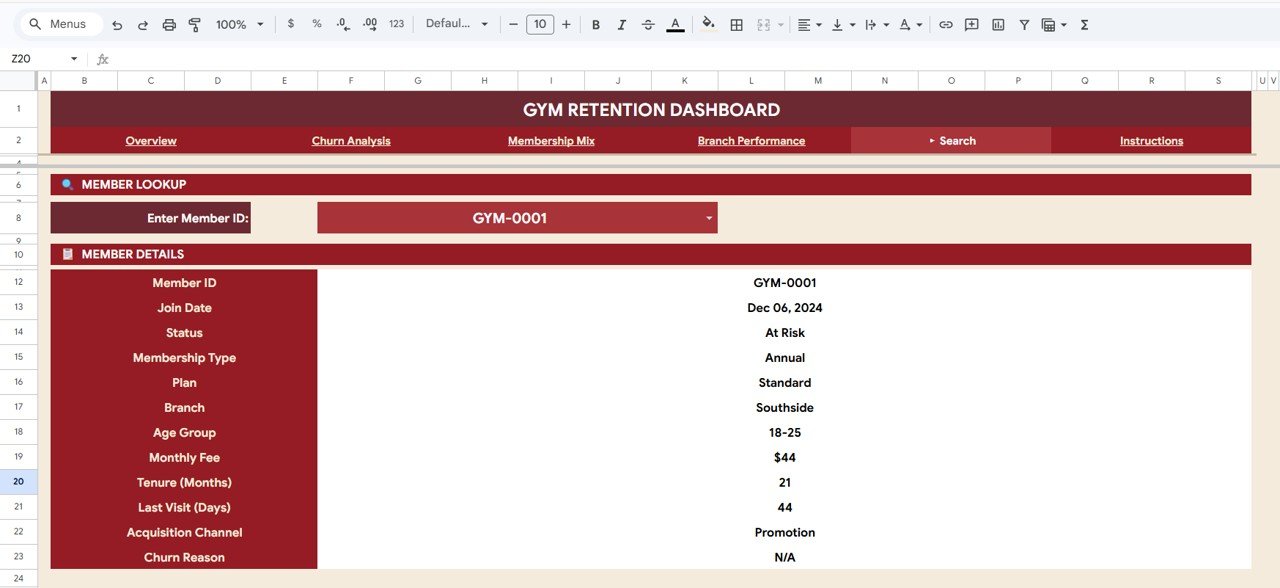 Search tab
6 — Data Sheet
Your single source of truth. Add member records row-by-row in the provided format and every chart, KPI, and analysis page updates automatically when you enter data. No macros, no coding, no pivot tables to manage.
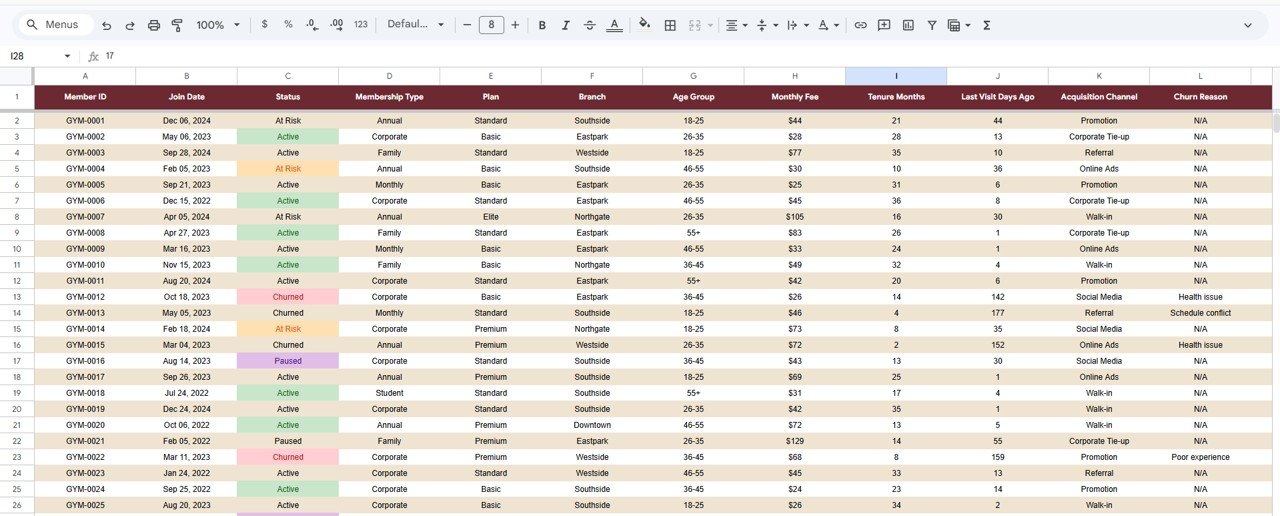 Data Sheet tab
📊 Gym Retention Dashboard in Google Sheets vs. Microsoft Excel Dashboard vs. Paid Gym SaaS — Where This Fits
| Feature | Gym Retention Dashboard (Google Sheets) | Microsoft Excel Dashboard | Paid Gym SaaS (Mindbody / Glofox / Gymdesk) |
|---|---|---|---|
| Cost | $9.99 one-time | $17-25 one-time | $129–$349 / month |
| Platform | Google Sheets (cloud) | Excel Desktop (offline) | Web + mobile app |
| Setup time | ✅ Under 10 minutes | ✅ Under 10 minutes | 2-6 weeks onboarding |
| Real-time team collaboration | ✅ Built-in (Google Sheets) | ❌ File-based sharing | ✅ Cloud native |
| Churn reason analysis | ✅ Dedicated page | Build manually | ⚠️ Varies by plan tier |
| Branch-level retention comparison | ✅ Included | Build manually | ✅ In higher tiers |
| Member search by ID | ✅ Dropdown lookup | ⚠️ Requires VBA or manual filter | ✅ Built-in CRM |
| Year-1 cost at 5 users | $9.99 total | $17-25 total | $1,548–$4,188 |
| Data ownership | ✅ Your Google Drive | ✅ Your local file | ❌ Vendor-hosted |
For gym owners who want dedicated retention and churn analytics without paying $1,500+ a year for Mindbody or Glofox, the Gym Retention Dashboard in Google Sheets sits in the sweet spot.
👥 Who This Template Is For — and Who It’s Not For
✅ This template is built for:
- Gym owners and fitness studio managers with 50–5,000 members who need to understand why members cancel and which branches retain best
- Membership directors tracking retention rate, churn reasons, and tenure trends across multiple locations
- Marketing managers analyzing which acquisition channels deliver the longest-staying members
- Small-to-mid gym chains comparing branch-level retention performance side-by-side
- Google Sheets users who want a finished retention analytics template to customize rather than build from scratch
❌ This template is NOT for:
- Large enterprise gym chains with 50+ locations needing SOC 2, SSO, and 24/7 vendor support — go with Mindbody Enterprise or ABC Fitness
- Gyms that need a booking, payments, and door-access system — this is an analytics dashboard, not a gym management platform
- Users who don’t have a Google account or prefer to work entirely offline — consider the Gym Fitness Business Dashboard in Excel instead
⚙️ How to Use the Gym Retention Dashboard in Google Sheets
- Open the PDF guide included in your download — it contains the Google Sheets copy link.
- Click the link to create your own editable copy in Google Drive.
- Navigate to the Data Sheet tab and replace the sample member records with your own gym data, keeping the same column structure.
- All 4 analysis pages, KPI cards, and charts will update automatically.
- Use the slicers on the Overview page to filter by branch, membership type, status, plan, or age group.
- Use the Search tab to look up any member’s complete profile by selecting their Member ID from the dropdown.
💼 Real-World Use Cases
Rahul manages a 3-branch gym chain with 1,200 members in Delhi. He opens the Gym Retention Dashboard every Monday and checks the Branch Performance page. Last quarter, he discovered his Noida branch had an average tenure of just 4.2 months compared to 8.1 months at his flagship — the Churn Analysis page showed “lack of parking” as the top reason, something Mindbody’s standard reports never surfaced.
Sophie runs a boutique fitness studio with 300 members in Melbourne. She uses the Membership Mix page to compare retention across annual vs monthly plan holders. The data showed annual members stay 3x longer on average, so she shifted her marketing budget toward annual-plan promotions and cut monthly churn by 18% in one quarter — without paying $229/month for Glofox analytics.
Carlos is a membership director at a mid-size health club in Miami. He uses the Search tab before every retention call to pull up a member’s full profile — join date, last visit, plan type, and churn reason — so conversations feel personalized. The Churn by Original Join Month chart helped him identify that January joiners churn 40% faster than April joiners, reshaping his onboarding strategy.
❓ Frequently Asked Questions
What KPIs does the Gym Retention Dashboard in Google Sheets track?
The Gym Retention Dashboard in Google Sheets tracks 4 primary KPIs — Total Members, Active Members, Retention Rate, and Monthly Revenue — plus 12 analytical charts across churn analysis, membership mix, branch performance, and member search pages covering churn reasons, tenure, acquisition channels, and age-group breakdowns.
How does this compare to Mindbody or Glofox?
Mindbody and Glofox are full gym management platforms costing $129–$349 per month. The Gym Retention Dashboard in Google Sheets is a one-time $9.99 analytics template focused specifically on member retention, churn analysis, and branch-level performance. If you already have a booking system, this dashboard adds the retention visibility those platforms often lack in standard tiers.
How long does setup take?
Under 10 minutes. Open the PDF, click the Google Sheets link, replace sample data with your member records, and every page updates. No onboarding, no training calls, no account creation required.
Can I use this dashboard for multiple gym branches?
Yes. The Gym Retention Dashboard includes a dedicated Branch Performance page comparing members, revenue, tenure, and status across all your locations. Add your branch data in the Data Sheet and every branch chart updates automatically.
Do I need advanced Google Sheets skills?
No. The Gym Retention Dashboard runs entirely on built-in Google Sheets formulas and charts. Replace the sample data in the Data Sheet tab and everything updates. No macros, no scripts, no coding needed.
Can I customize the charts and add new KPIs?
Yes. Since this is a native Google Sheets file, you can modify charts, add new KPIs, change colors, adjust formulas, and extend the data model to match your specific retention tracking needs.
Is the Gym Retention Dashboard available in other formats?
Currently this retention-focused template is available in Google Sheets. For broader gym business analytics, explore the Gym Fitness Business Dashboard in Excel, Gym Fitness Business Dashboard in HTML, and Fitness Trainer Dashboard in Power BI.
👤 About the Author
Built by PK — Microsoft Certified Professional with 15+ years of Excel, Google Sheets, and Power BI experience. Founder of NextGenTemplates, reaching 300K+ subscribers across YouTube channels (@PK-AnExcelExpert, @NextGenTemplates, @NeoTechNavigators). Every template is hand-built and tested before release.
🔗 Explore Related Templates
Also available as: Gym Fitness Business Dashboard in Excel | Gym Fitness Business Dashboard in HTML | Gym Fitness Business Dashboard in Power BI
Related picks from our Google Sheets Dashboard Templates collection:
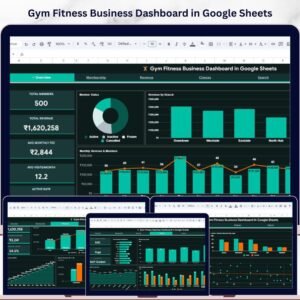
- 🔹 Gym Fitness Business Dashboard in Google Sheets — broader gym business view with membership, revenue, and class analytics.
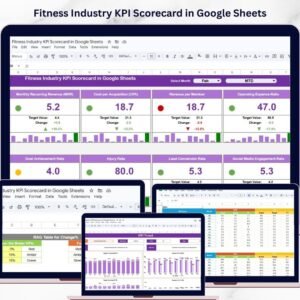
- 🔹 Fitness Industry KPI Scorecard in Google Sheets — MTD/YTD KPI tracking with trend analysis and traffic-light indicators.
- 🔹 CrossFit Gym KPI Dashboard in Google Sheets — CrossFit-specific KPIs including attendance, trainer performance, and revenue metrics.
📖 Click here to read the Detailed Blog Post
Watch the step-by-step video tutorial:
🎥 Visit our YouTube channel for step-by-step video tutorials
👉 YouTube.com/@NextGenTemplates