



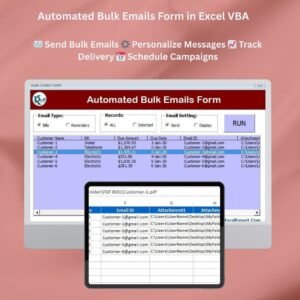
The Automated Bulk Emails Form in Excel VBA is a ready-made Excel VBA email tool that lets businesses, marketers and individuals send personalized bulk emails directly from Excel. It brings recipient lists, reusable email templates, scheduling and delivery tracking into one Excel workbook, so you spend less time on repetitive messages and communicate more efficiently.
Upload or import your recipient list, write a personalized message, and let the form automate the sending. You can manage email templates, track sent emails and review bounce-back reports, which makes it useful for email marketing, customer communication and bulk notifications.

Key Features of the Automated Bulk Emails Form in Excel VBA
- Bulk email sending: Send personalized bulk emails to multiple recipients at once, directly from Excel.
- Customizable email templates: Create and customize templates with personalized fields such as recipient names, subject lines, messages or order details.
- Recipient list management: Import and manage recipient lists so your contact details stay accurate and up to date.
- Scheduled email sending: Set up automated scheduling to send messages at a specified time, or send immediately.
- Delivery and bounce-back tracking: Track email delivery status and manage bounce-back reports to keep communication successful.
- Real-time updates: Monitor sending progress and view sent emails in real time.
- User-friendly interface: A simple form-based interface that anyone can use without coding expertise.
Why You’ll Love This Excel VBA Email Tool
- Automates email campaigns: Save time by automating bulk emails with personalized content.
- Increases communication efficiency: Reach large numbers of recipients quickly with customized messages.
- Reusable templates: Adapt email templates for different campaigns and reuse them later.
- Confidence in delivery: Delivery status and bounce-back tracking show whether your emails are reaching recipients.
- Built for businesses and marketers: Ideal for email marketing campaigns, customer communication and bulk notifications.
What’s Inside the Automated Bulk Emails Form in Excel VBA?
| Component | What it does |
|---|---|
| Email Sending Form | A user-friendly interface for sending bulk emails to multiple recipients at once. |
| Customizable Templates | Personalize email messages and create reusable templates for future campaigns. |
| Recipient List Management | Import and manage recipient lists for more effective email targeting. |
| Tracking and Analytics | Monitor delivery status and bounce-back reports to improve campaign performance. |
| Real-Time Progress | Follow the progress of your bulk send for smooth execution. |
Who Is It For?
- Small business owners who want to contact customers without manual, one-by-one emailing.
- Email marketers running personalized campaigns from an Excel list.
- Customer service teams sending updates and notifications.
- Event planners sharing invitations, reminders and announcements.
- Sales teams reaching prospects and clients with tailored messages.
- Freelancers and consultants managing client communication.
How to Use the Automated Bulk Emails Form
- Download the template: Get immediate access to the Excel file after purchase, then unzip it.
- Enable macros: Make sure macros are enabled before use (see the tutorial link below).
- Customize email templates: Design your templates and personalize fields like names, subject lines and messages.
- Import the recipient list: Add or import recipients directly into the form for bulk distribution.
- Schedule and send: Set a sending schedule or send immediately with a few clicks.
- Track and analyze: Monitor delivery status and review bounce-back reports.
After downloading and unzipping this file, ensure that macros are enabled before use. Refer to our tutorial for step-by-step instructions on enabling macros in Excel: https://www.pk-anexcelexpert.com/4-easy-ways-to-enable-macros-in-excel-vba/
Click here to read the detailed blog post
Watch the Step-by-Step Video Tutorial
Visit our YouTube channel to learn from step-by-step video tutorials: Youtube.com/@PKAnExcelExpert
Frequently Asked Questions
What does the Automated Bulk Emails Form in Excel VBA do?
It lets you send personalized bulk emails to multiple recipients directly from Excel, using customizable templates, imported recipient lists, scheduling and delivery tracking in one workbook.
Can I personalize each email?
Yes. Templates support personalized fields such as recipient names, subject lines, messages and order details, so every recipient gets a tailored message.
Does it support recipient list management?
Yes. Recipient list management lets you import and manage lists so contact details stay accurate and up to date.
Can I schedule emails?
Yes. You can set emails to send at a specified time or send them immediately.
Does it include bounce-back tracking?
Yes. Delivery and bounce-back tracking lets you monitor delivery status and manage bounce-back reports, and you can watch sending progress in real time.
Do I need coding skills?
No. The form-based interface is designed for anyone to use without coding expertise. You only need to enable macros after unzipping the file.
Boost your email communication efficiency and automate bulk sending with this customizable Excel VBA tool, ideal for any email marketing or communication campaign.
Also check our Asset Transfer Management System V1.0
Last updated: October 2026
Compatibility and Requirements
- Needs Microsoft Excel desktop on Windows with macros enabled, because the file runs on VBA.
- It does not work in Excel for the web, Google Sheets or the Excel mobile apps. Microsoft explains macro settings in Enable or disable macros in Microsoft 365 files.
Related Excel Email Automation Templates
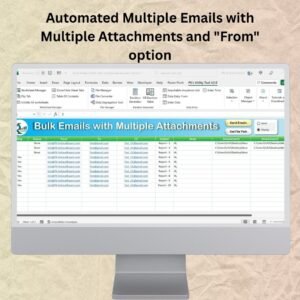
- Automated Multiple Emails with Multiple Attachments and “From” option: sends emails with attachments
- Email Reminder Scheduler in Excel: schedules reminder emails
- Send bulk emails using VBA and Outlook: another bulk email tool
- Bulk Auto Emailer with Picture Signature and HTML body: adds a picture signature and HTML body
- Email Data Consolidation Tool in Excel: collects email data into Excel
Browse all Excel VBA tools or the Excel utilities and converters.






Reviews
There are no reviews yet.