


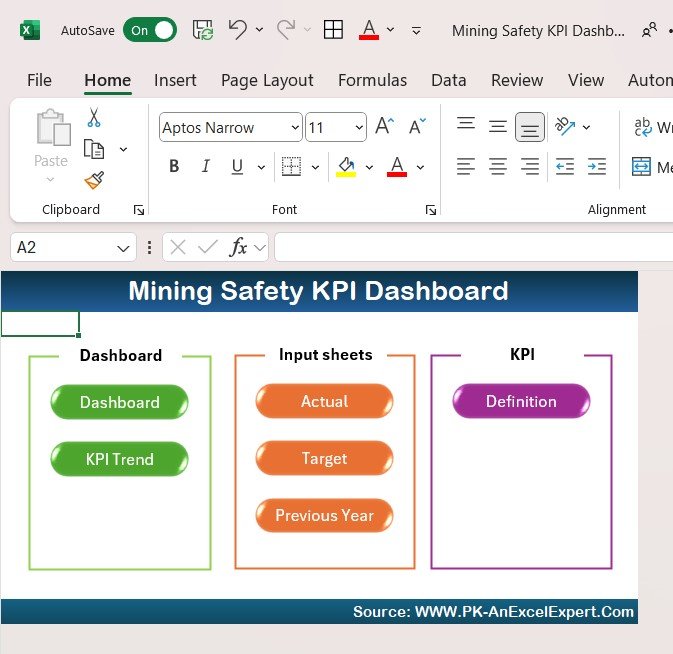



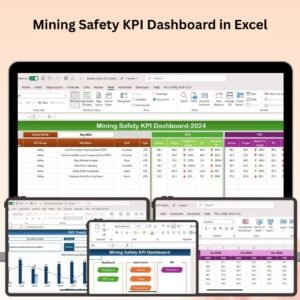
The Mining Safety KPI Dashboard in Excel is an essential tool designed to help mining operators, safety managers, and business owners track, analyze, and optimize key safety performance indicators (KPIs) within the mining industry. This Excel-based dashboard provides real-time insights into critical safety metrics such as accident rates, incident response times, compliance rates, and worker safety training, enabling you to ensure a safe and compliant mining operation.
With customizable reports, interactive charts, and detailed tracking, this dashboard helps you monitor safety performance, reduce risks, and improve overall safety culture in your mining operations. Whether you’re overseeing a large mining site or a smaller operation, this tool ensures that safety standards are consistently met and that you stay ahead of potential hazards.

Key Features of the Mining Safety KPI Dashboard in Excel:
⚠️ Comprehensive Safety Metrics Monitoring
Track KPIs such as accident frequency rate (AFR), incident response times, lost-time injury (LTI) rate, and safety audit results to evaluate overall safety performance.
💡 Safety Compliance Tracking
Ensure that your mining operations comply with industry regulations by tracking compliance with safety protocols, inspections, and audits.
📊 Incident and Accident Analysis
Monitor the number of safety incidents, near-misses, and accidents that occur on-site. Use this data to identify patterns, reduce risks, and improve safety protocols.
📝 Safety Training and Education Tracking
Keep track of worker safety training programs and certifications, ensuring that all employees are up to date with safety protocols and procedures.
📅 Customizable Reporting and Dashboards
Generate customized reports and dashboards that summarize safety performance metrics, providing stakeholders and management with clear, actionable insights.
🚀 Why You’ll Love the Mining Safety KPI Dashboard in Excel:
✅ Track Safety Performance – Monitor key safety KPIs such as accident rates, LTI, and AFR to assess the safety culture and effectiveness of your mining operations.
✅ Ensure Regulatory Compliance – Track safety compliance to ensure that your operations meet industry standards and legal requirements.
✅ Analyze Safety Incidents – Use data-driven insights to identify safety hazards, analyze incidents, and reduce the risk of future accidents.
✅ Improve Worker Safety – Track safety training and certifications to ensure that all workers are properly trained and aware of safety procedures.
✅ Customizable and Easy-to-Use – The Excel dashboard is simple to use, and you can tailor it to suit the specific safety needs of your mining operations.
✅ Data-Driven Decision Making – Use real-time data and visualizations to make informed decisions and improve safety protocols across your mining operations.
What’s Inside the Mining Safety KPI Dashboard in Excel:
- Safety Incident Tracking: Track the number of accidents, near misses, and safety violations to evaluate the effectiveness of your safety measures.
- Compliance Monitoring: Monitor compliance with safety regulations, inspections, and audits to ensure legal and industry-standard adherence.
- Safety Performance Metrics: Track KPIs such as accident frequency rate (AFR), lost-time injury (LTI), and the number of safety drills conducted to assess overall safety performance.
- Training and Certification Tracker: Keep track of worker safety certifications and training sessions to ensure all employees are up-to-date with required safety knowledge.
- Real-Time Data Visualizations: Use interactive charts and graphs to visualize key safety metrics in real-time, making it easy to spot trends and take corrective action.
- Custom Reports and Dashboards: Create customized reports that summarize safety data for management and stakeholders, ensuring transparency and actionability.
How to Use the Mining Safety KPI Dashboard in Excel:
1️⃣ Download the Template – Instantly access your Excel file upon purchase.
2️⃣ Input Safety Data – Enter key data points such as accident frequency, compliance inspection results, training sessions, and incident response times into the dashboard.
3️⃣ Track Safety Metrics – Monitor critical safety KPIs like LTI, AFR, and compliance rate in real time to evaluate your operations’ safety effectiveness.
4️⃣ Analyze Trends – Use the data to identify trends in safety incidents, compliance, and training to make informed decisions and prevent accidents.
5️⃣ Generate Reports – Create customized reports for safety audits, management reviews, or regulatory compliance purposes.
Who Can Benefit from the Mining Safety KPI Dashboard in Excel:
- Mining Safety Managers
- Site Supervisors
- Operations Managers
- Environmental and Health Safety (EHS) Teams
- Compliance Officers
- Business Owners in the Mining Industry
- Regulatory Compliance Teams
- Data Analysts in the Mining Sector
The Mining Safety KPI Dashboard in Excel is the ideal tool for anyone responsible for maintaining safety standards in the mining industry. It helps you track, analyze, and improve safety performance across your operations, reducing risks and ensuring a safer work environment.
Click here to read the Detailed blog post
https://www.pk-anexcelexpert.com/mining-safety-kpi-dashboard-in-excel/
Visit our YouTube channel to learn step-by-step video tutorials
Youtube.com/@PKAnExcelExpert
Compatibility and Requirements
- Works in Microsoft Excel desktop (Excel 2016 or later, or Microsoft 365).
- The dashboard uses standard Excel charts. Microsoft explains charts in Create a chart from start to finish.
Frequently Asked Questions
Which safety KPIs does it track?
Accident frequency rate (AFR), lost-time injury (LTI) rate, incident response times, safety audit results, compliance rates and safety drills.
Can I record near misses?
Yes. You can track accidents, near misses and safety violations on site.
Does it track safety training?
Yes. It keeps a record of worker safety training sessions and certifications.
Can I make reports for management?
Yes. You can build custom reports for safety audits, management reviews or regulatory compliance.
Related Mining Templates
- Mining Safety KPI Dashboard in Google Sheets: the same topic in Google Sheets
- Mining KPI Dashboard in Excel: wider mining KPIs in Excel
- Mining Operations Dashboard in Excel: tracks mining operations
- Mining KPI Dashboard in Power BI: mining KPIs in Power BI
Browse all Excel KPI dashboards or the Excel health and safety templates.































Reviews
There are no reviews yet.