

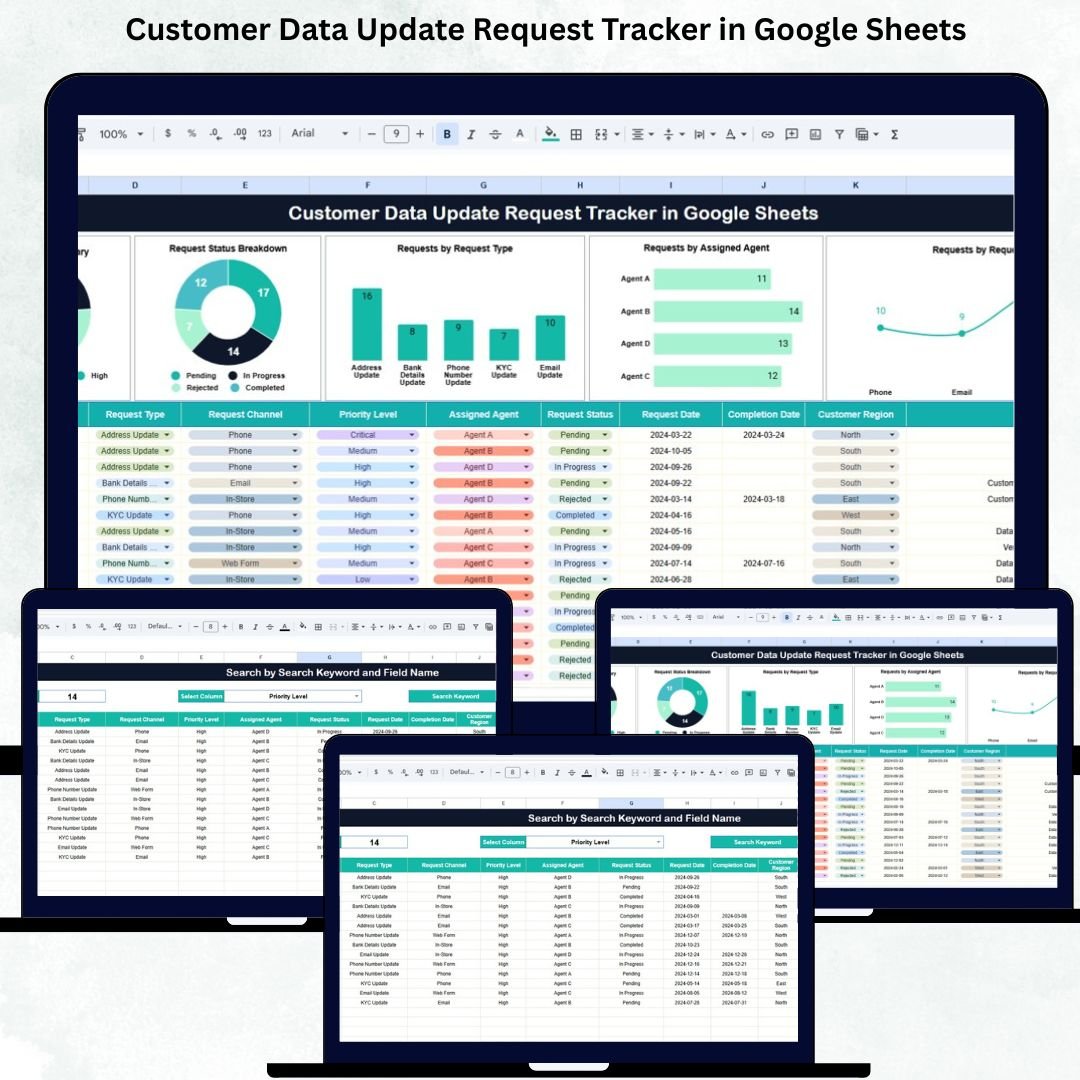


Managing customer data updates is a major responsibility for any organization. Every month, hundreds of customers request changes—address updates, email corrections, phone number changes, KYC updates, account details, payment information, and more. When these requests are tracked manually through emails, notes, or scattered spreadsheets, teams face delays, errors, and missed requests. This leads to compliance risks, unhappy customers, and slow operations. The Customer Data Update Request Tracker in Google Sheets solves this problem instantly with a clean, automated, and centralized system.
This ready-to-use tracker helps organizations handle large volumes of update requests quickly and accurately. It brings structure, transparency, and speed to data-management processes. With smart charts, organized fields, and a powerful search system, teams can monitor workload, track request progress, assign tasks effectively, and ensure that every customer receives timely service. Because the tracker runs on Google Sheets, it updates automatically, supports collaboration, and works on any device—making it ideal for customer service, CRM, operations, and compliance teams.
✨ Key Features of the Customer Data Update Request Tracker in Google Sheets
📋 1. Structured Request Management
The tracker captures every important detail including customer name, request type, priority level, assigned agent, request status, and dates. This ensures no request is ever lost or overlooked.
⚡ 2. Real-Time Dashboard Updates
As you update the Tracker Sheet, all charts refresh instantly. Managers get immediate visibility into request volume, bottlenecks, and pending items.
🎯 3. Priority-Level Insights
View how many requests are Low, Medium, High, or Urgent. This helps teams decide which requests need immediate attention.
📊 4. Status Breakdown
The dashboard highlights how many requests are Open, In Progress, Completed, or On Hold. This helps reduce pending workloads.
👤 5. Agent Workload Tracking
Track how many requests each agent is handling. This helps managers distribute tasks efficiently and avoid overload.
🌐 6. Request Channel Analysis
The tracker shows whether requests came through Phone, Email, Chat, Web Form, or In-Branch—helping organizations understand customer behavior.
📦 What’s Inside the Customer Data Update Request Tracker in Google Sheets
🗂️ 1. Tracker Sheet (Core Data Entry Page)
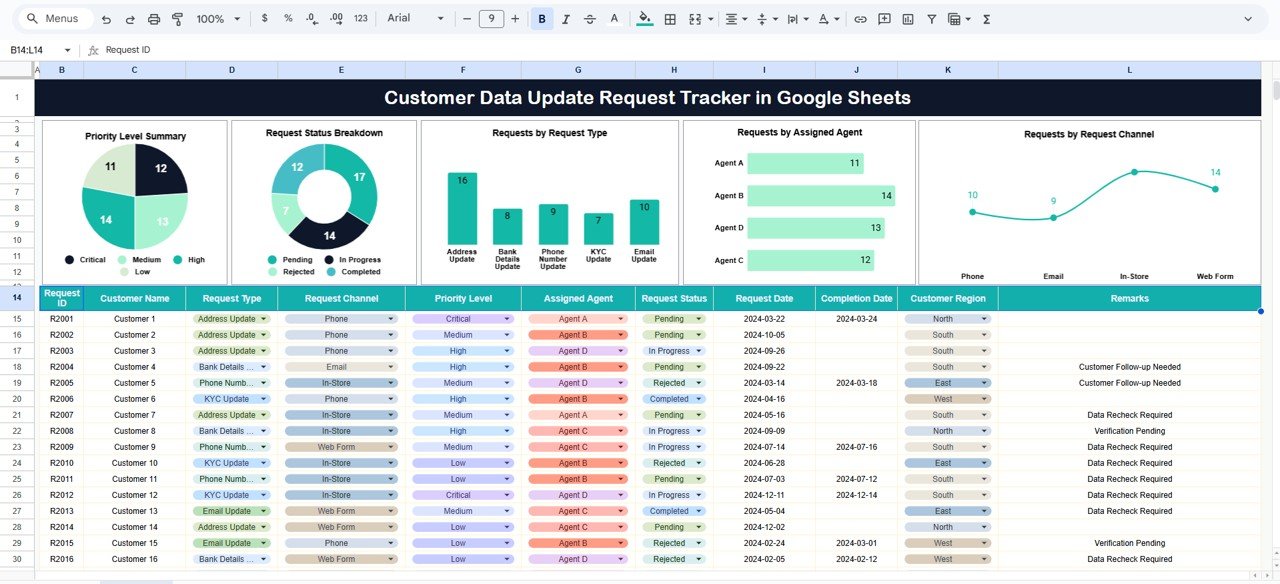
This is the main working sheet where teams enter customer requests. It includes fields such as:
Request ID
Customer Name & Customer ID
Request Type
Request Channel
Priority Level
Assigned Agent
Request Status
Date Received & Date Completed
Comments
Once entered, these records automatically feed into the charts and search system.
📊 2. Dashboard Charts for Insights
The dashboard includes five powerful charts:
📌 Priority Level Summary
Shows how many requests fall under each priority category.
📌 Request Status Breakdown
Helps teams quickly assess the workload and delays.
📌 Requests by Request Type
Displays which request types are most common.
📌 Requests by Assigned Agent
Identifies workload balance across team members.
📌 Requests by Request Channel
Shows how customers prefer to submit their update requests.
🔍 How the Search System Helps
With the smart Search Panel, users simply enter:
A Search Keyword, and
A Field Name
The tracker instantly filters matching records.
This system helps teams quickly:
Pull up customer updates
Check agent performance
Locate pending requests
Filter by priority or channel
Search becomes instant, smooth, and error-free.
🎯 Who Can Benefit from the Customer Data Update Request Tracker in Google Sheets
💼 Customer Service Teams
Track customer updates with zero confusion.
📊 CRM & Operations Teams
Monitor performance and improve turnaround time.
🏢 Managers & Supervisors
Get real-time visibility into workload and delays.
🔒 Compliance Teams
Maintain clean, audit-ready records.
Advantages of the Customer Data Update Request Tracker
✔ Faster Request Processing
Teams respond quicker, reducing customer waiting time.
✔ Improved Customer Satisfaction
Accurate and timely updates build trust.
✔ Real-Time Insights
All charts update instantly as data changes.
✔ Fair Task Allocation
Agent workload charts prevent burnout.
✔ No Software Cost
Google Sheets is completely cloud-based and free.
✔ Better Decision-Making
Trends reveal process gaps and improvement areas.
Opportunities for Enhancement
Organizations can extend this tracker with:
Automated email notifications
Google Apps Script integrations
SLA monitoring
Aging analysis
Customer communication logs
Update reason categorization
These improvements make the system even more powerful.
Click here to read the Detailed blog post
Watch the step-by-step video tutorial:
Visit our YouTube channel for step-by-step tutorials — Youtube.com/@NeotechNavigators
Compatibility and Requirements
- Works in Google Sheets. You need a free Google account and a web browser.
- Request type, priority level, request channel and request status are entered in the Tracker Sheet. Google explains dropdown lists in Create an in-cell dropdown list.
Frequently Asked Questions
What details can I record for each update request?
The Tracker Sheet has fields for Request ID, Customer Name and Customer ID, Request Type, Request Channel, Priority Level, Assigned Agent, Request Status, Date Received, Date Completed and Comments.
Which charts are on the dashboard?
Five charts: Priority Level Summary, Request Status Breakdown, Requests by Request Type, Requests by Assigned Agent and Requests by Request Channel. They refresh when you update the Tracker Sheet.
How do I find a specific request?
Use the Search Panel. Enter a search keyword and a field name, and the tracker filters the matching records.
Can I see how much work each agent has?
Yes. The Requests by Assigned Agent chart shows how many requests each team member is handling, so you can spread the workload.
Is there an Excel version of a similar request tracker?
Yes. See the Customer Service Request Tracker in Excel, which tracks customer requests in Excel.
Related Customer Service Templates
- Customer Service Request Tracker in Google Sheets: a tracker for general customer service requests
- Customer Complaint Tracker in Google Sheets: log and follow customer complaints
- Customer Service Dashboard in Google Sheets: a dashboard view of service performance
- Work Order Request Tracker in Google Sheets: track work order requests in the same format
- Google Sheets Business Pack (Pro): 14 business templates in one download
Browse all Google Sheets trackers.

































Reviews
There are no reviews yet.