



Managing contracts effectively is one of the most important responsibilities in any organization. Whether you work in procurement, vendor management, operations, sales, finance, or legal—contract performance and renewal tracking can determine operational stability and financial success. Missing a renewal date, overlooking an expiring contract, or mismanaging approval scores can quickly lead to cost overruns, compliance issues, and service interruptions. The Contract Performance & Renewal Dashboard in Google Sheets is a powerful solution designed to eliminate these challenges and bring your entire contract lifecycle into a single, visual, cloud-based system.Contract Performance & Renewal Dashboard in Google Sheets
This ready-to-use dashboard gives you a complete view of contract performance, renewal patterns, ownership, contract value, approval scores, and month-wise movement. With automated charts, structured worksheets, and real-time collaboration, it becomes an essential tool for teams that want accuracy, visibility, and accountability.Contract Performance & Renewal Dashboard in Google Sheets
✨ Key Features of the Contract Performance & Renewal Dashboard in Google Sheets
📊 Overview Sheet — Centralized Performance Snapshot
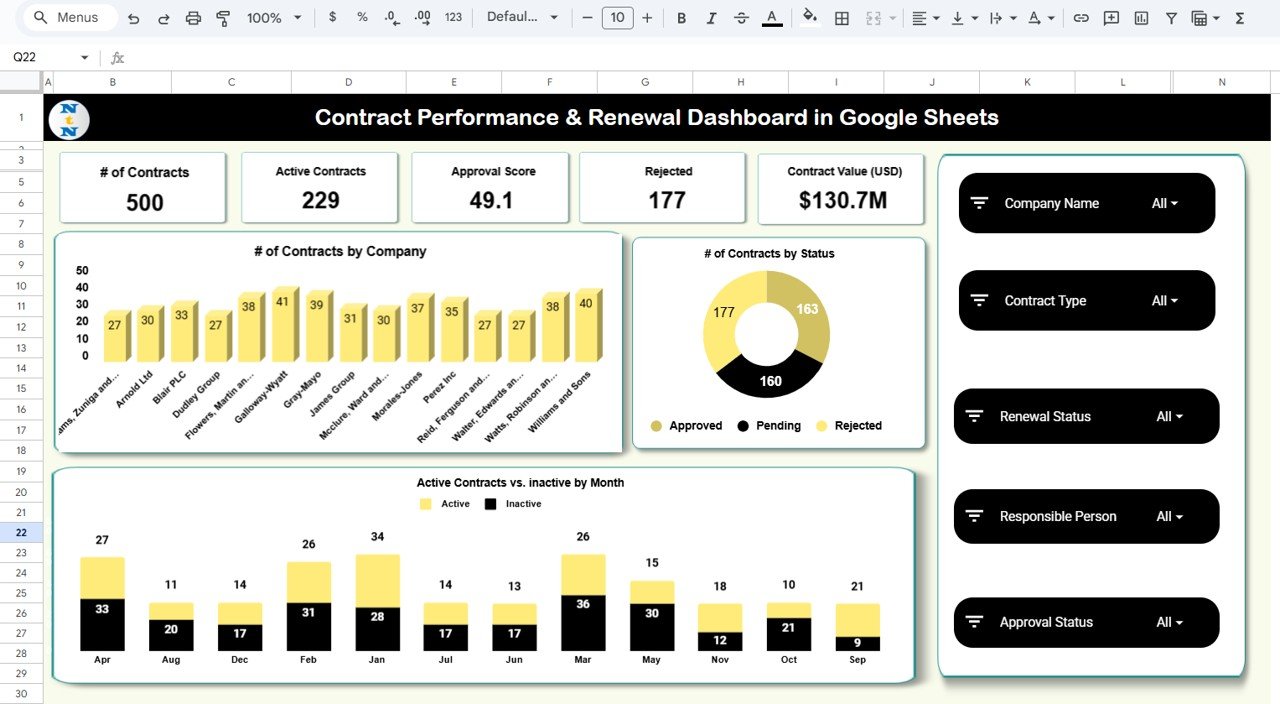
The Overview Sheet works as the command center of the entire dashboard. It displays the most important KPIs as clean visual cards:Contract Performance & Renewal Dashboard in Google Sheets
Total Number of Contracts
Active Contracts
Approval Score
Rejected Contracts
Total Contract Value (USD)
These KPIs help decision-makers evaluate contract health instantly.
The sheet also includes powerful charts such as:
# of Contracts by Company
# of Contracts by Status
Active vs Inactive Contracts by Month
This makes it easy to identify contract patterns, performance issues, and vendor concentration.
📈 Contract Analysis Sheet — Deep Contract Insights
This sheet gives you detailed analysis of contract behavior by type. It includes:
📘 Active Contracts by Contract Type
📊 Number of Contracts by Contract Type
💰 Contract Value (USD) by Contract Type
⭐ Average Approval Score by Contract Type
This helps procurement, legal, and finance teams understand which contract categories carry the most value, the highest risk, or the heaviest workload.
🔁 Renewal Analysis Sheet — Renewal Performance Tracking
Renewal mismanagement is one of the biggest risks organizations face. This sheet helps solve it with insights like:
🔄 Active Contracts by Renewal Status
📑 Number of Contracts by Renewal Status
💵 Contract Value (USD) by Renewal Status
These visuals help managers forecast renewals, plan follow-ups, and prevent costly contract expirations.
🧑💼 Responsible Person Analysis Sheet — Ownership & Accountability
Every contract must have a clear owner. This sheet tracks:
🟩 Active Contracts by Responsible Person
🧾 Number of Contracts by Responsible Person
💰 Contract Value by Responsible Person
⭐ Average Approval Score by Responsible Person
It supports resource planning and performance evaluation across teams.
📅 Monthly Trends Sheet — Month-over-Month Analysis
This sheet shows how contract activity changes throughout the year:
📊 Active Contracts by Month
📈 Number of Contracts by Month
💰 Contract Value (USD) by Month
⭐ Average Approval Score by Month
These insights help teams predict workload, prepare renewal cycles, and manage annual planning.
🔍 Search Sheet — Smart Contract Lookup Tool
The Search Sheet allows fast, filtered search using:
Search Keyword
Field Name
You can instantly find contracts by:
Company
Responsible Person
Contract Type
Renewal Status
Month
Contract Value
Contract ID
This feature is especially useful during audits, contract review meetings, and compliance reporting.
📦 What’s Inside the Contract Performance & Renewal Dashboard in Google Sheets
Overview Dashboard
Contract Analysis Sheet
Renewal Analysis Sheet
Responsible Person Analysis Sheet
Monthly Trends Sheet
Search Sheet
Data Sheet (complete contract database)
Automated charts & visuals
Drop-down filters
Approval score analytics
Ownership tracking
🛠️ How to Use This Dashboard
1️⃣ Fill the Data Sheet
Enter contract details such as company name, contract type, renewal status, value, responsible person, and approval score.
2️⃣ Review the Overview Dashboard
Monitor core KPIs and performance trends instantly.
3️⃣ Analyze Contract Type & Renewal Data
Use Contract Analysis and Renewal Analysis to identify patterns and risk areas.
4️⃣ Track Monthly Trends
Understand month-by-month changes for better planning.
5️⃣ Use Search Sheet for Quick Lookups
Ideal for audits, vendor meetings, and compliance checks.
👥 Who Can Benefit from This Dashboard
🧾 Procurement Teams
Track vendor contracts, renewal cycles, and approval scores.
⚖️ Legal Departments
Monitor compliance, contract types, and approval effectiveness.
📊 Finance Managers
Understand contract value distribution and risk exposure.
🏢 Operations & Administration
Gain visibility into upcoming contract deadlines and workload.
📈 Business Leaders
Get a clear overview of contract health for decision-making.
The Contract Performance & Renewal Dashboard in Google Sheets is more than a spreadsheet—it’s a complete contract intelligence system. With real-time collaboration, fully automated visuals, and structured analysis sheets, it helps organizations maintain compliance, reduce risks, and plan renewals accurately.Contract Performance & Renewal Dashboard in Google Sheets
Click Here to Read the Detailed Blog Post
Watch the step-by-step video Demo:
Visit our YouTube channel for step-by-step tutorials:
👉 Youtube.com/@NeotechNavigators
Compatibility and Requirements
- Works in Google Sheets. You need a free Google account and a web browser.
- The Search sheet and the filters use dropdown lists. Google explains dropdowns in Create an in-cell dropdown list.
Frequently Asked Questions
Which sheets are included?
The dashboard has an Overview sheet, a Contract Analysis sheet, a Renewal Analysis sheet, a Responsible Person Analysis sheet, a Monthly Trends sheet, a Search sheet and a Data sheet that holds the full contract database.
What do I enter in the Data sheet?
You enter the company name, contract type, renewal status, contract value, responsible person and approval score for each contract. The other sheets and charts read from this data.
Can I see contract value by renewal status?
Yes. The Renewal Analysis sheet shows active contracts, the number of contracts and the contract value in USD for each renewal status.
How do I find one contract quickly?
Open the Search sheet, type a keyword and choose the field name. You can search by company, responsible person, contract type, renewal status, month, contract value or contract ID.
Can I track who owns each contract?
Yes. The Responsible Person Analysis sheet shows active contracts, the number of contracts, contract value and average approval score for each person.
Is there an Excel or Power BI version?
There is a Contract Management Dashboard in Excel and a Contract Management Dashboard in Power BI.
Related Contract Templates
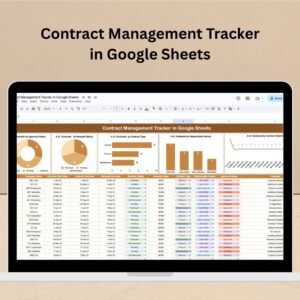
- Contract Management Tracker in Google Sheets: a tracker for your contract list in Google Sheets
- Vendor Contract Renewal Calendar in Google Sheets: a calendar of vendor renewal dates
- Contract Renewal Checklist in Google Sheets: a checklist for each renewal
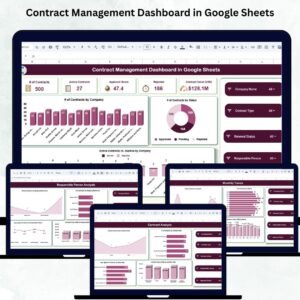
- Contract Management Dashboard in Excel: the Excel edition
- Procurement and Vendor Management Kit: a bundle of 7 templates for procurement and vendor work
Browse all Google Sheets dashboards.
































Reviews
There are no reviews yet.