



Managing IT support tickets efficiently is essential for ensuring smooth operations, faster resolutions, and higher employee satisfaction. Without a proper tracking system, support teams risk missed deadlines, unresolved issues, and declining service quality. The IT Support Ticket Dashboard in Google Sheets is a ready-to-use, interactive template designed to centralize ticket management, track team performance, and provide valuable insights at a glance.
This template empowers IT managers, helpdesks, and support teams to prioritize urgent tickets, monitor workloads, and analyze performance trends, all without the need for complex or costly ITSM tools.

🔑 Key Features of IT Support Ticket Dashboard
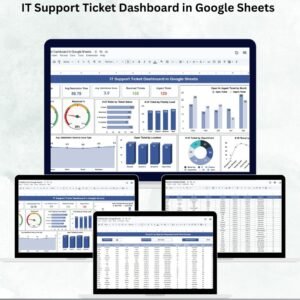
📊 Dashboard Sheet Tab – Central Overview
Cards show instant KPIs:
Total Tickets
Average Resolution Time (Hours)
Average Satisfaction Score
Open Tickets
Urgent Tickets
Charts included:
Resolved % vs In Progress %
Ticket distribution by Status
Ticket breakdown by Priority (Low/Medium/High)
Open vs Urgent Tickets by Month
Tickets by Department
Tickets by Assigned To (support agent performance)
Open Tickets by Location
Average Satisfaction Score by Issue Type
🔍 Search Sheet Tab – Quick Lookup
Filter tickets by any column and keyword.
Example: Search by “Email” under Issue Type to find all email-related tickets.
Perfect for following up on specific cases or identifying recurring problems.
🧾 Data Sheet Tab – Ticket Log
Stores all ticket details including:
Ticket ID
Issue Type
Department
Priority & Status
Assigned To
Location
Dates, Resolution Time, Satisfaction Score
Automatically feeds into the dashboard for real-time updates.
📦 What’s Inside the Dashboard
✅ 3 Core Sheets – Dashboard, Search, Data
✅ Comprehensive KPIs – Resolution time, satisfaction, urgent tickets
✅ Interactive Charts – Trends, workload, and performance metrics
✅ Search Functionality – Instantly find tickets by any detail
✅ Real-Time Updates – Dashboard auto-refreshes from the Data sheet
✅ Customizable Layout – Add or edit fields to fit your workflow
👥 Who Can Benefit from This Dashboard?
👨💻 IT Support Teams – Manage tickets, prioritize urgent issues, and reduce delays.
👩💼 IT Managers – Track performance and allocate resources effectively.
🏢 Organizations – Improve service quality and employee satisfaction.
🛠️ Helpdesk Providers – Provide transparency and insights to clients.
This tool is suitable for small teams and large enterprises alike, making IT support more structured and measurable.
📋 Best Practices for Using the Dashboard
🔄 Update Ticket Data Promptly – Ensure accuracy in metrics.
🎯 Assign Responsibilities Clearly – Use the Assigned To column for accountability.
📊 Monitor KPIs Regularly – Keep an eye on resolution times and satisfaction scores.
🚨 Highlight Urgent Tickets – Prioritize high-priority issues for faster resolutions.
💾 Back Up Data – Save monthly snapshots for trend analysis and audits.
✅ Advantages of IT Support Ticket Dashboard
Centralized Ticket Tracking – All issues in one place.
Performance Insights – Track agent, department, and location performance.
Better Prioritization – Identify and act on urgent tickets quickly.
Employee Satisfaction Monitoring – Capture real-time feedback with scores.
Customizable & Collaborative – Shareable in Google Sheets for team-wide use.
Cost-Effective – No expensive ITSM software required.
🔗 Click here to read the Detailed blog post
Watch the step-by-step video Demo:
🔗 Visit our YouTube channel to learn step-by-step video tutorials
Compatibility and Requirements
- Works in Google Sheets with a free Google account and a web browser. Nothing to install.
- Charts are standard Google Sheets charts. Google explains them in Add & edit a chart or graph.
Frequently Asked Questions
Which sheets are included?
Three: Dashboard, Search and Data.
What do the KPI cards show?
Total Tickets, Average Resolution Time (Hours), Average Satisfaction Score, Open Tickets and Urgent Tickets.
How do I find tickets for one issue type?
Use the Search sheet. Pick a column and a keyword, for example Email under Issue Type, to list every matching ticket.
What do I record for each ticket?
Ticket ID, issue type, department, priority, status, assigned to, location, dates, resolution time and satisfaction score.
Related IT Support Templates
- IT Support Ticket Dashboard in Excel: the same dashboard in Excel
- IT Support Ticket Dashboard in Power BI: the same dashboard in Power BI
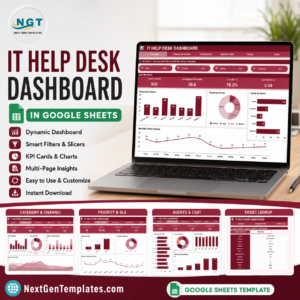
- IT Help Desk Dashboard in Google Sheets: another help desk view in Google Sheets
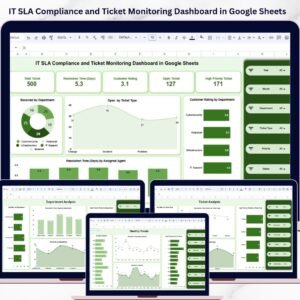
- IT SLA Compliance and Ticket Monitoring Dashboard in Google Sheets: adds SLA tracking
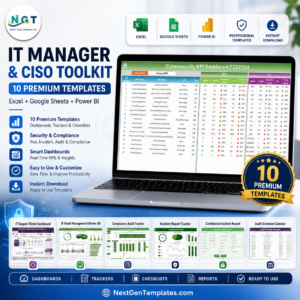
- IT Manager and CISO Toolkit: 10 IT templates in one bundle
Browse all Google Sheets dashboards or the Google Sheets templates.




Reviews
There are no reviews yet.