



The PPC Campaign Checklist in Excel is an essential tool for digital marketers, advertisers, and businesses managing pay-per-click (PPC) campaigns. This Excel-based checklist provides a structured way to plan, track, and optimize your PPC campaigns, ensuring that no important task is overlooked and that every campaign runs smoothly and efficiently.
From setting up your campaign to monitoring key metrics, this checklist helps streamline the PPC process, track budget allocation, and optimize ad performance. With this comprehensive tool, you can ensure that your PPC strategies are on track, deliver results, and maximize your return on investment (ROI).

Key Features of the PPC Campaign Checklist in Excel
📊 Campaign Setup Tracking
Keep track of every step of the campaign setup process, including keyword research, ad copy creation, landing page optimization, and targeting options.
💰 Budget Allocation & Management
Track your PPC campaign budget, ensuring that you allocate your spend wisely across different channels, keywords, and ad groups for maximum ROI.
📈 Performance Monitoring
Monitor key performance metrics such as click-through rates (CTR), conversion rates, and cost-per-click (CPC) in real-time to evaluate the success of your campaigns.
🎯 Campaign Goals & KPIs
Set clear campaign objectives and KPIs to measure success. Use the checklist to track progress and ensure that your PPC campaigns are aligned with business goals.
⚙️ Ad Performance Optimization
Track ad performance over time and make necessary adjustments to bidding strategies, keywords, and targeting options to improve campaign performance.
📅 Time-Based Task Management
Organize tasks by time to ensure you meet campaign deadlines and optimize the campaign effectively at every stage, from initial setup to ongoing monitoring.
Why You’ll Love the PPC Campaign Checklist in Excel
✅ Streamlined Campaign Setup
Easily plan, set up, and manage every aspect of your PPC campaign, from keyword research to landing page optimization and ad copywriting.
✅ Optimize Your Advertising Spend
Track your budget allocation and ensure that every penny is spent effectively to achieve the best ROI for your campaigns.
✅ Monitor & Analyze Performance
Keep track of essential PPC metrics such as CTR, CPC, and conversions to make data-driven decisions and optimize your ads for better performance.
✅ Improve Ad Effectiveness
Regularly review and optimize your ad copy, keywords, and bidding strategies to improve ad performance and maximize conversions.
✅ Customizable & Scalable
Tailor the checklist to suit your specific PPC campaign needs. Whether you’re managing a small campaign or handling multiple large-scale PPC strategies, this tool scales with your needs.
What’s Inside the PPC Campaign Checklist in Excel?
Campaign Setup Tracking: Track campaign setup tasks such as keyword research and ad copy creation.
Budget Allocation: Monitor and manage your PPC campaign budget for maximum ROI.
Performance Monitoring: Track CTR, CPC, and conversion rates in real-time.
Campaign Goals & KPIs: Set objectives and measure success against predefined KPIs.
Ad Performance Optimization: Continuously monitor and optimize ad performance over time.
Time-Based Task Management: Organize tasks to ensure timely completion and campaign optimization.
How to Use the PPC Campaign Checklist in Excel
1️⃣ Download the Template: Access the PPC Campaign Checklist in Excel instantly.
2️⃣ Set Up Your Campaign: Input your campaign goals, budget, and initial settings such as keywords and targeting options.
3️⃣ Track Performance: Monitor essential PPC metrics like CTR, CPC, and conversion rates.
4️⃣ Optimize Your Campaign: Make adjustments based on performance data to optimize ad performance and budget allocation.
5️⃣ Report & Analyze Results: Use the checklist to generate performance reports and adjust your strategy for continuous improvement.
Who Can Benefit from the PPC Campaign Checklist in Excel?
🔹 Digital Marketers & PPC Specialists
🔹 E-commerce & Retail Businesses
🔹 Small & Medium Enterprises (SMBs)
🔹 Advertising Agencies
🔹 Marketing Teams & Managers
🔹 Startups Looking to Launch PPC Campaigns
🔹 Business Owners & Entrepreneurs
Ensure that your PPC campaigns run smoothly, stay on budget, and drive results with the PPC Campaign Checklist in Excel. Stay organized, track performance, and optimize ad performance to maximize ROI.
Click here to read the Detailed blog post
Visit our YouTube channel to learn step-by-step video tutorials
Youtube.com/@PKAnExcelExpert
Compatibility and Requirements
- Works in Microsoft Excel desktop (Excel 2016 or later, or Microsoft 365).
- New to Excel? Microsoft’s Excel for Windows training covers the basics.
Frequently Asked Questions
What does the checklist cover?
It covers campaign setup tasks such as keyword research and ad copy, budget allocation, CTR, CPC and conversion rates, campaign goals and KPIs, and ongoing ad optimization.
How do I set up a campaign with it?
Enter your campaign goals, budget and initial settings such as keywords and targeting options. Then track performance as the campaign runs.
Which metrics can I track?
You can track CTR, CPC and conversion rates against the KPIs you set.
Can I report on results?
Yes. You can use the checklist to build performance reports and adjust your strategy.
Is there a Google Sheets version?
Yes. The PPC Campaign Checklist in Google Sheets covers the same tasks on that platform.
Related PPC and Digital Marketing Templates
- PPC Campaign Checklist in Google Sheets: the same checklist in Google Sheets
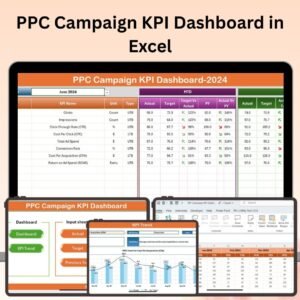
- PPC Campaign KPI Dashboard in Excel: track PPC KPIs on a dashboard
- SEO Audit Checklist in Excel: check your SEO alongside paid ads
- Digital Marketing KPI Dashboard in Excel: wider digital marketing KPIs
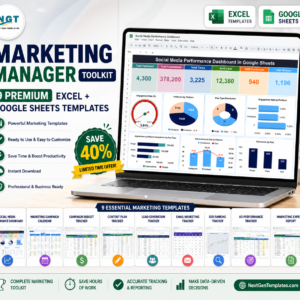
- Marketing Manager Toolkit: 9 Excel and Google Sheets marketing templates in one download
Browse all Excel checklists or the Excel sales and marketing templates.




















Reviews
There are no reviews yet.