



The Search Engine Marketing (SEM) KPI Dashboard in Excel is a powerful tool designed to help digital marketers efficiently track and analyze the performance of their SEM campaigns. This dashboard consolidates critical KPIs such as Click-Through Rate (CTR), Cost Per Click (CPC), Quality Score, and Return on Ad Spend (ROAS), giving marketers real-time insights into their campaign performance.
By using this Excel-based dashboard, you can optimize ad campaigns, enhance targeting, and allocate budgets more effectively, ultimately improving your SEM ROI and maximizing campaign success.

Key Features of the SEM KPI Dashboard in Excel
📊 Comprehensive KPI Tracking
Track Key Metrics: Monitor vital SEM KPIs like CTR, CPC, ROAS, and Quality Score to evaluate the effectiveness of your campaigns.
Real-Time Data Visualization: Use dynamic charts and graphs to visualize trends, compare performance across campaigns, and identify areas for improvement.
📈 Customizable Metrics
Tailor to Your Needs: Customize the dashboard to focus on KPIs that matter most for your business, such as campaign costs, conversions, or customer acquisition cost (CAC).
Data Integration: Easily import data from your SEM platforms like Google Ads, Bing Ads, or other analytics tools to ensure accurate, real-time tracking.
🔧 User-Friendly Interface
Easy Setup: The dashboard is designed to be intuitive and easy to use, with simple navigation and a layout that anyone can understand, even without advanced Excel skills.
Flexible Layout: Adjust the dashboard layout to suit your unique reporting needs, adding or removing KPIs as necessary.
📅 Performance Comparison and Analysis
Track MTD & YTD Performance: Monitor Month-to-Date (MTD) and Year-to-Date (YTD) performance to understand how campaigns are performing over different time frames.
Benchmark Against Targets: Compare actual performance with set targets and previous year data to assess campaign success and identify areas for optimization.
Benefits of Using the SEM KPI Dashboard in Excel
✅ Informed Decision-Making
Access real-time data that enables timely, data-driven decisions to improve SEM campaign effectiveness.
✅ Improved SEM Performance
Identify high-performing ads and underperforming campaigns, and make necessary adjustments to optimize ROI.
✅ Enhanced Accountability
With transparent tracking of KPIs, accountability is promoted across your marketing team, ensuring every campaign is aligned with your goals.
✅ Streamlined Reporting
The automated data visualization and performance tracking simplify the reporting process, saving time and effort while ensuring consistency in your SEM analysis.
Getting Started with Your SEM KPI Dashboard in Excel
Download the Template: Download the SEM KPI Dashboard template and begin customizing it for your campaigns.
Define Your KPIs: Set up the KPIs you want to track, such as CTR, CPC, and ROAS, and ensure they align with your SEM objectives.
Integrate Data: Import data from your SEM platforms (Google Ads, Bing Ads, etc.) to keep the dashboard updated with real-time insights.
Monitor & Analyze: Use the dashboard to track your SEM performance, compare actual performance with targets, and identify opportunities for improvement.
Optimize Campaigns: Based on your analysis, refine your SEM strategies to optimize your ad performance and budget allocation.
By utilizing the Search Engine Marketing (SEM) KPI Dashboard in Excel, your marketing team can optimize SEM campaigns, track performance, and make data-driven decisions that drive higher returns on investment.
Click here to read the Detailed blog post
Search Engine Marketing KPI Dashboard in Excel
Visit our YouTube channel to learn step-by-step video tutorials
YouTube.com/@PKAnExcelExpert
Watch the step-by-step video Demo:
Compatibility and Requirements
- Works in Microsoft Excel desktop (Excel 2016 or later, or Microsoft 365).
- Charts update from your data. Microsoft explains Excel charts in Create a chart from start to finish.
Frequently Asked Questions
Which SEM KPIs does the dashboard track?
It tracks click-through rate (CTR), cost per click (CPC), Quality Score and return on ad spend (ROAS).
Can I add other metrics?
Yes. You can add KPIs such as campaign costs, conversions or customer acquisition cost.
Where does the data come from?
You import data from your SEM platforms, such as Google Ads or Bing Ads, or other analytics tools.
Can I compare results with targets?
Yes. It shows MTD and YTD performance against your targets and the previous year.
Is there a Google Sheets version?
Yes. The Search Engine Marketing KPI Dashboard in Google Sheets covers the same KPIs in Google Sheets.
Related Search Marketing Templates
- Search Engine Marketing KPI Dashboard in Google Sheets: the same KPIs in Google Sheets
- SEO and SEM Services KPI Dashboard in Excel: KPIs for SEO and SEM service providers
- PPC Campaign KPI Dashboard in Excel: track pay-per-click campaigns
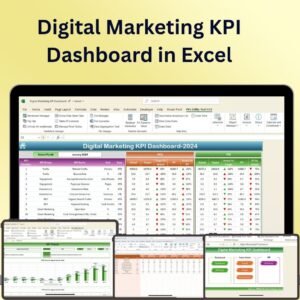
- Digital Marketing KPI Dashboard in Excel: wider digital marketing KPIs
- Marketing and Social Media Analytics Kit: 7 marketing templates in one download
Browse all Excel KPI dashboards or the Excel sales and marketing templates.




















Reviews
There are no reviews yet.