

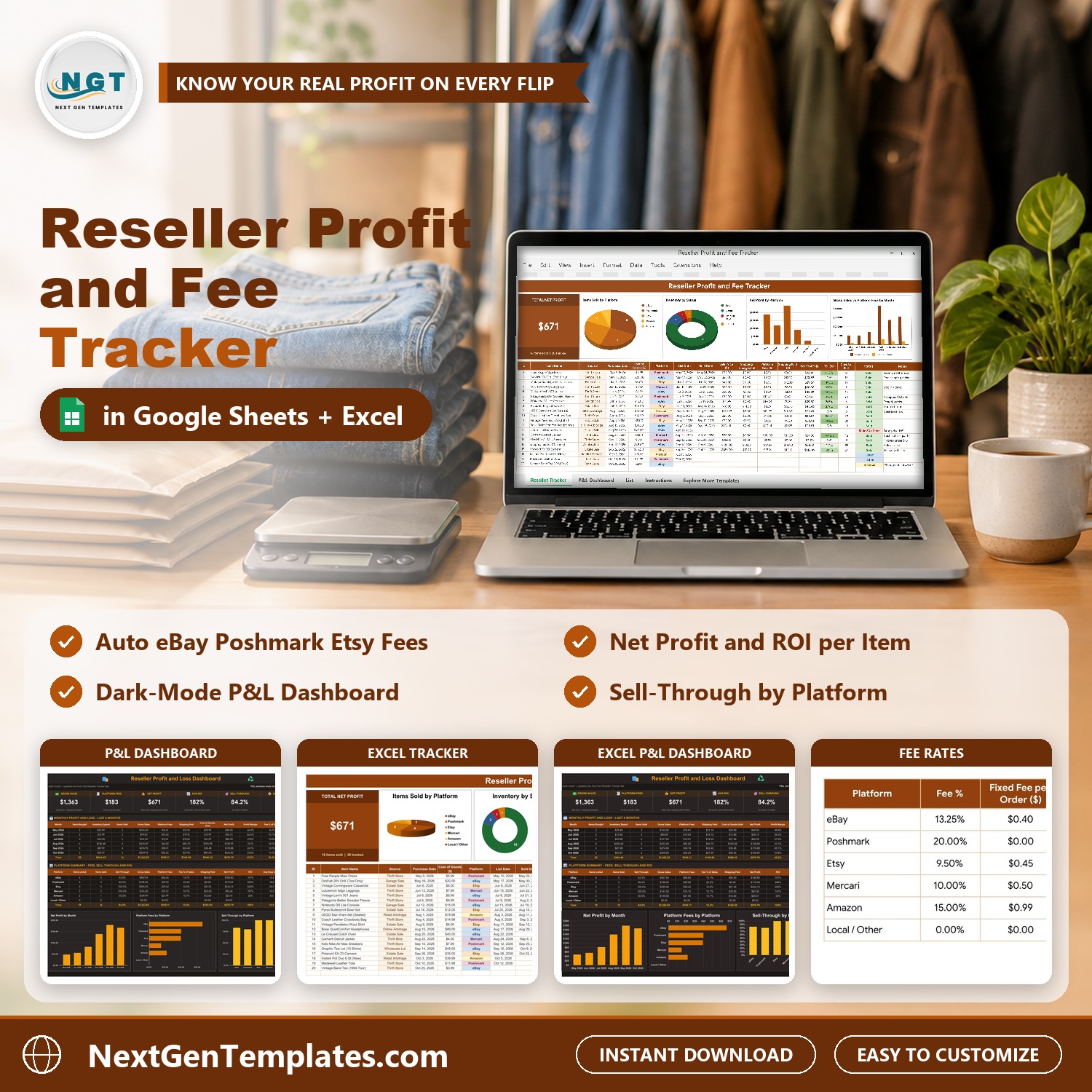

The Reseller Profit and Fee Tracker in Excel and Google Sheets shows your real profit on every item you flip, after the platform fee, the shipping label and the cost of goods. Log each item once and the sheet works out the fee from your own fee table, then the net profit, the ROI and the days it took to sell. A Total Net Profit card and four charts sit on top of a 17-column item table, and a dark mode P&L Dashboard adds 6 KPI tiles, a 6-month profit and loss table, a platform summary and 3 more charts. It ships with 20 sample items, both editions (Google Sheets and Excel), and setup takes about 10 minutes.
Watch the Reseller Profit and Fee Tracker in Excel and Google Sheets walkthrough
🌍 Join 10,000+ customers in 180+ countries using NextGenTemplates to replace paid SaaS tools with one-time-purchase Excel, Google Sheets, Power BI and HTML templates.
✅ Instant download · One-time payment · No subscription · No per-user fees · Lifetime access
This is a reseller profit tracker in Google Sheets and Excel for people who buy at thrift stores, garage sales, estate sales or retail clearance and sell on eBay, Poshmark, Etsy, Mercari or Amazon. It is a one-page tracker with a data-entry table, not a macro tool and not a live marketplace connection. If you want multi-page analytics across many sales channels, see the Online Marketplaces Dashboard in Google Sheets.
🔑 Key Features of the Reseller Profit and Fee Tracker
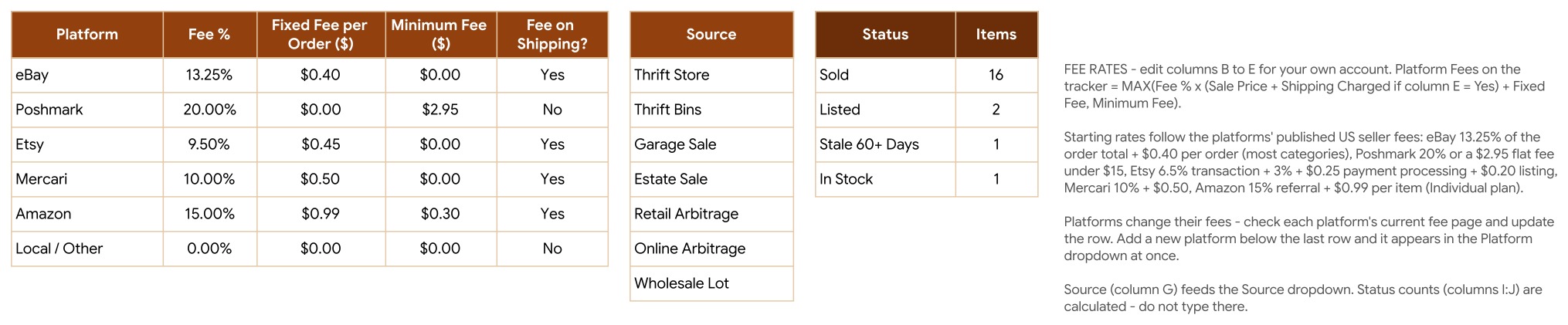
💲 Platform fee worked out for you. The List tab holds one row per platform: Fee %, Fixed Fee per Order, Minimum Fee and whether the fee also applies to shipping. The tracker calculates Platform Fees as the larger of (Fee % x (Sale Price + Shipping Charged, if the shipping column says Yes) + Fixed Fee) and the Minimum Fee. That is how a $13.00 Poshmark sale uses the $2.95 flat fee instead of 20%.
📈 Net profit, ROI and days to sell on every row. Net Profit = Sale Price + Shipping Charged – Platform Fees – Shipping Paid – Cost of Goods. ROI is Net Profit divided by Cost of Goods, and Days to Sell counts from the list date to the sold date. In the sample data the best flip, a Carhartt jacket bought for $4.50, returns $67.30.
🚦 A status that updates itself. Sold when there is a sold date, Listed when there is a list date, Stale 60+ Days when an item has been listed for more than 60 days without selling, and In Stock when it is bought but not listed yet.
🧾 Editable fee table for 6 platforms. eBay, Poshmark, Etsy, Mercari, Amazon and Local / Other come with starting rates that follow each platform’s published US seller fees. Platforms change their fees, so check your own account and edit the row. Add a new platform under the last row and it appears in the Platform dropdown at once.
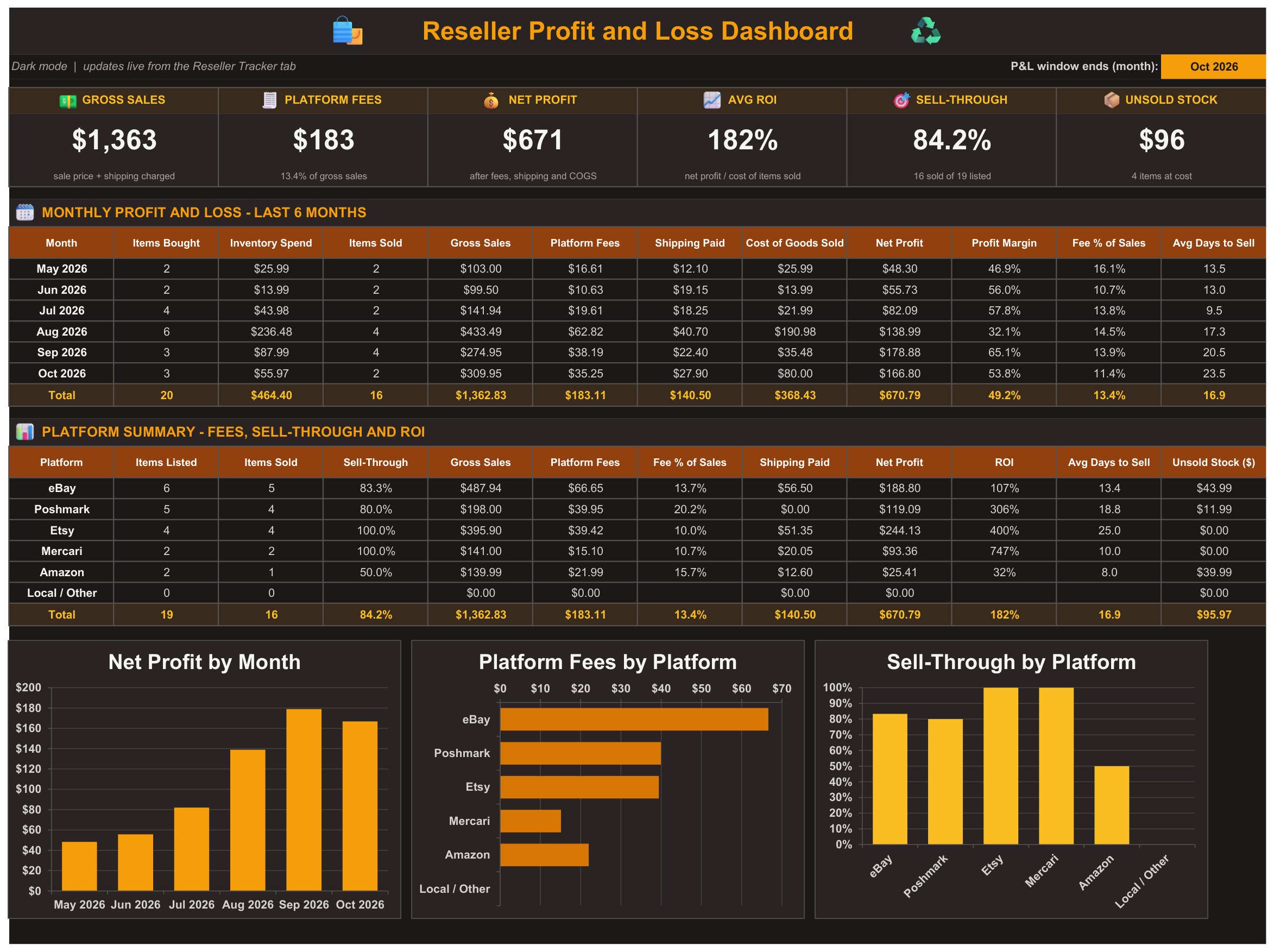
🌙 Dark mode P&L Dashboard. Six KPI tiles (Gross Sales, Platform Fees, Net Profit, Avg ROI, Sell-Through, Unsold Stock), a monthly profit and loss table for the last 6 months, a platform summary with fees, sell-through and ROI, and three charts. Type a new month in the yellow cell to move the 6-month window.
📊 Seven charts. Items Sold by Platform, Inventory by Status, Net Profit by Platform and Gross Sales vs Platform Fees by Month on the tracker tab, plus Net Profit by Month, Platform Fees by Platform and Sell-Through by Platform on the dashboard.
📦 What’s Inside the Reseller Profit and Fee Tracker
The download is a ZIP with two files: the Excel edition (.xlsx, no macros) and a PDF guide that carries the “Make a copy” link to your own editable Google Sheet. Both editions have the same five tabs, formulas and sample data: Reseller Tracker, P&L Dashboard, List, Instructions and Explore More Templates.
Page 1: Reseller Tracker (Google Sheets)
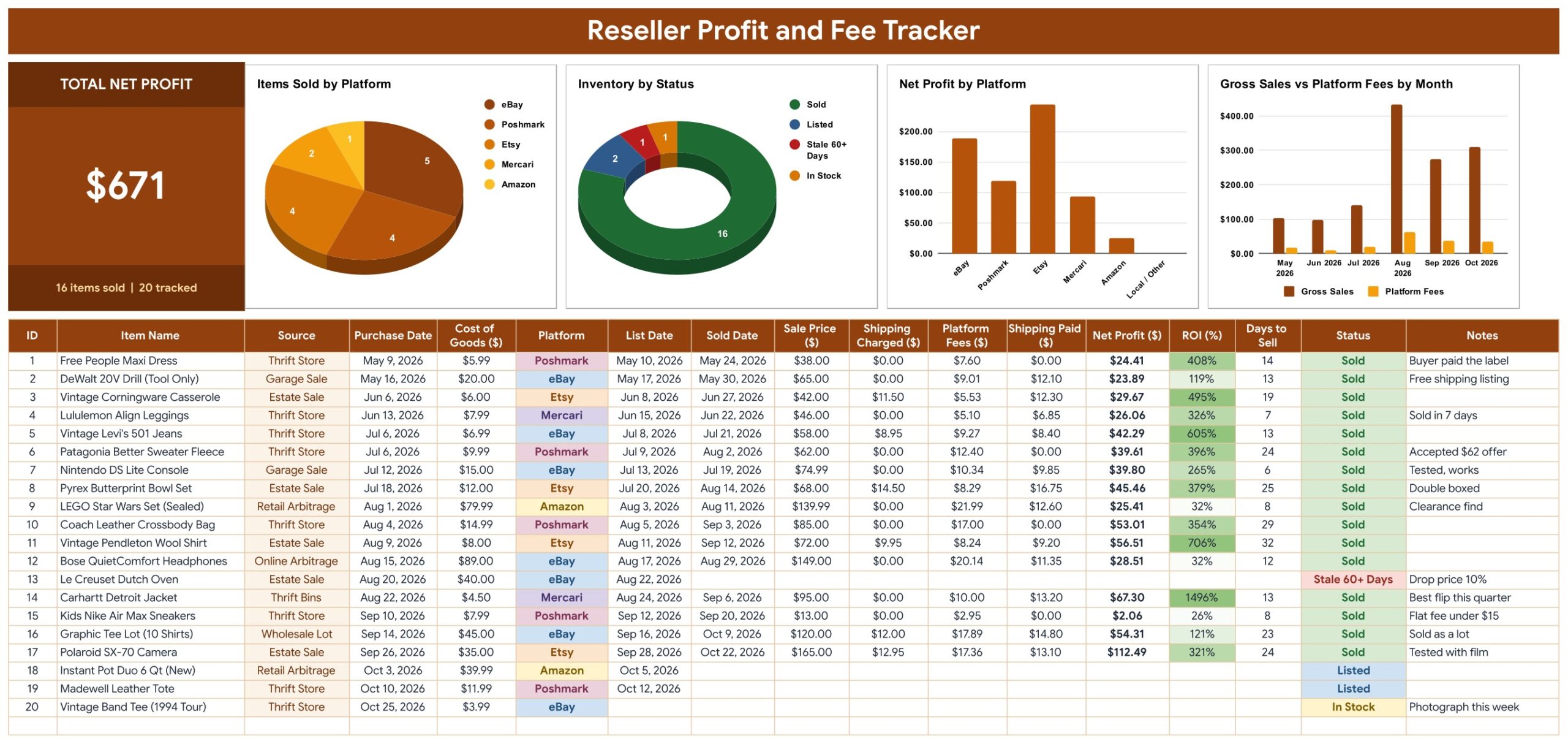
The Total Net Profit card shows $671 with 16 items sold out of 20 tracked, beside four charts and the item table: ID, Item Name, Source, Purchase Date, Cost of Goods, Platform, List Date, Sold Date, Sale Price, Shipping Charged, Platform Fees, Shipping Paid, Net Profit, ROI, Days to Sell, Status and Notes. Platform, Source and Status use dropdowns.
Page 2: P&L Dashboard (Google Sheets)
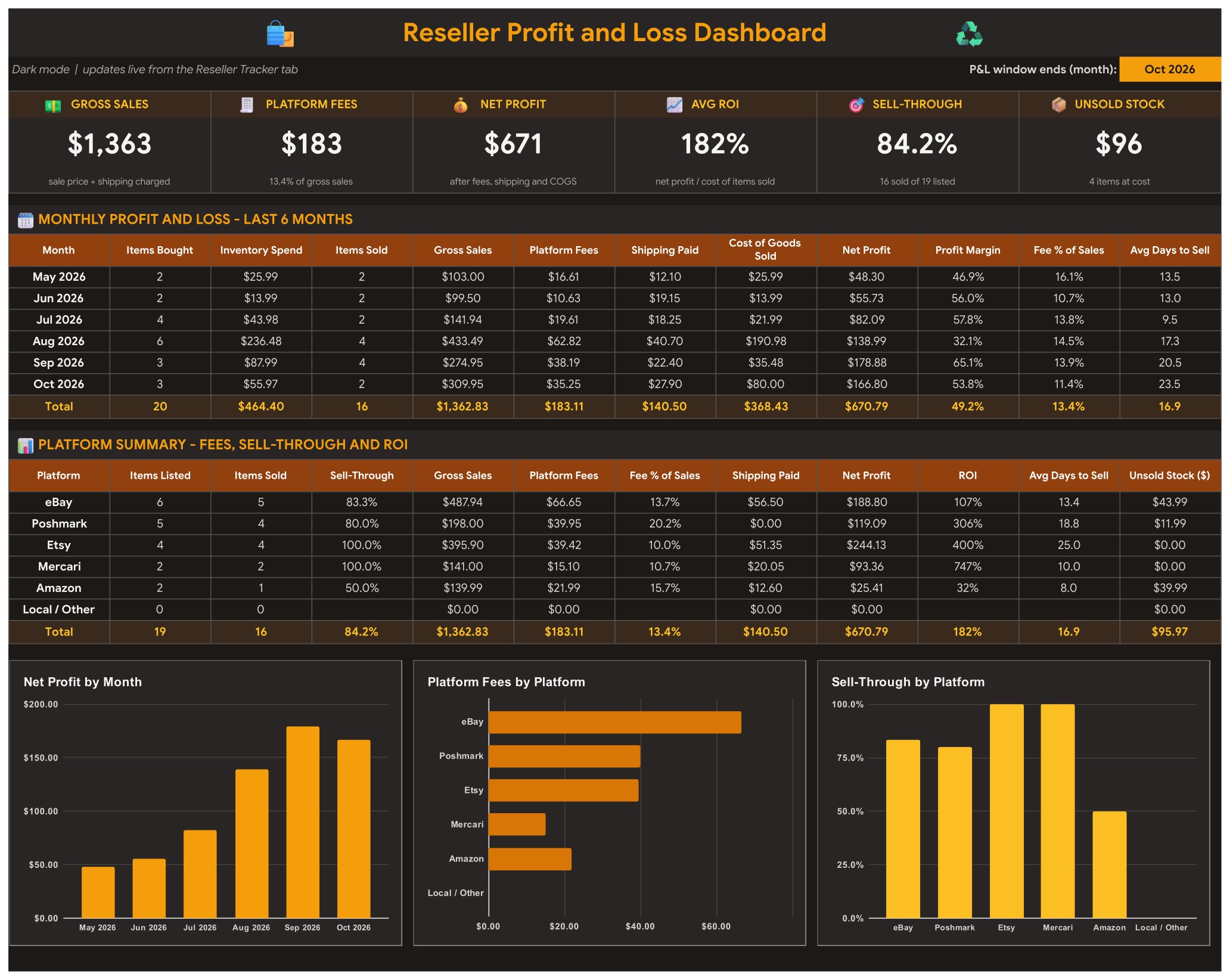
Gross Sales $1,363, Platform Fees $183, Net Profit $671, Avg ROI 182%, Sell-Through 84.2% and Unsold Stock $96 in the sample. Below them sit the monthly P&L with Profit Margin and Fee % of Sales, the platform summary, and the Net Profit by Month, Platform Fees by Platform and Sell-Through by Platform charts.
Page 3: Reseller Tracker (Excel edition)
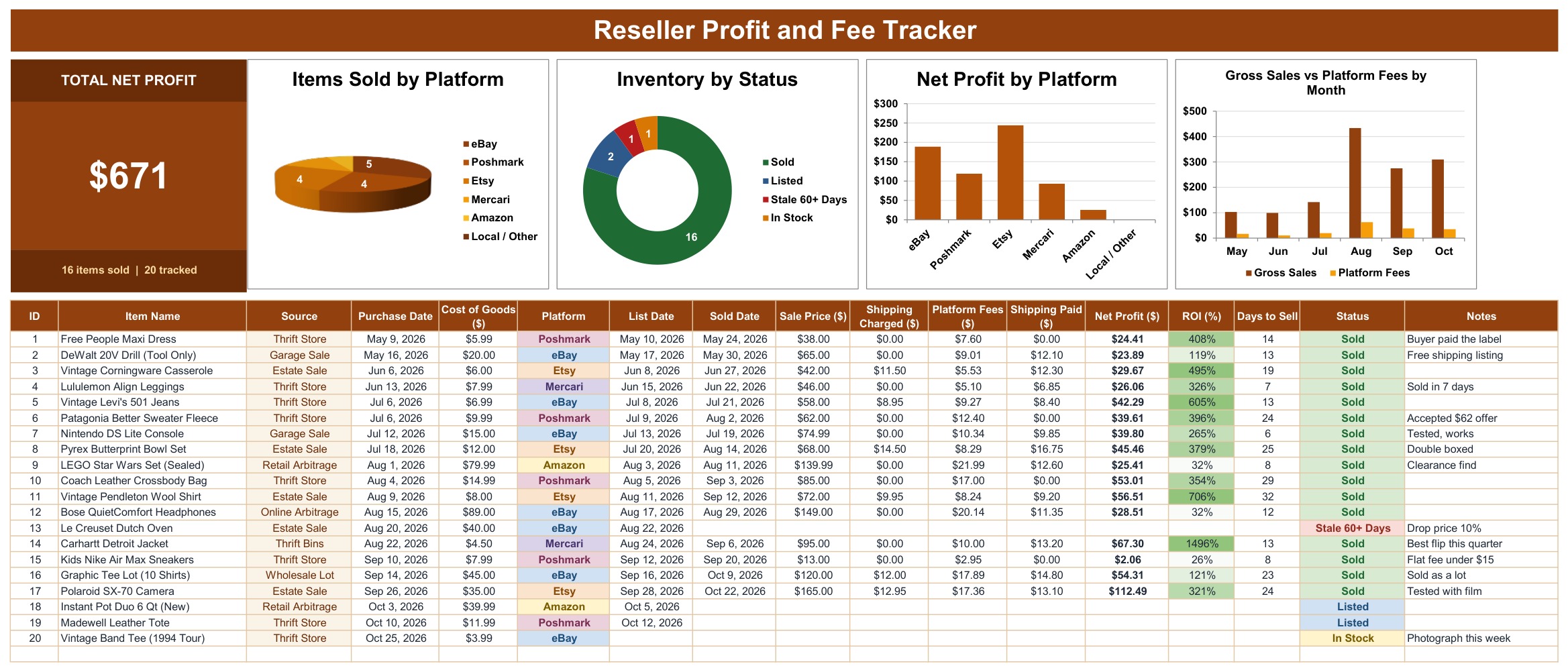
The same card, charts and item table in Microsoft Excel. Record a sale by typing the sold date and sale price; the fee, net profit, ROI, days to sell and status fill in, and the card and charts update.
Page 4: P&L Dashboard (Excel edition)
The dark mode dashboard in Excel with the same KPI tiles, 6-month P&L, platform summary and three charts.
Page 5: List tab, platform fee rates
Platform, Fee %, Fixed Fee per Order, Minimum Fee and Fee on Shipping for eBay, Poshmark, Etsy, Mercari, Amazon and Local / Other, plus the Source list and the status counts. Edit a rate and every item recalculates.
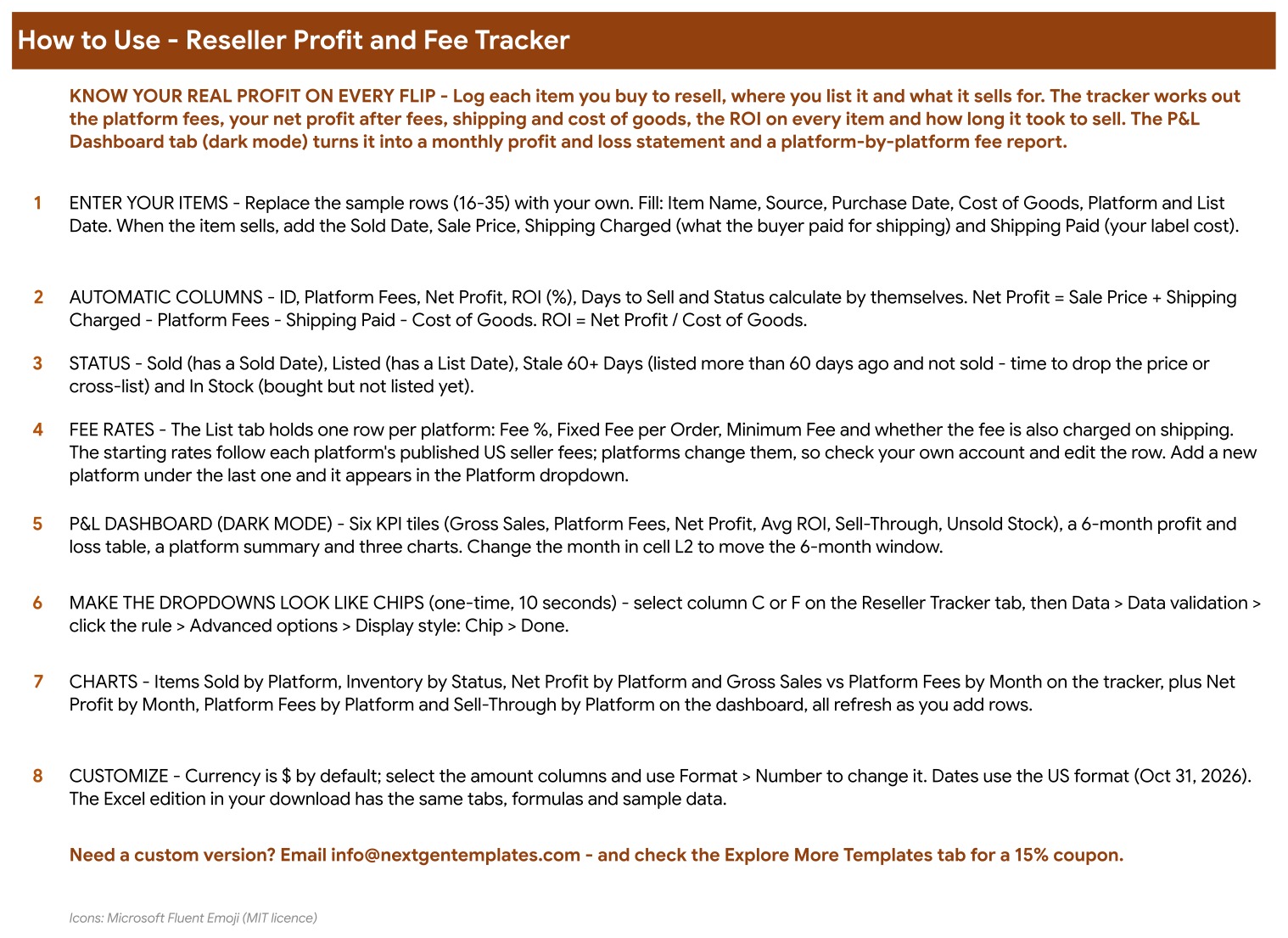
Page 6: How to Use
Eight numbered steps: enter your items, the automatic columns, status rules, fee rates, the P&L dashboard, chip-style dropdowns, charts and customizing the currency.
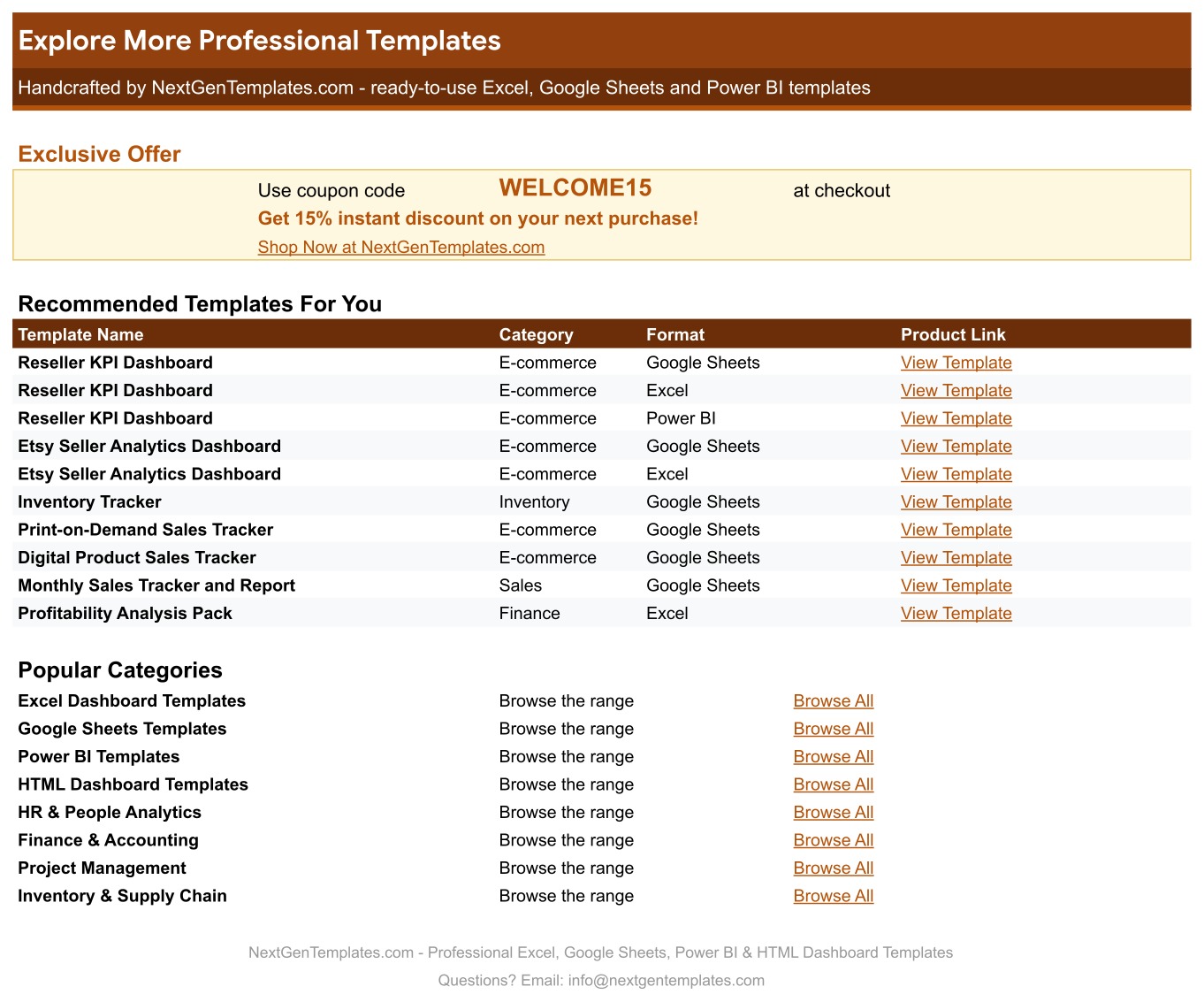
Page 7: Explore More Templates
Recommended templates and popular categories, plus a WELCOME15 coupon for 15% off your next purchase.
📊 Reseller Profit and Fee Tracker vs. Blank Spreadsheet vs. Reseller Software: Where This Fits
| Feature | Reseller Profit and Fee Tracker (Google Sheets + Excel) | Blank spreadsheet | Reseller inventory software |
|---|---|---|---|
| Cost | ✅ $6.99 one-time | Free to build, but your time | Monthly subscription, often tiered by listings |
| Platform | ✅ Google Sheets and Microsoft Excel, both included | One platform, one blank file | Web app |
| Setup time | ✅ About 10 minutes | Hours of formula building | Account setup plus marketplace connections |
| Platform fee worked out per item | ✅ From an editable fee table | You write the formulas | Usually yes, fixed by the vendor |
| Fee rules (percent, fixed fee, minimum fee) | ✅ All three, per platform | Rarely handled | Varies |
| Stale listing flag (60+ days) | ✅ Built in | Add it yourself | Varies |
| Dark mode P&L dashboard | ✅ 6 KPI tiles, 6-month P&L, platform summary | Not included | ✅ Yes |
| Customizable columns and fee rates | ✅ Edit any rate or column | ✅ Yes | Fixed by the vendor |
| Live marketplace sync | No, you type each sale | No | ✅ Often yes |
For resellers who want to know what they really keep on each item without paying a monthly subscription, this tracker sits in the sweet spot.
👥 Who This Template Is For, and Who It’s Not For
✅ This template is built for:
- Part-time and full-time resellers on eBay, Poshmark, Etsy, Mercari and Amazon
- Thrift, garage sale and estate sale flippers who want a reselling profit spreadsheet with real fees
- Retail arbitrage sellers who need ROI and sell-through by platform
❌ This template is NOT for:
- Sellers who want orders imported automatically from a marketplace (you enter each sale yourself)
- Stores with thousands of SKUs and barcode scanning, which need inventory software
⚙️ How to Use the Reseller Profit and Fee Tracker
- Open the PDF guide in your download and click the “Make a copy” link for Google Sheets, or open the Excel file.
- Check the platform fee rates on the List tab against your own seller account.
- Replace the sample items with your own: name, source, purchase date, cost of goods, platform and list date.
- When an item sells, add the sold date, sale price, shipping charged and your shipping label cost.
- Watch Platform Fees, Net Profit, ROI, Days to Sell and Status fill in by themselves.
- Open the P&L Dashboard and set the last month of the 6-month window.
💼 Real-World Use Cases
A weekend thrift flipper buys a Carhartt jacket for $4.50, sells it on Mercari for $95 and sees $67.30 of net profit after the $10.00 fee and the $13.20 label, a 1,496% ROI, instead of guessing from the sale price.
An eBay and Poshmark seller compares the platform summary and finds one platform takes 20.2% of sales in fees while another takes 13.7%, so the next listing goes where the margin is better.
A seller with slow stock uses the Stale 60+ Days status to find a Dutch oven listed for over two months and drops the price or cross-lists it.
❓ Frequently Asked Questions
What does the Reseller Profit and Fee Tracker calculate?
The Reseller Profit and Fee Tracker calculates the platform fee, net profit, ROI, days to sell and status for every item. The P&L Dashboard adds gross sales, fees, net profit, average ROI, sell-through and unsold stock at cost, by month and by platform.
How is the platform fee calculated?
The fee is Fee % x (Sale Price + Shipping Charged where the platform charges on shipping) + Fixed Fee, but never less than the Minimum Fee for that platform. All four values come from the List tab, so you can match your own seller account.
Are the fee rates guaranteed to be current?
No. The starting rates follow each platform’s published US seller fees, and platforms change them. Check your own account and edit the row on the List tab; every item recalculates.
Does it work in both Google Sheets and Excel?
Yes. The ZIP holds an Excel edition (.xlsx, no macros) and a PDF guide with the “Make a copy” link for Google Sheets. Both have the same five tabs, formulas and sample data.
Can I add a platform that is not listed?
Yes. Add a new row under the last platform on the List tab with its fee rules. It appears in the Platform dropdown on the tracker straight away.
Is this a reseller profit tracker or an inventory system?
It is a reseller profit tracker and a handy eBay and Poshmark fee calculator in one, with simple stock status (In Stock, Listed, Stale, Sold) and unsold stock at cost. It does not scan barcodes or sync with marketplaces.
Can I change the currency?
Yes. Currency is $ by default; select the amount columns and change the number format. Dates use the US format.
👤 About the Author
Built by PK, Microsoft Certified Professional with 15+ years of Excel, Google Sheets and Power BI experience. Founder of NextGenTemplates, reaching 300K+ subscribers across YouTube channels (@PKAnExcelExpert, @NextGenTemplates, @NeoTechNavigators). Every template is hand-built and tested before release.
🔗 Explore Related Templates
📌 Seller Analytics Dashboard in Google Sheets: sales analytics for online sellers.
📌 Online Marketplaces Dashboard in Google Sheets: compare marketplaces side by side.
📌 Online Marketplaces Dashboard in Excel: the Excel version of marketplace analytics.
📌 Print-on-Demand Sales Tracker in Google Sheets: track print-on-demand orders and royalties.
📌 Digital Product Sales Tracker in Google Sheets: track digital product sales and fees.
Browse every Google Sheets template in the store.
📖 Click here to read the Detailed Blog Post
🎥 Visit our YouTube channel for step-by-step video tutorials
👉 YouTube.com/@NextGenTemplates
📅 Last updated: October 2026




























Reviews
There are no reviews yet.