


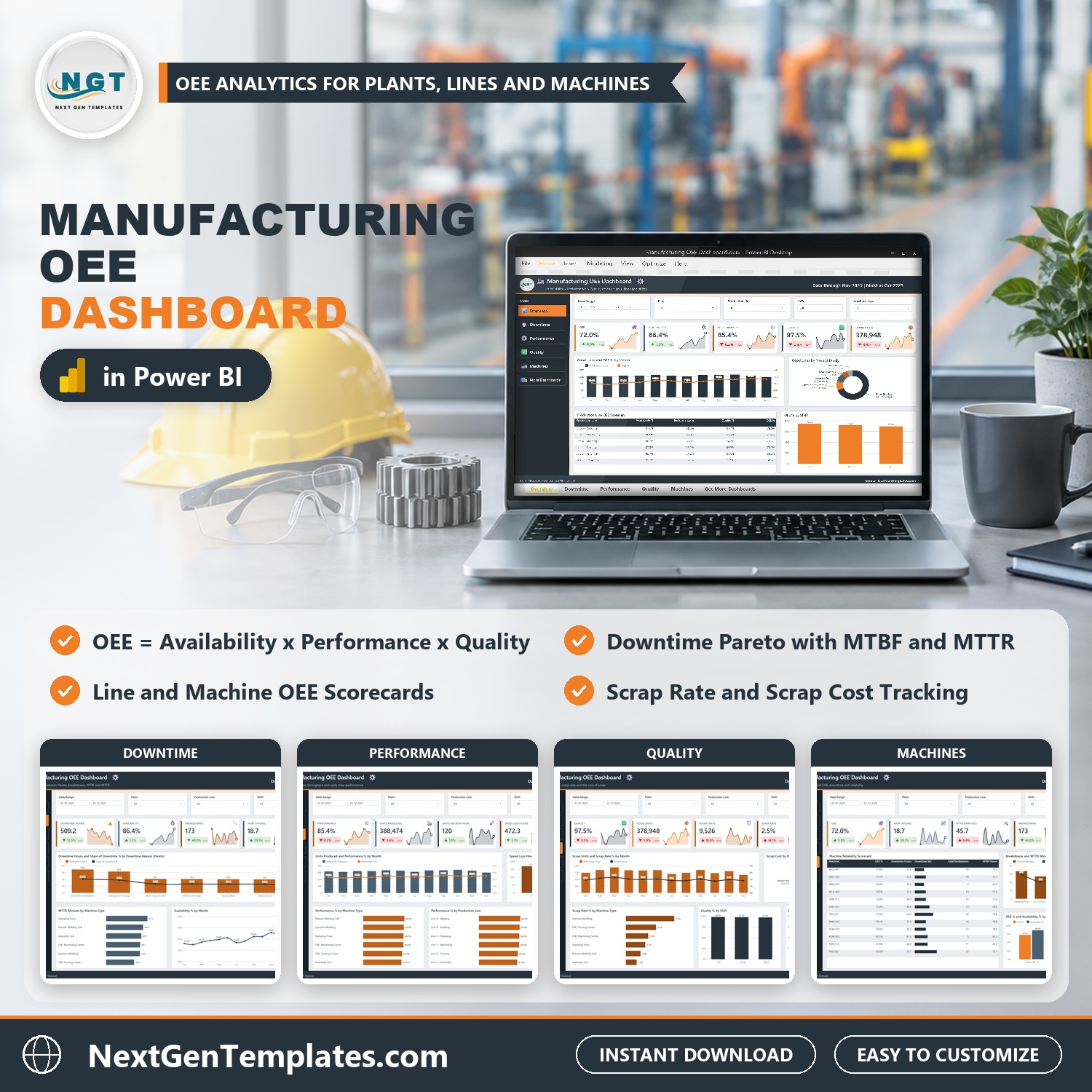
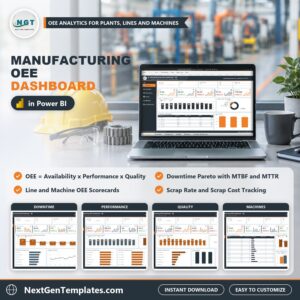
Manufacturing OEE Dashboard in Power BI shows how much of your planned production time turns into good parts: OEE (availability x performance x quality), downtime causes, speed losses and scrap cost by plant, production line, machine, shift and product family, across five interactive report pages. The sample model holds 500 production runs for 2025 across 3 plants and 12 machines, with 378,948 good units, 72.0% OEE, 86.4% availability and a 2.5% scrap rate. Load your own runs, press Refresh, and every visual redraws.
Watch the Manufacturing OEE Dashboard in Power BI walkthrough
✅ Instant download · One-time payment · No subscription · No per-user fees · Lifetime access
Key Features of the Manufacturing OEE Dashboard in Power BI
- Five report pages: Overview, Downtime, Performance, Quality and Machines, linked by page tabs on the left, plus a Get More Dashboards page.
- OEE in one place: OEE, Availability, Performance, Quality, Good Units, Units Produced, Units per Run Hour, Speed Loss Hours, Scrap Units, Scrap Rate and Scrap Cost, each with month-on-month change.
- Downtime Pareto with MTBF and MTTR: downtime hours and share of downtime by reason (Mechanical Breakdown, Changeover and Setup, Minor Stops and Jams, Material Shortage, Tooling Wear, Electrical Fault, Quality Hold, Operator Unavailable), plus breakdowns, MTBF and MTTR.
- Line and machine scorecards: a production line OEE scorecard and a machine reliability scorecard for all 12 machines with OEE, downtime hours, breakdowns and MTBF.
- Scrap rate and scrap cost: by month, product family, machine type, shift and plant.
- Shift and plant comparison: OEE by Day, Swing and Night shift, and OEE, availability, downtime and scrap cost for three plants.
- Five filters on every page: Date Range, Plant, Production Line and Shift, plus one page-specific slicer (Machine Type, Downtime Reason or Product Family).
- Drill-through and tooltips: a hidden Details page lists the production runs behind any chart, and two tooltip pages add context on hover.
- Open and editable: the model carries more than 50 DAX measures you can read and change in Power BI Desktop, which is free from Microsoft. The ZIP ships the .pbix, the sample Data.xlsx and a PDF user manual.
What’s Inside the Manufacturing OEE Dashboard in Power BI
Page 1: Overview
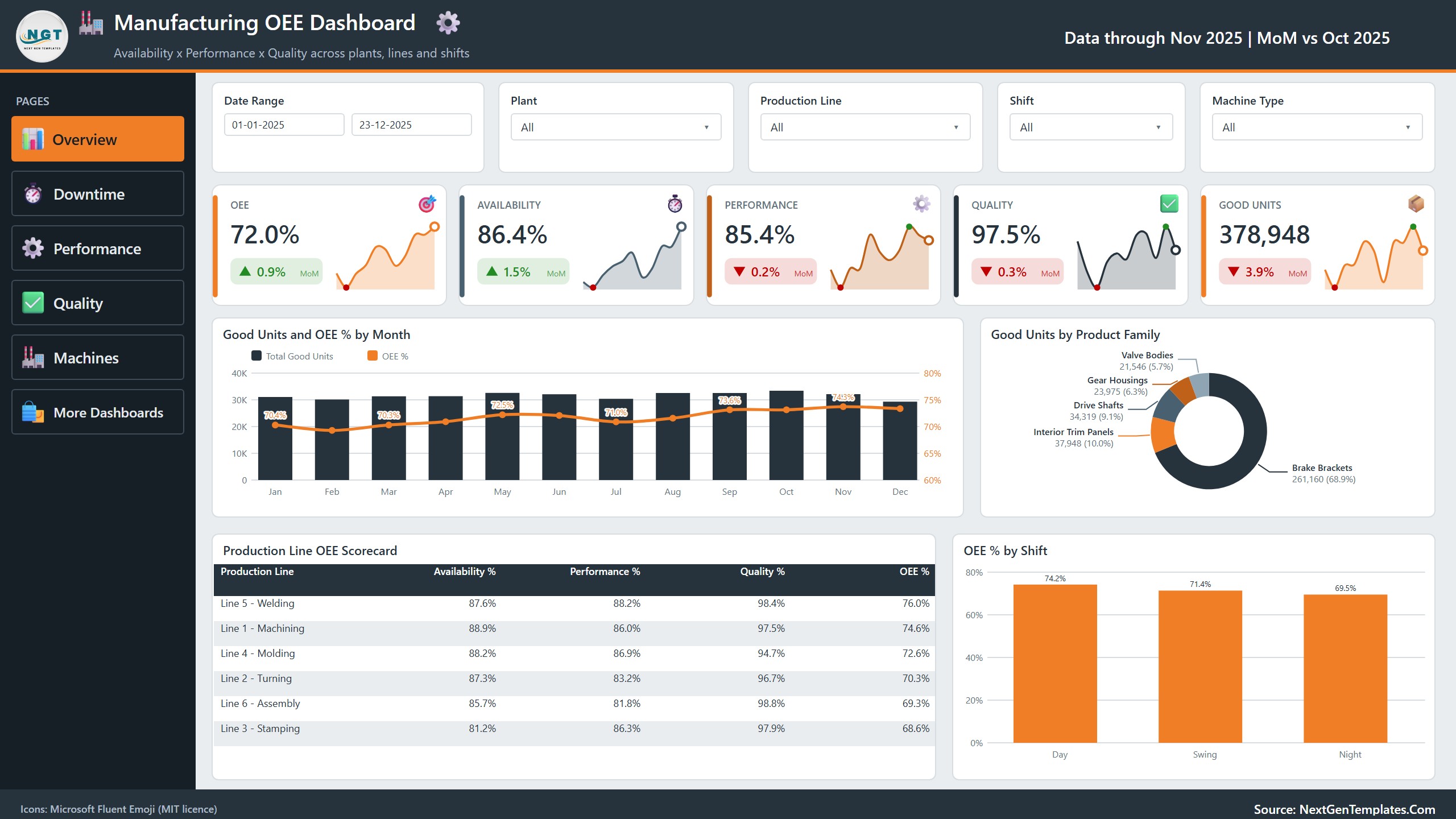
Five sparkline cards show OEE (72.0%), Availability (86.4%), Performance (85.4%), Quality (97.5%) and Good Units (378,948), each with a month-on-month change. Good Units and OEE % by Month sits beside a donut of good units by product family, where Brake Brackets bring 261,160 units, or 68.9% of the total. The Production Line OEE Scorecard ranks six lines, from Line 5 Welding at 76.0% to Line 3 Stamping at 68.6%, and OEE % by Shift compares Day (74.2%), Swing (71.4%) and Night (69.5%).
Page 2: Downtime
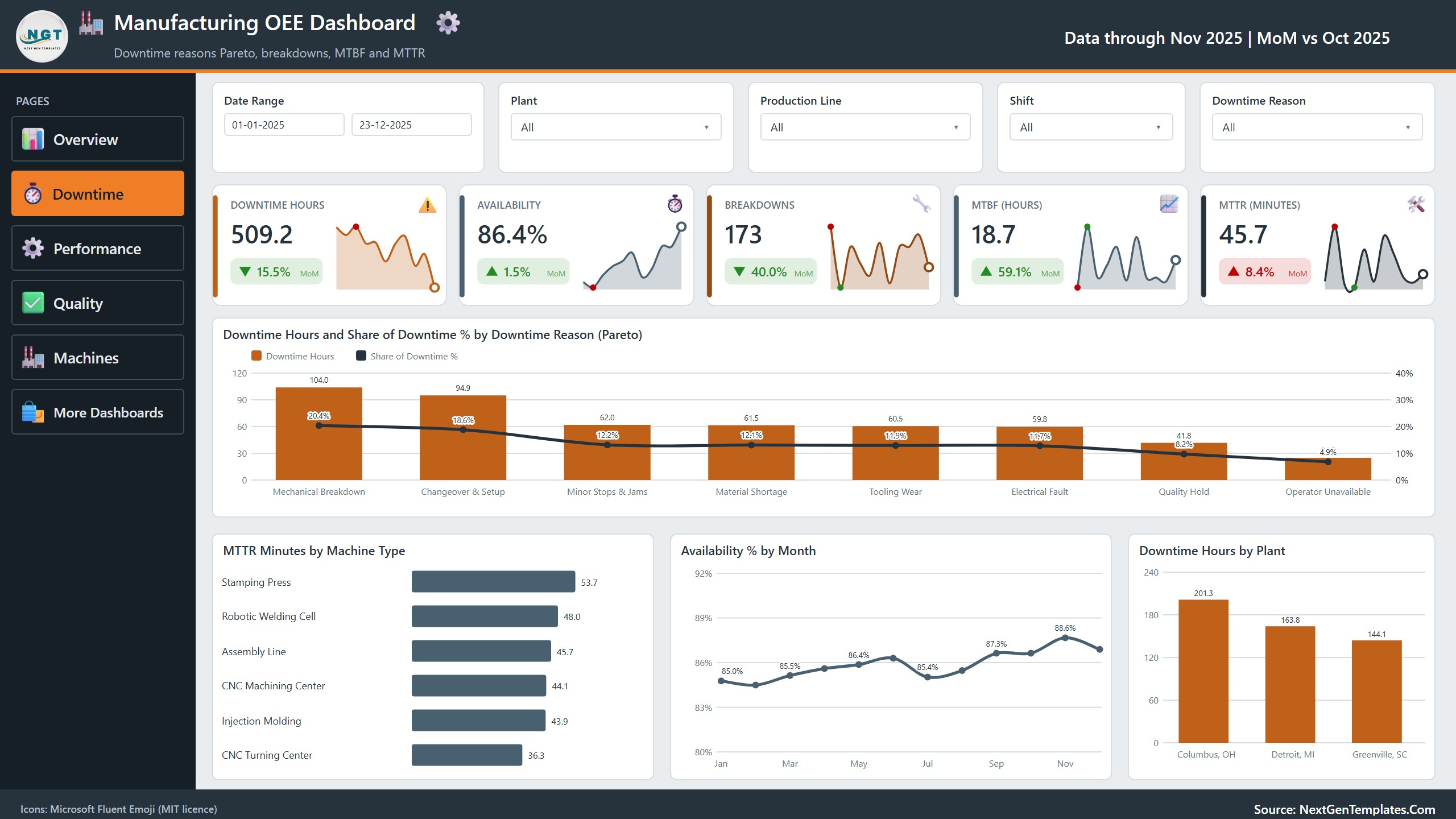
Cards for Downtime Hours (509.2), Availability, Breakdowns (173), MTBF (18.7 hours) and MTTR (45.7 minutes). The Pareto chart ranks eight downtime reasons: Mechanical Breakdown costs 104.0 hours (20.4%) and Changeover and Setup 94.9 hours (18.6%). MTTR Minutes by Machine Type, Availability % by Month and Downtime Hours by Plant complete the page.
Page 3: Performance
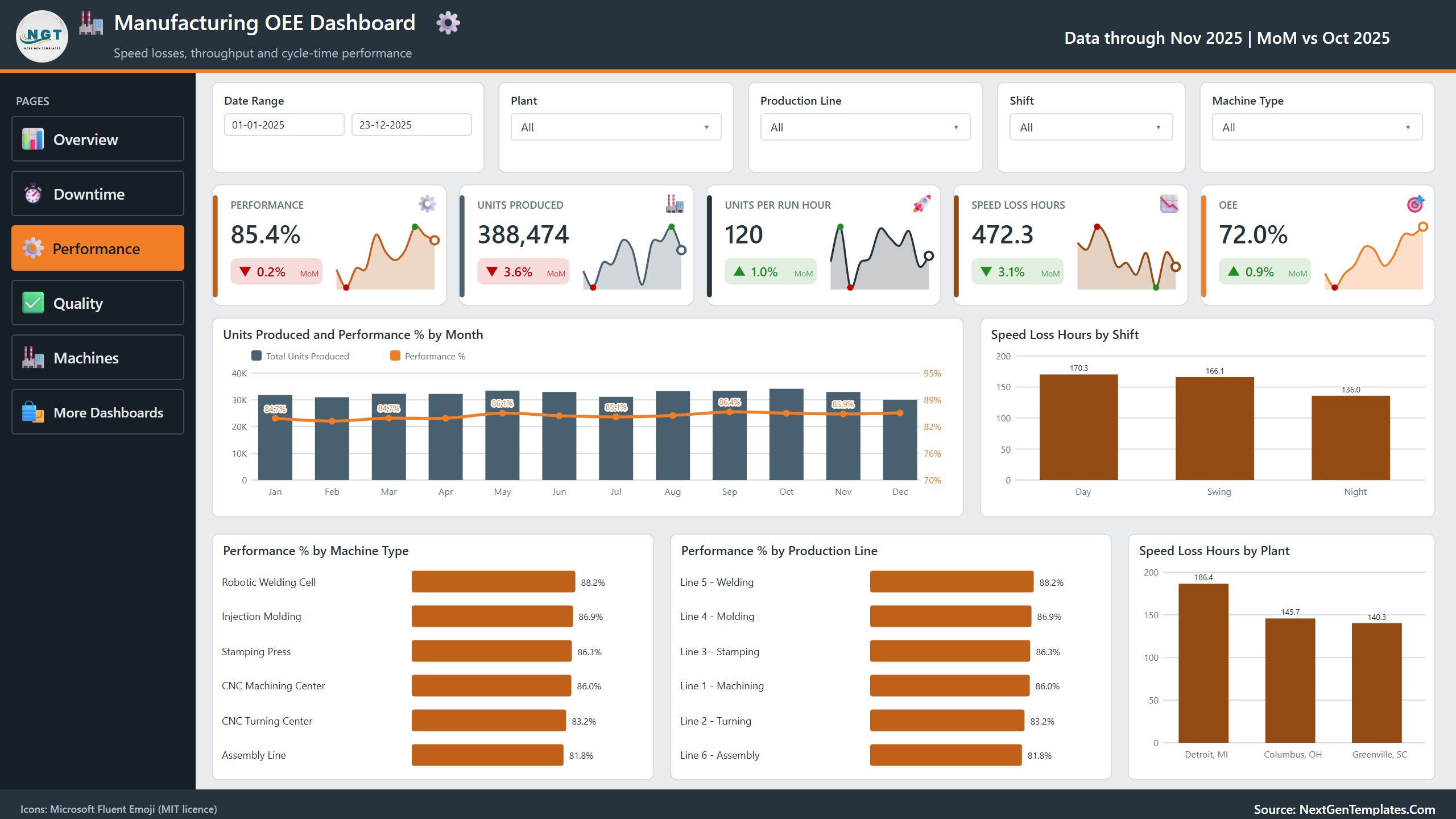
Cards for Performance, Units Produced (388,474), Units per Run Hour (120), Speed Loss Hours (472.3) and OEE. Units Produced and Performance % by Month is joined by Speed Loss Hours by Shift, Performance % by Machine Type, Performance % by Production Line and Speed Loss Hours by Plant (Detroit leads with 186.4).
Page 4: Quality
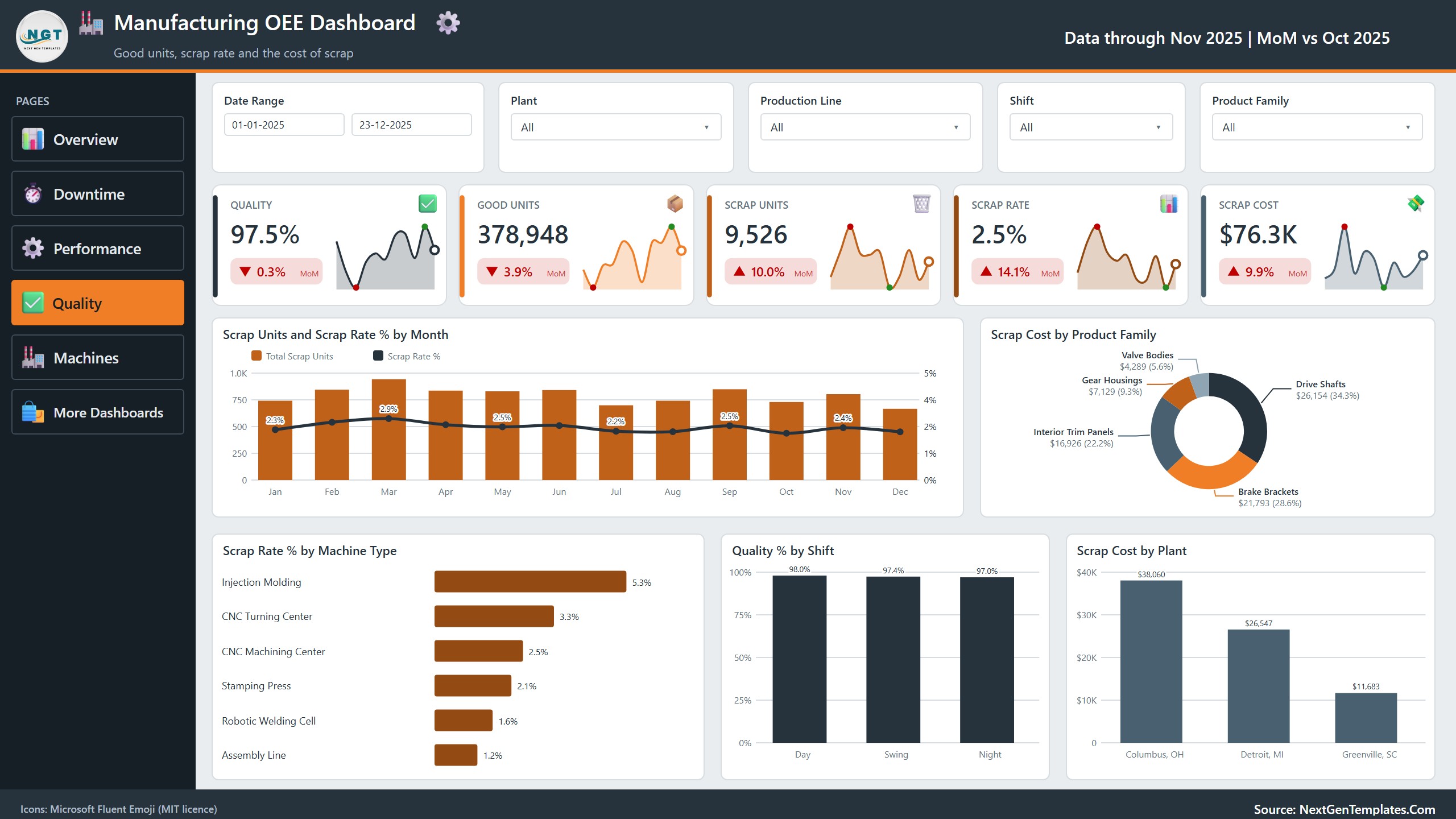
Cards for Quality, Good Units, Scrap Units (9,526), Scrap Rate (2.5%) and Scrap Cost ($76.3K). Scrap Units and Scrap Rate % by Month sits beside Scrap Cost by Product Family, where Drive Shafts account for $26,154 (34.3%). Scrap Rate % by Machine Type runs from 5.3% on Injection Molding to 1.2% on Assembly Line, and Scrap Cost by Plant puts Columbus, OH on top at $38,060.
Page 5: Machines
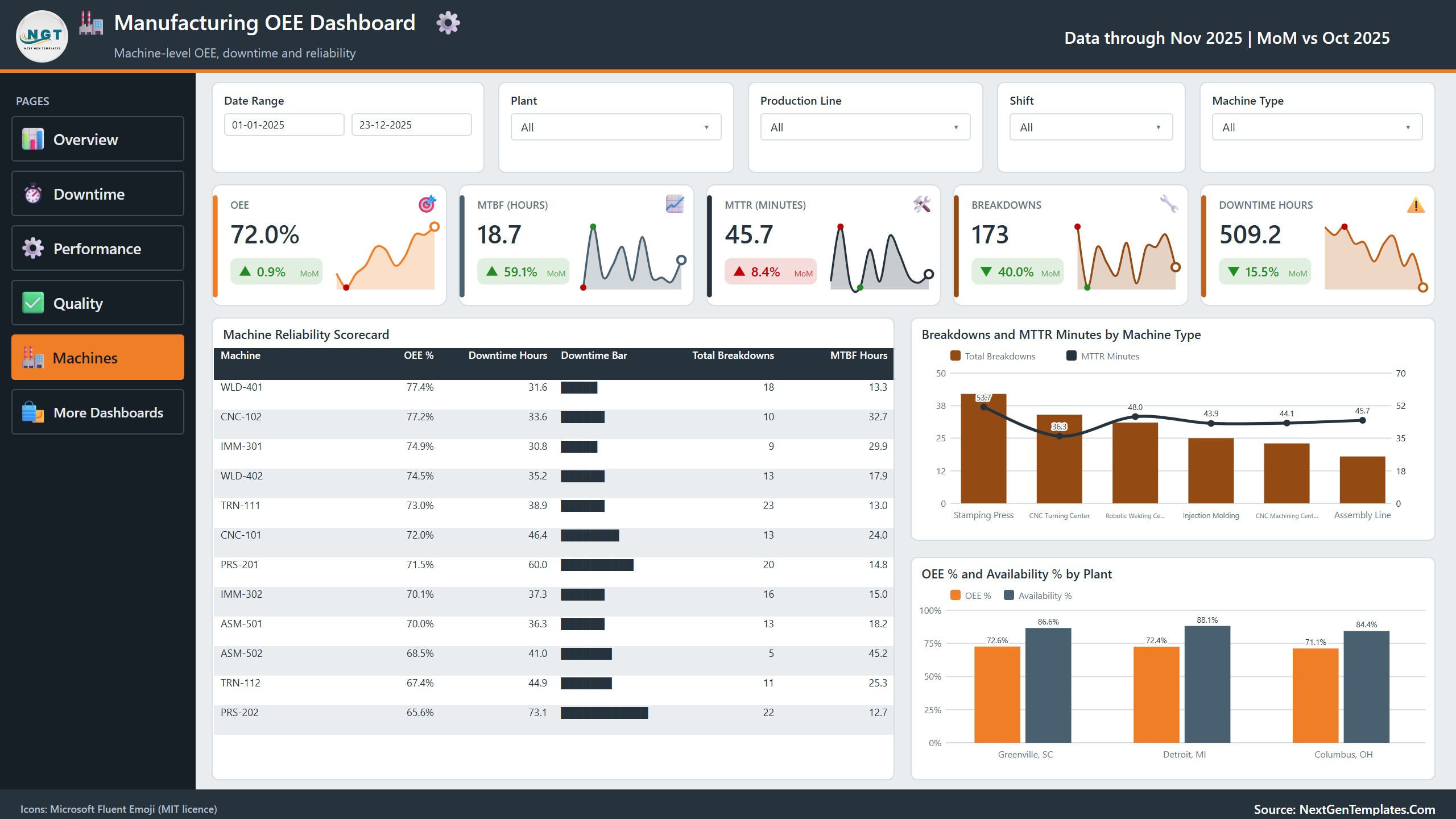
The Machine Reliability Scorecard lists all 12 machines with OEE %, downtime hours, a downtime bar, total breakdowns and MTBF hours: WLD-401 leads at 77.4% OEE, while PRS-202 sits at 65.6% with 73.1 downtime hours. Breakdowns and MTTR Minutes by Machine Type and OEE % and Availability % by Plant finish the page.
Also in the file
A Get More Dashboards page, a hidden Details drill-through page and two hidden tooltip pages (Trend Detail and Category Detail). The data model is one table of 500 production runs and 20 columns plus a Date table.
This Template vs. a Custom BI Build vs. MES and OEE Software
| Feature | Manufacturing OEE Dashboard in Power BI | Custom Tableau / Qlik build | MES / OEE software |
|---|---|---|---|
| Cost | One-time purchase | Licences plus build time | Usually a subscription per plant or machine |
| Ready-made OEE pages | Yes, five pages | No, you design them | Yes |
| Downtime Pareto with MTBF and MTTR | Yes | If you build it | Often |
| Scrap rate and scrap cost | Yes | If you build it | Varies |
| Edit measures and visuals | Full access, more than 50 DAX measures | Full access | Limited |
| Live machine data capture | No, you load an export | Possible with development | Usually yes |
| Your data stays on your machine | Yes | Depends on setup | Often vendor-hosted |
Who This Template Is For, and Who It’s Not For
Good fit: plant managers, operations and continuous improvement teams, maintenance planners and analysts who want an oee dashboard in Power BI to see availability, performance and quality losses without building a report from scratch.
Not a fit: anyone who needs live data capture from machines, a manufacturing execution system, work order management or predictive maintenance. This is a reporting template that reads a workbook you fill or export.
How to Use This Manufacturing OEE Dashboard
- Install Power BI Desktop (free from Microsoft) and unzip the download.
- Open Data.xlsx and replace the sample rows with your own production runs, keeping the column headers.
- Open the .pbix, go to Transform data, Data source settings, and use Change Source to point at your copy of Data.xlsx. The shipped path points at our build folder, so this step is required on first use.
- Press Refresh. Every page, card and chart updates.
- Use the slicers, the page tabs and right-click Drill through on a chart to open the Details page.
The workbook has 20 columns: Run ID, Production Date, Plant, Production Line, Machine, Machine Type, Shift, Product Family, Downtime Reason, Planned Minutes, Downtime Minutes, Run Minutes, Ideal Cycle Seconds, Ideal Run Minutes, Total Units, Good Units, Scrap Units, Breakdowns, Repair Minutes and Scrap Cost.
Real-World Use Cases
- Daily and weekly production review: start the meeting from OEE, availability, performance and quality instead of separate spreadsheets.
- Downtime reduction: use the downtime Pareto to pick the two or three reasons that deserve a kaizen event, and track MTBF and MTTR by machine type.
- Shift comparison: see why Night runs at a lower OEE than Day and where the speed loss hours sit.
- Scrap and cost control: follow scrap rate and scrap cost by product family, machine type and plant.
- Maintenance planning: rank machines by downtime hours and breakdowns on the reliability scorecard.
Frequently Asked Questions
How does the Manufacturing OEE Dashboard in Power BI calculate OEE?
OEE is Availability x Performance x Quality. Availability is run minutes over planned minutes, Performance compares ideal run minutes with actual run minutes, and Quality is good units over total units. All three come from the columns in Data.xlsx.
Does it connect to my machines or MES?
No. It reads Data.xlsx. You paste or export your production runs into that workbook and press Refresh. A developer can repoint the Power Query source at a database if you need that.
Do I need a paid Power BI licence?
No. Power BI Desktop is free. A Pro or Premium licence is only needed to publish and share the report in the Power BI Service.
How long does setup take?
About 10 minutes once your data matches the column headers: paste the rows, change the source path once and refresh.
Can I add my own plants, lines and machines?
Yes. Plants, production lines, machines, machine types, shifts, product families and downtime reasons are read from the data, so new values appear in the slicers and charts after a refresh.
Is the sample data real?
No. The runs and figures are fictional sample records used to demonstrate the visuals. Replace them with your own before presenting anything.
Does it work on Mac?
Power BI Desktop runs on Windows. Mac users can run it through a Windows virtual machine or open a published copy in the Power BI Service.
About the Author
Built by PK, Microsoft Certified Professional with 15+ years of Excel, Google Sheets and Power BI experience and founder of NextGenTemplates (@PKAnExcelExpert, @NextGenTemplates). Every template is hand-built and tested before release.
Explore Related Templates
- Flooring Materials Manufacturing Dashboard in Power BI: production reporting for a flooring manufacturer.
- Digital Twins in Manufacturing Dashboard in Power BI: asset monitoring for connected plants.
- Fire Safety Equipment Manufacturing Dashboard in Power BI: output and quality for equipment makers.
- Plant Production Planning and Control Management System in Excel VBA: plan and track production orders.
- Browse all Power BI dashboard templates.
📖 Click here to read the detailed blog post
🎥 Visit our YouTube channel for step-by-step video tutorials
👉 YouTube.com/@NextGenTemplates
Looking for an oee dashboard in Power BI you can edit instead of rent? Download it once, load your own production runs and keep it for life, with no subscription and no per-seat fee.
📅 Last updated: October 2026






























Reviews
There are no reviews yet.