



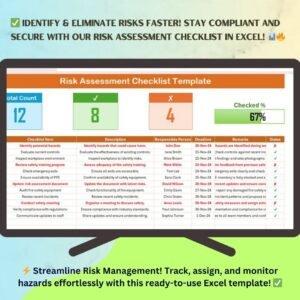
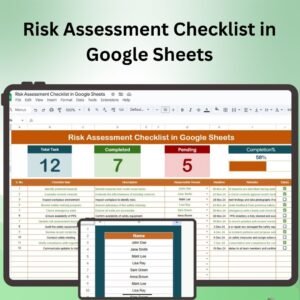
The Risk Assessment Checklist in Google Sheets is an essential tool designed to help businesses and teams identify, evaluate, and mitigate potential risks across projects, operations, and processes. This comprehensive checklist allows you to document, track, and assess risks, ensuring that you are prepared to handle challenges effectively. With a customizable format, it can be tailored to suit various industries, making it perfect for risk managers, project managers, and compliance officers.
This Google Sheets-based tool provides a structured framework for risk assessment, including risk identification, likelihood and impact evaluation, mitigation strategies, and tracking the status of identified risks. It’s a user-friendly tool that can be accessed and shared by multiple stakeholders, making collaboration on risk management easier than ever.

Key Features of the Risk Assessment Checklist in Google Sheets:
🔍 Comprehensive Risk Tracking
Identify and track risks across different stages of your projects or processes. Use the checklist to document risks, assess their potential impact, and prioritize them.
📊 Risk Evaluation
Evaluate risks based on their likelihood and potential impact, using a simple scoring system that helps prioritize which risks to address first.
🛠️ Mitigation Strategies
Develop actionable mitigation strategies for each identified risk. Plan how to reduce or eliminate risks before they impact your project or operations.
📅 Real-Time Collaboration
With Google Sheets, collaborate with your team in real-time. Share the checklist with stakeholders and update it seamlessly as new risks arise or mitigation plans evolve.
📈 Progress Tracking
Track the status of each risk, ensuring that mitigation measures are being implemented and risks are monitored effectively throughout the process.
Why You’ll Love the Risk Assessment Checklist in Google Sheets:
✅ Identify and Prioritize Risks – Quickly identify potential risks, assess their severity, and prioritize actions to mitigate them. ✅ Easy Collaboration – Share the checklist with your team and stakeholders, allowing for real-time collaboration and updates. ✅ Customizable for Your Needs – Tailor the checklist to fit your specific industry, project, or process requirements. ✅ Track Progress – Keep track of risk mitigation efforts and ensure that all risks are managed effectively. ✅ User-Friendly – The simple and clear structure of the checklist makes it easy to use for anyone, regardless of their experience with risk management.
What’s Inside the Risk Assessment Checklist in Google Sheets:
- Risk Identification – Document and categorize potential risks in a structured format.
- Likelihood and Impact Evaluation – Use a scoring system to assess the likelihood and impact of each risk.
- Mitigation Strategies – Develop strategies to address each identified risk, reducing potential harm.
- Progress Tracking – Monitor the status of risks and mitigation measures in real time.
- Customizable Design – Adjust the checklist to fit your specific needs and requirements.
How to Use the Risk Assessment Checklist in Google Sheets:
1️⃣ Download the Template – Access the Google Sheets file instantly after purchase. 2️⃣ Input Your Data – Add the risks associated with your project, operation, or process. 3️⃣ Evaluate Risks – Score the likelihood and impact of each risk and prioritize accordingly. 4️⃣ Mitigate Risks – Develop and assign mitigation strategies to reduce or eliminate risks. 5️⃣ Track and Monitor – Use the checklist to monitor risk status and update mitigation actions as needed.
Who Can Benefit from the Risk Assessment Checklist in Google Sheets:
- Risk Managers
- Project Managers
- Compliance Officers
- Operations Managers
- Business Owners
- Anyone involved in risk management, project planning, or operations
The Risk Assessment Checklist in Google Sheets is an indispensable tool for any organization looking to manage risks effectively. Track and mitigate potential risks, collaborate with your team, and ensure that your projects and operations stay on course.
Click here to read the Detailed blog post
https://neotechnavigators.com/risk-assessment-checklist-in-google-sheets/
Visit our YouTube channel to learn step-by-step video tutorials
h3>Watch the step-by-step video Demo:
Compatibility and Requirements
- Works in Google Sheets. You need a free Google account and a web browser.
- You can share the sheet with your team and edit it together. Google explains the basics in Get started with Google Sheets.
Frequently Asked Questions
What does the Risk Assessment Checklist cover?
It covers risk identification, likelihood and impact evaluation, mitigation strategies and progress tracking for each risk.
How are risks prioritized?
You score the likelihood and the impact of each risk with the built-in scoring system. The scores show which risks to address first.
Can my team work on it at the same time?
Yes. It is a Google Sheets file, so you can share it with stakeholders and update it together in real time.
Can I change the checklist for my industry?
Yes. The format is customizable, so you can adjust it to your own projects, processes and requirements.
Is there an Excel version?
Yes. See the Risk Assessment Checklist Template in Excel.
Related Risk Management Templates
- Risk Assessment Checklist Template in Excel: the same checklist for Excel
- Vendor Risk Assessment Checklist in Google Sheets: a checklist for assessing vendor risk
- Risk Management Dashboard in Google Sheets: a dashboard view of your risks
- Project Management Checklist in Google Sheets: a checklist for project work
Browse all Google Sheets checklists.






Reviews
There are no reviews yet.