

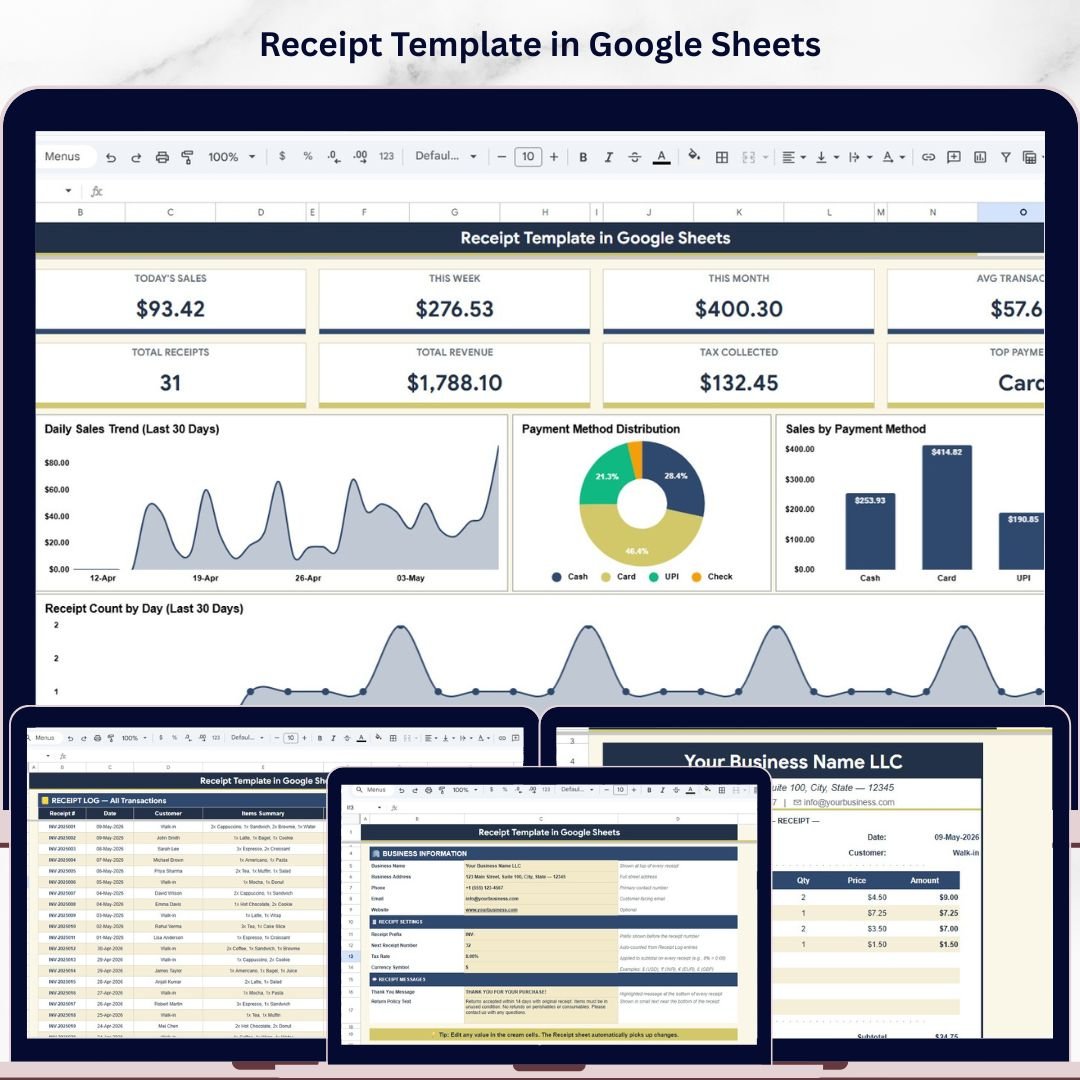
The Receipt Template in Google Sheets issues print-ready sales receipts and tracks every transaction across 5 connected sheet tabs, with 8 KPI cards on the Dashboard, 4 trend and distribution charts, and 7 daily collection metrics covering Cash, Card, UPI, and Check. Setup takes under 10 minutes — enter business details on the Settings tab, log a sale, and the receipt auto-numbers, calculates tax, and updates every dashboard.
🌍 Join 8,400+ teams in 40+ countries using NextGenTemplates to replace paid POS and billing SaaS tools with one-time-purchase Excel, Google Sheets, Power BI, and HTML templates.
✅ Instant download · One-time payment · No subscription · No per-user fees · Lifetime access
Receipt
🔑 Key Features of the Receipt Template in Google Sheets
🔹 5 purpose-built sheet tabs — Receipt (printable), Receipt Log, Daily Summary, Dashboard, and Settings — each handling a different part of the sales-receipt workflow so you do not have to switch between billing apps, spreadsheets, and POS software.
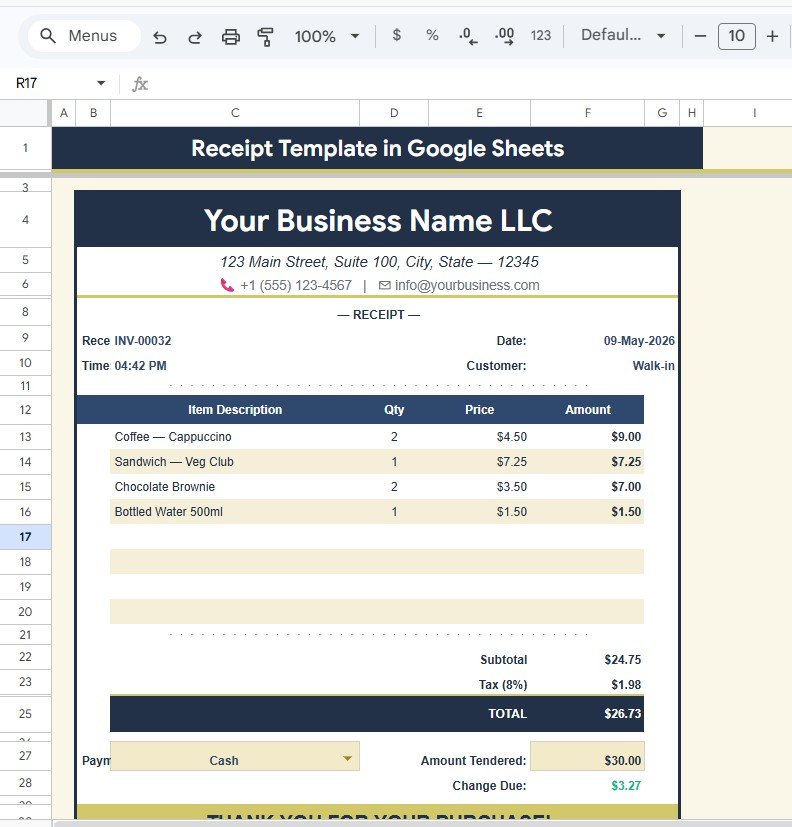
🔹 Print-ready receipt page — A clean A4-friendly layout shows Business Name, Address & Contact, Receipt Number, Date and Time, Customer Name, an itemized line-item table, Subtotal, Tax, Total, Payment Method, Amount Tendered, and Change Due — every field formatted for thermal or laser printing.
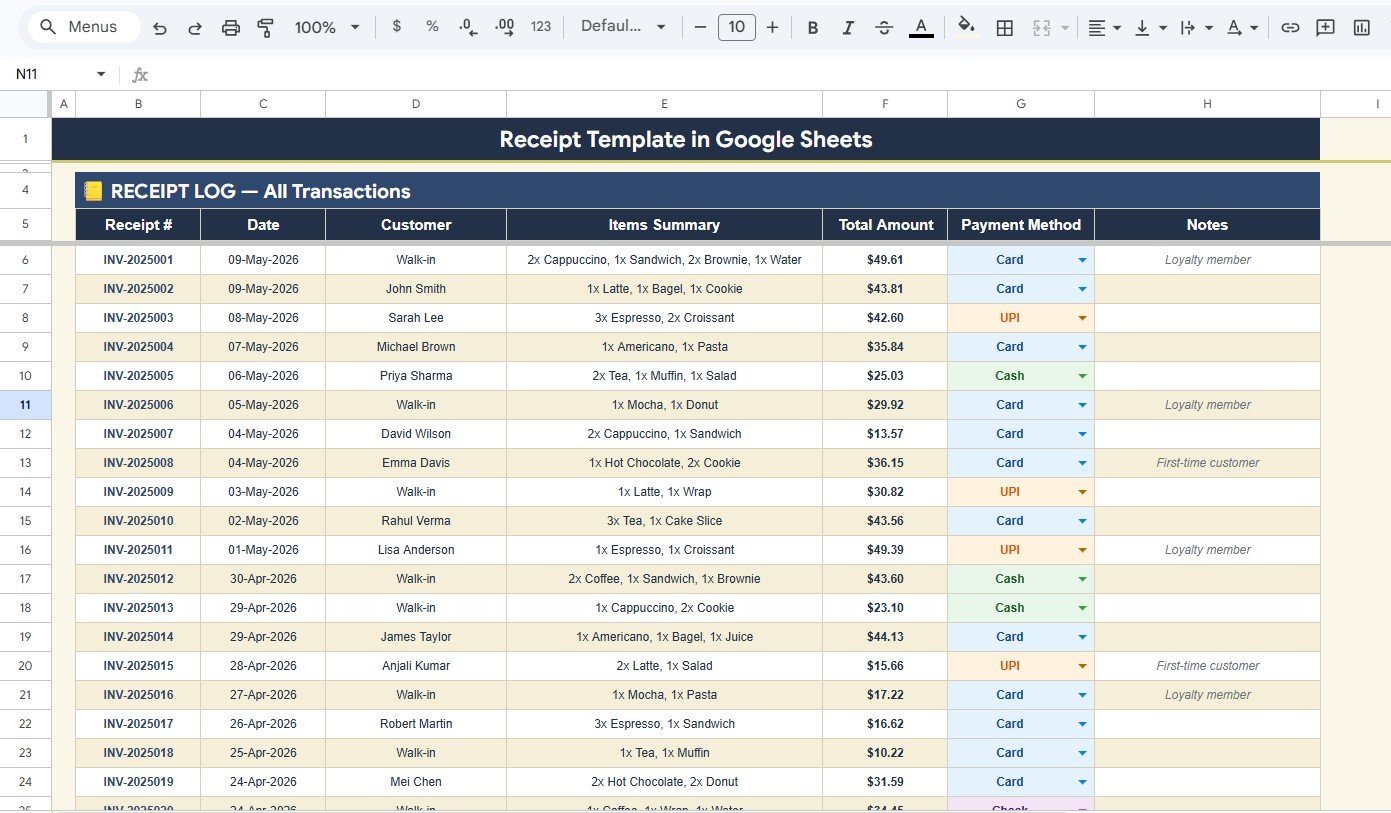
🔹 Receipt Log with 5 analyses — Total Amount by Receipt Number, Items Summary by Customer, Payment Method by Receipt, Total Amount by Date, and Customer Notes by Receipt give you a searchable transaction history without leaving Google Sheets.
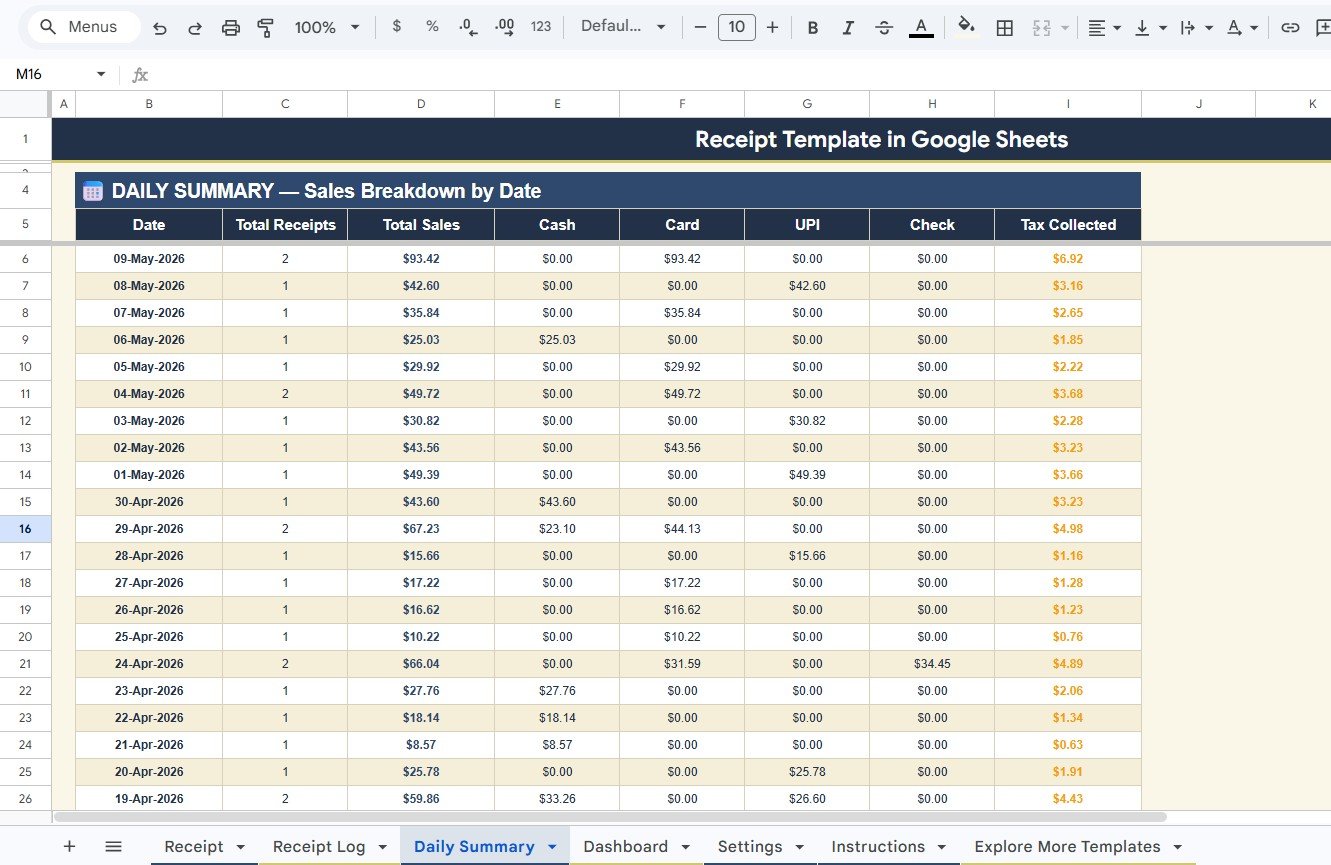
🔹 Daily Summary with 7 collection metrics — Total Receipts by Date, Total Sales by Date, plus four payment-method splits (Cash Collection, Card Collection, UPI Collection, Check Collection) and Tax Collected by Date — perfect for end-of-day reconciliation.
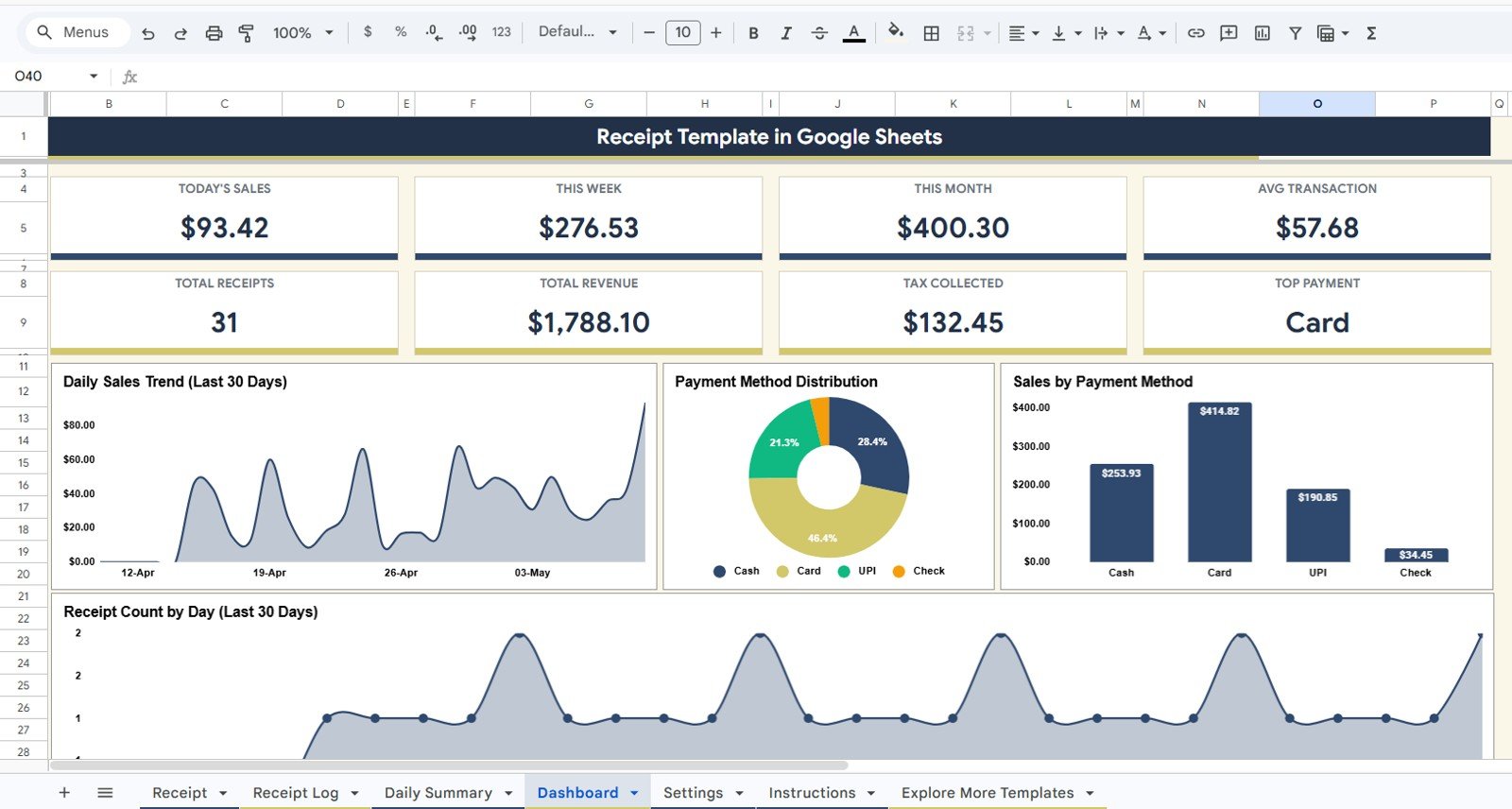
🔹 Sales Dashboard with 8 KPI cards — Today’s Sales, This Week Sales, This Month Sales, Average Transaction, Total Receipts, Total Revenue, Tax Collected, and Top Payment Method — refreshed automatically as new receipts are logged.
🔹 4 visual analytics on the Dashboard — Daily Sales Trend (Last 30 Days), Payment Method Distribution by Method, Sales by Payment Method, and Receipt Count (Last 30 Days) — making weekly and monthly reviews fast.
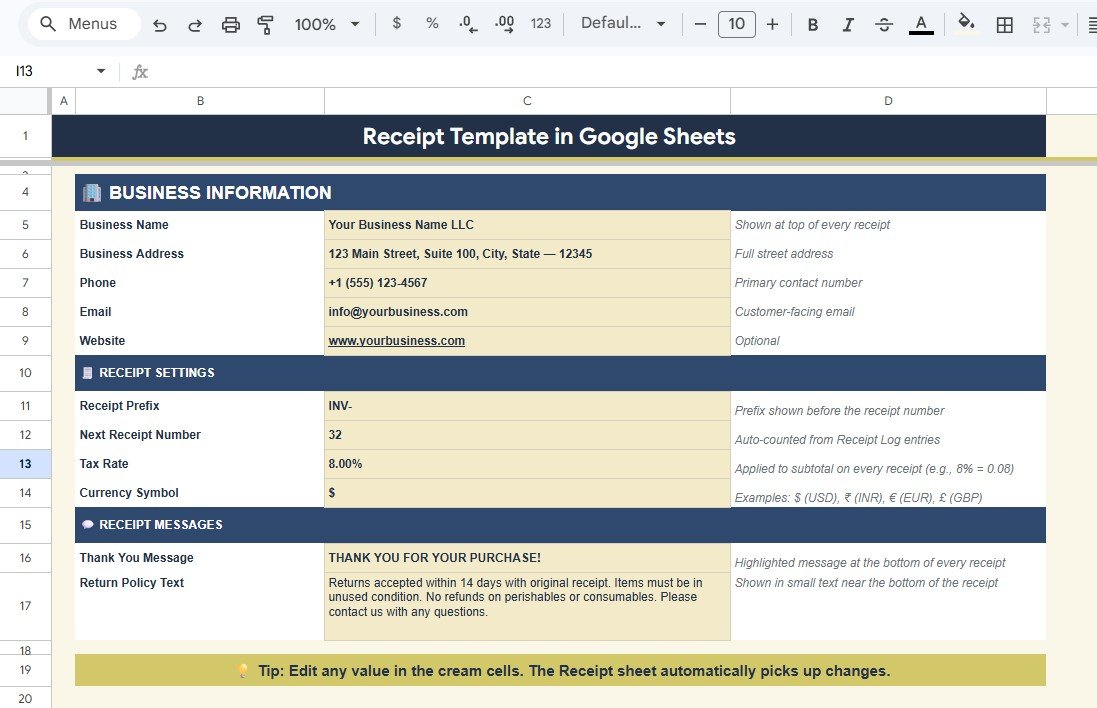
🔹 10 configurable Settings — Business Name, Address, Phone, Email, Website, Receipt Prefix, Next Receipt Number Counter, Tax Rate, Currency Symbol, Thank You Message, and Return Policy — change once and every printed receipt updates.
🔹 Works in Google Sheets — browser-based, mobile-friendly, real-time team collaboration, and only a free Google account is needed. Also explore our Google Sheets Financial Tools and Google Sheets Dashboards.
📦 What’s Inside the Receipt Template in Google Sheets
The template includes 5 sheet tabs that walk a sale from billing the customer to month-end review:
🔹 1. Receipt — The print-ready customer-facing page. Shows Business Name, Business Address & Contact, Receipt Number, Date and Time, Customer Name, the Item Description Table (with quantity and price), Subtotal, Tax, Total, Payment Method, Amount Tendered, and Change Due — formatted to print on standard letter or A4 paper.
🔹 2. Receipt Log — A central transaction database showing Total Amount by Receipt Number, Items Summary by Customer, Payment Method by Receipt, Total Amount by Date, and Customer Notes by Receipt. Every receipt issued lands here automatically and feeds the Daily Summary and Dashboard.
🔹 3. Daily Summary — A daily reconciliation sheet with Total Receipts by Date, Total Sales by Date, Cash Collection by Date, Card Collection by Date, UPI Collection by Date, Check Collection by Date, and Tax Collected by Date. Match this against your till float at end of day.
🔹 4. Dashboard — The performance hub. 8 KPI cards (Today’s Sales, This Week Sales, This Month Sales, Average Transaction, Total Receipts, Total Revenue, Tax Collected, Top Payment Method) sit alongside 4 charts: Daily Sales Trend (Last 30 Days), Payment Method Distribution by Method, Sales by Payment Method, and Receipt Count (Last 30 Days).
🔹 5. Settings — Your business profile and receipt configuration. Edit Business Name, Address, Phone & Email, Website, Receipt Prefix, the Next Receipt Number Counter, Tax Rate, Currency Symbol, Thank You Message, and Return Policy text — every change propagates to all future receipts.
📊 Receipt Template in Google Sheets vs. Microsoft Excel Receipt Template vs. Paid POS Software — Where This Fits
| Feature | Receipt Template in Google Sheets | Microsoft Excel Receipt Template | Paid POS (e.g., Square / Shopify POS / Lightspeed) |
|---|---|---|---|
| Cost | $6.99 one-time ✅ | $10–$30 one-time | $60–$165 / month + 2.6%–2.9% per transaction |
| Platform | Google Sheets (browser, mobile, any OS) ✅ | Microsoft Excel (desktop license) | Cloud SaaS — vendor lock-in, hardware required |
| Setup time | Under 10 minutes ✅ | Under 10 minutes | 2–6 weeks (hardware + onboarding) |
| Real-time team collaboration | Yes — built into Google Sheets ✅ | Limited (OneDrive co-authoring) | Yes |
| Mobile access | Yes — Google Sheets mobile app ✅ | Limited on mobile | Yes (native app, paid hardware) |
| Auto receipt numbering | Yes — counter on Settings tab ✅ | Manual | Yes |
| Multi-payment tracking (Cash, Card, UPI, Check) | Yes — Daily Summary splits all four ✅ | Manual setup | Yes (card-fee surcharges apply) |
| 30-day sales trend dashboard | Yes — included on Dashboard tab ✅ | Not included | Yes |
| Year-1 cost at 5 users | $6.99 ✅ | $10–$30 | $720–$2,000+ per terminal |
For boutiques, salons, food trucks, and small retailers who want professional receipts and daily sales tracking without paying $60+ a month for cloud POS, the Receipt Template in Google Sheets sits in the sweet spot.
👥 Who This Template Is For — and Who It’s Not For
✅ This template is built for:
- Small retailers, boutiques, salons, and food trucks issuing 5–100 receipts per day who want printable receipts plus daily sales reconciliation
- Solo consultants, freelancers, and tutors who bill clients in person and need a clean receipt with auto-numbering
- Pop-up stores, market stall vendors, and event sellers needing a portable receipt system that runs on a phone or tablet
- Cash-and-card businesses that want a single sheet to track Cash, Card, UPI, and Check collections side by side
- Bookkeepers managing 5–10 micro-business clients who need shareable, audit-ready receipt logs
❌ This template is NOT for:
- High-volume retailers with 500+ daily transactions needing barcode scanning and integrated inventory
- Restaurants needing kitchen-display systems, table management, or split-check workflows
- Businesses requiring direct credit-card processing inside the template — payment capture is logged manually
⚙️ How to Use the Receipt Template in Google Sheets
- Open the PDF guide in your download and click the Google Sheets copy link to create your own editable copy in Google Drive.
- Configure the Settings tab — enter Business Name, Address, Phone, Email, Receipt Prefix, starting Receipt Number, Tax Rate, and Currency Symbol.
- Issue a receipt on the Receipt tab — type the customer name, add line items with quantity and price, select a payment method, and enter Amount Tendered. Subtotal, Tax, Total, and Change Due calculate automatically.
- Print or share the Receipt tab as PDF — every field is print-formatted with your business header.
- Log every sale in the Receipt Log so it flows into the Daily Summary and Dashboard.
- Reconcile at end of day using the Daily Summary — match Cash, Card, UPI, and Check collections against your till.
- Review weekly on the Dashboard — check Today’s Sales, This Week Sales, Average Transaction, and the 30-day trend chart to spot slow days early.
💼 Real-World Use Cases
Aarti runs a 4-chair beauty salon in Pune. She uses the Receipt Template in Google Sheets to print receipts for each walk-in, splits the Daily Summary by Cash, Card, and UPI to match her end-of-day cash drawer, and reviews the 30-day Dashboard trend on Sundays to plan staffing — all from her phone, replacing a $79-per-month cloud POS subscription.
Marcus owns a Brooklyn weekend coffee cart. He logs every receipt on his iPad during the morning rush, lets the Settings-tab counter auto-number each one, and reconciles cash versus card sales against his till at close. The Dashboard’s Top Payment Method KPI showed him that 71% of customers pay by card — so he renegotiated his card-fee plan.
Lakshmi is a freelance home-tuition tutor in Bengaluru. She bills 30 students monthly and prints a Google Sheets receipt for each in-person fee collection. The Receipt Log keeps a clean payment history per student, the Customer Notes column flags fee waivers, and the Tax Collected metric on the Dashboard makes her quarterly GST filing painless.
❓ Frequently Asked Questions
What sheets are included in the Receipt Template in Google Sheets?
The Receipt Template in Google Sheets includes 5 sheet tabs: Receipt (print-ready), Receipt Log (transaction database), Daily Summary (date-wise collection breakdown), Dashboard (8 KPIs and 4 charts), and Settings (business configuration). All tabs are connected so a single receipt entry updates every report.
Can I print the receipts directly from Google Sheets?
Yes. The Receipt tab is formatted for print — set Google Sheets to print the current sheet only, and the layout fits standard letter or A4 paper. You can also export the receipt as a PDF and email or message it to the customer directly.
How does the auto-receipt-numbering work?
The Settings tab contains a Next Receipt Number Counter and a Receipt Prefix field. When you issue a new receipt, the prefix and counter combine to form the Receipt Number (for example, INV-1042). After you save the receipt to the Log, increment the counter once.
Which payment methods does this Receipt Template track?
The Daily Summary and Dashboard split collections by Cash, Card, UPI, and Check. The Receipt page lets you tag any payment method on each transaction, so the Dashboard’s Top Payment Method KPI and Payment Method Distribution chart always reflect your actual customer behavior.
How long does setup take for this Receipt Template?
Setup of the Receipt Template in Google Sheets takes under 10 minutes. Click the copy link in the PDF guide, fill in the Settings tab with your business details and tax rate, and issue your first receipt. No formulas to write, no scripts to authorize.
How does this compare to paid POS software like Square or Shopify POS?
Paid POS software costs $60–$165 per month per terminal plus 2.6%–2.9% in transaction fees. The Receipt Template in Google Sheets is $6.99 one-time with no recurring fees and no transaction cuts. It does not process card payments directly — you record them manually after they clear — but for low-volume retailers it pays for itself in week one.
Is the Receipt Template in Google Sheets a one-time purchase?
Yes. The Receipt Template in Google Sheets is $6.99 one-time, instant download, no subscription, no per-user fees, and lifetime access. You also get free updates whenever the template is revised.
👤 About the Author
Built by PK — Microsoft Certified Professional with 15+ years of Excel, Google Sheets, and Power BI experience. Founder of NextGenTemplates, reaching 300K+ subscribers across YouTube channels (@PK-AnExcelExpert, @NextGenTemplates, @NeoTechNavigators). Every template is hand-built and tested before release.
🔗 Explore Related Templates
🔹 Client Billing & Invoice Management Dashboard in Google Sheets — Track invoices, payments, and overdue accounts in real time with a connected dashboard.
🔹 Pricing Calculator in Google Sheets — Model selling prices at multiple margins with discount and bundle simulation.
🔹 Weekly Expense Tracker in Google Sheets — A free companion tracker for weekly business expenses.
🔹 Expense Management KPI Dashboard in Google Sheets — Pair receipt-side revenue tracking with expense-side analytics.
🔹 Browse all Google Sheets Financial Tools on NextGenTemplates.
📖 Click here to read the Detailed Blog Post
Watch the step-by-step video tutorial:
🎥 Visit our YouTube channel for step-by-step video tutorials
👉 YouTube.com/@NextGenTemplates




















Reviews
There are no reviews yet.