

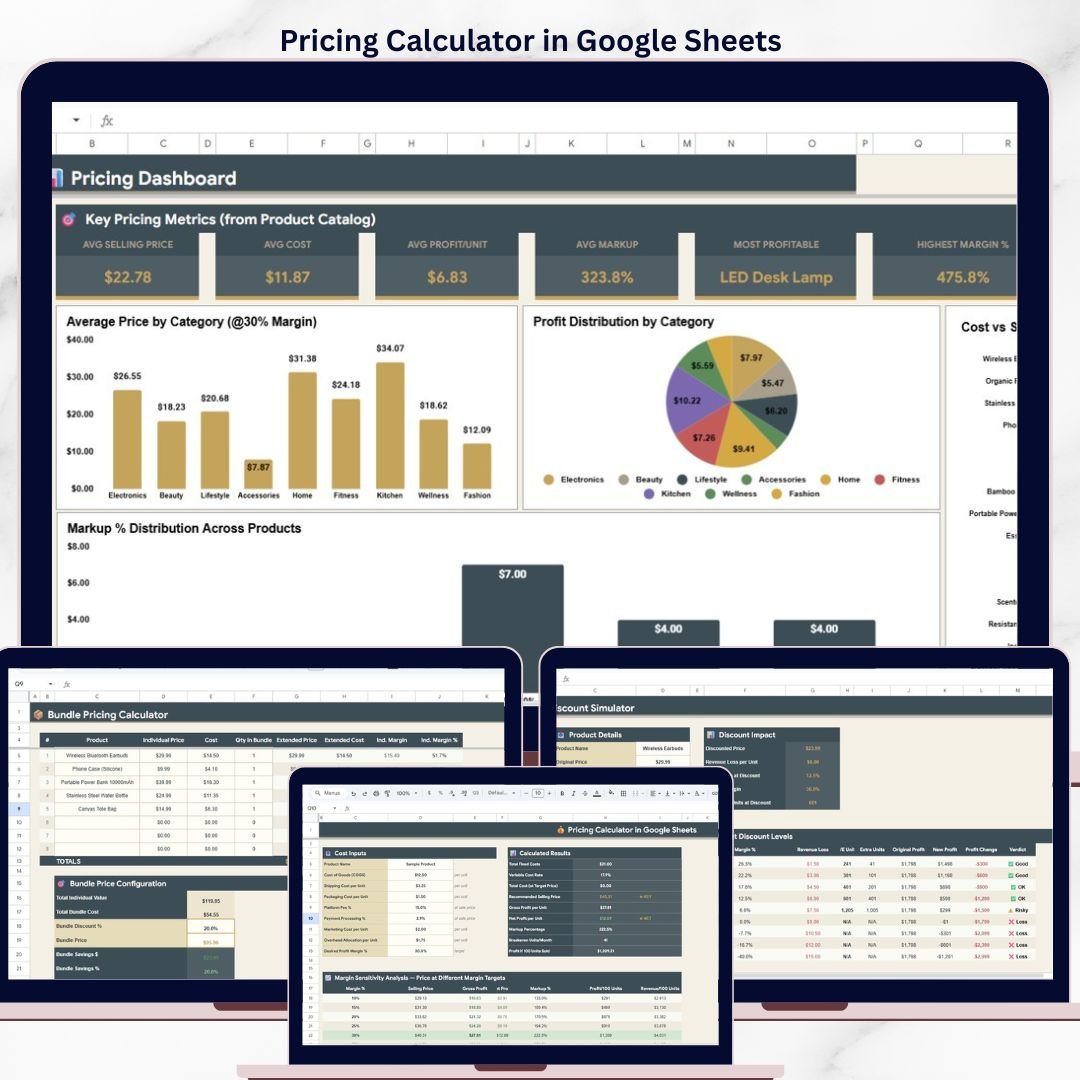
The Pricing Calculator in Google Sheets models pricing across 6 interactive sheet tabs, with 9 KPI cards, 14+ charts, multi-margin product catalog analysis, competitive benchmarking, discount simulation, and bundle pricing — all in one editable spreadsheet. Replace the sample data and every formula, chart, and KPI updates in under 10 minutes.
🌍 Join 8,400+ teams in 40+ countries using NextGenTemplates to replace paid SaaS pricing tools with one-time-purchase Excel, Google Sheets, Power BI, and HTML templates.
✅ Instant download · One-time payment · No subscription · No per-user fees · Lifetime access
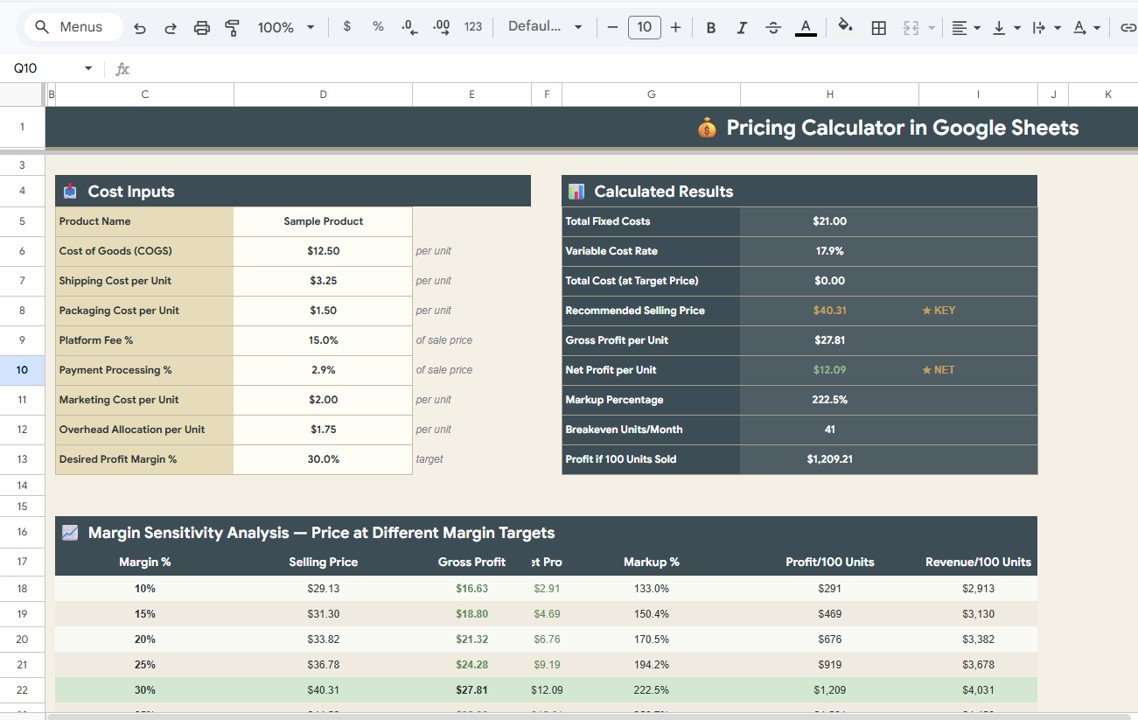
Pricing Calculator in Google Sheets — Overview Page
🔑 Key Features of Pricing Calculator in Google Sheets
🔹 6 purpose-built sheet tabs — Overview, Product Catalog Pricing at Multiple Margins, Competitive Analysis, Discount Simulator, Bundle Pricing Calculator, and Pricing Dashboard — each solving a different pricing decision so you never have to switch between tools.
🔹 9 KPI cards on the Overview page — Total Fixed Costs, Variable Cost Rate, Total Cost (at Target Price), Recommended Selling Price, Gross Profit per Unit, Net Profit per Unit, Markup Percentage, Breakeven Units/Month, and Profit if 100 Units Sold give you a real-time snapshot of pricing health at a glance.
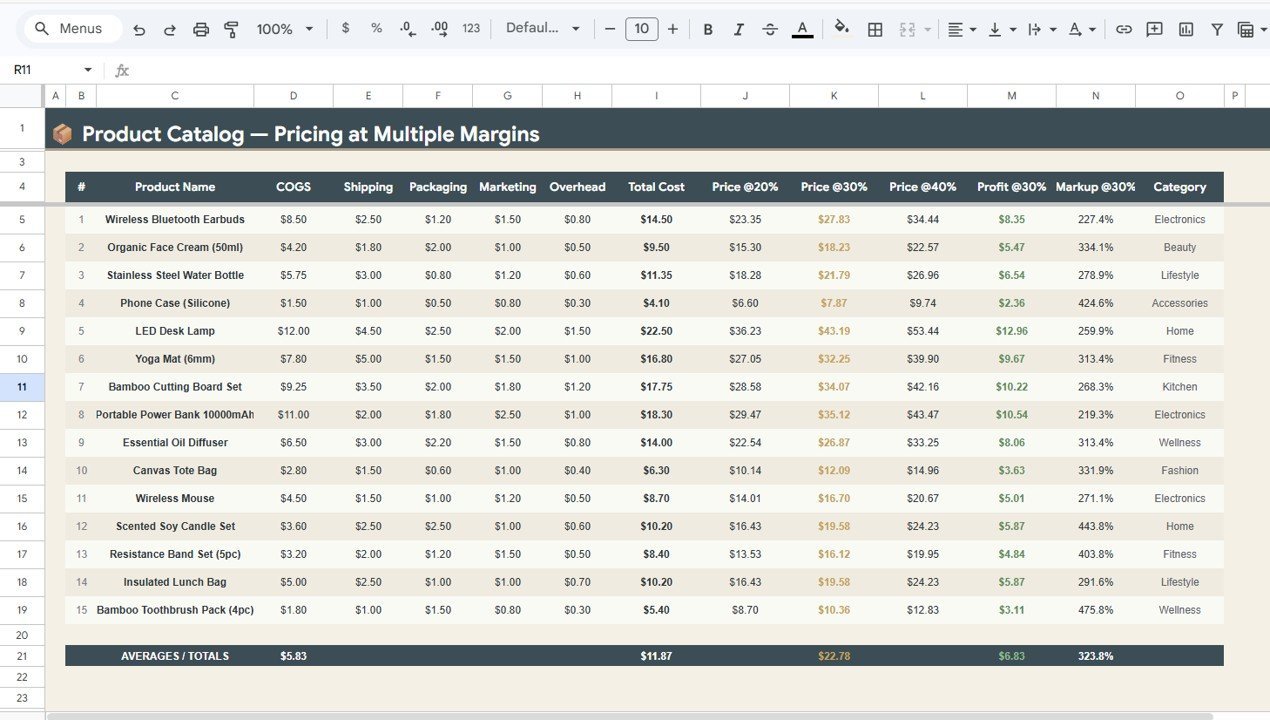
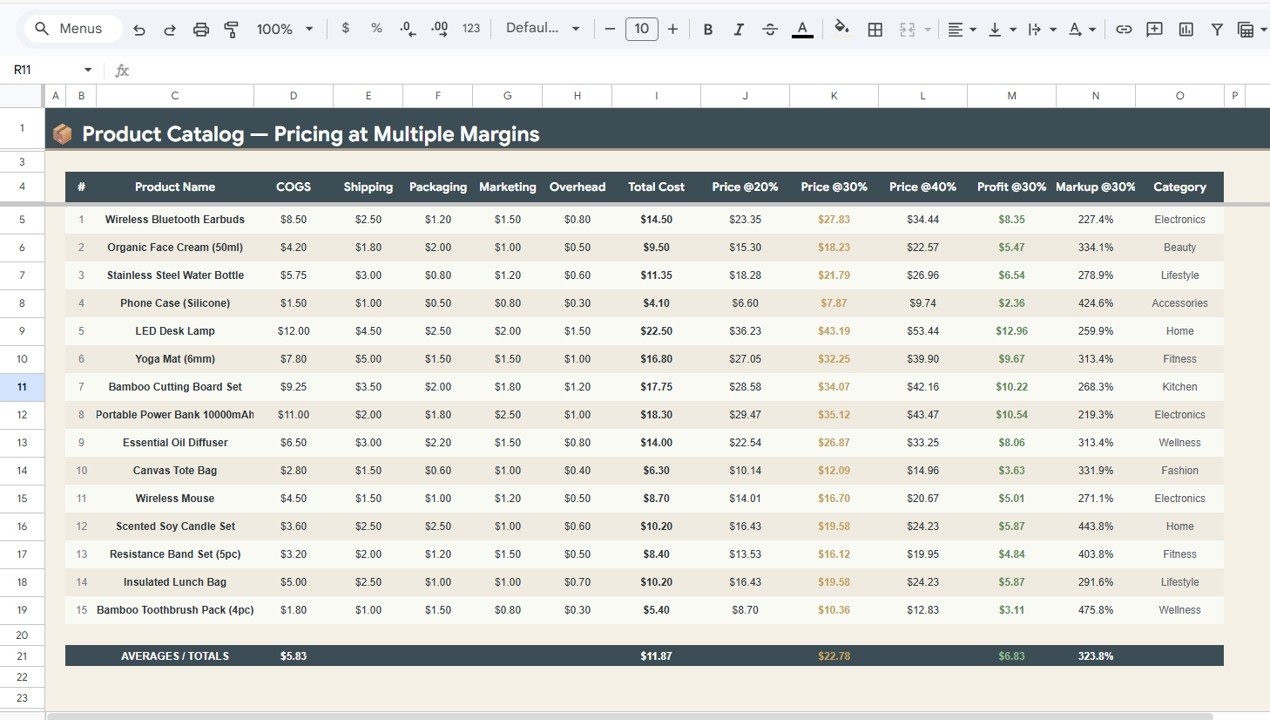
🔹 Multi-margin product catalog pricing — The Product Catalog tab calculates Total Cost, Selling Price at 20%, 30%, and 40% margins, Profit at 30%, and Markup at 30% for every product in your catalog — with category-level summaries that help you compare across product lines.
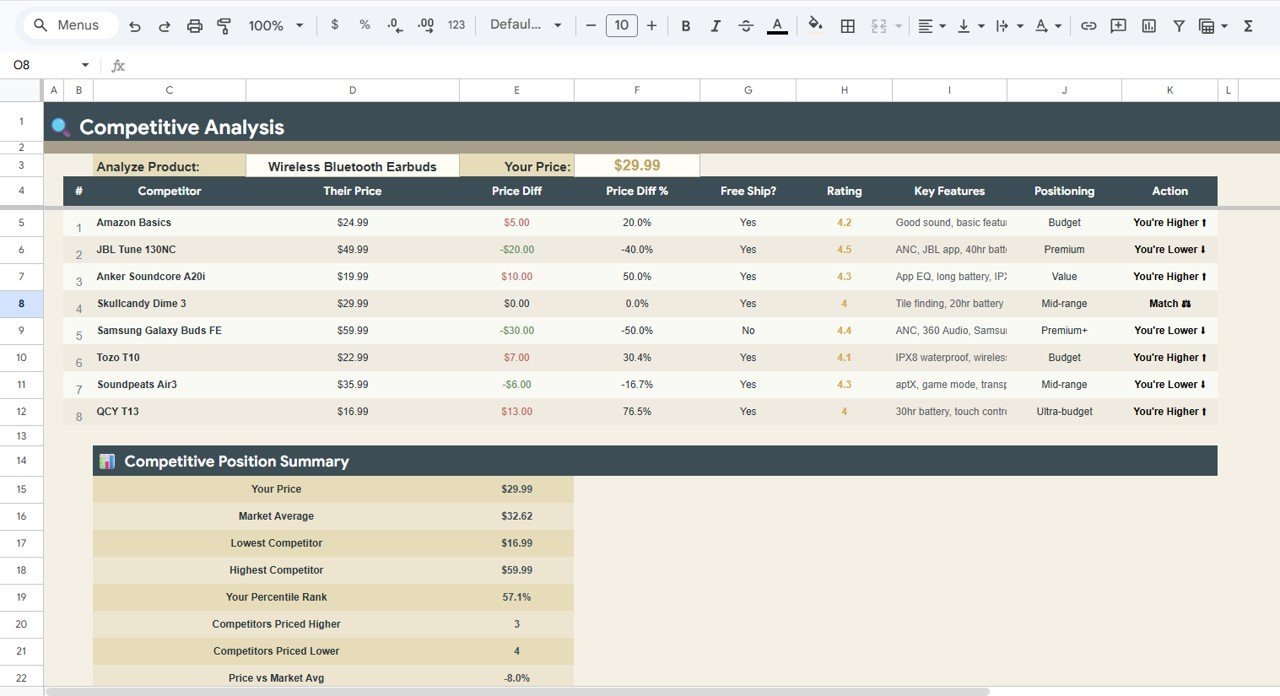
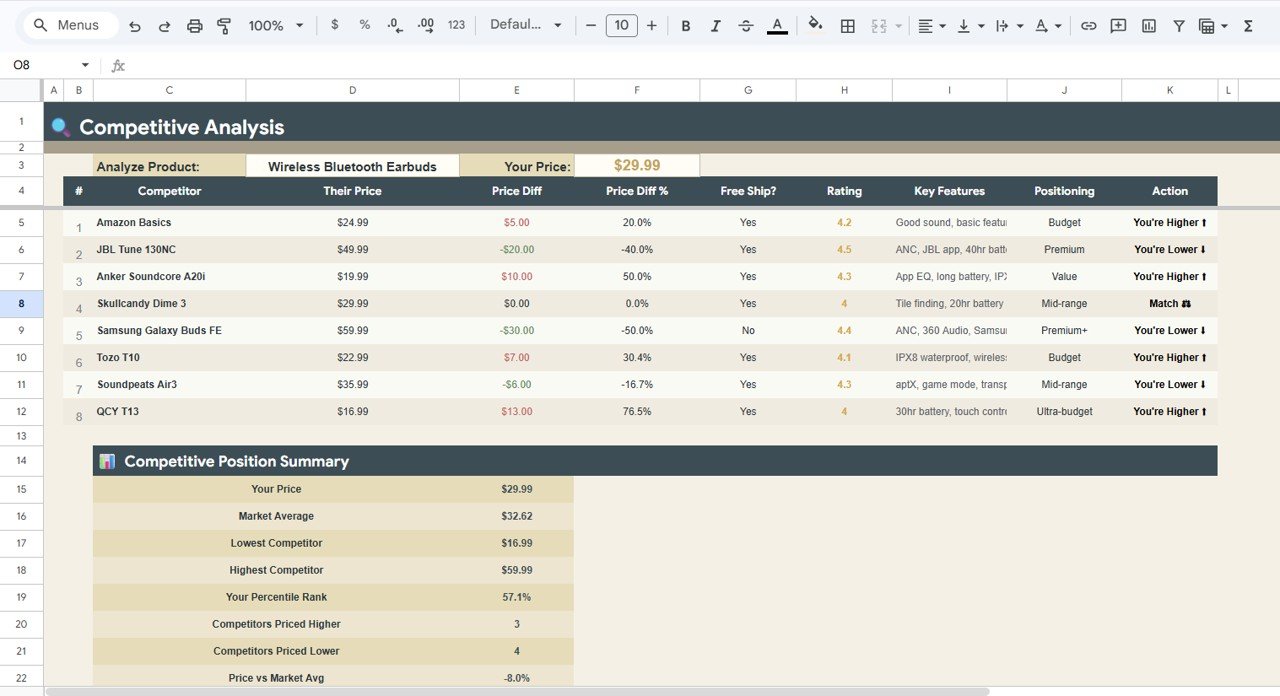
🔹 Competitive analysis sheet — Enter competitor prices and ratings to see Price Diff by Competitor, Price Diff %, Rating by Competitor, Positioning by Competitor, and a recommended Action by Competitor — giving you data to justify your price point in sales conversations.
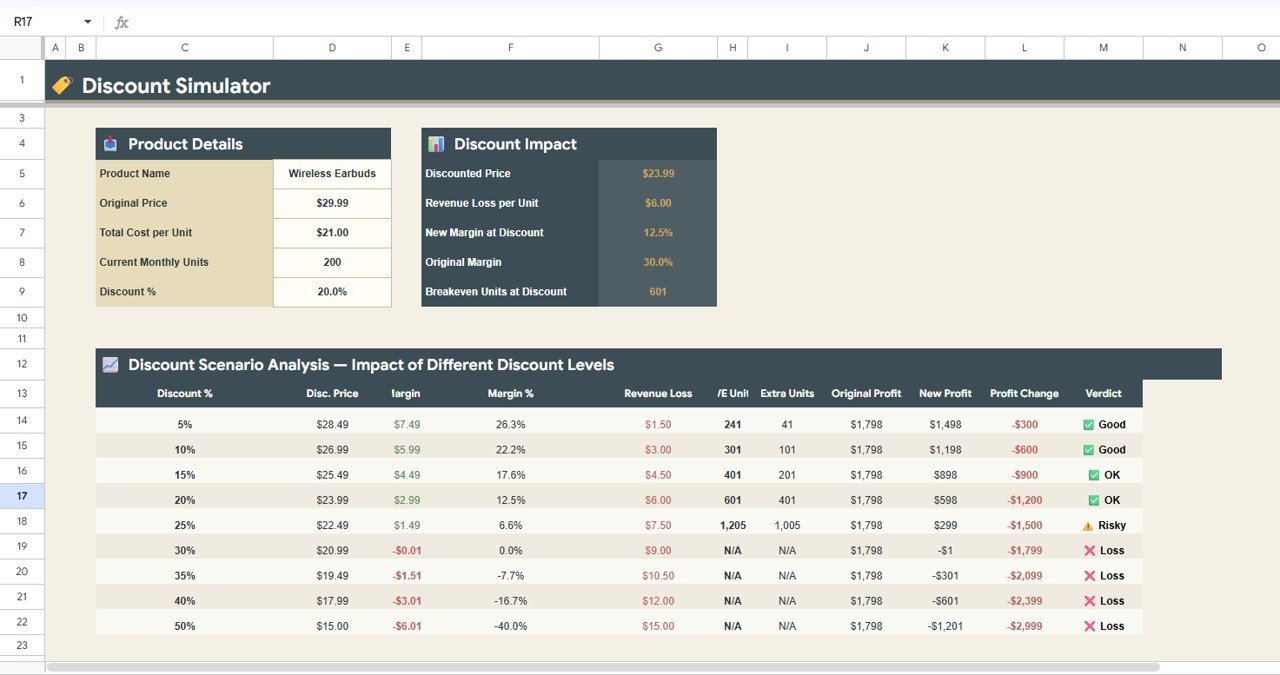
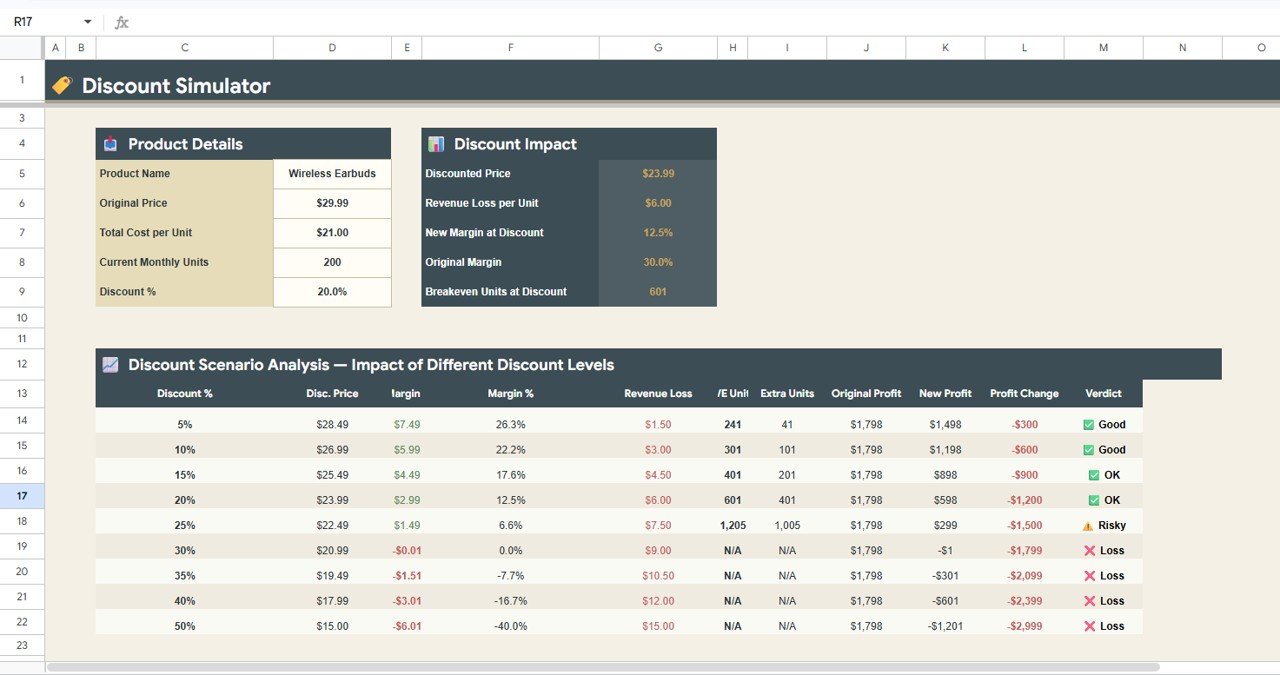
🔹 Discount simulation engine — Test any discount percentage and instantly see Discounted Price, Margin impact, Revenue Loss, New Profit, Profit Change %, and a Verdict (viable, marginal, or destructive) — before committing to a promotion.
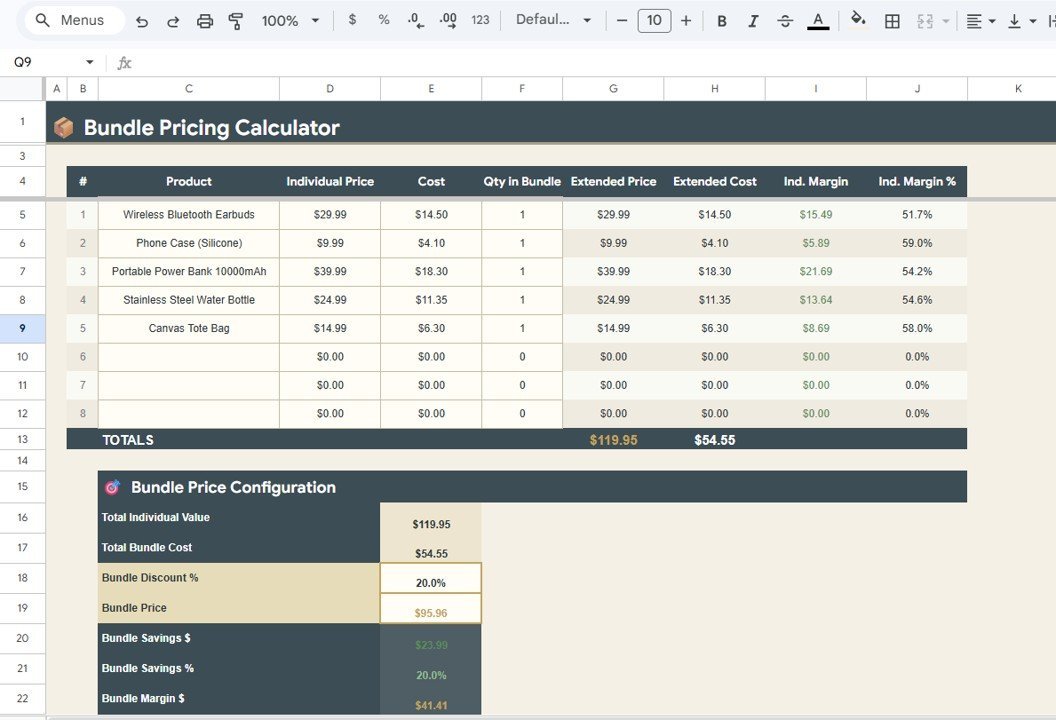
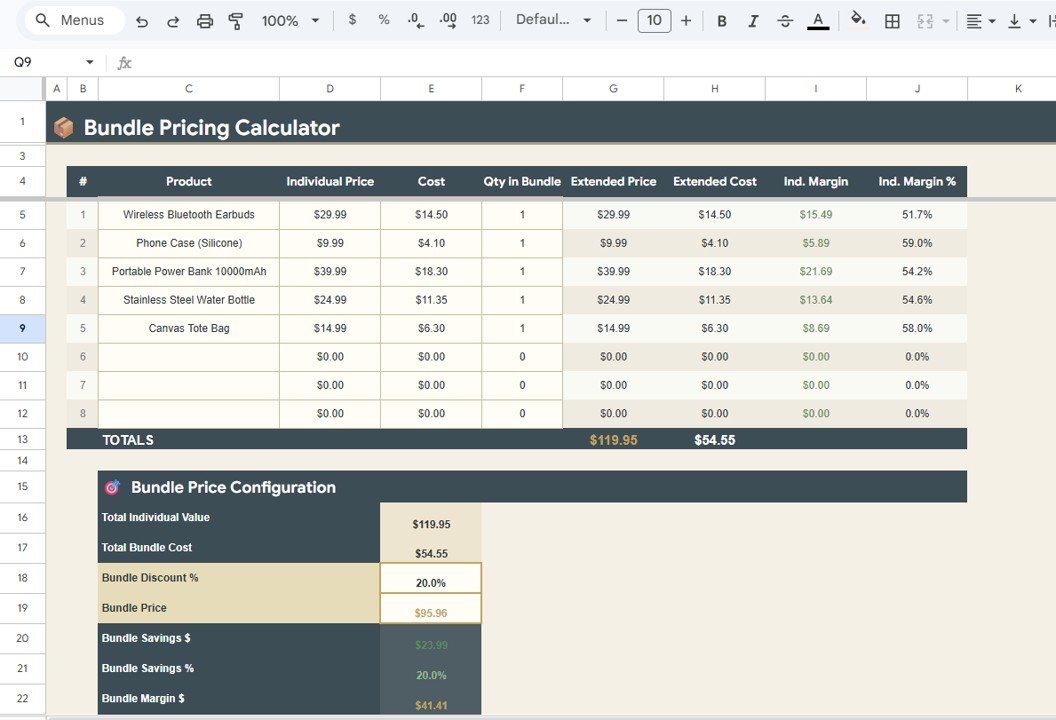
🔹 Bundle pricing calculator — Add products to a bundle and see Individual Price, Cost, Extended Price, Extended Cost, Individual Margin, and Individual Margin % per item — so you can set bundle discounts that protect margins.
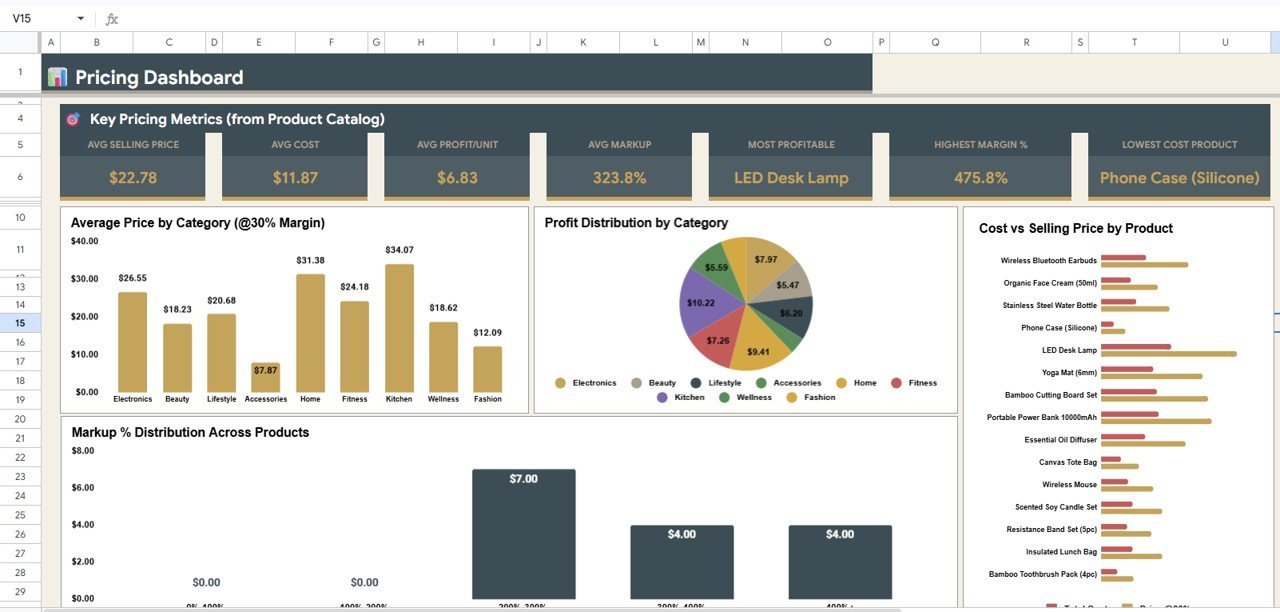
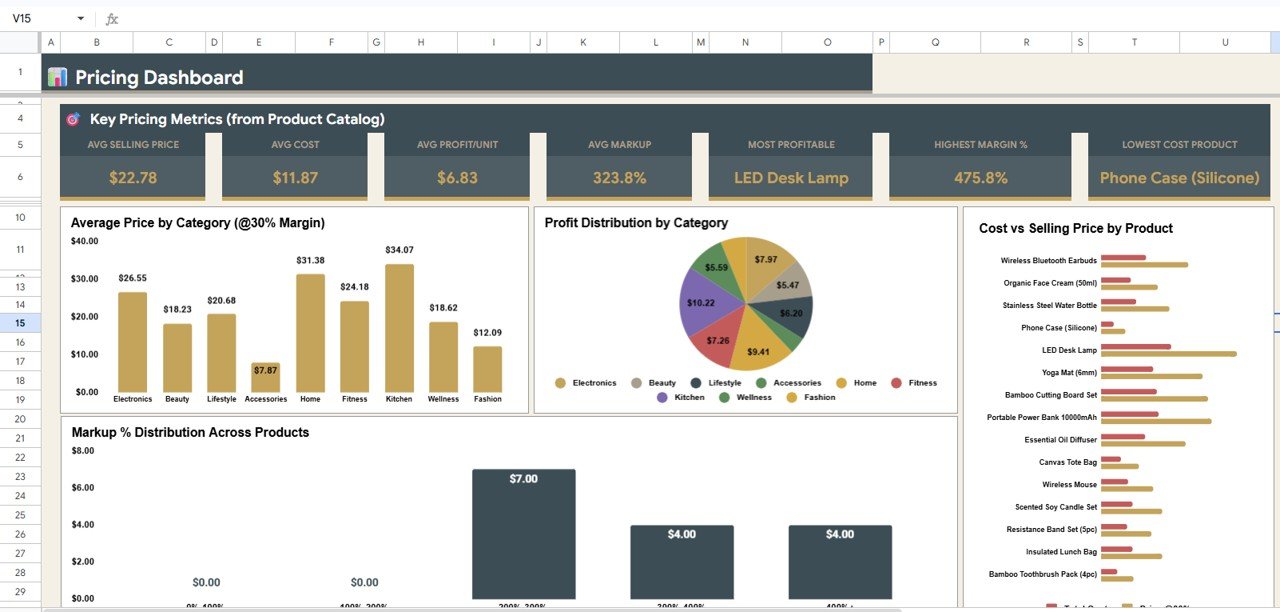
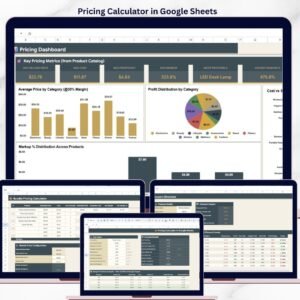
🔹 Pricing dashboard with 8 charts — Average Selling Price by Catalog, Average Cost by Catalog, Average Profit per Unit by Catalog, Average Markup by Catalog, Average Price by Category, Profit Distribution by Category, Cost vs Selling Price by Product, and Markup % by Product give you a visual overview across your entire pricing structure.
🔹 Slicer filters on the Overview page — Apply filters to slice KPIs and charts instantly by product, category, or margin target without editing any formula.
🔹 Works in Google Sheets — browser-based, accessible from any device, real-time collaboration, and free Google account is all you need. Also explore our Financial Tools Templates for more pricing and finance solutions.
📦 What’s Inside the Pricing Calculator in Google Sheets
The template contains 6 sheet tabs organized to walk you through every pricing decision:
🔹 1. Overview Page — Your pricing command center. 9 KPI cards (Total Fixed Costs, Variable Cost Rate, Total Cost at Target Price, Recommended Selling Price, Gross Profit per Unit, Net Profit per Unit, Markup Percentage, Breakeven Units/Month, Profit if 100 Units Sold) sit above 6 interactive charts: Selling Price by Margin Target, Gross Profit by Margin Target, Net Profit by Margin Target, Markup % by Margin Target, Profit per 100 Units by Margin Target, and Revenue per 100 Units by Margin Target. Slicer filters let you drill into any product or margin scenario instantly.
Product Catalog Pricing at Multiple Margins
🔹 2. Product Catalog Pricing at Multiple Margins — Lists every product with Total Cost by Product, Price at 20% Margin, Price at 30% Margin, Price at 40% Margin, Profit at 30% by Product, Markup at 30% by Product, and Total Cost by Category — letting you compare how different margin targets change your catalog pricing.
Competitive Analysis
🔹 3. Competitive Analysis — Enter competitor data and see Their Price by Competitor, Price Diff by Competitor, Price Diff % by Competitor, Rating by Competitor, Positioning by Competitor, and recommended Action by Competitor. This tab turns raw competitor intelligence into clear pricing decisions.
Discount Simulator
🔹 4. Discount Simulator — Model any discount scenario with Discounted Price by Discount %, Margin by Discount %, Revenue Loss by Discount %, New Profit by Discount %, Profit Change by Discount %, and a color-coded Verdict that flags whether the discount is profitable, marginal, or destructive.
Bundle Pricing Calculator
🔹 5. Bundle Pricing Calculator — Select products for a bundle and analyze Individual Price by Product, Cost by Product, Extended Price by Product, Extended Cost by Product, Individual Margin by Product, and Individual Margin % by Product — so every bundle you offer protects your profit floor.
Pricing Dashboard
🔹 6. Pricing Dashboard — A visual summary with 8 charts: Average Selling Price by Catalog, Average Cost by Catalog, Average Profit per Unit by Catalog, Average Markup by Catalog, Average Price by Category, Profit Distribution by Category, Cost vs Selling Price by Product, and Markup % by Product — giving you a bird’s-eye view of your entire pricing landscape.
📊 Pricing Calculator in Google Sheets vs. Microsoft Excel Pricing Template vs. Paid SaaS Pricing Tools — Where This Fits
| Feature | Pricing Calculator in Google Sheets | Microsoft Excel Pricing Template | Paid SaaS (e.g., ProfitWell / Pricefx / PROS) |
|---|---|---|---|
| Cost | $6.99 one-time ✅ | $10–$30 one-time | $500–$5,000+ per month |
| Platform | Google Sheets (browser, mobile, any OS) ✅ | Microsoft Excel (desktop license required) | Cloud SaaS — vendor lock-in |
| Setup time | Under 10 minutes ✅ | Under 10 minutes | 4–12 weeks (onboarding + integrations) |
| Real-time team collaboration | Yes — built into Google Sheets ✅ | Limited (OneDrive co-authoring) | Yes |
| Mobile access | Yes — Google Sheets mobile app ✅ | Limited on mobile | Yes (native app) |
| Multi-margin catalog pricing | Yes — 20%, 30%, 40% margins side-by-side ✅ | Manual formula setup | Yes (automated) |
| Competitive analysis tab | Yes — built-in with price diff and positioning ✅ | Not included | Yes (advanced) |
| Discount simulation | Yes — with viability verdict ✅ | Manual | Yes (AI-driven) |
| Year-1 cost at 5 users | $6.99 ✅ | $10–$30 | $6,000–$60,000+ |
For small businesses and product managers who want structured pricing analysis — margin modeling, competitor benchmarks, discount impact, and bundle optimization — without paying $500+/month for enterprise SaaS, the Pricing Calculator in Google Sheets sits in the sweet spot.
👥 Who This Template Is For — and Who It’s Not For
✅ This template is built for:
- Product managers at small-to-mid businesses (10–200 products) who need to model pricing at multiple margin targets before setting prices
- E-commerce store owners who want to benchmark their prices against competitors and test discount scenarios before running sales
- Startup founders and solopreneurs setting initial product pricing with cost-plus and margin-based calculations
- Sales managers who need a quick tool to calculate bundle pricing and ensure bundled deals stay profitable
- Finance and operations teams looking for a $6.99 alternative to a $500+/month pricing SaaS subscription
❌ This template is NOT for:
- Enterprise teams with 10,000+ SKUs needing AI-driven dynamic pricing with real-time market feeds
- Businesses requiring automated competitor price scraping — this template uses manual competitor data entry
- Teams who need multi-currency pricing with live exchange rate integrations
⚙️ How to Use the Pricing Calculator in Google Sheets
- Open the PDF guide in your download and click the Google Sheets copy link to create your own editable copy in Google Drive.
- Enter your cost data on the Overview page — fixed costs, variable cost rate, and target margin — and the 9 KPI cards update automatically.
- Add your product catalog on the Product Catalog Pricing sheet — enter each product’s cost and the template calculates prices at 20%, 30%, and 40% margins.
- Enter competitor data on the Competitive Analysis tab — add competitor names, their prices, and ratings to see positioning and recommended actions.
- Test discounts on the Discount Simulator — enter discount percentages and review the margin, revenue, and profit impact before committing.
- Build bundles on the Bundle Pricing Calculator — select products and set bundle pricing while monitoring individual and extended margins.
- Review the Pricing Dashboard for a visual summary of average prices, costs, profits, and markups across your entire product catalog.
💼 Real-World Use Cases
Ravi runs a 45-product skincare brand on Shopify. He uses the Pricing Calculator in Google Sheets to model prices at 20%, 30%, and 40% margins across his product line, runs the Discount Simulator before every seasonal sale to ensure promotions stay above his profit floor, and reviews the Pricing Dashboard monthly to spot products where markup has drifted below 25%. The template replaced a $200/month pricing analytics subscription.
Elena manages pricing for a 120-SKU industrial parts distributor in Chicago. She uses the Competitive Analysis tab to benchmark against three key competitors weekly, the Bundle Pricing Calculator to structure volume-discount packages for large customers, and the Overview KPIs to present breakeven analysis to her operations director — all from a shared Google Sheet that her team accesses simultaneously.
Tomás is a solo SaaS founder in Lisbon building his first product. He uses the Overview page to test different price points and instantly see how each one affects gross profit, net profit, and breakeven volume. The Discount Simulator helps him decide whether to offer a launch discount, and the Competitive Analysis tab keeps his pricing positioned correctly against two established competitors — without needing Pricefx or PROS.
❓ Frequently Asked Questions
What sheets are included in the Pricing Calculator in Google Sheets?
The Pricing Calculator in Google Sheets includes 6 sheet tabs: Overview with 9 KPI cards and 6 charts, Product Catalog Pricing at Multiple Margins, Competitive Analysis, Discount Simulator, Bundle Pricing Calculator, and a Pricing Dashboard with 8 visual charts.
How does the multi-margin pricing work in this template?
The Product Catalog Pricing tab takes each product’s total cost and calculates the selling price needed to hit 20%, 30%, and 40% profit margins side by side. It also shows profit and markup at 30% margin plus category-level cost summaries — so you can compare margin scenarios across your entire catalog instantly.
Can I add my own competitors to the Competitive Analysis tab?
Yes. Enter competitor names, their prices, and ratings in the Competitive Analysis sheet. The template calculates price differences, price diff percentages, market positioning, and recommended pricing actions automatically for each competitor you add.
How does the Discount Simulator help with pricing decisions?
The Discount Simulator in the Pricing Calculator in Google Sheets lets you enter any discount percentage and instantly shows the discounted price, remaining margin, revenue loss, new profit amount, profit change percentage, and a color-coded verdict — viable, marginal, or destructive — so you know the impact before running a promotion.
How long does setup take for this pricing calculator?
Setup of the Pricing Calculator in Google Sheets takes under 10 minutes. Click the copy link in the PDF guide, replace the sample product data with your own costs and prices, and every KPI, chart, and calculation updates automatically. No formulas to build, no macros to enable.
How does this compare to paid pricing SaaS like Pricefx or ProfitWell?
Paid pricing SaaS tools cost $500 to $5,000+ per month with multi-week onboarding. The Pricing Calculator in Google Sheets is $6.99 one-time with no recurring fees, covers margin modeling, competitive benchmarking, discount simulation, and bundle pricing, and can be customized freely since you own the spreadsheet.
Is the Pricing Calculator in Google Sheets a one-time purchase?
Yes. The Pricing Calculator in Google Sheets is $6.99 one-time, instant download, no subscription, no per-user fees, and lifetime access. You also get free updates whenever the template is revised.
👤 About the Author
Built by PK — Microsoft Certified Professional with 15+ years of Excel, Google Sheets, and Power BI experience. Founder of NextGenTemplates, reaching 300K+ subscribers across YouTube channels (@PK-AnExcelExpert, @NextGenTemplates, @NeoTechNavigators). Every template is hand-built and tested before release.
🔗 Explore Related Templates
🔹 Personal Finance Dashboard in Google Sheets — Track income, expenses, savings, and budgets with an interactive Google Sheets dashboard.
🔹 Personal Monthly Budget Tracker in Google Sheets — Monthly budget tracker with category-level expense analysis and savings tracking.
🔹 Debt Payoff Calculator Template in Google Sheets — Snowball and avalanche debt payoff strategies with timeline projections.
🔹 Credit Card KPI Dashboard in Google Sheets — Monitor credit card spending, limits, utilization, and payment tracking.
🔹 Browse all Google Sheets Financial Tools and Google Sheets Dashboards on NextGenTemplates.
📖 Click here to read the Detailed Blog Post
Watch the step-by-step video tutorial:
🎥 Visit our YouTube channel for step-by-step video tutorials
👉 YouTube.com/@NextGenTemplates



Reviews
There are no reviews yet.