

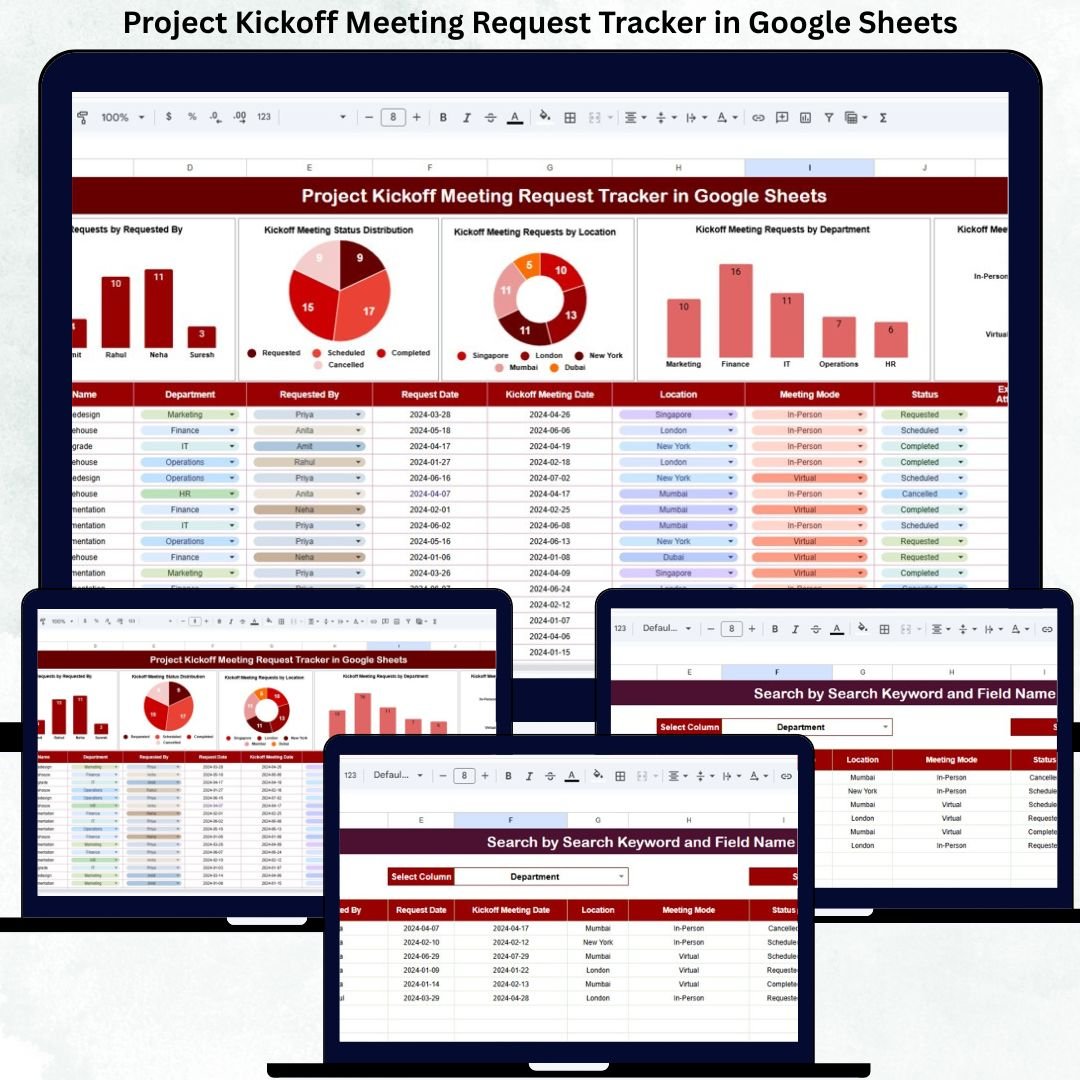

Starting a project without a clear kickoff meeting often leads to confusion, misalignment, and delays. When kickoff meeting requests arrive through emails, chats, or informal conversations, project teams struggle to track requests, schedule meetings on time, and maintain visibility. As a result, projects start late, stakeholders remain unclear, and coordination suffers. The Project Kickoff Meeting Request Tracker in Google Sheets solves this problem by offering a centralized, structured, and easy-to-use system for managing kickoff meeting requests.
This ready-to-use tracker brings all kickoff meeting requests into one place. It allows project managers, PMOs, and operations teams to log requests, track their status, analyze request trends, and find information instantly using built-in search and charts. Because it is built entirely in Google Sheets, the tracker is cloud-based, collaborative, and accessible from anywhere—without any software installation or technical complexity.
✨ Key Features of the Project Kickoff Meeting Request Tracker in Google Sheets
📋 1. Centralized Kickoff Request Management
All kickoff meeting requests are captured in a single Tracker Sheet. This eliminates scattered emails and manual follow-ups, giving teams one reliable source of truth.
📊 2. Automated Charts for Instant Insights
Built-in charts transform raw request data into meaningful insights, helping managers understand workload, trends, and bottlenecks instantly.
🔍 3. Smart Search Functionality
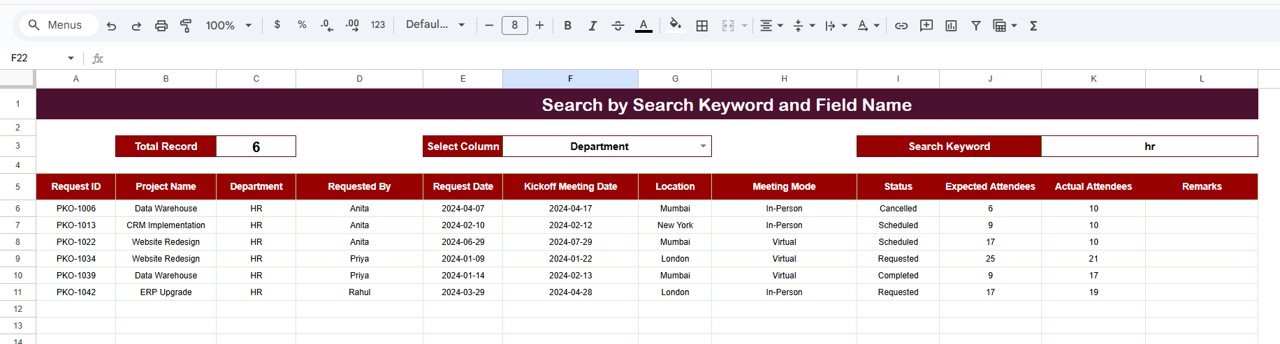
Search requests by keyword and field name to find any project or requester within seconds—no scrolling required.
🤝 4. Real-Time Collaboration
Multiple users can update and review requests simultaneously using Google Sheets’ sharing features.
🧩 5. Fully Customizable Structure
Easily modify fields, statuses, departments, or charts to match your organization’s project workflow.
📦 What’s Inside the Project Kickoff Meeting Request Tracker
🗂️ Tracker Sheet Tab (Core Database)
This sheet stores all kickoff meeting request details in a structured format, including:
Request ID
Project Name
Requested By
Department
Location
Meeting Mode (Online / In-Person / Hybrid)
Requested Date
Preferred Time
Kickoff Meeting Status
Assigned Project Manager
Comments / Notes
Whenever data is updated, all charts and summaries refresh automatically.
📈 Charts Included for Better Visibility
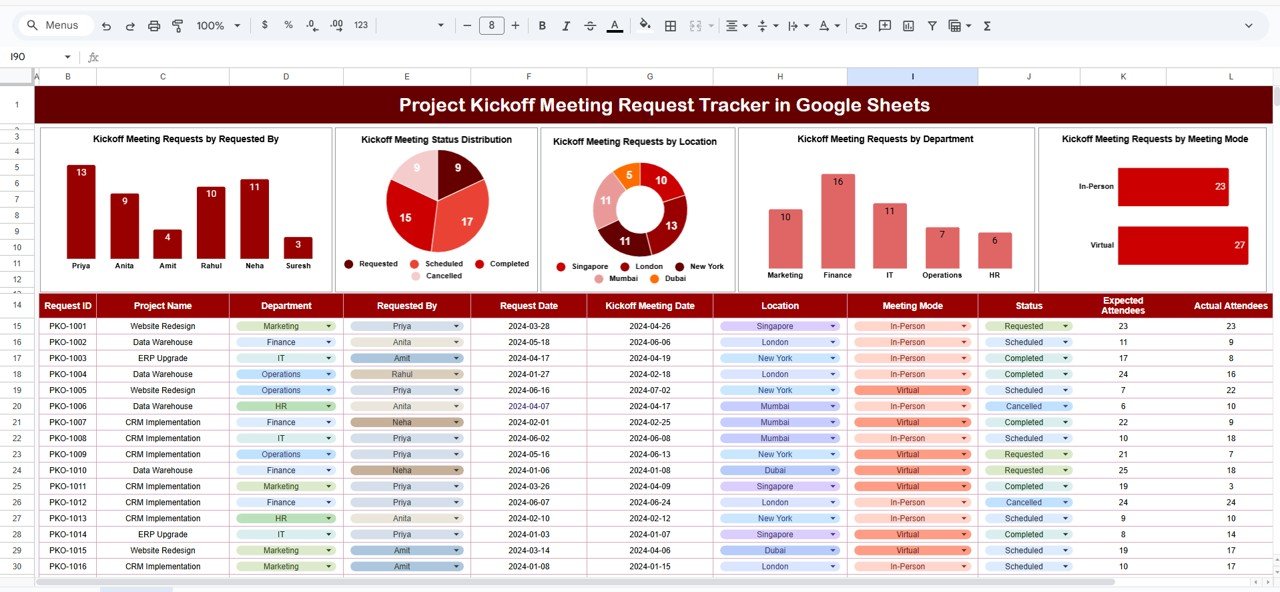
📌 Kickoff Requests by Requested By
Shows which individuals or teams initiate the most kickoff meetings—useful for demand planning.
📊 Kickoff Meeting Status Distribution
Displays how many meetings are Requested, Scheduled, Completed, or Cancelled—helping teams clear backlogs quickly.
📍 Kickoff Requests by Location
Breaks down requests by office, region, or client site—ideal for logistics and resource planning.
🏢 Kickoff Requests by Department
Highlights which departments are driving project initiation and where demand is increasing.
💻 Kickoff Requests by Meeting Mode
Tracks Online, In-Person, and Hybrid meetings—supporting infrastructure and room planning.
All charts update instantly, giving real-time insights without manual reporting.
🛠️ How to Use the Project Kickoff Meeting Request Tracker
1️⃣ Log Every Kickoff Request
Enter request details as soon as a new project kickoff is requested.
2️⃣ Update Status Regularly
Move requests from Requested → Scheduled → Completed to maintain clarity.
3️⃣ Review Charts Weekly
Identify pending requests, workload spikes, and departmental trends early.
4️⃣ Use Search Before Meetings
Quickly locate project details during planning or review discussions.
5️⃣ Share Access with Key Stakeholders
Allow PMOs, project managers, and operations teams to collaborate smoothly.
🎯 Who Can Benefit from This Tracker
📅 Project Managers & PMOs
Manage kickoff demand, reduce delays, and ensure structured project starts.
🏢 Operations & Delivery Teams
Improve scheduling efficiency and coordination.
📊 Department Heads
Gain visibility into project initiation trends.
🚀 Growing Organizations
Handle increasing project volumes with confidence and control.
📋 Audit & Governance Teams
Maintain clean, traceable kickoff request records.
### Click here to read the Detailed blog post
Watch the step-by-step video tutorial:
Visit our YouTube channel to learn step-by-step video tutorials — Youtube.com/@NeotechNavigators
Compatibility and Requirements
- Works in Google Sheets. You need a free Google account and a web browser.
- Several people can open and update the Tracker sheet at the same time. Google explains the basics in Get started with Google Sheets.
Frequently Asked Questions
What details can I log for each kickoff request?
The Tracker sheet has columns for Request ID, Project Name, Requested By, Department, Location, Meeting Mode, Requested Date, Preferred Time, Kickoff Meeting Status, Assigned Project Manager and Comments / Notes.
Which charts are included?
Five charts: Kickoff Requests by Requested By, Kickoff Meeting Status Distribution, Kickoff Requests by Location, Kickoff Requests by Department and Kickoff Requests by Meeting Mode. They update when you change the data.
Can I find a request quickly?
Yes. The tracker has a search function. Enter a keyword and a field name to find a project or requester without scrolling.
Can my team work in it together?
Yes. It is built in Google Sheets, so several users can update and review requests at the same time once you share the file.
Can I change the fields or statuses?
Yes. You can edit the fields, statuses, departments and charts to match your own project workflow.
Related Project Management Templates
- Project Resource Request Tracker in Google Sheets: log and track resource requests for projects
- Project Scope Change Request Tracker in Google Sheets: track scope change requests after kickoff
- Project Issue Tracker in Google Sheets: record project issues once work has started
- Multiple Project Management Dashboard in Google Sheets: a dashboard view across several projects
- Project Management Pro Bundle: 9 project management templates in one download
Browse all Google Sheets trackers or Google Sheets project management templates.


































Reviews
There are no reviews yet.