New: NextGenTemplates Academy - video courses on Excel formulas with AI and Pivot Tables & dashboards. Early-bird: 20% off with code EARLYBIRD20 - first 20 orders only.See the courses →
₹1,499.00Original price was: ₹1,499.00.₹699.00Current price is: ₹699.00.
A ready-made, editable Excel VBA login form sample: a login screen that checks the user ID and password against a small Access user table, so you can add a login step to your own Excel tool. Includes the .xlsm workbook, the Access database file and the form design.
Windows Excel (desktop) only. A basic sample – no user roles, no user-management screen and no password encryption.
SUMIFS, XLOOKUP, FILTER, LAMBDA and checking AI-written formulas, with real business projects. 11h 47m of video by PK, with practice files, quizzes and a capstone.
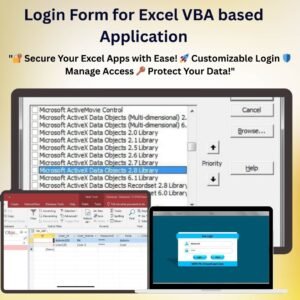
The Login Form for Excel VBA based Application is a ready-made, editable login screen sample for your own Excel VBA projects. It shows a clean login form, checks the user ID and password against a small user table, and tells the user whether the login worked – a working starting point, so you don’t have to build the form and the database connection from scratch.
Login Form for Excel VBA based Application
What’s inside the download
Login Form Sample.xlsm – the workbook with the login form and the login code (fully visible and editable).
DatabaseDatabase.accdb – an Access database file holding the user table (User ID and Password).
Login Form Design PPT.pptx – the design of the form, so you can restyle it.
Login Form.JPG – a screenshot of the form.
How it works
Click the button on the sheet to open the login form.
Type the user ID and password and press Login (or Enter).
The code connects to Database.accdb, looks up the user and shows “Login successfully”, “Incorrect User Id” or “Incorrect password”.
Add your own users as rows in the user table in Database.accdb, and add your own code after a successful login – for example, open your main sheet or form.
Requirements
Microsoft Excel for Windows (desktop) with macros enabled. It does not work on Mac, Excel Online or mobile.
You do not need the Microsoft Access program. The code uses the Microsoft Access Database Engine (ACE OLEDB 12.0), which comes with most Microsoft Office installations. If Excel says the provider is not registered, install the free Microsoft Access Database Engine from Microsoft (matching your Office’s 32-bit or 64-bit version).
Keep the Database folder next to the workbook.
Good to know before you buy
This is a basic, editable login sample for Excel users and VBA developers – not a complete user-management system.
It does not include user roles, a user-management screen or password encryption: passwords are stored as plain text in the Access file. You can add these yourself, or ask us to build them as custom work.
There is no PDF manual – the code is short and easy to follow, and we can send setup notes on request.
Need a complete system with login?
Our Excel VBA management systems (billing, inventory, production and more) come with a built-in login, user management and a full user manual. If you need a login with roles for your own tool, we can build it as custom work – email [email protected] or message us on WhatsApp.
No - please use Windows. Our VBA tools use forms with controls such as ListBox, which work only in Microsoft Excel for Windows. They do not work on Mac Excel, Excel Online (browser), Google Sheets or the Excel mobile app.
Which Excel version do I need?
Microsoft Excel 2016, 2019, 2021 or Microsoft 365 for Windows (the desktop app).
The macros do not run or I see a yellow security bar. What do I do?
Unzip the download first. Right-click the .xlsm file > Properties > tick Unblock > OK. Open it and click Enable Content on the yellow bar. If Excel still says macros are blocked, check File > Options > Trust Center > Macro Settings.
Is there a login? What are the default details?
Systems with a login screen come with default admin login details in the user manual (or message us and we will send them). Sign in as admin and change the password straight away. Where the system has User Management, the admin can change user names and passwords and add or edit users.
Are the sheets or the VBA code protected?
Data sheets are protected so the forms and reports keep working - you enter data through the forms. In some tools the VBA code is also protected. If you need to edit the code, email [email protected] with your order number and we will share the password.
Can I enter back-dated (past) records?
Yes, you can enter records with past dates.
Can more than one person use it at the same time?
It is a single-user desktop workbook. For shared, multi-user access from anywhere, see our Google Apps Script web apps.
How many records can it handle?
It has been tested with several thousand records and suits normal small-business volumes.
Is it a one-time payment or a subscription?
One-time payment. No subscription, no per-user fees and nothing to renew - the file is yours to keep.
How do I get the file after payment?
Instantly. The download link appears on screen after checkout, is emailed to you, and stays under My Account > Downloads on our website. If the email does not arrive within a few minutes, check your spam or promotions folder.
Is a user manual included?
Most of our newer products include a PDF user manual in the download. If yours does not have one, message us with your order number and we will send it.
Do I get free updates?
Bug fixes are always free - if something does not work as described, we fix it and send you the corrected file. New versions with new features are not included in the price, unless this product's description says otherwise.
Can you customise it for me?
Yes. Small changes to this template (your columns, categories, logo, colours, minor layout) cost the template price plus $40-80 (Rs 3,000-6,000 + GST), quoted once you send your list. A fully custom build is usually $100-200 (Rs 8,000-18,000 + GST) with two revision rounds. Email your requirements to [email protected] or message us on WhatsApp.
Can I use it for my business or my clients?
Yes, for your own personal or internal business use, for as long as you like. Reselling or redistributing the template is not allowed.
What is your refund policy?
Because these are digital downloads, they are non-refundable once delivered - except when the product does not match its description (report it within 48 hours of purchase) or there is a technical problem our team cannot fix within 72 hours. Email [email protected] with your order number.
How do I get help?
Email [email protected] (Mon-Fri, 10 AM-7 PM IST) or message us on WhatsApp +91 80770 90260 (chat only, no calls). Please include your order number.
Still have a question? Click Need help? at the bottom-left to ask our assistant, or message us on WhatsApp.
Application
MS Excel
Template Type
VBA Tool
Price
Paid
Business Or Department
IT and Software Development
Reviews
There are no reviews yet.
Only logged in customers who have purchased this product may leave a review.








Reviews
There are no reviews yet.