

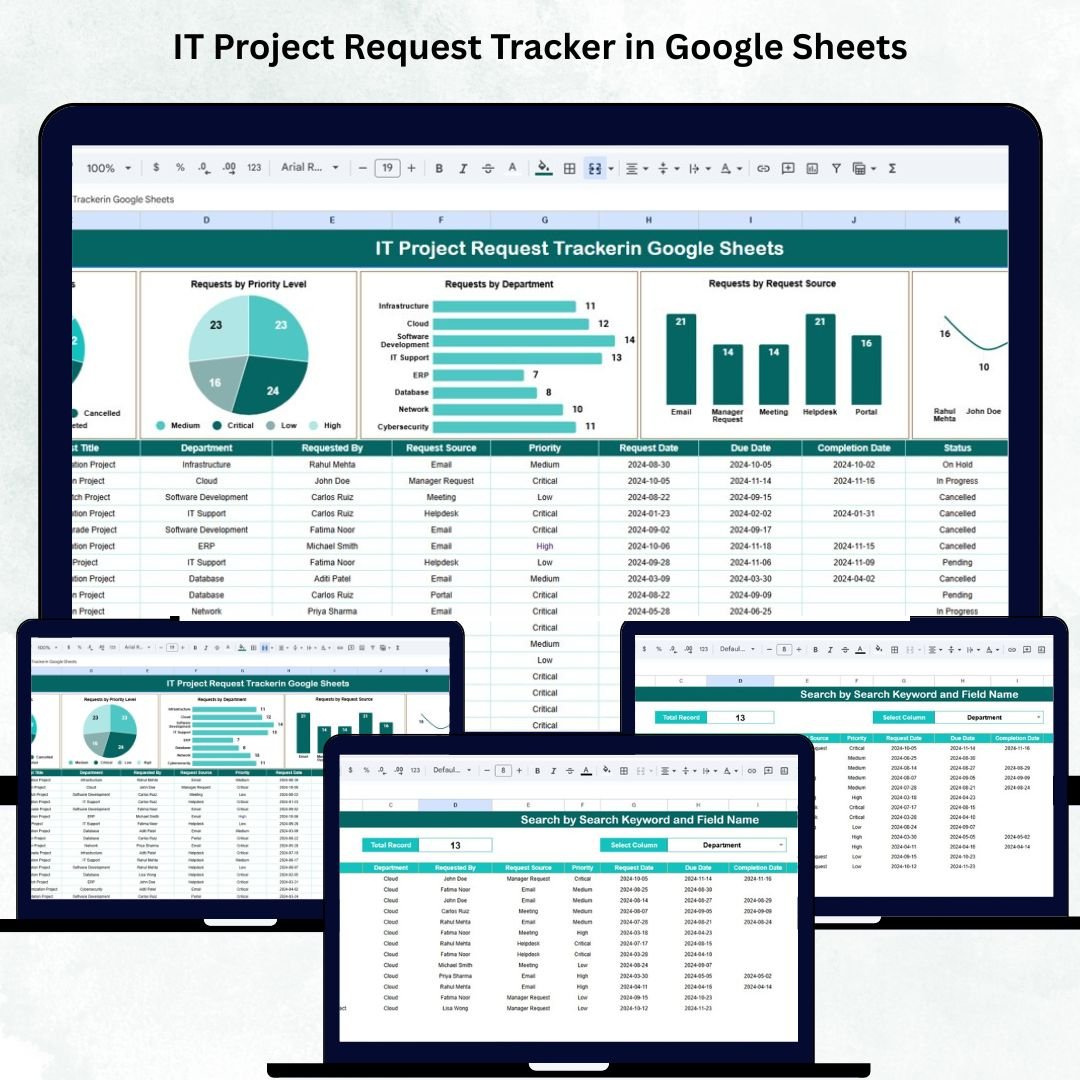
In a fast-moving digital world, IT teams are constantly managing project requests, system updates, and software deployments. Without a structured tracking system, requests can easily get lost — leading to delays, miscommunication, and inefficiency. The IT Project Request Tracker in Google Sheets offers a smart, automated, and ready-to-use solution for managing IT requests from start to finish. 💻📊
Designed for IT managers, PMOs, and support teams, this tracker centralizes all project requests, monitors their progress, and provides real-time visibility into departmental and priority-based workloads.
Built entirely in Google Sheets, this dynamic tracker requires no coding or software installation — making it the perfect solution for teams seeking control, collaboration, and efficiency.
🔑 Key Features of the IT Project Request Tracker in Google Sheets
📋 Tracker Sheet Tab (Main Dashboard)
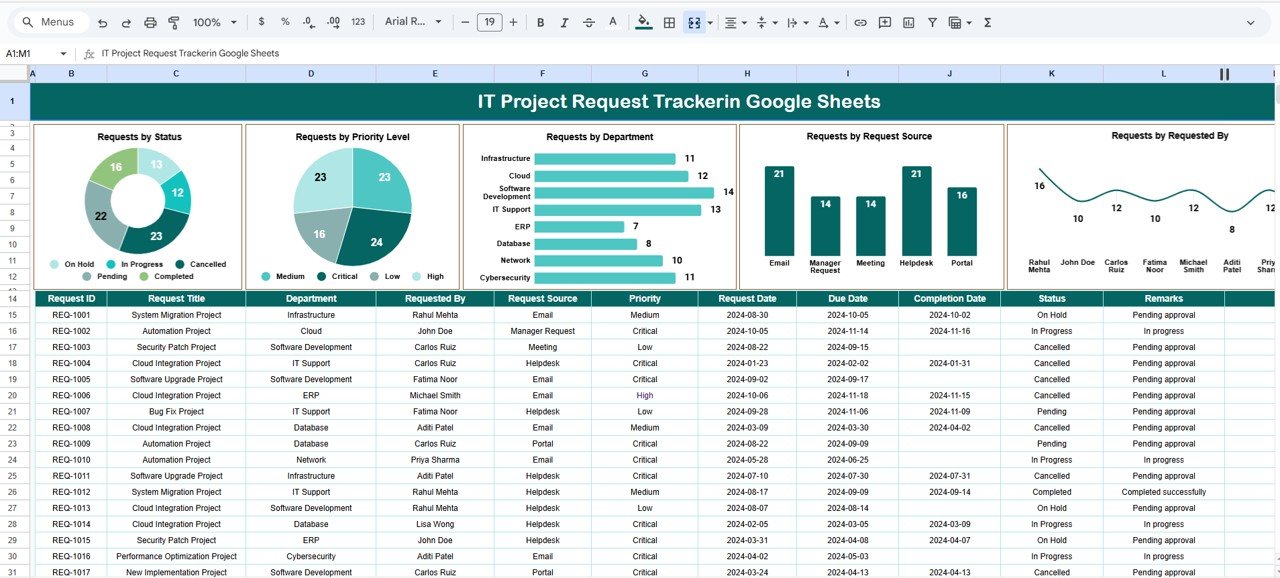
The heart of the system — the Tracker Sheet — serves as the command center for all IT project requests.
Charts Included:
🧾 Requests by Status: Shows how many requests are New, In Progress, Completed, or On Hold.
🚦 Requests by Priority Level: Categorizes requests as High, Medium, or Low — ideal for workload planning.
🏢 Requests by Department: Identifies which departments are generating the most IT requests.
✉️ Requests by Request Source: Tracks how requests were submitted (Email, Ticket System, Google Form, etc.).
👤 Requests by Requested By: Displays project volume per requester for better accountability.
All charts are auto-updated as new data is entered — giving managers an instant, data-driven overview of workloads and bottlenecks.
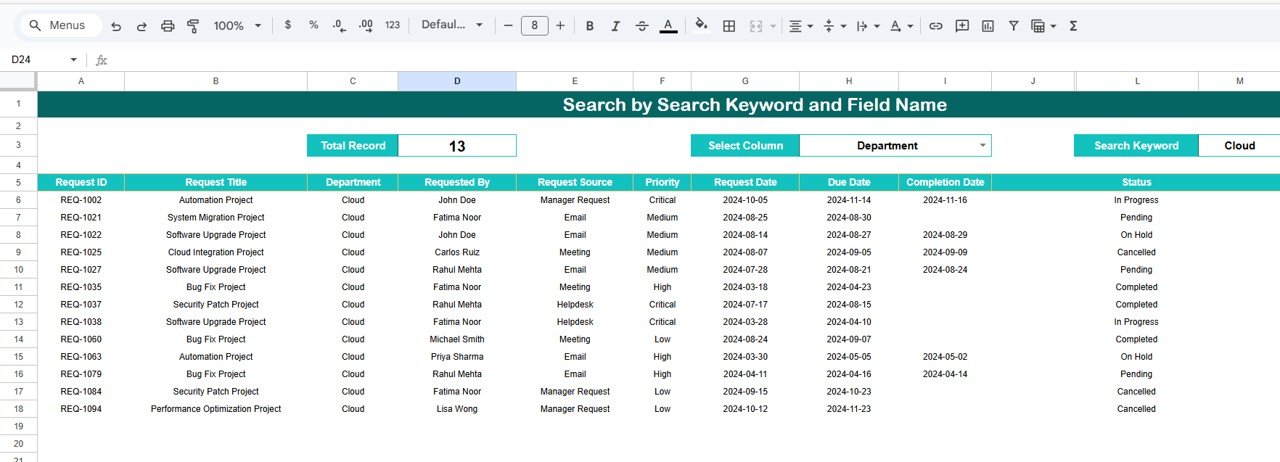
🔍 Search Sheet Tab (Smart Search & Filter)
Finding a specific request has never been easier.
You can search by keywords or fields — instantly filtering project data by:
Project Name or Keyword
Department
Priority Level
Status (New, Completed, On Hold)
Requested By
Example Searches:
“Priority = High” → Displays all high-priority tasks.
“Status = Completed” → Lists all finished requests.
“Department = Marketing” → Filters requests from the Marketing department.
This search feature helps generate quick reports without manual scrolling or sorting.
📦 What’s Inside the IT Project Request Tracker
✅ Pre-built Google Sheets file (no coding required)
✅ Real-time updating dashboard with visual charts
✅ Department, priority, and status-based analytics
✅ Search feature for instant record lookup
✅ Auto-calculated charts and category filters
✅ Editable layout — add columns or formulas anytime
✅ Multi-user collaboration with Google Sheets sharing
All the data you need to manage your IT project pipeline — organized, visual, and automated.
🧑💼 Who Can Benefit from This Tracker
👨💻 IT Managers & Department Heads – Gain complete visibility into request volumes and statuses.
📋 Project Management Offices (PMOs) – Streamline prioritization and task allocation.
🏢 Business Teams – Submit and track IT requests easily.
💼 Executives – Monitor IT workload distribution and department performance.
🧠 Freelancers & IT Consultants – Manage multiple client requests efficiently.
The IT Project Request Tracker is ideal for both small IT teams and large organizations managing multiple ongoing projects.
🧪 How to Use the Tracker
1️⃣ Add Requests: Enter project details in the Tracker Sheet (Project Name, Department, Priority, Status, Request Source, etc.).
2️⃣ Monitor Dashboard: Review charts to track workload by department, priority, and progress.
3️⃣ Use Search Tab: Find specific projects instantly using filters or keywords.
4️⃣ Update Regularly: Change statuses (New, In Progress, Completed) as requests evolve.
5️⃣ Collaborate: Share the file with stakeholders for real-time updates.
💡 Pro Tip: Integrate with Google Forms to automatically log new project requests into the sheet — saving time and reducing manual data entry.
🌟 Why Choose This Tracker
Real-time tracking of all IT project requests
Visual analytics for quick decision-making
Easy-to-use search functionality
Fully customizable dashboard
No software dependency — 100% Google Sheets
Perfect for both internal IT teams and service providers
Cloud-based access for seamless collaboration
The IT Project Request Tracker in Google Sheets simplifies IT project request management, enhances team coordination, and provides the clarity needed to deliver projects efficiently — every single time. 🚀



















Reviews
There are no reviews yet.