



The Influencer Collaboration Checklist in Excel is an essential tool for marketers, businesses, and agencies looking to effectively manage their influencer marketing campaigns. This Excel-based checklist helps track all critical tasks associated with influencer partnerships—from initial outreach to campaign wrap-up. With easy-to-use templates, the checklist ensures that no detail is overlooked and that every step of the collaboration process runs smoothly.
Designed for both small businesses and large brands, this tracker allows you to maintain a structured approach to working with influencers. Whether it’s tracking content creation, approvals, deliverables, or payments, this tool keeps everything organized in one place. Simplify your influencer collaborations and boost campaign success by using this checklist.

Key Features of the Influencer Collaboration Checklist in Excel
📅 Campaign Planning & Tracking
Track key campaign details, including start and end dates, target objectives, and influencer goals. Monitor campaign progress to ensure all steps are completed on time.
📝 Influencer Outreach & Communication
Keep track of all interactions with influencers, from initial outreach emails to contract negotiations. Record all important communication details, ensuring a seamless collaboration process.
📸 Content Creation & Approval Tracking
Monitor content creation and review processes for each influencer. Keep track of approval stages, ensuring that all content meets your brand’s standards before publication.
💰 Payment & Compensation Management
Track influencer compensation and payment schedules. Ensure timely payments and avoid any payment discrepancies by documenting all payment details.
⚙️ Customizable & Scalable
Fully customizable to match your specific needs. Add additional fields or modify sections based on campaign requirements, whether it’s a one-off collaboration or a long-term partnership.
📊 Performance Monitoring & Reporting
Monitor the performance of each influencer’s content, including engagement rates, reach, and conversions. Use this data to measure ROI and optimize future campaigns.
Why You’ll Love the Influencer Collaboration Checklist in Excel
✅ Centralized Campaign Management
All campaign details, influencer interactions, content approvals, and payment information are centralized, making it easy to manage your influencer collaborations from start to finish.
✅ Streamline Influencer Communication
Track and organize all communication with influencers, ensuring a smooth flow of conversations and timely responses.
✅ Optimize Content Creation & Approval
Track the entire content creation and approval process to ensure that influencers submit high-quality content that aligns with your brand’s image.
✅ Ensure Timely Payments
Keep track of influencer payments to avoid any payment delays or misunderstandings, ensuring smooth and trustworthy partnerships.
✅ Measure Campaign Success
Use the performance tracking feature to evaluate the effectiveness of influencer collaborations and make data-driven decisions for future campaigns.
What’s Inside the Influencer Collaboration Checklist in Excel?
Campaign Planning & Tracking: Keep track of campaign goals, timelines, and objectives.
Influencer Outreach & Communication: Record all outreach efforts, contract details, and communication logs.
Content Creation & Approval: Monitor content creation, revisions, and final approvals.
Payment Tracking: Document influencer compensation, payments, and schedules.
Performance Monitoring: Track key performance metrics like engagement, reach, and conversions.
Customizable Layout: Modify the tracker to match your specific needs and preferences.
How to Use the Influencer Collaboration Checklist in Excel
1️⃣ Download the Template: Get instant access to the Influencer Collaboration Checklist in Excel.
2️⃣ Input Campaign Details: Add the campaign’s start and end dates, objectives, and target influencers.
3️⃣ Track Influencer Communication: Record outreach emails, contract details, and collaboration milestones.
4️⃣ Monitor Content Creation & Approval: Track content development and approval processes for each influencer.
5️⃣ Manage Payments & Performance: Keep track of influencer payments and campaign performance to evaluate ROI.
Who Can Benefit from the Influencer Collaboration Checklist in Excel?
🔹 Marketing Teams
🔹 Influencer Marketing Agencies
🔹 Small & Medium Businesses (SMBs)
🔹 E-commerce Brands
🔹 Social Media Managers
🔹 Content Creators and Influencers
🔹 PR and Communications Teams
Optimize your influencer marketing campaigns with the Influencer Collaboration Checklist in Excel. Keep your campaigns on track, ensure smooth communication, and maximize your ROI.
Click here to read the Detailed blog post
Visit our YouTube channel to learn step-by-step video tutorials
Youtube.com/@PKAnExcelExpert
Compatibility and Requirements
- Works in Microsoft Excel desktop (Excel 2016 or later, or Microsoft 365).
- New to Excel? Microsoft’s Excel for Windows training covers the basics.
Frequently Asked Questions
Which stages of a collaboration does it cover?
It covers campaign planning, influencer outreach and communication, content creation and approval, payments and performance monitoring.
Can I track influencer payments?
Yes. You can record compensation, payment schedules and payment details for each influencer.
Which performance figures can I log?
You can log engagement rates, reach and conversions for each influencer’s content.
Can I add my own fields?
Yes. The checklist is fully customizable, so you can add fields or change sections for one-off or long-term partnerships.
Is there a Google Sheets version?
Yes. The Influencer Collaboration Checklist in Google Sheets covers the same steps in a browser.
Related Influencer Marketing Templates
- Influencer Collaboration Checklist in Google Sheets: the same checklist in Google Sheets
- Social Media Influencer Outreach Calendar in Excel: plan outreach dates
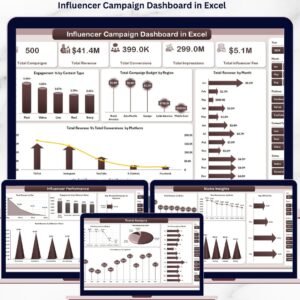
- Influencer Campaign Dashboard in Excel: campaign results on a dashboard
- Influencer Campaign Dashboard in Power BI: campaign reporting in Power BI
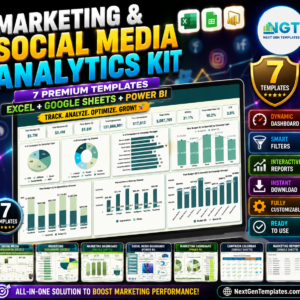
- Marketing and Social Media Analytics Kit: 7 marketing templates in one download
Browse all Excel checklists or the Excel sales and marketing templates.






















Reviews
There are no reviews yet.