
🎉 Black Friday Sale: 40% OFF everything with code BF40 · ends 1 Dec  Shop now →

Goal Setting Checklist in Google Sheets

Google Sheets - instant download

Original price was: ₹799.00.Current price is: ₹349.00.
Details, requirements and demo below
Sale!

Goal Setting Checklist in Google Sheets

Original price was: ₹799.00.Current price is: ₹349.00.

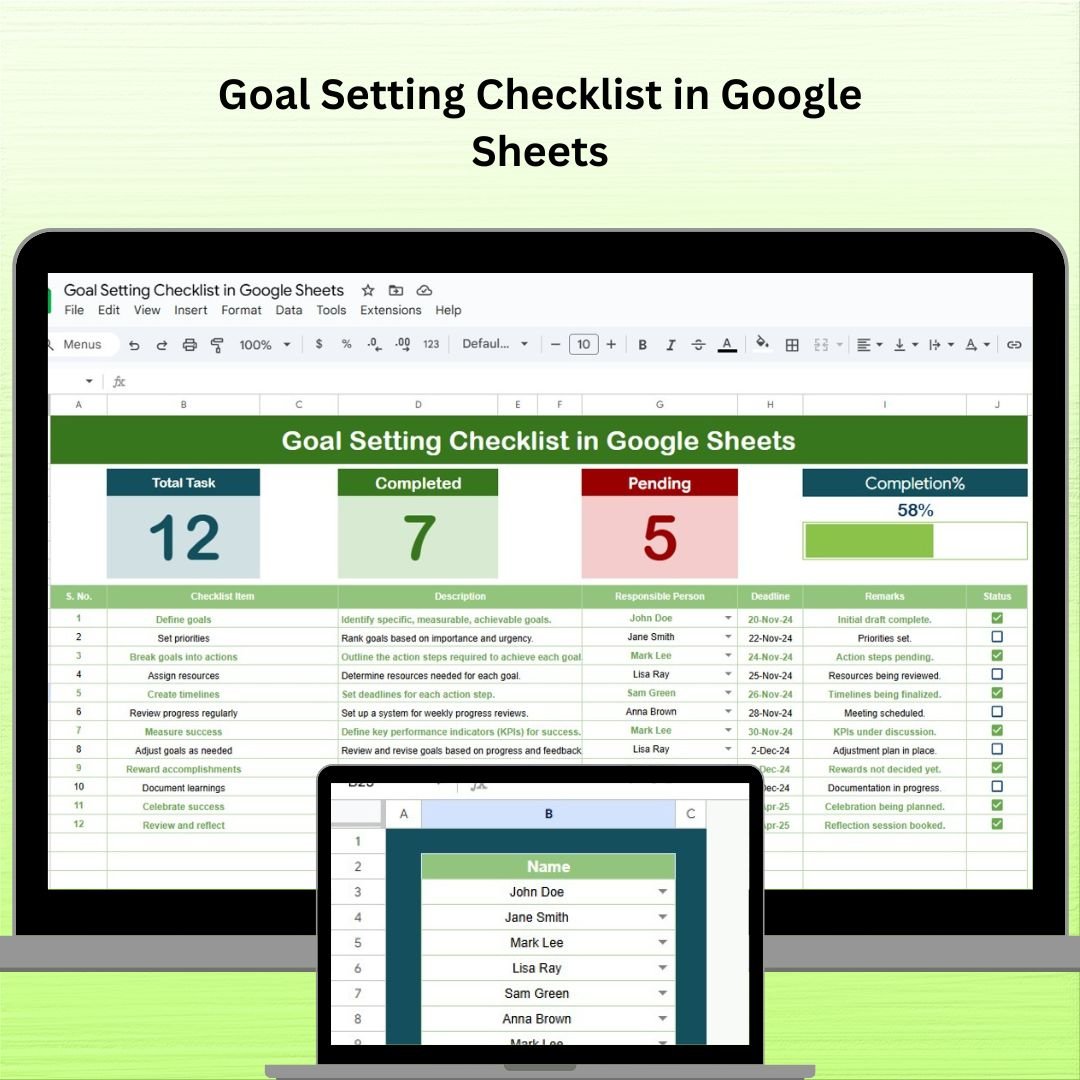
Stay on track and achieve your goals with the Goal Setting Checklist in Google Sheets. Organize tasks, set priorities, and monitor progress for success.

  • SMART Goal Framework: Define clear, achievable goals.

  • Track Progress: Monitor completion with checkboxes and progress bars.

  • Customizable Template: Adjust to your personal, academic, or professional goals.

Customize this template for your business (optional)

Handled by email: we contact you within 1 business day. One revision round included. What is included

- +

💡 Buy any 2 templates and save 20% automatically at checkout.

Included in All-Access Templates. Get this plus 7,000+ templates for ₹4,999.00 a year. Compare plans →
Pricing country
Prices follow your selected country; checkout uses your billing country.
Google Sheets Complete Course: Beginner to Advanced courseLaunch offer
🎓 NEXTGENTEMPLATES ACADEMY
Want to build Google Sheets like this yourself?
Google Sheets Complete Course: Beginner to Advanced

Formulas, lookups, QUERY, dynamic arrays, pivot tables, charts, live data and Apps Script, ending with an interactive sales dashboard. 74 lessons by PK with a practice file for every lesson.

The Goal Setting Checklist in Google Sheets is a versatile and powerful tool designed to help individuals and teams set, track, and achieve their goals. This user-friendly template allows you to define specific, measurable, achievable, relevant, and time-bound (SMART) objectives, organize tasks, set deadlines, and monitor your progress toward success.
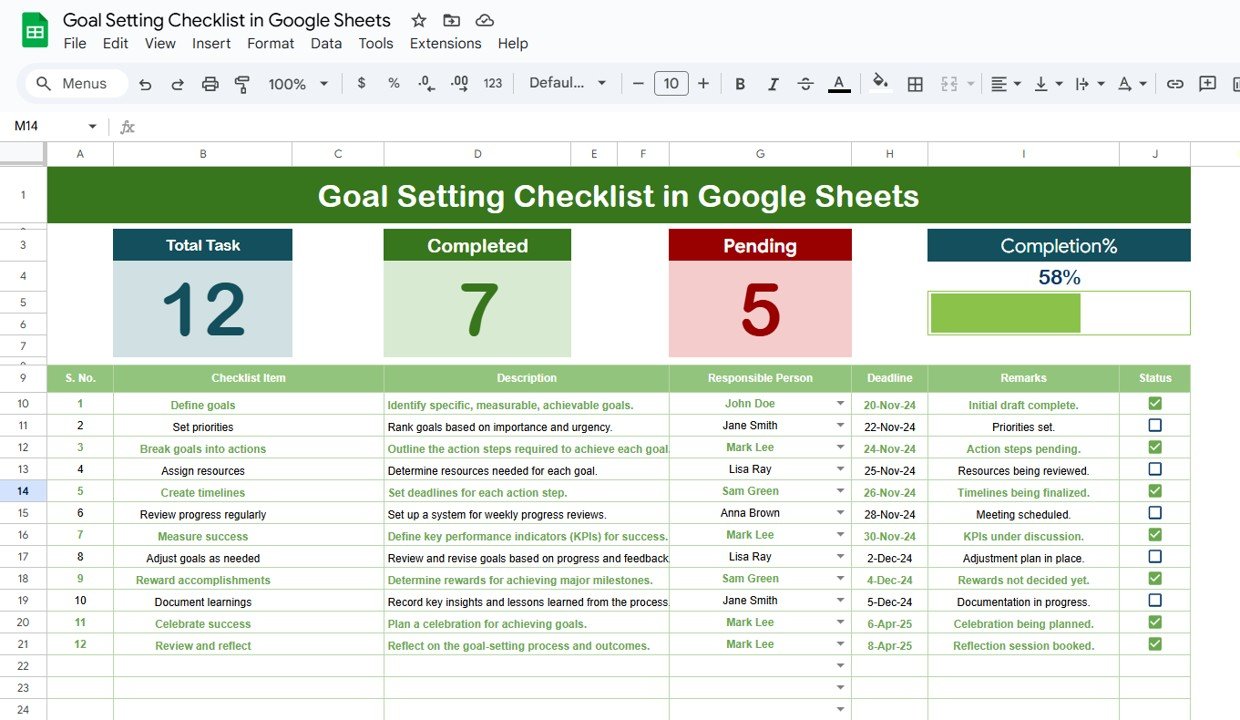
Goal setting checklist

Key Features of the Goal Setting Checklist in Google Sheets

🎯 SMART Goal Framework

  • Specific, Measurable, Achievable, Relevant, Time-bound: Set clear goals that are actionable and realistic, increasing your chances of success.

  • Actionable Steps: Break down your goals into manageable tasks and prioritize them based on importance.

📅 Customizable Templates

  • Tailor to Your Needs: Whether it’s personal, academic, or professional goals, customize the template to suit your specific objectives.

  • Flexible Structure: Modify the categories and fields based on your preferences to ensure your goals are organized the way you need.

📊 Progress Tracking

  • Monitor Your Journey: Track your progress with visual indicators like checkboxes and progress bars to stay motivated.

  • Real-Time Updates: Keep track of deadlines and goals by updating the template regularly with completed tasks and milestones.

⏳ Timeline Management

  • Set Deadlines: Assign start and end dates to your goals, ensuring timely completion and helping you stay focused.

  • Structured Planning: Organize your goals over daily, weekly, or monthly timelines to avoid overwhelm and stay on course.

Benefits of Using the Goal Setting Checklist in Google Sheets

✅ Clarity & Focus
Clearly define what you want to achieve and map out actionable steps to guide you toward success.

✅ Accountability
Regularly updating your progress ensures you stay committed to your goals, fostering a sense of responsibility.

✅ Increased Productivity
A structured approach to goal setting allows for better time management, reducing procrastination and boosting efficiency.

✅ Motivation Boost
As you track progress and tick off completed tasks, you’ll stay motivated and encouraged to keep going.

How to Use the Goal Setting Checklist in Google Sheets

  1. Download the Template: Download the Goal Setting Checklist template and save it to your Google Drive for easy access.

  2. Define Your Goals: Use the SMART criteria to input your goals, ensuring they are well-defined and achievable.

  3. Break Down Tasks: Organize your goals into smaller, actionable steps with deadlines and priorities.

  4. Track Your Progress: Regularly update the checklist as you complete tasks and milestones, monitoring your progress.

  5. Review & Adjust: Periodically review your goals and adjust your plan as needed to stay on track.

By utilizing the Goal Setting Checklist in Google Sheets, you can organize your goals, monitor your progress, and achieve success, whether you’re planning personal, academic, or professional milestones.

Click here to read the Detailed blog post
Goal Setting Checklist in Google Sheets

Visit our YouTube channel to learn step-by-step video tutorials
YouTube.com/@NeotechNavigators

Watch the step-by-step video Demo:

Compatibility and Requirements

  • Works in Google Sheets. You need a free Google account and a web browser.
  • New to Google Sheets? Google’s guide How to use Google Sheets covers the basics.

Frequently Asked Questions

Does it follow the SMART goal method?

Yes. You set goals that are specific, measurable, achievable, relevant and time-bound.

Can I break a goal into smaller tasks?

Yes. You split each goal into tasks and set a deadline and priority for each one.

How do I see my progress?

Checkboxes and progress bars show what is done as you tick off tasks and milestones.

Can I plan by day, week or month?

Yes. You set start and end dates and organize goals on daily, weekly or monthly timelines.

Is there an Excel version?

Yes. The Goal Setting Checklist in Excel does the same job in Excel.

Related Goal Planning Templates

Browse all Google Sheets checklists or the Google Sheets trackers.
Frequently asked questions

How do I get my own copy?
After purchase you get a link to the Google Sheet. Open it while signed in to your Google account and use File > Make a copy - the copy in your Google Drive is fully yours and editable.
Do I need a paid Google account? Will it expire?
No. A free Google account is enough, and your copy lives in your own Google Drive - it never expires and there is nothing to renew.
Does it work on Mac, phone or tablet?
Yes - in any browser on Windows, Mac or Chromebook, and in the Google Sheets mobile app for viewing and quick entries.
Can I share it with my team?
Yes. Share your copy with colleagues using Google's normal sharing, with view or edit rights as you choose.
Can I change the design and formulas?
Yes, your copy is fully editable - colours, labels, logo, formulas and charts. If a range is protected, use Data > Protect sheets and ranges to remove it in your copy.
Are there macros or add-ons?
No macros or add-ons - it uses normal Google Sheets formulas and charts.
Is it a one-time payment or a subscription?
One-time payment. No subscription, no per-user fees and nothing to renew - the file is yours to keep.
How do I get the file after payment?
Instantly. The download link appears on screen after checkout, is emailed to you, and stays under My Account > Downloads on our website. If the email does not arrive within a few minutes, check your spam or promotions folder.
Is a user manual included?
Most of our newer products include a PDF user manual in the download. If yours does not have one, message us with your order number and we will send it.
Do I get free updates?
Bug fixes are always free - if something does not work as described, we fix it and send you the corrected file. New versions with new features are not included in the price, unless this product's description says otherwise.
Can you customise it for me?
Yes. Small changes to this template (your columns, categories, logo, colours, minor layout) cost the template price plus $40-80 (Rs 3,000-6,000 + GST), quoted once you send your list. A fully custom build is usually $100-200 (Rs 8,000-18,000 + GST) with two revision rounds. Email your requirements to [email protected] or message us on WhatsApp.
Can I use it for my business or my clients?
Yes, for your own personal or internal business use, for as long as you like. Reselling or redistributing the template is not allowed.
What is your refund policy?
Because these are digital downloads, they are non-refundable once delivered - except when the product does not match its description (report it within 48 hours of purchase) or there is a technical problem our team cannot fix within 72 hours. Email [email protected] with your order number.
How do I get help?
Email [email protected] (Mon-Fri, 10 AM-7 PM IST) or message us on WhatsApp +91 80770 90260 (chat only, no calls). Please include your order number.

Still have a question? Click Need help? at the bottom-left to ask our assistant, or message us on WhatsApp.

Application

Google Sheets

Template Type

Checklist

Price

Paid

Business Or Department

Operations Management

Reviews

There are no reviews yet.

Only logged in customers who have purchased this product may leave a review.

You may also like…

Goal Setting Checklist in Google SheetsGoal Setting Checklist in Google Sheets
Original price was: ₹799.00.Current price is: ₹349.00.
- +
Scroll to Top