

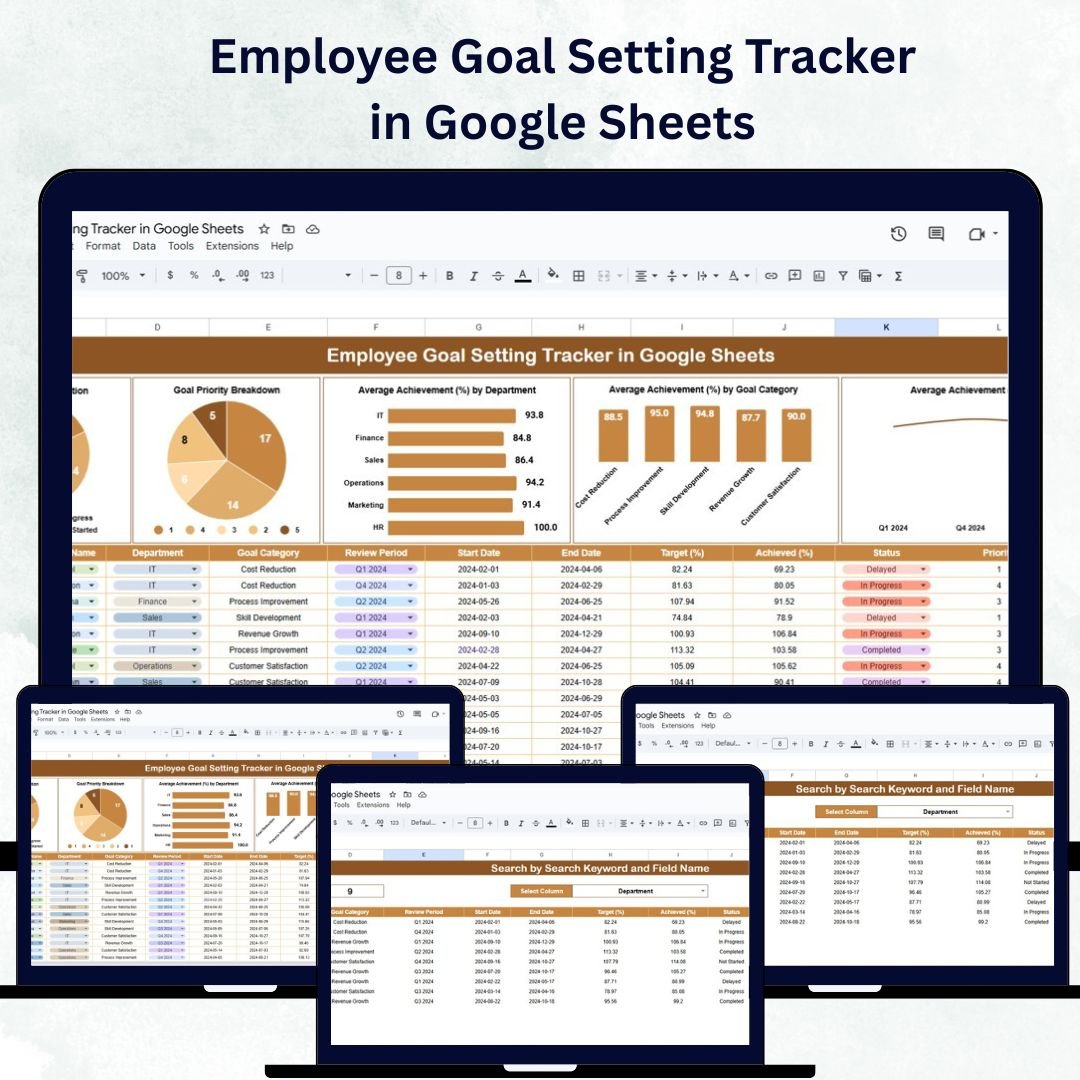

Setting clear, measurable goals is essential for driving employee productivity and ensuring organizational success. The Employee Goal Setting Tracker in Google Sheets is a ready-to-use, interactive solution designed to help managers, HR professionals, and team leads effectively track employee goals, monitor progress, and measure achievement — all in one place.
Built in Google Sheets, this tracker simplifies goal management by combining structured data entry with dynamic dashboards and search functionality. It provides instant visual insights, allowing organizations to align individual performance with company objectives while maintaining transparency and accountability.
🔑 Key Features of the Employee Goal Setting Tracker in Google Sheets
📊 Tracker Sheet Tab
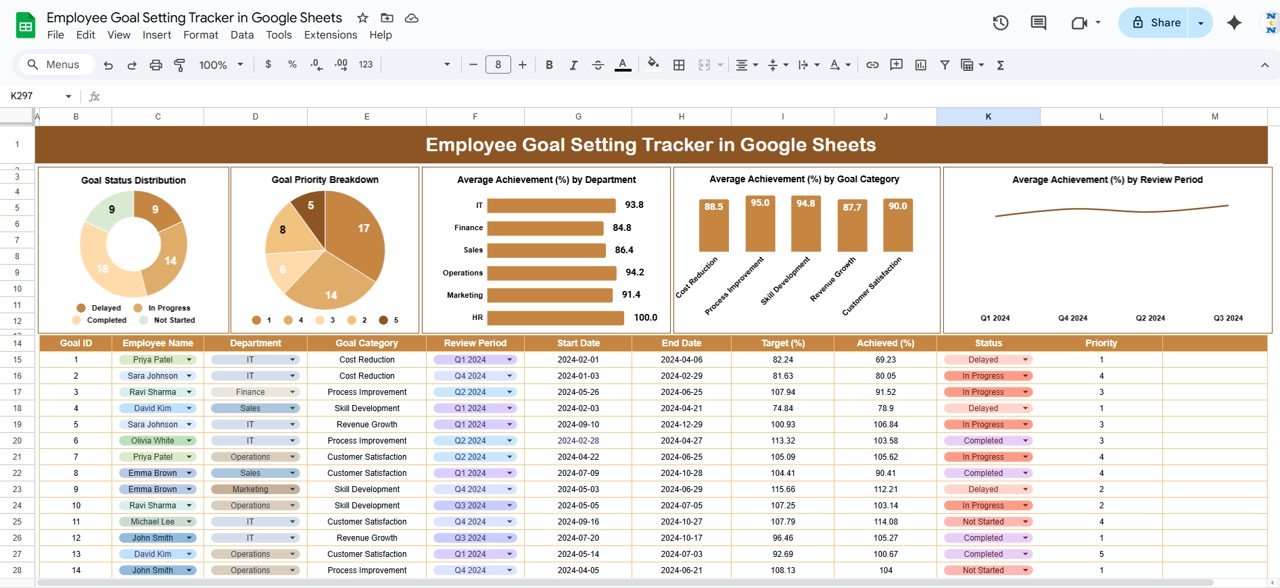
The Tracker Sheet serves as the central dashboard where all performance data comes to life.
Charts and Visuals Include:
Goal Status Distribution: See the proportion of goals that are completed, in progress, or pending.
Goal Priority Breakdown: Visualize goals by priority level — High, Medium, or Low.
Average Achievement (%) by Department: Compare goal completion rates across departments.
Average Achievement (%) by Goal Category: Evaluate performance by category, such as Sales, Training, or Innovation.
Average Achievement (%) by Review Period: Assess performance by review cycles — monthly, quarterly, or annual.
This tab provides a quick overview of your organization’s goal achievement performance with data-driven insights.
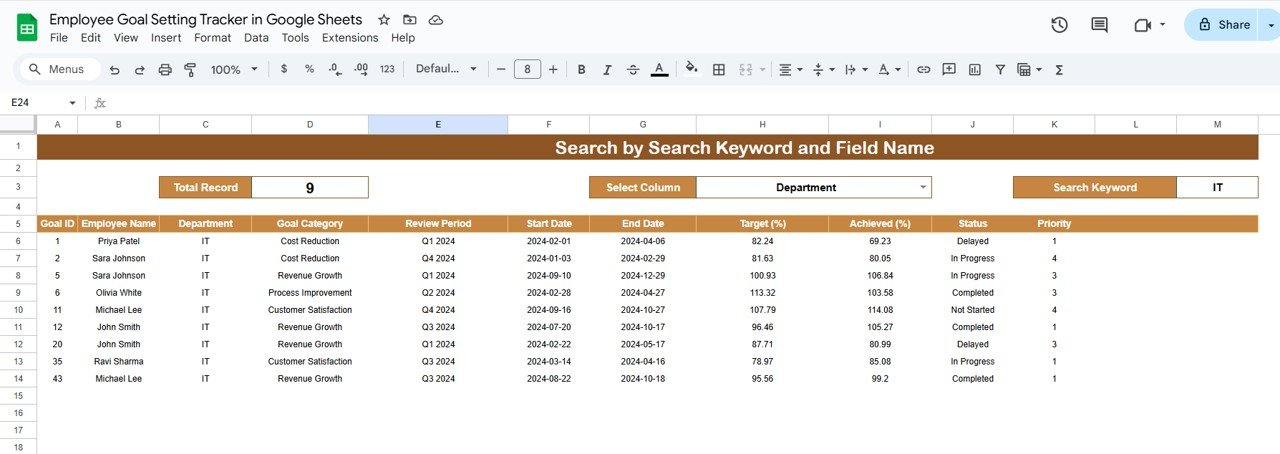
🔍 Search Sheet Tab
Quickly find any goal or employee record in seconds using this intelligent search feature.
Search by keyword, goal name, or field name.
Retrieve specific employee or department records without scrolling through entire datasets.
Easily access goal progress, priority, and review period data.
This feature helps HR teams save valuable time while improving reporting accuracy.
🌟 Advantages of Using the Employee Goal Setting Tracker
✅ Centralized Goal Management: All employee goals, progress, and achievements stored in one structured system.
📈 Visual Insights: Interactive charts provide a clear picture of goal achievement and trends.
🧭 Departmental Comparison: Identify high-performing teams and areas that require attention.
🔥 Priority Monitoring: Focus on high-priority or delayed goals for immediate action.
📊 Data-Driven Appraisals: Back performance reviews with accurate goal-tracking data.
🕒 Time-Saving: Reduce manual reporting and improve efficiency through automation.
💡 Customizable: Add more goal categories, priorities, or performance metrics as per your HR policies.
This tracker transforms traditional goal management into a streamlined and transparent performance system accessible to all stakeholders.
🧠 Best Practices for Using the Dashboard
Update Data Regularly: Keep all employee goals and progress updated for real-time accuracy.
Segment by Department: Analyze achievement data across departments for balanced evaluations.
Focus on Priorities: Review high-priority or overdue goals frequently to avoid missed deadlines.
Leverage Visual Insights: Use dashboard charts in performance review meetings.
Align with Reviews: Integrate the tracker’s data into quarterly or annual performance appraisals.
Encourage Employee Involvement: Share dashboards to promote goal ownership and accountability.
💼 How This Tracker Helps HR Teams and Managers
Boosts Transparency: Every team member can see goals and progress clearly.
Supports Fair Evaluations: Enables objective, data-driven performance assessments.
Recognizes High Performers: Identify and reward employees achieving consistent success.
Improves Productivity: Encourages accountability and self-management.
Aligns with Company Objectives: Ensures individual goals support broader organizational targets.
By integrating this tracker into your HR workflow, you’ll foster a culture of continuous improvement, empowerment, and performance excellence. 🌟
🔗 Click here to read the Detailed blog post
Watch the step-by-step video Demo:
🔗 Visit our YouTube channel to learn step-by-step video tutorials
Compatibility and Requirements
- Works in Google Sheets. You need a free Google account and a web browser.
- The Tracker sheet shows its results as charts. Google explains how charts work in Add and edit a chart or graph.
Frequently Asked Questions
Which sheets are included?
Two tabs: the Tracker Sheet with the charts, and the Search Sheet for finding goal and employee records.
What charts does the Tracker Sheet show?
Goal Status Distribution, Goal Priority Breakdown, and Average Achievement (%) by Department, by Goal Category and by Review Period.
How do I find a specific goal or employee?
Open the Search Sheet and search by keyword, goal name or field name. It returns the matching record with its progress, priority and review period.
Can I compare departments?
Yes. The Average Achievement (%) by Department chart compares goal completion rates across departments.
Is there an Excel version?
Yes. See the Employee Goal Setting Tracker in Excel.
Related HR and Goal Templates
- Employee Goal Setting Tracker in Excel: the same tracker for Excel
- Goal Setting Checklist in Google Sheets: a checklist for setting goals
- Employee Productivity Dashboard in Google Sheets: a dashboard view of productivity
- Employee Attendance Tracker in Google Sheets: attendance records for the same team
- HR Google Sheets Pack: 10 HR templates for Google Sheets in one download
Browse all Google Sheets trackers.



























Reviews
There are no reviews yet.