

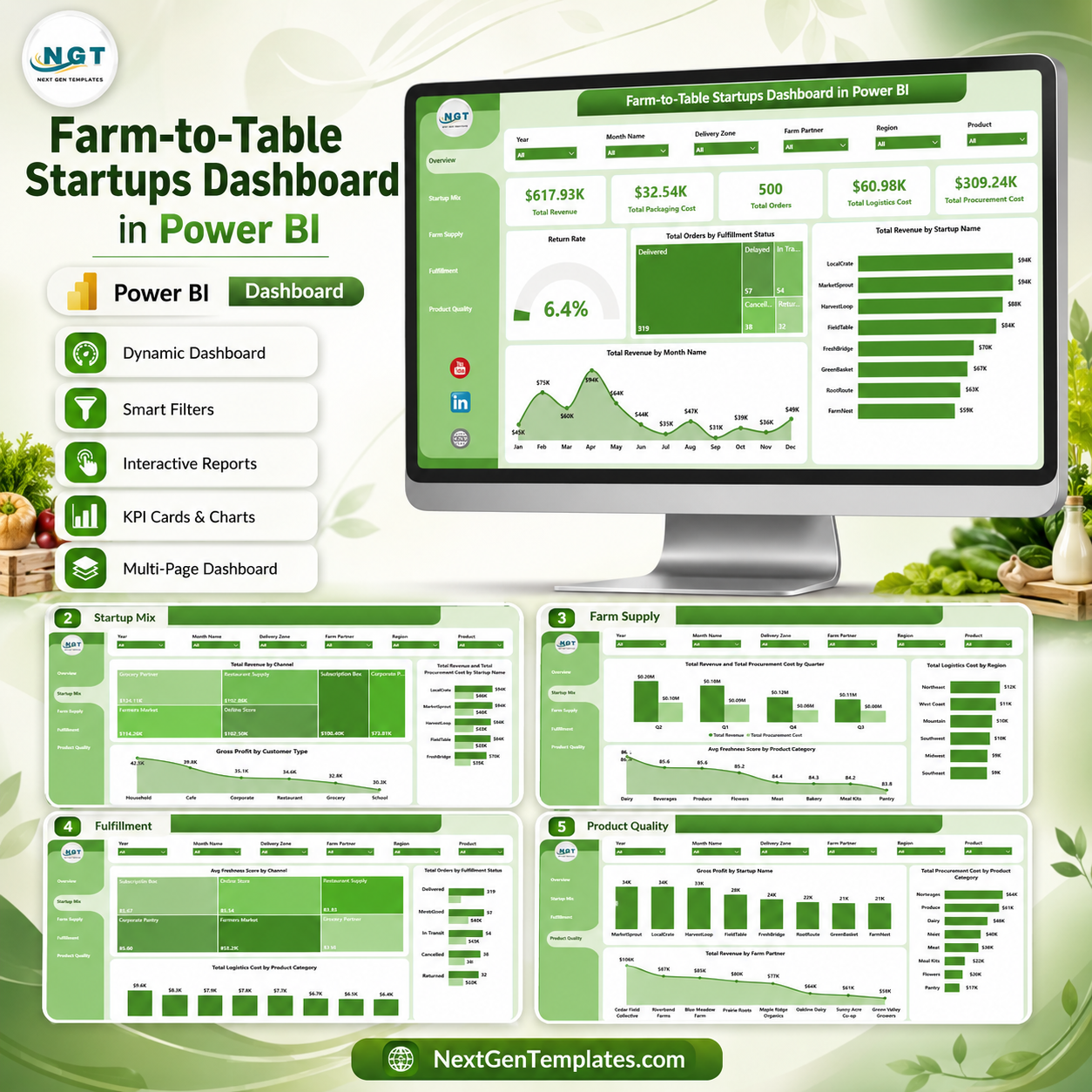

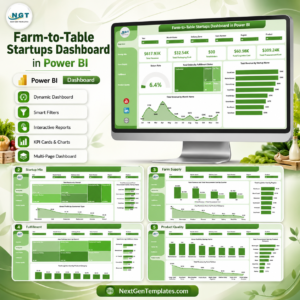
Farm-to-Table Startups Dashboard in Power BI gives food founders, local produce marketplaces, farm partners, and fulfillment teams a ready .pbix reporting template with 5 Power BI pages, 5 executive KPI cards, 16 analytical visuals, and slicer-based filtering. For $17.99 one-time, users can review revenue, packaging cost, procurement cost, logistics cost, order volume, fulfillment status, freshness, startup mix, channel performance, farm supply, and product quality without building a Power BI report from zero. Built by PK, Microsoft Certified Professional with 15+ years of Excel, Google Sheets, and Power BI experience and 300K+ YouTube subscribers, this dashboard is made for faster reviews, cleaner reporting, and editable Power BI analysis.
Key Features of Farm-to-Table Startups Dashboard in Power BI
- 5 Power BI report pages covering Overview, Startup Mix, Farm Supply, Fulfillment, and Product Quality.
- 5 executive KPI cards for Total Revenue, Total Packaging Cost, Total Orders, Total Logistics Cost, and Total Procurement Cost.
- Interactive slicers for quick filtering during leadership reviews and operational check-ins.
- Revenue and cost analysis by startup, month, channel, quarter, product category, region, and farm partner.
- Fulfillment reporting for order status, logistics cost, product category movement, and channel-level freshness score.
- Product quality views for gross profit, procurement cost, farm partner revenue, and product-category performance.
- Editable .pbix file so teams can adjust visuals, fields, colors, labels, measures, and report pages in Power BI Desktop.
What’s Inside the Farm-to-Table Startups Dashboard in Power BI
1. Overview Page
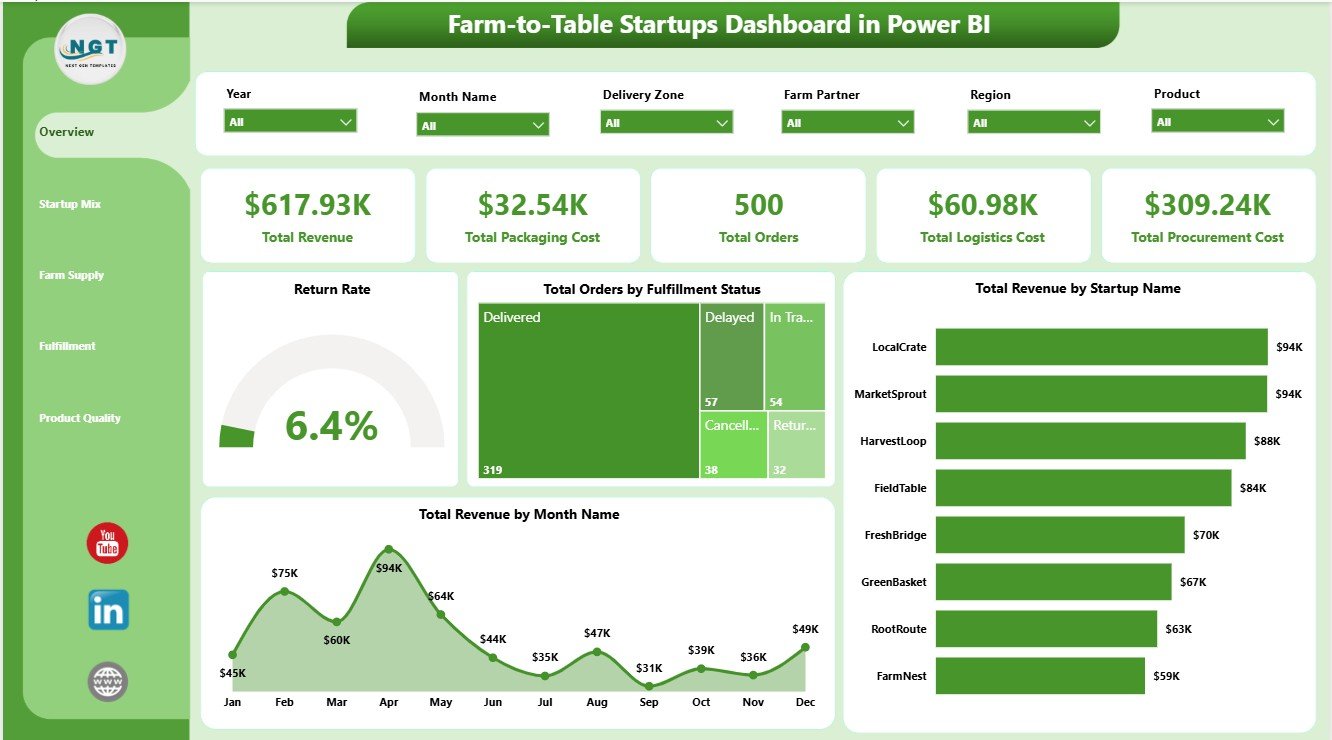
The Overview Page is the executive starting point for the report. The top cards show Total Revenue, Total Packaging Cost, Total Orders, Total Logistics Cost, and Total Procurement Cost so leaders can quickly review sales scale, operating cost, order volume, and sourcing pressure.
Return Rate by Overall Orders: This chart shows the return rate compared with overall order activity. It helps teams spot whether quality, delivery, or customer experience issues are creating unwanted returns.
Total Orders by Fulfillment Status: This visual breaks orders into their current fulfillment stages. It helps operations teams see completed, pending, delayed, or cancelled order patterns quickly.
Total Revenue by Startup Name: This chart compares revenue contribution across startups. It is useful for incubators, co-ops, and multi-brand operators reviewing which businesses are driving the strongest sales.
Total Revenue by Month Name: This trend shows monthly revenue movement. It helps founders identify seasonal demand, campaign impact, and months that need deeper operational review.
2. Startup Mix
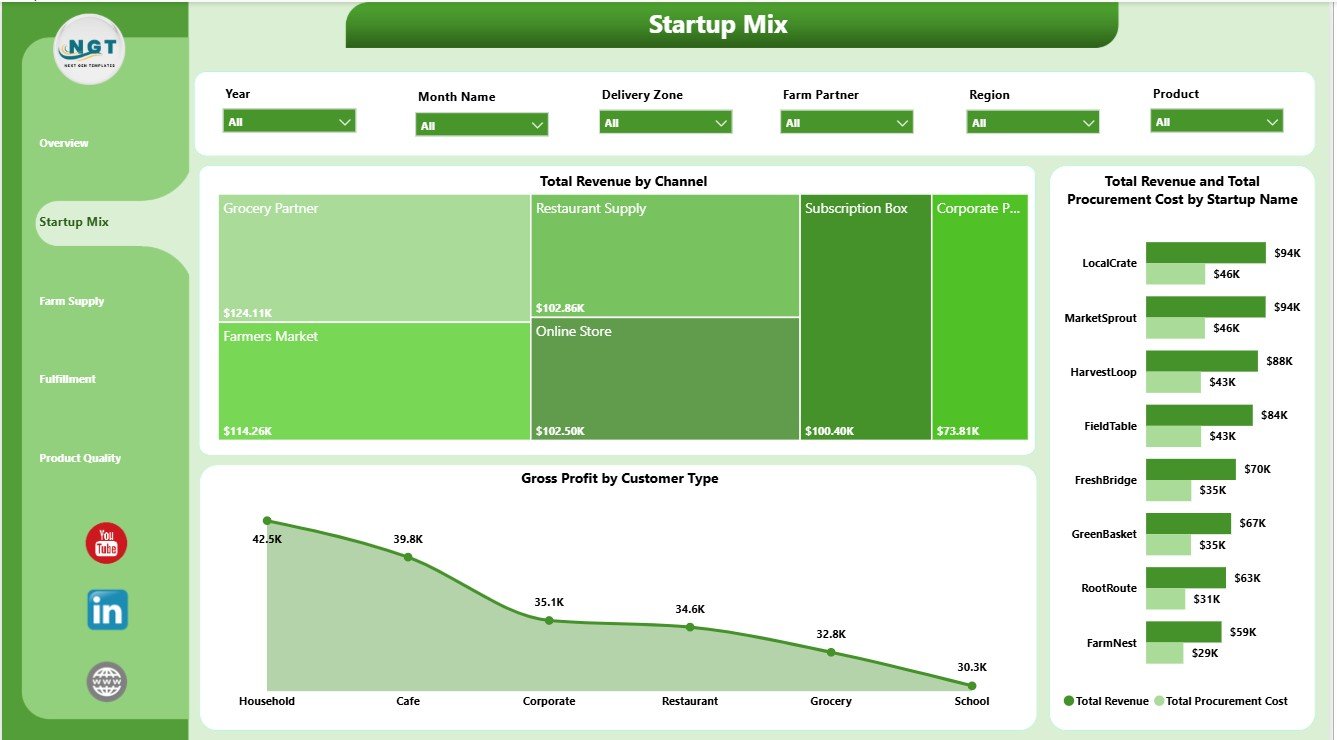
The Startup Mix page helps users compare commercial performance by sales channel, startup, procurement cost, and customer type. Total Revenue by Channel shows which channels produce the most sales. Total Revenue and Total Procurement Cost by Startup Name compares sales against sourcing cost by startup, while Gross Profit by Customer Type helps identify customer groups with stronger contribution.
3. Farm Supply
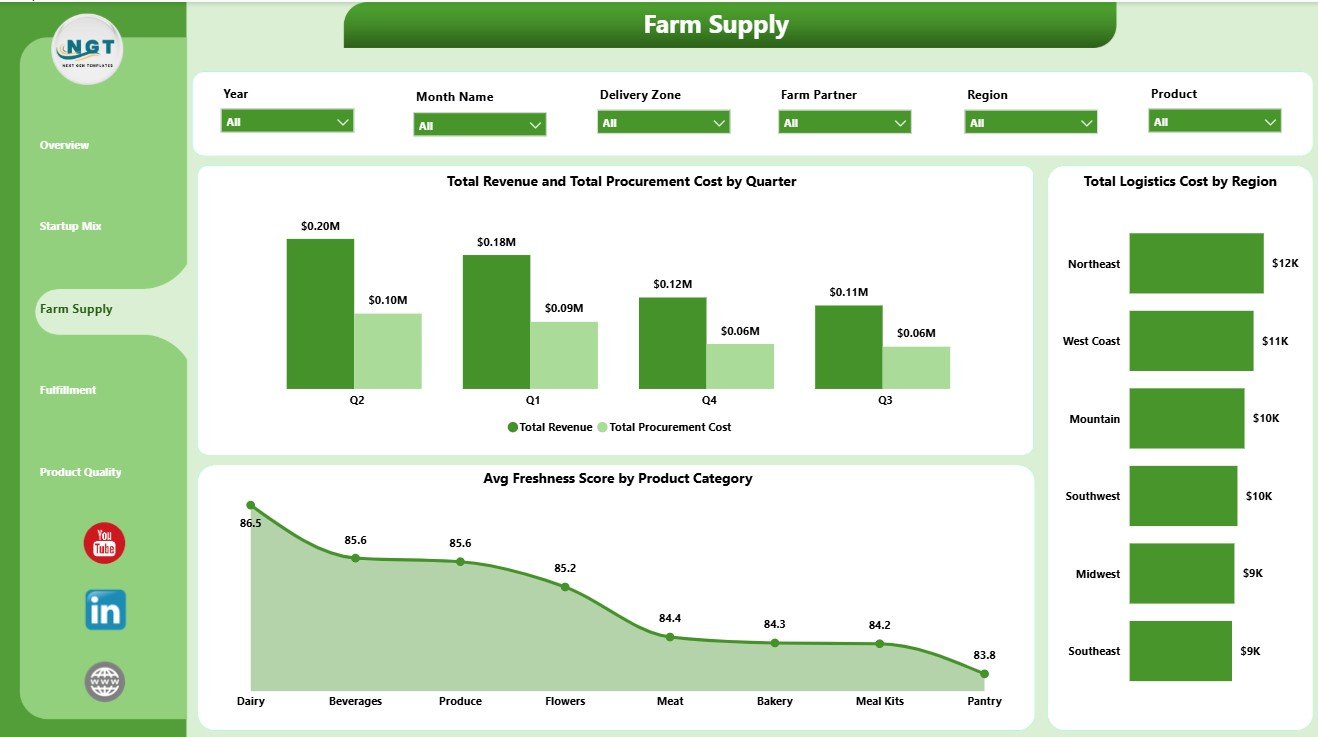
The Farm Supply page focuses on sourcing, logistics, regions, quarters, and product freshness. Total Revenue and Total Procurement Cost by Quarter helps compare sales and sourcing cost over time. Total Logistics Cost by Region highlights costly delivery areas, and Avg Freshness Score by Product Category shows where quality performance is strongest or weakest.
4. Fulfillment
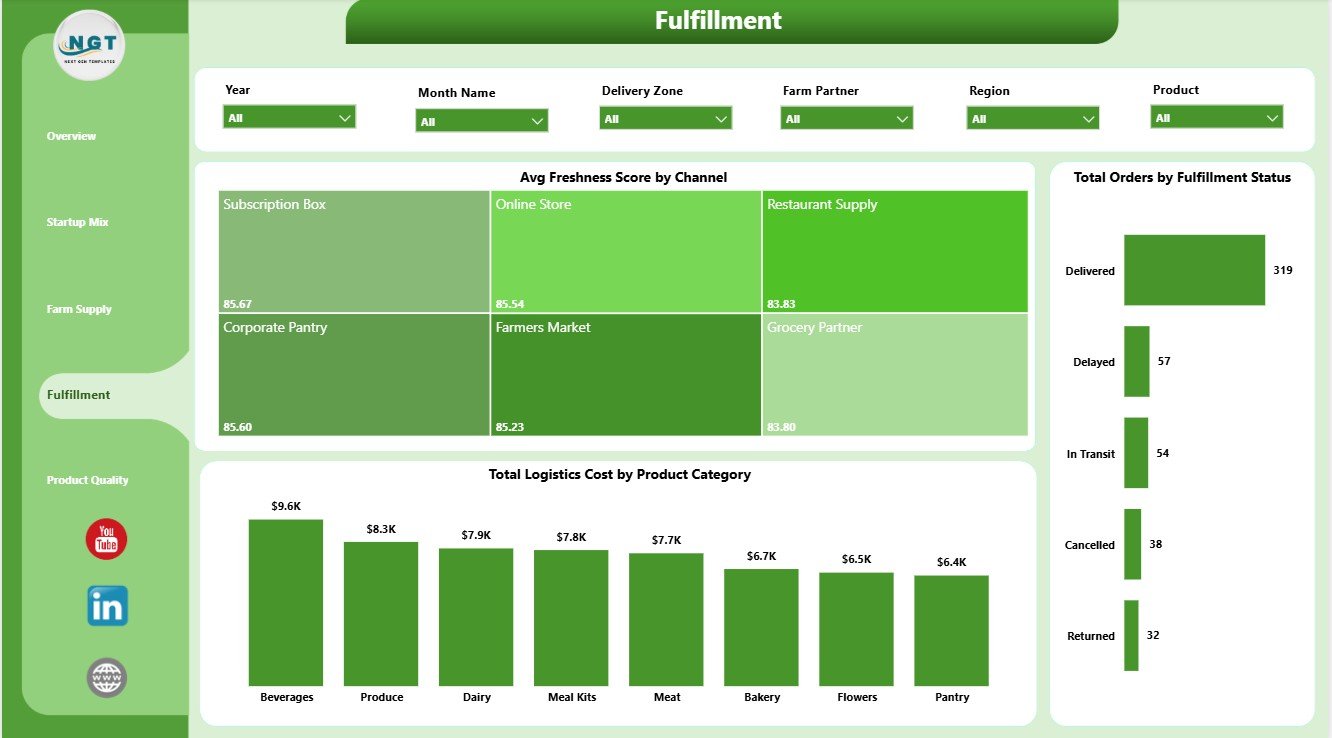
The Fulfillment page connects freshness, order status, logistics cost, channels, and product categories. Avg Freshness Score by Channel helps compare quality by sales channel. Total Orders by Fulfillment Status supports order pipeline review, while Total Logistics Cost by Product Category identifies product groups that carry higher movement cost.
5. Product Quality
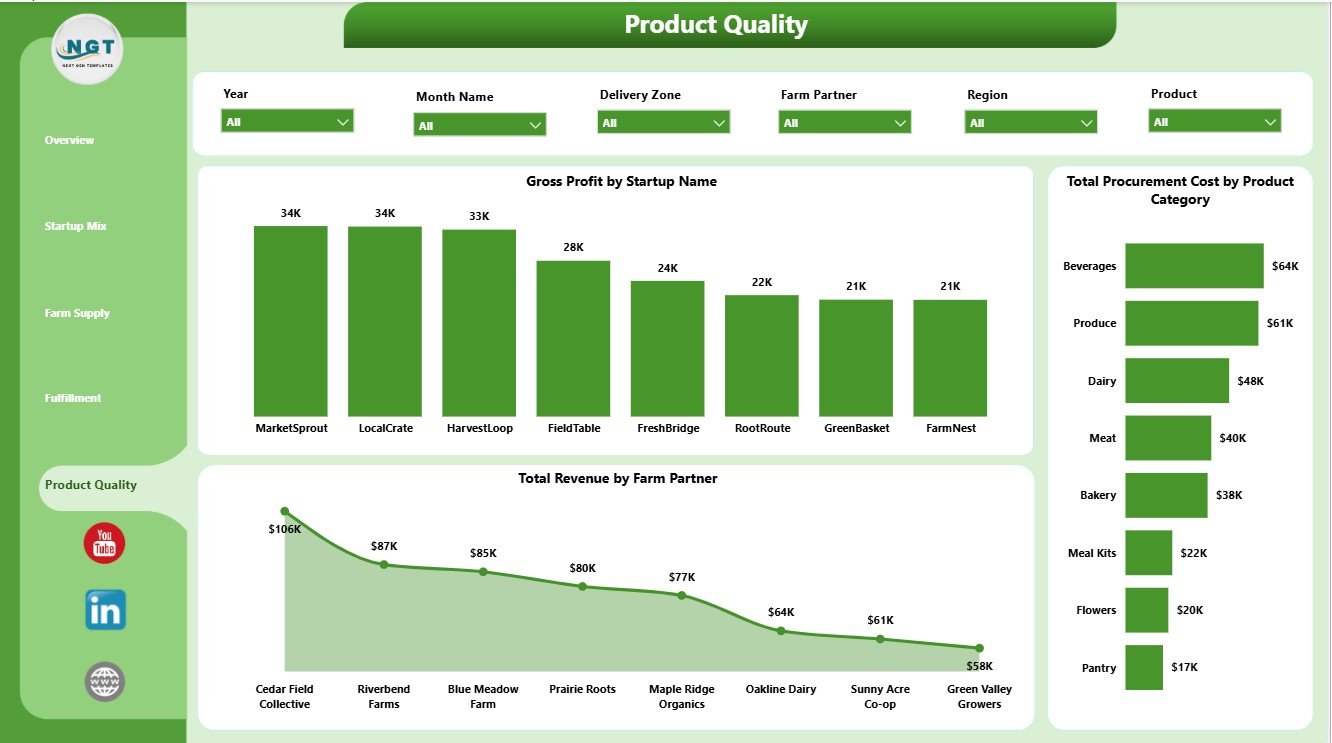
The Product Quality page gives teams a focused view of profit, sourcing cost, product categories, startup performance, and farm partner revenue. Gross Profit by Startup Name compares profitability across startup brands. Total Procurement Cost by Product Category shows sourcing pressure by product group, while Total Revenue by Farm Partner helps identify farm partners linked to stronger sales.
Farm-to-Table Startups Dashboard in Power BI vs. Tableau vs. Paid CRM/SaaS – Where This Fits
| Feature | This Power BI Dashboard | Tableau Alternative | Paid Food Operations SaaS |
|---|---|---|---|
| Cost | $17.99 one-time | License plus dashboard build time | Monthly or annual subscription |
| Platform | Power BI Desktop and Power BI Service | Tableau Desktop or Cloud | Vendor cloud platform |
| Setup time | Open .pbix, replace data, refresh | Build or adapt workbook | Requires onboarding and configuration |
| Real-time team collaboration | Available through Power BI Service setup | Available through Tableau Cloud | Usually included by plan |
| Mobile access | Available after publishing | Available after publishing | Usually included |
| Customizable fields | Editable model, visuals, fields, and measures | Editable if you own the workbook | Limited by vendor settings |
| Share with link | Available through Power BI Service | Available through Tableau Cloud | Login controlled |
| Year-1 cost at 5 users | $17.99 plus any Microsoft licensing | Usually much higher | Often hundreds or thousands |
| Farm-to-table analysis | Pre-built across 5 report pages | Requires custom dashboard design | Depends on reporting module |
Who This Template Is For – and Who It’s Not For
This template is for farm-to-table startups, local food marketplaces, produce delivery teams, farm co-ops, food incubators, subscription box operators, operations analysts, and Power BI users who need recurring reporting on revenue, sourcing cost, packaging, logistics, orders, freshness, fulfillment, and farm partner performance.
It is not an ordering system, route optimizer, POS platform, inventory barcode tool, food safety compliance system, or live procurement workflow. It works best when your source data is already available in clean tables that can be refreshed in Power BI Desktop.
How to Use the Farm-to-Table Startups Dashboard in Power BI
- Download and unzip the dashboard package.
- Open the .pbix file in Power BI Desktop.
- Review the sample fields and report pages.
- Replace or connect your own farm-to-table startup data.
- Refresh the report and validate the KPI cards.
- Use slicers to filter by startup, channel, customer type, product category, farm partner, region, quarter, month, and fulfillment status.
- Customize visuals, colors, labels, and measures as needed.
Real-World Use Cases
Aarav, farm-to-table founder: Aarav uses the Overview page to explain revenue, packaging cost, procurement cost, logistics cost, and order volume before monthly investor updates.
Meera, fulfillment manager: Meera reviews Fulfillment to compare freshness by channel, order status, and logistics cost by product category before planning delivery improvements.
Daniel, local food consultant: Daniel uses Startup Mix, Farm Supply, and Product Quality to compare customer types, quarters, farm partners, regions, product categories, and startup profitability.
Frequently Asked Questions
What does this Power BI dashboard track?
It tracks revenue, packaging cost, orders, logistics cost, procurement cost, return rate, fulfillment status, startup performance, channels, quarters, regions, freshness score, product categories, gross profit, and farm partner revenue.
How many Power BI pages are included?
The report includes five pages: Overview, Startup Mix, Farm Supply, Fulfillment, and Product Quality.
Do I need Power BI Desktop?
Yes. Power BI Desktop is used to open, edit, refresh, and customize the .pbix file. Publishing to Power BI Service may require Microsoft licensing.
Can I customize this dashboard?
Yes. The .pbix file is editable, so you can change visuals, fields, measures, slicers, themes, labels, and page layouts.
Does this replace food operations software?
No. It is an analytics dashboard for structured reporting, not a live ordering, inventory, delivery routing, POS, or compliance platform.
Can this dashboard be published online?
Yes. You can publish it to Power BI Service if you have the required Microsoft account and licensing.
About the Author
Built by PK – Microsoft Certified Professional with 15+ years of Excel, Google Sheets, and Power BI experience. Founder of NextGenTemplates, reaching 300K+ subscribers across YouTube channels. Every template is hand-built and tested before release.
Explore Related Templates
- Farm-to-Table Startups Dashboard in Excel
- Drone Farming Startups Dashboard in Power BI
- Vertical Farming Dashboard in Power BI
- Browse Power BI Dashboard Templates
- Browse Power BI Templates
Download the Farm-to-Table Startups Dashboard in Power BI and turn farm-to-table revenue, cost, fulfillment, supply, and quality data into clear Power BI reporting.
Last updated: June 11, 2026.
Watch the step-by-step video tutorial:
Compatibility and Requirements
- Works in Power BI Desktop, which is free. Microsoft explains how to install it in Get Power BI Desktop.
- The download is an editable .pbix file, so you can change visuals, fields, measures and slicers in Power BI Desktop.
- Publishing to Power BI Service needs a Microsoft account and the matching Microsoft licensing.



























Reviews
There are no reviews yet.